Windows Updates not downloading

I think I'm starting to lose it because I could have sworn I already posted the following information, but I don't know where it went because it's not here.

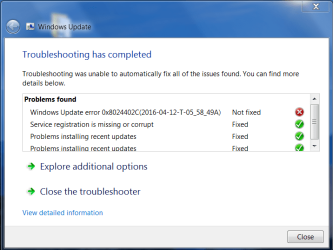
In running the Windows Update Diagnostic I have now gotten the same results 5 times in a row, which is the error code 0x8024402c, with the same diagnostic log. Could those here take a look at this and see if there's anything that hits your knowledge base? I not only can't download updates, but I can't install the ones I manually download either.

Exception: I started my computer with clean boot and was able to install one update. I thought for sure I would at least be able to get things going through that route. That first update I tried went like a dream. I tried another one and it was right back to the same old thing, which is the Windows Update Installer running and running and nothing happening.
 

Attachments

My Computer My Computer

Computer type
PC/Desktop
Computer Manufacturer/Model Number
Dell XPS410
OS
Windows 7 Home Premium SP1
Memory
4 GB
Browser
Google Chrome
@Nikilet:

Have you gone to the Windows Update distribution folder and deleted all the contents? Make sure to
also empty the recycle bin as well after you delete the contents of the folder,
BUT DO NOT DELETE THE FOLDER ITSELF!

Also are you using a proxy for your internet connection?

From Microsoft
The 0x8024402C or 0x8024502D error codes typically occur because an incorrect character exists in the proxy override settings.


Fix the 0x8024402C error

Let me fix it myself

To resolve these errors, remove characters from the proxy exception list, and then clear the proxy cache. To do this, follow these steps:
Open Internet Explorer.
On the Tools menu, click Internet Options.
Click the Connections tab, click LAN Settings, and then click Advance.
Delete any entry in the Exceptions section.
Quit Internet Explorer.
Click Start, click Run, type cmd, and then click OK.
Type the following commands. Press ENTER after each command.
proxycfg -d
net stop wuauserv
net start wuauserv

Where is the Windows Update distribution folder? I've never done that. I don't use Internet Explorer, but I opened it, went to Tools/LAN Settings. There is no Advance or Exceptions section. When I click LAN Settings a small window opens and selected within is "Automatically detect settings."
 

My Computer My Computer

Computer type
PC/Desktop
Computer Manufacturer/Model Number
Dell XPS410
OS
Windows 7 Home Premium SP1
Memory
4 GB
Browser
Google Chrome
Nikilet - i had the exact same issues you have on a windows 7 laptop last night same errors and all as I tried all sorts of things to fix it.

1. stop running the diagnostics.

2. Set the windows update service, Bits service and the Cryptographic service to automatic and start all 3

3 run the windows update it may take a few hours mine took 4 hours to see the updates. it will continue to run and the updates will appear.

4. Install the updates you want

It will be slow to do the windows update check but it will eventually work.
 

My Computer My Computer

Computer type
Laptop
Computer Manufacturer/Model Number
Dell
OS
W7 64bit
Nikilet - i had the exact same issues you have on a windows 7 laptop last night same errors and all as I tried all sorts of things to fix it.

1. stop running the diagnostics.

2. Set the windows update service, Bits service and the Cryptographic service to automatic and start all 3

3 run the windows update it may take a few hours mine took 4 hours to see the updates. it will continue to run and the updates will appear.

4. Install the updates you want

It will be slow to do the windows update check but it will eventually work.

I'm in Services. Do I stop all 3 of the Diagnostic items -- Diagnostic Policy Service, Diagnostic Service Host, Diagnostic System Host ?
 

My Computer My Computer

Computer type
PC/Desktop
Computer Manufacturer/Model Number
Dell XPS410
OS
Windows 7 Home Premium SP1
Memory
4 GB
Browser
Google Chrome
@Nikilet:

Have you gone to the Windows Update distribution folder and deleted all the contents? Make sure to
also empty the recycle bin as well after you delete the contents of the folder,
BUT DO NOT DELETE THE FOLDER ITSELF!

Also are you using a proxy for your internet connection?

From Microsoft
The 0x8024402C or 0x8024502D error codes typically occur because an incorrect character exists in the proxy override settings.


Fix the 0x8024402C error

Let me fix it myself

To resolve these errors, remove characters from the proxy exception list, and then clear the proxy cache. To do this, follow these steps:
Open Internet Explorer.
On the Tools menu, click Internet Options.
Click the Connections tab, click LAN Settings, and then click Advance.
Delete any entry in the Exceptions section.
Quit Internet Explorer.
Click Start, click Run, type cmd, and then click OK.
Type the following commands. Press ENTER after each command.
proxycfg -d
net stop wuauserv
net start wuauserv

Where is the Windows Update distribution folder? I've never done that. I don't use Internet Explorer, but I opened it, went to Tools/LAN Settings. There is no Advance or Exceptions section. When I click LAN Settings a small window opens and selected within is "Automatically detect settings."

Open Windows Explorer and navigate to Local Disk C:>Windows> SoftwareDistribution>Download then delete the contents of that folder.
 

My Computer My Computer

Computer type
PC/Desktop
OS
Windows 7 Home 64-bit
I'm in Services. Do I stop all 3 of the Diagnostic items -- Diagnostic Policy Service, Diagnostic Service Host, Diagnostic System Host ?

No, just do not run anymore of the "fixit" tools or "SURT"


1. Set the windows update service, Bits service and the Cryptographic service to automatic and start all 3

2. Then run windows update it may take a long time (took me 4 hours)
 

My Computer My Computer

Computer type
Laptop
Computer Manufacturer/Model Number
Dell
OS
W7 64bit
OMG, these updates are ridiculous. Gave up yesterday evening. Started checking for updates around 7pm (uk time) but come 11 pm it was still checking. Tried again this evening starting 7 pm and here we are at 9.36 pm and it's still checking. Had the same hell last month for patch Tuesday. In the end it took,about 3 days to get them found, downloaded and installed. Ms servers are a joke
 

My Computer My Computer

Computer type
Laptop
Computer Manufacturer/Model Number
Alienware M17RX3
OS
Windows 7 Ultimate 64 bit
CPU
Sandybridge 2820 QM 2.3 ghz
Memory
8 gb
Graphics Card(s)
AMD Radeon 6970m
Sound Card
Integrated
Monitor(s) Displays
Laptop 17"
Screen Resolution
1980x1080
Hard Drives
750 gb mechanical (7,200RPM) Seagate Momentous paired with OCZ Synapse 128 gb SSD cache drive
Internet Speed
55 mbits download, 12 mbits download
Antivirus
Microsoft Security Essentials
Browser
IE11, Mozilla
I agree, it's ridiculous.

With Win 7 it took over 3 hours for me to check for updates available after PT updates were released yesterday.
They then downloaded and installed "quickly" (10-20 minutes including MSRT).
After a re-boot with the PT updates installed, it now takes me about 2 minutes to check for new updates.

With Win 8.1 it took me about 2 minutes to check for PT updates available, and they downloaded and installed "quickly".
Win 10 also found and installed PT updates "quickly", but that's hard for me to compare because W10 updates work differently.

This is all on my legacy triple boot test PC, so it's the same hardware, modem, router, network, etc.

Last month and earlier W7 PT check for updates took me 30-60 minutes.
A year ago+ Win 7 checked for updates in a few minutes.
For me, it's getting worse to check for new updates after PT updates are published - only with Win 7.
Does MS have a bulls-eye painted on the back of W7 users ?
 

My Computer My Computer

Computer type
PC/Desktop
Computer Manufacturer/Model Number
home built
OS
Multi-Boot W7_Pro_x64 W8.1_Pro_x64 W10_Pro_x64 +Linux_VMs +Chromium_VM
CPU
AMD Athlon II x4 620
Motherboard
Gigabyte GA-MA785G-UD3H
Memory
6GB GSkill DDR2 800
Graphics Card(s)
AMD 4670 GPU + AMD 4200 IGP
Sound Card
on board Realtek ALC889A
Monitor(s) Displays
RCA 40" LCD TV, Insignia 32" LCD TV, HP 15" LCD monitor
Screen Resolution
1680 x 1050
Hard Drives
OCZ Vertex 3 120GB,
Samsung F3 1TB (3),
Several others - WD, Seagate, Hitachi, ...
PSU
Corsair 500 W
Case
Rosewill mid tower
Cooling
CM 90mm rifle
Keyboard
Gyration wireless, Logitech wireless, Dell USB wired
Mouse
Gyration wireless, Logitech wireless, V7 USB wired
Internet Speed
Spectrum - 100Mbps D / 10Mbps U
Antivirus
Avast, MBAM3, EMET, WinPatrol
Browser
Pale Moon, Firefox, IE
Other Info
2 multi-boot PC's
Mainly HTPC/Office/Gen purpose (no gaming).
Trendnet USB KVM.
LG DVD burner/Blue Ray Player.
Tray system for removable SATA backup drives.

Not currently OCd, under-volted.
I use Hybrid sleep, rarely re-boot or shutdown.

Hauppauge HD-PVR, Avermedia PCIe TV Tuner, Hauppauge PCI TV Tuner.
Open Windows Explorer and navigate to Local Disk C:>Windows> SoftwareDistribution>Download then delete the contents of that folder.[/QUOTE]

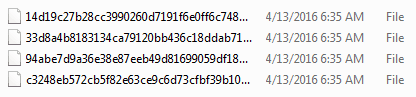
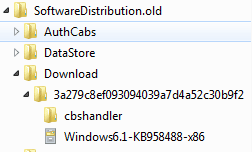
Brings me to another question. I assume this is from running some/all of the fixit tools I have used, but I have two Software Distribution folders: SoftwareDistribution and SoftwareDistribution.old.

When I open SD/Downloads there is a list of files. When I open SD.old/Downloads it looks different. See screenshots
 

Attachments

  • SD.PNG
    SD.PNG
    3.5 KB · Views: 37
  • SD.old.PNG
    SD.old.PNG
    3.4 KB · Views: 37

My Computer My Computer

Computer type
PC/Desktop
Computer Manufacturer/Model Number
Dell XPS410
OS
Windows 7 Home Premium SP1
Memory
4 GB
Browser
Google Chrome
I'm in Services. Do I stop all 3 of the Diagnostic items -- Diagnostic Policy Service, Diagnostic Service Host, Diagnostic System Host ?

No, just do not run anymore of the "fixit" tools or "SURT"

1. Set the windows update service, Bits service and the Cryptographic service to automatic and start all 3

2. Then run windows update it may take a long time (took me 4 hours)

Why do you say not to run any more of the fixit tools or SURT?
I set my computer to NEVER go to sleep and I ran Windows Update for about 8 hours and nothing.

There is something that has me totally puzzled that no one has addressed; the fact that I can't even install a Windows Update if I download it manually to my desktop. I can install anything else without problem. When I click on a Windows Update it runs forever and nothing happens. There was one exception, which I mentioned already, and that was once when I did a clean boot I was allowed to install one update and then it wouldn't work again, even after I restarted in Clean Boot mode again.
 

My Computer My Computer

Computer type
PC/Desktop
Computer Manufacturer/Model Number
Dell XPS410
OS
Windows 7 Home Premium SP1
Memory
4 GB
Browser
Google Chrome
Hi Nikilet,

You have at some stage run a fixit that has renamed the original SD folder to old, hence 2 of them.
your just duplicating something youve already done. DONT do it

Please can you copy and paste the LAST day entries only from the WindowsUpdate log.
It will give me an error code that i can check on.

Have you any optimiser/registry cleaner progs on your system, and have used lately.

and it wouldn't hurt to run this tool please
http://www.sevenforums.com/windows-...ne-activation-issue-posting-instructions.html

Roy
 

My Computer My Computer

Computer type
PC/Desktop
Computer Manufacturer/Model Number
medionl/Aspire 6930G/acer x55a
OS
W7 home premium 32bit/W7HP 64bit/w10 tp insider ring
CPU
E5300 dual core
Motherboard
medion MS7366
Memory
3gb
Graphics Card(s)
Nvidia Geforce 7100 Nforce 630i
Monitor(s) Displays
avixc
Internet Speed
n (isp resticted to 72)
Antivirus
mse/pands
Browser
palemoon
Other Info
Belkin Fd7050 n USB using Railink RT2870 drivers, more upto date
Nikilet -

1. The fixit tools are most likely not going to help you, as the windows updates are messed up for lots of people, not just you so it is probably not a issue with your system.

2. Downloaded windows updates are usually .msu files which use windows update to install, if windows update is buggy the installation of the .msu file may time out.

3. yes, one of the fixit tools created the .old software distribution folder.

Now to see if we can get it working...

1. reboot the system.

2. Make sure you have the latest Net framework 4.6.1 installed - download and install it manually
https://www.microsoft.com/en-us/down....aspx?id=49982

3. reboot

4. Ensure you have the most recent update client - download and install it manually
https://support.microsoft.com/en-us/kb/3138612

5. Reboot

6. Ensure the windows update service, Bits service and the Cryptographic service to automatic and started.

7. run windows update.

8. just wait.... some people on here have reported that the process took several hours.

Note the .net and the new windows update client may take a bit of time to install.
 

My Computer My Computer

Computer type
Laptop
Computer Manufacturer/Model Number
Dell
OS
W7 64bit
Hi Nikilet,

You have at some stage run a fixit that has renamed the original SD folder to old, hence 2 of them.
your just duplicating something youve already done. DONT do it

Please can you copy and paste the LAST day entries only from the WindowsUpdate log.
It will give me an error code that i can check on.

Have you any optimiser/registry cleaner progs on your system, and have used lately.

and it wouldn't hurt to run this tool please
http://www.sevenforums.com/windows-...ne-activation-issue-posting-instructions.html

Roy

I hope when I question that no one feels like I'm arguing because that's not the case. I'm trying to learn. I pasted the WindowsUpdate log items for 4-13 into notepad because they are extensive.

I have only CCleaner and the only thing I have run is the cleaner part.

Code:
Diagnostic Report (1.9.0027.0):
-----------------------------------------
Windows Validation Data-->

Validation Code: 0
Cached Online Validation Code: N/A, hr = 0xc004f012
Windows Product Key: *****-*****-XRYC2-XCD34-M8KRG
Windows Product Key Hash: yRKDVzwf/DqMef3QlfrUkXrcYDg=
Windows Product ID: 00359-OEM-9811934-93727
Windows Product ID Type: 8
Windows License Type: COA SLP
Windows OS version: 6.1.7601.2.00010300.1.0.003
ID: {795BC15C-8C50-4EF7-A9BF-C80DD4395E1D}(1)
Is Admin: Yes
TestCab: 0x0
LegitcheckControl ActiveX: N/A, hr = 0x80070002
Signed By: N/A, hr = 0x80070002
Product Name: Windows 7 Home Premium
Architecture: 0x00000000
Build lab: 7601.win7sp1_rtm.101119-1850
TTS Error: 
Validation Diagnostic: 
Resolution Status: N/A

Vista WgaER Data-->
ThreatID(s): N/A, hr = 0x80070002
Version: N/A, hr = 0x80070002

Windows XP Notifications Data-->
Cached Result: N/A, hr = 0x80070002
File Exists: No
Version: N/A, hr = 0x80070002
WgaTray.exe Signed By: N/A, hr = 0x80070002
WgaLogon.dll Signed By: N/A, hr = 0x80070002

OGA Notifications Data-->
Cached Result: N/A, hr = 0x80070002
Version: N/A, hr = 0x80070002
OGAExec.exe Signed By: N/A, hr = 0x80070002
OGAAddin.dll Signed By: N/A, hr = 0x80070002

OGA Data-->
Office Status: 109 N/A
OGA Version: N/A, 0x80070002
Signed By: N/A, hr = 0x80070002
Office Diagnostics: 77F760FE-153-80070002_7E90FEE8-175-80070002_025D1FF3-364-80041010_025D1FF3-229-80041010_025D1FF3-230-1_025D1FF3-517-80040154_025D1FF3-237-80040154_025D1FF3-238-2_025D1FF3-244-80070002_025D1FF3-258-3

Browser Data-->
Proxy settings: N/A
User Agent: Mozilla/4.0 (compatible; MSIE 8.0; Win32)
Default Browser: C:\Program Files\Internet Explorer\iexplore.exe
Download signed ActiveX controls: Prompt
Download unsigned ActiveX controls: Disabled
Run ActiveX controls and plug-ins: Allowed
Initialize and script ActiveX controls not marked as safe: Disabled
Allow scripting of Internet Explorer Webbrowser control: Disabled
Active scripting: Allowed
Script ActiveX controls marked as safe for scripting: Allowed

File Scan Data-->

Other data-->
Office Details: <GenuineResults><MachineData><UGUID>{795BC15C-8C50-4EF7-A9BF-C80DD4395E1D}</UGUID><Version>1.9.0027.0</Version><OS>6.1.7601.2.00010300.1.0.003</OS><Architecture>x32</Architecture><PKey>*****-*****-*****-*****-M8KRG</PKey><PID>00359-OEM-9811934-93727</PID><PIDType>8</PIDType><SID>S-1-5-21-2099019518-1724254037-3601246615</SID><SYSTEM><Manufacturer>Dell Inc.                </Manufacturer><Model>Dell DXP061                  </Model></SYSTEM><BIOS><Manufacturer>Dell Inc.                </Manufacturer><Version>2.5.3 </Version><SMBIOSVersion major="2" minor="3"/><Date>20071122000000.000000+000</Date></BIOS><HWID>CD383707018400FA</HWID><UserLCID>0409</UserLCID><SystemLCID>0409</SystemLCID><TimeZone>Mountain Standard Time(GMT-07:00)</TimeZone><iJoin>0</iJoin><SBID><stat>3</stat><msppid></msppid><name></name><model></model></SBID><OEM><OEMID>DELL  </OEMID><OEMTableID>B8K    </OEMTableID></OEM><GANotification/></MachineData><Software><Office><Result>109</Result><Products/><Applications/></Office></Software></GenuineResults>  

Spsys.log Content: 0x80070002

Licensing Data-->
Software licensing service version: 6.1.7601.17514

Name: Windows(R) 7, HomePremium edition
Description: Windows Operating System - Windows(R) 7, OEM_COA_SLP channel
Activation ID: 5e017a8a-f3f9-4167-b1bd-ba3e236a4d8f
Application ID: 55c92734-d682-4d71-983e-d6ec3f16059f
Extended PID: 00359-00196-119-393727-02-1033-7601.0000-1022016
Installation ID: 014134688115008173877136832345745583534162056863540710
Processor Certificate URL: http://go.microsoft.com/fwlink/?LinkID=88338
Machine Certificate URL: http://go.microsoft.com/fwlink/?LinkID=88339
Use License URL: http://go.microsoft.com/fwlink/?LinkID=88341
Product Key Certificate URL: http://go.microsoft.com/fwlink/?LinkID=88340
Partial Product Key: M8KRG
License Status: Licensed
Remaining Windows rearm count: 3
Trusted time: 4/13/2016 5:27:07 PM

Windows Activation Technologies-->
HrOffline: 0x00000000
HrOnline: N/A
HealthStatus: 0x0000000000000000
Event Time Stamp: N/A
ActiveX: Registered, Version: 7.1.7600.16395
Admin Service: Registered, Version: 7.1.7600.16395
HealthStatus Bitmask Output:


HWID Data-->
HWID Hash Current: LAAAAAIAAAABAAEAAQABAAAAAQABAAEAeqhcYOx2PqRc5FzByo5aZWASKoU=

OEM Activation 1.0 Data-->
N/A

OEM Activation 2.0 Data-->
BIOS valid for OA 2.0: yes
Windows marker version: 0x0
OEMID and OEMTableID Consistent: yes
BIOS Information: 
  ACPI Table Name	OEMID Value	OEMTableID Value
  APIC			DELL  		B8K    
  FACP			DELL  		B8K    
  HPET			DELL  		B8K    
  BOOT			DELL  		B8K    
  MCFG			DELL  		B8K    
  SSDT			DELL		st_ex
  DUMY			DELL  		B8K    
  SLIC			DELL  		B8K

I want to share something with all who are contributing and helping with this issue (and I appreciated every word shared here). I just powered down my computer. I pulled the electrical plug; then pushed the start button to release all current. I let it set a few minutes. I booted back up and attempted to INSTALL one of the Windows Updates I manually downloaded. It opened right up and installed instantly. So I went to the next update, clicked on it and all I got was the Windows Update Installer searching and searching. Once again, just like when I did the clean boot, it allowed me to install one update and then quit.

I will return to respond majulook's last post as soon as I do a few of the tasks and rebooting he/she has requested.
 

Attachments

My Computer My Computer

Computer type
PC/Desktop
Computer Manufacturer/Model Number
Dell XPS410
OS
Windows 7 Home Premium SP1
Memory
4 GB
Browser
Google Chrome
@Nikilet:

Did you delete the windows update .old distribution folder entirely and delete the files in the current distribution folder?

Did you follow the instructions for correcting any proxy issues with your internet connection?
 

My Computer My Computer

Computer Manufacturer/Model Number
hp pavilion 6680t
OS
win 7 home premium 64 bit
CPU
core i5 760
Motherboard
iona (from MSI)
Memory
6 gb
Graphics Card(s)
ati 5450
Sound Card
real tek 888
@Nikilet:

Did you delete the windows update .old distribution folder entirely and delete the files in the current distribution folder?

Did you follow the instructions for correcting any proxy issues with your internet connection?

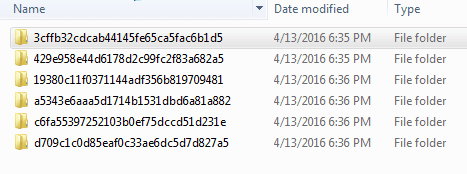
I hadn't done that yet because I was waiting for your response about there being two folders. I just went to do that and this is a little scary for me because I don't know what I'm doing for the most part. Before in the SD/Download folder there were only four files. After I deleted SD.old, then went to the SD/Download it was FULL. I used Select All/Delete. It took quite awhile to finish but when it was done I went to the Download folder again to see if it was empty and now there are six FOLDERS in there. Since I used Select All/Delete I thought it would be empty. Please let me know if I should also delete those 6 folders.
 

Attachments

  • SD-Download.PNG
    SD-Download.PNG
    6.4 KB · Views: 35

My Computer My Computer

Computer type
PC/Desktop
Computer Manufacturer/Model Number
Dell XPS410
OS
Windows 7 Home Premium SP1
Memory
4 GB
Browser
Google Chrome
1. reboot the system.

2. Make sure you have the latest Net framework 4.6.1 installed - download and install it manually
https://www.microsoft.com/en-us/down....aspx?id=49982

3. reboot

4. Ensure you have the most recent update client - download and install it manually
https://support.microsoft.com/en-us/kb/3138612

5. Reboot

6. Ensure the windows update service, Bits service and the Cryptographic service to automatic and started.

7. run windows update.

8. just wait.... some people on here have reported that the process took several hours.

Note the .net and the new windows update client may take a bit of time to install.[/QUOTE]

I was sure I had that 4.6.1 framework installed, but I downloaded again and ran it and selected Repair. I rebooted. After reboot I clicked on that KB3138612 you gave me the link for. I didn't think I'd be able to install it but it went through. I rebooted. Then I tried to install another of the updates I had manually downloaded and it wouldn't let me.


EUREKA! EUREKA! EUREKA!

Windows Update has shaken loose and is working! You know, there are so many people like me who just don't know what to do when things like this go wrong. What would we do without people like all of you on this forum who have shown me such patience and given of your time and knowledge to help me out of this pit.

Thank you is not enough, but it's all I have so please know how grateful I am to each one of you.

Now I have just one more question ... (sorry) ...
When running all those tools, the folders with all those long letter/number names kept appearing in C drive. I created a folder and put them all it so I didn't have such a mess when I went into my C drive and I just checked that folder for size. It is 543 MB. Is it safe to delete all those files?

Also, I updated my information but I see at the bottom of my posts it's still showing Vista and Avast. Is there a way I can get it to display the correct information?
 

My Computer My Computer

Computer type
PC/Desktop
Computer Manufacturer/Model Number
Dell XPS410
OS
Windows 7 Home Premium SP1
Memory
4 GB
Browser
Google Chrome
Hello!
I may have messed up. Suddenly every time I'd install a batch of updates a bunch of them would fail. So I thought I would do what legacy had me do before: stop off Windows Update, go to C/Windows/SoftwareDistribution and delete the files in DataStore and Download.

Well, that erased all of my update history and I decided I had made a mistake in doing that. But I had made a restore point first, so I ran System Restore. When that finished, I had no updates left and Windows Update now says there are no updates for my computer. The problem is, I still had 76 important updates to install (in addition to all the ones that had failed). So is there any way for me to find out now what updates I still need for my computer?
 

My Computer My Computer

Computer type
PC/Desktop
Computer Manufacturer/Model Number
Dell XPS410
OS
Windows 7 Home Premium SP1
Memory
4 GB
Browser
Google Chrome
Nikilet - Some times with lots of updates it may have some of them fail as one update makes a change that the other also would make or one update being needed before the other, and if a file that would be changed is in use the system needs to restart to make that file change. So if you get failures on some updates, restart and run windows update again.

Remember that it may take hours to get the updates to show up. Also do not pay that much attention to the number of updates as some updates are superseded by others.


Run through these instructions again see if it gives it a kick in the pants.

1. reboot the system.

2. Make sure you have the latest Net framework 4.6.1 installed - download and install it manually selecting repair if it is already installed.
https://www.microsoft.com/en-us/down....aspx?id=49982

3. reboot

4. Ensure you have the most recent update client - download and install it manually
https://support.microsoft.com/en-us/kb/3138612

5. Reboot

6. Ensure the windows update service, Bits service and the Cryptographic service to automatic and started.

7. run windows update.

8. just wait.... some people on here have reported that the process took several hours.

Note the .net and the new windows update client may take a bit of time to install.
 

My Computer My Computer

Computer type
Laptop
Computer Manufacturer/Model Number
Dell
OS
W7 64bit
Hi
Both of those reports that you ran are showing errors.
one is related to validation, the other is showing multiple errors for drivers which then might in turn clear up some of the the other errors

For a start Update your Dell drivers from Dell ONLY, turn off the Windows update driver check.

I have a sneaky feeling that you have purchased a licence that will fail validation in the next 90 days.
Where did you get it.

Roy
 

My Computer My Computer

Computer type
PC/Desktop
Computer Manufacturer/Model Number
medionl/Aspire 6930G/acer x55a
OS
W7 home premium 32bit/W7HP 64bit/w10 tp insider ring
CPU
E5300 dual core
Motherboard
medion MS7366
Memory
3gb
Graphics Card(s)
Nvidia Geforce 7100 Nforce 630i
Monitor(s) Displays
avixc
Internet Speed
n (isp resticted to 72)
Antivirus
mse/pands
Browser
palemoon
Other Info
Belkin Fd7050 n USB using Railink RT2870 drivers, more upto date
Hi
Both of those reports that you ran are showing errors.
one is related to validation, the other is showing multiple errors for drivers which then might in turn clear up some of the the other errors

For a start Update your Dell drivers from Dell ONLY, turn off the Windows update driver check.

I have a sneaky feeling that you have purchased a licence that will fail validation in the next 90 days.
Where did you get it.

Roy

I purchased it on e-bay (around $60). Seller had been with e-bay for many years and had excellent ratings. He/she said if it didn't work I could return it and get refund. However, it took me so long to get it installed (about 3 months) that I don't know if that would still be honored or not.

I called the automated phone service (I think it was a Microsoft automated service) and I had to read them a bunch of numbers, and they read me back a bunch of numbers that I had to fill in. The robot on the phone said my activation was successful and then told me to write down the numbers/letters I had just been given (9 boxes with 5 in each box) so that I would be able to use the disk on this computer again if I needed to. Under System it shows that Windows is Activated.

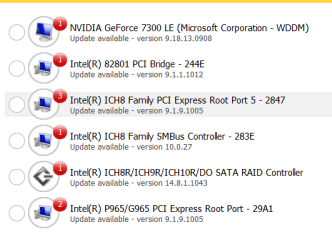
I haven't a clue how to proceed as far as drivers. I ran that Win 7 compatibility file and it showed only that I needed to update the network adapter, which I did. I still have the Drivers & Utilities CD from my Vista, which was on this computer when I purchased it. How do I know which drivers I need to update? Is there a trustworthy program I can run for that?

I installed DriverMax just so I could run the report and see what it said. See screenshot.
 

Attachments

  • DriverMax report.PNG
    DriverMax report.PNG
    13.2 KB · Views: 20
Last edited:

My Computer My Computer

Computer type
PC/Desktop
Computer Manufacturer/Model Number
Dell XPS410
OS
Windows 7 Home Premium SP1
Memory
4 GB
Browser
Google Chrome
Back
Top