Unable to boot from cloned HDD

davide445

New member
Local time
11:58 AM
Messages
6

My Computer My Computer

At a glance

Win7ProSP1x64i7-86014GB DDR3Sapphire Radeon HD 7950 Boost
Computer type
PC/Desktop
Computer Manufacturer/Model Number
HP Compaq 8100 Elite Convertible MiniTower
OS
Win7ProSP1x64
CPU
i7-860
Motherboard
Proprietary
Memory
14GB DDR3
Graphics Card(s)
Sapphire Radeon HD 7950 Boost
Monitor(s) Displays
ASUS VW193D-B
Screen Resolution
1440x900
Hard Drives
Intel SSD X25M 80GB
PSU
Proprietary
Case
Proprietary
Cooling
Proprietary
Internet Speed
ADSL 20 Mb
Antivirus
MS Security, AVG, ZoneAlarm
After you clone the drive you should always remove the old drive before booting the first time. You can add it to the system later.

Try removing the old drive and, if necessary, accomplish a startup repair.
 

My Computer My Computer

At a glance

Windows 10 Pro x64, Windows 8.1 Pro x64, Wind...INTEL i9-7920X LGA 206664 GB (4 X 16 GB) G-Skill V Series DDR4 3200 ...EVGA GTX 1060 SC 3 GB
Computer type
PC/Desktop
Computer Manufacturer/Model Number
Custom Built
OS
Windows 10 Pro x64, Windows 8.1 Pro x64, Windows 7 Ultimate x64 SP1,
CPU
INTEL i9-7920X LGA 2066
Motherboard
Gigabyte X299-WU8 F3
Memory
64 GB (4 X 16 GB) G-Skill V Series DDR4 3200 Quad Channel
Graphics Card(s)
EVGA GTX 1060 SC 3 GB
Sound Card
Realtek Onboard ALC1220
Monitor(s) Displays
2 x Samsung S27E310
Screen Resolution
1920x1080
Hard Drives
Samsung 2 x 970 EVO Plus 500 GB NVMe
1 x 6TB WD 6003FZBX SATA
1 x 6TB WD 60EFRX SATA
12 x 3TB WD 30EFRX SATA
PSU
Seasonic X-1050
Case
Thermaltake Armor+
Cooling
Corsair H80i V2 Liquid AOI Cooler
Keyboard
Logitech G510s
Mouse
Logitech MX Master 2S
Internet Speed
200 Mb/s
Antivirus
ESET NOD32 13.1
Browser
EDGE (Dev, Canary, Beta), Chrome
Other Info
ASUS RT-AC68U router
Malwarebytes 4.0.4
Thanks for answering.
I didn't have the Win 7 installation disk since was an OEM install and also my laptop come without DVD reader, can I create a recovery disk on an USB stick?
 

My Computer My Computer

At a glance

Win7ProSP1x64i7-86014GB DDR3Sapphire Radeon HD 7950 Boost
Computer type
PC/Desktop
Computer Manufacturer/Model Number
HP Compaq 8100 Elite Convertible MiniTower
OS
Win7ProSP1x64
CPU
i7-860
Motherboard
Proprietary
Memory
14GB DDR3
Graphics Card(s)
Sapphire Radeon HD 7950 Boost
Monitor(s) Displays
ASUS VW193D-B
Screen Resolution
1440x900
Hard Drives
Intel SSD X25M 80GB
PSU
Proprietary
Case
Proprietary
Cooling
Proprietary
Internet Speed
ADSL 20 Mb
Antivirus
MS Security, AVG, ZoneAlarm
Yes you can use a USB stick. You could also reclone the drive, if nothing else works, and remove the original before you boot to the clone.
 

My Computer My Computer

At a glance

Windows 10 Pro x64, Windows 8.1 Pro x64, Wind...INTEL i9-7920X LGA 206664 GB (4 X 16 GB) G-Skill V Series DDR4 3200 ...EVGA GTX 1060 SC 3 GB
Computer type
PC/Desktop
Computer Manufacturer/Model Number
Custom Built
OS
Windows 10 Pro x64, Windows 8.1 Pro x64, Windows 7 Ultimate x64 SP1,
CPU
INTEL i9-7920X LGA 2066
Motherboard
Gigabyte X299-WU8 F3
Memory
64 GB (4 X 16 GB) G-Skill V Series DDR4 3200 Quad Channel
Graphics Card(s)
EVGA GTX 1060 SC 3 GB
Sound Card
Realtek Onboard ALC1220
Monitor(s) Displays
2 x Samsung S27E310
Screen Resolution
1920x1080
Hard Drives
Samsung 2 x 970 EVO Plus 500 GB NVMe
1 x 6TB WD 6003FZBX SATA
1 x 6TB WD 60EFRX SATA
12 x 3TB WD 30EFRX SATA
PSU
Seasonic X-1050
Case
Thermaltake Armor+
Cooling
Corsair H80i V2 Liquid AOI Cooler
Keyboard
Logitech G510s
Mouse
Logitech MX Master 2S
Internet Speed
200 Mb/s
Antivirus
ESET NOD32 13.1
Browser
EDGE (Dev, Canary, Beta), Chrome
Other Info
ASUS RT-AC68U router
Malwarebytes 4.0.4
You could also try imaging rather than cloning.
 

My Computer My Computer

At a glance

Windows 7 Home Premium SP1, 64-bitIntel Skylake i5-6600K, not overclocked8 GB HyperX DDR4-2666 (2 x 4 GB)none; graphics are integrated on CPU
Computer type
PC/Desktop
Computer Manufacturer/Model Number
Ignatz Special; 4 speed manual gearbox; factory air conditioning; one of one
OS
Windows 7 Home Premium SP1, 64-bit
CPU
Intel Skylake i5-6600K, not overclocked
Motherboard
AsRock Z170M Extreme 4, micro ATX
Memory
8 GB HyperX DDR4-2666 (2 x 4 GB)
Graphics Card(s)
none; graphics are integrated on CPU
Sound Card
onboard: Realtek ALC1150; external: USB Behringer UF0-202
Monitor(s) Displays
Dell S2340M 23 inch IPS
Screen Resolution
1600 x 900
Hard Drives
System: Crucial MX100 series SSD, 128 GB;
Data: Samsung Spinpoint 103SJ, 1 TB;
Backup: WD Caviar Green WD30EZRX-00D8PB0, 3 TB
PSU
Rosewill SilentNight 500 watt fanless, semi-modular
Case
Antec Solo II
Cooling
Noctua NH-U12S; Noctua F12 intake, Noctua S12A exhaust
Keyboard
Microsoft 200 6JH-00001 USB
Mouse
Dell or Microsoft optical wired; USB
Antivirus
Microsoft Security Essentials and Malwarebytes Premium
Browser
Pale Moon
Other Info
All fans PWM; speeds at idle: CPU circa 500 rpm; intake circa 600 rpm; exhaust circa 600 rpm; CPU temps 27 idle and 47 C load in a warm room (27 C/81 F) when running Intel Extreme Tuning Utility stress test.

My Computer My Computer

At a glance

Multi-Boot W7_Pro_x64 W8.1_Pro_x64 W10_Pro_x6...AMD Athlon II x4 6206GB GSkill DDR2 800AMD 4670 GPU + AMD 4200 IGP
Computer type
PC/Desktop
Computer Manufacturer/Model Number
home built
OS
Multi-Boot W7_Pro_x64 W8.1_Pro_x64 W10_Pro_x64 +Linux_VMs +Chromium_VM
CPU
AMD Athlon II x4 620
Motherboard
Gigabyte GA-MA785G-UD3H
Memory
6GB GSkill DDR2 800
Graphics Card(s)
AMD 4670 GPU + AMD 4200 IGP
Sound Card
on board Realtek ALC889A
Monitor(s) Displays
RCA 40" LCD TV, Insignia 32" LCD TV, HP 15" LCD monitor
Screen Resolution
1680 x 1050
Hard Drives
OCZ Vertex 3 120GB,
Samsung F3 1TB (3),
Several others - WD, Seagate, Hitachi, ...
PSU
Corsair 500 W
Case
Rosewill mid tower
Cooling
CM 90mm rifle
Keyboard
Gyration wireless, Logitech wireless, Dell USB wired
Mouse
Gyration wireless, Logitech wireless, V7 USB wired
Internet Speed
Spectrum - 100Mbps D / 10Mbps U
Antivirus
Avast, MBAM3, EMET, WinPatrol
Browser
Pale Moon, Firefox, IE
Other Info
2 multi-boot PC's
Mainly HTPC/Office/Gen purpose (no gaming).
Trendnet USB KVM.
LG DVD burner/Blue Ray Player.
Tray system for removable SATA backup drives.

Not currently OCd, under-volted.
I use Hybrid sleep, rarely re-boot or shutdown.

Hauppauge HD-PVR, Avermedia PCIe TV Tuner, Hauppauge PCI TV Tuner.
Tried to remove the original HDD and start with just the SSD.
It's working....just a bit.
The first time after login the system told me is preparing the desktop, and after that asked me to reboot.
Done, again preparing the desktop and finally I reach the desktop....that's completely empty with blue background and a writing in the bottom right corner telling me the Win installation it's not original.
There is no command bar no start menu nothing, just a light blue background with this writing.
Tested another couple of reboot same behavior, preparing the desktop and next this fake desktop.
Back to HDD all is working normally.
Cloning for some reason broke Win license?
 

My Computer My Computer

At a glance

Win7ProSP1x64i7-86014GB DDR3Sapphire Radeon HD 7950 Boost
Computer type
PC/Desktop
Computer Manufacturer/Model Number
HP Compaq 8100 Elite Convertible MiniTower
OS
Win7ProSP1x64
CPU
i7-860
Motherboard
Proprietary
Memory
14GB DDR3
Graphics Card(s)
Sapphire Radeon HD 7950 Boost
Monitor(s) Displays
ASUS VW193D-B
Screen Resolution
1440x900
Hard Drives
Intel SSD X25M 80GB
PSU
Proprietary
Case
Proprietary
Cooling
Proprietary
Internet Speed
ADSL 20 Mb
Antivirus
MS Security, AVG, ZoneAlarm
I didn't know how to proceed, maybe someone can give me a suggestion if image the HDD to SSD will be better or better will be to follow another path.
Only I didn't want to reinstall Win from scratch, way too many programs and configurations to recreate.
 

My Computer My Computer

At a glance

Win7ProSP1x64i7-86014GB DDR3Sapphire Radeon HD 7950 Boost
Computer type
PC/Desktop
Computer Manufacturer/Model Number
HP Compaq 8100 Elite Convertible MiniTower
OS
Win7ProSP1x64
CPU
i7-860
Motherboard
Proprietary
Memory
14GB DDR3
Graphics Card(s)
Sapphire Radeon HD 7950 Boost
Monitor(s) Displays
ASUS VW193D-B
Screen Resolution
1440x900
Hard Drives
Intel SSD X25M 80GB
PSU
Proprietary
Case
Proprietary
Cooling
Proprietary
Internet Speed
ADSL 20 Mb
Antivirus
MS Security, AVG, ZoneAlarm
Imaging can't hurt.

You should be able to install Macrium, make an image, and attempt a restore within an hour or so once you have a half-baked idea of how Macrium works.

I have no idea why cloning won't work. Imaging may fail as well. But it's easy enough to find out.

I'm not sure what other path you have other than imaging, clean install, or figuring out why cloning failed.
 

My Computer My Computer

At a glance

Windows 7 Home Premium SP1, 64-bitIntel Skylake i5-6600K, not overclocked8 GB HyperX DDR4-2666 (2 x 4 GB)none; graphics are integrated on CPU
Computer type
PC/Desktop
Computer Manufacturer/Model Number
Ignatz Special; 4 speed manual gearbox; factory air conditioning; one of one
OS
Windows 7 Home Premium SP1, 64-bit
CPU
Intel Skylake i5-6600K, not overclocked
Motherboard
AsRock Z170M Extreme 4, micro ATX
Memory
8 GB HyperX DDR4-2666 (2 x 4 GB)
Graphics Card(s)
none; graphics are integrated on CPU
Sound Card
onboard: Realtek ALC1150; external: USB Behringer UF0-202
Monitor(s) Displays
Dell S2340M 23 inch IPS
Screen Resolution
1600 x 900
Hard Drives
System: Crucial MX100 series SSD, 128 GB;
Data: Samsung Spinpoint 103SJ, 1 TB;
Backup: WD Caviar Green WD30EZRX-00D8PB0, 3 TB
PSU
Rosewill SilentNight 500 watt fanless, semi-modular
Case
Antec Solo II
Cooling
Noctua NH-U12S; Noctua F12 intake, Noctua S12A exhaust
Keyboard
Microsoft 200 6JH-00001 USB
Mouse
Dell or Microsoft optical wired; USB
Antivirus
Microsoft Security Essentials and Malwarebytes Premium
Browser
Pale Moon
Other Info
All fans PWM; speeds at idle: CPU circa 500 rpm; intake circa 600 rpm; exhaust circa 600 rpm; CPU temps 27 idle and 47 C load in a warm room (27 C/81 F) when running Intel Extreme Tuning Utility stress test.
As long as you have a place to store an image, use Macrium to create an image, remove the hard drive, then reimage to the ssd.

But anyway.......

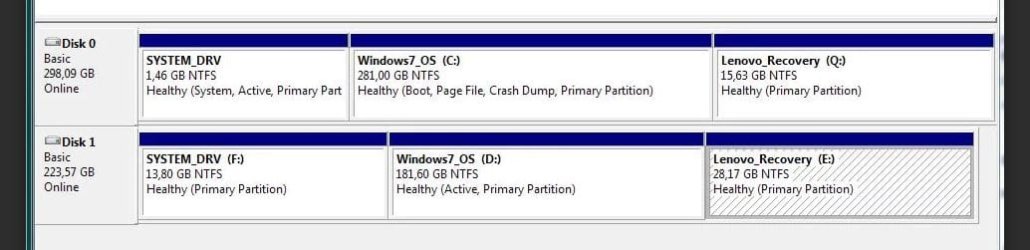
Why are there no system files on Disk 1 if that is the new SSD ? That is why it won`t boot on its own.

By the way, you don`t have a C drive, C is just a partition on your drive, the entire thing is called a drive :)

This is what needs to be done.

http://www.sevenforums.com/tutorials/209885-bootmgr-move-c-easybcd.html
 

My Computer My Computer

At a glance

Windows 10 Pro x64Intel Core i7 6700KGSkill TridentZ RGB 16GB 3600 16-16-16-36EVGA GTX 980 Ti SC x2
Computer type
PC/Desktop
Computer Manufacturer/Model Number
Skylake Special #666
OS
Windows 10 Pro x64
CPU
Intel Core i7 6700K
Motherboard
Asus Sabertooth Z170 Mark 1
Memory
GSkill TridentZ RGB 16GB 3600 16-16-16-36
Graphics Card(s)
EVGA GTX 980 Ti SC x2
Sound Card
Realtek High Definition
Monitor(s) Displays
AOC G2460PG
Screen Resolution
1920 x 1080 144Hz
Hard Drives
Samsung 860 Pro 256GB, Seagate Barracuda 4TB x2
PSU
EVGA 1000 P2, EVGA White Custom Braided Cables
Case
Corsair Vengeance C70 Gunmetal Black
Cooling
Corsair H100i v2, Corsair ML120 x2, Thermal Grizzly Kryonaut
Keyboard
Logitech G910 Orion Spectrum
Mouse
Logitech G700s
Internet Speed
Verizon Fios Quantum Gateway 75/75
Antivirus
Windows Defender, Malwarebytes Free 3.8.3
Browser
Chrome
Other Info
Corsair SP120 x4, LG Blu-ray Drive, Durabrand HT-395 100 Watt Dolby Digital Amp, Corsair H2100 Wireless 7.1 Headset
Why did F and E grow in size on the SSD ? That is totally wrong. Those partitions are not even supposed to have letters.

Is this a Windows 7 install ? Why are the 1st 2 partitions on each drive labeled System Drive ???
 

Attachments

  • Capture.JPG
    Capture.JPG
    43.7 KB · Views: 1

My Computer My Computer

At a glance

Windows 10 Pro x64Intel Core i7 6700KGSkill TridentZ RGB 16GB 3600 16-16-16-36EVGA GTX 980 Ti SC x2
Computer type
PC/Desktop
Computer Manufacturer/Model Number
Skylake Special #666
OS
Windows 10 Pro x64
CPU
Intel Core i7 6700K
Motherboard
Asus Sabertooth Z170 Mark 1
Memory
GSkill TridentZ RGB 16GB 3600 16-16-16-36
Graphics Card(s)
EVGA GTX 980 Ti SC x2
Sound Card
Realtek High Definition
Monitor(s) Displays
AOC G2460PG
Screen Resolution
1920 x 1080 144Hz
Hard Drives
Samsung 860 Pro 256GB, Seagate Barracuda 4TB x2
PSU
EVGA 1000 P2, EVGA White Custom Braided Cables
Case
Corsair Vengeance C70 Gunmetal Black
Cooling
Corsair H100i v2, Corsair ML120 x2, Thermal Grizzly Kryonaut
Keyboard
Logitech G910 Orion Spectrum
Mouse
Logitech G700s
Internet Speed
Verizon Fios Quantum Gateway 75/75
Antivirus
Windows Defender, Malwarebytes Free 3.8.3
Browser
Chrome
Other Info
Corsair SP120 x4, LG Blu-ray Drive, Durabrand HT-395 100 Watt Dolby Digital Amp, Corsair H2100 Wireless 7.1 Headset
This is why imaging is so much better in my opinion, you shrink your C partition down so it will fit on the new ssd, and in your case you`d have to image the system drive partition as well because it has the system files on it, and you make sure it stays the same exact size.


Disk 1 may not show the system files because you can`t boot into it, but I hope that`s not the case.

And Greg always told me, a Recovery partition carried over to a new drive won`t work anymore.
 

My Computer My Computer

At a glance

Windows 10 Pro x64Intel Core i7 6700KGSkill TridentZ RGB 16GB 3600 16-16-16-36EVGA GTX 980 Ti SC x2
Computer type
PC/Desktop
Computer Manufacturer/Model Number
Skylake Special #666
OS
Windows 10 Pro x64
CPU
Intel Core i7 6700K
Motherboard
Asus Sabertooth Z170 Mark 1
Memory
GSkill TridentZ RGB 16GB 3600 16-16-16-36
Graphics Card(s)
EVGA GTX 980 Ti SC x2
Sound Card
Realtek High Definition
Monitor(s) Displays
AOC G2460PG
Screen Resolution
1920 x 1080 144Hz
Hard Drives
Samsung 860 Pro 256GB, Seagate Barracuda 4TB x2
PSU
EVGA 1000 P2, EVGA White Custom Braided Cables
Case
Corsair Vengeance C70 Gunmetal Black
Cooling
Corsair H100i v2, Corsair ML120 x2, Thermal Grizzly Kryonaut
Keyboard
Logitech G910 Orion Spectrum
Mouse
Logitech G700s
Internet Speed
Verizon Fios Quantum Gateway 75/75
Antivirus
Windows Defender, Malwarebytes Free 3.8.3
Browser
Chrome
Other Info
Corsair SP120 x4, LG Blu-ray Drive, Durabrand HT-395 100 Watt Dolby Digital Amp, Corsair H2100 Wireless 7.1 Headset
This is what you really should do.

Download the iso file of the version of Windows 7 SP1 you need.

Create a 4 GB usb stick Windows 7 SP1 installer using rufus.

https://rufus.akeo.ie/

Remove the hard drive.

Connect the new ssd where the hard drive is (yes it matters)

Install windows to the entire new ssd,, you do this by creating an install partition out of the entire ssd during the beginning of the install. (After you delete the entire ssd back down to unallocated space by deleting all the partitions you have on it now)

http://www.sevenforums.com/tutorials/1649-clean-install-windows-7-a.html

You then end up with a beautiful clean install using your entire new ssd for windows 7 and nothing else, your ssd is too small to have any other partitions.

And it will look like this. Ignore the unallocated space, that is used for over provisioning and a topic you should read up on, it`s good to have on a solid state drive. (But not even needed if you always keep plenty of free space.
 

Attachments

  • Capture.JPG
    Capture.JPG
    32.6 KB · Views: 1

My Computer My Computer

At a glance

Windows 10 Pro x64Intel Core i7 6700KGSkill TridentZ RGB 16GB 3600 16-16-16-36EVGA GTX 980 Ti SC x2
Computer type
PC/Desktop
Computer Manufacturer/Model Number
Skylake Special #666
OS
Windows 10 Pro x64
CPU
Intel Core i7 6700K
Motherboard
Asus Sabertooth Z170 Mark 1
Memory
GSkill TridentZ RGB 16GB 3600 16-16-16-36
Graphics Card(s)
EVGA GTX 980 Ti SC x2
Sound Card
Realtek High Definition
Monitor(s) Displays
AOC G2460PG
Screen Resolution
1920 x 1080 144Hz
Hard Drives
Samsung 860 Pro 256GB, Seagate Barracuda 4TB x2
PSU
EVGA 1000 P2, EVGA White Custom Braided Cables
Case
Corsair Vengeance C70 Gunmetal Black
Cooling
Corsair H100i v2, Corsair ML120 x2, Thermal Grizzly Kryonaut
Keyboard
Logitech G910 Orion Spectrum
Mouse
Logitech G700s
Internet Speed
Verizon Fios Quantum Gateway 75/75
Antivirus
Windows Defender, Malwarebytes Free 3.8.3
Browser
Chrome
Other Info
Corsair SP120 x4, LG Blu-ray Drive, Durabrand HT-395 100 Watt Dolby Digital Amp, Corsair H2100 Wireless 7.1 Headset
Post what version of Windows 7 you have a key for for the Lenovo and what bit version you want, either 32 or 64 and I/we will gladly post the Microsoft link that will let you download the iso file.

Simply entering your oem key at the Microsoft site will not work to download the iso file.
 

My Computer My Computer

At a glance

Windows 10 Pro x64Intel Core i7 6700KGSkill TridentZ RGB 16GB 3600 16-16-16-36EVGA GTX 980 Ti SC x2
Computer type
PC/Desktop
Computer Manufacturer/Model Number
Skylake Special #666
OS
Windows 10 Pro x64
CPU
Intel Core i7 6700K
Motherboard
Asus Sabertooth Z170 Mark 1
Memory
GSkill TridentZ RGB 16GB 3600 16-16-16-36
Graphics Card(s)
EVGA GTX 980 Ti SC x2
Sound Card
Realtek High Definition
Monitor(s) Displays
AOC G2460PG
Screen Resolution
1920 x 1080 144Hz
Hard Drives
Samsung 860 Pro 256GB, Seagate Barracuda 4TB x2
PSU
EVGA 1000 P2, EVGA White Custom Braided Cables
Case
Corsair Vengeance C70 Gunmetal Black
Cooling
Corsair H100i v2, Corsair ML120 x2, Thermal Grizzly Kryonaut
Keyboard
Logitech G910 Orion Spectrum
Mouse
Logitech G700s
Internet Speed
Verizon Fios Quantum Gateway 75/75
Antivirus
Windows Defender, Malwarebytes Free 3.8.3
Browser
Chrome
Other Info
Corsair SP120 x4, LG Blu-ray Drive, Durabrand HT-395 100 Watt Dolby Digital Amp, Corsair H2100 Wireless 7.1 Headset
Back
Top