
replacing dead laptop HDD with new SSD

djrobison22

New member
Local time
9:19 AM
Messages
19
Location
West Hollywood, CA
My hard drive on my Dell Studio 1745 running Windows 7 SP1 has died and will not boot. I purchased an SSD and want to know if I need to align or do anything other than remove the dead HDD replace it with the SSD and run boot with the Windows Installation CD that came with my laptop.

Thanks,

djrobison22
 

My Computer My Computer

At a glance

Microsoft Windows 7 Home Premium 64-bit 7601 ...Intel(R) Core(TM)2 Quad CPU Q8400 @ 2.66GHz8.00 GBNVIDIA GeForce GT 330M
Computer type
PC/Desktop
Computer Manufacturer/Model Number
Sony
OS
Microsoft Windows 7 Home Premium 64-bit 7601 Multiprocessor Free Service Pack 1
CPU
Intel(R) Core(TM)2 Quad CPU Q8400 @ 2.66GHz
Motherboard
Sony Corporation VAIO
Memory
8.00 GB
Graphics Card(s)
NVIDIA GeForce GT 330M
Sound Card
(1) Bluetooth Hands-free Audio (2) Realtek High Definition
Monitor(s) Displays
Digital Flat Panel (1920X1080 60Hz)
Screen Resolution
1920 x 1080 x 32 bits (4294967296 colors) @ 59 Hz
Hard Drives
ST31000528AS ATA Device
Keyboard
MS USB Dual Receiver Wireless Keyboard and Mouse
Mouse
MS USB Dual Receiver Wireless Keyboard and Mouse
Antivirus
ms security essentials, mbam 3.0 premium
Browser
Chrome
What you mean by dead? It's a hardware or software failure? I suppose you already tried to do a boot repair.
To install Win7 on the SSD, just take off the HDD, place in the SSD and do a install formatting the SSD. Windows will align it.
After installation:
TRIM
Type this cmd
fsutil behavior query DisableDeleteNotify

It will give you one of two results, either a 0 or a 1. A zero indicates that TRIM is enabled correctly, a one means that it is not. If you have a TRIM-compatible SSD, but find that Windows 7 hasn't enabled the command, you can easily do so by running this command:
fsutil behavior set DisableDeleteNotify 0

Tweaks
Windows 7 - Ultimate SSD Speed Tweaks
Windows 7 SSD Tweaking Guide
Windows 7 and SSDs: Setup secrets and tune-up tweaks | ZDNet
 

My Computers My Computers

  • At a glance

    Windows 7 HP 64i5 6600K - 800MHz to 4200MHz4+4G GSkill DDR4 3000IG - Intel 530
    Computer type
    PC/Desktop
    Computer Manufacturer/Model Number
    custom build
    OS
    Windows 7 HP 64
    CPU
    i5 6600K - 800MHz to 4200MHz
    Motherboard
    GA-Z170-HD3P
    Memory
    4+4G GSkill DDR4 3000
    Graphics Card(s)
    IG - Intel 530
    Monitor(s) Displays
    Samsung 226BW
    Screen Resolution
    1680x1050
    Hard Drives
    (1) -1 SM951 – 128GB M.2 AHCI PCIe SSD drive for Windows 7 and Lubuntu
    (2) -1 WD SATA 3 - 1T for Data
    (3) -1 WD SATA 3 - 1T for backup
    PSU
    Thermaltake 450W TR2 gold
    Keyboard
    Old and good Chicony mechanical keyboard
    Mouse
    Logitech mX performance - 9 buttons (had to disable some)
    Internet Speed
    500Mb/s
    Browser
    Firefox 64
    Other Info
    TinyWall firewall
  • At a glance

    Windows 7 Proi7-4500U 800MHz to 3.0GHz(4+4)G DDR3 1600IG intel 4400 + NVIDIA GeForce GT 745M
    Computer type
    Laptop
    System Manufacturer/Model Number
    Asus Q550LF
    OS
    Windows 7 Pro
    CPU
    i7-4500U 800MHz to 3.0GHz
    Motherboard
    Asus Q550LF
    Memory
    (4+4)G DDR3 1600
    Graphics Card(s)
    IG intel 4400 + NVIDIA GeForce GT 745M
    Sound Card
    Realtek
    Monitor(s) Displays
    LG Display LP156WF4-SPH1
    Screen Resolution
    1920 x 1080
    Hard Drives
    BX500 120G SSD for Windows and programs +
    1T HDD for data
    Internet Speed
    500 Mb/s
    Browser
    Firefox
    Other Info
    TinyWall firewall
replacing dead laptop HDD with a new SSD

Apparently myself and one of the experts on this site got a little ahead of ourselves although the suggestion was made to me to run SeaTools to verify the health of the hard drive. I did run it and the drive passed without any errors but there was something preventing my computer from starting up on its own. I am attaching the Startup Repair log for you to look at and maybe you could shed some light on this issue. I did notice when I was copying files from the laptop in System Recovery mode that my main drive which is usually C: was listed as D: and my optical drive (usually D:) was listed as C:. I do not know if this could prevent the computer from starting up on its own or how it even happened but again maybe the Startup Repair log will tell us something.

I appreciate your links to all the tutorials for my switch to an SSD and I have downloaded them and read them at least 2 other times prior to tonight so I am very confident I will be able to complete this successfully and am extremely confident that I will have plenty of support if things go awry.

FYI I purchased Drive Copy from Paragon so I don't think I need to worry about many of the manual steps for the migration that you have discussed but I would like to know if there is anything in particular that I need to watch out for that Drive Copy may not be doing or explaining in great enough detail.

I have just two more issues: I am switching my HDD on my Sony VAIO All In One (VPCL137FX) to a 250 GB Samsung 850 EVO and I do not have the original Windows Installation disks as this computer was given to me by a friend who cannot find them. Having the Recovery partition has proven invaluable a couple of times when I first got the computer and discovered how very little common sense my friend has when it comes to computers and I ended up having to to a complete recovery back to factory settings. When I migrate is it necessary for me to keep the recovery partition or is there any way to create installation disks of my own. I do have the product key and my version of Windows is legal but not downloadable through the Microsoft website.

Lastly, just how important is it to to the Optimize for Windows Reinstallation on both computers? That process seems a little daunting but also something I should do sooner than later if I am going to do it at all.

Thanks for the great support you all provide in these forums...i don't know how I would stay sane with out it!
 

Attachments

My Computer My Computer

At a glance

Microsoft Windows 7 Home Premium 64-bit 7601 ...Intel(R) Core(TM)2 Quad CPU Q8400 @ 2.66GHz8.00 GBNVIDIA GeForce GT 330M
Computer type
PC/Desktop
Computer Manufacturer/Model Number
Sony
OS
Microsoft Windows 7 Home Premium 64-bit 7601 Multiprocessor Free Service Pack 1
CPU
Intel(R) Core(TM)2 Quad CPU Q8400 @ 2.66GHz
Motherboard
Sony Corporation VAIO
Memory
8.00 GB
Graphics Card(s)
NVIDIA GeForce GT 330M
Sound Card
(1) Bluetooth Hands-free Audio (2) Realtek High Definition
Monitor(s) Displays
Digital Flat Panel (1920X1080 60Hz)
Screen Resolution
1920 x 1080 x 32 bits (4294967296 colors) @ 59 Hz
Hard Drives
ST31000528AS ATA Device
Keyboard
MS USB Dual Receiver Wireless Keyboard and Mouse
Mouse
MS USB Dual Receiver Wireless Keyboard and Mouse
Antivirus
ms security essentials, mbam 3.0 premium
Browser
Chrome
Almost all laptops have a factory recovery partition that can be setup on BIOS, and on Windows, generate a recovery disk (DVD or pendrive). By BIOS or by disk method, it formats the disk and uses an image to recovery to the original system. I’ve already tried to use the DVD’s to have the system installed on a SSD. As the SSD was smaller than the original HDD, it didn’t work. So I’ve backed up the user files, restore to factory default and then cloned the disk, resizing windows partition and discarding the factory recovery partition.
So, once you have already generated an installation disk (DVD’s or pendrive), there is no reason to copy the factory recovery partition to the SSD.
If you do have the BIOS factory recovery, you can recovery many times. To make the recovery disks, normally it is allowed to do only once (no sense). This counter can be reset, but as it is stored on the hidden recovery partition and it is tricky.

On the Dell Studio 1745:
Is the HDD original (hardware and software) that came with the laptop?
Does the BIOS have an option to restore to factory default?
Was the Startup Repair log generated by SeaTools or by means of Win 7 install disk on repair mode?
By the Startup Repair log, apparently, your drive is working without any failure (hardware).
With a Win 7 install disk, did you already tried to do a boot repair?
In Bios, is your HDD fist booting option?
What you want to do?
- Repair the HDD and then clone it to the SSD?
- Do a fresh install on the SSD?

On the VAIO:
As you already did a factory recover, from windows, I would first generate a recovery disk (DVD or pendrive) and then clone the HHD to the SSD discarding the factory recovery partition.
 

My Computers My Computers

  • At a glance

    Windows 7 HP 64i5 6600K - 800MHz to 4200MHz4+4G GSkill DDR4 3000IG - Intel 530
    Computer type
    PC/Desktop
    Computer Manufacturer/Model Number
    custom build
    OS
    Windows 7 HP 64
    CPU
    i5 6600K - 800MHz to 4200MHz
    Motherboard
    GA-Z170-HD3P
    Memory
    4+4G GSkill DDR4 3000
    Graphics Card(s)
    IG - Intel 530
    Monitor(s) Displays
    Samsung 226BW
    Screen Resolution
    1680x1050
    Hard Drives
    (1) -1 SM951 – 128GB M.2 AHCI PCIe SSD drive for Windows 7 and Lubuntu
    (2) -1 WD SATA 3 - 1T for Data
    (3) -1 WD SATA 3 - 1T for backup
    PSU
    Thermaltake 450W TR2 gold
    Keyboard
    Old and good Chicony mechanical keyboard
    Mouse
    Logitech mX performance - 9 buttons (had to disable some)
    Internet Speed
    500Mb/s
    Browser
    Firefox 64
    Other Info
    TinyWall firewall
  • At a glance

    Windows 7 Proi7-4500U 800MHz to 3.0GHz(4+4)G DDR3 1600IG intel 4400 + NVIDIA GeForce GT 745M
    Computer type
    Laptop
    System Manufacturer/Model Number
    Asus Q550LF
    OS
    Windows 7 Pro
    CPU
    i7-4500U 800MHz to 3.0GHz
    Motherboard
    Asus Q550LF
    Memory
    (4+4)G DDR3 1600
    Graphics Card(s)
    IG intel 4400 + NVIDIA GeForce GT 745M
    Sound Card
    Realtek
    Monitor(s) Displays
    LG Display LP156WF4-SPH1
    Screen Resolution
    1920 x 1080
    Hard Drives
    BX500 120G SSD for Windows and programs +
    1T HDD for data
    Internet Speed
    500 Mb/s
    Browser
    Firefox
    Other Info
    TinyWall firewall
Almost all laptops have a factory recovery partition that can be setup on BIOS, and on Windows, generate a recovery disk (DVD or pendrive). By BIOS or by disk method, it formats the disk and uses an image to recovery to the original system. I’ve already tried to use the DVD’s to have the system installed on a SSD. As the SSD was smaller than the original HDD, it didn’t work. So I’ve backed up the user files, restore to factory default and then cloned the disk, resizing windows partition and discarding the factory recovery partition.
So, once you have already generated an installation disk (DVD’s or pendrive), there is no reason to copy the factory recovery partition to the SSD.
If you do have the BIOS factory recovery, you can recovery many times. To make the recovery disks, normally it is allowed to do only once (no sense). This counter can be reset, but as it is stored on the hidden recovery partition and it is tricky.


What djrobison22 mentioned is that the Hard disk has died.

There is no way to do recovery as it is inside the dead hard disk.
I did know about that as i did used it on my laptop, it went to recovery what the just pull out the power.
 

My Computer My Computer

At a glance

Windows 7 x64
Computer type
Laptop
Computer Manufacturer/Model Number
Toshiba L630 and L735
OS
Windows 7 x64
Hard Drives
240 GB SSD
His drive isn't dead. It just can't boot, as you can see on Startup Repair log
 

My Computers My Computers

  • At a glance

    Windows 7 HP 64i5 6600K - 800MHz to 4200MHz4+4G GSkill DDR4 3000IG - Intel 530
    Computer type
    PC/Desktop
    Computer Manufacturer/Model Number
    custom build
    OS
    Windows 7 HP 64
    CPU
    i5 6600K - 800MHz to 4200MHz
    Motherboard
    GA-Z170-HD3P
    Memory
    4+4G GSkill DDR4 3000
    Graphics Card(s)
    IG - Intel 530
    Monitor(s) Displays
    Samsung 226BW
    Screen Resolution
    1680x1050
    Hard Drives
    (1) -1 SM951 – 128GB M.2 AHCI PCIe SSD drive for Windows 7 and Lubuntu
    (2) -1 WD SATA 3 - 1T for Data
    (3) -1 WD SATA 3 - 1T for backup
    PSU
    Thermaltake 450W TR2 gold
    Keyboard
    Old and good Chicony mechanical keyboard
    Mouse
    Logitech mX performance - 9 buttons (had to disable some)
    Internet Speed
    500Mb/s
    Browser
    Firefox 64
    Other Info
    TinyWall firewall
  • At a glance

    Windows 7 Proi7-4500U 800MHz to 3.0GHz(4+4)G DDR3 1600IG intel 4400 + NVIDIA GeForce GT 745M
    Computer type
    Laptop
    System Manufacturer/Model Number
    Asus Q550LF
    OS
    Windows 7 Pro
    CPU
    i7-4500U 800MHz to 3.0GHz
    Motherboard
    Asus Q550LF
    Memory
    (4+4)G DDR3 1600
    Graphics Card(s)
    IG intel 4400 + NVIDIA GeForce GT 745M
    Sound Card
    Realtek
    Monitor(s) Displays
    LG Display LP156WF4-SPH1
    Screen Resolution
    1920 x 1080
    Hard Drives
    BX500 120G SSD for Windows and programs +
    1T HDD for data
    Internet Speed
    500 Mb/s
    Browser
    Firefox
    Other Info
    TinyWall firewall
His drive isn't dead. It just can't boot, as you can see on Startup Repair log

But the problem why on booting, it should have an option to do recovery.

As i tested mine, i just turn off without using shutdown.
Upon start, there is an option to do system repair /recovery, which it will auto run the repair.

Funny thing is, why there is no prompt for system repair /recovery upon turn on.

Most probably something is missed out.
 

My Computer My Computer

At a glance

Windows 7 x64
Computer type
Laptop
Computer Manufacturer/Model Number
Toshiba L630 and L735
OS
Windows 7 x64
Hard Drives
240 GB SSD
Eric, there are two kinds of recovery:
- Windows recovery uses a restore point to undo system changes by reverting the computer to a previous restore point.
- By Bios or by DVD, you format the HDD and load an image that restore to factory default.
If the laptop isn't booting you can't use Windows recovery.
 

My Computers My Computers

  • At a glance

    Windows 7 HP 64i5 6600K - 800MHz to 4200MHz4+4G GSkill DDR4 3000IG - Intel 530
    Computer type
    PC/Desktop
    Computer Manufacturer/Model Number
    custom build
    OS
    Windows 7 HP 64
    CPU
    i5 6600K - 800MHz to 4200MHz
    Motherboard
    GA-Z170-HD3P
    Memory
    4+4G GSkill DDR4 3000
    Graphics Card(s)
    IG - Intel 530
    Monitor(s) Displays
    Samsung 226BW
    Screen Resolution
    1680x1050
    Hard Drives
    (1) -1 SM951 – 128GB M.2 AHCI PCIe SSD drive for Windows 7 and Lubuntu
    (2) -1 WD SATA 3 - 1T for Data
    (3) -1 WD SATA 3 - 1T for backup
    PSU
    Thermaltake 450W TR2 gold
    Keyboard
    Old and good Chicony mechanical keyboard
    Mouse
    Logitech mX performance - 9 buttons (had to disable some)
    Internet Speed
    500Mb/s
    Browser
    Firefox 64
    Other Info
    TinyWall firewall
  • At a glance

    Windows 7 Proi7-4500U 800MHz to 3.0GHz(4+4)G DDR3 1600IG intel 4400 + NVIDIA GeForce GT 745M
    Computer type
    Laptop
    System Manufacturer/Model Number
    Asus Q550LF
    OS
    Windows 7 Pro
    CPU
    i7-4500U 800MHz to 3.0GHz
    Motherboard
    Asus Q550LF
    Memory
    (4+4)G DDR3 1600
    Graphics Card(s)
    IG intel 4400 + NVIDIA GeForce GT 745M
    Sound Card
    Realtek
    Monitor(s) Displays
    LG Display LP156WF4-SPH1
    Screen Resolution
    1920 x 1080
    Hard Drives
    BX500 120G SSD for Windows and programs +
    1T HDD for data
    Internet Speed
    500 Mb/s
    Browser
    Firefox
    Other Info
    TinyWall firewall
Eric, there are two kinds of recovery:
- Windows recovery uses a restore point to undo system changes by reverting the computer to a previous restore point.
- By Bios or by DVD, you format the HDD and load an image that restore to factory default.
If the laptop isn't booting you can't use Windows recovery.


Thanks.
Actually i was referring to djrobison22 computer.
That is i had just tested on turn off computer without shutdown.
After turn on, it went to repair mode, as i was playing and it did work.
But his did not work, that is why i wonder.
Anyway, I did use the system restore several times.
Most of my backup i use clone using O&O DiskImage to another HDD, reguarly, of which it is bootable in Windows.
 

My Computer My Computer

At a glance

Windows 7 x64
Computer type
Laptop
Computer Manufacturer/Model Number
Toshiba L630 and L735
OS
Windows 7 x64
Hard Drives
240 GB SSD
My two cents worth is there any chance you can hook the drive to another machine and run a test on it??
SeaTools for Windows | Seagate

If you want to recover data form it before you throw it out then try this
BOOTABLE UBUNTU
Make a bootable Ubuntu disk Download Ubuntu Desktop | Download | Ubuntu
Set the BIOS to boot from the optical when the machine boots it will show you a screen with TRY or INSTALL > select TRY not INSTALL
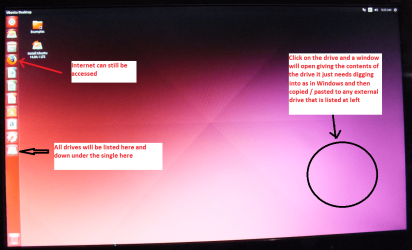
When it is finished - it takes very little time you will get a screen like in the pic .
Open the drive you want > User and dig down until you get to the data / settings you may be able to copy / paste the material you want to an external source or other installed drive doing this.
I am not sure if it will but I have recovered tons of data etc using this method both on "dead" or just plain drives that you cannot get data from using Windows.

By the by if you run the Ubuntu it will let you access the internet and you could run the Seatools or any form of drive test via it ;)
 

Attachments

  • UBUNTU SCREEN X2.PNG
    UBUNTU SCREEN X2.PNG
    272.7 KB · Views: 0

My Computer My Computer

At a glance

Desk1 7 Home Prem / Desk2 10 Pro / Main lap A...Desk1 i5 3750K / Laptop i7 GTX 860M / Desk2 i...Desk1 8GB (1866) / Desk2 16GB (1333) / Laptop...Desk 1& 2NVidia GTX 650 & Laptops on board Intel
Computer type
PC/Desktop
Computer Manufacturer/Model Number
Own build (new) Desk1 / Asus ROG Win 7 / Desk2 1st build
OS
Desk1 7 Home Prem / Desk2 10 Pro / Main lap Asus ROG 10 Pro 2 laptop Toshiba 7 Pro Asus P2520 7 & 10
CPU
Desk1 i5 3750K / Laptop i7 GTX 860M / Desk2 i5 2500
Motherboard
Desk1 Asus P877-V / Desk2 Gigabyte H67 UD3H / Laptop ?
Memory
Desk1 8GB (1866) / Desk2 16GB (1333) / Laptop 8Gb DDR3
Graphics Card(s)
Desk 1& 2NVidia GTX 650 & Laptops on board Intel
Sound Card
Desk 1 & 2 -XONAR DG Realtek High Def audio Laptop
Monitor(s) Displays
Desk 1 Benq HD 2450 / Desk2 Philips 24" / Laptop 17.5"
Screen Resolution
1920x1080 D1 & D2 & Laptop 1
Hard Drives
Desk1 Samsung 120GB 830 SSD
Asus ROG 256GB 850 Pro SSD
Desk2 Samsung 840 256 SSD
Toshiba 120GB EVO
PSU
Desk 1 Corsair HX 1050/ Laptop ? / Desk 2 Corsair HX 650
Case
Desk 1 Cooler HAF XM ? Toshiba laptop / Desk2 Coolermaster
Cooling
Fans on all Desk1 -2 Desk2 - all Coolermasters 5 Laptop ?
Keyboard
Desk 1 MS Sidewinder X6 Desk 2 MS Sidewinder X 4
Mouse
Desk 1&2 - Gigabyte MS 900 gamer - laptop - Logitec wireless
Internet Speed
ADSL2+
Other Info
One other Desktop (tester) and spare Toshba laptop both with SSD's
Running Kaspersky 2016 ISS on all machines config'd identically
Logitec audio stereo systems on each machine (x3)
Canon MG5250MFC
Router/modem TP-Link running WPA2SK
Back
Top