More on Windows 7 and Windows 8.1 servicing changes

What is the easiest way of determining the KB code of the Security Only Rollup?

Even though MS said the W7 security-only package would only be available from the MS Update Catalog, here it is available as a download from their regular website ...

KB3192391

No need to stress out over Active-X / IE and that antiquated website.
Thanks. :)
 
Last edited:

My Computer My Computer

Computer type
PC/Desktop
Computer Manufacturer/Model Number
n/a
OS
W7 Ultimate SP1, LM19.2 MATE, W10 Home 1703, W10 Pro 1703 VM, #All 64 bit
CPU
AMD Phenom II x6 1100T, 3.3 GHz
Motherboard
ASUS M4A88T-M/USB3 (AM3)
Memory
12GB DDR3 1333 G-Skill (4GB x 2), G-Skill (2GB x 2)
Graphics Card(s)
NVIDIA GeForce GTX 660
Sound Card
Realtek?
Monitor(s) Displays
Samsung S23B350
Screen Resolution
1920x1080
Hard Drives
WD Green 2TB (SATA), WD Green 3TB (SATA), WD Blue 4TB (SATA), WD Blue 6TB (SATA)
PSU
Cooler Master
Case
Antec GX300 Tower
Cooling
3x Antec TRICOOL 120mm Fans
Mouse
Wired Optical
Internet Speed
DSL
Antivirus
Avast
Browser
Pale Moon (64 bit)
Other Info
2018-12-27 Upgraded HDDs
2015-12-10 Upgraded case, graphics card, storage
2015-08-15 Upgraded motherboard & RAM
2015-07-15 Upgraded LM17.1 to LM17.2
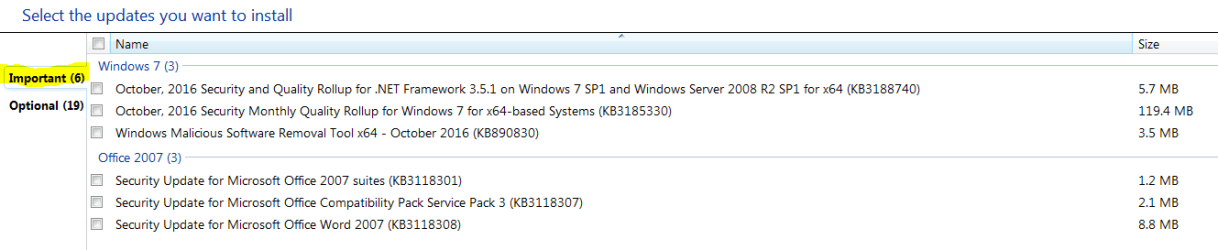
I got my updates today and one of the updates on the "Important" list is KB2952664, which was one of the ones we avoided because of it's connection with the W10 garbage. I removed that one a long time ago.
Now it's back and says it has no GWX or upgrade functionality in it. Is Microsoft trying to pull another back door trick or what?
 

My Computer My Computer

Computer type
PC/Desktop
Computer Manufacturer/Model Number
HP ProDesk 400 G3
OS
Windows 7 Pro x64
CPU
Intel I7 6700 3.40 GHz
Memory
8GB
Monitor(s) Displays
Samsung 21.5" LED
Hard Drives
1 TB
Keyboard
Ducky mechanical with PBT double shot keycaps.
Good morning again,

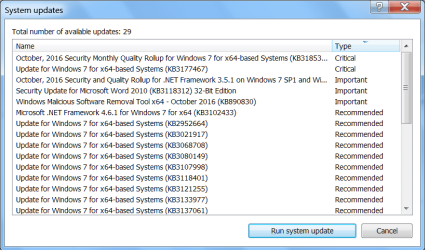
For what it's worth...although I have yet to receive the usual popup notification that updates are available, my ESET SS program shows the following alert about the Patch Tuesday updates (at the bottom part of the list, there are something like 4 "Optional" updates listed):
 

Attachments

  • PATCH TUESDAY UPDATES AS SHOWN IN ESET.png
    PATCH TUESDAY UPDATES AS SHOWN IN ESET.png
    23.1 KB · Views: 2

My Computer My Computer

Computer type
PC/Desktop
Computer Manufacturer/Model Number
Dell Inspiron Desktop (refurbished)
OS
Win 7 Home Premium x64 SP1
CPU
Intel Core i3, 3.07 gHz
Motherboard
Dell
Memory
6 GB
Graphics Card(s)
ASUS VH198 (1440x900@60Hz) Intel Q965/Q963 Express Chipset F
Monitor(s) Displays
Asus
Hard Drives
Western Digital 1 TB SATA HDD (Internal)

WD 1-TB "My Passport Ultra" (external drive used for system images)
Keyboard
Azio KB505U wired, standard, large print 3-color backlit
Mouse
Logitech (wired)
Internet Speed
Download: up to 50 Mbps | Upload: 5 Mbps
Antivirus
MSE
Browser
Firefox (default) and IE11
Other Info
MBAM 3xx (lifetime license) |
SAS (on-demand) | FF w/NoScript & IE11 | uBlock Origin | POP Peeper Pro | Aeris Calendar | GWX Control Panel Monitor | CPUID
Good morning again,

For what it's worth...although I have yet to receive the usual popup notification that updates are available, my ESET SS program shows the following alert about the Patch Tuesday updates (at the bottom part of the list, there are something like 4 "Optional" updates listed):

Hi,
A lot of those updates are just telemetry junkware :)
I'd dump ESet in a millisecond if "or any security program calling a lot of those updates as important or insisting on loading recommended updates at all :D
10-12-16 Important updates.PNG
 

My Computer My Computer

Computer type
PC/Desktop
Computer Manufacturer/Model Number
Custom assembled by me :}
OS
Win-7-Pro64bit 7-H-Prem-64bit
CPU
i7-5930K 2nd i9-9940x both water blocked VRM's too
Motherboard
ASUS SABERTOOTH X99 2nd ASUS x299 Apex
Memory
Trident-z 3200C14 2nd Trident-z 3600C16
Graphics Card(s)
EVGA 1080ti ftw3 2nd Titan Xp both water blocked
Sound Card
Built-in Realtek
Monitor(s) Displays
1-AOC G2460PG 24"G-Sync 144Hz/ 2nd 1-ASUS VG248QE 24" 144Hz
Screen Resolution
1920 x 1080 144Hz
Hard Drives
2-Samsung M.2 Evo & Evo Plus
2-Samsung 850 EVO 500GB SSD's/ 3-2.5 W.D. Black 1tb-&3-1tb/3-3.5 WD Black 1tb hdd's
PSU
EVGA SuperNOVA 1000-P2 2nd 1200-P2
Case
2-Corsair Obsidian Series 450D Black ATX Mid Tower
Cooling
Custom water loops
Keyboard
Logitech G710+/ 2nd Logitech G910
Mouse
2-RedDragon M901 Perdition 16400 dpi Gaming mouse = wired
Internet Speed
Comcast Ping 19ms 89.31mbps download speed 6.12mbps upload
Antivirus
Malwarebytes Pro/ Superantispyware Pro
Browser
FireFox & Pale moon
Other Info
2nd ASUS X299 Apex/Intel i9-9940x with Custom water loop/7H-Prem-x64/Corsair 450D case/Ram Trident-z 3600C16 4x8gb / Samsung970Evo plus 500gb SSD/Dual ssd EZ swap evo/PSU EVGA SuperNova 1200w-P2 80+Platinum/GPU Titan Xp /8-ML-140 on push-pull on 2-280GTX rads
I find the original paste in Brink's first post confusing, as follows:

There is a "security-only quality update", not found on standard Windows Update. This is apparently NOT cumulative.

Then there is a "security monthly quality rollup", which WILL be on Windows Update.

Questions:

1: Is the "security monthly quality rollup" going to contain ANY non-security updates?

If no, then why not just get it from Windows Update?

If yes, why is it named "security monthly quality rollup"?

2: I see the wording regarding the rollup is "the initial monthly rollup released in October will only have new security updates from October, as well as the non-security updates from September."

Does that wording mean that the rollups AFTER October WILL NOT contain "non-security" updates, but that the October rollup WILL contain "non-security updates"? Again--if the "rollup" will contain non-security stuff, why call it a "security monthly quality rollup"?

I would prefer to get ONLY security updates and to get them CUMULATIVELY through Windows Update.

An ordinary reading of the first portion of Brink's first post in this thread suggests that will be possible. Correct or not correct?
 

My Computer My Computer

Computer type
PC/Desktop
Computer Manufacturer/Model Number
Ignatz Special; 4 speed manual gearbox; factory air conditioning; one of one
OS
Windows 7 Home Premium SP1, 64-bit
CPU
Intel Skylake i5-6600K, not overclocked
Motherboard
AsRock Z170M Extreme 4, micro ATX
Memory
8 GB HyperX DDR4-2666 (2 x 4 GB)
Graphics Card(s)
none; graphics are integrated on CPU
Sound Card
onboard: Realtek ALC1150; external: USB Behringer UF0-202
Monitor(s) Displays
Dell S2340M 23 inch IPS
Screen Resolution
1600 x 900
Hard Drives
System: Crucial MX100 series SSD, 128 GB;
Data: Samsung Spinpoint 103SJ, 1 TB;
Backup: WD Caviar Green WD30EZRX-00D8PB0, 3 TB
PSU
Rosewill SilentNight 500 watt fanless, semi-modular
Case
Antec Solo II
Cooling
Noctua NH-U12S; Noctua F12 intake, Noctua S12A exhaust
Keyboard
Microsoft 200 6JH-00001 USB
Mouse
Dell or Microsoft optical wired; USB
Antivirus
Microsoft Security Essentials and Malwarebytes Premium
Browser
Pale Moon
Other Info
All fans PWM; speeds at idle: CPU circa 500 rpm; intake circa 600 rpm; exhaust circa 600 rpm; CPU temps 27 idle and 47 C load in a warm room (27 C/81 F) when running Intel Extreme Tuning Utility stress test.
Good morning again,

For what it's worth...although I have yet to receive the usual popup notification that updates are available, my ESET SS program shows the following alert about the Patch Tuesday updates (at the bottom part of the list, there are something like 4 "Optional" updates listed):

Hi,
A lot of those updates are just telemetry junkware :)
I'd dump ESet in a millisecond if "or any security program calling a lot of those updates as important or insisting on loading recommended updates at all :D
View attachment 392674

Hi TZ and thanks for the feedback!

I won't be installing any updates via ESET SS. In fact, I just went into the program and disabled the function which generates what is shown in the screenshot I included. (I'd noticed it before - over the past few months, but just never got around to locating & disabling that option in ESET SS). I plan to wait until Friday or Saturday - to see if any issues are reported here with these latest Patch Tuesday updates - before trying to install them.
[I haven't yet received the usual "popup" that the updates are available, anyway].

Cheers! :)
 

My Computer My Computer

Computer type
PC/Desktop
Computer Manufacturer/Model Number
Dell Inspiron Desktop (refurbished)
OS
Win 7 Home Premium x64 SP1
CPU
Intel Core i3, 3.07 gHz
Motherboard
Dell
Memory
6 GB
Graphics Card(s)
ASUS VH198 (1440x900@60Hz) Intel Q965/Q963 Express Chipset F
Monitor(s) Displays
Asus
Hard Drives
Western Digital 1 TB SATA HDD (Internal)

WD 1-TB "My Passport Ultra" (external drive used for system images)
Keyboard
Azio KB505U wired, standard, large print 3-color backlit
Mouse
Logitech (wired)
Internet Speed
Download: up to 50 Mbps | Upload: 5 Mbps
Antivirus
MSE
Browser
Firefox (default) and IE11
Other Info
MBAM 3xx (lifetime license) |
SAS (on-demand) | FF w/NoScript & IE11 | uBlock Origin | POP Peeper Pro | Aeris Calendar | GWX Control Panel Monitor | CPUID
... edited to reply

2: I see the wording regarding the rollup is "the initial monthly rollup released in October will only have new security updates from October, as well as the non-security updates from September."

Does that wording mean that the rollups AFTER October WILL NOT contain "non-security" updates, but that the October rollup WILL contain "non-security updates"? Again--if the "rollup" will contain non-security stuff, why call it a "security monthly quality rollup"?

I would prefer to get ONLY security updates and to get them CUMULATIVELY through Windows Update.

An ordinary reading of the first portion of Brink's first post in this thread suggests that will be possible. Correct or not correct?

The announcement was probably written by a techie and edited by a lawyer or a marketing genius :sarc:

They botched the way they explained it. The September updates (both security and non-security) get rolled into the October update. You can not skip the October rollup and install the November rollup. In other words, it is cumulative. The naming of this rollup should have been The October 2016 Rollup. The words, 'security' and 'quality' should have been eliminated. You will continue to see non-security updates in this rollup every month until 2020.

The Security-only Rollup is not cumulative and it is aptly named. However MS says it will not be available through Windows Update, as you duly noted. You can complain to MS - good luck with that. :rolleyes:
 

My Computer My Computer

Computer type
PC/Desktop
Computer Manufacturer/Model Number
Custom build
OS
W7Pro/64
I manually checked for today's PT updates and had 4 important and 2 optional available.
I installed the 4 important updates, rebooted, and let mscoresvw recompile for the net framework update.
Re-booted, and the 2 optional updates i didn't install were no longer listed as available for me.
I got a notification of another new important update available for KB3177467.
https://support.microsoft.com/en-us/kb/3177467
I installed KB3177467, and then the optionals are listed as available again.

No problems here so far.
Just weird that the optionals disappeared/reappeared, and another important was available.

:rolleyes:

Well I don't know about this new update system but usually after installing updates and rebooting it takes a while before you get the correct missing/ optional updates showing up as available. The reason is that your machine needs to be re-scanned for installed updates and it can take a while. I've always found it best to wait for trustedinstaller.exe and svchost (netsvcs) to finish after a reboot before rechecking for updates.

Currently I have not received this months updates. They will probably arrive later or tomorrow here in the UK.

I made as system image backup yesterday after getting everything patched.

I can confirm that I had the same update appear on my work machine: KB3177467 after installing the other updates. I did not get KB3177467 on my home machine because I'd already installed it.

https://support.microsoft.com/en-us/kb/3177467

However if I look at the file list on both machines the replacement files sit in WINSXS only.

See this post and link in post here: New KB3184143 Update to Remove Windows 10 Upgrade Offer
 

My Computer My Computer

Computer type
Laptop
Computer Manufacturer/Model Number
ASUS
OS
Microsoft Windows 7 Home Premium 64-bit 7601 Multiprocessor Free Service Pack 1
CPU
AMD C-60 APU with Radeon(tm) HD Graphics
Motherboard
ASUSTeK COMPUTER INC. X501U
Memory
4.00 GB
Graphics Card(s)
AMD Radeon HD 6290 Graphics
Sound Card
(1) AMD High Definition Audio Device (2) Realtek High Defi
Screen Resolution
1366 x 768 x 32 bits (4294967296 colors) @ 60 Hz
Hard Drives
Hitachi HTS545050A7E380 SATA Disk Device
Antivirus
Comodo CIS & FW, SecureAplus App Whitelisting, Threatfire
Browser
Cyberfox 64bit, Opera 64bit, Airfox
Other Info
Spy-The-Spy, HitmanPro.Alert, Norton Connect Safe, MJRegWatcher, BitDefender TrafficLight, Voodoo Shield, Zemana AntiMalware
From what I've read, the Security only update is not going to be cumulative. This is going to make installing security only updates extremely difficult on new installs. Unless you keep the security-only update rollups for every month.

The Security Quality rollup contains security fixes and all the other updates (except what MS classes as "out-of-band updates"). This will be fully cumulative eventually and incorporate everything.

I just don't see how clean installs are going to be easy from now on (if you want to pick and choose), unless you keep every month's security only updates and install them separately, plus all past patches you want separately too.

Or install the cumulative update and have to put up with everything being installed.

I have kept all the update packs from Dr. Windows, up until the end of September for new installs. I've yet to decide what I'm going to do about future updates.

This would have been a lot easier if MS had made both updates (security-only and security quality rollups) cumulative. Then users who just want the security updates on a fresh install could just install one update and be up-to-date security wise. Maybe this makes things more difficult for business environments though?
 
Last edited:

My Computer My Computer

Computer type
PC/Desktop
Computer Manufacturer/Model Number
Custom Build
OS
Win 7 Ultimate, Win 8.1 Pro, Linux Mint 19 Cinnamon (All 64-Bit)
CPU
Intel i5 4690K
Motherboard
Gigabyte Z97X-UD3H
Memory
Corsair Vengeance LP 32GB DDR3
Graphics Card(s)
MSI GTX 1060 GAMING X 6GB
Sound Card
Onboard
Hard Drives
Samsung 850 EVO 250GB SSD (x2)
Samsung 860 EVO 1TB SSD (x2)
Crucial MX300 525GB SSD
WD Blue 2TB 5400rpm Intellipark Disabled (x2)
PSU
Corsair HX750i
Case
Phanteks Enthoo Pro
Cooling
CM Hyper 212 EVO on CPU, Noctua Redux NF-P14S 1500rpm (x6)
Keyboard
Corsair K70 RGB LUX
Mouse
Corsair Sabre RGB
Antivirus
Avast Free, MalwareBytes, SAS & CryptoPrevent
Browser
Chrome
Other Info
StarTech PEXESAT322I 2 Port PCI-E SATA Card
ASUS PCE-AC56 Dual-band AC1300 Wireless Card
Akasa FC.Six Manual Fan Controller
And a Partridge in a Pear Tree!
So, how to avoid telemetry, spyware and other so called "updates" ?

Once the updates become fully cumulative, you won't be able to, unless you go for the security only update option. Or unless MS does leave some updates separate. But according to their articles they want to incorporate all past patches.

Well, I'm curious as to if after the cumulative update the patches will be listed individually in the update history. If so, they could be researched & removed if needed.

There are a couple programs out there that say they block the telemetry of Windows. Most are designed for 10, some have adapted to include 7 & 8.1

https://www.safer-networking.org/spybot-anti-beacon/

Doing a Google search yields known telemetry tracker KB's to avoid.

I also came across this article during some searching:

4 Tools to Update Windows Offline and install Hotfixes from a Local Source • Raymond.CC
 

My Computer My Computer

Computer type
PC/Desktop
Computer Manufacturer/Model Number
Dell Hell oh Well
OS
Win 7 32 Home Premium, Win 7 64 Pro, Win 8.1, Win 10
CPU
Intel Core 2 Duo 2.93GHz
Memory
Not much with my ADHD
Graphics Card(s)
ATI Radeon HD 4350
Monitor(s) Displays
24" HDTV/Monitor
Screen Resolution
Blurry after a Scotch or 2
Hard Drives
1 HDD 250 GB, 1 HDD 1 TB, 3 - 1 TB Externals
Case
Don't get on my case...man :D
Cooling
I have an Air Conditioner & Diet Pepsi
Keyboard
Saitek Cyborg
Mouse
10 yr old MS optical mouse that still works
Internet Speed
Never fast enough
Antivirus
Various
Browser
Various
So, how to avoid telemetry, spyware and other so called "updates" ?

Once the updates become fully cumulative, you won't be able to, unless you go for the security only update option. Or unless MS does leave some updates separate. But according to their articles they want to incorporate all past patches.

Well, I'm curious as to if after the cumulative update the patches will be listed individually in the update history. If so, they could be researched & removed if needed

Good question. I think MS wants us all to be on the same patch level, so once the fully cumulative updates come into force, I don't think individual patches will be removable. I don't see how that would work.
My guess is any patches that were installed before the update change might still show up in the history but won't be removable.

If they're going by the Windows 10 cumulative update model, then they won't allow people to remove individual patches once cumulatives are installed (they'll be classed as one patch). I hope I'm wrong about this.

It also depends on what MS wants to incorporate into the cumulatives. If, as they say, it will incorporate every past patch.
 

My Computer My Computer

Computer type
PC/Desktop
Computer Manufacturer/Model Number
Custom Build
OS
Win 7 Ultimate, Win 8.1 Pro, Linux Mint 19 Cinnamon (All 64-Bit)
CPU
Intel i5 4690K
Motherboard
Gigabyte Z97X-UD3H
Memory
Corsair Vengeance LP 32GB DDR3
Graphics Card(s)
MSI GTX 1060 GAMING X 6GB
Sound Card
Onboard
Hard Drives
Samsung 850 EVO 250GB SSD (x2)
Samsung 860 EVO 1TB SSD (x2)
Crucial MX300 525GB SSD
WD Blue 2TB 5400rpm Intellipark Disabled (x2)
PSU
Corsair HX750i
Case
Phanteks Enthoo Pro
Cooling
CM Hyper 212 EVO on CPU, Noctua Redux NF-P14S 1500rpm (x6)
Keyboard
Corsair K70 RGB LUX
Mouse
Corsair Sabre RGB
Antivirus
Avast Free, MalwareBytes, SAS & CryptoPrevent
Browser
Chrome
Other Info
StarTech PEXESAT322I 2 Port PCI-E SATA Card
ASUS PCE-AC56 Dual-band AC1300 Wireless Card
Akasa FC.Six Manual Fan Controller
And a Partridge in a Pear Tree!
I have kept all the update packs from Dr. Windows, up until the end of September for new installs.

How many of these are there and can you post a link to this "Dr. Windows", which I can't find with my browser? Do you have a list of KBs?

I rarely reinstall and may not have to for years, but I want the least painful way to get security only updates on into the future, which I assume would mean permanently saving whatever you got from "Dr. Windows", plus the monthly non-cumulative "security only quality update" package. Beginning with October and NOT available through Windows Update.
 

My Computer My Computer

Computer type
PC/Desktop
Computer Manufacturer/Model Number
Ignatz Special; 4 speed manual gearbox; factory air conditioning; one of one
OS
Windows 7 Home Premium SP1, 64-bit
CPU
Intel Skylake i5-6600K, not overclocked
Motherboard
AsRock Z170M Extreme 4, micro ATX
Memory
8 GB HyperX DDR4-2666 (2 x 4 GB)
Graphics Card(s)
none; graphics are integrated on CPU
Sound Card
onboard: Realtek ALC1150; external: USB Behringer UF0-202
Monitor(s) Displays
Dell S2340M 23 inch IPS
Screen Resolution
1600 x 900
Hard Drives
System: Crucial MX100 series SSD, 128 GB;
Data: Samsung Spinpoint 103SJ, 1 TB;
Backup: WD Caviar Green WD30EZRX-00D8PB0, 3 TB
PSU
Rosewill SilentNight 500 watt fanless, semi-modular
Case
Antec Solo II
Cooling
Noctua NH-U12S; Noctua F12 intake, Noctua S12A exhaust
Keyboard
Microsoft 200 6JH-00001 USB
Mouse
Dell or Microsoft optical wired; USB
Antivirus
Microsoft Security Essentials and Malwarebytes Premium
Browser
Pale Moon
Other Info
All fans PWM; speeds at idle: CPU circa 500 rpm; intake circa 600 rpm; exhaust circa 600 rpm; CPU temps 27 idle and 47 C load in a warm room (27 C/81 F) when running Intel Extreme Tuning Utility stress test.
I have kept all the update packs from Dr. Windows, up until the end of September for new installs.

How many of these are there and can you post a link to this "Dr. Windows", which I can't find with my browser? Do you have a list of KBs?

I rarely reinstall and may not have to for years, but I want the least painful way to get security only updates on into the future, which I assume would mean permanently saving whatever you got from "Dr. Windows", plus the monthly non-cumulative "security only" package.

Hi Ignatzatsonic,

Unfortunately I can't post links to that site. I was asked to remove it last time as the site is in German. The packs are in English though. There is one pack for 32-Bit and one for 64-Bit.
I've used the packs many times though for 7 and 8.1 and they work well. You can choose the patches you want to install/exclude when you run it. Or you can use the option to just extract the patches.
Just look up "Dr. Windows Update pack" and they should come up in Google.
 

My Computer My Computer

Computer type
PC/Desktop
Computer Manufacturer/Model Number
Custom Build
OS
Win 7 Ultimate, Win 8.1 Pro, Linux Mint 19 Cinnamon (All 64-Bit)
CPU
Intel i5 4690K
Motherboard
Gigabyte Z97X-UD3H
Memory
Corsair Vengeance LP 32GB DDR3
Graphics Card(s)
MSI GTX 1060 GAMING X 6GB
Sound Card
Onboard
Hard Drives
Samsung 850 EVO 250GB SSD (x2)
Samsung 860 EVO 1TB SSD (x2)
Crucial MX300 525GB SSD
WD Blue 2TB 5400rpm Intellipark Disabled (x2)
PSU
Corsair HX750i
Case
Phanteks Enthoo Pro
Cooling
CM Hyper 212 EVO on CPU, Noctua Redux NF-P14S 1500rpm (x6)
Keyboard
Corsair K70 RGB LUX
Mouse
Corsair Sabre RGB
Antivirus
Avast Free, MalwareBytes, SAS & CryptoPrevent
Browser
Chrome
Other Info
StarTech PEXESAT322I 2 Port PCI-E SATA Card
ASUS PCE-AC56 Dual-band AC1300 Wireless Card
Akasa FC.Six Manual Fan Controller
And a Partridge in a Pear Tree!
Good question. I think MS wants us all to be on the same patch level, so once the fully cumulative updates come into force, I don't think individual patches will be removable. I don't see how that would work.
My guess is any patches that were installed before the update change might still show up in the history but won't be removable.

If they're going by the Windows 10 cumulative update model, then they won't allow people to remove individual patches once cumulatives are installed (they'll be classed as one patch). I hope I'm wrong about this.

It also depends on what MS wants to incorporate into the cumulatives. If, as they say, it will incorporate every past patch.

I did go to the information page when the cumulative update appeared & individual KB's are listed, everything included in the cumulative. As of now it looked like only security updates were on this one. With the KB numbers listed, notes could be kept & then perhaps they could be removed via command line individually.

But yeah, they may set up something so that they can't be removed individually. Wouldn't surprise me :sarc:

I've never tried or heard of anyone removing an individual patch from 10 that came bundled as a cumulative. Anyone ever try this by chance?
 

My Computer My Computer

Computer type
PC/Desktop
Computer Manufacturer/Model Number
Dell Hell oh Well
OS
Win 7 32 Home Premium, Win 7 64 Pro, Win 8.1, Win 10
CPU
Intel Core 2 Duo 2.93GHz
Memory
Not much with my ADHD
Graphics Card(s)
ATI Radeon HD 4350
Monitor(s) Displays
24" HDTV/Monitor
Screen Resolution
Blurry after a Scotch or 2
Hard Drives
1 HDD 250 GB, 1 HDD 1 TB, 3 - 1 TB Externals
Case
Don't get on my case...man :D
Cooling
I have an Air Conditioner & Diet Pepsi
Keyboard
Saitek Cyborg
Mouse
10 yr old MS optical mouse that still works
Internet Speed
Never fast enough
Antivirus
Various
Browser
Various
Unfortunately I can't post links to that site. I was asked to remove it last time as the site is in German. The packs are in English though.

Ja wohl!

Found it and downloading.

Thanks Brds.
 

My Computer My Computer

Computer type
PC/Desktop
Computer Manufacturer/Model Number
Ignatz Special; 4 speed manual gearbox; factory air conditioning; one of one
OS
Windows 7 Home Premium SP1, 64-bit
CPU
Intel Skylake i5-6600K, not overclocked
Motherboard
AsRock Z170M Extreme 4, micro ATX
Memory
8 GB HyperX DDR4-2666 (2 x 4 GB)
Graphics Card(s)
none; graphics are integrated on CPU
Sound Card
onboard: Realtek ALC1150; external: USB Behringer UF0-202
Monitor(s) Displays
Dell S2340M 23 inch IPS
Screen Resolution
1600 x 900
Hard Drives
System: Crucial MX100 series SSD, 128 GB;
Data: Samsung Spinpoint 103SJ, 1 TB;
Backup: WD Caviar Green WD30EZRX-00D8PB0, 3 TB
PSU
Rosewill SilentNight 500 watt fanless, semi-modular
Case
Antec Solo II
Cooling
Noctua NH-U12S; Noctua F12 intake, Noctua S12A exhaust
Keyboard
Microsoft 200 6JH-00001 USB
Mouse
Dell or Microsoft optical wired; USB
Antivirus
Microsoft Security Essentials and Malwarebytes Premium
Browser
Pale Moon
Other Info
All fans PWM; speeds at idle: CPU circa 500 rpm; intake circa 600 rpm; exhaust circa 600 rpm; CPU temps 27 idle and 47 C load in a warm room (27 C/81 F) when running Intel Extreme Tuning Utility stress test.
Unfortunately I can't post links to that site. I was asked to remove it last time as the site is in German. The packs are in English though.

Ja wohl!

Found it and downloading.

Thanks Brds.

No problem :thumbsup:

If you try them out in a VM, make sure you set Windows Update to "Never Check", stop the Windows Update service and set it to manual. Otherwise, the pack will stall at the first update.
 

My Computer My Computer

Computer type
PC/Desktop
Computer Manufacturer/Model Number
Custom Build
OS
Win 7 Ultimate, Win 8.1 Pro, Linux Mint 19 Cinnamon (All 64-Bit)
CPU
Intel i5 4690K
Motherboard
Gigabyte Z97X-UD3H
Memory
Corsair Vengeance LP 32GB DDR3
Graphics Card(s)
MSI GTX 1060 GAMING X 6GB
Sound Card
Onboard
Hard Drives
Samsung 850 EVO 250GB SSD (x2)
Samsung 860 EVO 1TB SSD (x2)
Crucial MX300 525GB SSD
WD Blue 2TB 5400rpm Intellipark Disabled (x2)
PSU
Corsair HX750i
Case
Phanteks Enthoo Pro
Cooling
CM Hyper 212 EVO on CPU, Noctua Redux NF-P14S 1500rpm (x6)
Keyboard
Corsair K70 RGB LUX
Mouse
Corsair Sabre RGB
Antivirus
Avast Free, MalwareBytes, SAS & CryptoPrevent
Browser
Chrome
Other Info
StarTech PEXESAT322I 2 Port PCI-E SATA Card
ASUS PCE-AC56 Dual-band AC1300 Wireless Card
Akasa FC.Six Manual Fan Controller
And a Partridge in a Pear Tree!
When I look for more info on the update listed as "Security monthly quality rollup," I see a summary of several items & clicking on the MS #'s takes you to the description as well as the KB #.

I've also read on a couple sites that the Windows Update Catalog may offer stand alone packages of individual patches.
 

My Computer My Computer

Computer type
PC/Desktop
Computer Manufacturer/Model Number
Dell Hell oh Well
OS
Win 7 32 Home Premium, Win 7 64 Pro, Win 8.1, Win 10
CPU
Intel Core 2 Duo 2.93GHz
Memory
Not much with my ADHD
Graphics Card(s)
ATI Radeon HD 4350
Monitor(s) Displays
24" HDTV/Monitor
Screen Resolution
Blurry after a Scotch or 2
Hard Drives
1 HDD 250 GB, 1 HDD 1 TB, 3 - 1 TB Externals
Case
Don't get on my case...man :D
Cooling
I have an Air Conditioner & Diet Pepsi
Keyboard
Saitek Cyborg
Mouse
10 yr old MS optical mouse that still works
Internet Speed
Never fast enough
Antivirus
Various
Browser
Various
But yeah, they may set up something so that they can't be removed individually. Wouldn't surprise me :sarc

I have to be honest and say I'm not 100% sure how they work on 10. As I don't really use it, other than what I've tested in VM's. I wasn't impressed enough to upgrade though. :D

My understanding was the cumulatives were just one big patch that gets built on every month and not individuals. So, when you do a clean install you just install one patch and not individual patches?

Also, remember that these 7/8.1 patches have not yet become fully cumulative, that's going to be happening over the next few months and will take up until mid 2017.

It's going to be an interesting few months ahead anyway! :D
 

My Computer My Computer

Computer type
PC/Desktop
Computer Manufacturer/Model Number
Custom Build
OS
Win 7 Ultimate, Win 8.1 Pro, Linux Mint 19 Cinnamon (All 64-Bit)
CPU
Intel i5 4690K
Motherboard
Gigabyte Z97X-UD3H
Memory
Corsair Vengeance LP 32GB DDR3
Graphics Card(s)
MSI GTX 1060 GAMING X 6GB
Sound Card
Onboard
Hard Drives
Samsung 850 EVO 250GB SSD (x2)
Samsung 860 EVO 1TB SSD (x2)
Crucial MX300 525GB SSD
WD Blue 2TB 5400rpm Intellipark Disabled (x2)
PSU
Corsair HX750i
Case
Phanteks Enthoo Pro
Cooling
CM Hyper 212 EVO on CPU, Noctua Redux NF-P14S 1500rpm (x6)
Keyboard
Corsair K70 RGB LUX
Mouse
Corsair Sabre RGB
Antivirus
Avast Free, MalwareBytes, SAS & CryptoPrevent
Browser
Chrome
Other Info
StarTech PEXESAT322I 2 Port PCI-E SATA Card
ASUS PCE-AC56 Dual-band AC1300 Wireless Card
Akasa FC.Six Manual Fan Controller
And a Partridge in a Pear Tree!
Alrighty, I just d/l ed the update (Security Monthly Rollup) and it appears in my update history as one update without individual KB's. :( it also shows up that way under programs/features.

However this makes me wonder if individual ones can still be yanked out via command line if you get the KB number 1st from the summary.

Yeah, interesting is not the word I would use, but I can't use that word here.....

I have 10 as well as 8.1 & 7 32 & 7.64, but I really don't use 10 much.
 

My Computer My Computer

Computer type
PC/Desktop
Computer Manufacturer/Model Number
Dell Hell oh Well
OS
Win 7 32 Home Premium, Win 7 64 Pro, Win 8.1, Win 10
CPU
Intel Core 2 Duo 2.93GHz
Memory
Not much with my ADHD
Graphics Card(s)
ATI Radeon HD 4350
Monitor(s) Displays
24" HDTV/Monitor
Screen Resolution
Blurry after a Scotch or 2
Hard Drives
1 HDD 250 GB, 1 HDD 1 TB, 3 - 1 TB Externals
Case
Don't get on my case...man :D
Cooling
I have an Air Conditioner & Diet Pepsi
Keyboard
Saitek Cyborg
Mouse
10 yr old MS optical mouse that still works
Internet Speed
Never fast enough
Antivirus
Various
Browser
Various
A question concerning the Security Monthly Rollup, (199.4MB) as well. Lets just say one update fails to install for whatever reason, will the remaining continue to install?
 

My Computer My Computer

Computer type
PC/Desktop
Computer Manufacturer/Model Number
Custom
OS
Windows 7 Ultimate x64
CPU
Intel i5-4670k @ 4.30GHz
Motherboard
GByte Z87X-UD4H MOBO
Memory
8gb
Graphics Card(s)
3GB EVGA NVIDIA GeForce GTX 780 OC
Sound Card
ASUS Xonar Essence STX
Monitor(s) Displays
ASUS VG248QE 144hz
Screen Resolution
1920x1080
Hard Drives
Samsung SSD 840 Pro Series 256gb & Seagate 3TB Performance SATA 3 Hard Drive ST3000DM001 7200rpm
PSU
XFX 750w P1-750B-BEFX
Case
Silverstone SST-FT02B-W
Cooling
Noctua NH-D14 Dual
Internet Speed
150mb
Antivirus
ESET Smart Security 8 / Malwarebytes
Browser
Firefox/Chrome
Back
Top