More on Windows 7 and Windows 8.1 servicing changes

My Computer My Computer

Computer type
PC/Desktop
Computer Manufacturer/Model Number
Custom Build
OS
Win 7 Ultimate, Win 8.1 Pro, Linux Mint 19 Cinnamon (All 64-Bit)
CPU
Intel i5 4690K
Motherboard
Gigabyte Z97X-UD3H
Memory
Corsair Vengeance LP 32GB DDR3
Graphics Card(s)
MSI GTX 1060 GAMING X 6GB
Sound Card
Onboard
Hard Drives
Samsung 850 EVO 250GB SSD (x2)
Samsung 860 EVO 1TB SSD (x2)
Crucial MX300 525GB SSD
WD Blue 2TB 5400rpm Intellipark Disabled (x2)
PSU
Corsair HX750i
Case
Phanteks Enthoo Pro
Cooling
CM Hyper 212 EVO on CPU, Noctua Redux NF-P14S 1500rpm (x6)
Keyboard
Corsair K70 RGB LUX
Mouse
Corsair Sabre RGB
Antivirus
Avast Free, MalwareBytes, SAS & CryptoPrevent
Browser
Chrome
Other Info
StarTech PEXESAT322I 2 Port PCI-E SATA Card
ASUS PCE-AC56 Dual-band AC1300 Wireless Card
Akasa FC.Six Manual Fan Controller
And a Partridge in a Pear Tree!
So, how to avoid telemetry, spyware and other so called "updates" ?

Once the updates become fully cumulative, you won't be able to, unless you go for the security only update option. Or unless MS does leave some updates separate. But according to their articles they want to incorporate all past patches.

Going for the security only update is the route I'm going to take...later (I want to wait awhile before downloading and installing it in case something goes pear shaped).

I found the security only update by highlighting the "Quality" (what a lie!) Rollup and clicking on the More information link. On the webpage that pops up, I scrolled down to More information and a link for the Security Only "Quality" update, then clicked on that link. On the next page that comes up, just scroll down to the appropriate update, then download and install it.
 

My Computer My Computer

Computer type
PC/Desktop
Computer Manufacturer/Model Number
Custom Build
OS
Win 7 Ultimate 64 bit
CPU
Intel i7-3930K
Motherboard
ASUS P9X79 WS
Memory
Kingston HyperX Genesis 32GB Kit (8x4GB Modules) 1600MHz DDR
Graphics Card(s)
MSI R7850 Twin Frozr 2GD5/OC Radeon HD 7850 2GB 256-bit GDDR
Sound Card
Asus Xonar Essence STX
Monitor(s) Displays
3x Asus VG248QE 24", Vizio 32" TV
Screen Resolution
1920 x 1080, ?
Hard Drives
Samsung 128GB 840 Pro SSD (1),
Samsung 4TB 850 EVO SSDs (4)
Samsung 4TB 850 EVO SSDs (16) external backup drives used in 2.5" hot swap bays in the computer.
PSU
Corsair HX750w
Case
Antec Two Hundred v2 (modified)
Cooling
Cooler Master GeminII S524 120mm (fan replaced with a 140mm)
Keyboard
Logitech G510s
Mouse
Logitech M525 (two in use)
Internet Speed
=< 32Mbps down, 8Mbps up
Antivirus
AVAST!, MBAM, SAS, Spybot S&D (all but MBAM free) Glary Util
Browser
IE11
Other Info
LSI 9211-8i HBA card (8 SATA III ports), 2.5" & 3.5" Hot Swap Bays, HooToo HT-CR001 PCI-E to USB 3.0 Internal Hub + 6 Slot Card Reader, and LG Model CH12LS28 BD-ROM Optical Drive. Also, ScanSnap S1500 ADF duplexing scanner, Canon 9000F flat bed scanner, Corsair SP2500 2.1 speakers, Samsung CLP 415nw laser color printer, Cyberpower PP2200SW UPS
A question concerning the Security Monthly Rollup, (199.4MB) as well. Lets just say one update fails to install for whatever reason, will the remaining continue to install?

Do you mean the stupidly titled "security quality update rollup"?

I would think as they're going to be cumulative MS would fix it in the next update and you would get both months fixes in that update.
 

My Computer My Computer

Computer type
PC/Desktop
Computer Manufacturer/Model Number
Custom Build
OS
Win 7 Ultimate, Win 8.1 Pro, Linux Mint 19 Cinnamon (All 64-Bit)
CPU
Intel i5 4690K
Motherboard
Gigabyte Z97X-UD3H
Memory
Corsair Vengeance LP 32GB DDR3
Graphics Card(s)
MSI GTX 1060 GAMING X 6GB
Sound Card
Onboard
Hard Drives
Samsung 850 EVO 250GB SSD (x2)
Samsung 860 EVO 1TB SSD (x2)
Crucial MX300 525GB SSD
WD Blue 2TB 5400rpm Intellipark Disabled (x2)
PSU
Corsair HX750i
Case
Phanteks Enthoo Pro
Cooling
CM Hyper 212 EVO on CPU, Noctua Redux NF-P14S 1500rpm (x6)
Keyboard
Corsair K70 RGB LUX
Mouse
Corsair Sabre RGB
Antivirus
Avast Free, MalwareBytes, SAS & CryptoPrevent
Browser
Chrome
Other Info
StarTech PEXESAT322I 2 Port PCI-E SATA Card
ASUS PCE-AC56 Dual-band AC1300 Wireless Card
Akasa FC.Six Manual Fan Controller
And a Partridge in a Pear Tree!
So, how to avoid telemetry, spyware and other so called "updates" ?

Once the updates become fully cumulative, you won't be able to, unless you go for the security only update option. Or unless MS does leave some updates separate. But according to their articles they want to incorporate all past patches.

Going for the security only update is the route I'm going to take...later (I want to wait awhile before downloading and installing it in case something goes pear shaped).

Unless things change over the future months, this is my plan for any new installs & VM's:

1) Turn off Windows update during setup and keep Internet disconnected.

2) After setup and I've done my tweaks, run the Dr. Windows Update Pack (excluding the updates I have on my current ignore list). This will get me up to date both Security wise and with fixes up until September 2016.

3) Scratch my head and wonder what the hell I'm going to do next.

I could keep all the security only update rollups from now until EOL. But that's going to be a lot of work installing the remaining individual security only rollups for both 7 and 8.1. Especially when I'm going to have to keep all the patches for 8.1 until 2023....


Anybody got any headache pills? :doh:
 
Last edited:

My Computer My Computer

Computer type
PC/Desktop
Computer Manufacturer/Model Number
Custom Build
OS
Win 7 Ultimate, Win 8.1 Pro, Linux Mint 19 Cinnamon (All 64-Bit)
CPU
Intel i5 4690K
Motherboard
Gigabyte Z97X-UD3H
Memory
Corsair Vengeance LP 32GB DDR3
Graphics Card(s)
MSI GTX 1060 GAMING X 6GB
Sound Card
Onboard
Hard Drives
Samsung 850 EVO 250GB SSD (x2)
Samsung 860 EVO 1TB SSD (x2)
Crucial MX300 525GB SSD
WD Blue 2TB 5400rpm Intellipark Disabled (x2)
PSU
Corsair HX750i
Case
Phanteks Enthoo Pro
Cooling
CM Hyper 212 EVO on CPU, Noctua Redux NF-P14S 1500rpm (x6)
Keyboard
Corsair K70 RGB LUX
Mouse
Corsair Sabre RGB
Antivirus
Avast Free, MalwareBytes, SAS & CryptoPrevent
Browser
Chrome
Other Info
StarTech PEXESAT322I 2 Port PCI-E SATA Card
ASUS PCE-AC56 Dual-band AC1300 Wireless Card
Akasa FC.Six Manual Fan Controller
And a Partridge in a Pear Tree!
...Anybody got any headache pills? :doh:
Yeah, they look like this.

serveimage


You apply them at high velocity to the source of the headache.

Btw, where does one find this Dr. Windows Update pack?
 

My Computer My Computer

Computer type
PC/Desktop
Computer Manufacturer/Model Number
Custom Build
OS
Win 7 Ultimate 64 bit
CPU
Intel i7-3930K
Motherboard
ASUS P9X79 WS
Memory
Kingston HyperX Genesis 32GB Kit (8x4GB Modules) 1600MHz DDR
Graphics Card(s)
MSI R7850 Twin Frozr 2GD5/OC Radeon HD 7850 2GB 256-bit GDDR
Sound Card
Asus Xonar Essence STX
Monitor(s) Displays
3x Asus VG248QE 24", Vizio 32" TV
Screen Resolution
1920 x 1080, ?
Hard Drives
Samsung 128GB 840 Pro SSD (1),
Samsung 4TB 850 EVO SSDs (4)
Samsung 4TB 850 EVO SSDs (16) external backup drives used in 2.5" hot swap bays in the computer.
PSU
Corsair HX750w
Case
Antec Two Hundred v2 (modified)
Cooling
Cooler Master GeminII S524 120mm (fan replaced with a 140mm)
Keyboard
Logitech G510s
Mouse
Logitech M525 (two in use)
Internet Speed
=< 32Mbps down, 8Mbps up
Antivirus
AVAST!, MBAM, SAS, Spybot S&D (all but MBAM free) Glary Util
Browser
IE11
Other Info
LSI 9211-8i HBA card (8 SATA III ports), 2.5" & 3.5" Hot Swap Bays, HooToo HT-CR001 PCI-E to USB 3.0 Internal Hub + 6 Slot Card Reader, and LG Model CH12LS28 BD-ROM Optical Drive. Also, ScanSnap S1500 ADF duplexing scanner, Canon 9000F flat bed scanner, Corsair SP2500 2.1 speakers, Samsung CLP 415nw laser color printer, Cyberpower PP2200SW UPS
...Anybody got any headache pills? :doh:
Yeah, they look like this.

serveimage


You apply them at high velocity to the source of the headache.

Btw, where does one find this Dr. Windows Update pack?

:roflmao: At least it's less painful!

You have to Google it LF, otherwise I get my wrist slapped! :( Posted some info on previous page about it.
 

My Computer My Computer

Computer type
PC/Desktop
Computer Manufacturer/Model Number
Custom Build
OS
Win 7 Ultimate, Win 8.1 Pro, Linux Mint 19 Cinnamon (All 64-Bit)
CPU
Intel i5 4690K
Motherboard
Gigabyte Z97X-UD3H
Memory
Corsair Vengeance LP 32GB DDR3
Graphics Card(s)
MSI GTX 1060 GAMING X 6GB
Sound Card
Onboard
Hard Drives
Samsung 850 EVO 250GB SSD (x2)
Samsung 860 EVO 1TB SSD (x2)
Crucial MX300 525GB SSD
WD Blue 2TB 5400rpm Intellipark Disabled (x2)
PSU
Corsair HX750i
Case
Phanteks Enthoo Pro
Cooling
CM Hyper 212 EVO on CPU, Noctua Redux NF-P14S 1500rpm (x6)
Keyboard
Corsair K70 RGB LUX
Mouse
Corsair Sabre RGB
Antivirus
Avast Free, MalwareBytes, SAS & CryptoPrevent
Browser
Chrome
Other Info
StarTech PEXESAT322I 2 Port PCI-E SATA Card
ASUS PCE-AC56 Dual-band AC1300 Wireless Card
Akasa FC.Six Manual Fan Controller
And a Partridge in a Pear Tree!
Once again, I find myself contemplating saying the hell with updating, just install good AV and take your chances. Easy for me, as I now live on Planet Linux. Unfortunately, my wife hasn't yet made the crossing, and I am responsible for keeping her computer both safe and Windows 10-resistant until she does. So, I will have to continue reading these painful threads. trying to sift out the kernels of wisdom among the confusion. Keep those kernels coming, you have no idea how much they are appreciated.
 

My Computer My Computer

Computer type
PC/Desktop
Computer Manufacturer/Model Number
Gateway GT5656
OS
Windows 7 x64 SP1
CPU
AMD Athlon 64 X2 6000+ / 3.0 GHz
Motherboard
NVIDIA GeForce 6150 SE
Memory
6 GB
Monitor(s) Displays
Lenovo LED
Screen Resolution
1920 X 1080
Hard Drives
Windows on 500 GB spinner; Ubuntu 16 on Sandisk 250GB SSD; Bodhi5 on Samsung 250GB SSD; another old spinner for fooling around.
PSU
Original that came with computer
Keyboard
Logitech wireless
Mouse
Logitech wireless
Antivirus
Microsoft Sec Essentials
Browser
Vivaldi

My Computer My Computer

Computer type
PC/Desktop
Computer Manufacturer/Model Number
Custom Build
OS
Win 7 Ultimate 64 bit
CPU
Intel i7-3930K
Motherboard
ASUS P9X79 WS
Memory
Kingston HyperX Genesis 32GB Kit (8x4GB Modules) 1600MHz DDR
Graphics Card(s)
MSI R7850 Twin Frozr 2GD5/OC Radeon HD 7850 2GB 256-bit GDDR
Sound Card
Asus Xonar Essence STX
Monitor(s) Displays
3x Asus VG248QE 24", Vizio 32" TV
Screen Resolution
1920 x 1080, ?
Hard Drives
Samsung 128GB 840 Pro SSD (1),
Samsung 4TB 850 EVO SSDs (4)
Samsung 4TB 850 EVO SSDs (16) external backup drives used in 2.5" hot swap bays in the computer.
PSU
Corsair HX750w
Case
Antec Two Hundred v2 (modified)
Cooling
Cooler Master GeminII S524 120mm (fan replaced with a 140mm)
Keyboard
Logitech G510s
Mouse
Logitech M525 (two in use)
Internet Speed
=< 32Mbps down, 8Mbps up
Antivirus
AVAST!, MBAM, SAS, Spybot S&D (all but MBAM free) Glary Util
Browser
IE11
Other Info
LSI 9211-8i HBA card (8 SATA III ports), 2.5" & 3.5" Hot Swap Bays, HooToo HT-CR001 PCI-E to USB 3.0 Internal Hub + 6 Slot Card Reader, and LG Model CH12LS28 BD-ROM Optical Drive. Also, ScanSnap S1500 ADF duplexing scanner, Canon 9000F flat bed scanner, Corsair SP2500 2.1 speakers, Samsung CLP 415nw laser color printer, Cyberpower PP2200SW UPS
A question concerning the Security Monthly Rollup, (199.4MB) as well. Lets just say one update fails to install for whatever reason, will the remaining continue to install?

Do you mean the stupidly titled "security quality update rollup"?

I would think as they're going to be cumulative MS would fix it in the next update and you would get both months fixes in that update.

No not exactly..

For example, the all in one package download titled "Security Monthly Rollup" Prior to October's layout if one individual update fails, it acknowledges you with an error code. This is out of curiosity, but if one did fail, will that cause the others to abort as well? Or will it simply carry on, only to leave the one at fault behind?
 

My Computer My Computer

Computer type
PC/Desktop
Computer Manufacturer/Model Number
Custom
OS
Windows 7 Ultimate x64
CPU
Intel i5-4670k @ 4.30GHz
Motherboard
GByte Z87X-UD4H MOBO
Memory
8gb
Graphics Card(s)
3GB EVGA NVIDIA GeForce GTX 780 OC
Sound Card
ASUS Xonar Essence STX
Monitor(s) Displays
ASUS VG248QE 144hz
Screen Resolution
1920x1080
Hard Drives
Samsung SSD 840 Pro Series 256gb & Seagate 3TB Performance SATA 3 Hard Drive ST3000DM001 7200rpm
PSU
XFX 750w P1-750B-BEFX
Case
Silverstone SST-FT02B-W
Cooling
Noctua NH-D14 Dual
Internet Speed
150mb
Antivirus
ESET Smart Security 8 / Malwarebytes
Browser
Firefox/Chrome
One individual update won't fail as their won't be any individuals. It'll be the whole security rollup that will fail. The rollups have all the files in one update, not several separate ones that can be separated. If the whole rollup fails then that's something MS would have to address. I'm sure they'll get enough reports back about it.
 

My Computer My Computer

Computer type
PC/Desktop
Computer Manufacturer/Model Number
Custom Build
OS
Win 7 Ultimate, Win 8.1 Pro, Linux Mint 19 Cinnamon (All 64-Bit)
CPU
Intel i5 4690K
Motherboard
Gigabyte Z97X-UD3H
Memory
Corsair Vengeance LP 32GB DDR3
Graphics Card(s)
MSI GTX 1060 GAMING X 6GB
Sound Card
Onboard
Hard Drives
Samsung 850 EVO 250GB SSD (x2)
Samsung 860 EVO 1TB SSD (x2)
Crucial MX300 525GB SSD
WD Blue 2TB 5400rpm Intellipark Disabled (x2)
PSU
Corsair HX750i
Case
Phanteks Enthoo Pro
Cooling
CM Hyper 212 EVO on CPU, Noctua Redux NF-P14S 1500rpm (x6)
Keyboard
Corsair K70 RGB LUX
Mouse
Corsair Sabre RGB
Antivirus
Avast Free, MalwareBytes, SAS & CryptoPrevent
Browser
Chrome
Other Info
StarTech PEXESAT322I 2 Port PCI-E SATA Card
ASUS PCE-AC56 Dual-band AC1300 Wireless Card
Akasa FC.Six Manual Fan Controller
And a Partridge in a Pear Tree!
One individual update won't fail as their won't be any individuals. It'll be the whole security rollup that will fail. The rollups have all the files in one update, not several separate ones that can be separated. If the whole rollup fails then that's something MS would have to address. I'm sure they'll get enough reports back about it.


I got it now, thanks for clearing that up.
 

My Computer My Computer

Computer type
PC/Desktop
Computer Manufacturer/Model Number
Custom
OS
Windows 7 Ultimate x64
CPU
Intel i5-4670k @ 4.30GHz
Motherboard
GByte Z87X-UD4H MOBO
Memory
8gb
Graphics Card(s)
3GB EVGA NVIDIA GeForce GTX 780 OC
Sound Card
ASUS Xonar Essence STX
Monitor(s) Displays
ASUS VG248QE 144hz
Screen Resolution
1920x1080
Hard Drives
Samsung SSD 840 Pro Series 256gb & Seagate 3TB Performance SATA 3 Hard Drive ST3000DM001 7200rpm
PSU
XFX 750w P1-750B-BEFX
Case
Silverstone SST-FT02B-W
Cooling
Noctua NH-D14 Dual
Internet Speed
150mb
Antivirus
ESET Smart Security 8 / Malwarebytes
Browser
Firefox/Chrome

My Computers My Computers

System One System Two

  • Computer type
    Laptop
    Computer Manufacturer/Model Number
    Toshiba Satellite P750 series
    OS
    Windows 7 Home Premium 64 bit
  • Computer type
    Laptop
    System Manufacturer/Model Number
    Hewlett Packard 15-BW0XX
    OS
    Windows 10 Home
The Downloading Updates procedure has elapsed the 6 hour mark now. The longest I have ever known it to be. I have noticed these last few months it's becoming longer and longer....

Is anybody else having to wait painfully as well?
 

My Computer My Computer

Computer type
PC/Desktop
Computer Manufacturer/Model Number
Custom
OS
Windows 7 Ultimate x64
CPU
Intel i5-4670k @ 4.30GHz
Motherboard
GByte Z87X-UD4H MOBO
Memory
8gb
Graphics Card(s)
3GB EVGA NVIDIA GeForce GTX 780 OC
Sound Card
ASUS Xonar Essence STX
Monitor(s) Displays
ASUS VG248QE 144hz
Screen Resolution
1920x1080
Hard Drives
Samsung SSD 840 Pro Series 256gb & Seagate 3TB Performance SATA 3 Hard Drive ST3000DM001 7200rpm
PSU
XFX 750w P1-750B-BEFX
Case
Silverstone SST-FT02B-W
Cooling
Noctua NH-D14 Dual
Internet Speed
150mb
Antivirus
ESET Smart Security 8 / Malwarebytes
Browser
Firefox/Chrome
Portable Update

Hi Borg,
Thank you for this post of offline updaters. Have been trying to understand the User interface from the author's page since June, but found it lacking in clarity. This link shows a much simpler and easier way to understand it's usage. [ 4 Tools to Update Windows Offline and install Hotfixes from a Local Source • Raymond.CC - Page 2 ] . Have been hesitant/wary, trying to update a friend's computer from a 2yr old Macrium image. After seeing this, am more confident. Don't want to bork-it-up...:)

Cheers!
 

My Computer My Computer

Computer type
PC/Desktop
Computer Manufacturer/Model Number
custom build
OS
Windows 7 Ultimate 64bit & Windows XP Pro (Dual Boot)
CPU
AMD Phenom II x4 965 3.40GHz
Motherboard
ECS A885GM-A2
Memory
8.00 GB
Graphics Card(s)
AMD Radeon HD 6670
Monitor(s) Displays
HP L2445w
Screen Resolution
1920 x 1200
Hard Drives
Samsung SSD 840 series SATA 120GB-Win 7 &
WD 1Tb Caviar Black 7200 rpm-XP Pro
PSU
Cooler Master Elite Power 460 Watt ATX Power Supply
Case
Thermaltake V3 Black Edition ATX Mid Tower
Cooling
Cooler Master Hyper 212 EVO Universal CPU Cooler
Keyboard
Logitech
Internet Speed
30 Mg download-10 Mg upload
Antivirus
Bitdefender & Malwarebytes Pro
Browser
IE 11-because I like a SLOW browser!
Hi Borg,
Thank you for this post of offline updaters. Have been trying to understand the User interface from the author's page since June, but found it lacking in clarity. This link shows a much simpler and easier way to understand it's usage. [ 4 Tools to Update Windows Offline and install Hotfixes from a Local Source • Raymond.CC - Page 2 ] . Have been hesitant/wary, trying to update a friend's computer from a 2yr old Macrium image. After seeing this, am more confident. Don't want to bork-it-up...:)

Cheers!

Yes, I understand your concern. I'm a bit wary too, but I will be trying a couple of them out down the road. My hope is that these updaters will separate the cumulative patches into individual KB's & then you would still have a choice which one to apply.

All of this months updates looked security related so I haven't tried uninstalling one via command line, but should one come up that looks suspicious or I don't want, then I will try that method of removing it after the cumulative has installed. Not sure if individual patches will be able to uninstalled, but I'm hoping this works & keeps us from having to resort to 3rd party telemetry blockers.
 

My Computer My Computer

Computer type
PC/Desktop
Computer Manufacturer/Model Number
Dell Hell oh Well
OS
Win 7 32 Home Premium, Win 7 64 Pro, Win 8.1, Win 10
CPU
Intel Core 2 Duo 2.93GHz
Memory
Not much with my ADHD
Graphics Card(s)
ATI Radeon HD 4350
Monitor(s) Displays
24" HDTV/Monitor
Screen Resolution
Blurry after a Scotch or 2
Hard Drives
1 HDD 250 GB, 1 HDD 1 TB, 3 - 1 TB Externals
Case
Don't get on my case...man :D
Cooling
I have an Air Conditioner & Diet Pepsi
Keyboard
Saitek Cyborg
Mouse
10 yr old MS optical mouse that still works
Internet Speed
Never fast enough
Antivirus
Various
Browser
Various
Unfortunately I can't post links to that site. I was asked to remove it last time as the site is in German. The packs are in English though.

Ja wohl!

Found it and downloading.

Thanks Brds.

i cant read german, which link is the one

It's the link which says "Bitte Hier Klicken" on the right hand side of the site.

The Downloading Updates procedure has elapsed the 6 hour mark now. The longest I have ever known it to be. I have noticed these last few months it's becoming longer and longer....

Is anybody else having to wait painfully as well?

Swizz, have a look at my post, this should resolve the long scans:

Win 7 Updates Stuck on Downloading % For Three Days!!
 

My Computer My Computer

Computer type
PC/Desktop
Computer Manufacturer/Model Number
Custom Build
OS
Win 7 Ultimate, Win 8.1 Pro, Linux Mint 19 Cinnamon (All 64-Bit)
CPU
Intel i5 4690K
Motherboard
Gigabyte Z97X-UD3H
Memory
Corsair Vengeance LP 32GB DDR3
Graphics Card(s)
MSI GTX 1060 GAMING X 6GB
Sound Card
Onboard
Hard Drives
Samsung 850 EVO 250GB SSD (x2)
Samsung 860 EVO 1TB SSD (x2)
Crucial MX300 525GB SSD
WD Blue 2TB 5400rpm Intellipark Disabled (x2)
PSU
Corsair HX750i
Case
Phanteks Enthoo Pro
Cooling
CM Hyper 212 EVO on CPU, Noctua Redux NF-P14S 1500rpm (x6)
Keyboard
Corsair K70 RGB LUX
Mouse
Corsair Sabre RGB
Antivirus
Avast Free, MalwareBytes, SAS & CryptoPrevent
Browser
Chrome
Other Info
StarTech PEXESAT322I 2 Port PCI-E SATA Card
ASUS PCE-AC56 Dual-band AC1300 Wireless Card
Akasa FC.Six Manual Fan Controller
And a Partridge in a Pear Tree!
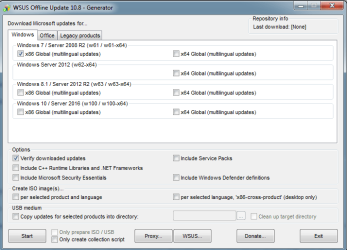
If you guys could advise me, that would be great. I am going to use wsus offline to grab my security updates, as this will be the first time using this piece of software. What box/boxes do I need to check?

Cheers.
 

Attachments

  • 123.png
    123.png
    17.1 KB · Views: 4

My Computer My Computer

Computer type
PC/Desktop
Computer Manufacturer/Model Number
Custom
OS
Windows 7 Ultimate x64
CPU
Intel i5-4670k @ 4.30GHz
Motherboard
GByte Z87X-UD4H MOBO
Memory
8gb
Graphics Card(s)
3GB EVGA NVIDIA GeForce GTX 780 OC
Sound Card
ASUS Xonar Essence STX
Monitor(s) Displays
ASUS VG248QE 144hz
Screen Resolution
1920x1080
Hard Drives
Samsung SSD 840 Pro Series 256gb & Seagate 3TB Performance SATA 3 Hard Drive ST3000DM001 7200rpm
PSU
XFX 750w P1-750B-BEFX
Case
Silverstone SST-FT02B-W
Cooling
Noctua NH-D14 Dual
Internet Speed
150mb
Antivirus
ESET Smart Security 8 / Malwarebytes
Browser
Firefox/Chrome
If you're using 64-Bit Windows 7 then you need to tick the x64 box. The only other one I tick is "include C++ runtimes and .NET Frameworks", but that's a personal preference.

Also tick the "create ISO" box if you want to put the updates on to a DVD.
 

My Computer My Computer

Computer type
PC/Desktop
Computer Manufacturer/Model Number
Custom Build
OS
Win 7 Ultimate, Win 8.1 Pro, Linux Mint 19 Cinnamon (All 64-Bit)
CPU
Intel i5 4690K
Motherboard
Gigabyte Z97X-UD3H
Memory
Corsair Vengeance LP 32GB DDR3
Graphics Card(s)
MSI GTX 1060 GAMING X 6GB
Sound Card
Onboard
Hard Drives
Samsung 850 EVO 250GB SSD (x2)
Samsung 860 EVO 1TB SSD (x2)
Crucial MX300 525GB SSD
WD Blue 2TB 5400rpm Intellipark Disabled (x2)
PSU
Corsair HX750i
Case
Phanteks Enthoo Pro
Cooling
CM Hyper 212 EVO on CPU, Noctua Redux NF-P14S 1500rpm (x6)
Keyboard
Corsair K70 RGB LUX
Mouse
Corsair Sabre RGB
Antivirus
Avast Free, MalwareBytes, SAS & CryptoPrevent
Browser
Chrome
Other Info
StarTech PEXESAT322I 2 Port PCI-E SATA Card
ASUS PCE-AC56 Dual-band AC1300 Wireless Card
Akasa FC.Six Manual Fan Controller
And a Partridge in a Pear Tree!
If you're using 64-Bit Windows 7 then you need to tick the x64 box. The only other one I tick is "include C++ runtimes and .NET Frameworks", but that's a personal preference.

Also tick the "create ISO" box if you want to put the updates on to a DVD.


The x64 Updates downloaded in 2/3 minutes. Just one other thing, before I install them..I noticed there are 231 files in the client folder - w61-x64 which equals to 1.13GB. Does that sound right to you, before I push the button.
 

My Computer My Computer

Computer type
PC/Desktop
Computer Manufacturer/Model Number
Custom
OS
Windows 7 Ultimate x64
CPU
Intel i5-4670k @ 4.30GHz
Motherboard
GByte Z87X-UD4H MOBO
Memory
8gb
Graphics Card(s)
3GB EVGA NVIDIA GeForce GTX 780 OC
Sound Card
ASUS Xonar Essence STX
Monitor(s) Displays
ASUS VG248QE 144hz
Screen Resolution
1920x1080
Hard Drives
Samsung SSD 840 Pro Series 256gb & Seagate 3TB Performance SATA 3 Hard Drive ST3000DM001 7200rpm
PSU
XFX 750w P1-750B-BEFX
Case
Silverstone SST-FT02B-W
Cooling
Noctua NH-D14 Dual
Internet Speed
150mb
Antivirus
ESET Smart Security 8 / Malwarebytes
Browser
Firefox/Chrome
2 - 3 minutes sounds way too fast. My Internet speed is fast and it doesn't finish that quickly. It takes more like 20 - 30 minutes. The client folder should be a lot bigger than that once completed.

You sure you selected the correct options? Selected x64 under the Windows 7 section?

Just running now and even after 20 minutes it's still going, and that's with verify updates unchecked. Which adds some time on to verify.

Edit: Okay, just finished, took 25 minutes and my client folder is 2.84GB and 1.33GB without the .NET and C++ updates. So yours might be right without all the extras. Still seems extremely fast though. :confused:
 
Last edited:

My Computer My Computer

Computer type
PC/Desktop
Computer Manufacturer/Model Number
Custom Build
OS
Win 7 Ultimate, Win 8.1 Pro, Linux Mint 19 Cinnamon (All 64-Bit)
CPU
Intel i5 4690K
Motherboard
Gigabyte Z97X-UD3H
Memory
Corsair Vengeance LP 32GB DDR3
Graphics Card(s)
MSI GTX 1060 GAMING X 6GB
Sound Card
Onboard
Hard Drives
Samsung 850 EVO 250GB SSD (x2)
Samsung 860 EVO 1TB SSD (x2)
Crucial MX300 525GB SSD
WD Blue 2TB 5400rpm Intellipark Disabled (x2)
PSU
Corsair HX750i
Case
Phanteks Enthoo Pro
Cooling
CM Hyper 212 EVO on CPU, Noctua Redux NF-P14S 1500rpm (x6)
Keyboard
Corsair K70 RGB LUX
Mouse
Corsair Sabre RGB
Antivirus
Avast Free, MalwareBytes, SAS & CryptoPrevent
Browser
Chrome
Other Info
StarTech PEXESAT322I 2 Port PCI-E SATA Card
ASUS PCE-AC56 Dual-band AC1300 Wireless Card
Akasa FC.Six Manual Fan Controller
And a Partridge in a Pear Tree!
Back
Top