A problem with Firefox on a used/rebuilt Dell Inspiron laptop

reble

New member
Member
VIP
Local time
3:44 PM
Messages
326
Location
Kennewick, Wa
This is a used/rebuilt Dell Inspiron 3541 laptop that I just got not to long ago. OS Win7 Home 64bit. When I am typing (like in this box for this post) it is taking anywere from 3 to 5 seconds for the words that I just typed to show up on the screen. It doesn't matter whether I use the internal keyboard or the external wireless (Infrared USB Plug) keyboard. Firefox is also very slow in moving between tabs and loading new pages or going back to an old page. The yellow "auto save" box that pops up in the lower right corner of the typing box when I am typing a post makes Firefox even slower. Other prog's that I have that have internet connection, like Remotehams.com live streaming remote base control prog aren't effected by what is slowing Firefox down. And the rest of Windows is fine. I have the latest version of Win Cleaner on a USB thumb drive. It didn't help Firefox. It isn't a big problem, just annoying, waiting for the screen to catch up. Especially when I have to backup the cursor to correct spelling. A question. I only have 4gb's total of memory. Is win7 64bit to much for the ammount of memory that I have? I do have the Win7 Home 32bit install disk also.

Steve
 

My Computer My Computer

At a glance

windows 7 home 32 bit, I just changed back fr...amc a6-6310, radon r4 graphics 1800mhz with 4...6.8gbnot sure off hand
Computer type
Laptop
Computer Manufacturer/Model Number
Dell Inspiron 3541
OS
windows 7 home 32 bit, I just changed back from 64 to 32bit
CPU
amc a6-6310, radon r4 graphics 1800mhz with 4 cores
Memory
6.8gb
Graphics Card(s)
not sure off hand
Sound Card
not shure off hand
Monitor(s) Displays
built in lcd
Screen Resolution
1366 x 768
Hard Drives
1 500gb sata internal HDD and 1 250 gb's sata HDD in a USB external USB case.
Keyboard
Wifi with attached wifi mouse
Internet Speed
don't know
Antivirus
Zone Alarm
Browser
Firefox
Other Info
The gateway laptop model MD2614U died because a voltage regulator on the motherboard went poof. The Gateway laptop has been scraped.
Hi

is it the same when using other browsers?
 

My Computer My Computer

At a glance

win 10
Computer type
PC/Desktop
Computer Manufacturer/Model Number
dell xps 9000
OS
win 10
Have you tried rereshing FireFox?

To Refresh Firefox:

  1. Open the Troubleshooting Information page using one of these methods:
    • Click the menu button
      2014-01-10-13-08-08-f52b8c.png
      , click help
      2014-01-10-13-10-08-eaa722.png
      and select Troubleshooting Information. A new tab containing your troubleshooting information should open.
    • If you're unable to access the Help menu, type about:support in your address bar to bring up the Troubleshooting Information page.
  2. At the top right corner of the page, you should see a button that says "Refresh Firefox" ("Reset Firefox" in older Firefox versions). Click on it.
  3. Firefox will close. After the refresh process is completed, Firefox will show a window with the information that is imported.
  4. Click Finish and Firefox will reopen.
 

My Computer My Computer

At a glance

W10 Pro desktop, W11 laptop, W11 Pro tablet (...3.7Ghz 8700K i7, i7-11800H, i7-1065G716G desktop, 16G laptop, 4G tabletAMD Radeon RX580, RTX 3060, Intel Iris Plus
Computer type
PC/Desktop
Computer Manufacturer/Model Number
Home Built desktop, Dell G15 5511 Gaming laptop,MS Surface Pro 7 tablet
OS
W10 Pro desktop, W11 laptop, W11 Pro tablet (all 64-bit)
CPU
3.7Ghz 8700K i7, i7-11800H, i7-1065G7
Motherboard
ASUS TUF Z370-Pro Gaming in desktop
Memory
16G desktop, 16G laptop, 4G tablet
Graphics Card(s)
AMD Radeon RX580, RTX 3060, Intel Iris Plus
Sound Card
High Definition Audio (Built-in to mobo)
Monitor(s) Displays
Samsung U32J59 32" (2x), 15.6", 12"
Screen Resolution
3840x2160, 3840x2160, 1920x1080, 2160x1440
Hard Drives
500G SSD for OS; 2T, 10T & 15T HDDs for Data on Desktop, 1TB SSD laptop, 128G SSD tablet.
PSU
Corsair CX 750M
Case
Antec 100
Cooling
CM 212+
Keyboard
IBM Model M - used continuously since 1986
Mouse
Microsoft Pro IntelliMouse
Internet Speed
400M down 8M up
Antivirus
Windows Defender
Browser
FireFox
Other Info
Built my first computer (8Mhz 8088cpu, 640K RAM, 20MB HDD, 2 360K floppy drives) in 1985 and have been building them for myself, relatives and friends ever since.
No. I am using Internet Explorer now. And IE is working fine. No slow down's, no delays with the words coming up on the screen. 1 other odd thing though I don't know if it is connected with the Firefox problem or not. In DreamMail, my mail reader in my laptop. Every time I open the prog there is 5 or 6 of the same email in the outgoing folder. They don't get sent until I hit the manual send. And I don't compose any of them.
------------
Subject: Fw: [ham-antennas] best way to mesure electrical length of ladder line / open wire
From: "Steven" <[email protected]>
To: <[email protected]>

Size: 13.2 K
Priority: Normal Priority
Folders: temp
Account: [email protected]

Send + Check at: 2016-10-11, 15:52:22
Compose at: 2016-10-11, 15:52:22

-------------
this is just one of those email propertys. They are all the same.
Hi

is it the same when using other browsers?
 

My Computer My Computer

At a glance

windows 7 home 32 bit, I just changed back fr...amc a6-6310, radon r4 graphics 1800mhz with 4...6.8gbnot sure off hand
Computer type
Laptop
Computer Manufacturer/Model Number
Dell Inspiron 3541
OS
windows 7 home 32 bit, I just changed back from 64 to 32bit
CPU
amc a6-6310, radon r4 graphics 1800mhz with 4 cores
Memory
6.8gb
Graphics Card(s)
not sure off hand
Sound Card
not shure off hand
Monitor(s) Displays
built in lcd
Screen Resolution
1366 x 768
Hard Drives
1 500gb sata internal HDD and 1 250 gb's sata HDD in a USB external USB case.
Keyboard
Wifi with attached wifi mouse
Internet Speed
don't know
Antivirus
Zone Alarm
Browser
Firefox
Other Info
The gateway laptop model MD2614U died because a voltage regulator on the motherboard went poof. The Gateway laptop has been scraped.
The "Reset Firefox" Has seemed to work. Firefox is responding normaly now. What was the problem? :)

Have you tried rereshing FireFox?

To Refresh Firefox:

  1. Open the Troubleshooting Information page using one of these methods:
    • Click the menu button
      2014-01-10-13-08-08-f52b8c.png
      , click help
      2014-01-10-13-10-08-eaa722.png
      and select Troubleshooting Information. A new tab containing your troubleshooting information should open.
    • If you're unable to access the Help menu, type about:support in your address bar to bring up the Troubleshooting Information page.
  2. At the top right corner of the page, you should see a button that says "Refresh Firefox" ("Reset Firefox" in older Firefox versions). Click on it.
  3. Firefox will close. After the refresh process is completed, Firefox will show a window with the information that is imported.
  4. Click Finish and Firefox will reopen.
 

My Computer My Computer

At a glance

windows 7 home 32 bit, I just changed back fr...amc a6-6310, radon r4 graphics 1800mhz with 4...6.8gbnot sure off hand
Computer type
Laptop
Computer Manufacturer/Model Number
Dell Inspiron 3541
OS
windows 7 home 32 bit, I just changed back from 64 to 32bit
CPU
amc a6-6310, radon r4 graphics 1800mhz with 4 cores
Memory
6.8gb
Graphics Card(s)
not sure off hand
Sound Card
not shure off hand
Monitor(s) Displays
built in lcd
Screen Resolution
1366 x 768
Hard Drives
1 500gb sata internal HDD and 1 250 gb's sata HDD in a USB external USB case.
Keyboard
Wifi with attached wifi mouse
Internet Speed
don't know
Antivirus
Zone Alarm
Browser
Firefox
Other Info
The gateway laptop model MD2614U died because a voltage regulator on the motherboard went poof. The Gateway laptop has been scraped.
"...The "Reset Firefox" Has seemed to work. Firefox is responding normally now. What was the problem?..."
Resetting FF removed all user-added plugins, extensions, etc., personal configurations were set to FF default configurations.
 

My Computer My Computer

At a glance

Windows 7 Professional 64-bitDesktop i5; Acers i5 & i7desktop 16GB; 1 Acer 8GB & 1 Acer 16GB
Computer type
PC/Desktop
Computer Manufacturer/Model Number
Antec desktop; Acer Aspire laptops
OS
Windows 7 Professional 64-bit
CPU
Desktop i5; Acers i5 & i7
Memory
desktop 16GB; 1 Acer 8GB & 1 Acer 16GB
Hard Drives
1TB split into 2 equal partitions [OS and data] usable by RJS
Internet Speed
AT&T DSL
Browser
FF, GChrome, msIE
Other Info
Windows 7 Firewall, Emsisoft AM/AV, MSE [scan-only], SpywareBlaster, Ruiware/BillP combine
After about 5 days Firefox is right back to doing the same old slow things again. As described above. The "reset Firefox" worked again. I am thinking there is some spot ether in the memory or on the hard drive that needs to be expended. Witch leads me to my next question. I only have 1 stick of 4gb of memory. Is Win7 64bit taking up to much resources?

Steve
 

My Computer My Computer

At a glance

windows 7 home 32 bit, I just changed back fr...amc a6-6310, radon r4 graphics 1800mhz with 4...6.8gbnot sure off hand
Computer type
Laptop
Computer Manufacturer/Model Number
Dell Inspiron 3541
OS
windows 7 home 32 bit, I just changed back from 64 to 32bit
CPU
amc a6-6310, radon r4 graphics 1800mhz with 4 cores
Memory
6.8gb
Graphics Card(s)
not sure off hand
Sound Card
not shure off hand
Monitor(s) Displays
built in lcd
Screen Resolution
1366 x 768
Hard Drives
1 500gb sata internal HDD and 1 250 gb's sata HDD in a USB external USB case.
Keyboard
Wifi with attached wifi mouse
Internet Speed
don't know
Antivirus
Zone Alarm
Browser
Firefox
Other Info
The gateway laptop model MD2614U died because a voltage regulator on the motherboard went poof. The Gateway laptop has been scraped.
Hi:

A couple of things come to mind:


  1. If this is a USED computer, the safest thing to do is to wipe the hard drive and reinstall Windows fresh -- one never knows the issues, corruption, problems or even malware that may have come with it.
  2. 4 GB of RAM ought to be enough to run Windows 7, even 64-bit. But your other hardware specs, internet connection speed/bandwidth may also be limiting you.
  3. Most problems with Firefox originate in the user's profile, not in the program itself, although system issues (hardware, internet speed, global plugins, security applications, insufficient RAM, even malware, etc.) can impact performance.
If the slowness has returned after a "refresh", then that suggests that either your profile has been mucked up again AND/OR that there is something more general wrong with your system.

There are step-wise diagnostic procedures to troubleshoot Firefox. The steps range from easy/non-invasive to more complicated/bridge-burning.

I suggest starting with the steps here, which detail the process, carefully following each step in the sequence:

Firefox is slow or stops working

OR

Firefox - Standard Diagnostic
Mozilla Safe Mode

Please let us know how it goes, so that we can all learn.

Thanks,

MM
 

My Computer My Computer

At a glance

OEM Windows 7 Ult (x64) SP1Intel Core-i7 3770 @ 3.4 GHz16 GB DDR3 SDRAM @ 1333 MHzNVidia GeForce GT620 1 GB
Computer type
PC/Desktop
Computer Manufacturer/Model Number
Dell Studio XPS 8500
OS
OEM Windows 7 Ult (x64) SP1
CPU
Intel Core-i7 3770 @ 3.4 GHz
Motherboard
"Dell" branded
Memory
16 GB DDR3 SDRAM @ 1333 MHz
Graphics Card(s)
NVidia GeForce GT620 1 GB
Sound Card
THX TruStudio PC
Monitor(s) Displays
Dell U2410 Full HD
Hard Drives
2.0 TB SATA2 @ 7200 RPM
PSU
350W
Keyboard
MS 4000 Ergon - Wired
Mouse
Logitech Anywhere MX
Internet Speed
Cable HSI w/Turbo (router)
Antivirus
KIS-MBAM Premium-MBAE Premium
Browser
Fx (current version); IE
Other Info
And a Win7/64 Pro laptop; And a Win10/64 Pro desktop.
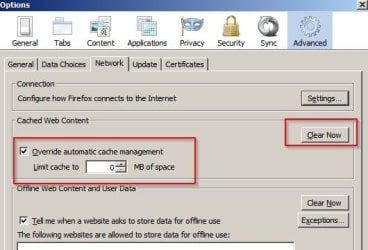
Other suggestion:

Try limiting cache to zero and clearing cache. I use old style preferences so your options might look different.

FF-Options.jpg
 

My Computer My Computer

At a glance

Microsoft Windows 7 Home Premium 64-bit 7601 ...AMD C-60 APU with Radeon(tm) HD Graphics4.00 GBAMD Radeon HD 6290 Graphics
Computer type
Laptop
Computer Manufacturer/Model Number
ASUS
OS
Microsoft Windows 7 Home Premium 64-bit 7601 Multiprocessor Free Service Pack 1
CPU
AMD C-60 APU with Radeon(tm) HD Graphics
Motherboard
ASUSTeK COMPUTER INC. X501U
Memory
4.00 GB
Graphics Card(s)
AMD Radeon HD 6290 Graphics
Sound Card
(1) AMD High Definition Audio Device (2) Realtek High Defi
Screen Resolution
1366 x 768 x 32 bits (4294967296 colors) @ 60 Hz
Hard Drives
Hitachi HTS545050A7E380 SATA Disk Device
Antivirus
Comodo CIS & FW, SecureAplus App Whitelisting, Threatfire
Browser
Cyberfox 64bit, Opera 64bit, Airfox
Other Info
Spy-The-Spy, HitmanPro.Alert, Norton Connect Safe, MJRegWatcher, BitDefender TrafficLight, Voodoo Shield, Zemana AntiMalware
Other suggestion:

Try limiting cache to zero and clearing cache. I use old style preferences so your options might look different.

Excellent idea!

MM
 

My Computer My Computer

At a glance

OEM Windows 7 Ult (x64) SP1Intel Core-i7 3770 @ 3.4 GHz16 GB DDR3 SDRAM @ 1333 MHzNVidia GeForce GT620 1 GB
Computer type
PC/Desktop
Computer Manufacturer/Model Number
Dell Studio XPS 8500
OS
OEM Windows 7 Ult (x64) SP1
CPU
Intel Core-i7 3770 @ 3.4 GHz
Motherboard
"Dell" branded
Memory
16 GB DDR3 SDRAM @ 1333 MHz
Graphics Card(s)
NVidia GeForce GT620 1 GB
Sound Card
THX TruStudio PC
Monitor(s) Displays
Dell U2410 Full HD
Hard Drives
2.0 TB SATA2 @ 7200 RPM
PSU
350W
Keyboard
MS 4000 Ergon - Wired
Mouse
Logitech Anywhere MX
Internet Speed
Cable HSI w/Turbo (router)
Antivirus
KIS-MBAM Premium-MBAE Premium
Browser
Fx (current version); IE
Other Info
And a Win7/64 Pro laptop; And a Win10/64 Pro desktop.
I did the "limiting cache to zero and clearing cache" bit again. That lasted a few days. I did the "reset Firefox". That lasted a while. I got tired of this and I del Firefox and the whole ball of wax that goes with it. The whole Firefox dir with the profile and everything else that has to do with Firefox except for the bookmarks. I reinstalled Firefox completely clean. Only time will tell if Firefox is permanently fixed. So far Firefox is working 100%. If Firefox starts acting up again. I guess it is time to wipe the C drive partition and start over again clean from the backup cd's.
 

My Computer My Computer

At a glance

windows 7 home 32 bit, I just changed back fr...amc a6-6310, radon r4 graphics 1800mhz with 4...6.8gbnot sure off hand
Computer type
Laptop
Computer Manufacturer/Model Number
Dell Inspiron 3541
OS
windows 7 home 32 bit, I just changed back from 64 to 32bit
CPU
amc a6-6310, radon r4 graphics 1800mhz with 4 cores
Memory
6.8gb
Graphics Card(s)
not sure off hand
Sound Card
not shure off hand
Monitor(s) Displays
built in lcd
Screen Resolution
1366 x 768
Hard Drives
1 500gb sata internal HDD and 1 250 gb's sata HDD in a USB external USB case.
Keyboard
Wifi with attached wifi mouse
Internet Speed
don't know
Antivirus
Zone Alarm
Browser
Firefox
Other Info
The gateway laptop model MD2614U died because a voltage regulator on the motherboard went poof. The Gateway laptop has been scraped.
I got tired of this and I del Firefox and the whole ball of wax that goes with it. The whole Firefox dir with the profile and everything else that has to do with Firefox except for the bookmarks. I reinstalled Firefox completely clean. Only time will tell if Firefox is permanently fixed. So far Firefox is working 100%.

There may have been less destructive, less bridge-burning ways to resolve the issue, as mentioned in my previous reply, with links to a step-wise troubleshooting process.

But, if you removed the program (and its files) AND your profile (except perhaps bookmarks), then that OUGHT to fix it "permanently"..... UNLESS there is something else going on with your system (hardware issues, networking/bandwidth issues, software conflicts (e.g. security programs), even malware).

Despite no data to substantiate this (e.g. diagnostic logs for your system), I have a feeling that the Firefox "slowness" you report is a symptom of something else wrong. So, reinstalling Fx over and over may or may not provide a longstanding solution.

If Firefox starts acting up again. I guess it is time to wipe the C drive partition and start over again clean from the backup cd's.
That would be the "nuclear" option, and it would be a bit extreme to fix ONLY a problem with one browser.
But, it would have been a good initial step upon taking delivery of a "used" computer anyway.
Sometimes it's best to start fresh, especially if you are having other performance and stability issues...

Let us know how it goes.

Thanks,
MM
 

My Computer My Computer

At a glance

OEM Windows 7 Ult (x64) SP1Intel Core-i7 3770 @ 3.4 GHz16 GB DDR3 SDRAM @ 1333 MHzNVidia GeForce GT620 1 GB
Computer type
PC/Desktop
Computer Manufacturer/Model Number
Dell Studio XPS 8500
OS
OEM Windows 7 Ult (x64) SP1
CPU
Intel Core-i7 3770 @ 3.4 GHz
Motherboard
"Dell" branded
Memory
16 GB DDR3 SDRAM @ 1333 MHz
Graphics Card(s)
NVidia GeForce GT620 1 GB
Sound Card
THX TruStudio PC
Monitor(s) Displays
Dell U2410 Full HD
Hard Drives
2.0 TB SATA2 @ 7200 RPM
PSU
350W
Keyboard
MS 4000 Ergon - Wired
Mouse
Logitech Anywhere MX
Internet Speed
Cable HSI w/Turbo (router)
Antivirus
KIS-MBAM Premium-MBAE Premium
Browser
Fx (current version); IE
Other Info
And a Win7/64 Pro laptop; And a Win10/64 Pro desktop.
I did wipe the hard drive clean just after I got it. It had win 8.1 in it. I was having a lot of trouble figuring out Win 8.1 and went back to win7 that I know. I normly used Win7 Home 32 bit. But this time I though I would give the 64 bit a try. And by the way Firefox is slowing down again. The delay in seconds is slowly creeping up again. And this time it was only around 5 hours after I cleaned out Firefox and it is acting up again.

If Firefox starts acting up again. I guess it is time to wipe the C drive partition and start over again clean from the backup cd's.
That would be the "nuclear" option, and it would be a bit extreme to fix ONLY a problem with one browser.
But, it would have been a good initial step upon taking delivery of a "used" computer anyway.
Sometimes it's best to start fresh, especially if you are having other performance and stability issues...

Let us know how it goes.

Thanks,
MM
 

My Computer My Computer

At a glance

windows 7 home 32 bit, I just changed back fr...amc a6-6310, radon r4 graphics 1800mhz with 4...6.8gbnot sure off hand
Computer type
Laptop
Computer Manufacturer/Model Number
Dell Inspiron 3541
OS
windows 7 home 32 bit, I just changed back from 64 to 32bit
CPU
amc a6-6310, radon r4 graphics 1800mhz with 4 cores
Memory
6.8gb
Graphics Card(s)
not sure off hand
Sound Card
not shure off hand
Monitor(s) Displays
built in lcd
Screen Resolution
1366 x 768
Hard Drives
1 500gb sata internal HDD and 1 250 gb's sata HDD in a USB external USB case.
Keyboard
Wifi with attached wifi mouse
Internet Speed
don't know
Antivirus
Zone Alarm
Browser
Firefox
Other Info
The gateway laptop model MD2614U died because a voltage regulator on the motherboard went poof. The Gateway laptop has been scraped.
Hi:

Well, I'm really at a loss.
If a clean reinstall of Fx with a new, bare profile performs poorly, then the problem must be somewhere else, as already suggested (your hardware, your bandwidth/networking/internet speed, software conflicts, perhaps even malware, etc. etc. etc.).

It seems you recently reported a similar problem with a different computer here?
a problem with firefox

That would seem to point to something that both computers have in common (e.g. your internet speed or perhaps security applications?)?

Have you tried any of the steps listed in the tutorials mentioned in my other reply here?

Otherwise, without a bit of data, it's hard to diagnose a subjective report of "slowness".:(

Perhaps -- for the one computer reported here in this thread -- some basic diagnostic logs might help to point to a cause. If you wish, please download and save to your desktop the version of FRST for your architecture (32-bit or 64-bit). Then temporarily pause your AV to run it. It will produce 2 logs (FRST.txt and Addition.txt). Please ATTACH them to your next reply. Be sure to re-enable your AV.
(Other data, e.g. a Speccy log, may be needed. But the FRST logs are a good start.)

Thanks,

MM
 

My Computer My Computer

At a glance

OEM Windows 7 Ult (x64) SP1Intel Core-i7 3770 @ 3.4 GHz16 GB DDR3 SDRAM @ 1333 MHzNVidia GeForce GT620 1 GB
Computer type
PC/Desktop
Computer Manufacturer/Model Number
Dell Studio XPS 8500
OS
OEM Windows 7 Ult (x64) SP1
CPU
Intel Core-i7 3770 @ 3.4 GHz
Motherboard
"Dell" branded
Memory
16 GB DDR3 SDRAM @ 1333 MHz
Graphics Card(s)
NVidia GeForce GT620 1 GB
Sound Card
THX TruStudio PC
Monitor(s) Displays
Dell U2410 Full HD
Hard Drives
2.0 TB SATA2 @ 7200 RPM
PSU
350W
Keyboard
MS 4000 Ergon - Wired
Mouse
Logitech Anywhere MX
Internet Speed
Cable HSI w/Turbo (router)
Antivirus
KIS-MBAM Premium-MBAE Premium
Browser
Fx (current version); IE
Other Info
And a Win7/64 Pro laptop; And a Win10/64 Pro desktop.
Why don't you try Cyberfox (uses it's own profile) and see if that works any better?

Here's a link to the 32bit Intel optimized version:

Cyberfox Intel Version x86 >> Cyberfox

Test it and see if you get the same problem.
 

My Computer My Computer

At a glance

Microsoft Windows 7 Home Premium 64-bit 7601 ...AMD C-60 APU with Radeon(tm) HD Graphics4.00 GBAMD Radeon HD 6290 Graphics
Computer type
Laptop
Computer Manufacturer/Model Number
ASUS
OS
Microsoft Windows 7 Home Premium 64-bit 7601 Multiprocessor Free Service Pack 1
CPU
AMD C-60 APU with Radeon(tm) HD Graphics
Motherboard
ASUSTeK COMPUTER INC. X501U
Memory
4.00 GB
Graphics Card(s)
AMD Radeon HD 6290 Graphics
Sound Card
(1) AMD High Definition Audio Device (2) Realtek High Defi
Screen Resolution
1366 x 768 x 32 bits (4294967296 colors) @ 60 Hz
Hard Drives
Hitachi HTS545050A7E380 SATA Disk Device
Antivirus
Comodo CIS & FW, SecureAplus App Whitelisting, Threatfire
Browser
Cyberfox 64bit, Opera 64bit, Airfox
Other Info
Spy-The-Spy, HitmanPro.Alert, Norton Connect Safe, MJRegWatcher, BitDefender TrafficLight, Voodoo Shield, Zemana AntiMalware
Suggest running ZHP Cleaner

Run a scan and if items of concern are found do not select the repair option. Instead upload the report that will be saved to your desktop and exit the program.
 

My Computer My Computer

At a glance

Microsoft Windows 7 Home Premium 64-bit 7601 ...AMD C-60 APU with Radeon(tm) HD Graphics4.00 GBAMD Radeon HD 6290 Graphics
Computer type
Laptop
Computer Manufacturer/Model Number
ASUS
OS
Microsoft Windows 7 Home Premium 64-bit 7601 Multiprocessor Free Service Pack 1
CPU
AMD C-60 APU with Radeon(tm) HD Graphics
Motherboard
ASUSTeK COMPUTER INC. X501U
Memory
4.00 GB
Graphics Card(s)
AMD Radeon HD 6290 Graphics
Sound Card
(1) AMD High Definition Audio Device (2) Realtek High Defi
Screen Resolution
1366 x 768 x 32 bits (4294967296 colors) @ 60 Hz
Hard Drives
Hitachi HTS545050A7E380 SATA Disk Device
Antivirus
Comodo CIS & FW, SecureAplus App Whitelisting, Threatfire
Browser
Cyberfox 64bit, Opera 64bit, Airfox
Other Info
Spy-The-Spy, HitmanPro.Alert, Norton Connect Safe, MJRegWatcher, BitDefender TrafficLight, Voodoo Shield, Zemana AntiMalware
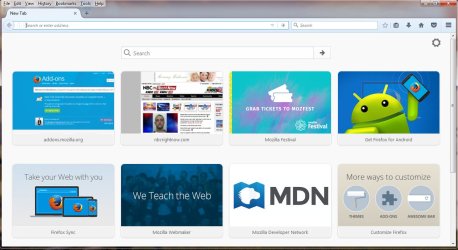
I think I found the problem. When I install Firefox I add New Tab Override (browser.newtab.url replacement) :: Add-ons for Firefox so I have a blank page when I open a new tab. If I don't there is all kinds of screens in the new tab of web pages that I have looked at and some pages that I didn't look at. See the attached picture. I forgot to add the new tab override untill last night. This shows the new tab before the tab override is in place. I installed the tab override last night. And I have been on Firefox all day hunting for a screen capture app for a tablet that I am working on. So far Firefox is working fine.

Steve
 

Attachments

  • new tab.jpg
    new tab.jpg
    100.4 KB · Views: 0

My Computer My Computer

At a glance

windows 7 home 32 bit, I just changed back fr...amc a6-6310, radon r4 graphics 1800mhz with 4...6.8gbnot sure off hand
Computer type
Laptop
Computer Manufacturer/Model Number
Dell Inspiron 3541
OS
windows 7 home 32 bit, I just changed back from 64 to 32bit
CPU
amc a6-6310, radon r4 graphics 1800mhz with 4 cores
Memory
6.8gb
Graphics Card(s)
not sure off hand
Sound Card
not shure off hand
Monitor(s) Displays
built in lcd
Screen Resolution
1366 x 768
Hard Drives
1 500gb sata internal HDD and 1 250 gb's sata HDD in a USB external USB case.
Keyboard
Wifi with attached wifi mouse
Internet Speed
don't know
Antivirus
Zone Alarm
Browser
Firefox
Other Info
The gateway laptop model MD2614U died because a voltage regulator on the motherboard went poof. The Gateway laptop has been scraped.
Hi:

I'm glad you were able to resolve your issue.

When you reinstalled Firefox from scratch, it sounded from your description as if the problem re-occurred even in a brand new, BARE profile. That pointed to something outside Firefox itself.
Even so, I am a bit surprised that running Firefox without the New Tab Override add-on would be so problematic.
I suppose that, if one does not keep the Firefox cache and history to a minimum, the load of "most visited sites" could clutter the new tab page and *perhaps* slow down Firefox on a slower system. But that would likely only happen if you had a LOT of content-heavy "most visited" sites...

FWIW As explained HERE, it's not entirely necessary to install a 3rd-party add-on in order to customize the New Tab page. There is an easier way -- within Firefox -- to change the new tab page to blank. See here.:)

Having said all that, if your problems are resolved by installing that add-on to create a blank new tab page, then I guess we should all be happy.:) And perhaps the info will help other users who are bogged down by a cluttered new tab page.

Thanks for reporting your favorable outcome.

Cheers,
MM

P.S. As for the unrelated topic of finding a screen capture app for an (Android? Windows?) tablet, that might be best handled in a new, separate thread in a more relevant forum. There are many options for the Android platform and many others for Windows, both free and paid.
 

My Computer My Computer

At a glance

OEM Windows 7 Ult (x64) SP1Intel Core-i7 3770 @ 3.4 GHz16 GB DDR3 SDRAM @ 1333 MHzNVidia GeForce GT620 1 GB
Computer type
PC/Desktop
Computer Manufacturer/Model Number
Dell Studio XPS 8500
OS
OEM Windows 7 Ult (x64) SP1
CPU
Intel Core-i7 3770 @ 3.4 GHz
Motherboard
"Dell" branded
Memory
16 GB DDR3 SDRAM @ 1333 MHz
Graphics Card(s)
NVidia GeForce GT620 1 GB
Sound Card
THX TruStudio PC
Monitor(s) Displays
Dell U2410 Full HD
Hard Drives
2.0 TB SATA2 @ 7200 RPM
PSU
350W
Keyboard
MS 4000 Ergon - Wired
Mouse
Logitech Anywhere MX
Internet Speed
Cable HSI w/Turbo (router)
Antivirus
KIS-MBAM Premium-MBAE Premium
Browser
Fx (current version); IE
Other Info
And a Win7/64 Pro laptop; And a Win10/64 Pro desktop.
The old way of going into "about:config: to change the "about:blank" has been removed from the "about:config". The "about:config" was getting 2 messed up by malware and so on. This add on comes right from the horses mouth ;)

Steve

Hi:

I'm glad you were able to resolve your issue.

I am a bit surprised that running Firefox without the New Tab Override add-on would be so problematic.
I suppose that, if one does not keep the Firefox cache and history to a minimum, the load of "most visited sites" could clutter the new tab page and *perhaps* slow down Firefox on a slower system. But that would likely only happen if you had a LOT of content-heavy "most visited" sites...

FWIW As explained HERE, it's not entirely necessary to install a 3rd-party add-on in order to customize the New Tab page. There is an easier way -- within Firefox -- to change the new tab page to blank. See here.:)


Thanks for reporting your favorable outcome.

Cheers,
MM
 

My Computer My Computer

At a glance

windows 7 home 32 bit, I just changed back fr...amc a6-6310, radon r4 graphics 1800mhz with 4...6.8gbnot sure off hand
Computer type
Laptop
Computer Manufacturer/Model Number
Dell Inspiron 3541
OS
windows 7 home 32 bit, I just changed back from 64 to 32bit
CPU
amc a6-6310, radon r4 graphics 1800mhz with 4 cores
Memory
6.8gb
Graphics Card(s)
not sure off hand
Sound Card
not shure off hand
Monitor(s) Displays
built in lcd
Screen Resolution
1366 x 768
Hard Drives
1 500gb sata internal HDD and 1 250 gb's sata HDD in a USB external USB case.
Keyboard
Wifi with attached wifi mouse
Internet Speed
don't know
Antivirus
Zone Alarm
Browser
Firefox
Other Info
The gateway laptop model MD2614U died because a voltage regulator on the motherboard went poof. The Gateway laptop has been scraped.
Hi:

The old way of going into "about:config: to change the "about:blank" has been removed from the "about:config". The "about:config" was getting 2 messed up by malware and so on.

I'm not sure what you mean about "getting 2 messed up by malware"?
"about:config" works just fine for me under Fx 49.0.1
Yes, browser.newtab.url was removed a while back (version 41) for security reasons, but see below...


This add on comes right from the horses mouth ;)
Yes, the New Tab Override add-on is one option, but it's not necessary.
All that's needed is to select the "show blank page" option after clicking the cogwheel icon.
See here.
The extension merely permits further customization, e.g. hiding all new tab controls and selecting a custom new tab URL.

If Firefox performance were drastically impacted for many/all users by showing the "top sites" tiles in a new tab (default setting), then Mozilla probably would code Fx accordingly, rather than relying on 3rd-party add-on developers to perform a vital function?
I've never used the New Tab Override extension on any system and have never experienced slow-downs using the "show blank page" option within Fx. So Fx can work just fine without it.

But that's the beauty of Fx -- it allows for infinite customization through the use of add-ons and settings.
And if installing that extension resolves the issue that was plaguing Fx on your system, then that's the best outcome of all.:)

Cheers,
MM
 

Attachments

  • Blank-NewTab-2016-10-17_4-57-53.png
    Blank-NewTab-2016-10-17_4-57-53.png
    5.6 KB · Views: 14

My Computer My Computer

At a glance

OEM Windows 7 Ult (x64) SP1Intel Core-i7 3770 @ 3.4 GHz16 GB DDR3 SDRAM @ 1333 MHzNVidia GeForce GT620 1 GB
Computer type
PC/Desktop
Computer Manufacturer/Model Number
Dell Studio XPS 8500
OS
OEM Windows 7 Ult (x64) SP1
CPU
Intel Core-i7 3770 @ 3.4 GHz
Motherboard
"Dell" branded
Memory
16 GB DDR3 SDRAM @ 1333 MHz
Graphics Card(s)
NVidia GeForce GT620 1 GB
Sound Card
THX TruStudio PC
Monitor(s) Displays
Dell U2410 Full HD
Hard Drives
2.0 TB SATA2 @ 7200 RPM
PSU
350W
Keyboard
MS 4000 Ergon - Wired
Mouse
Logitech Anywhere MX
Internet Speed
Cable HSI w/Turbo (router)
Antivirus
KIS-MBAM Premium-MBAE Premium
Browser
Fx (current version); IE
Other Info
And a Win7/64 Pro laptop; And a Win10/64 Pro desktop.
Back
Top