a problem with firefox

reble

New member
Member
VIP
Local time
8:56 AM
Messages
326
Location
Kennewick, Wa
This is a HP Compaq Presario C700 laptop OS Win7 Home 32bit. I just last week changed out the laptop's HDD, the old one kick the bucket. Windows install and the other installs went fine. Wed night I was using Firefox, everything was fine. I fired up the laptop Thur morning and Firefox was been a bit slow at loading pages and so on. When I came home from my meeting Thur night and turned the laptop back on Firefox was slower then a snail in a foot race, then Firefox completly stalled out and shut down on it's own. I couldn't get Firefox to start up again without rebooting the laptop. I rebooted and Firefox worked for about 10 minutes slowly then Firefox froze again and shut down. I tried uninstalling Firefox and got the following message bellow in the screen capture. I had to go into safemode to del Firefox. But the cookies, history, bookmarks (bookmarks are backed up) weren't del. And were still in place when I reinstalled Firefox. At this point I don't know what to do. By the way I am typing this post on Internet Explorer. IE is working fine along with Windows and every other prog that I installed.

Steve
 

Attachments

  • firefox uninstall error.jpg
    firefox uninstall error.jpg
    35.8 KB · Views: 63

My Computer

Computer type
Laptop
Computer Manufacturer/Model Number
Dell Inspiron 3541
OS
windows 7 home 32 bit, I just changed back from 64 to 32bit
CPU
amc a6-6310, radon r4 graphics 1800mhz with 4 cores
Memory
6.8gb
Graphics Card(s)
not sure off hand
Sound Card
not shure off hand
Monitor(s) Displays
built in lcd
Screen Resolution
1366 x 768
Hard Drives
1 500gb sata internal HDD and 1 250 gb's sata HDD in a USB external USB case.
Keyboard
Wifi with attached wifi mouse
Internet Speed
don't know
Antivirus
Zone Alarm
Browser
Firefox
Other Info
The gateway laptop model MD2614U died because a voltage regulator on the motherboard went poof. The Gateway laptop has been scraped.
Update I am now on my Samsung Galaxy tablet because Internet Explorer on the C700 laptop is doing the same thing as Firefox. Unless someone has some new ideas. Probably tonight I am going to whipe the HDD partition and start over again clean.

Steve
 

My Computer

Computer type
Laptop
Computer Manufacturer/Model Number
Dell Inspiron 3541
OS
windows 7 home 32 bit, I just changed back from 64 to 32bit
CPU
amc a6-6310, radon r4 graphics 1800mhz with 4 cores
Memory
6.8gb
Graphics Card(s)
not sure off hand
Sound Card
not shure off hand
Monitor(s) Displays
built in lcd
Screen Resolution
1366 x 768
Hard Drives
1 500gb sata internal HDD and 1 250 gb's sata HDD in a USB external USB case.
Keyboard
Wifi with attached wifi mouse
Internet Speed
don't know
Antivirus
Zone Alarm
Browser
Firefox
Other Info
The gateway laptop model MD2614U died because a voltage regulator on the motherboard went poof. The Gateway laptop has been scraped.
Try using Firefox with no add-ons.
 

My Computer

Computer type
PC/Desktop
Computer Manufacturer/Model Number
Home made Desktop
OS
Windows 10 Pro. 64/ version 1709 Windows 7 Pro/64
CPU
Intel i7-6800K @ 4.3
Motherboard
ASUS X-99 Deluxe II
Memory
Corsair Platinum 16 gig @2400
Graphics Card(s)
EVGA GTX 1070 OC
Monitor(s) Displays
Asus 27" LED LCD/VE278Q
Screen Resolution
1920-1080 or 1280-720 HDMI
Hard Drives
INTEL SSD 730-240 Gb Sata 3.0/
PSU
EVGA Platium 1200W
Case
Phanteks Luxe Tempered Glass 8 fans/ one radiator
Cooling
XSPC/ Water Cooled CPU
Keyboard
Das 4 Professional
Mouse
Logitech M705/MX Anywhere 2-S
Internet Speed
100 mbits
Antivirus
Microsoft Security Essentials/ Malwarebytes Premium 3.0/ SAS
Browser
I.E. 11 default/Firefox/ ISP Time Warner Cable/Spectrum
Other Info
LG BluRay Burner/
Sound system-KLipsch-THX/
Icy Dock ssd Hot Swap bays.

My Computer

Computer type
Laptop
Computer Manufacturer/Model Number
ASUS
OS
Microsoft Windows 7 Home Premium 64-bit 7601 Multiprocessor Free Service Pack 1
CPU
AMD C-60 APU with Radeon(tm) HD Graphics
Motherboard
ASUSTeK COMPUTER INC. X501U
Memory
4.00 GB
Graphics Card(s)
AMD Radeon HD 6290 Graphics
Sound Card
(1) AMD High Definition Audio Device (2) Realtek High Defi
Screen Resolution
1366 x 768 x 32 bits (4294967296 colors) @ 60 Hz
Hard Drives
Hitachi HTS545050A7E380 SATA Disk Device
Antivirus
Comodo CIS & FW, SecureAplus App Whitelisting, Threatfire
Browser
Cyberfox 64bit, Opera 64bit, Airfox
Other Info
Spy-The-Spy, HitmanPro.Alert, Norton Connect Safe, MJRegWatcher, BitDefender TrafficLight, Voodoo Shield, Zemana AntiMalware
Hi,

In addition to the excellent advice already offered...

You wrote:
I tried uninstalling Firefox and got the following message bellow in the screen capture. I had to go into safemode to del Firefox. But the cookies, history, bookmarks (bookmarks are backed up) weren't del. And were still in place when I reinstalled Firefox.

Your bookmarks, history, preferences, etc. are stored in your profile, not in the program.
So simply uninstalling Firefox itself will not necessarily remove those items.
Moreover, most problems with Firefox originate in the user's profile.

I agree with @Layback Bear's suggestion to try Firefox with add-ons disabled. This is called Mozilla Safe Mode (not to be confused with Windows Safe Mode). It's a temporary, non-destructive means to troubleshoot. If Safe Mode resolves the issue, then the problem is likely with a Firefox add-on or extension.

The following articles explain how to proceed logically through diagnostic steps, from "least invasive" to "most aggressive", starting with Mozilla Safe Mode:

Firefox - Standard Diagnostic

Firefox - Fix slowness, crashing, error messages, and other problems

>>It's a good idea to backup either your entire profile, or at least critical data (e.g. bookmarks) before undertaking major work, just in case.

Please let us know how it goes, so that we can all learn.

MM
 

My Computer

Computer type
PC/Desktop
Computer Manufacturer/Model Number
Dell Studio XPS 8500
OS
OEM Windows 7 Ult (x64) SP1
CPU
Intel Core-i7 3770 @ 3.4 GHz
Motherboard
"Dell" branded
Memory
16 GB DDR3 SDRAM @ 1333 MHz
Graphics Card(s)
NVidia GeForce GT620 1 GB
Sound Card
THX TruStudio PC
Monitor(s) Displays
Dell U2410 Full HD
Hard Drives
2.0 TB SATA2 @ 7200 RPM
PSU
350W
Keyboard
MS 4000 Ergon - Wired
Mouse
Logitech Anywhere MX
Internet Speed
Cable HSI w/Turbo (router)
Antivirus
KIS-MBAM Premium-MBAE Premium
Browser
Fx (current version); IE
Other Info
And a Win7/64 Pro laptop; And a Win10/64 Pro desktop.
What about the fact that internet Explorer is doing the samething now. I will check out those ideas when I get back from the store.
 

My Computer

Computer type
Laptop
Computer Manufacturer/Model Number
Dell Inspiron 3541
OS
windows 7 home 32 bit, I just changed back from 64 to 32bit
CPU
amc a6-6310, radon r4 graphics 1800mhz with 4 cores
Memory
6.8gb
Graphics Card(s)
not sure off hand
Sound Card
not shure off hand
Monitor(s) Displays
built in lcd
Screen Resolution
1366 x 768
Hard Drives
1 500gb sata internal HDD and 1 250 gb's sata HDD in a USB external USB case.
Keyboard
Wifi with attached wifi mouse
Internet Speed
don't know
Antivirus
Zone Alarm
Browser
Firefox
Other Info
The gateway laptop model MD2614U died because a voltage regulator on the motherboard went poof. The Gateway laptop has been scraped.

My Computer

Computer type
Laptop
Computer Manufacturer/Model Number
ASUS
OS
Microsoft Windows 7 Home Premium 64-bit 7601 Multiprocessor Free Service Pack 1
CPU
AMD C-60 APU with Radeon(tm) HD Graphics
Motherboard
ASUSTeK COMPUTER INC. X501U
Memory
4.00 GB
Graphics Card(s)
AMD Radeon HD 6290 Graphics
Sound Card
(1) AMD High Definition Audio Device (2) Realtek High Defi
Screen Resolution
1366 x 768 x 32 bits (4294967296 colors) @ 60 Hz
Hard Drives
Hitachi HTS545050A7E380 SATA Disk Device
Antivirus
Comodo CIS & FW, SecureAplus App Whitelisting, Threatfire
Browser
Cyberfox 64bit, Opera 64bit, Airfox
Other Info
Spy-The-Spy, HitmanPro.Alert, Norton Connect Safe, MJRegWatcher, BitDefender TrafficLight, Voodoo Shield, Zemana AntiMalware

My Computer

Computer type
Laptop
Computer Manufacturer/Model Number
ASUS
OS
Microsoft Windows 7 Home Premium 64-bit 7601 Multiprocessor Free Service Pack 1
CPU
AMD C-60 APU with Radeon(tm) HD Graphics
Motherboard
ASUSTeK COMPUTER INC. X501U
Memory
4.00 GB
Graphics Card(s)
AMD Radeon HD 6290 Graphics
Sound Card
(1) AMD High Definition Audio Device (2) Realtek High Defi
Screen Resolution
1366 x 768 x 32 bits (4294967296 colors) @ 60 Hz
Hard Drives
Hitachi HTS545050A7E380 SATA Disk Device
Antivirus
Comodo CIS & FW, SecureAplus App Whitelisting, Threatfire
Browser
Cyberfox 64bit, Opera 64bit, Airfox
Other Info
Spy-The-Spy, HitmanPro.Alert, Norton Connect Safe, MJRegWatcher, BitDefender TrafficLight, Voodoo Shield, Zemana AntiMalware
I'd look at your network drivers too. If this problem is occurring in multiple browsers and everything else is o.k. (Windows itself), I'd look at wi-fi/Lan etc drivers.
 

My Computer

Computer type
Laptop
Computer Manufacturer/Model Number
MSI GE72VR Apache Pro-416
OS
Windows 10x64 Build 1709
CPU
Intel i7 7700HQ Kaby Lake
Motherboard
Micro-Star Intl. MS-179B (U3C1)
Memory
16 GB DDR4 @2400
Graphics Card(s)
Nvidia Geforce GTX 1060
Screen Resolution
1920x1080 120Hz
Hard Drives
256 GB Nvme M.2 SSD

1TB HDD@7200
Cooling
Cooler Blast 4
Keyboard
Steel Series
Antivirus
Bit Defender Free
Browser
Edge

My Computer

Computer type
Laptop
Computer Manufacturer/Model Number
ASUS
OS
Microsoft Windows 7 Home Premium 64-bit 7601 Multiprocessor Free Service Pack 1
CPU
AMD C-60 APU with Radeon(tm) HD Graphics
Motherboard
ASUSTeK COMPUTER INC. X501U
Memory
4.00 GB
Graphics Card(s)
AMD Radeon HD 6290 Graphics
Sound Card
(1) AMD High Definition Audio Device (2) Realtek High Defi
Screen Resolution
1366 x 768 x 32 bits (4294967296 colors) @ 60 Hz
Hard Drives
Hitachi HTS545050A7E380 SATA Disk Device
Antivirus
Comodo CIS & FW, SecureAplus App Whitelisting, Threatfire
Browser
Cyberfox 64bit, Opera 64bit, Airfox
Other Info
Spy-The-Spy, HitmanPro.Alert, Norton Connect Safe, MJRegWatcher, BitDefender TrafficLight, Voodoo Shield, Zemana AntiMalware
Mostly Firefox will run slow,then slower, then prog "not responding" pops up on the top, then Firefox just shuts its self off. And I can't restart Firefox without 1st doing a warm restart on the laptop. Internet Explorer did it 1 time.

Steve

What about the fact that internet Explorer is doing the same thing now.

You mean freezing?
 

My Computer

Computer type
Laptop
Computer Manufacturer/Model Number
Dell Inspiron 3541
OS
windows 7 home 32 bit, I just changed back from 64 to 32bit
CPU
amc a6-6310, radon r4 graphics 1800mhz with 4 cores
Memory
6.8gb
Graphics Card(s)
not sure off hand
Sound Card
not shure off hand
Monitor(s) Displays
built in lcd
Screen Resolution
1366 x 768
Hard Drives
1 500gb sata internal HDD and 1 250 gb's sata HDD in a USB external USB case.
Keyboard
Wifi with attached wifi mouse
Internet Speed
don't know
Antivirus
Zone Alarm
Browser
Firefox
Other Info
The gateway laptop model MD2614U died because a voltage regulator on the motherboard went poof. The Gateway laptop has been scraped.
I opened Firefox in safemode. I held the shift key down, dbl clicked the icon and the box opened. I clicked on "start in safe mode" Firefox was working fine.i was typing in the url for this form manually and Firefox stopped working again and shut down again in safemode. Now what? Dump the whole Firefox profile and then del Firefox again?:banghead:

Hi,

In addition to the excellent advice already offered...

You wrote:
I tried uninstalling Firefox and got the following message bellow in the screen capture. I had to go into safemode to del Firefox. But the cookies, history, bookmarks (bookmarks are backed up) weren't del. And were still in place when I reinstalled Firefox.
Your bookmarks, history, preferences, etc. are stored in your profile, not in the program.
So simply uninstalling Firefox itself will not necessarily remove those items.
Moreover, most problems with Firefox originate in the user's profile.

I agree with @Layback Bear's suggestion to try Firefox with add-ons disabled. This is called Mozilla Safe Mode (not to be confused with Windows Safe Mode). It's a temporary, non-destructive means to troubleshoot. If Safe Mode resolves the issue, then the problem is likely with a Firefox add-on or extension.

The following articles explain how to proceed logically through diagnostic steps, from "least invasive" to "most aggressive", starting with Mozilla Safe Mode:

Firefox - Standard Diagnostic

Firefox - Fix slowness, crashing, error messages, and other problems

>>It's a good idea to backup either your entire profile, or at least critical data (e.g. bookmarks) before undertaking major work, just in case.

Please let us know how it goes, so that we can all learn.

MM
 

My Computer

Computer type
Laptop
Computer Manufacturer/Model Number
Dell Inspiron 3541
OS
windows 7 home 32 bit, I just changed back from 64 to 32bit
CPU
amc a6-6310, radon r4 graphics 1800mhz with 4 cores
Memory
6.8gb
Graphics Card(s)
not sure off hand
Sound Card
not shure off hand
Monitor(s) Displays
built in lcd
Screen Resolution
1366 x 768
Hard Drives
1 500gb sata internal HDD and 1 250 gb's sata HDD in a USB external USB case.
Keyboard
Wifi with attached wifi mouse
Internet Speed
don't know
Antivirus
Zone Alarm
Browser
Firefox
Other Info
The gateway laptop model MD2614U died because a voltage regulator on the motherboard went poof. The Gateway laptop has been scraped.
No. Just try backing up your profile using FEBE but store the backup away from Program Files, Program Files x86 or your AppData directories. Backup to a folder on your desktop would be okay.

Then fully remove Firefox including the manual check for leftovers as described and delete manually where needed.

Reboot. Reinstall Firefox. Add the FEBE extension. Import bookmarks and extensions.

EDIT: You could try MozBackup instead of FEBE but last time I tried the developer states that it no longer works with latest versions of Firefox.

MozBackup is not being developed anymore. There are known issues and there is no time on my side to fix all issues and develop new features. Use MozBackup only on your risk.

MozBackup - Backup tool for Firefox and Thunderbird
 

My Computer

Computer type
Laptop
Computer Manufacturer/Model Number
ASUS
OS
Microsoft Windows 7 Home Premium 64-bit 7601 Multiprocessor Free Service Pack 1
CPU
AMD C-60 APU with Radeon(tm) HD Graphics
Motherboard
ASUSTeK COMPUTER INC. X501U
Memory
4.00 GB
Graphics Card(s)
AMD Radeon HD 6290 Graphics
Sound Card
(1) AMD High Definition Audio Device (2) Realtek High Defi
Screen Resolution
1366 x 768 x 32 bits (4294967296 colors) @ 60 Hz
Hard Drives
Hitachi HTS545050A7E380 SATA Disk Device
Antivirus
Comodo CIS & FW, SecureAplus App Whitelisting, Threatfire
Browser
Cyberfox 64bit, Opera 64bit, Airfox
Other Info
Spy-The-Spy, HitmanPro.Alert, Norton Connect Safe, MJRegWatcher, BitDefender TrafficLight, Voodoo Shield, Zemana AntiMalware
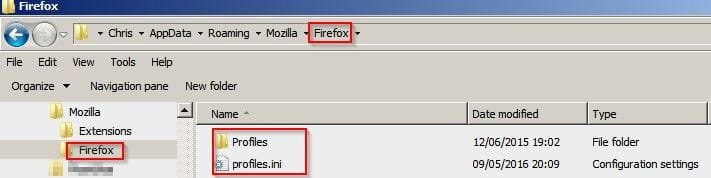
Also create a secondary backup just by copying the profile folder and .ini file to a new folder on your desktop.

Firefox.jpg
 

My Computer

Computer type
Laptop
Computer Manufacturer/Model Number
ASUS
OS
Microsoft Windows 7 Home Premium 64-bit 7601 Multiprocessor Free Service Pack 1
CPU
AMD C-60 APU with Radeon(tm) HD Graphics
Motherboard
ASUSTeK COMPUTER INC. X501U
Memory
4.00 GB
Graphics Card(s)
AMD Radeon HD 6290 Graphics
Sound Card
(1) AMD High Definition Audio Device (2) Realtek High Defi
Screen Resolution
1366 x 768 x 32 bits (4294967296 colors) @ 60 Hz
Hard Drives
Hitachi HTS545050A7E380 SATA Disk Device
Antivirus
Comodo CIS & FW, SecureAplus App Whitelisting, Threatfire
Browser
Cyberfox 64bit, Opera 64bit, Airfox
Other Info
Spy-The-Spy, HitmanPro.Alert, Norton Connect Safe, MJRegWatcher, BitDefender TrafficLight, Voodoo Shield, Zemana AntiMalware
Fresh install Firefox keeping bookmarks & extensions

Well I've just fresh installed Cyberfox and then restored bookmarks and extensions from previous install. I'll post details but it should also work for Firefox. Sorry but I only have the portable version of Firefox - not the installed version.

Download and save the installer for a fresh copy of Firefox but do not run it.

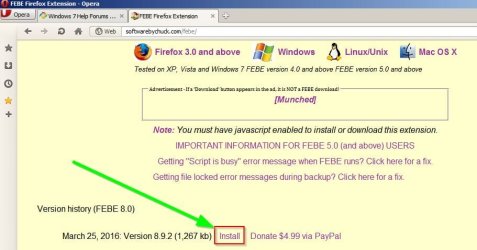
So get a copy of FEBE from here: FEBE Firefox Extension

Save the downloaded file to a folder somewhere (away from FF Program Files x86 and Appdata)

Install FEBE Firefox Extension - Opera.jpg

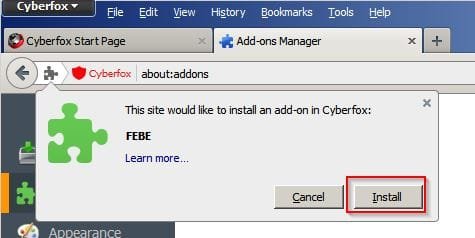
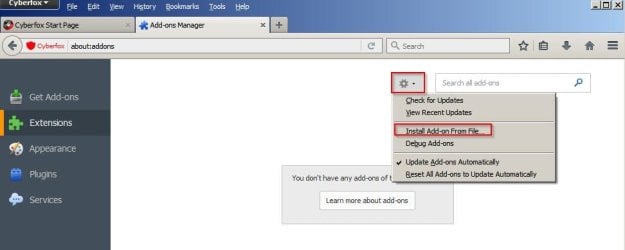
Install FEBE Addon from file.

Firefox Tools> Addons> Extensions. Click gear symbol.

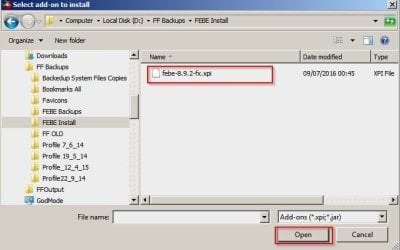
Browse to the downloaded.xpi file and click on it

Restore 1.jpg

Restore 2.jpg

Restore 3.jpg

Once installed - restart Firefox.

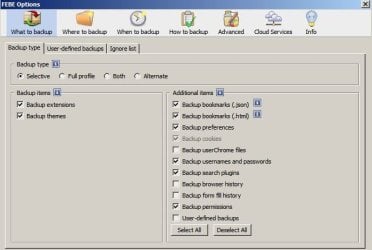
Tools> FEBE> FEBE Options. Set like this.

Options 1.jpg

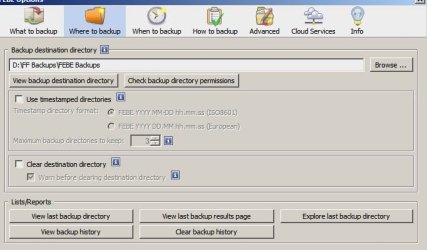
Choose a folder where you want to save backups.

Options 2.jpg

Run a backup. Tools> FEBE> Perform Backup Now

FEBE 1.jpg

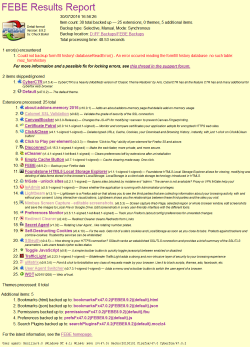
View the report:

FEBE Report.png

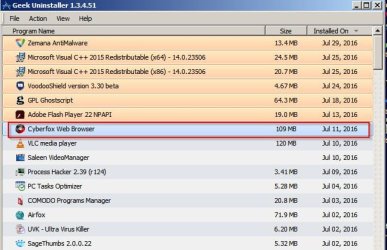
Get a copy of GeekUninstaller and run it.

Find Firefox in the list of programs and double click it.

Uninstall 1.jpg

Choose yes when deleting profile data.

Uninstall 2.jpg

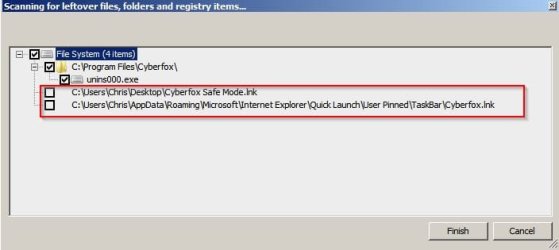
Allow it to scan for leftovers.

Uninstall 3.jpg

From the results list delete everything directly related to the Firefox Program installation or application data.

Optionally keep shortcuts.

Uninstall 4.jpg

Reboot when finished.

Run Cccleaner if you've got a copy. Check here for Firefox leftovers and delete if found:

C:\Program Files\Mozilla Firefox
C:\Program Files (x86)\Mozilla Firefox
Press the [Windows key+R] to open a Run dialog, type in %APPDATA%\Mozilla\ and click OK to open the Mozilla folder, then delete the Firefox folder if found.

Run the installer for Firefox and install it.

Once installed launch Firefox and repeat these steps:

Install FEBE Addon from file.

Firefox Tools> Addons> Extensions. Click gear symbol.

Browse to the downloaded.xpi file and click on it

Restore 1.jpg

Restore 2.jpg

Restore 3.jpg

Once installed - restart Firefox.

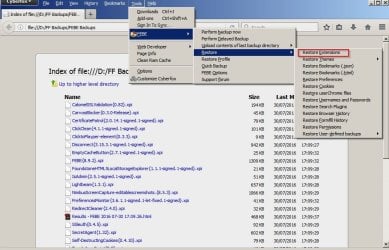
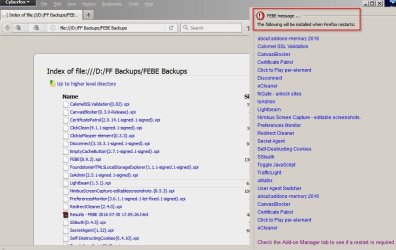
Then restore extensions. Note: Some will require a reboot.

Restore 6.jpg

Restore 7.jpg

Repeat the restore process for bookmarks (.json & .html) and then preferences.

Restart Firefox.

You should find that everything works and your bookmarks/ extensions have been restored.

Before restore after fresh install:

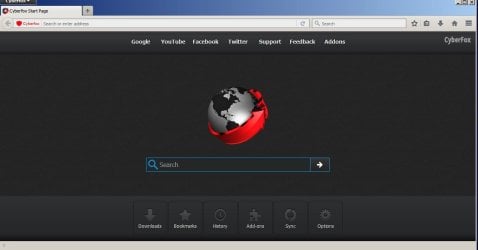
Cyberfox New.jpg

After fresh install with elements of profile restored:

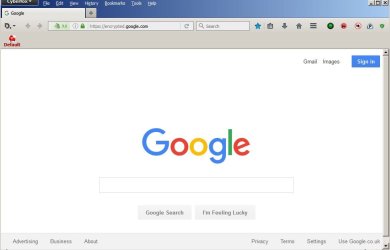
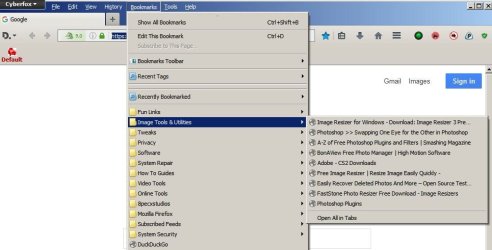
Restore 9.jpg

Restore 8.jpg
 

My Computer

Computer type
Laptop
Computer Manufacturer/Model Number
ASUS
OS
Microsoft Windows 7 Home Premium 64-bit 7601 Multiprocessor Free Service Pack 1
CPU
AMD C-60 APU with Radeon(tm) HD Graphics
Motherboard
ASUSTeK COMPUTER INC. X501U
Memory
4.00 GB
Graphics Card(s)
AMD Radeon HD 6290 Graphics
Sound Card
(1) AMD High Definition Audio Device (2) Realtek High Defi
Screen Resolution
1366 x 768 x 32 bits (4294967296 colors) @ 60 Hz
Hard Drives
Hitachi HTS545050A7E380 SATA Disk Device
Antivirus
Comodo CIS & FW, SecureAplus App Whitelisting, Threatfire
Browser
Cyberfox 64bit, Opera 64bit, Airfox
Other Info
Spy-The-Spy, HitmanPro.Alert, Norton Connect Safe, MJRegWatcher, BitDefender TrafficLight, Voodoo Shield, Zemana AntiMalware
How can I use the FEBE add-on when Firefox won't even stay runing long enough to let me log into lets say this forum. I am on Internet Explorer right now. Other then that 1 time Internet Explorer is working fine. I think the IE upgrade to IE 11 helped that out. I probably will have to do a complete manual dump of the Firefox profile. Then reinstall Firefox. The bookmarks are already backed up on my D HDD in the external USB case.

No. Just try backing up your profile using FEBE but store the backup away from Program Files, Program Files x86 or your AppData directories. Backup to a folder on your desktop would be okay.

Then fully remove Firefox including the manual check for leftovers as described and delete manually where needed.

Reboot. Reinstall Firefox. Add the FEBE extension. Import bookmarks and extensions.

EDIT: You could try MozBackup instead of FEBE but last time I tried the developer states that it no longer works with latest versions of Firefox.

MozBackup is not being developed anymore. There are known issues and there is no time on my side to fix all issues and develop new features. Use MozBackup only on your risk.

MozBackup - Backup tool for Firefox and Thunderbird
 

My Computer

Computer type
Laptop
Computer Manufacturer/Model Number
Dell Inspiron 3541
OS
windows 7 home 32 bit, I just changed back from 64 to 32bit
CPU
amc a6-6310, radon r4 graphics 1800mhz with 4 cores
Memory
6.8gb
Graphics Card(s)
not sure off hand
Sound Card
not shure off hand
Monitor(s) Displays
built in lcd
Screen Resolution
1366 x 768
Hard Drives
1 500gb sata internal HDD and 1 250 gb's sata HDD in a USB external USB case.
Keyboard
Wifi with attached wifi mouse
Internet Speed
don't know
Antivirus
Zone Alarm
Browser
Firefox
Other Info
The gateway laptop model MD2614U died because a voltage regulator on the motherboard went poof. The Gateway laptop has been scraped.
Hi:

Yep, @Callender's outstanding tutorial for FEBE won't work if you cannot run Firefox.:(
I would be leery of relying on Mozbackup with current versions of Firefox, as Mozbackup was abandoned in 2012 and no longer works reliably.

Did you try any of the steps in these tutorials, starting with Mozilla Safe Mode?

Firefox - Standard Diagnostic

Firefox - Fix slowness, crashing, error messages, and other problems

----------------------
If you want to cleanly reinstall Firefox....
And if you are comfortable with your bookmarks backup as the only data you want to save, you are probably OK to fully uninstall Firefox AND all the profile data.

If you want to backup everything before proceeding, just in case, you can do this:

  1. CLOSE Firefox completely (from the Windows Task Manager if necessary).
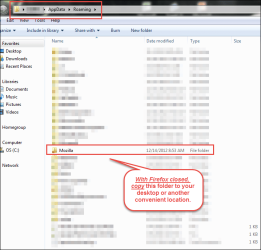
  2. Click the Windows7 start orb and then type "%appdata" (without the quotes) into the search box.
  3. Locate the entire "Mozilla" folder and copy it to your desktop or another location.
At that point, you can probably completely uninstall Firefox and then delete all remaining associated folders and files manually, if necessary. It might not be a bad idea to reboot the computer after doing that.


Then, you can download a fresh copy of the Firefox installer here: https://www.mozilla.org/en-US/firefox/all/


HTH,
MM
 

Attachments

  • 2016-07-30_21-19-32.png
    2016-07-30_21-19-32.png
    50.5 KB · Views: 16

My Computer

Computer type
PC/Desktop
Computer Manufacturer/Model Number
Dell Studio XPS 8500
OS
OEM Windows 7 Ult (x64) SP1
CPU
Intel Core-i7 3770 @ 3.4 GHz
Motherboard
"Dell" branded
Memory
16 GB DDR3 SDRAM @ 1333 MHz
Graphics Card(s)
NVidia GeForce GT620 1 GB
Sound Card
THX TruStudio PC
Monitor(s) Displays
Dell U2410 Full HD
Hard Drives
2.0 TB SATA2 @ 7200 RPM
PSU
350W
Keyboard
MS 4000 Ergon - Wired
Mouse
Logitech Anywhere MX
Internet Speed
Cable HSI w/Turbo (router)
Antivirus
KIS-MBAM Premium-MBAE Premium
Browser
Fx (current version); IE
Other Info
And a Win7/64 Pro laptop; And a Win10/64 Pro desktop.
Yes I ran Firefox in it's safe mode (by the way this is Firefox v47). Firefox ran slowly for about 3 to 4 minutes then the "stopped responding" showed up in the top bar then Firefox shut it self off. I tried the diag and the stuff in the "fix slowness" link. Nothing works. If the manual dump of Firefox's profile and clean reinstall doesn't work. I can't think of anything else to do other then wipe the partition clean on the C hard drive and reinstall everything clean. What bugs me is I just installed this new HDD in, about a week or 2 ago and Firefox has only been installed for a short time. It seems to me Firefox is acting like it has been installed for a long time and has clected a lot of junk. :banghead:

By the way I also have a text file with the name and link of every web page stored in the bookmark. I did this after the current bookmark backup got ceruped and I had to rebuild the bookmark from a file stored on a USB thumb drive and that file was 7 months old.

Hi:

Yep, @Callender's outstanding tutorial for FEBE won't work if you cannot run Firefox.:(
I would be leery of relying on Mozbackup with current versions of Firefox, as Mozbackup was abandoned in 2012 and no longer works reliably.

Did you try any of the steps in these tutorials, starting with Mozilla Safe Mode?

Firefox - Standard Diagnostic

Firefox - Fix slowness, crashing, error messages, and other problems

----------------------
If you want to cleanly reinstall Firefox....
And if you are comfortable with your bookmarks backup as the only data you want to save, you are probably OK to fully uninstall Firefox AND all the profile data.

If you want to backup everything before proceeding, just in case, you can do this:

  1. CLOSE Firefox completely (from the Windows Task Manager if necessary).
  2. Click the Windows7 start orb and then type "%appdata" (without the quotes) into the search box.
  3. Locate the entire "Mozilla" folder and copy it to your desktop or another location.
At that point, you can probably completely uninstall Firefox and then delete all remaining associated folders and files manually, if necessary. It might not be a bad idea to reboot the computer after doing that.


Then, you can download a fresh copy of the Firefox installer here: https://www.mozilla.org/en-US/firefox/all/


HTH,
MM
 

My Computer

Computer type
Laptop
Computer Manufacturer/Model Number
Dell Inspiron 3541
OS
windows 7 home 32 bit, I just changed back from 64 to 32bit
CPU
amc a6-6310, radon r4 graphics 1800mhz with 4 cores
Memory
6.8gb
Graphics Card(s)
not sure off hand
Sound Card
not shure off hand
Monitor(s) Displays
built in lcd
Screen Resolution
1366 x 768
Hard Drives
1 500gb sata internal HDD and 1 250 gb's sata HDD in a USB external USB case.
Keyboard
Wifi with attached wifi mouse
Internet Speed
don't know
Antivirus
Zone Alarm
Browser
Firefox
Other Info
The gateway laptop model MD2614U died because a voltage regulator on the motherboard went poof. The Gateway laptop has been scraped.
You sead in #2 "start orb" what is "orb"?

Hi:

Yep, @Callender's outstanding tutorial for FEBE won't work if you cannot run Firefox.:(
I would be leery of relying on Mozbackup with current versions of Firefox, as Mozbackup was abandoned in 2012 and no longer works reliably.

Did you try any of the steps in these tutorials, starting with Mozilla Safe Mode?

Firefox - Standard Diagnostic

Firefox - Fix slowness, crashing, error messages, and other problems

----------------------
If you want to cleanly reinstall Firefox....
And if you are comfortable with your bookmarks backup as the only data you want to save, you are probably OK to fully uninstall Firefox AND all the profile data.

If you want to backup everything before proceeding, just in case, you can do this:

  1. CLOSE Firefox completely (from the Windows Task Manager if necessary).
  2. Click the Windows7 start orb and then type "%appdata" (without the quotes) into the search box.
  3. Locate the entire "Mozilla" folder and copy it to your desktop or another location.
At that point, you can probably completely uninstall Firefox and then delete all remaining associated folders and files manually, if necessary. It might not be a bad idea to reboot the computer after doing that.


Then, you can download a fresh copy of the Firefox installer here: https://www.mozilla.org/en-US/firefox/all/


HTH,
MM
 

My Computer

Computer type
Laptop
Computer Manufacturer/Model Number
Dell Inspiron 3541
OS
windows 7 home 32 bit, I just changed back from 64 to 32bit
CPU
amc a6-6310, radon r4 graphics 1800mhz with 4 cores
Memory
6.8gb
Graphics Card(s)
not sure off hand
Sound Card
not shure off hand
Monitor(s) Displays
built in lcd
Screen Resolution
1366 x 768
Hard Drives
1 500gb sata internal HDD and 1 250 gb's sata HDD in a USB external USB case.
Keyboard
Wifi with attached wifi mouse
Internet Speed
don't know
Antivirus
Zone Alarm
Browser
Firefox
Other Info
The gateway laptop model MD2614U died because a voltage regulator on the motherboard went poof. The Gateway laptop has been scraped.
Well I moved the Mozilla dir from "appdata > Roaming" to the desktop. Uninstalled Firefox and did a clean reinstall. Firefox opened up with the default Google web page. I changed the web page to www.nbcnewsrightnow.com the web page for the local tv station kndu 25. Firefox sat that way fow a few minute because I had to find out what the dogs were barking about. I came back. Firefox had the "not responding" again on the top bar and then shut it self off. At this point I don't know what else to do but wipe the HDD clean and start over. Unless there is something else to try. I don't have horse blinders on. I will try just about anything as apose to spending a few hours reinstalling and set up everything again.

A ps. is the any possibility the file "Firefox Setup Stub 47.0.exe" got corrupted and I am installing a bad copy?

Steve
 
Last edited:

My Computer

Computer type
Laptop
Computer Manufacturer/Model Number
Dell Inspiron 3541
OS
windows 7 home 32 bit, I just changed back from 64 to 32bit
CPU
amc a6-6310, radon r4 graphics 1800mhz with 4 cores
Memory
6.8gb
Graphics Card(s)
not sure off hand
Sound Card
not shure off hand
Monitor(s) Displays
built in lcd
Screen Resolution
1366 x 768
Hard Drives
1 500gb sata internal HDD and 1 250 gb's sata HDD in a USB external USB case.
Keyboard
Wifi with attached wifi mouse
Internet Speed
don't know
Antivirus
Zone Alarm
Browser
Firefox
Other Info
The gateway laptop model MD2614U died because a voltage regulator on the motherboard went poof. The Gateway laptop has been scraped.
Back
Top