Moving and deleting OS on triple-boot setup

paramaibo

New member
Member
Local time
2:49 PM
Messages
59
I have a dual boot 7 with 32bit and 64bit, and unknowingly installed the 32 first and 64 thereafter (on 2 partitions of SSD). I realise now that I want to delete 32bit and cannot format this partition.

I ask because I have a Win 10 partition on my HDD that I eventually want to clone to the SSD and thereafter only have 2 partitions with 64bit 7 & 10, and format the space left on the HDD as a backup location.

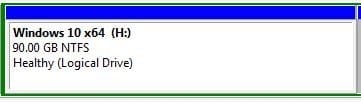
Attached are screenshots from disk management.

Can anybody help please?
 

Attachments

  • SSD.JPG
    SSD.JPG
    19.3 KB · Views: 33
  • HDD.JPG
    HDD.JPG
    12.8 KB · Views: 33

My Computer My Computer

At a glance

Windows 7 Ultimate 64/32bit2.66 GHz4 GB
Computer type
Laptop
Computer Manufacturer/Model Number
Toshiba Qosmio G50
OS
Windows 7 Ultimate 64/32bit
CPU
2.66 GHz
Memory
4 GB
You cannot delete D because it`s the Active partition and has the system files on it.

And if you wiped out D you wouldn`t be able to boot from C because it`s on an extended partition, it must be a primary partition, set Active and contain the system files.

You`d have to wipe out C and D in order to reinstall W7 64 bit, and I`m not sure you can do that as C and H are both part of an extended partition.

Why is there a gap between C and H, please post an unedited shot of Disk Management.
 

My Computer My Computer

At a glance

Windows 10 Pro x64Intel Core i7 6700KGSkill TridentZ RGB 16GB 3600 16-16-16-36EVGA GTX 980 Ti SC x2
Computer type
PC/Desktop
Computer Manufacturer/Model Number
Skylake Special #666
OS
Windows 10 Pro x64
CPU
Intel Core i7 6700K
Motherboard
Asus Sabertooth Z170 Mark 1
Memory
GSkill TridentZ RGB 16GB 3600 16-16-16-36
Graphics Card(s)
EVGA GTX 980 Ti SC x2
Sound Card
Realtek High Definition
Monitor(s) Displays
AOC G2460PG
Screen Resolution
1920 x 1080 144Hz
Hard Drives
Samsung 860 Pro 256GB, Seagate Barracuda 4TB x2
PSU
EVGA 1000 P2, EVGA White Custom Braided Cables
Case
Corsair Vengeance C70 Gunmetal Black
Cooling
Corsair H100i v2, Corsair ML120 x2, Thermal Grizzly Kryonaut
Keyboard
Logitech G910 Orion Spectrum
Mouse
Logitech G700s
Internet Speed
Verizon Fios Quantum Gateway 75/75
Antivirus
Windows Defender, Malwarebytes Free 3.8.3
Browser
Chrome
Other Info
Corsair SP120 x4, LG Blu-ray Drive, Durabrand HT-395 100 Watt Dolby Digital Amp, Corsair H2100 Wireless 7.1 Headset
I have come to realise that I screwed up by installing D first.

Short of buying a new SSD and starting from scratch, is there a way to copy/move the system files in order to end up with my desired configuration?
 

My Computer My Computer

At a glance

Windows 7 Ultimate 64/32bit2.66 GHz4 GB
Computer type
Laptop
Computer Manufacturer/Model Number
Toshiba Qosmio G50
OS
Windows 7 Ultimate 64/32bit
CPU
2.66 GHz
Memory
4 GB
None that I know of, not without wiping the extended partition.

There is no reason to have Windows 7 and Windows 10 on the same drive, I keep my 2 ssd`s totally separate with 7 and 10 and only pug in one or the other.

An expert may come along with a different solution.

But never install an OS on an extended partition. There`s no reason to.

Install Partition Wizard free on W7 32 bit and see if it will let you make W7 64 bit a Primary partition, but I don`t think you can without wiping it out.

Personally, I would wipe out the entire drive, choose either 7 or 10 and reinstall.
 

My Computer My Computer

At a glance

Windows 10 Pro x64Intel Core i7 6700KGSkill TridentZ RGB 16GB 3600 16-16-16-36EVGA GTX 980 Ti SC x2
Computer type
PC/Desktop
Computer Manufacturer/Model Number
Skylake Special #666
OS
Windows 10 Pro x64
CPU
Intel Core i7 6700K
Motherboard
Asus Sabertooth Z170 Mark 1
Memory
GSkill TridentZ RGB 16GB 3600 16-16-16-36
Graphics Card(s)
EVGA GTX 980 Ti SC x2
Sound Card
Realtek High Definition
Monitor(s) Displays
AOC G2460PG
Screen Resolution
1920 x 1080 144Hz
Hard Drives
Samsung 860 Pro 256GB, Seagate Barracuda 4TB x2
PSU
EVGA 1000 P2, EVGA White Custom Braided Cables
Case
Corsair Vengeance C70 Gunmetal Black
Cooling
Corsair H100i v2, Corsair ML120 x2, Thermal Grizzly Kryonaut
Keyboard
Logitech G910 Orion Spectrum
Mouse
Logitech G700s
Internet Speed
Verizon Fios Quantum Gateway 75/75
Antivirus
Windows Defender, Malwarebytes Free 3.8.3
Browser
Chrome
Other Info
Corsair SP120 x4, LG Blu-ray Drive, Durabrand HT-395 100 Watt Dolby Digital Amp, Corsair H2100 Wireless 7.1 Headset

My Computer My Computer

At a glance

Multi-Boot W7_Pro_x64 W8.1_Pro_x64 W10_Pro_x6...AMD Athlon II x4 6206GB GSkill DDR2 800AMD 4670 GPU + AMD 4200 IGP
Computer type
PC/Desktop
Computer Manufacturer/Model Number
home built
OS
Multi-Boot W7_Pro_x64 W8.1_Pro_x64 W10_Pro_x64 +Linux_VMs +Chromium_VM
CPU
AMD Athlon II x4 620
Motherboard
Gigabyte GA-MA785G-UD3H
Memory
6GB GSkill DDR2 800
Graphics Card(s)
AMD 4670 GPU + AMD 4200 IGP
Sound Card
on board Realtek ALC889A
Monitor(s) Displays
RCA 40" LCD TV, Insignia 32" LCD TV, HP 15" LCD monitor
Screen Resolution
1680 x 1050
Hard Drives
OCZ Vertex 3 120GB,
Samsung F3 1TB (3),
Several others - WD, Seagate, Hitachi, ...
PSU
Corsair 500 W
Case
Rosewill mid tower
Cooling
CM 90mm rifle
Keyboard
Gyration wireless, Logitech wireless, Dell USB wired
Mouse
Gyration wireless, Logitech wireless, V7 USB wired
Internet Speed
Spectrum - 100Mbps D / 10Mbps U
Antivirus
Avast, MBAM3, EMET, WinPatrol
Browser
Pale Moon, Firefox, IE
Other Info
2 multi-boot PC's
Mainly HTPC/Office/Gen purpose (no gaming).
Trendnet USB KVM.
LG DVD burner/Blue Ray Player.
Tray system for removable SATA backup drives.

Not currently OCd, under-volted.
I use Hybrid sleep, rarely re-boot or shutdown.

Hauppauge HD-PVR, Avermedia PCIe TV Tuner, Hauppauge PCI TV Tuner.
Easeus Partition Master won't let me convert D to a logical partition (contains system/boot files) & similarly it won't let me convert C for the same reason; where D contains system and C contains boot files.
 

My Computer My Computer

At a glance

Windows 7 Ultimate 64/32bit2.66 GHz4 GB
Computer type
Laptop
Computer Manufacturer/Model Number
Toshiba Qosmio G50
OS
Windows 7 Ultimate 64/32bit
CPU
2.66 GHz
Memory
4 GB
Are C, D and H on the same disk? Where is allocated the remaining disk space? 477-(50+90+90) = 247G

If you know how to use a external bootable Linux USB drive to make a backup of the disk, it is possible to clean all SSD disk, then create the partitions, restore Win 7 and Win 10 and then make it bootable.
 

My Computers My Computers

  • At a glance

    Windows 7 HP 64i5 6600K - 800MHz to 4200MHz4+4G GSkill DDR4 3000IG - Intel 530
    Computer type
    PC/Desktop
    Computer Manufacturer/Model Number
    custom build
    OS
    Windows 7 HP 64
    CPU
    i5 6600K - 800MHz to 4200MHz
    Motherboard
    GA-Z170-HD3P
    Memory
    4+4G GSkill DDR4 3000
    Graphics Card(s)
    IG - Intel 530
    Monitor(s) Displays
    Samsung 226BW
    Screen Resolution
    1680x1050
    Hard Drives
    (1) -1 SM951 – 128GB M.2 AHCI PCIe SSD drive for Windows 7 and Lubuntu
    (2) -1 WD SATA 3 - 1T for Data
    (3) -1 WD SATA 3 - 1T for backup
    PSU
    Thermaltake 450W TR2 gold
    Keyboard
    Old and good Chicony mechanical keyboard
    Mouse
    Logitech mX performance - 9 buttons (had to disable some)
    Internet Speed
    500Mb/s
    Browser
    Firefox 64
    Other Info
    TinyWall firewall
  • At a glance

    Windows 7 Proi7-4500U 800MHz to 3.0GHz(4+4)G DDR3 1600IG intel 4400 + NVIDIA GeForce GT 745M
    Computer type
    Laptop
    System Manufacturer/Model Number
    Asus Q550LF
    OS
    Windows 7 Pro
    CPU
    i7-4500U 800MHz to 3.0GHz
    Motherboard
    Asus Q550LF
    Memory
    (4+4)G DDR3 1600
    Graphics Card(s)
    IG intel 4400 + NVIDIA GeForce GT 745M
    Sound Card
    Realtek
    Monitor(s) Displays
    LG Display LP156WF4-SPH1
    Screen Resolution
    1920 x 1080
    Hard Drives
    BX500 120G SSD for Windows and programs +
    1T HDD for data
    Internet Speed
    500 Mb/s
    Browser
    Firefox
    Other Info
    TinyWall firewall
Are you running Easeus Partition Master in Windows ?
That's why i suggested a Minitool Partition Wizard bootable CD, so Windows isn't running when you convert it to Primary.
 

My Computer My Computer

At a glance

Multi-Boot W7_Pro_x64 W8.1_Pro_x64 W10_Pro_x6...AMD Athlon II x4 6206GB GSkill DDR2 800AMD 4670 GPU + AMD 4200 IGP
Computer type
PC/Desktop
Computer Manufacturer/Model Number
home built
OS
Multi-Boot W7_Pro_x64 W8.1_Pro_x64 W10_Pro_x64 +Linux_VMs +Chromium_VM
CPU
AMD Athlon II x4 620
Motherboard
Gigabyte GA-MA785G-UD3H
Memory
6GB GSkill DDR2 800
Graphics Card(s)
AMD 4670 GPU + AMD 4200 IGP
Sound Card
on board Realtek ALC889A
Monitor(s) Displays
RCA 40" LCD TV, Insignia 32" LCD TV, HP 15" LCD monitor
Screen Resolution
1680 x 1050
Hard Drives
OCZ Vertex 3 120GB,
Samsung F3 1TB (3),
Several others - WD, Seagate, Hitachi, ...
PSU
Corsair 500 W
Case
Rosewill mid tower
Cooling
CM 90mm rifle
Keyboard
Gyration wireless, Logitech wireless, Dell USB wired
Mouse
Gyration wireless, Logitech wireless, V7 USB wired
Internet Speed
Spectrum - 100Mbps D / 10Mbps U
Antivirus
Avast, MBAM3, EMET, WinPatrol
Browser
Pale Moon, Firefox, IE
Other Info
2 multi-boot PC's
Mainly HTPC/Office/Gen purpose (no gaming).
Trendnet USB KVM.
LG DVD burner/Blue Ray Player.
Tray system for removable SATA backup drives.

Not currently OCd, under-volted.
I use Hybrid sleep, rarely re-boot or shutdown.

Hauppauge HD-PVR, Avermedia PCIe TV Tuner, Hauppauge PCI TV Tuner.
What you should be able to do to fix this
Make a system image backup before making any of these changes.

Use a Minitool Partition Wizard bootable CD to set the C partition as Primary.
Bootable Partition Manager| MiniTool Partition Wizard Bootable Edition

Then use EasyBCD to move the Bootmgr to C.
Bootmgr - Move to C:\ with EasyBCD

Boot the PC and make sure C is the System, Active, Boot partition.
If it is, then D shouldn't be needed any more.

I've seen that I can do something with EasyBCD (not sure exactly what), but I want to get the whole process worked out before I embark on piecemeal efforts as this is my only work station.

I'm waiting for delivery of a couple of 8Gb flash drives tomorrow, so that I have a bootable Win 7 64 (it's presently wasting space on a 128Gb flash drive (don't laugh).

Are you running Easeus Partition Master in Windows ?
That's why i suggested a Minitool Partition Wizard bootable CD, so Windows isn't running when you convert it to Primary.
Ah! Got it, thanks.

A bootable Minitool Partition Wizard on a flash drive should be possible & clear the way then to fiddle outside Windows.
 

My Computer My Computer

At a glance

Windows 7 Ultimate 64/32bit2.66 GHz4 GB
Computer type
Laptop
Computer Manufacturer/Model Number
Toshiba Qosmio G50
OS
Windows 7 Ultimate 64/32bit
CPU
2.66 GHz
Memory
4 GB
Are C, D and H on the same disk? Where is allocated the remaining disk space? 477-(50+90+90) = 247G

If you know how to use a external bootable Linux USB drive to make a backup of the disk, it is possible to clean all SSD disk, then create the partitions, restore Win 7 and Win 10 and then make it bootable.

There are three more partitions on the SSD.
 

My Computer My Computer

At a glance

Windows 7 Ultimate 64/32bit2.66 GHz4 GB
Computer type
Laptop
Computer Manufacturer/Model Number
Toshiba Qosmio G50
OS
Windows 7 Ultimate 64/32bit
CPU
2.66 GHz
Memory
4 GB

My Computer My Computer

At a glance

Multi-Boot W7_Pro_x64 W8.1_Pro_x64 W10_Pro_x6...AMD Athlon II x4 6206GB GSkill DDR2 800AMD 4670 GPU + AMD 4200 IGP
Computer type
PC/Desktop
Computer Manufacturer/Model Number
home built
OS
Multi-Boot W7_Pro_x64 W8.1_Pro_x64 W10_Pro_x64 +Linux_VMs +Chromium_VM
CPU
AMD Athlon II x4 620
Motherboard
Gigabyte GA-MA785G-UD3H
Memory
6GB GSkill DDR2 800
Graphics Card(s)
AMD 4670 GPU + AMD 4200 IGP
Sound Card
on board Realtek ALC889A
Monitor(s) Displays
RCA 40" LCD TV, Insignia 32" LCD TV, HP 15" LCD monitor
Screen Resolution
1680 x 1050
Hard Drives
OCZ Vertex 3 120GB,
Samsung F3 1TB (3),
Several others - WD, Seagate, Hitachi, ...
PSU
Corsair 500 W
Case
Rosewill mid tower
Cooling
CM 90mm rifle
Keyboard
Gyration wireless, Logitech wireless, Dell USB wired
Mouse
Gyration wireless, Logitech wireless, V7 USB wired
Internet Speed
Spectrum - 100Mbps D / 10Mbps U
Antivirus
Avast, MBAM3, EMET, WinPatrol
Browser
Pale Moon, Firefox, IE
Other Info
2 multi-boot PC's
Mainly HTPC/Office/Gen purpose (no gaming).
Trendnet USB KVM.
LG DVD burner/Blue Ray Player.
Tray system for removable SATA backup drives.

Not currently OCd, under-volted.
I use Hybrid sleep, rarely re-boot or shutdown.

Hauppauge HD-PVR, Avermedia PCIe TV Tuner, Hauppauge PCI TV Tuner.
You should post a maximized/resized screen print of Disk Management using these instructions so all info is displayed:
Disk Management - Post a Screen Capture Image

Make sure you have backups before making any changes !

Thanks to all, I'm not going to do anything tonight or before the USB drives arrive tomorrow, so that I can have an image backup on the USB drive; but all the help has been invaluable and I will pop in again tomorrow.
 

My Computer My Computer

At a glance

Windows 7 Ultimate 64/32bit2.66 GHz4 GB
Computer type
Laptop
Computer Manufacturer/Model Number
Toshiba Qosmio G50
OS
Windows 7 Ultimate 64/32bit
CPU
2.66 GHz
Memory
4 GB

My Computer My Computer

At a glance

Windows 10 Pro x64Intel Core i7 6700KGSkill TridentZ RGB 16GB 3600 16-16-16-36EVGA GTX 980 Ti SC x2
Computer type
PC/Desktop
Computer Manufacturer/Model Number
Skylake Special #666
OS
Windows 10 Pro x64
CPU
Intel Core i7 6700K
Motherboard
Asus Sabertooth Z170 Mark 1
Memory
GSkill TridentZ RGB 16GB 3600 16-16-16-36
Graphics Card(s)
EVGA GTX 980 Ti SC x2
Sound Card
Realtek High Definition
Monitor(s) Displays
AOC G2460PG
Screen Resolution
1920 x 1080 144Hz
Hard Drives
Samsung 860 Pro 256GB, Seagate Barracuda 4TB x2
PSU
EVGA 1000 P2, EVGA White Custom Braided Cables
Case
Corsair Vengeance C70 Gunmetal Black
Cooling
Corsair H100i v2, Corsair ML120 x2, Thermal Grizzly Kryonaut
Keyboard
Logitech G910 Orion Spectrum
Mouse
Logitech G700s
Internet Speed
Verizon Fios Quantum Gateway 75/75
Antivirus
Windows Defender, Malwarebytes Free 3.8.3
Browser
Chrome
Other Info
Corsair SP120 x4, LG Blu-ray Drive, Durabrand HT-395 100 Watt Dolby Digital Amp, Corsair H2100 Wireless 7.1 Headset
Easeus Partition Master won't let me convert D to a logical partition (contains system/boot files) & similarly it won't let me convert C for the same reason; where D contains system and C contains boot files.

Why are you trying to convert D (windows 7 32 bit) to a logical partition ?

No one said to do that and there is no reason to.

Please follow the instructions that you are given.

If you can`t covert C Windows 64 bit to a Primary partition, then you will be wiping out everything and reinstalling, as I suspected.

But there should be no reason at all you can`t convert the Windows 10 partition from Logical to Primary

If you can convert H Windows 10 to Primary, then all you`ll have to do is delete D and C to unallocated space, then you can install Windows 7 64 bit on the unallocated space and nothing will happen to the Windows 10 partition.
 
Last edited:

My Computer My Computer

At a glance

Windows 10 Pro x64Intel Core i7 6700KGSkill TridentZ RGB 16GB 3600 16-16-16-36EVGA GTX 980 Ti SC x2
Computer type
PC/Desktop
Computer Manufacturer/Model Number
Skylake Special #666
OS
Windows 10 Pro x64
CPU
Intel Core i7 6700K
Motherboard
Asus Sabertooth Z170 Mark 1
Memory
GSkill TridentZ RGB 16GB 3600 16-16-16-36
Graphics Card(s)
EVGA GTX 980 Ti SC x2
Sound Card
Realtek High Definition
Monitor(s) Displays
AOC G2460PG
Screen Resolution
1920 x 1080 144Hz
Hard Drives
Samsung 860 Pro 256GB, Seagate Barracuda 4TB x2
PSU
EVGA 1000 P2, EVGA White Custom Braided Cables
Case
Corsair Vengeance C70 Gunmetal Black
Cooling
Corsair H100i v2, Corsair ML120 x2, Thermal Grizzly Kryonaut
Keyboard
Logitech G910 Orion Spectrum
Mouse
Logitech G700s
Internet Speed
Verizon Fios Quantum Gateway 75/75
Antivirus
Windows Defender, Malwarebytes Free 3.8.3
Browser
Chrome
Other Info
Corsair SP120 x4, LG Blu-ray Drive, Durabrand HT-395 100 Watt Dolby Digital Amp, Corsair H2100 Wireless 7.1 Headset
Since my last post, I have 7 on C, 10 on D (both primary partitions), 7 boots and 10 doesn't beyond the boot screen & I currently have 10 as default to try the various start up tools but not much happens beyond a dark illuminated screen and a movable cursor.
 

My Computer My Computer

At a glance

Windows 7 Ultimate 64/32bit2.66 GHz4 GB
Computer type
Laptop
Computer Manufacturer/Model Number
Toshiba Qosmio G50
OS
Windows 7 Ultimate 64/32bit
CPU
2.66 GHz
Memory
4 GB
I have discovered the boot partition that had been left behind in the move, restored it and copied it to the SSD with EaseUS. Is there a way to manually reunite this with the 10 OS on the same disk?
 

My Computer My Computer

At a glance

Windows 7 Ultimate 64/32bit2.66 GHz4 GB
Computer type
Laptop
Computer Manufacturer/Model Number
Toshiba Qosmio G50
OS
Windows 7 Ultimate 64/32bit
CPU
2.66 GHz
Memory
4 GB
I'm not sure what all you've done and have/had in Disk Management (DM).
You never posted the requested proper DM screen prints.
You should post a maximized/resized screen print of Disk Management using these instructions:
Disk Management - Post a Screen Capture Image

You could try using a Win 7 install disc and do a Startup Repair and see if that fixes your problem, here's the tutorial:
Startup Repair
 

My Computer My Computer

At a glance

Multi-Boot W7_Pro_x64 W8.1_Pro_x64 W10_Pro_x6...AMD Athlon II x4 6206GB GSkill DDR2 800AMD 4670 GPU + AMD 4200 IGP
Computer type
PC/Desktop
Computer Manufacturer/Model Number
home built
OS
Multi-Boot W7_Pro_x64 W8.1_Pro_x64 W10_Pro_x64 +Linux_VMs +Chromium_VM
CPU
AMD Athlon II x4 620
Motherboard
Gigabyte GA-MA785G-UD3H
Memory
6GB GSkill DDR2 800
Graphics Card(s)
AMD 4670 GPU + AMD 4200 IGP
Sound Card
on board Realtek ALC889A
Monitor(s) Displays
RCA 40" LCD TV, Insignia 32" LCD TV, HP 15" LCD monitor
Screen Resolution
1680 x 1050
Hard Drives
OCZ Vertex 3 120GB,
Samsung F3 1TB (3),
Several others - WD, Seagate, Hitachi, ...
PSU
Corsair 500 W
Case
Rosewill mid tower
Cooling
CM 90mm rifle
Keyboard
Gyration wireless, Logitech wireless, Dell USB wired
Mouse
Gyration wireless, Logitech wireless, V7 USB wired
Internet Speed
Spectrum - 100Mbps D / 10Mbps U
Antivirus
Avast, MBAM3, EMET, WinPatrol
Browser
Pale Moon, Firefox, IE
Other Info
2 multi-boot PC's
Mainly HTPC/Office/Gen purpose (no gaming).
Trendnet USB KVM.
LG DVD burner/Blue Ray Player.
Tray system for removable SATA backup drives.

Not currently OCd, under-volted.
I use Hybrid sleep, rarely re-boot or shutdown.

Hauppauge HD-PVR, Avermedia PCIe TV Tuner, Hauppauge PCI TV Tuner.
Win 7 works absolutely fine, it's win 10 that didn't boot........and now that I've found the hidden partition and copied it to the other disk where both remaining OS are, I am wondering whether there is a way to manually reunite the win 10 partition with its previous boot environment before hiding the latter.

I cannot see how a startup repair on 7 will help me getting 10 to boot.

It's coming along, but really only in fits and starts.
 

Attachments

  • Disk 1.JPG
    Disk 1.JPG
    33.7 KB · Views: 5

My Computer My Computer

At a glance

Windows 7 Ultimate 64/32bit2.66 GHz4 GB
Computer type
Laptop
Computer Manufacturer/Model Number
Toshiba Qosmio G50
OS
Windows 7 Ultimate 64/32bit
CPU
2.66 GHz
Memory
4 GB
I did not say Repair Install !
I said Startup Repair.

I have used Startup Repair many times to fix issues on my multi-boot PC's.
It's always to fix self-inflicted wounds i caused by restructuring partitions/changing OS's/etc.

I've done a Startup Repair with a W7 disc that fixed a problem where no OS would boot on my triple boot test box - it has W7, W8.1, and W10.
 
Last edited:

My Computer My Computer

At a glance

Multi-Boot W7_Pro_x64 W8.1_Pro_x64 W10_Pro_x6...AMD Athlon II x4 6206GB GSkill DDR2 800AMD 4670 GPU + AMD 4200 IGP
Computer type
PC/Desktop
Computer Manufacturer/Model Number
home built
OS
Multi-Boot W7_Pro_x64 W8.1_Pro_x64 W10_Pro_x64 +Linux_VMs +Chromium_VM
CPU
AMD Athlon II x4 620
Motherboard
Gigabyte GA-MA785G-UD3H
Memory
6GB GSkill DDR2 800
Graphics Card(s)
AMD 4670 GPU + AMD 4200 IGP
Sound Card
on board Realtek ALC889A
Monitor(s) Displays
RCA 40" LCD TV, Insignia 32" LCD TV, HP 15" LCD monitor
Screen Resolution
1680 x 1050
Hard Drives
OCZ Vertex 3 120GB,
Samsung F3 1TB (3),
Several others - WD, Seagate, Hitachi, ...
PSU
Corsair 500 W
Case
Rosewill mid tower
Cooling
CM 90mm rifle
Keyboard
Gyration wireless, Logitech wireless, Dell USB wired
Mouse
Gyration wireless, Logitech wireless, V7 USB wired
Internet Speed
Spectrum - 100Mbps D / 10Mbps U
Antivirus
Avast, MBAM3, EMET, WinPatrol
Browser
Pale Moon, Firefox, IE
Other Info
2 multi-boot PC's
Mainly HTPC/Office/Gen purpose (no gaming).
Trendnet USB KVM.
LG DVD burner/Blue Ray Player.
Tray system for removable SATA backup drives.

Not currently OCd, under-volted.
I use Hybrid sleep, rarely re-boot or shutdown.

Hauppauge HD-PVR, Avermedia PCIe TV Tuner, Hauppauge PCI TV Tuner.
OK, worth a try. Thanks.
 

My Computer My Computer

At a glance

Windows 7 Ultimate 64/32bit2.66 GHz4 GB
Computer type
Laptop
Computer Manufacturer/Model Number
Toshiba Qosmio G50
OS
Windows 7 Ultimate 64/32bit
CPU
2.66 GHz
Memory
4 GB
Back
Top