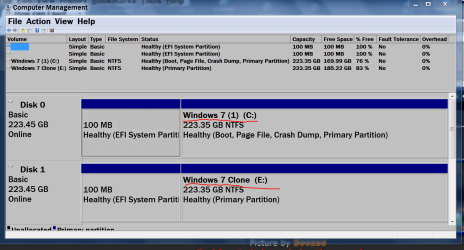
Hi
May i add to what being mentioned below.
Continue below the quote.
Do read first before continue...
The link to the free version;
Macrium Reflect Free
You need to install this free software to your current /existing Windows.
About the label, is your computer a OEM version or Retail version.
For OEM version, you cannot change the label of the active partition of the Windows.
For example: My laptop is OEM version, the label is: S3A8571D007 and another laptop S3A8571D001, Toshiba but different models.
As for Retail, you can use the label as in the quote.
When you start the clone, the Windows will shutdown and restart.
During restart, this is to start the operation of cloning.
This will not have any problem, as i done before.
After completed, it may restart the computer.
At this point, while booting, you can press the shutdown button to turn off the computer.
You need to remove the existing HDD first, leaving the SSD as connected.
Then turn on to check if the procedure is complete and without any problem.
If you encountered any problem, do stop and post here, as someone would reply to you.
Hope you understand.
May i add to what being mentioned below.
Continue below the quote.
Do read first before continue...
Layback Bear earlier posted:
1. Install the hard drive you want to make a clone of.
2. Install the SSD you want to clone to.
Allow me to add something:
1. Install the hard drive you want to make a clone of. Make sure it is labeled something like "OldHD"
2. Install the SSD you want to clone to. Make sure it is labeled something like "NewSSD"
The reason I bring that up is that you want to make absolutely sure you are cloning from the original "old" hard-drive onto the SSD, the "new" hard-drive. USB or DVD boots often "shuffle" the drive letters, what you see may not be the normal lettering you are used to seeing during your normal Windows boot and load.
The link to the free version;
Macrium Reflect Free
You need to install this free software to your current /existing Windows.
About the label, is your computer a OEM version or Retail version.
For OEM version, you cannot change the label of the active partition of the Windows.
For example: My laptop is OEM version, the label is: S3A8571D007 and another laptop S3A8571D001, Toshiba but different models.
As for Retail, you can use the label as in the quote.
When you start the clone, the Windows will shutdown and restart.
During restart, this is to start the operation of cloning.
This will not have any problem, as i done before.
After completed, it may restart the computer.
At this point, while booting, you can press the shutdown button to turn off the computer.
You need to remove the existing HDD first, leaving the SSD as connected.
Then turn on to check if the procedure is complete and without any problem.
If you encountered any problem, do stop and post here, as someone would reply to you.
Hope you understand.
My Computer
At a glance
Windows 7 x64
- Computer type
- Laptop
- Computer Manufacturer/Model Number
- Toshiba L630 and L735
- OS
- Windows 7 x64
- Hard Drives
- 240 GB SSD