Documents Library Not Functioning

dsopocy

New member
Local time
9:50 PM
Messages
38
Location
Glenview, IL
Upon upgrading Vista Ultimate 64 to Windows 7 Ultimate 64, the Documents Library in my installation of Win 7 is non-functional. Selecting Documents from the Start Menu does not open a window. Opening my personal Library from the Start Menu and clicking on Documents does nothing. Currently, I'm resorting to navigating through Computer --> Local Disk --> Users --> my name --> My Documents to access my documents.

Has anyone else encountered this bug and/or have any ideas how to fix it?
 

My Computer

Computer Manufacturer/Model Number
Dell XPS/Dimension 600 /Model Dell DXG051
OS
Windows 7 Professional 64-bit
CPU
Pentium D 3.20 GHz (Intel64 Family 15 Model 4 Stepping 4)
Motherboard
nVidia nForce4 SLIx16; Dell Phoenix BIOS PLUS v1.10 A11
Memory
6GB 667 MHz DDR2 + ~4GB ReadyBoost
Graphics Card(s)
OEM nVidia Geoforce 6800 256MB
Sound Card
OEM X-Fi XtremeMusic (Model SB0467); OEM Realtek AC'97
Monitor(s) Displays
Dell 2007FP (21" Flat Screen)
Screen Resolution
1600 x 1200 x 32-bit
Hard Drives
3, Maxtor 7 L250S0 SCSI Disk Device 232.8Gb;
NVIDIA STRIPE 465.66G;
HL-DT-ST DVD+-RW GWA4164B ATA Device;
TSSTcorp DVD-ROM TS-H352C ATA Device
Internet Speed
Cable - 5164/3161 per recent DSL Reports test
Other Info
Pinnacle PCTV 800i; Logitech QuickCam Ultravision Pro
Hi dsopocy and welcome to the forum!

Please try clicking on Start then right-click your Login Name and select "Restore Default Libraries"

Let us know how it turns out ;)
 

My Computer

Computer Manufacturer/Model Number
Custom Build
OS
Windows 7 Build 7048 x64
CPU
Athlon 64 X2 Dual Core 4600+
Motherboard
EMX-AMD750G-PRO
Memory
4 x 1GB Kingston 400MHz 6-6-6-18 (800MHz)
Graphics Card(s)
ATI Radeon 3650
Sound Card
Realtek HD Audio
Monitor(s) Displays
22" AOC 2216Vw
Screen Resolution
1680x1050
Cooling
Arctic Cooling Freezer 64 Pro PWM
Keyboard
Generic Enhanced Natural Keyboard
Mouse
Logitech VX Nano
Other Info
Edifier M1550
Hi dsopocy and welcome to the forum!

Please try clicking on Start then right-click your Login Name and select "Restore Default Libraries"

Let us know how it turns out ;)

Thanks, NosferatuX. Selecting "Restore Default Libraries" only had the effect of opening the Libraries window, which was working before. Subsequently clicking Documents in either the Start Menu or the Libraries window does not trigger any action whatsoever.
 

My Computer

Computer Manufacturer/Model Number
Dell XPS/Dimension 600 /Model Dell DXG051
OS
Windows 7 Professional 64-bit
CPU
Pentium D 3.20 GHz (Intel64 Family 15 Model 4 Stepping 4)
Motherboard
nVidia nForce4 SLIx16; Dell Phoenix BIOS PLUS v1.10 A11
Memory
6GB 667 MHz DDR2 + ~4GB ReadyBoost
Graphics Card(s)
OEM nVidia Geoforce 6800 256MB
Sound Card
OEM X-Fi XtremeMusic (Model SB0467); OEM Realtek AC'97
Monitor(s) Displays
Dell 2007FP (21" Flat Screen)
Screen Resolution
1600 x 1200 x 32-bit
Hard Drives
3, Maxtor 7 L250S0 SCSI Disk Device 232.8Gb;
NVIDIA STRIPE 465.66G;
HL-DT-ST DVD+-RW GWA4164B ATA Device;
TSSTcorp DVD-ROM TS-H352C ATA Device
Internet Speed
Cable - 5164/3161 per recent DSL Reports test
Other Info
Pinnacle PCTV 800i; Logitech QuickCam Ultravision Pro
Have you tried restoring them to default as well by going to their properties?
After doing so, you can then proceed by adding your folders in the libraries. Once its mapped in the library, you should be able to click on it and see it's contents.

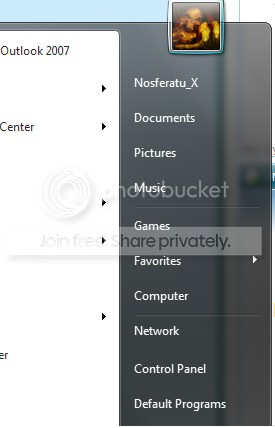
For example, right click on the Documents link here

start.png


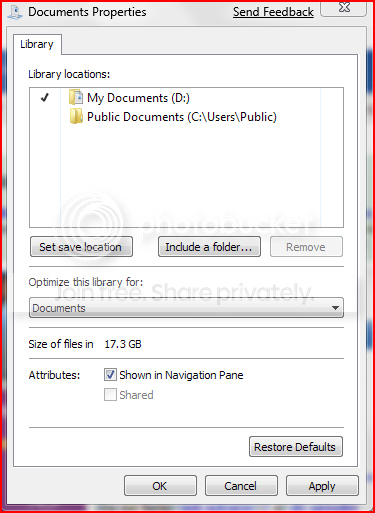
Then select properties. It should bring up this dialog box

Capture-3.png


You can add your folders here then.

Now if for some weird reason, even though you have contents here but still unable to open them, I'd suggest doing a Repair Install, since you've migrated, somewhere it might have messed up Windows 7.
 

My Computer

Computer Manufacturer/Model Number
Custom Build
OS
Windows 7 Build 7048 x64
CPU
Athlon 64 X2 Dual Core 4600+
Motherboard
EMX-AMD750G-PRO
Memory
4 x 1GB Kingston 400MHz 6-6-6-18 (800MHz)
Graphics Card(s)
ATI Radeon 3650
Sound Card
Realtek HD Audio
Monitor(s) Displays
22" AOC 2216Vw
Screen Resolution
1680x1050
Cooling
Arctic Cooling Freezer 64 Pro PWM
Keyboard
Generic Enhanced Natural Keyboard
Mouse
Logitech VX Nano
Other Info
Edifier M1550
Yes, Properties is one of the first things I tried. Although my account has Administrator privileges, clicking on either my user account name or Documents in the Start Menu gets me the error message "The properties for this item are unavailable." The same holds true when clicking on either Documents or Music Library Properties from the Libraries window. I'm able to access Properties for the Pictures and Videos Libraries, however, which have functioned properly and provided access to files stored in their Vista counterparts from the start.

Next idea? :)
 

My Computer

Computer Manufacturer/Model Number
Dell XPS/Dimension 600 /Model Dell DXG051
OS
Windows 7 Professional 64-bit
CPU
Pentium D 3.20 GHz (Intel64 Family 15 Model 4 Stepping 4)
Motherboard
nVidia nForce4 SLIx16; Dell Phoenix BIOS PLUS v1.10 A11
Memory
6GB 667 MHz DDR2 + ~4GB ReadyBoost
Graphics Card(s)
OEM nVidia Geoforce 6800 256MB
Sound Card
OEM X-Fi XtremeMusic (Model SB0467); OEM Realtek AC'97
Monitor(s) Displays
Dell 2007FP (21" Flat Screen)
Screen Resolution
1600 x 1200 x 32-bit
Hard Drives
3, Maxtor 7 L250S0 SCSI Disk Device 232.8Gb;
NVIDIA STRIPE 465.66G;
HL-DT-ST DVD+-RW GWA4164B ATA Device;
TSSTcorp DVD-ROM TS-H352C ATA Device
Internet Speed
Cable - 5164/3161 per recent DSL Reports test
Other Info
Pinnacle PCTV 800i; Logitech QuickCam Ultravision Pro
Try going to control panel> folder options
There are three tabs; General, View and Search
Go go View and click on Reset Folders and then Reset Defaults
Try accessing your Documents folder again

If that doesn't work, I strongly suggest doing a Repair Install to fix this issue. Instructions are available here
It's like doing a fresh install but without the hassle and it doesn't take a long time to complete ;)

Let us know how this works out for you...
 

My Computer

Computer Manufacturer/Model Number
Custom Build
OS
Windows 7 Build 7048 x64
CPU
Athlon 64 X2 Dual Core 4600+
Motherboard
EMX-AMD750G-PRO
Memory
4 x 1GB Kingston 400MHz 6-6-6-18 (800MHz)
Graphics Card(s)
ATI Radeon 3650
Sound Card
Realtek HD Audio
Monitor(s) Displays
22" AOC 2216Vw
Screen Resolution
1680x1050
Cooling
Arctic Cooling Freezer 64 Pro PWM
Keyboard
Generic Enhanced Natural Keyboard
Mouse
Logitech VX Nano
Other Info
Edifier M1550
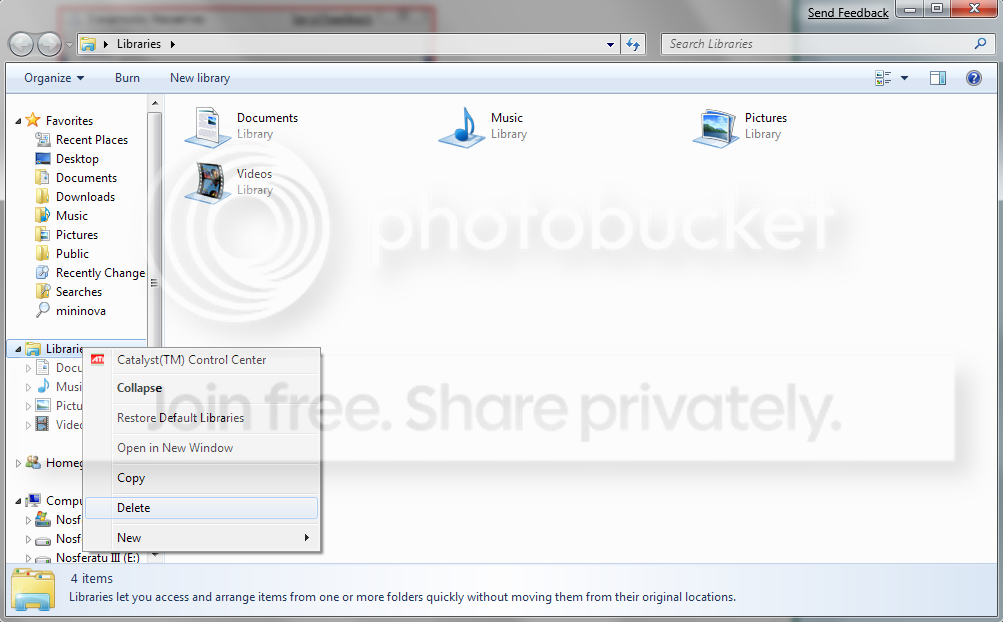
Try deleting the 'Documents' Library completely, then create a new one and remap.
 

My Computer

Computer Manufacturer/Model Number
Self Build
OS
Windows 7 Ultimate 64bit
CPU
Intel Xeon 3110 (Same as Core 2 Duo E8400) 3.0Ghz @ 3.6Ghz
Motherboard
Gigabyte EX38-DS4
Memory
8GB G. Skill PC2-8500
Graphics Card(s)
PALiT GeForce 9600 GT PCI Express 2.0
Sound Card
OnBoard - Realtek ALC889A High Definition Audio
Monitor(s) Displays
Dell 24" LCD
Screen Resolution
1920x1200
Hard Drives
Western Digital VelociRaptor WD3000GLFS - 300GB | Western Digital Caviar SE16 WD7500AAKS - 750GB | LaCie d2Next-Quadra external - 1TB
PSU
Corsair HS620W
Case
Lian Li PC-V1100b Plus II
Cooling
Thermalright Ultra 120 eXtreme
Keyboard
Logitech
Mouse
Logitech MX Laser
Internet Speed
SLOW - HughesNet Satellite Internet - SUCKS!
Hi fillup,

I've been trying to find a way to delete the "Documents" library but to no avail, how to do this exactly?

I know this can easily be done on XP and Vista and solves this issue but the library feature is quite new in Windows 7 and I can't seem to locate the holder :(

Maybe you can point where its at?
 

My Computer

Computer Manufacturer/Model Number
Custom Build
OS
Windows 7 Build 7048 x64
CPU
Athlon 64 X2 Dual Core 4600+
Motherboard
EMX-AMD750G-PRO
Memory
4 x 1GB Kingston 400MHz 6-6-6-18 (800MHz)
Graphics Card(s)
ATI Radeon 3650
Sound Card
Realtek HD Audio
Monitor(s) Displays
22" AOC 2216Vw
Screen Resolution
1680x1050
Cooling
Arctic Cooling Freezer 64 Pro PWM
Keyboard
Generic Enhanced Natural Keyboard
Mouse
Logitech VX Nano
Other Info
Edifier M1550
Never mind. Found it!

Untitled.png


There you go...

This just might work.
dsoposy, please try and delete this and might solve your problem ;)

I haven't tried this myself so, please make sure you back up your files, just to be safe.

Nice suggestion fillup :)
 

My Computer

Computer Manufacturer/Model Number
Custom Build
OS
Windows 7 Build 7048 x64
CPU
Athlon 64 X2 Dual Core 4600+
Motherboard
EMX-AMD750G-PRO
Memory
4 x 1GB Kingston 400MHz 6-6-6-18 (800MHz)
Graphics Card(s)
ATI Radeon 3650
Sound Card
Realtek HD Audio
Monitor(s) Displays
22" AOC 2216Vw
Screen Resolution
1680x1050
Cooling
Arctic Cooling Freezer 64 Pro PWM
Keyboard
Generic Enhanced Natural Keyboard
Mouse
Logitech VX Nano
Other Info
Edifier M1550
Problem Solved

Try going to control panel> folder options
There are three tabs; General, View and Search
Go go View and click on Reset Folders and then Reset Defaults
Try accessing your Documents folder again

If that doesn't work, I strongly suggest doing a Repair Install to fix this issue. Instructions are available here
It's like doing a fresh install but without the hassle and it doesn't take a long time to complete ;)

Let us know how this works out for you...

I went ahead with the Repair Install as you suggested. (My reasoning against trying Fillups approach was that something clearly had gone wrong with the installation for me to have this problem in the first place, so my hope is that the Repair Install fixes anything else that did not install correctly with my original Upgrade install.) 4 1/2 hours later, the Repair Install completed and the Documents Library is now functioning correctly!

Thanks for your help!

Unfortunately, my other problem (X-Fi Crackling and Popping) still persists. Any ideas on that one?
 

My Computer

Computer Manufacturer/Model Number
Dell XPS/Dimension 600 /Model Dell DXG051
OS
Windows 7 Professional 64-bit
CPU
Pentium D 3.20 GHz (Intel64 Family 15 Model 4 Stepping 4)
Motherboard
nVidia nForce4 SLIx16; Dell Phoenix BIOS PLUS v1.10 A11
Memory
6GB 667 MHz DDR2 + ~4GB ReadyBoost
Graphics Card(s)
OEM nVidia Geoforce 6800 256MB
Sound Card
OEM X-Fi XtremeMusic (Model SB0467); OEM Realtek AC'97
Monitor(s) Displays
Dell 2007FP (21" Flat Screen)
Screen Resolution
1600 x 1200 x 32-bit
Hard Drives
3, Maxtor 7 L250S0 SCSI Disk Device 232.8Gb;
NVIDIA STRIPE 465.66G;
HL-DT-ST DVD+-RW GWA4164B ATA Device;
TSSTcorp DVD-ROM TS-H352C ATA Device
Internet Speed
Cable - 5164/3161 per recent DSL Reports test
Other Info
Pinnacle PCTV 800i; Logitech QuickCam Ultravision Pro
Just to let you know, I lost My Pictures Library yesterday and I've been trying to fix it ever since.
I was adding a folder to the Pictures library when it just kinda hung with the progress bar slowly moving thru the breadcrumb bar...and then it stopped. Now it's not recognized as a Library anymore and it won't open at all. Properties is unavailable thru normal channels and when I nav to the hidden folder for libraries, I can get a properties page but the Libraries Tab is missing so there's no "Restore Default Library" option available.

I've been trying to figure out a way to restore it without resorting to deleting it and rebuilding a new library for the Pictures...there has to be some way to do it.

I think it's just a Beta bug of course, and I've seen others that have posted about this on other sites, but no definitive answers anywhere..yet. I'm gonna figure this out the hard way come He[[ or high water (or until I get sick & tired of it..)
 

My Computer

Computer Manufacturer/Model Number
Personal Build
OS
Vista Ult 64bit - Windows 7 Ult 7264 64bit
CPU
Intel Core 2 Duo E6750
Motherboard
Asus Commando
Memory
4 G's Crucial Ballistix Tracer
Graphics Card(s)
BFG Nvidia 8800 GTS 340
Sound Card
Creative Sound Blaster X-FI Platinum FATAL1TY
Monitor(s) Displays
2-22" HP W2207 LCD
Screen Resolution
1920 x 1080
Hard Drives
3 x 500G WD Caviar SATA II
PSU
Enermax Noise Taker II 600W
Case
NZXT Lexa Classic (dual doored & windowed)
Cooling
Zalman 9700 CPU cooler - 4 x 120mm, 1 x 90mm fans
Keyboard
Logitech MX 5500
Mouse
Logitech MX Revolution
Internet Speed
Blazing...
Just to let you know, I lost My Pictures Library yesterday and I've been trying to fix it ever since.
I was adding a folder to the Pictures library when it just kinda hung with the progress bar slowly moving thru the breadcrumb bar...and then it stopped. Now it's not recognized as a Library anymore and it won't open at all. Properties is unavailable thru normal channels and when I nav to the hidden folder for libraries, I can get a properties page but the Libraries Tab is missing so there's no "Restore Default Library" option available.

I've been trying to figure out a way to restore it without resorting to deleting it and rebuilding a new library for the Pictures...there has to be some way to do it.

I think it's just a Beta bug of course, and I've seen others that have posted about this on other sites, but no definitive answers anywhere..yet. I'm gonna figure this out the hard way come He[[ or high water (or until I get sick & tired of it..)

It's just an XML file (this is my Pictures library):

Code:
<?xml version="1.0" encoding="UTF-8"?>
<libraryDescription>
<name>@shell32.dll,-34595</name>
<ownerSID>S-1-5-21-336492276-748903644-40737299-1011</ownerSID>
<version>1</version>
<isLibraryPinned>-1</isLibraryPinned>
<iconReference>imageres.dll,-1003</iconReference>
<templateInfo>
<folderType>{b3690e58-e961-423b-b687-386ebfd83239}</folderType>
</templateInfo>
<searchConnectorDescriptionList>
<searchConnectorDescription publisher="Microsoft" product="Windows">
<description>@shell32.dll,-34597</description>
<isDefaultSaveLocation>-1</isDefaultSaveLocation>
<simpleLocation>
<url>knownfolder:{33E28130-4E1E-4676-835A-98395C3BC3BB}</url>
<serialized>MBAAAEAFCAAAAAAAADAAAAAAAY0gAAQARAAAAQ6XARuDImcAW1jzZ+AiJHgV94cmPgYyBAAoAAAAAAAABAAAAAAAAAAAAAAAAAAAAcPAUAwHQB+TQDi66kGEiiNCAsCMw0ZGA8CR6wFAAAAAAAAAAAAAAAAAAAAAAAAAKBQMAAAAAAAAAAAAQAQTptWZAAgNAgAAEAw7+CAAAAAAAAAAqAAAAAAAAAAAAAAAAAAAAAAAAAAAAAAAAAQTAkGArBQZAAAAUAgfAEDAAAAAAYkOyASEAAVajRXdyV2cAAgZAgAAEAw7+akOP8hR6IDIqAAAA8KaAAAAAUAAAAAAAAAAAAAPAAAAAAAUAkGAjBAdAUHAyBQZAMHAAAAQAMHAoBQZAwGAsBwMAIDAuAAZAwGAsBALA0CAyAQMAgDAyAANAAAAYAAAAMEAAAAHAAAABAAAAwBAAAQMAAAAAAAAAIEAAAQFAAAADAAAAEYkkbKEAAAAEFGdhBAR6wVTptWZcBVajRXdyV2cAAAEAAAAFAAAgeCAAAQ9AAAAcAAAAsAAAAKMBK+Me4kdGNoWYmDX7M8u1DAAAEJAAAQCAAAoFCAAAEzUQNl4KilR8yEODtL/TMpJY2mzpBAAAQAAAAAAfAAAAsCAAAwUA0CAxAQLAUDAtAgMAEDAtAwMAMDA2AANAkDAyAgMAcDA2AQLAcDA0AAOAkDAwAwMAYDA0AANA0CA0AAMAcDAzAwNAIDA5AQOA0CAxAAMAEDAxAAAAAAAAAAAAAAAAAAYAAAADAAAgiFAAAAAAAAAvJXav52NAAAAAAAAAAAAAwNcN3y9tJ+RjGsXREDBdGwaocD5AQf3RMKmAoRTShdMcDXztcfbif0oB7VExQQnBsGK3QOA03dEjiJAa0kUYHDAAAAA</serialized>
</simpleLocation>
</searchConnectorDescription>
<searchConnectorDescription publisher="Microsoft" product="Windows">
<description>@shell32.dll,-34599</description>
<isDefaultNonOwnerSaveLocation>-1</isDefaultNonOwnerSaveLocation>
<simpleLocation>
<url>knownfolder:{B6EBFB86-6907-413C-9AF7-4FC2ABF07CC5}</url>
<serialized>MBAAAEAFCAAAAAAAADAAAAAAAY0gAAQARAAAA00TVWu+clcA6byRS+NXJHw3jknkfzVyBAAAAAAAAAAABAAAAAAAAAAAAAAAAAAAAkUAUAwHQB+TQDi66kGEiiNCAsCMw0ZGA8yQ6wFAAAAAAAAAAAAAAAAAAAAAAAAAMBQMAAAAAAAAAAAAQAQVzVmczBAOAgAAEAw7+CAAAAAAAAAAqAAAAAAAAAAAAAAAAAAAAAAAAAAAAAAAAAQVAMHAlBgcAMHAAAAFAAFAxAAAAAAAAAAAAABAQVnYsl2YAAgOAgAAEAw7+CAAAAAAAAAAqAAAAAAAAAAAAAAAAAAAAAAAAAAAAAAAAAAUAUHAiBAbAkGAjBAAAYBA+BQMAAAAAAQj542JRAAUpNGd1JXZzBAAmBACAQAAv7bj5IeQNmTbnoCAAAAxCAAAAAQAAAAAAAAAAAAA8AAAAAAAQBQaAMGA0BQdAIHAlBwcAAAAABwcAgGAlBAbAwGAzAgMA4CAkBAbAwGAsAQLAIDAxAAOAADAyAAAAgBAAAwaAAAAcAAAAMAAAAAHAAAAuAAAAgDAAAwWAAAASAAAAMAAAAQkoyDxQAAAAcDADpDXVNXZyNHXAMCAAAgAAAAAUAAAAAAAAAAAAIAAcx1TSl0TOdDXVNXZyNHAQVnYsl2YcBVajRXdyV2cAABAAAQBAAAo2AAAAcUAAAAHAAAALAAAga4+rb7BpxTQae/TCvK88V8RBAAARCAAAkAAAAahAAAAxMFUTJuiYZEvMhzQ7y/ETaCmt5caAAAAEAAAAAwHAAAArAAAAMFAtAQMA0CA1AQLAIDAxAQLAMDAzAgNAQDA5AgMAIDA3AgNA0CA3AANAgDA5AAMAMDA2AANAQDAtAANAADA3AwMAcDAyAQOAkDAtAQMAADAxAQMAAAAAAAAAAAAAAAAAAGAAAwAAAAoYBAAAAAAAAwbyl2budDAAAAAAAAAAAAASwrvrKo4WBkvljQQoCaI/rkwAo9Qz3dE/SIAa0kUYHjE867qCKuVA5b5IEEqgGy/KJMAaP08dHxvECgGNJF2xAAAAAA</serialized>
</simpleLocation>
</searchConnectorDescription>
</searchConnectorDescriptionList>
</libraryDescription>

Perhaps paste yours and we can fix it? Look in %appdata%\Microsoft\Windows\Libraries right click and open with... notepad

Edit: Figured out how to make a new one -- take the XML above and cut out everything in the <searchConnectorDescriptionList> tag. Edit a working library and copy your <ownerSID>...</ownerSID> tag from it to replace my SID above. Save and you should have a new empty working Music library. Add what folders you wish and you're off and running!
 
Last edited:

My Computer

Computer type
Laptop
Computer Manufacturer/Model Number
Apple
OS
El Capitan / Windows 10
CPU
i7-4980HQ
Memory
16GB
Graphics Card(s)
Iris 5200
There is one thing that I have noticed about the Libraries feature of Windows 7 that may be of use to those having problems with it.

The Search Indexer that everybody loves to hate.

The Libraries feature only works properly if your Search Index is up to date, so if you have for whatever reason turned of the indexer, or it is not yet done it's job, then libraries will not work correctly.

Maybe this will help with some of the problems that other posters have been having?
 

My Computer

Computer type
PC/Desktop
Computer Manufacturer/Model Number
Virtual Machine
OS
Windows 7 Professional 32-bit SP1
CPU
AMD A4/A6
Motherboard
Intel Corporation 440BX Desktop Reference Platform
Memory
3.00GB EDO
Graphics Card(s)
VMware SVGA 3D
Sound Card
High Definition Audio Device
Monitor(s) Displays
Generic Non-PnP Monitor on VMware SVGA 3D
Screen Resolution
1440x900
Hard Drives
1 x 60GB VMware Virtual SATA Hard Drive ATA Device
Antivirus
Kaspersky Total Security
Hey

@ Baarod - Thanx bud! Mine is no longer an xml file apparently, and that's probably where the problem exists.
First thing I did notice was that your user ID was in the file so I knew that had to go...
I'll throw that into a text file and make the edits. I'll let you know how it works out.

@ Dzomlija - Indexer is up to date so that's not my issue, but that should help some others probably..mine just seemed to barf when adding a folder to monitor. Beta bugs eh
 

My Computer

Computer Manufacturer/Model Number
Personal Build
OS
Vista Ult 64bit - Windows 7 Ult 7264 64bit
CPU
Intel Core 2 Duo E6750
Motherboard
Asus Commando
Memory
4 G's Crucial Ballistix Tracer
Graphics Card(s)
BFG Nvidia 8800 GTS 340
Sound Card
Creative Sound Blaster X-FI Platinum FATAL1TY
Monitor(s) Displays
2-22" HP W2207 LCD
Screen Resolution
1920 x 1080
Hard Drives
3 x 500G WD Caviar SATA II
PSU
Enermax Noise Taker II 600W
Case
NZXT Lexa Classic (dual doored & windowed)
Cooling
Zalman 9700 CPU cooler - 4 x 120mm, 1 x 90mm fans
Keyboard
Logitech MX 5500
Mouse
Logitech MX Revolution
Internet Speed
Blazing...
Mine is no longer an xml file apparently, and that's probably where the problem exists.

The open with option only appears when you access the real folder containing the libraries not when you access the virtual folder. Do a Win+R and paste %appdata%\Microsoft\Windows\Libraries then right click the busted library. The shell doesn't know squat about the file content at that point so there's no reason the open with... option should be hidden when you get to the library source from there.
 

My Computer

Computer type
Laptop
Computer Manufacturer/Model Number
Apple
OS
El Capitan / Windows 10
CPU
i7-4980HQ
Memory
16GB
Graphics Card(s)
Iris 5200
Baarod

Here's an screenie of my Pictures Library xml file

Kinda says it all doesn't it....:huh:

(yes, I know where the Library file is...;) )
 

Attachments

  • Picture Library.jpg
    Picture Library.jpg
    8 KB · Views: 11

My Computer

Computer Manufacturer/Model Number
Personal Build
OS
Vista Ult 64bit - Windows 7 Ult 7264 64bit
CPU
Intel Core 2 Duo E6750
Motherboard
Asus Commando
Memory
4 G's Crucial Ballistix Tracer
Graphics Card(s)
BFG Nvidia 8800 GTS 340
Sound Card
Creative Sound Blaster X-FI Platinum FATAL1TY
Monitor(s) Displays
2-22" HP W2207 LCD
Screen Resolution
1920 x 1080
Hard Drives
3 x 500G WD Caviar SATA II
PSU
Enermax Noise Taker II 600W
Case
NZXT Lexa Classic (dual doored & windowed)
Cooling
Zalman 9700 CPU cooler - 4 x 120mm, 1 x 90mm fans
Keyboard
Logitech MX 5500
Mouse
Logitech MX Revolution
Internet Speed
Blazing...
Hmm..it also may look like deleting the

HKEY_CLASSES_ROOT\Local Settings\Software\Microsoft\Windows\Shell\BagMRU
HKEY_CLASSES_ROOT\Local Settings\Software\Microsoft\Windows\Shell\Bags

keys and rebooting may also rebuild the library files, but I'm not saying that for certain just yet, I'll have to test this on a test instll first.

Edit - Baarod my friend..can you edit your post to wrap that line to the page please, this thread is wayyyyy over off my screen >>>> and my eyes are going buggy :confused:
 

My Computer

Computer Manufacturer/Model Number
Personal Build
OS
Vista Ult 64bit - Windows 7 Ult 7264 64bit
CPU
Intel Core 2 Duo E6750
Motherboard
Asus Commando
Memory
4 G's Crucial Ballistix Tracer
Graphics Card(s)
BFG Nvidia 8800 GTS 340
Sound Card
Creative Sound Blaster X-FI Platinum FATAL1TY
Monitor(s) Displays
2-22" HP W2207 LCD
Screen Resolution
1920 x 1080
Hard Drives
3 x 500G WD Caviar SATA II
PSU
Enermax Noise Taker II 600W
Case
NZXT Lexa Classic (dual doored & windowed)
Cooling
Zalman 9700 CPU cooler - 4 x 120mm, 1 x 90mm fans
Keyboard
Logitech MX 5500
Mouse
Logitech MX Revolution
Internet Speed
Blazing...
Eek! There's a lot of other stuff in those property bags -- I'd use caution (and a backup)!
 

My Computer

Computer type
Laptop
Computer Manufacturer/Model Number
Apple
OS
El Capitan / Windows 10
CPU
i7-4980HQ
Memory
16GB
Graphics Card(s)
Iris 5200
Can I get someone else to post their Pictures Library xml file for comparison please? I need to make sure that something is consistent across machines, or whether I need to edit it for my own.
Location - %user appdata%\Roaming\Microsoft\Windows\Libraries
Thanx
 

My Computer

Computer Manufacturer/Model Number
Personal Build
OS
Vista Ult 64bit - Windows 7 Ult 7264 64bit
CPU
Intel Core 2 Duo E6750
Motherboard
Asus Commando
Memory
4 G's Crucial Ballistix Tracer
Graphics Card(s)
BFG Nvidia 8800 GTS 340
Sound Card
Creative Sound Blaster X-FI Platinum FATAL1TY
Monitor(s) Displays
2-22" HP W2207 LCD
Screen Resolution
1920 x 1080
Hard Drives
3 x 500G WD Caviar SATA II
PSU
Enermax Noise Taker II 600W
Case
NZXT Lexa Classic (dual doored & windowed)
Cooling
Zalman 9700 CPU cooler - 4 x 120mm, 1 x 90mm fans
Keyboard
Logitech MX 5500
Mouse
Logitech MX Revolution
Internet Speed
Blazing...
Hi Baarod

Yah..Bags folders in there can be quite big, but that's something definitely destined for a TEST install 4 sure!!

Edit - Thanx Barrod! That was driving me bonkers with having to scroll to find the Reply box
 

My Computer

Computer Manufacturer/Model Number
Personal Build
OS
Vista Ult 64bit - Windows 7 Ult 7264 64bit
CPU
Intel Core 2 Duo E6750
Motherboard
Asus Commando
Memory
4 G's Crucial Ballistix Tracer
Graphics Card(s)
BFG Nvidia 8800 GTS 340
Sound Card
Creative Sound Blaster X-FI Platinum FATAL1TY
Monitor(s) Displays
2-22" HP W2207 LCD
Screen Resolution
1920 x 1080
Hard Drives
3 x 500G WD Caviar SATA II
PSU
Enermax Noise Taker II 600W
Case
NZXT Lexa Classic (dual doored & windowed)
Cooling
Zalman 9700 CPU cooler - 4 x 120mm, 1 x 90mm fans
Keyboard
Logitech MX 5500
Mouse
Logitech MX Revolution
Internet Speed
Blazing...
Back
Top