Solved wifi not working when computer wakes up from sleep

kf10

New member
Member
VIP
Local time
3:59 PM
Messages
469
i had this problem on win7 laptop, instead of shutting down the computer i put it to sleep, so that laptop awakes faster,

however sometime when i wake up the wifi adapter dont work, meaning that when i goto network and sharing center the wifi adapter is not shown, so i have to reboot the system for wifi to work.

this is only happening in my Dell A860 Vostro Laptop running win7

i have HP laptop running win8, and i never ecnountered this problem on HP
 

My Computer My Computer

Computer type
PC/Desktop
Computer Manufacturer/Model Number
Dell Vostro A860 laptop
OS
Win 7 home premium 32 bit
CPU
1.6 GHz dual core
Memory
3GB
Hard Drives
160GB
Internet Speed
4Mbps
Antivirus
AVG
Browser
chrome
Hello mate I am assuming you have done these
SFC /SCANNOW Command - System File Checker
Disk Check < if necessary include the /f and /r in the command line as per Option2

Now starting the machine are you leaving it in sleep mode because it takes a long time to get to the desktop??
 

My Computer My Computer

Computer type
PC/Desktop
Computer Manufacturer/Model Number
Own build (new) Desk1 / Asus ROG Win 7 / Desk2 1st build
OS
Desk1 7 Home Prem / Desk2 10 Pro / Main lap Asus ROG 10 Pro 2 laptop Toshiba 7 Pro Asus P2520 7 & 10
CPU
Desk1 i5 3750K / Laptop i7 GTX 860M / Desk2 i5 2500
Motherboard
Desk1 Asus P877-V / Desk2 Gigabyte H67 UD3H / Laptop ?
Memory
Desk1 8GB (1866) / Desk2 16GB (1333) / Laptop 8Gb DDR3
Graphics Card(s)
Desk 1& 2NVidia GTX 650 & Laptops on board Intel
Sound Card
Desk 1 & 2 -XONAR DG Realtek High Def audio Laptop
Monitor(s) Displays
Desk 1 Benq HD 2450 / Desk2 Philips 24" / Laptop 17.5"
Screen Resolution
1920x1080 D1 & D2 & Laptop 1
Hard Drives
Desk1 Samsung 120GB 830 SSD
Asus ROG 256GB 850 Pro SSD
Desk2 Samsung 840 256 SSD
Toshiba 120GB EVO
PSU
Desk 1 Corsair HX 1050/ Laptop ? / Desk 2 Corsair HX 650
Case
Desk 1 Cooler HAF XM ? Toshiba laptop / Desk2 Coolermaster
Cooling
Fans on all Desk1 -2 Desk2 - all Coolermasters 5 Laptop ?
Keyboard
Desk 1 MS Sidewinder X6 Desk 2 MS Sidewinder X 4
Mouse
Desk 1&2 - Gigabyte MS 900 gamer - laptop - Logitec wireless
Internet Speed
ADSL2+
Other Info
One other Desktop (tester) and spare Toshba laptop both with SSD's
Running Kaspersky 2016 ISS on all machines config'd identically
Logitec audio stereo systems on each machine (x3)
Canon MG5250MFC
Router/modem TP-Link running WPA2SK
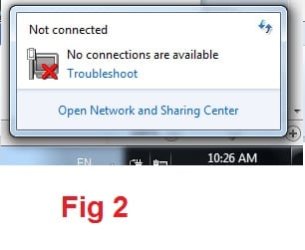
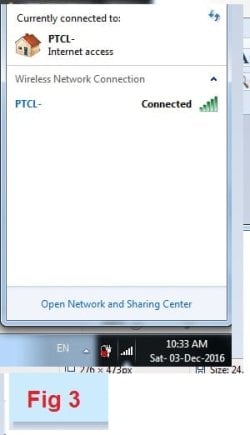
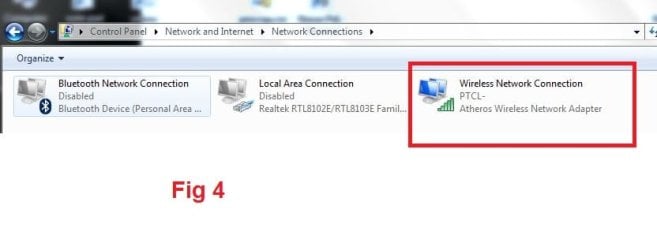
fig 1 and 2 shows that wifi adapter is not available and after reboot fig 3 and 4 shows wifi connected to PTCL- netwrok and wifi adapter visible in network and sharing center
 

Attachments

  • wifi 1.JPG
    wifi 1.JPG
    27.4 KB · Views: 1
  • wifi 2.JPG
    wifi 2.JPG
    10.8 KB · Views: 27
  • wifi 3.jpg
    wifi 3.jpg
    15.5 KB · Views: 27
  • wifi 4.JPG
    wifi 4.JPG
    29.7 KB · Views: 2

My Computer My Computer

Computer type
PC/Desktop
Computer Manufacturer/Model Number
Dell Vostro A860 laptop
OS
Win 7 home premium 32 bit
CPU
1.6 GHz dual core
Memory
3GB
Hard Drives
160GB
Internet Speed
4Mbps
Antivirus
AVG
Browser
chrome
Hello mate I am assuming you have done these
SFC /SCANNOW Command - System File Checker
Disk Check < if necessary include the /f and /r in the command line as per Option2

Now starting the machine are you leaving it in sleep mode because it takes a long time to get to the desktop??

Dear ICIT2LOL

can you please explain in detail how these 2 command will help in solving the wifi adapter not visible issue because this issues arises only once in a while

SFC /SCANNOW
Disk Check


i also didnt understood your following sentence, can you explain in simple english

Now starting the machine are you leaving it in sleep mode because it takes a long time to get to the desktop?

instead of shutting down i choose sleep so that laptop wakes up faster from sleep then from booting up

Thanks
 

My Computer My Computer

Computer type
PC/Desktop
Computer Manufacturer/Model Number
Dell Vostro A860 laptop
OS
Win 7 home premium 32 bit
CPU
1.6 GHz dual core
Memory
3GB
Hard Drives
160GB
Internet Speed
4Mbps
Antivirus
AVG
Browser
chrome
Try going to Device Manager>Network adapters>right click your wifi adapter, click on Properties. The Properties window will pop up. Click the Power Management tab. Uncheck "Allow this computer to turn off this device to save power".
 

My Computer My Computer

Computer type
Laptop
Computer Manufacturer/Model Number
Alienware
OS
Windows 7 Home Premium 64bit
CPU
iNTEL Core i7 2630QM 2GHz
Memory
8GB
Graphics Card(s)
NVIDIA GeForce GT 555M
Hard Drives
INTEL SSDSC2CW240A3
Antivirus
Windows Defender
Browser
Google Chrome
Try going to Device Manager>Network adapters>right click your wifi adapter, click on Properties. The Properties window will pop up. Click the Power Management tab. Uncheck "Allow this computer to turn off this device to save power".

Dear TrustMe
I uncheck the option if i still have problem i will report here agian.

Thanks for the advice
with love from your buddy
 

My Computer My Computer

Computer type
PC/Desktop
Computer Manufacturer/Model Number
Dell Vostro A860 laptop
OS
Win 7 home premium 32 bit
CPU
1.6 GHz dual core
Memory
3GB
Hard Drives
160GB
Internet Speed
4Mbps
Antivirus
AVG
Browser
chrome
Hello
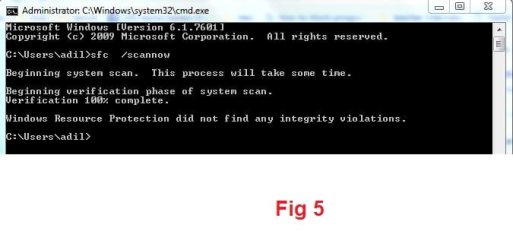
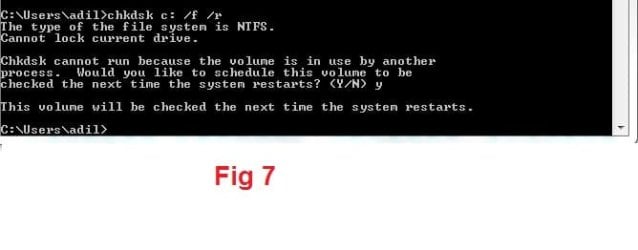
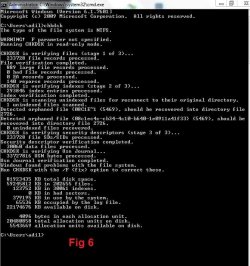
i have run both the following commands


SFC /SCANNOW
Disk Check


see the screen shots
 

Attachments

  • wifi 5.JPG
    wifi 5.JPG
    28.5 KB · Views: 25
  • wifi 7.JPG
    wifi 7.JPG
    23.6 KB · Views: 26
  • wifi 6.JPG
    wifi 6.JPG
    75.3 KB · Views: 27

My Computer My Computer

Computer type
PC/Desktop
Computer Manufacturer/Model Number
Dell Vostro A860 laptop
OS
Win 7 home premium 32 bit
CPU
1.6 GHz dual core
Memory
3GB
Hard Drives
160GB
Internet Speed
4Mbps
Antivirus
AVG
Browser
chrome
i have run both these commands

SFC /SCANNOW
Disk Check

and i also Uncheck "Allow this computer to turn off this device to save power".

but still the same problem,

one more problem pop up, when i inserted usb drive, it didnt show up in my computer

so i have to reboot the laptop and then wifi and usb drive was fine
 

My Computer My Computer

Computer type
PC/Desktop
Computer Manufacturer/Model Number
Dell Vostro A860 laptop
OS
Win 7 home premium 32 bit
CPU
1.6 GHz dual core
Memory
3GB
Hard Drives
160GB
Internet Speed
4Mbps
Antivirus
AVG
Browser
chrome
Ok mate sorry late reply the scans were just to make sure the system OS was in correct working order and that there were no corrupt files lying around because a few corrupt files could possibly be what is causing your issue/s - it is something I always check first if my machines are playing up.

Now the other query was in other words because possibly my terms were not clear - do you put the machine to sleep - simply to make it wake up in a full booted manner ie your desktop / login? because my machines all wake up to login with just a touch on the mouse click button - usually sometimes even knocking the table or desk the machine is resting will do just that.

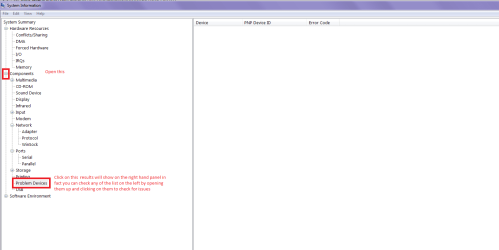
Now one other thing you can do is to go into Start> type "msinfo32" (without the quotation marks) > open it and go through the various sub categories and look for problems within the different components. One I always look for is Problem devices see my pic
 

Attachments

  • MSINFO.PNG
    MSINFO.PNG
    19.8 KB · Views: 3

My Computer My Computer

Computer type
PC/Desktop
Computer Manufacturer/Model Number
Own build (new) Desk1 / Asus ROG Win 7 / Desk2 1st build
OS
Desk1 7 Home Prem / Desk2 10 Pro / Main lap Asus ROG 10 Pro 2 laptop Toshiba 7 Pro Asus P2520 7 & 10
CPU
Desk1 i5 3750K / Laptop i7 GTX 860M / Desk2 i5 2500
Motherboard
Desk1 Asus P877-V / Desk2 Gigabyte H67 UD3H / Laptop ?
Memory
Desk1 8GB (1866) / Desk2 16GB (1333) / Laptop 8Gb DDR3
Graphics Card(s)
Desk 1& 2NVidia GTX 650 & Laptops on board Intel
Sound Card
Desk 1 & 2 -XONAR DG Realtek High Def audio Laptop
Monitor(s) Displays
Desk 1 Benq HD 2450 / Desk2 Philips 24" / Laptop 17.5"
Screen Resolution
1920x1080 D1 & D2 & Laptop 1
Hard Drives
Desk1 Samsung 120GB 830 SSD
Asus ROG 256GB 850 Pro SSD
Desk2 Samsung 840 256 SSD
Toshiba 120GB EVO
PSU
Desk 1 Corsair HX 1050/ Laptop ? / Desk 2 Corsair HX 650
Case
Desk 1 Cooler HAF XM ? Toshiba laptop / Desk2 Coolermaster
Cooling
Fans on all Desk1 -2 Desk2 - all Coolermasters 5 Laptop ?
Keyboard
Desk 1 MS Sidewinder X6 Desk 2 MS Sidewinder X 4
Mouse
Desk 1&2 - Gigabyte MS 900 gamer - laptop - Logitec wireless
Internet Speed
ADSL2+
Other Info
One other Desktop (tester) and spare Toshba laptop both with SSD's
Running Kaspersky 2016 ISS on all machines config'd identically
Logitec audio stereo systems on each machine (x3)
Canon MG5250MFC
Router/modem TP-Link running WPA2SK
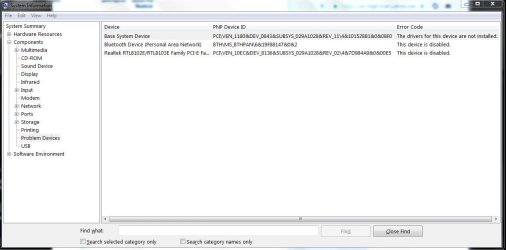
what is a base system means

i have disabled the ethernet and bluetooth adapter

yes i put the computer to sleep so that it awakes up faster
 

Attachments

  • Capture.JPG
    Capture.JPG
    63.2 KB · Views: 2

My Computer My Computer

Computer type
PC/Desktop
Computer Manufacturer/Model Number
Dell Vostro A860 laptop
OS
Win 7 home premium 32 bit
CPU
1.6 GHz dual core
Memory
3GB
Hard Drives
160GB
Internet Speed
4Mbps
Antivirus
AVG
Browser
chrome
Ok well I knew here had to be something amiss within the machine but not sure if it was hardware or software.

Now the Base System is to put it simply one of the many devices within the machine that make the system run properly.
Now this is one reference to this issue Base System Device Error in Device Manager and it is advising that you update he chipset for your laptop and it can be found here Support for Vostro A860 | Dell Australia lets try this first.

Now that we are clear on putting the computer to sleep I have to say that I only use sleep when I have my machines on I never leave them running overnight for example a) I think that that practice is a fire hazard for one and b) a waste of power, having said that I do have a lot of machines:p

Now if you are looking to make your machines run that little bit faster and more efficiently then follow this tutorial Optimize Windows 7 it is my bible when setting machines up and one area is point #16 Menu Show Delay Time

Admittedly if you follow the tutorial to the Nth degree you may lose some of the "bling" for example transparency which I find really unnecessary.

Edit I have referenced the Australian Dell site you might like to Google the Dell site for wherever you are - just enter the laptop model into the Google search box and look for hits on the actual Dell site - don't use "aftermarket" sites for getting the drivers.
 

My Computer My Computer

Computer type
PC/Desktop
Computer Manufacturer/Model Number
Own build (new) Desk1 / Asus ROG Win 7 / Desk2 1st build
OS
Desk1 7 Home Prem / Desk2 10 Pro / Main lap Asus ROG 10 Pro 2 laptop Toshiba 7 Pro Asus P2520 7 & 10
CPU
Desk1 i5 3750K / Laptop i7 GTX 860M / Desk2 i5 2500
Motherboard
Desk1 Asus P877-V / Desk2 Gigabyte H67 UD3H / Laptop ?
Memory
Desk1 8GB (1866) / Desk2 16GB (1333) / Laptop 8Gb DDR3
Graphics Card(s)
Desk 1& 2NVidia GTX 650 & Laptops on board Intel
Sound Card
Desk 1 & 2 -XONAR DG Realtek High Def audio Laptop
Monitor(s) Displays
Desk 1 Benq HD 2450 / Desk2 Philips 24" / Laptop 17.5"
Screen Resolution
1920x1080 D1 & D2 & Laptop 1
Hard Drives
Desk1 Samsung 120GB 830 SSD
Asus ROG 256GB 850 Pro SSD
Desk2 Samsung 840 256 SSD
Toshiba 120GB EVO
PSU
Desk 1 Corsair HX 1050/ Laptop ? / Desk 2 Corsair HX 650
Case
Desk 1 Cooler HAF XM ? Toshiba laptop / Desk2 Coolermaster
Cooling
Fans on all Desk1 -2 Desk2 - all Coolermasters 5 Laptop ?
Keyboard
Desk 1 MS Sidewinder X6 Desk 2 MS Sidewinder X 4
Mouse
Desk 1&2 - Gigabyte MS 900 gamer - laptop - Logitec wireless
Internet Speed
ADSL2+
Other Info
One other Desktop (tester) and spare Toshba laptop both with SSD's
Running Kaspersky 2016 ISS on all machines config'd identically
Logitec audio stereo systems on each machine (x3)
Canon MG5250MFC
Router/modem TP-Link running WPA2SK

Attachments

  • dell chipset 2.JPG
    dell chipset 2.JPG
    29.8 KB · Views: 0
  • dell chipset.JPG
    dell chipset.JPG
    46.8 KB · Views: 1

My Computer My Computer

Computer type
PC/Desktop
Computer Manufacturer/Model Number
Dell Vostro A860 laptop
OS
Win 7 home premium 32 bit
CPU
1.6 GHz dual core
Memory
3GB
Hard Drives
160GB
Internet Speed
4Mbps
Antivirus
AVG
Browser
chrome
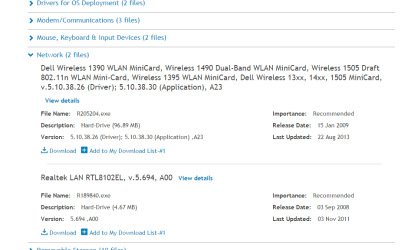
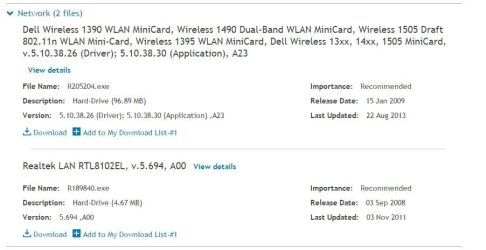
kf10 mate you did not go down far enough on that support site they are under Network;)

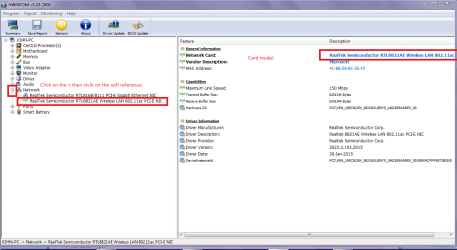
If these do not work then hunt down the card manufacturer using this
Using HW Info
PART A:
You can test the volts on the PSU with HW Info HWiNFO, HWiNFO32/64 - Download < download the right bit version and close the right hand window select Sensors and scroll down to the power section where you will see what the volts are doing see my pic. In my pic the section (Nuvoton) with VBATT as a dead give away you are in the section for the rail voltages. There are other section titles and one that pops up often is ITE (sometimes the usual one for Gigabyte boards)
Now the voltage on the different rails have to be within 5% =+/- of what is required or the machine will not work properly if at all.
Limits +/-
12v = 11.4 – 12.6v
5v = 4.74 – 5.25v
3.3v = 3.135 – 3.465v
The Power good signal voltage at pin 8 on the 24 pin plug (grey cable) should be the same as the 5v rail reading/s
See this for the rail voltage info
PSUs 101: A Detailed Look Into Power Supplies (Section 2.)
The original right hand window shows the machine running and is handy for that but for looking at the components in some detail close it and use the main left hand side panel
FOR OTHER COMPONENTS
PART B:
Open each small square with + in it on the section the components are in and then click on the individual component/s (it will highlight in blue) - in the right hand side will appear all sorts of details including brands speeds and other essential info that particular device. See pic for example.

Use Part B: let us know what that model is if you cannot find it
 

Attachments

  • NET.PNG
    NET.PNG
    24.8 KB · Views: 1
  • NET 2.PNG
    NET 2.PNG
    36.5 KB · Views: 1

My Computer My Computer

Computer type
PC/Desktop
Computer Manufacturer/Model Number
Own build (new) Desk1 / Asus ROG Win 7 / Desk2 1st build
OS
Desk1 7 Home Prem / Desk2 10 Pro / Main lap Asus ROG 10 Pro 2 laptop Toshiba 7 Pro Asus P2520 7 & 10
CPU
Desk1 i5 3750K / Laptop i7 GTX 860M / Desk2 i5 2500
Motherboard
Desk1 Asus P877-V / Desk2 Gigabyte H67 UD3H / Laptop ?
Memory
Desk1 8GB (1866) / Desk2 16GB (1333) / Laptop 8Gb DDR3
Graphics Card(s)
Desk 1& 2NVidia GTX 650 & Laptops on board Intel
Sound Card
Desk 1 & 2 -XONAR DG Realtek High Def audio Laptop
Monitor(s) Displays
Desk 1 Benq HD 2450 / Desk2 Philips 24" / Laptop 17.5"
Screen Resolution
1920x1080 D1 & D2 & Laptop 1
Hard Drives
Desk1 Samsung 120GB 830 SSD
Asus ROG 256GB 850 Pro SSD
Desk2 Samsung 840 256 SSD
Toshiba 120GB EVO
PSU
Desk 1 Corsair HX 1050/ Laptop ? / Desk 2 Corsair HX 650
Case
Desk 1 Cooler HAF XM ? Toshiba laptop / Desk2 Coolermaster
Cooling
Fans on all Desk1 -2 Desk2 - all Coolermasters 5 Laptop ?
Keyboard
Desk 1 MS Sidewinder X6 Desk 2 MS Sidewinder X 4
Mouse
Desk 1&2 - Gigabyte MS 900 gamer - laptop - Logitec wireless
Internet Speed
ADSL2+
Other Info
One other Desktop (tester) and spare Toshba laptop both with SSD's
Running Kaspersky 2016 ISS on all machines config'd identically
Logitec audio stereo systems on each machine (x3)
Canon MG5250MFC
Router/modem TP-Link running WPA2SK
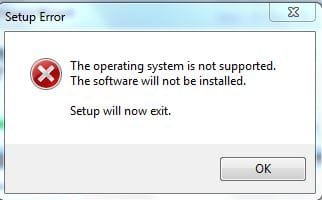
i couldnt find atheros driver on dell website, so i downloaded the first option in networking driver R205204.exe but when i try to isntall it, it should said Operating system is not supported see the screen shot. i am using 32bit windows7
 

Attachments

  • wifi 9.JPG
    wifi 9.JPG
    48.4 KB · Views: 0
  • wifi 10.JPG
    wifi 10.JPG
    14.9 KB · Views: 11

My Computer My Computer

Computer type
PC/Desktop
Computer Manufacturer/Model Number
Dell Vostro A860 laptop
OS
Win 7 home premium 32 bit
CPU
1.6 GHz dual core
Memory
3GB
Hard Drives
160GB
Internet Speed
4Mbps
Antivirus
AVG
Browser
chrome
Dear ICIT2LOL
Thanks a lot for your help
if the problem arises again, i will post update here

take care n love
bye

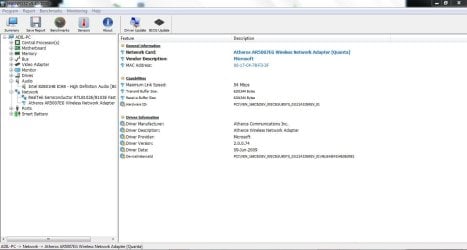
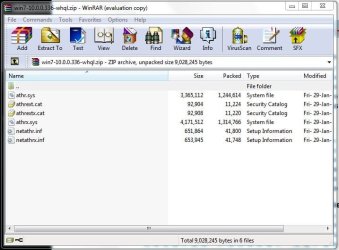
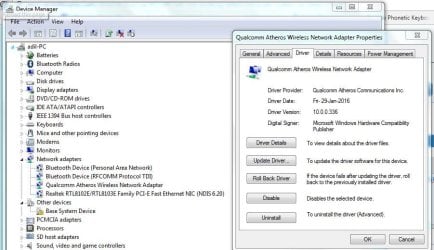
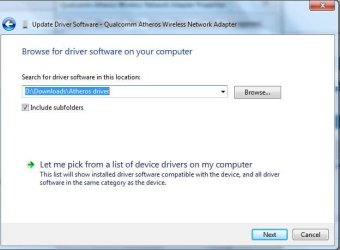
ok i have upgraded the drivers from Select Qualcomm Atheros wireless driver for AR5007EG wifi adpater
and then i was able to install the new drivers from device manager

see the screen shots
 

Attachments

  • wifi 12.JPG
    wifi 12.JPG
    76.8 KB · Views: 1
  • wifi 13.JPG
    wifi 13.JPG
    56.9 KB · Views: 1
  • wifi 15.JPG
    wifi 15.JPG
    78.4 KB · Views: 0
  • wifi 16.JPG
    wifi 16.JPG
    36.3 KB · Views: 11

My Computer My Computer

Computer type
PC/Desktop
Computer Manufacturer/Model Number
Dell Vostro A860 laptop
OS
Win 7 home premium 32 bit
CPU
1.6 GHz dual core
Memory
3GB
Hard Drives
160GB
Internet Speed
4Mbps
Antivirus
AVG
Browser
chrome

My Computer My Computer

Computer type
PC/Desktop
Computer Manufacturer/Model Number
Own build (new) Desk1 / Asus ROG Win 7 / Desk2 1st build
OS
Desk1 7 Home Prem / Desk2 10 Pro / Main lap Asus ROG 10 Pro 2 laptop Toshiba 7 Pro Asus P2520 7 & 10
CPU
Desk1 i5 3750K / Laptop i7 GTX 860M / Desk2 i5 2500
Motherboard
Desk1 Asus P877-V / Desk2 Gigabyte H67 UD3H / Laptop ?
Memory
Desk1 8GB (1866) / Desk2 16GB (1333) / Laptop 8Gb DDR3
Graphics Card(s)
Desk 1& 2NVidia GTX 650 & Laptops on board Intel
Sound Card
Desk 1 & 2 -XONAR DG Realtek High Def audio Laptop
Monitor(s) Displays
Desk 1 Benq HD 2450 / Desk2 Philips 24" / Laptop 17.5"
Screen Resolution
1920x1080 D1 & D2 & Laptop 1
Hard Drives
Desk1 Samsung 120GB 830 SSD
Asus ROG 256GB 850 Pro SSD
Desk2 Samsung 840 256 SSD
Toshiba 120GB EVO
PSU
Desk 1 Corsair HX 1050/ Laptop ? / Desk 2 Corsair HX 650
Case
Desk 1 Cooler HAF XM ? Toshiba laptop / Desk2 Coolermaster
Cooling
Fans on all Desk1 -2 Desk2 - all Coolermasters 5 Laptop ?
Keyboard
Desk 1 MS Sidewinder X6 Desk 2 MS Sidewinder X 4
Mouse
Desk 1&2 - Gigabyte MS 900 gamer - laptop - Logitec wireless
Internet Speed
ADSL2+
Other Info
One other Desktop (tester) and spare Toshba laptop both with SSD's
Running Kaspersky 2016 ISS on all machines config'd identically
Logitec audio stereo systems on each machine (x3)
Canon MG5250MFC
Router/modem TP-Link running WPA2SK
the wifi porblem has not occured since i upgraded the wifi drivers

thanks all of you

love n take care
 

My Computer My Computer

Computer type
PC/Desktop
Computer Manufacturer/Model Number
Dell Vostro A860 laptop
OS
Win 7 home premium 32 bit
CPU
1.6 GHz dual core
Memory
3GB
Hard Drives
160GB
Internet Speed
4Mbps
Antivirus
AVG
Browser
chrome
Back
Top