My pc seems to be running hot?

Regun

New member
Local time
1:43 PM
Messages
15
Location
MN
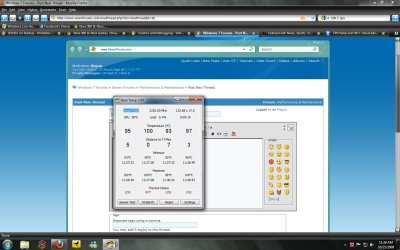
Is my pc running way hotter than it should? What would be the best fix? I mean the thing has 4 fans....

moz-screenshot-1.png


Or is 100 C normal >.>
 

Attachments

  • PC TEMP.jpg
    PC TEMP.jpg
    126.6 KB · Views: 530
Last edited:

My Computer My Computer

At a glance

Windows 7 Ultimate and Windows Vista UltimateIntel core I7 ~ 2.7Ghz4gb DDR3Nvidia 7900 GTX
OS
Windows 7 Ultimate and Windows Vista Ultimate
CPU
Intel core I7 ~ 2.7Ghz
Motherboard
EVGA X58
Memory
4gb DDR3
Graphics Card(s)
Nvidia 7900 GTX
Monitor(s) Displays
Samsung- SyncMaster 953bw
Screen Resolution
1440x900
Hard Drives
1tb WD
Case
Altech 900
Keyboard
Razer - Lycosa
Mouse
Logitech G9
Internet Speed
http://www.speedtest.net/result/602345614.png
Is my pc running way hotter than it should? What would be the best fix? I mean the thing has 4 fans....

moz-screenshot-1.png


Or is 100 C normal >.>

Definately NOT GOOD. It might be as simple as blowing out the entire insides with compressed air. It could also mean the thermal paste between the cpu and heat sink needs to be replaced, etc.

First thing a good blowing out with the computer unplugged and a visual expression of the case, cpu, video card. If you are running 64bit there are some hardware/software combos that conflict in the power plan

Let us know if we can help

Ken
 

My Computer My Computer

At a glance

Win 8 Release candidate 8400[email protected]4 gigsNvidia 9600M
Computer Manufacturer/Model Number
HP Pavillion dv-7 1005 Tx
OS
Win 8 Release candidate 8400
CPU
[email protected]
Memory
4 gigs
Graphics Card(s)
Nvidia 9600M
Sound Card
HD built-in
Monitor(s) Displays
17" Wxga
Screen Resolution
1440x900
Cooling
none
Internet Speed
45Mb down 5Mb up
ive actually found my laptop to be getting really hot after upgading to 7, its a brand new laptop so dust cant be the problem, but since upgrading its suddenly become very hot..... any ideas on how to fix it?
 

My Computer My Computer

At a glance

Windows 7 Home Premium 32-bitAMD athlon X2 2.13GB
Computer Manufacturer/Model Number
HP Compaq
OS
Windows 7 Home Premium 32-bit
CPU
AMD athlon X2 2.1
Memory
3GB
100 C is too hot and above Intel's max rating according to this page.

Did you have another OS on this hardware before Windows 7? What CPU temperature did you see with that OS?

Check that all your fans are in fact spinning, especially the fan on the CPU cooler. Fans can get jammed or unplugged. Make sure that hot air is actually being exhausted from the case. A failed CPU fan on a small heatsink can cause a large temperature rise. If your heatsink is large, and the other fans are working, passive cooling would probably keep the CPU lower than 100 C even with a failed CPU fan.

You could try downloading SpeedFan and see if it reports different temperatures. I'm not familiar with Real Temp and have seen spurious data from temperature reporting programs in the past. Also, reboot and enter Setup. Setup should report temperatures on some setting page.

If you turn the computer off and place your fingers near the CPU, you should feel a lot of heat if 100 C is the actual temperature. But be careful, 100 C is scalding hot and you would burn your finger if you touched something that hot.

If this is a newly installed system and you confirm the temperature report, thermal paste and heatsink mounting is where I would look. Maybe one of the heatsink mounting brackets is loose? Any air gap between the CPU and the heatsink caused by thermal paste separation or improper tightening could easily cause CPU overheating in a very short time.

Guy
 

My Computer My Computer

At a glance

Win 7-32, XP Pro-32Xeon 3070 (2.66 GHz)4 GBPowerColor ATI Radeon HD 5750 (fanless)
Computer Manufacturer/Model Number
home-built
OS
Win 7-32, XP Pro-32
CPU
Xeon 3070 (2.66 GHz)
Motherboard
Asus P5W DH Deluxe, BIOS 2901
Memory
4 GB
Graphics Card(s)
PowerColor ATI Radeon HD 5750 (fanless)
Sound Card
on-board
Monitor(s) Displays
Dell U2711
Screen Resolution
2560x1440
Hard Drives
All SATA:
ICH7R (AHCI): 1 Intel X-25M 80GB SSD, 2 Samsung HD103UJ 1TB, 1 Seagate ST3750330MS 750GB;
JMB363: Samsung SH-S223L DVD;
Promise TX4302: two mobile racks, normally powered off
PSU
Seasonic SS-650HT
Case
Antec P180
Cooling
Sunbeam Tuniq Tower 120, 4 120mm fans (variable rpm)
Keyboard
Lexmark IBM Type "M" - PS/2 connector
Mouse
Wacom Intous4, Logitech Wheel Mouse as backup
Internet Speed
Cable ~ 6 mbps
Other Info
DVD: Samsung SH-S223L (SATA),
SanDisk CompactFlash reader,
Epson R280 printer,
HP Laserjet 4100dtn,
Epson scanner,
NeatReceipts scanner

Laptops: Dell XPS 15 L501x, Dell E5420
Hey ken,

After letting my pc sit turned off all day, I turned it back on to find that it said it was running at the same high temps. The computer doesn't seem to be pushing out hot air or anything. It seems as if it should be room temp.

Maybe windows 7 or my I7 motherboard conflicts with the program? What do you think?
 

My Computer My Computer

At a glance

Windows 7 Ultimate and Windows Vista UltimateIntel core I7 ~ 2.7Ghz4gb DDR3Nvidia 7900 GTX
OS
Windows 7 Ultimate and Windows Vista Ultimate
CPU
Intel core I7 ~ 2.7Ghz
Motherboard
EVGA X58
Memory
4gb DDR3
Graphics Card(s)
Nvidia 7900 GTX
Monitor(s) Displays
Samsung- SyncMaster 953bw
Screen Resolution
1440x900
Hard Drives
1tb WD
Case
Altech 900
Keyboard
Razer - Lycosa
Mouse
Logitech G9
Internet Speed
http://www.speedtest.net/result/602345614.png
ive actually found my laptop to be getting really hot after upgading to 7, its a brand new laptop so dust cant be the problem, but since upgrading its suddenly become very hot..... any ideas on how to fix it?
On my Core 2 Duo desktop system, I was surprised to find that Intel Speedstep was not working with Windows 7 but had worked fine with Windows XP. I had to go into the BIOS and enable both EIST and C1 (I think that was the name for the other parameter), while XP worked fine with just EIST enabled.

Speedstep is a way for the OS to reduce power to the CPU when demand on the CPU is less. My CPU probably runs at 60% power 98% of the time. I would imagine that the heat difference resulting from running at 100% power would be even more noticeable in a laptop.

CPU-Z will report the actual speed of your CPU. Watch it with your system idle and confirm that the processor has slowed down.

If you have an AMD chip, then I think the equivalent feature is called Cool 'n Quiet. I haven't personally used an AMD system with Windows 7 so don't know if any equivalent issue might happen with it.

Guy
 

My Computer My Computer

At a glance

Win 7-32, XP Pro-32Xeon 3070 (2.66 GHz)4 GBPowerColor ATI Radeon HD 5750 (fanless)
Computer Manufacturer/Model Number
home-built
OS
Win 7-32, XP Pro-32
CPU
Xeon 3070 (2.66 GHz)
Motherboard
Asus P5W DH Deluxe, BIOS 2901
Memory
4 GB
Graphics Card(s)
PowerColor ATI Radeon HD 5750 (fanless)
Sound Card
on-board
Monitor(s) Displays
Dell U2711
Screen Resolution
2560x1440
Hard Drives
All SATA:
ICH7R (AHCI): 1 Intel X-25M 80GB SSD, 2 Samsung HD103UJ 1TB, 1 Seagate ST3750330MS 750GB;
JMB363: Samsung SH-S223L DVD;
Promise TX4302: two mobile racks, normally powered off
PSU
Seasonic SS-650HT
Case
Antec P180
Cooling
Sunbeam Tuniq Tower 120, 4 120mm fans (variable rpm)
Keyboard
Lexmark IBM Type "M" - PS/2 connector
Mouse
Wacom Intous4, Logitech Wheel Mouse as backup
Internet Speed
Cable ~ 6 mbps
Other Info
DVD: Samsung SH-S223L (SATA),
SanDisk CompactFlash reader,
Epson R280 printer,
HP Laserjet 4100dtn,
Epson scanner,
NeatReceipts scanner

Laptops: Dell XPS 15 L501x, Dell E5420
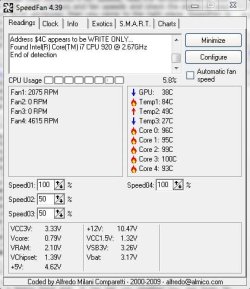
Here is my speedfan result


100 C is too hot and above Intel's max rating according to this page.

Did you have another OS on this hardware before Windows 7? What CPU temperature did you see with that OS?

Check that all your fans are in fact spinning, especially the fan on the CPU cooler. Fans can get jammed or unplugged. Make sure that hot air is actually being exhausted from the case. A failed CPU fan on a small heatsink can cause a large temperature rise. If your heatsink is large, and the other fans are working, passive cooling would probably keep the CPU lower than 100 C even with a failed CPU fan.

You could try downloading SpeedFan and see if it reports different temperatures. I'm not familiar with Real Temp and have seen spurious data from temperature reporting programs in the past. Also, reboot and enter Setup. Setup should report temperatures on some setting page.

If you turn the computer off and place your fingers near the CPU, you should feel a lot of heat if 100 C is the actual temperature. But be careful, 100 C is scalding hot and you would burn your finger if you touched something that hot.

If this is a newly installed system and you confirm the temperature report, thermal paste and heatsink mounting is where I would look. Maybe one of the heatsink mounting brackets is loose? Any air gap between the CPU and the heatsink caused by thermal paste separation or improper tightening could easily cause CPU overheating in a very short time.

Guy
 

Attachments

  • speedfan.JPG
    speedfan.JPG
    43.6 KB · Views: 78

My Computer My Computer

At a glance

Windows 7 Ultimate and Windows Vista UltimateIntel core I7 ~ 2.7Ghz4gb DDR3Nvidia 7900 GTX
OS
Windows 7 Ultimate and Windows Vista Ultimate
CPU
Intel core I7 ~ 2.7Ghz
Motherboard
EVGA X58
Memory
4gb DDR3
Graphics Card(s)
Nvidia 7900 GTX
Monitor(s) Displays
Samsung- SyncMaster 953bw
Screen Resolution
1440x900
Hard Drives
1tb WD
Case
Altech 900
Keyboard
Razer - Lycosa
Mouse
Logitech G9
Internet Speed
http://www.speedtest.net/result/602345614.png
Maybe windows 7 or my I7 motherboard conflicts with the program?
That's always a possibility. See if EVGA has a temperature reporting program for your motherboard.

Also, after seeing a hot temperature from Real Temp or Speedfan, reboot, enter setup, and see what temperature the BIOS reports. It should be about the same because the CPU won't cool off that much just by rebooting.

Is your motherboard a new model? Did you build the computer yourself recently, or did someone else?

Did you check temperatures on this same computer with a previous OS?

On your SpeedFan report, Temp2 looks like a typical hard drive temperature, Temp3 like a case temperature, and GPU looks plausible. The core temperatures seem the same as Real Temp reported.

It is usually possible to tailor Speedfan for your motherboard. Go to the Info tab, press Get Config, and it points you to the web page to start looking for a Speedfan configuration for your specific motherboard. As people develop configurations, they upload them to the Speedfan site. You may have to try several to find a good fit.

I also recommend a Google search for your exact motherboard and temperature reporting to see if there are any known issues.

Guy
 

My Computer My Computer

At a glance

Win 7-32, XP Pro-32Xeon 3070 (2.66 GHz)4 GBPowerColor ATI Radeon HD 5750 (fanless)
Computer Manufacturer/Model Number
home-built
OS
Win 7-32, XP Pro-32
CPU
Xeon 3070 (2.66 GHz)
Motherboard
Asus P5W DH Deluxe, BIOS 2901
Memory
4 GB
Graphics Card(s)
PowerColor ATI Radeon HD 5750 (fanless)
Sound Card
on-board
Monitor(s) Displays
Dell U2711
Screen Resolution
2560x1440
Hard Drives
All SATA:
ICH7R (AHCI): 1 Intel X-25M 80GB SSD, 2 Samsung HD103UJ 1TB, 1 Seagate ST3750330MS 750GB;
JMB363: Samsung SH-S223L DVD;
Promise TX4302: two mobile racks, normally powered off
PSU
Seasonic SS-650HT
Case
Antec P180
Cooling
Sunbeam Tuniq Tower 120, 4 120mm fans (variable rpm)
Keyboard
Lexmark IBM Type "M" - PS/2 connector
Mouse
Wacom Intous4, Logitech Wheel Mouse as backup
Internet Speed
Cable ~ 6 mbps
Other Info
DVD: Samsung SH-S223L (SATA),
SanDisk CompactFlash reader,
Epson R280 printer,
HP Laserjet 4100dtn,
Epson scanner,
NeatReceipts scanner

Laptops: Dell XPS 15 L501x, Dell E5420
I checked BIOS and here is what I have for temps

CPU 84C
NB 46C
VREG 50C
System 26C

I shall talk a look at the speedfan configs you were talking about. Do you think updating my BIOS could make things better?
 

My Computer My Computer

At a glance

Windows 7 Ultimate and Windows Vista UltimateIntel core I7 ~ 2.7Ghz4gb DDR3Nvidia 7900 GTX
OS
Windows 7 Ultimate and Windows Vista Ultimate
CPU
Intel core I7 ~ 2.7Ghz
Motherboard
EVGA X58
Memory
4gb DDR3
Graphics Card(s)
Nvidia 7900 GTX
Monitor(s) Displays
Samsung- SyncMaster 953bw
Screen Resolution
1440x900
Hard Drives
1tb WD
Case
Altech 900
Keyboard
Razer - Lycosa
Mouse
Logitech G9
Internet Speed
http://www.speedtest.net/result/602345614.png
The first step I would take would be to confirm that the CPU was actually hot. Check the CPU fan and make sure it is spinning and that the heatsink still seems to be mounted properly. See if the heatsink of the CPU cooler is hot. See if you can tell if the CPU itself is hot, but don't burn yourself. The CPU is hidden by the heatsink, so it may be hard to sense directly.

If the machine is new and under warranty, call your support person. If you built it yourself, check the heat sink mounting.

If you suspect the BIOS is misreporting the temperature, then a BIOS update might make a difference. If that is happening, I would expect that you would be able to find references to the problem using Google.

Since Real Temp, SpeedFan, and BIOS all report similar numbers, a SpeedFan configuration would make the display prettier but probably wouldn't affect the reported temperature.

fwiw, Real Temp reports Core temperature, while SpeedFan reports both CPU and Core temperatures. Core temps are usually 5 or so degrees higher than CPU temps. At 100 C Core temp, a Core i7 is supposed to start shutting/slowing down because of thermal overload. But I've never had that happen personally, so that statement is based on web research not personal experience.

Good luck!
 

My Computer My Computer

At a glance

Win 7-32, XP Pro-32Xeon 3070 (2.66 GHz)4 GBPowerColor ATI Radeon HD 5750 (fanless)
Computer Manufacturer/Model Number
home-built
OS
Win 7-32, XP Pro-32
CPU
Xeon 3070 (2.66 GHz)
Motherboard
Asus P5W DH Deluxe, BIOS 2901
Memory
4 GB
Graphics Card(s)
PowerColor ATI Radeon HD 5750 (fanless)
Sound Card
on-board
Monitor(s) Displays
Dell U2711
Screen Resolution
2560x1440
Hard Drives
All SATA:
ICH7R (AHCI): 1 Intel X-25M 80GB SSD, 2 Samsung HD103UJ 1TB, 1 Seagate ST3750330MS 750GB;
JMB363: Samsung SH-S223L DVD;
Promise TX4302: two mobile racks, normally powered off
PSU
Seasonic SS-650HT
Case
Antec P180
Cooling
Sunbeam Tuniq Tower 120, 4 120mm fans (variable rpm)
Keyboard
Lexmark IBM Type "M" - PS/2 connector
Mouse
Wacom Intous4, Logitech Wheel Mouse as backup
Internet Speed
Cable ~ 6 mbps
Other Info
DVD: Samsung SH-S223L (SATA),
SanDisk CompactFlash reader,
Epson R280 printer,
HP Laserjet 4100dtn,
Epson scanner,
NeatReceipts scanner

Laptops: Dell XPS 15 L501x, Dell E5420
I found out the problem! It was actually a pin on my CPU cooler that was not plugged in all the way through my MB. Not an issue with windows 7 or anything.

Thanks you!
 

My Computer My Computer

At a glance

Windows 7 Ultimate and Windows Vista UltimateIntel core I7 ~ 2.7Ghz4gb DDR3Nvidia 7900 GTX
OS
Windows 7 Ultimate and Windows Vista Ultimate
CPU
Intel core I7 ~ 2.7Ghz
Motherboard
EVGA X58
Memory
4gb DDR3
Graphics Card(s)
Nvidia 7900 GTX
Monitor(s) Displays
Samsung- SyncMaster 953bw
Screen Resolution
1440x900
Hard Drives
1tb WD
Case
Altech 900
Keyboard
Razer - Lycosa
Mouse
Logitech G9
Internet Speed
http://www.speedtest.net/result/602345614.png
Back
Top