Windows 7, corrupt? Got myself into a mess, help!

facebook

New member
Local time
12:25 PM
Messages
5
Here's what happened. A user tried hibernating the machine (no idea why) and subsequently it got stuck in a boot loop where the machine wouldn't progress past the bios logo and the hit X to enter setup. I literally couldn't even hold down F8 before it would reboot and the loop would start again.

So I used the inbuilt system utilities to run a HDD diagnostic, and after 2 hours of that it checked out fine.

I grabbed hirens boot USB, loaded into that and changed the windows folder to windowsX. Rebooted, Lo and behold, the boot progressed this time to windows recovery. I let the recovery do its auto repair and I was back in windows.

Suprisingly, it wasn't smart enough to name windowsX to back to windows. It just created another windows folder with some rubbish in it.

So I went back into my boot USB. Changed it back manually to windows and rebooted. Unfortunately, windows is still confused and I get a boot menu now with two Windows 7 (recovered) options. One is from a previous install, which I don't use. Although it's hard to distingish which is which.

But anyway, when it boots I now get put on to a temporary profile. Any idea how I can get out of this mess, please?

Thanks.
 

My Computer My Computer

Computer type
PC/Desktop
Computer Manufacturer/Model Number
HP 6830s
OS
32 7
Hello and welcome facebook mate just boot into safe mode and run these
SFC /SCANNOW Command - System File Checker
Disk Check < if necessary include the /f and /r in the command line as per Option2 (if you are going to use the /r switch there is no need for the /f switch)
Run these in safe mode and the sfc often best run for two to three runs – you can leave out the /r switch in ckdsk if you feel it not necessary

Now the other thing you can also try in safe mode is a system restore to a point before you used all that stuff because I think what you have done with checks etc is just to really confuse the system as to what it is supposed to be doing.

Now for what it is worth when you test drives etc always best to go for some of the recognised tests as I find the Windows features like drive testing and updating drivers leaves a lot to be desired.
 

My Computer My Computer

Computer type
PC/Desktop
Computer Manufacturer/Model Number
Own build (new) Desk1 / Asus ROG Win 7 / Desk2 1st build
OS
Desk1 7 Home Prem / Desk2 10 Pro / Main lap Asus ROG 10 Pro 2 laptop Toshiba 7 Pro Asus P2520 7 & 10
CPU
Desk1 i5 3750K / Laptop i7 GTX 860M / Desk2 i5 2500
Motherboard
Desk1 Asus P877-V / Desk2 Gigabyte H67 UD3H / Laptop ?
Memory
Desk1 8GB (1866) / Desk2 16GB (1333) / Laptop 8Gb DDR3
Graphics Card(s)
Desk 1& 2NVidia GTX 650 & Laptops on board Intel
Sound Card
Desk 1 & 2 -XONAR DG Realtek High Def audio Laptop
Monitor(s) Displays
Desk 1 Benq HD 2450 / Desk2 Philips 24" / Laptop 17.5"
Screen Resolution
1920x1080 D1 & D2 & Laptop 1
Hard Drives
Desk1 Samsung 120GB 830 SSD
Asus ROG 256GB 850 Pro SSD
Desk2 Samsung 840 256 SSD
Toshiba 120GB EVO
PSU
Desk 1 Corsair HX 1050/ Laptop ? / Desk 2 Corsair HX 650
Case
Desk 1 Cooler HAF XM ? Toshiba laptop / Desk2 Coolermaster
Cooling
Fans on all Desk1 -2 Desk2 - all Coolermasters 5 Laptop ?
Keyboard
Desk 1 MS Sidewinder X6 Desk 2 MS Sidewinder X 4
Mouse
Desk 1&2 - Gigabyte MS 900 gamer - laptop - Logitec wireless
Internet Speed
ADSL2+
Other Info
One other Desktop (tester) and spare Toshba laptop both with SSD's
Running Kaspersky 2016 ISS on all machines config'd identically
Logitec audio stereo systems on each machine (x3)
Canon MG5250MFC
Router/modem TP-Link running WPA2SK
Try an external boot that has a file manager to delete hiberfil.sys -- that will delete that pesky hibernation file. Now, the challenge is: to return your Windows back to the proper directory, delete the parallel directory, which perhaps you have already done?
 

My Computer My Computer

Computer type
PC/Desktop
Computer Manufacturer/Model Number
Antec desktop; Acer Aspire laptops
OS
Windows 7 Professional 64-bit
CPU
Desktop i5; Acers i5 & i7
Memory
desktop 16GB; 1 Acer 8GB & 1 Acer 16GB
Hard Drives
1TB split into 2 equal partitions [OS and data] usable by RJS
Internet Speed
AT&T DSL
Browser
FF, GChrome, msIE
Other Info
Windows 7 Firewall, Emsisoft AM/AV, MSE [scan-only], SpywareBlaster, Ruiware/BillP combine
Please edit your profile with ALL your hardware specs.

When you renamed windowsX back to windows, what did you do with the Windows folder created by the recover?
Is you C: drive a UEFI-GPT or a Legacy -MBR?

If you're logged to a temporary profile look if under C:\Users you still have your name.
 

My Computers My Computers

System One System Two

  • Computer type
    PC/Desktop
    Computer Manufacturer/Model Number
    custom build
    OS
    Windows 7 HP 64
    CPU
    i5 6600K - 800MHz to 4200MHz
    Motherboard
    GA-Z170-HD3P
    Memory
    4+4G GSkill DDR4 3000
    Graphics Card(s)
    IG - Intel 530
    Monitor(s) Displays
    Samsung 226BW
    Screen Resolution
    1680x1050
    Hard Drives
    (1) -1 SM951 – 128GB M.2 AHCI PCIe SSD drive for Windows 7 and Lubuntu
    (2) -1 WD SATA 3 - 1T for Data
    (3) -1 WD SATA 3 - 1T for backup
    PSU
    Thermaltake 450W TR2 gold
    Keyboard
    Old and good Chicony mechanical keyboard
    Mouse
    Logitech mX performance - 9 buttons (had to disable some)
    Internet Speed
    500Mb/s
    Browser
    Firefox 64
    Other Info
    TinyWall firewall
  • Computer type
    Laptop
    System Manufacturer/Model Number
    Asus Q550LF
    OS
    Windows 7 Pro
    CPU
    i7-4500U 800MHz to 3.0GHz
    Motherboard
    Asus Q550LF
    Memory
    (4+4)G DDR3 1600
    Graphics Card(s)
    IG intel 4400 + NVIDIA GeForce GT 745M
    Sound Card
    Realtek
    Monitor(s) Displays
    LG Display LP156WF4-SPH1
    Screen Resolution
    1920 x 1080
    Hard Drives
    BX500 120G SSD for Windows and programs +
    1T HDD for data
    Internet Speed
    500 Mb/s
    Browser
    Firefox
    Other Info
    TinyWall firewall
Hello and welcome facebook mate just boot into safe mode and run these
SFC /SCANNOW Command - System File Checker
Disk Check < if necessary include the /f and /r in the command line as per Option2 (if you are going to use the /r switch there is no need for the /f switch)
Run these in safe mode and the sfc often best run for two to three runs – you can leave out the /r switch in ckdsk if you feel it not necessary

Now the other thing you can also try in safe mode is a system restore to a point before you used all that stuff because I think what you have done with checks etc is just to really confuse the system as to what it is supposed to be doing.

Now for what it is worth when you test drives etc always best to go for some of the recognised tests as I find the Windows features like drive testing and updating drivers leaves a lot to be desired.

Did this, thanks. Fixed somewhat, what I'm not sure as windows still isn't right. System restore might be an option...!

Try an external boot that has a file manager to delete hiberfil.sys -- that will delete that pesky hibernation file. Now, the challenge is: to return your Windows back to the proper directory, delete the parallel directory, which perhaps you have already done?

Here's what's weird. I've got two windows directories. I can change them now to whatever I like. I've no idea how windows is booting. When I hit the boot menu before windows loads, it tells me one of my directories is corrupt (one which I renamed windowsJ) I've since changed that to something else yet it's still referring back to the windows folder as that.

I'm confused, if there's any other suggestions here i'd appreciate it. Thanks.
 

My Computer My Computer

Computer type
PC/Desktop
Computer Manufacturer/Model Number
HP 6830s
OS
32 7
Please edit your profile with ALL your hardware specs.

When you renamed windowsX back to windows, what did you do with the Windows folder created by the recover?
Is you C: drive a UEFI-GPT or a Legacy -MBR?

If you're logged to a temporary profile look if under C:\Users you still have your name.

I deleted the temporary folder. Not sure how to tell about the UEFI-GPT? In bios it's set as UEFI, though. I wonder if in hirens boot CD there's a MBR editor?
 

My Computer My Computer

Computer type
PC/Desktop
Computer Manufacturer/Model Number
HP 6830s
OS
32 7
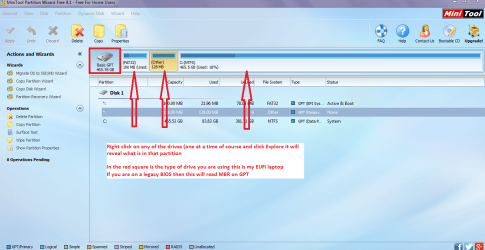
Well you can use tis to see what the drive is set up as Best Free Partition Manager for Windows | MiniTool Partition Free

Now when you have the program up and running you will see the drive type, partitions etc and if you right click on the individual partitions and then go to explore it will tell you just what is in those individual partitions.

Now the boot partitions will not yield much about the info in them some of the other members might know what they mean. I have attached two pics to show you how the program looks like one for a one drive machine and a second fora multi drive machine.
 

Attachments

  • PW.PNG
    PW.PNG
    211.1 KB · Views: 0
  • MINI TOOL EXPLORE.PNG
    MINI TOOL EXPLORE.PNG
    117.8 KB · Views: 0

My Computer My Computer

Computer type
PC/Desktop
Computer Manufacturer/Model Number
Own build (new) Desk1 / Asus ROG Win 7 / Desk2 1st build
OS
Desk1 7 Home Prem / Desk2 10 Pro / Main lap Asus ROG 10 Pro 2 laptop Toshiba 7 Pro Asus P2520 7 & 10
CPU
Desk1 i5 3750K / Laptop i7 GTX 860M / Desk2 i5 2500
Motherboard
Desk1 Asus P877-V / Desk2 Gigabyte H67 UD3H / Laptop ?
Memory
Desk1 8GB (1866) / Desk2 16GB (1333) / Laptop 8Gb DDR3
Graphics Card(s)
Desk 1& 2NVidia GTX 650 & Laptops on board Intel
Sound Card
Desk 1 & 2 -XONAR DG Realtek High Def audio Laptop
Monitor(s) Displays
Desk 1 Benq HD 2450 / Desk2 Philips 24" / Laptop 17.5"
Screen Resolution
1920x1080 D1 & D2 & Laptop 1
Hard Drives
Desk1 Samsung 120GB 830 SSD
Asus ROG 256GB 850 Pro SSD
Desk2 Samsung 840 256 SSD
Toshiba 120GB EVO
PSU
Desk 1 Corsair HX 1050/ Laptop ? / Desk 2 Corsair HX 650
Case
Desk 1 Cooler HAF XM ? Toshiba laptop / Desk2 Coolermaster
Cooling
Fans on all Desk1 -2 Desk2 - all Coolermasters 5 Laptop ?
Keyboard
Desk 1 MS Sidewinder X6 Desk 2 MS Sidewinder X 4
Mouse
Desk 1&2 - Gigabyte MS 900 gamer - laptop - Logitec wireless
Internet Speed
ADSL2+
Other Info
One other Desktop (tester) and spare Toshba laptop both with SSD's
Running Kaspersky 2016 ISS on all machines config'd identically
Logitec audio stereo systems on each machine (x3)
Canon MG5250MFC
Router/modem TP-Link running WPA2SK
Back
Top