
You are using an out of date browser. It may not display this or other websites correctly.
You should upgrade or use an alternative browser.
You should upgrade or use an alternative browser.
WD laptop HDD not loading
- Thread starter prashantsbhatia
- Start date
- Local time
- 6:42 AM
- Messages
- 38
Do a total Windows shutdown. When computer's completely off; remove the problem device and store until jumanji and you resume the next day. He will advise when to stick that HD back in.
Alright that makes sense Roland. I will shutdown my laptop post which I will take out the problem device and keep it aside. Hopefully when I stick it in tomorrow, it shall have same status...
Thank You for all the assistance Jumanji, Jack and Roland...Will catch up tomorrow...
My Computer
- Computer type
- PC/Desktop
- OS
- win 8.1 64 bit
- Local time
- 6:42 AM
- Messages
- 38
OK , Shut down your PC and then remove the drive.
Boot again without the drive and let me know whether the shutdown was successful .
okay sure, give me couple of mins
My Computer
- Computer type
- PC/Desktop
- OS
- win 8.1 64 bit
- Local time
- 6:42 AM
- Messages
- 38
okay sure, give me couple of mins
Shutdown was successful. I have removed the device and kept it aside. We shall resume tomorrow. Good Night!
Anything else before I log off?
My Computer
- Computer type
- PC/Desktop
- OS
- win 8.1 64 bit

- Local time
- 5:12 PM
- Messages
- 5,915
Fine. Now we see atleast three partitions, though RAW.
Tom we shall run Partition Wizard and check what it shows. Download PartitionWizard free edition version 9.1 from here and install it. MiniTool Partition Wizard Free 10.1 Download for Windows / Old Versions / FileHorse.com
No 10.0 or 10.1 only 9.1. Goodnight.
Tom we shall run Partition Wizard and check what it shows. Download PartitionWizard free edition version 9.1 from here and install it. MiniTool Partition Wizard Free 10.1 Download for Windows / Old Versions / FileHorse.com
No 10.0 or 10.1 only 9.1. Goodnight.
My Computer
- OS
- Windows 7 Home Premium 32 bit
- Local time
- 6:42 AM
- Messages
- 38
Fine. Now we see atleast three partitions, though RAW.
Tom we shall run Partition Wizard and check what it shows. Download PartitionWizard free edition version 9.1 from here and install it. MiniTool Partition Wizard Free 10.1 Download for Windows / Old Versions / FileHorse.com
No 10.0 or 10.1 only 9.1. Goodnight.
Thank You sir, I shall do the same. I do have PW downloaded, I will check the version tomorrow and download the right one if I don't have what you have suggested.
Good Nite.
Prashant
My Computer
- Computer type
- PC/Desktop
- OS
- win 8.1 64 bit
- Local time
- 5:12 PM
- Messages
- 5,915
1. Another task for you. TestDisk - If you had downloaded Windows 64-bit version that is not the right one. Delete that TestDisk folder and install the Windows version only. The second in the list here TestDisk Download - CGSecurity
2. Do you have another external drive with atleast 320GB of free space? I would like to have it plugged in before we run TestDisk so that you can copy, if it succeeds listing your files. Grab the data at the first instance. With Laybackbear and RolandJS reminding the disk ticking, I am getting nervous now .
.
It will indeed be very sad if the HDD gives up during the process of this data recovery but then we can't do anything about it except keeping it under rest when not used..
3. Can you identify the three partitions as they were originally? Of course first is System Reserved Partition. What are the other 2 and 3 in order? We shall concentrate on that partition which has your data.
4. Let me know your convenient time when both of us can be online. I would prefer after 4 PM.
5. Are you trying the drive on a laptop or Desktop? Your System spec lists a desktop. Win 8.1 64bit.
2. Do you have another external drive with atleast 320GB of free space? I would like to have it plugged in before we run TestDisk so that you can copy, if it succeeds listing your files. Grab the data at the first instance. With Laybackbear and RolandJS reminding the disk ticking, I am getting nervous now
.It will indeed be very sad if the HDD gives up during the process of this data recovery but then we can't do anything about it except keeping it under rest when not used..
3. Can you identify the three partitions as they were originally? Of course first is System Reserved Partition. What are the other 2 and 3 in order? We shall concentrate on that partition which has your data.
4. Let me know your convenient time when both of us can be online. I would prefer after 4 PM.
5. Are you trying the drive on a laptop or Desktop? Your System spec lists a desktop. Win 8.1 64bit.
Last edited:
My Computer
- OS
- Windows 7 Home Premium 32 bit
- Local time
- 6:42 AM
- Messages
- 38
1. Another task for you. TestDisk - If you had downloaded Windows 64-bit version that is not the right one. Delete that TestDisk folder and install the Windows version only. The second in the list here TestDisk Download - CGSecurity
2. Do you have another external drive with atleast 320GB of free space? I would like to have it plugged in before we run TestDisk so that you can copy, if it succeeds listing your files. Grab the data at the first instance. With Laybackbear and RolandJS reminding the disk ticking, I am getting nervous now
It will indeed be very sad if the HDD gives up during the process of this data recovery but then we can't do anything about it except keeping it under rest when not used..
3. Can you identify the three partitions as they were originally? Of course first is System Reserved Partition. What are the other 2 and 3 in order? We shall concentrate on that partition which has your data.
4. Let me know your convenient time when both of us can be online. I would prefer after 4 PM.
5. Are you trying the drive on a laptop or Desktop? Your System spec lists a desktop. Win 8.1 64bit.
Hello Jumanji,
Thanks for your revert. Shall I first download the partition manager that you spoke about last night and then try out the steps you have outlined in today's post?
Answer to point - 1 --> I think I downloaded the right version the last time around, nevertheless I will delete that testdisk and download the one you have mentioned.
Answer to point - 2 --> Yes, I do have another external HDD with close to 323 GB of free space.
Answer to point - 3 --> I think the partitions showing up in yesterday night's screenshot are more or less what I expected. The first one am assuming would be c drive and second partition is d drive. Priority can be given to c drive for obvious reasons (My data). However it will be perfect if we can recover both.
Answer to point - 4 --> I can be available per your convenience. Do let me know a set time and I shall come online.
Answer to point - 5 --> Long story short, am currently trying this out on my laptop. HP pavilion x360 is the model, has win 10 with 4 GB ram.
My Computer
- Computer type
- PC/Desktop
- OS
- win 8.1 64 bit
- Local time
- 6:42 AM
- Messages
- 38
I am currently uninstalling Minitool PW version 10 and downloading 9.1 per your suggestion. Do let me know if you want me to plug in the defective device and start the scanning process?
My Computer
- Computer type
- PC/Desktop
- OS
- win 8.1 64 bit
- Local time
- 5:12 PM
- Messages
- 5,915
Yes. Download and install PW 9.1.
TestDisk- If you had downloaded and used Windows-64bit version delete it .Then download Windows version of TestDisk.
And answer my queries 2, 3, 4 and 5 in my last post.
TestDisk- If you had downloaded and used Windows-64bit version delete it .Then download Windows version of TestDisk.
And answer my queries 2, 3, 4 and 5 in my last post.
My Computer
- OS
- Windows 7 Home Premium 32 bit
- Local time
- 6:42 AM
- Messages
- 38
Yes. Download and install PW 9.1.
TestDisk- If you had downloaded and used Windows-64bit version delete it .Then download Windows version of TestDisk.
And answer my queries 2, 3, 4 and 5 in my last post.
Yep, I have responded to your queries in post 28. PW 9.1 installed, test disk is also in place.
Anything else I need to do right now before we meet?
Also, what time shall I come online today?
Do let me know and accordingly I will keep everything ready...
Good Day!
My Computer
- Computer type
- PC/Desktop
- OS
- win 8.1 64 bit
- Local time
- 5:12 PM
- Messages
- 5,915
3. Can you identify the three partitions as they were originally? Of course first is System Reserved Partition. What are the other 2 (102.68GB) and 3(195.31GB) in order? We shall concentrate on that partition which has your data. Which one do you want to recover first ?
5. Are you trying the drive on a laptop or Desktop? Your System spec lists a desktop. Win 8.1 64 bit
We shall start at 1600hrs.
5. Are you trying the drive on a laptop or Desktop? Your System spec lists a desktop. Win 8.1 64 bit
We shall start at 1600hrs.
My Computer
- OS
- Windows 7 Home Premium 32 bit
- Local time
- 6:42 AM
- Messages
- 38
3. Can you identify the three partitions as they were originally? Of course first is System Reserved Partition. What are the other 2 (102.68GB) and 3(195.31GB) in order? We shall concentrate on that partition which has your data. Which one do you want to recover first ?
5. Are you trying the drive on a laptop or Desktop? Your System spec lists a desktop. Win 8.1 64 bit
We shall start at 1600hrs.
Priority can be given to 2 (102.68GB).
I am trying the drive on my laptop. I will make the changes to the specs if needed, the reason for those specs there is because I was trying the device on my desktop at that time. Since it did the same thing, I decided to switch back on my laptop and will continue to work on that.
Alright, I will catch up at 1600 hours and am not running any scan as of now in that case.
My Computer
- Computer type
- PC/Desktop
- OS
- win 8.1 64 bit
- Local time
- 5:12 PM
- Messages
- 5,915
No probs. On an external drive that has atleast 100GB free space, create a folder named Recovery. We shall plugin this external drive alongwith your RAW drive before we run TestDisk.
Will see you at 1600hrs.
Will see you at 1600hrs.
My Computer
- OS
- Windows 7 Home Premium 32 bit
- Local time
- 6:42 AM
- Messages
- 38
No probs. On an external drive that has atleast 100GB free space, create a folder named Recovery. We shall plugin this external drive alongwith your RAW drive before we run TestDisk.
Will see you at 1600hrs.
Sure sir, am online and waiting

My Computer
- Computer type
- PC/Desktop
- OS
- win 8.1 64 bit
- Local time
- 6:42 AM
- Messages
- 38
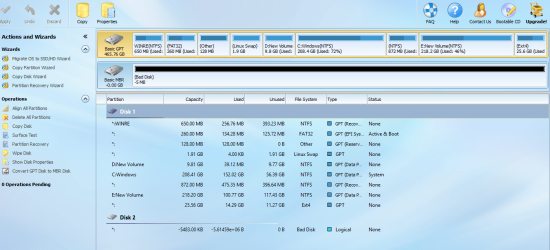
Fine. Now plug in your 320GB RAW drive. Launch Partition Wizard. Post the very first screen that appears showing your system drive and the faulty drive.
Not too encouraging...do you recommend to use bootice again and make the changes?
Attachments
My Computer
- Computer type
- PC/Desktop
- OS
- win 8.1 64 bit
- Local time
- 6:42 AM
- Messages
- 38
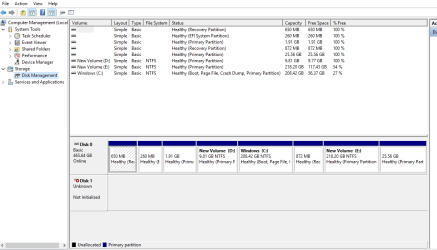
OK, Close Partition Wizard. Run Windows Disk Management and check whether it still shows your drive as RAW with three Partitions.
Nope. :-(
Attachments
My Computer
- Computer type
- PC/Desktop
- OS
- win 8.1 64 bit
- Local time
- 5:12 PM
- Messages
- 5,915
It went back to the previous state. Run bootice and repeat what we had done. If after the operation we could get back the drive showing three RAW partitions in Windows Disk Management, we shall close Windows Disk Management, plug in your destination external drive and start TestDisk.
My Computer
- OS
- Windows 7 Home Premium 32 bit
Similar threads
- Replies
- 7
- Views
- 4K


- Replies
- 2
- Views
- 4K
- Replies
- 4
- Views
- 1K