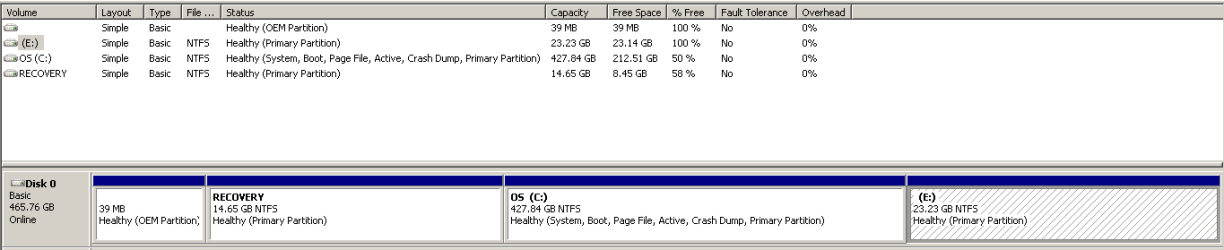
I restored Windows 7 os from recovery disks I made from a different computer
Are we to assume the "different computer" was another, substantially similar Dell? If not, I don't know why you would want to retain the Recovery partition from a different Dell model because it may require different hardware drivers.
The Recovery partition will contain the factory.wim recovery image (in a set of one or more files) for the computer your recovery discs were made from. If that factory image was created for different hardware than the computer it's on now, then the Recovery partition is of less value and it's your choice whether to keep or delete it.
The first partition is the DellUtility partition, which is a pretty much useless artifact from the ME/XP era. Dell continued shipping it on Vista and Win7 computers, and finally eliminated it altogether from their Win8 computers.
It can be deleted, but IMHO there's little point in doing so because it takes up such little space anyway. Sliding or resizing the Recovery partition to incorporate that space is not difficult, but does involve some risk and is time-consuming enough that it's not worth the effort, due to the inconsequential gain.
The only reason to delete it would be because it's taking up a slot in the partition table that you may need for another partition elsewhere on the disk. But in that case, I'd just delete it, leave the space unallocated and not try to reclaim the space.
I've worked on a lot of Dells, but that E: partition isn't normal. I haven't seen factory recovery discs create something like that, so I don't know where it came from. There were some earlier Dells that shipped with a "Backup" partition (besides the Recovery partition), but that was always half the size of the C: partition, and IAC that practice was discontinued before the Win7 era.
What was the size of the source computer's hard drive (from which the recovery discs were made)? I don't think that should make any difference, but it might be worth knowing as a data point.
IAC, if it's accessible to Windows and truly is empty, then it's obviously not essential and can be deleted and the space reallocated.
One thing your screenshot shows that is different from Dell's normal practice is your OS partition is the "Active" partition. That's not how Dell normally shipped Win7 computers. Vista computers were indeed shipped with the OS partition active, but Win7 computers were shipped with the Recovery partition active. I don't know why yours is different, but it might be worth experimenting by setting the Recovery partition active and see what happens. That may be why you're not seeing a factory recovery option on your boot menu.
Beware that you want to alter the active partition from external boot media, so you can reverse the action if necessary to avoid accidentally losing the ability to boot Windows. I recommend using a bootable CD made from the MiniTool Partition Wizard program.