Turbo Tax 2008 won't install in Windows 7 - Help!

Itsdon

New member
Local time
2:20 PM
Messages
31
Up until today I've been thrilled with the compatibility that Windows 7 offers, so much so I killed Vista and have run Win7 as my main (and only) OS.

Today however I ran into my first real problem. TurboTax 2008 will not install. It checks for Windows versions and complains that it didn't find one it likes, fair enough. I then run the compatibility wizard and tell it to install as XP, no go. Then I try Vista, no go. Both of these were with and without administrative rights.

I then diasbled the internet update portion of the program prior to install and.... it worked! Actually, not. It did install but wouldn't run, kept giving me errors like "APPSHORTNAME" and other mysterious messages.

Anyway, has ANYONE been able to get it installed and running? If so, please help!
 

My Computer My Computer

At a glance

7201 64 bit
OS
7201 64 bit
I installed Turbo Tax Premier 2008 yesterday and updated with no issues.
Also used last years Turbo Tax files with no issues on Windows 7.
Not sure what to tell you.
 

My Computer My Computer

At a glance

Windows 7 7022 x86
OS
Windows 7 7022 x86
Just for kicks I tried to install it on my kids laptop which is also running Windows 7, same exact issue. Maybe a bad install CD? I Googled for the problem and didn't find a big outcry which I assumed there would be..... hmmm. I have my UAC tuned off, would that have anything to do with it?
 

My Computer My Computer

At a glance

7201 64 bit
OS
7201 64 bit
Just for kicks I tried to install it on my kids laptop which is also running Windows 7, same exact issue. Maybe a bad install CD? I Googled for the problem and didn't find a big outcry which I assumed there would be..... hmmm. I have my UAC tuned off, would that have anything to do with it?
I would try to install on different OS (if you have one, you should since its beta) to see if its the CD.
 

My Computer My Computer

At a glance

Windows 7 7022 x86
OS
Windows 7 7022 x86
I believe I installed without compatibility, so its got to be your cd.
 

My Computer My Computer

At a glance

Windows 7 7022 x86
OS
Windows 7 7022 x86
Probably shouldn't have killed Vista and used 7 as your only main OS. Should of dual booted just to be able if the need ever be to use things in Vista if they don't work in 7.
 

My Computer My Computer

At a glance

Windows 7 Ultimate x64 SP1Core i7 920 (D0) @ 4Ghz, *26c idle *65c full ...12GB DDR3 Corsair Dominator -CMD12GX3M6A1600C...Zotac Geforce GTX 770
Computer type
PC/Desktop
Computer Manufacturer/Model Number
Airbot 2.0
OS
Windows 7 Ultimate x64 SP1
CPU
Core i7 920 (D0) @ 4Ghz, *26c idle *65c full load on air
Motherboard
Asus P6X58D Premium - Sata 6Gb/s - USB 3.0
Memory
12GB DDR3 Corsair Dominator -CMD12GX3M6A1600C8 at 1600MHz
Graphics Card(s)
Zotac Geforce GTX 770
Sound Card
ASUS Xonar D2X
Monitor(s) Displays
1 LG 24" Flatron W2453V-PF 1 Samsung 24" P2450H both 2ms RT
Screen Resolution
1920x1080@60hz
Hard Drives
1 Samsung 250GB 840 Evo SSD
1 OCZ Vertex2 180GB SSD
1 TB Samsung Spinpoint F1 7200RPM 32MB cache
2 500GB WD Caviar Blacks 7200RPM 32MB cache (WD5001AALS)

Pioneer DVD Burner DVR-S18M
PSU
Corsair HX1000W
Case
Cooler Master HAF 932
Cooling
Case Fans *3 230mm, *1 140mm/CPU - *Tuniq Tower 120 Extreme
Keyboard
Logitech Wireless MK700
Mouse
Logitech Wireless MK700
Internet Speed
DL 15 Mbps UL 0.98 Mbps
Antivirus
None
Browser
Firefox Nightly
Other Info
Processor-7.7 *RAM- 7.9 *Graphics-7.9 *Gaming Graphics- 7.9 *SSD- 7.8 W.E.I final score= 7.7
*Phone- LG Nexus 5
Try going to the CD and running Setup.exe as admin. I don't remember having any problems running the normal install as admin, but I have the basic version. Maybe Premiere needs access to more areas.

It has been recommended by a software vendor (not just TurboTax) to install as admin, and run the program the first time as admin, so I have adopted that idea whenever I can.
 

My Computer My Computer

At a glance

Windows 7 x64i7-2600K8 GGTX 480
Computer Manufacturer/Model Number
Homebuilt
OS
Windows 7 x64
CPU
i7-2600K
Motherboard
Asus P8Z77-v Pro
Memory
8 G
Graphics Card(s)
GTX 480
Sound Card
Onboard
Monitor(s) Displays
LG W2753V
Screen Resolution
1920x1080
Hard Drives
Crucial M4 128 G SSD
Try going to the CD and running Setup.exe as admin. I don't remember having any problems running the normal install as admin, but I have the basic version. Maybe Premiere needs access to more areas.

It has been recommended by a software vendor (not just TurboTax) to install as admin, and run the program the first time as admin, so I have adopted that idea whenever I can.

Mine is the Deluxe Version and I did install as admin, no help. I called Intuit and they said I needed to have Adobe Reader installed (why?) for it to work. I use Foxit so I didn't have it. I hung up with them, installed reader and still have no love. This is the error message before it dies:

Missing configuration file #APPSHORTNAME#

Funny because the splash screen says TurboTax Basic as it boots, not Deluxe.
 

My Computer My Computer

At a glance

7201 64 bit
OS
7201 64 bit
Mine is the Deluxe Version and I did install as admin, no help. I called Intuit and they said I needed to have Adobe Reader installed (why?) for it to work. I use Foxit so I didn't have it. I hung up with them, installed reader and still have no love. This is the error message before it dies:

Missing configuration file #APPSHORTNAME#

Funny because the splash screen says TurboTax Basic as it boots, not Deluxe.
I goggled "APPSHORTNAME", look what was the very first topic in that search.
Error: Missing configuration file; reinstall #APPSHORTNAME# - TurboTax® Customer Care & Support
Did you do this?
 

My Computer My Computer

At a glance

Windows 7 7022 x86
OS
Windows 7 7022 x86
It sounds like it might be your CD, because although I did get the same message about my OS (Windows 7) not being compatible when I first tried to install the program thru AutoRun, I ran the setup.exe file directly in compatibility mode using Windows Vista, and told the wizard to always remember this setting for this program, and it worked with no problems after that. I'm already working on my taxes as we speak.
 

My Computer My Computer

At a glance

Windows 7
OS
Windows 7
TurboTax is basically an .pdf file fill in product. They probably wrote it to use the most widely used .pdf software. Perhaps you could make a restore point and then install the Adobe Reader to see if operations return to normal.

What the #AppShortName# refers to, I don't know. The post from lappydog seems to verify Intuit thinks it means their software, but maybe is doesn't. Intuit seems to be having problems with .pdf type software, expecially in Quicken and the newer Operating Systems.
 

My Computer My Computer

At a glance

Windows 7 x64i7-2600K8 GGTX 480
Computer Manufacturer/Model Number
Homebuilt
OS
Windows 7 x64
CPU
i7-2600K
Motherboard
Asus P8Z77-v Pro
Memory
8 G
Graphics Card(s)
GTX 480
Sound Card
Onboard
Monitor(s) Displays
LG W2753V
Screen Resolution
1920x1080
Hard Drives
Crucial M4 128 G SSD
Turns out there is a bum install file on some batches of TT. I had a great level two tech e-mail me over an updated setup file and all is well (except for having crappy Adobe reader on my system now) :)
 

My Computer My Computer

At a glance

7201 64 bit
OS
7201 64 bit
:sarc:

I have tried to get a new setup.exe installer from Turbotax support but went nowhere. The support person 05_Leslie D insisted Windows 7 was not supported and that there was nothing in the support database about a revised installer.

Would it be possible to either post the installer or forward it to my email account?

Thanks for your help.
 

My Computer My Computer

At a glance

Windows 7
OS
Windows 7
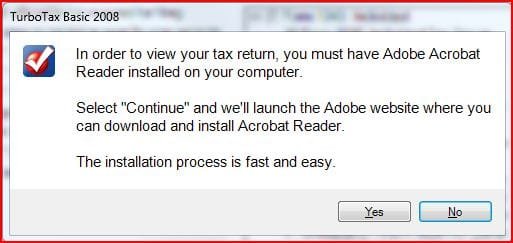
Just to refresh, my TurboTax was installed and running fine. I decided to test, and removed Adobe and installed Foxit. The program will still print normally, but it will not let me save as pdf or view pdf without the type of message below. I would say if you want TurboTax to be able to use all it's features, you need to keep Adobe until after your taxes are done.

Unless you think the IRS would accept such an excuse! :geek:
 

Attachments

  • Turbo.JPG
    Turbo.JPG
    28.3 KB · Views: 46

My Computer My Computer

At a glance

Windows 7 x64i7-2600K8 GGTX 480
Computer Manufacturer/Model Number
Homebuilt
OS
Windows 7 x64
CPU
i7-2600K
Motherboard
Asus P8Z77-v Pro
Memory
8 G
Graphics Card(s)
GTX 480
Sound Card
Onboard
Monitor(s) Displays
LG W2753V
Screen Resolution
1920x1080
Hard Drives
Crucial M4 128 G SSD
:sarc:

I have tried to get a new setup.exe installer from Turbotax support but went nowhere. The support person 05_Leslie D insisted Windows 7 was not supported and that there was nothing in the support database about a revised installer.

Would it be possible to either post the installer or forward it to my email account?

Thanks for your help.

I have the updated (modified?) install file that the Intuit rep sent me, anyone want to host it?
 

My Computer My Computer

At a glance

7201 64 bit
OS
7201 64 bit
I was able to fix this issue by right clicking on Setup.exe and selecting Vista in compatibility tab. TurboTax Premier installed without any messages, updated and now works just fine.
 

My Computer My Computer

At a glance

Windows 7
OS
Windows 7
I was able to fix this issue by right clicking on Setup.exe and selecting Vista in compatibility tab. TurboTax Premier installed without any messages, updated and now works just fine.

That was the first thing I tried. Nothing was able to get the product installed except the new install file and an hour of tech supports time.
 

My Computer My Computer

At a glance

7201 64 bit
OS
7201 64 bit
I had the same problem that Itsdon originally reported. I went into the Turbo Tax 2008 directory of the Premier CD and ran "Turbo Tax 2008 Installer.exe" as adminstrator. Installation and update completed without issue and so far the program seems to run properly.
 

My Computer My Computer

At a glance

Windows 7
OS
Windows 7
I did the same (ran the "Turbo Tax 2008 Installer.exe" ) as administrator and it seems to be installing just fine.
 

My Computer My Computer

At a glance

Windows 7
OS
Windows 7
Back
Top