Solved External USB HDD changed from NTFS to RAW

WinDozeUser

New member
Member
Local time
1:02 PM
Messages
52
I have a:
Seagate BarraCuda Green ST1500DL003 1.5TB
5900 RPM 64MB Cache SATA 6.0Gb/s
3.5" Internal Hard Drive Bare Drive


It was formatted as NTFS and partitioned. One partition does not show up at all, a second one shows up as Unallocated with no drive letter, and a third partition shows up as having a drive letter, but with the RAW file system/not NTFS. Below is a "Computer Management" view:


DISK 2 is the drive in question...

View attachment 401901

Some posts here on this topic mentioned possible ways to recover these partitions.
I have Partition Wizard 10.2 with Partition Recovery options. So I opened it up and started a quick scan.
The image below is what I remember the Drive partitions to be except the "Unallocated 472.3GB" Drive should be labeled SOFTWARE.

View attachment 401902

Should I select "Apply" to start this recovery??? Don't want to mess this up. Or should I run the advanced scan first?

Thanks


Wanted to check here before I run this software for a fix.
 
Last edited:

My Computer My Computer

Computer type
Laptop
Computer Manufacturer/Model Number
Dell B130
OS
Microsoft Windows 7 Home Premium Build 7601 32bit
CPU
Intel Pentium-M 735 Dothan - 1.7Ghz
Motherboard
DELL 0RJ272 / Intel 915GM (Alviso-GM) + ICH6-M
Memory
2GB DDR2-SDRAM
Graphics Card(s)
Intel 82915GMx Graphics Controller 0 [B-1/C-0] [DELL]
Screen Resolution
1280x800
Hard Drives
Seagate ST9408114A - 40GB
Antivirus
Microsoft Scurity Essentials
Browser
Firefox

My Computers My Computers

System One System Two

  • Computer type
    PC/Desktop
    Computer Manufacturer/Model Number
    custom build
    OS
    Windows 7 HP 64
    CPU
    i5 6600K - 800MHz to 4200MHz
    Motherboard
    GA-Z170-HD3P
    Memory
    4+4G GSkill DDR4 3000
    Graphics Card(s)
    IG - Intel 530
    Monitor(s) Displays
    Samsung 226BW
    Screen Resolution
    1680x1050
    Hard Drives
    (1) -1 SM951 – 128GB M.2 AHCI PCIe SSD drive for Windows 7 and Lubuntu
    (2) -1 WD SATA 3 - 1T for Data
    (3) -1 WD SATA 3 - 1T for backup
    PSU
    Thermaltake 450W TR2 gold
    Keyboard
    Old and good Chicony mechanical keyboard
    Mouse
    Logitech mX performance - 9 buttons (had to disable some)
    Internet Speed
    500Mb/s
    Browser
    Firefox 64
    Other Info
    TinyWall firewall
  • Computer type
    Laptop
    System Manufacturer/Model Number
    Asus Q550LF
    OS
    Windows 7 Pro
    CPU
    i7-4500U 800MHz to 3.0GHz
    Motherboard
    Asus Q550LF
    Memory
    (4+4)G DDR3 1600
    Graphics Card(s)
    IG intel 4400 + NVIDIA GeForce GT 745M
    Sound Card
    Realtek
    Monitor(s) Displays
    LG Display LP156WF4-SPH1
    Screen Resolution
    1920 x 1080
    Hard Drives
    BX500 120G SSD for Windows and programs +
    1T HDD for data
    Internet Speed
    500 Mb/s
    Browser
    Firefox
    Other Info
    TinyWall firewall
I shall await for a proper Windows Disk Management screenshot.

How to post a proper screen capture image of your Disk Management screen

Disk Management - Post a Screen Capture Image - Windows 7 Help Forums

Screenshots and Files - Upload and Post in Seven Forums

Screenshots and Files - Upload and Post in Seven Forums - Windows 7 Help Forums

Next uninstall Partition Wizard Free 10.2. Partition Recovery is not free from ver 10.0 and above. Download and install version 9.1 from MiniTool Partition Wizard Free 10.2.2 Download for Windows / Old Versions / FileHorse.com

Run it and post a screenshot of how your problem drive looks in it - the very first screen when you launch it.(Please remove all other external drives and flash drives. Have only the problem drive plugged in when you take the above screenshots)

Do not attempt any data recovery on your own.You will be doing so at your own risk.
 

My Computer My Computer

OS
Windows 7 Home Premium 32 bit
Disregard the previous img posts. I am moving this operation to my fastest computer.
The Partition Wizard version I have is 1.2.2 Pro, so it has no restrictions.
Will post pics as soon as I do a scan.
 

My Computer My Computer

Computer type
Laptop
Computer Manufacturer/Model Number
Dell B130
OS
Microsoft Windows 7 Home Premium Build 7601 32bit
CPU
Intel Pentium-M 735 Dothan - 1.7Ghz
Motherboard
DELL 0RJ272 / Intel 915GM (Alviso-GM) + ICH6-M
Memory
2GB DDR2-SDRAM
Graphics Card(s)
Intel 82915GMx Graphics Controller 0 [B-1/C-0] [DELL]
Screen Resolution
1280x800
Hard Drives
Seagate ST9408114A - 40GB
Antivirus
Microsoft Scurity Essentials
Browser
Firefox
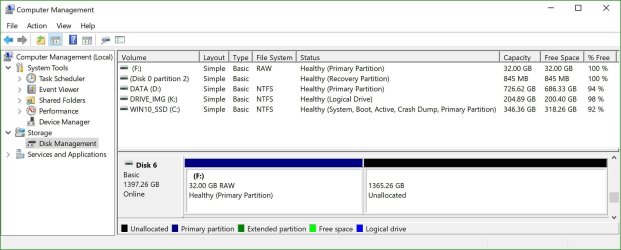
Computer Management(Windows)(Disk 6 is the drive in question)
01 ComputerMgt.JPG

Here are some images from PW scans...

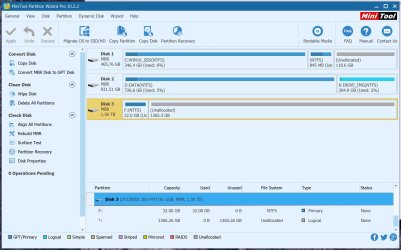
Partition Wizard - Overview (Disk 3 is the Drive in question)
02 PW-Overview.JPG

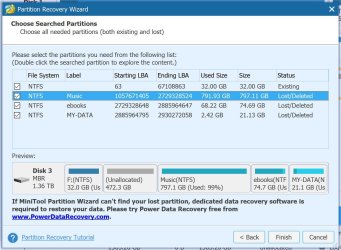
Partition Wizard - Simple Scan - full disk
03 PartRec_QS.JPG
Things look pretty good here. The "Unallocated" space(472.3GB) should be the partition labeled SOFTWARE.

Partition Wizard - Full Scan - full disk
coming shortly...well not exactly!

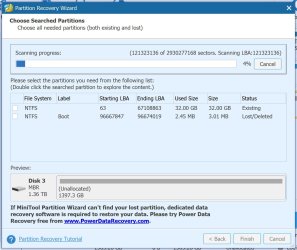
In progress(Full Scan)
04a PartRec_FS.JPG
The Lost/Deleted listing occurs a lot in FULL SCAN Mode as I was scanning last night. Each Lost/Delete listing seems to be the same...Label/Used Size/Size - Boot/2.45MB/3.01MB

Q: Do I really need a full scan? @ current rate the FULL SCAN may take up to 20hrs to complete.

Q: Would making a image of this disk insure no data loss prior to making any "fixes?" (Backup software like Acronis True Image) In other words, If the attempt to rebuild partition info fails, restoring an image to the drive could be restored to pre fix state. Or will the MBR be messed up after restore?

Appreciate the help Megahertz07 & jumanji
 
Last edited:

My Computer My Computer

Computer type
Laptop
Computer Manufacturer/Model Number
Dell B130
OS
Microsoft Windows 7 Home Premium Build 7601 32bit
CPU
Intel Pentium-M 735 Dothan - 1.7Ghz
Motherboard
DELL 0RJ272 / Intel 915GM (Alviso-GM) + ICH6-M
Memory
2GB DDR2-SDRAM
Graphics Card(s)
Intel 82915GMx Graphics Controller 0 [B-1/C-0] [DELL]
Screen Resolution
1280x800
Hard Drives
Seagate ST9408114A - 40GB
Antivirus
Microsoft Scurity Essentials
Browser
Firefox
Edit: You can quit full scan. No use of it.

"It was formatted as NTFS and partitioned. One partition does not show up at all, a second one shows up as Unallocated with no drive letter, and a third partition shows up as having a drive letter, but with the RAW file system/not NTFS. Below is a "Computer Management" view:"

Your above description in the first post does not match fully with the screenshot of Windows Disk Management. Never mind.

1. In the PW searched partitions list where you have put a tick mark, double click on each partition and see whether it shows all your files ( It is clearly mentioned there. and if you aren't a "junior Windows user" you shouldn't have clearly missed it :) )

2. At the moment I don't think you need to image your whole drive. If at all I would take an image of sector 0 MBR + Partition tables) and keep it. If during fixing it up we botch it,we can restore it from the backup. Again if you aren't a "junior Windows user" you shouldn't have clearly missed it :) ) Don't take it seriously. Just pulling your legs :).

3. Quick Scan did not find the volume boot record of your 472.3 GB Software partition and that is why it remains unallocated. I would rather try to find out if it is really missing or corrupted and if so what is the status of the backup boot sector, using TestDisk for Windows. If you are going to jump at it and download TestDisk, download the stable version 7.0 and not the beta 7.1. If you are going to experiment with it, go ahead and do but do not give any write command to write the partition table.

4. Already bedtime for me. So wait till my tom morning to give further instructions.
 

My Computer My Computer

OS
Windows 7 Home Premium 32 bit
OK, here are some images of TestDisk 7.0

01 TestDisk Disk Size.JPG

02 TestDisk Disk Size.JPG

Performed a QuickSearch
03 TestDisk Scan Results.JPG
Had the above errors and decided not to "Continue"
The computer is idle with TestDisk still at the previous screen. I now consider myself a novice when it comes to MBR repair!! Waiting for reply before proceeding.

FYI:
Had run a "Surface Test" with Partition Wizard yesterday which revealed 3000+ errors, but did not fix them.
...in case this is of value.

View attachment testdisk.log
 

My Computer My Computer

Computer type
Laptop
Computer Manufacturer/Model Number
Dell B130
OS
Microsoft Windows 7 Home Premium Build 7601 32bit
CPU
Intel Pentium-M 735 Dothan - 1.7Ghz
Motherboard
DELL 0RJ272 / Intel 915GM (Alviso-GM) + ICH6-M
Memory
2GB DDR2-SDRAM
Graphics Card(s)
Intel 82915GMx Graphics Controller 0 [B-1/C-0] [DELL]
Screen Resolution
1280x800
Hard Drives
Seagate ST9408114A - 40GB
Antivirus
Microsoft Scurity Essentials
Browser
Firefox
You can close TestDisk anytime by clicking on the X in the top right of Title bar. Close it now.

Are you following the exact sequence as in my post error on new Samsung 850 EVO NAND SSD Solved - Windows 7 Help Forums

Please run TestDisk again, take a screenshot of each and every screen as you proceed and post it in sequence ( Take the screenshot before you hit enter on each screen). Otherwise I won't be able to determine whether you are on the right course - given your screenshots vary from what I expect.
 
Last edited:

My Computer My Computer

OS
Windows 7 Home Premium 32 bit

My Computer My Computer

Computer type
Laptop
Computer Manufacturer/Model Number
Dell B130
OS
Microsoft Windows 7 Home Premium Build 7601 32bit
CPU
Intel Pentium-M 735 Dothan - 1.7Ghz
Motherboard
DELL 0RJ272 / Intel 915GM (Alviso-GM) + ICH6-M
Memory
2GB DDR2-SDRAM
Graphics Card(s)
Intel 82915GMx Graphics Controller 0 [B-1/C-0] [DELL]
Screen Resolution
1280x800
Hard Drives
Seagate ST9408114A - 40GB
Antivirus
Microsoft Scurity Essentials
Browser
Firefox
1
001 TD.JPG

2
002 TD.JPG
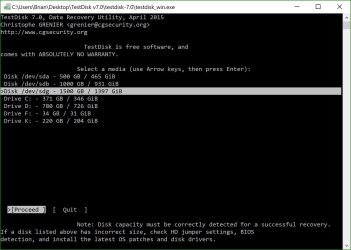
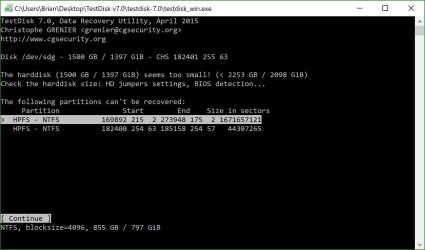
Drive C, D, & K are on the computer I am using... F is the drive in question, thought the size is way off

3
003 TD.JPG

4
004 TD.JPG

5
005 TD.JPG
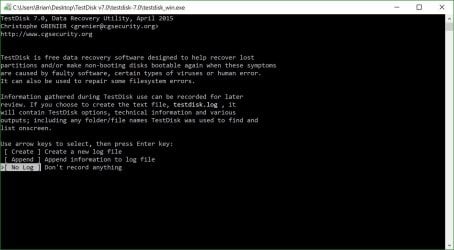
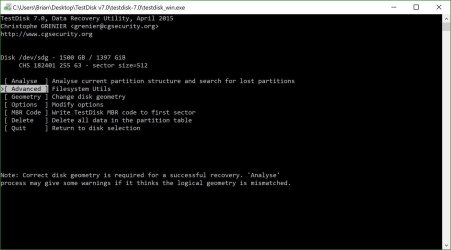
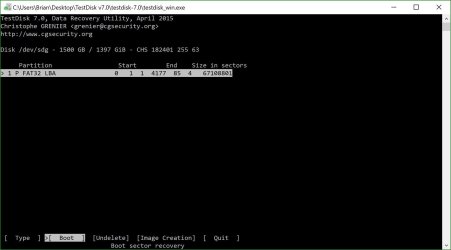
There is no "List" option Partition list does not look right at all.
 

My Computer My Computer

Computer type
Laptop
Computer Manufacturer/Model Number
Dell B130
OS
Microsoft Windows 7 Home Premium Build 7601 32bit
CPU
Intel Pentium-M 735 Dothan - 1.7Ghz
Motherboard
DELL 0RJ272 / Intel 915GM (Alviso-GM) + ICH6-M
Memory
2GB DDR2-SDRAM
Graphics Card(s)
Intel 82915GMx Graphics Controller 0 [B-1/C-0] [DELL]
Screen Resolution
1280x800
Hard Drives
Seagate ST9408114A - 40GB
Antivirus
Microsoft Scurity Essentials
Browser
Firefox
OK. It detects only the first 32GB partition. No use.

Is your drive deteriorating??????????

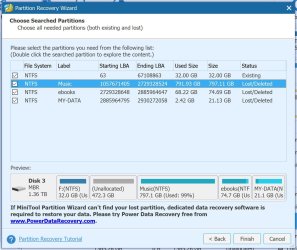
Go back to PW, do a Quick Scan again and post a screenshot of partitions found Window. ( You can tick all the partitions and take the screenshot but do not APPLY) I have noted that you have the Pro version. So yes, no restrictions.

Double click on all the partitions ticked and check whether the explorer shows all your files and report.

If you want you may go to sleep now and do it in the morning. ( I presume the local time indicated is correct)
 

My Computer My Computer

OS
Windows 7 Home Premium 32 bit
PW Quick Scan
006 PW.JPG

Files look OK

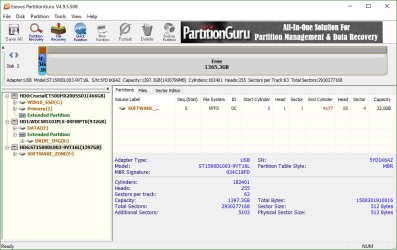
Funny thing...I scanned the drive with Partition Guru and it showed only the "Software" partition and files were accessible for viewing! All the partitions and file seen in the PW Scan did not show up!

007 PG.JPG
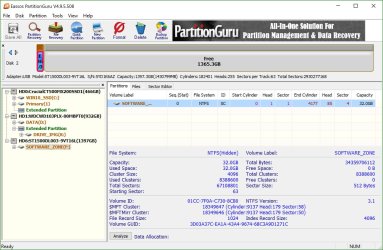
Partition Size of the "Software" Partition was far greater than 32GB, 742.3GB as seen in the Unallocated PW Scan.

008 PG.JPG
 
Last edited:

My Computer My Computer

Computer type
Laptop
Computer Manufacturer/Model Number
Dell B130
OS
Microsoft Windows 7 Home Premium Build 7601 32bit
CPU
Intel Pentium-M 735 Dothan - 1.7Ghz
Motherboard
DELL 0RJ272 / Intel 915GM (Alviso-GM) + ICH6-M
Memory
2GB DDR2-SDRAM
Graphics Card(s)
Intel 82915GMx Graphics Controller 0 [B-1/C-0] [DELL]
Screen Resolution
1280x800
Hard Drives
Seagate ST9408114A - 40GB
Antivirus
Microsoft Scurity Essentials
Browser
Firefox
"I scanned the drive with Partition Guru and it showed only the "Software" partition and files were accessible for viewing! All the partitions and file seen in the PW Scan did not show up!"

OK, how important are those files in Software partition for you? I am not conversant with Partition Guru and so cannot advise you anything on it. (Actually Partition Guru shows you only the 32GB partition and not the 472.3GB Software partition.)

SIW2 is the Partition Guru. May be he can help you on it if he is looking into this thread.

On my part I would like to restore all the other partitions except that unallocated partition but not before I capture and save sector 0 before I order you to APPLY it with PW. (FYI Sector 0 contains the MBR code and Partition table/s. PW will write the new partition table/s into it.)

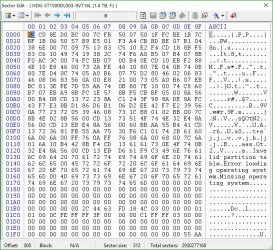
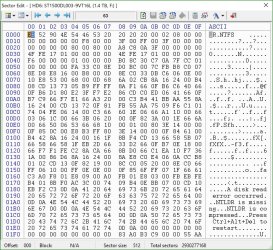
To save sector 0, you have to use bootice. Download x64 or x86 as per your system Windows bit version and save sector 0 . Help: Post #7 here Lost partitions! Solved - Windows 7 Help Forums Also save sector 63

Post the screenshots of Sector 0 and sector 63 for the record and my perusal.

( Make sure those are backed up. By default it is saved in the bootice folder. File size: 512 bytes)

Once you have saved sector 0 and sector 63, you can run PW Quickscan and APPLY to write the partition tables in sector 0. You may need to assign drive letters. After applying, right click on the partitions without drive letters and assign a drive letter/s.

Once the process is complete we may turn our attention to the Unallocated Software partition and try to recover it if possible.
 
Last edited:

My Computer My Computer

OS
Windows 7 Home Premium 32 bit
I also need some clarifications:

Were the 32GB partition and the adjacent 472.3 GB partiiion ( now showing unallocated) existing before when the drive was working properly? Did those have distinct and seperate drive letters?

In all how many partitions were there when it was working normally?

Was there any extended partition and logical partitions in it?

You say it is a bare internal drive Seagate Barracuda. How come it is a USB external drive? Was this drive working properly in that external enclosure before?

Is it still in that external enclosure?

Answer these questions before you run Quick Scan and apply.

If it was being used as an internal drive before, it will be worthwhile to put it back as as an internal drive in its original location and check whether everything is alright.
 

My Computer My Computer

OS
Windows 7 Home Premium 32 bit
I also need some clarifications:

[I]"Were the 32GB partition and the adjacent 472.3 GB partition ( now showing unallocated) existing before when the drive was working properly? Did those have distinct and separate drive letters?"
[/I]
I honestly don't remember a 32GB partition It could be valid, but am not sure

[I]"In all how many partitions were there when it was working normally?"
Partitions were(to the best of my knowledge):
1 SOFTWARE (Likely 742GB)
2 MUSIC 797GB
3 EBOOKS 74GB
4 MY-DATA 31GB

"Was there any extended partition and logical partitions in it?"
It was never a Primary drive, so I am thinking they are all Logical Drives. Not sure if any were extended

You say it is a bare internal drive Seagate Barracuda. How come it is a USB external drive? Was this drive working properly in that external enclosure before?
This drive is sold as a bare Internal HDD. I bought an external case and used it exclusively as a USB attached external drive. It was working perfect in the external enclosure.


"Is it still in that external enclosure?"
Yes


Answer these questions before you run Quick Scan and apply.

If it was being used as an internal drive before, it will be worthwhile to put it back as as an internal drive in its original location and check whether everything is alright.


The trouble is that the cable has gotten bumped many times and this is what I believe preceded the failure, possible while in the write/read state.

Our time schedules are quite off. Do you have "best hours" when you are able to help. I am able to stay up to as late as 1AM, my time, but generally am not available before 10AM my time.
Thanks
 
Last edited:

My Computer My Computer

Computer type
Laptop
Computer Manufacturer/Model Number
Dell B130
OS
Microsoft Windows 7 Home Premium Build 7601 32bit
CPU
Intel Pentium-M 735 Dothan - 1.7Ghz
Motherboard
DELL 0RJ272 / Intel 915GM (Alviso-GM) + ICH6-M
Memory
2GB DDR2-SDRAM
Graphics Card(s)
Intel 82915GMx Graphics Controller 0 [B-1/C-0] [DELL]
Screen Resolution
1280x800
Hard Drives
Seagate ST9408114A - 40GB
Antivirus
Microsoft Scurity Essentials
Browser
Firefox
OK, you have answered all the questions. I would think that the 32GB partition is an anamoly. That plus the adjoining 472.3GB must have been one single partition before.

Now go ahead using bootice post the screenshots of sector 0 and sector 63 and save those.

Once done run Quickscan, put a tick mark on all partitions in the list view the disk map below the list and if it is the same as before, go ahead and Apply. Should there be any error or cautionary message capture it and post. (I would believe that there will be none). Then assign drive letters where necessary.

After that post a screenshot of Windows Disk Management and also PW.

After analysing sector 0 and sector 63 screenshots we shall decide what further should be done. I may take sometime to mull over it and crystallise my ideas.

Now let me hear some music and refresh myself.
 

My Computer My Computer

OS
Windows 7 Home Premium 32 bit
Images:
Overview
009 BI_View.JPG

MBR Sector 0
010 BI_S0.JPG

Sector 63
011 BI_S63.JPG

Not sure why these images are not viewable on post..?

Before I physically change anything...The backup of sector 0 & sector 63 will enable me to restore to pre-altered state??
 
Last edited:

My Computer My Computer

Computer type
Laptop
Computer Manufacturer/Model Number
Dell B130
OS
Microsoft Windows 7 Home Premium Build 7601 32bit
CPU
Intel Pentium-M 735 Dothan - 1.7Ghz
Motherboard
DELL 0RJ272 / Intel 915GM (Alviso-GM) + ICH6-M
Memory
2GB DDR2-SDRAM
Graphics Card(s)
Intel 82915GMx Graphics Controller 0 [B-1/C-0] [DELL]
Screen Resolution
1280x800
Hard Drives
Seagate ST9408114A - 40GB
Antivirus
Microsoft Scurity Essentials
Browser
Firefox
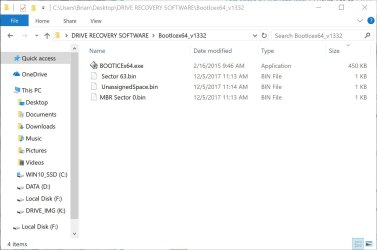
Also:
011 backup sizes.JPG

"Make sure those are backed up. By default it is saved in the bootice folder. File size: 512 bytes"
This does not appear to be the case...

Sweet Dreams, jumanji
I am going to use Partition Guru to copy all file in the Unallocated space(742.3GB) to a 4TB drive via the PG interface. It seems to be working great, so maybe we can ignore the partition when making changes with PW. Am waiting for an educated guess on weather the backups of the MBR 0 & Sector 63 via BootIce is reasonable before proceeding. I'll update this reply when the "Unallocated (SOFTWARE)" data is complete.

really appreciate your help.

NOTE: All files from the "unallocated" partition (the folder called SOFTWARE) are not copied to a 4TB dive successfully. Total real-estate was 468GB. I no longer have to worry about these files.
 
Last edited:

My Computer My Computer

Computer type
Laptop
Computer Manufacturer/Model Number
Dell B130
OS
Microsoft Windows 7 Home Premium Build 7601 32bit
CPU
Intel Pentium-M 735 Dothan - 1.7Ghz
Motherboard
DELL 0RJ272 / Intel 915GM (Alviso-GM) + ICH6-M
Memory
2GB DDR2-SDRAM
Graphics Card(s)
Intel 82915GMx Graphics Controller 0 [B-1/C-0] [DELL]
Screen Resolution
1280x800
Hard Drives
Seagate ST9408114A - 40GB
Antivirus
Microsoft Scurity Essentials
Browser
Firefox
Glad you are able to copy all files in the Unallocated space(742.3GB) with PG :thumbsup: EDIT: Or was it not?

Now go ahead with partition recovery with Partition Wizard. That should write the three 16 byte partition tables in sector 0 ( which is missing now)

After that post the screenshot of Windows Disk Management. That should tell us whether we can make the whole 32GB + 472.3GB into unallocated so that we can format it as one single partition without taking recourse to bootice..

.........shall continue after a short break.
 
Last edited:

My Computer My Computer

OS
Windows 7 Home Premium 32 bit
Back
Top