\EFI\BOOT\BCD Error While Booting On Windows 7 USB Installation

Hi All,
SweeX : Sir,

TASK-1

1) What is that Detta (D:) partition ? Is that for Data purposes only ?
2) Not even residuals of windows 8! Windows 10 booting/working good & flawlessly ?
3) Where do you plan to install windows 7, Where is that partition ? I think you should shrink (c:) to make 100 GB partition for Win 7 installation. Be careful & do that. Can you do that ? Get us Disk Management window's view after doing that.

TASK-2

4) What is the win7 iso's name, version, etc. Where did you find/download that ?

TASK-3

5) Open elevated Windows PowerShell in Win10 :
Open Elevated Windows PowerShell in Windows 10 | Windows 10 Tutorials

Then type in that PowerShell Window exactly as :
Confirm-SecureBootUEFI

& Press enter.

What are the results/outcome in the PowerShell Window ?

Let us know.

Thanks & Regards. ...

Task 1:

1) The DETTA Partition is were i keep my important stuff, like from my previous windows 10 i had.
2) Windows 10 Does work fine, however the BCD has a problem every time i reboot. Windows 8 is no more in my hard drive.
3) Right now i don't wanna make a Windows 7 Partition or else my windows 10 drive will have less space, gonna do that later!

Task 2:

4) My Windows 7 ISO Name got renamed, i don't remember the original name, now it's called Windows 7 Professional x64

Task 3:

5) no pls
 

My Computer

Computer type
Laptop
Computer Manufacturer/Model Number
Asus Vivobook Max
OS
Windows 10 Super Lite x64
CPU
Celeron N3350
Motherboard
X541NA
Memory
4GB
Graphics Card(s)
HD 500
Screen Resolution
1366x768
Hard Drives
500Gb HDD
Browser
Chrome
Hi,
SweeX : Sir,

TASK-1

1. Windows 10 Does work fine, however the BCD has a problem every time i reboot.
What's the problem, Error code, etc. ?

TASK-2

I assume that you use English version of windows. We are going to check the integrity of your downloaded win7 x64 sp1 professional iso by calculating & verifying it's check sums with the original check sums. You have to compare SHA-1 check sum which is :

Windows 7 Professional SP1 64-bit
SHA1: 0BCFC54019EA175B1EE51F6D2B207A3D14DD2B58

2. Make this download : https://www.nirsoft.net/utils/hashmyfiles-x64.zip

3. Extract the zip file to a folder & execute 'HashMyFiles.exe'

4. Drag & Drop or Copy & Paste your iso on/in the HashMyFiles window.

5. Compare the SHA-1: check sums.

TASK-3

6. no pls

Why are you getting afraid ? It won't make any changes to your system but just tell the status. That's all. It is needed!

Let us know.

Thanks & Regards. ...
 

My Computer

Computer type
Laptop
Computer Manufacturer/Model Number
hp compaq presario c795VU notebook pc
OS
Windows 7 Ultimate x32 With Sp1 + Vista Ultimate x32 with Sp1 & Sp2 !!
CPU
Intel Mobile Core 2 Duo T5750 @ 2.00GHz Merom 65nm Technolog
Motherboard
Hewlett-Packard 30D9 (CPU)
Memory
2.00GB Dual-Channel DDR2 @ 332MHz (5-5-5-15)
Graphics Card(s)
Mobile Intel(R) 965 Express Chipset Family
Sound Card
High Definition Audio Device
Monitor(s) Displays
LP154WX4-TLCB on Mobile Intel 965 Express Chipset Family
Screen Resolution
1280x800 @ 60Hz
Hard Drives
149GB Western Digital WDC WD1600BEVS-60VAT0 ATA Device (SATA)
Keyboard
Standard 101/102-Key or Microsoft Natural PS/2 Key + HP QLB
Mouse
ALPS pointing device
Antivirus
Kaspersky AV 2017(Win 7) & AVG AntiVirus Free 2016 (VISTA)
Browser
google chrome
Hi,
SweeX : Sir,

TASK-1

1. Windows 10 Does work fine, however the BCD has a problem every time i reboot.
What's the problem, Error code, etc. ?

TASK-2

I assume that you use English version of windows. We are going to check the integrity of your downloaded win7 x64 sp1 professional iso by calculating & verifying it's check sums with the original check sums. You have to compare SHA-1 check sum which is :

Windows 7 Professional SP1 64-bit
SHA1: 0BCFC54019EA175B1EE51F6D2B207A3D14DD2B58

2. Make this download : https://www.nirsoft.net/utils/hashmyfiles-x64.zip

3. Extract the zip file to a folder & execute 'HashMyFiles.exe'

4. Drag & Drop or Copy & Paste your iso on/in the HashMyFiles window.

5. Compare the SHA-1: check sums.

TASK-3

6. no pls

Why are you getting afraid ? It won't make any changes to your system but just tell the status. That's all. It is needed!

Let us know.

Thanks & Regards. ...

Task-1

1) Windows 10 Has BCD Problem Everytime i may boot, some times won't. basically first the BCD is called "Windows Boot Manager" but after i reboot or shut down it comes back to "Windows" and then to fix it i have to delete the "Windows" Option from bios then it will came back to "Windows Boot Manager" so i can boot.
i don't know the error code

2) Here is the SHA-1 checksum:
Mine:0bcfc54019ea175b1ee51f6d2b207a3d14dd2b58
compared to your and it's the same

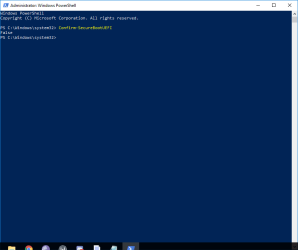
3) The result i get on Powershell is this:
 

Attachments

  • PowerShell.png
    PowerShell.png
    15.6 KB · Views: 1

My Computer

Computer type
Laptop
Computer Manufacturer/Model Number
Asus Vivobook Max
OS
Windows 10 Super Lite x64
CPU
Celeron N3350
Motherboard
X541NA
Memory
4GB
Graphics Card(s)
HD 500
Screen Resolution
1366x768
Hard Drives
500Gb HDD
Browser
Chrome
Hi,
SweeX : Sir,

1. Windows 10 Has BCD Problem Everytime i may boot, some times won't. basically first the BCD is called "Windows Boot Manager" but after i reboot or shut down it comes back to "Windows" and then to fix it i have to delete the "Windows" Option from bios then it will came back to "Windows Boot Manager" so i can boot.

Not able to understand. Can you explain a little ? What happens ? What you do & How you do it to get rid of that ?

2. The iso is identical & untouched.

3. The result is False which means secure boot is disabled well.

(((Confirm-SecureBootUEFI can be run on any windows 8, 8.1 & 10 from elevated Windows Powershell. Here is a short article about how to interpret it's results :
Confirm-SecureBootUEFI )))

CSM & Legacy Boot option is not available on/for your Apollo Lake Platform. First we would concentrate on your BCD problem because it can fail/corrupt win 7 installation.

Let us know.

Thanks & Regards. ...
 

My Computer

Computer type
Laptop
Computer Manufacturer/Model Number
hp compaq presario c795VU notebook pc
OS
Windows 7 Ultimate x32 With Sp1 + Vista Ultimate x32 with Sp1 & Sp2 !!
CPU
Intel Mobile Core 2 Duo T5750 @ 2.00GHz Merom 65nm Technolog
Motherboard
Hewlett-Packard 30D9 (CPU)
Memory
2.00GB Dual-Channel DDR2 @ 332MHz (5-5-5-15)
Graphics Card(s)
Mobile Intel(R) 965 Express Chipset Family
Sound Card
High Definition Audio Device
Monitor(s) Displays
LP154WX4-TLCB on Mobile Intel 965 Express Chipset Family
Screen Resolution
1280x800 @ 60Hz
Hard Drives
149GB Western Digital WDC WD1600BEVS-60VAT0 ATA Device (SATA)
Keyboard
Standard 101/102-Key or Microsoft Natural PS/2 Key + HP QLB
Mouse
ALPS pointing device
Antivirus
Kaspersky AV 2017(Win 7) & AVG AntiVirus Free 2016 (VISTA)
Browser
google chrome
Hi,
SweeX : Sir,

1. Windows 10 Has BCD Problem Everytime i may boot, some times won't. basically first the BCD is called "Windows Boot Manager" but after i reboot or shut down it comes back to "Windows" and then to fix it i have to delete the "Windows" Option from bios then it will came back to "Windows Boot Manager" so i can boot.

Not able to understand. Can you explain a little ? What happens ? What you do & How you do it to get rid of that ?

2. The iso is identical & untouched.

3. The result is False which means secure boot is disabled well.

(((Confirm-SecureBootUEFI can be run on any windows 8, 8.1 & 10 from elevated Windows Powershell. Here is a short article about how to interpret it's results :
Confirm-SecureBootUEFI )))

CSM & Legacy Boot option is not available on/for your Apollo Lake Platform. First we would concentrate on your BCD problem because it can fail/corrupt win 7 installation.

Let us know.

Thanks & Regards. ...

i cannot really explain the BCD Error if windows 10 + Windows 7 BCD Error is fixed, just gets stuck
 

My Computer

Computer type
Laptop
Computer Manufacturer/Model Number
Asus Vivobook Max
OS
Windows 10 Super Lite x64
CPU
Celeron N3350
Motherboard
X541NA
Memory
4GB
Graphics Card(s)
HD 500
Screen Resolution
1366x768
Hard Drives
500Gb HDD
Browser
Chrome
Hi,
SweeX : Sir,
I would like to look into BCD problem first but i would like to properly cover against the risks. Here are some queries & the troubleshooting steps will depend on it.
1. Do you have a spare computer to support ?
2. You have been backing up data but did you ever make a System Image ? System Image is an exact image of the system crucial partitions. It would make sure that we can revert system back to the present status if something goes wrong while backing up data can only provide the backed up data, files & not the system!
3. Did you actually try & ended up in a broken installation of win 7 ? because it seems your BCD is corrupted due to that. How you lost win 8 ?
4. Do you have any external/spare hard disk ? that would be needed for the System Image.

Let us know.

Thanks & Regards. ...
 

My Computer

Computer type
Laptop
Computer Manufacturer/Model Number
hp compaq presario c795VU notebook pc
OS
Windows 7 Ultimate x32 With Sp1 + Vista Ultimate x32 with Sp1 & Sp2 !!
CPU
Intel Mobile Core 2 Duo T5750 @ 2.00GHz Merom 65nm Technolog
Motherboard
Hewlett-Packard 30D9 (CPU)
Memory
2.00GB Dual-Channel DDR2 @ 332MHz (5-5-5-15)
Graphics Card(s)
Mobile Intel(R) 965 Express Chipset Family
Sound Card
High Definition Audio Device
Monitor(s) Displays
LP154WX4-TLCB on Mobile Intel 965 Express Chipset Family
Screen Resolution
1280x800 @ 60Hz
Hard Drives
149GB Western Digital WDC WD1600BEVS-60VAT0 ATA Device (SATA)
Keyboard
Standard 101/102-Key or Microsoft Natural PS/2 Key + HP QLB
Mouse
ALPS pointing device
Antivirus
Kaspersky AV 2017(Win 7) & AVG AntiVirus Free 2016 (VISTA)
Browser
google chrome
Hi,
SweeX : Sir,
I would like to look into BCD problem first but i would like to properly cover against the risks. Here are some queries & the troubleshooting steps will depend on it.
1. Do you have a spare computer to support ?
2. You have been backing up data but did you ever make a System Image ? System Image is an exact image of the system crucial partitions. It would make sure that we can revert system back to the present status if something goes wrong while backing up data can only provide the backed up data, files & not the system!
3. Did you actually try & ended up in a broken installation of win 7 ? because it seems your BCD is corrupted due to that. How you lost win 8 ?
4. Do you have any external/spare hard disk ? that would be needed for the System Image.

Let us know.

Thanks & Regards. ...

1)i dont know

2)no

3)The BCD Error is not really an issue, i had to select the windows 7 USB Multiple times then it boots but get stuck at starting windows + i deleted windows 8 partition because there wasnt video drivers for it so i deleted windows 8 and installed Windows 10 Super Lite 2018 x64

4)no
 

My Computer

Computer type
Laptop
Computer Manufacturer/Model Number
Asus Vivobook Max
OS
Windows 10 Super Lite x64
CPU
Celeron N3350
Motherboard
X541NA
Memory
4GB
Graphics Card(s)
HD 500
Screen Resolution
1366x768
Hard Drives
500Gb HDD
Browser
Chrome
Hi,
SweeX : Sir,

The BCD Error is not really an issue
One never knows when it becomes an issue! My first preference would be to resolve that first.

Task-1 Taking Cover : Create System Restore point.

Create System Restore Point in Windows 10 | Windows 10 Tutorials

( Just look there & continue here, I have narrowed down things as suitable for you )

(a) Press Win+X to open Power User Tasks Menu, click/tap on System.
(b) Click/tap on the System protection link on the left side.
(c) If prompted by UAC, click/tap on Yes.
(d) Make sure that you have system protection turned on for C:
(e) When ready to create a restore point, click/tap on the Create button
(f) Type a description you want to help you identify the restore point
(g) Click/tap on Create
(h) Windows System Protection will now create a restore point
(i) When successfully created, click/tap on Close
(J) You can now close the System Properties window

TASK-2 The Portable Utility : EasyBCD

Download EasyBCD zip & extract it to a folder.

View attachment EasyBCD.zip

TASK-3 Resolving BCD Issue

Be a little careful from here!

(a) Go to the EasyBCD folder & execute EasyBCD.exe
(b) Select YES at prompt
(c) Press OK at prompt
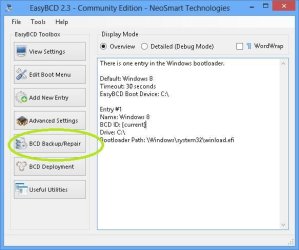
(d) Click BCD Backup/Repair

Capture.JPG

(e) Choose the location for the BCD Backup other than c: , take note of the location & then press Backup Settings Button.

Capture2.JPG

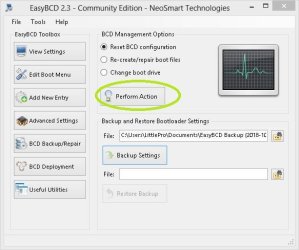
(f) Now press Perform Action button.

Capture3.JPG

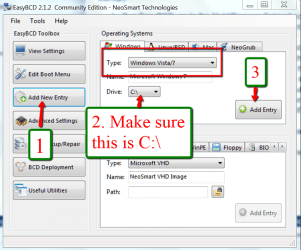
(g) Now follow as in image : Take care for points 1, 2 & 3

Capture4.png

(h) Now close the EasyBCD box.

It's done! Now restart pc & check the BCD error from now on wards.

Let us know.

Thanks & Regards. ...
 

Attachments

Last edited:

My Computer

Computer type
Laptop
Computer Manufacturer/Model Number
hp compaq presario c795VU notebook pc
OS
Windows 7 Ultimate x32 With Sp1 + Vista Ultimate x32 with Sp1 & Sp2 !!
CPU
Intel Mobile Core 2 Duo T5750 @ 2.00GHz Merom 65nm Technolog
Motherboard
Hewlett-Packard 30D9 (CPU)
Memory
2.00GB Dual-Channel DDR2 @ 332MHz (5-5-5-15)
Graphics Card(s)
Mobile Intel(R) 965 Express Chipset Family
Sound Card
High Definition Audio Device
Monitor(s) Displays
LP154WX4-TLCB on Mobile Intel 965 Express Chipset Family
Screen Resolution
1280x800 @ 60Hz
Hard Drives
149GB Western Digital WDC WD1600BEVS-60VAT0 ATA Device (SATA)
Keyboard
Standard 101/102-Key or Microsoft Natural PS/2 Key + HP QLB
Mouse
ALPS pointing device
Antivirus
Kaspersky AV 2017(Win 7) & AVG AntiVirus Free 2016 (VISTA)
Browser
google chrome
Hi,
SweeX : Sir,

The BCD Error is not really an issue
One never knows when it becomes an issue! My first preference would be to resolve that first.

Task-1 Taking Cover : Create System Restore point.

Create System Restore Point in Windows 10 | Windows 10 Tutorials

( Just look there & continue here, I have narrowed down things as suitable for you )

(a) Press Win+X to open Power User Tasks Menu, click/tap on System.
(b) Click/tap on the System protection link on the left side.
(c) If prompted by UAC, click/tap on Yes.
(d) Make sure that you have system protection turned on for C:
(e) When ready to create a restore point, click/tap on the Create button
(f) Type a description you want to help you identify the restore point
(g) Click/tap on Create
(h) Windows System Protection will now create a restore point
(i) When successfully created, click/tap on Close
(J) You can now close the System Properties window

TASK-2 The Portable Utility : EasyBCD

Download EasyBCD zip & extract it to a folder.

View attachment 405574

TASK-3 Resolving BCD Issue

Be a little careful from here!

(a) Go to the EasyBCD folder & execute EasyBCD.exe
(b) Select YES at prompt
(c) Press OK at prompt
(d) Click BCD Backup/Repair

View attachment 405576

(e) Choose the location for the BCD Backup other than c: , take note of the location & then press Backup Settings Button.

View attachment 405577

(f) Now press Perform Action button.

View attachment 405578

(g) Now follow as in image : Take care for points 1, 2 & 3

View attachment 405579

(h) Now close the EasyBCD box.

It's done! Now restart pc & check the BCD error from now on wards.

Let us know.

Thanks & Regards. ...

i wanted to say that i don't want to make a system restore and i fixed the windows 10 BCD Error with EasyUEFI.

also, what do i need to do with EasyBCD?
 

My Computer

Computer type
Laptop
Computer Manufacturer/Model Number
Asus Vivobook Max
OS
Windows 10 Super Lite x64
CPU
Celeron N3350
Motherboard
X541NA
Memory
4GB
Graphics Card(s)
HD 500
Screen Resolution
1366x768
Hard Drives
500Gb HDD
Browser
Chrome
Install it from CD.
When you been have blue screen, change the type from SATA/ATA to IDE
 

My Computer

Computer type
PC/Desktop
OS
Windows 7 Ultimate x64, Windows 10 Home x64, Windows 98 SE, Windows XP Profesionnal
Install it from CD.
When you been have blue screen, change the type from SATA/ATA to IDE
i cant do that! but what is this answer? i tried DVD already and it didnt boot!
 

My Computer

Computer type
Laptop
Computer Manufacturer/Model Number
Asus Vivobook Max
OS
Windows 10 Super Lite x64
CPU
Celeron N3350
Motherboard
X541NA
Memory
4GB
Graphics Card(s)
HD 500
Screen Resolution
1366x768
Hard Drives
500Gb HDD
Browser
Chrome
Hi All,
Greets,
SweeX : Sir,

i wanted to say that i don't want to make a system restore and i fixed the windows 10 BCD Error with EasyUEFI. also, what do i need to do with EasyBCD?
1.
(a) I asked you to make a System Restore Point only as a cover/precaution, as i was trying to resolve the BCD error with EasyBCD. I thought if something goes wrong, you can restore the system back to the working status. It is always good to make System Image(s) but if you don't, at least make a new System Restore Point just before trying anything else.
(b) The objective of EasyBCD was to resolve the BCD error. Because one never knows when it becomes critical! I will insist on getting your system free of any type of BCD/ Booting errors. If EasyUEFI has done it for you, you don't need EasyBCD as of now! [ EasyUEFI Free offers a very limited functionality & Trial for full/professional version ends 15 days & you probably running a trial version , Isn't it ? ]
(c) Once you get rid of BCD/Boot errors, use EasyUEFI to Backup EFI System Partition. Take a note of the location where the backup is saved, Save it to other than c: & keep a copy of it safely for the future! The Backing Up & Restoring EFI System Partition is supported on free version as well.
(d) I would advise to Backup BCD with EasyBCD as well & keep it safely somewhere!

2. To Backup BCD with EasyBCD:

(a) Download EasyBCD.zip & extract it to a folder :
https://www.sevenforums.com/attachm...ooting-windows-7-usb-installation-easybcd.zip
(b) Follow TASK-3 : (a) to (e) & close EasyBCD here :
\EFI\BOOT\BCD Error While Booting On Windows 7 USB Installation

3. Have you done it all ? Should we proceed with preparing the windows 7 USB installation media ? It would need a USB Pen Drive & all the data on it will be erased/lost.

Let us know.

Thanks & Regards. ...
 

My Computer

Computer type
Laptop
Computer Manufacturer/Model Number
hp compaq presario c795VU notebook pc
OS
Windows 7 Ultimate x32 With Sp1 + Vista Ultimate x32 with Sp1 & Sp2 !!
CPU
Intel Mobile Core 2 Duo T5750 @ 2.00GHz Merom 65nm Technolog
Motherboard
Hewlett-Packard 30D9 (CPU)
Memory
2.00GB Dual-Channel DDR2 @ 332MHz (5-5-5-15)
Graphics Card(s)
Mobile Intel(R) 965 Express Chipset Family
Sound Card
High Definition Audio Device
Monitor(s) Displays
LP154WX4-TLCB on Mobile Intel 965 Express Chipset Family
Screen Resolution
1280x800 @ 60Hz
Hard Drives
149GB Western Digital WDC WD1600BEVS-60VAT0 ATA Device (SATA)
Keyboard
Standard 101/102-Key or Microsoft Natural PS/2 Key + HP QLB
Mouse
ALPS pointing device
Antivirus
Kaspersky AV 2017(Win 7) & AVG AntiVirus Free 2016 (VISTA)
Browser
google chrome
Hi All,
Greets,
SweeX : Sir,

i wanted to say that i don't want to make a system restore and i fixed the windows 10 BCD Error with EasyUEFI. also, what do i need to do with EasyBCD?
1.
(a) I asked you to make a System Restore Point only as a cover/precaution, as i was trying to resolve the BCD error with EasyBCD. I thought if something goes wrong, you can restore the system back to the working status. It is always good to make System Image(s) but if you don't, at least make a new System Restore Point just before trying anything else.
(b) The objective of EasyBCD was to resolve the BCD error. Because one never knows when it becomes critical! I will insist on getting your system free of any type of BCD/ Booting errors. If EasyUEFI has done it for you, you don't need EasyBCD as of now! [ EasyUEFI Free offers a very limited functionality & Trial for full/professional version ends 15 days & you probably running a trial version , Isn't it ? ]
(c) Once you get rid of BCD/Boot errors, use EasyUEFI to Backup EFI System Partition. Take a note of the location where the backup is saved, Save it to other than c: & keep a copy of it safely for the future! The Backing Up & Restoring EFI System Partition is supported on free version as well.
(d) I would advise to Backup BCD with EasyBCD as well & keep it safely somewhere!

2. To Backup BCD with EasyBCD:

(a) Download EasyBCD.zip & extract it to a folder :
https://www.sevenforums.com/attachm...ooting-windows-7-usb-installation-easybcd.zip
(b) Follow TASK-3 : (a) to (e) & close EasyBCD here :
\EFI\BOOT\BCD Error While Booting On Windows 7 USB Installation

3. Have you done it all ? Should we proceed with preparing the windows 7 USB installation media ? It would need a USB Pen Drive & all the data on it will be erased/lost.

Let us know.

Thanks & Regards. ...

Sorry for late reply:

i've backup my BCD with EasyUEFI Portable (note that the normal version won't open)

i'm going to erase all the files on the usb i had and re-make the Windows 7 USB with all options suggested disabled, i'm pretty sure i can't get windows 7 to work :cry:
 

My Computer

Computer type
Laptop
Computer Manufacturer/Model Number
Asus Vivobook Max
OS
Windows 10 Super Lite x64
CPU
Celeron N3350
Motherboard
X541NA
Memory
4GB
Graphics Card(s)
HD 500
Screen Resolution
1366x768
Hard Drives
500Gb HDD
Browser
Chrome
Hi All,
SweeX : Sir,

1. i've backup my BCD with EasyUEFI Portable (note that the normal version won't open)
(a). EasyBCD Portable & EasyUEFI are two independent/different softwares.
(b). I suggested you to backup BCD with EasyBCD & back up EFI System Partition with EasyUEFI , once the BCD errors fixed.
(c). What do you mean by '' the normal version won't open '' ? Do you mean to say that you are not able to backup EFI System Partition with EasyUEFI ?

2. As i recall you have already disabled Fast Boot & Secure Boot in the Bios. And also disabled Fast Startup in/from win 10.

3. You have UEFI + GPT configuration on your pc & I will help you make the installation media properly. Just be ready with a USB 2.0 pen drive of 8gb or more capacity.
( win 7 doesn't support USB 3.0 out of the box, So, to avoid any problems use USB 2.0 pen drive & USB 2.0 Port for win 7 installation media )

4. What are your plans for win 7 ? You don't want to make & use a separate partition for win 7 on your current internal hard disk ? Are you having a second internal hard disk option in your pc/mother board ? What are your plans ? Do you just want to make it certain that you can boot into win 7 installation media & that is all ? Why do you think that you can't get win 7 to work on this pc ? ( There are good reasons that you can run windows 7 on this pc! )

Let us know.

Thanks & Regards. ...
 
Last edited:

My Computer

Computer type
Laptop
Computer Manufacturer/Model Number
hp compaq presario c795VU notebook pc
OS
Windows 7 Ultimate x32 With Sp1 + Vista Ultimate x32 with Sp1 & Sp2 !!
CPU
Intel Mobile Core 2 Duo T5750 @ 2.00GHz Merom 65nm Technolog
Motherboard
Hewlett-Packard 30D9 (CPU)
Memory
2.00GB Dual-Channel DDR2 @ 332MHz (5-5-5-15)
Graphics Card(s)
Mobile Intel(R) 965 Express Chipset Family
Sound Card
High Definition Audio Device
Monitor(s) Displays
LP154WX4-TLCB on Mobile Intel 965 Express Chipset Family
Screen Resolution
1280x800 @ 60Hz
Hard Drives
149GB Western Digital WDC WD1600BEVS-60VAT0 ATA Device (SATA)
Keyboard
Standard 101/102-Key or Microsoft Natural PS/2 Key + HP QLB
Mouse
ALPS pointing device
Antivirus
Kaspersky AV 2017(Win 7) & AVG AntiVirus Free 2016 (VISTA)
Browser
google chrome
Hi All,
@SweeX : Sir,

1. i've backup my BCD with EasyUEFI Portable (note that the normal version won't open)
(a). EasyBCD Portable & EasyUEFI are two independent/different softwares.
(b). I suggested you to backup BCD with EasyBCD & back up EFI System Partition with EasyUEFI , once the BCD errors fixed.
(c). What do you mean by '' the normal version won't open '' ? Do you mean to say that you are not able to backup EFI System Partition with EasyUEFI ?

2. As i recall you have already disabled Fast Boot & Secure Boot in the Bios. And also disabled Fast Startup in/from win 10.

3. You have UEFI + GPT configuration on your pc & I will help you make the installation media properly. Just be ready with a USB 2.0 pen drive of 8gb or more capacity.
( win 7 doesn't support USB 3.0 out of the box, So, to avoid any problems use USB 2.0 pen drive & USB 2.0 Port for win 7 installation media )

4. What are your plans for win 7 ? You don't want to make & use a separate partition for win 7 on your current internal hard disk ? Are you having a second internal hard disk option in your pc/mother board ? What are your plans ? Do you just want to make it certain that you can boot into win 7 installation media & that is all ? Why do you think that you can't get win 7 to work on this pc ? ( There are good reasons that you can run windows 7 on this pc! )

Let us know.

Thanks & Regards. ...

Sorry for late reply. (again)

So basically i just found an iso called Windows 8 Build 7989, it's kinda like windows 7...

But the only problem is that I CANNOT FIND INTEL HD GRAPHICS 500 DRIVERS FOR IT.

I am currently searching for windows 7, not windows 8.

I'm kinda of sad because of it...and i think i will stop trying because i never can get it to work.
 
Last edited:

My Computer

Computer type
Laptop
Computer Manufacturer/Model Number
Asus Vivobook Max
OS
Windows 10 Super Lite x64
CPU
Celeron N3350
Motherboard
X541NA
Memory
4GB
Graphics Card(s)
HD 500
Screen Resolution
1366x768
Hard Drives
500Gb HDD
Browser
Chrome
Hi All,
Greets,
SweeX : Sir,
1) Can you brief what is that Windows 8 Build 7989 ? Why did you choose it instead of win 7 ? Did you make the download from authentic sources ?
2) Why do you think that you can't run the Win 7 SP1 on your pc at all ? Do you find some drivers missing ? If yes, what are those ?
( From within windows 10 installation on the pc, you can easily make out the missing drivers for/in win 7/win 8 iso for that same pc with a utility. )
3) I am quite confused! Are you looking for graphics driver for Windows 8 Build 7989 ? If yes, then you have to search for a win 8 driver & not a win 7 driver. Though the Win 8 version may be alike win 7, it is still win 8.
4) Have you installed that win 8 version ?
5) Are you planning to establish a dual boot/multi boot of win7 with your original installation of win 10 ? That way you can evaluate whether win 7 can be run on your pc while the win 10 is running as it is. You can evaluate win 7 genuinely for almost 110 days without a product key.
6) Do you plan multi boot ? If yes, are you going to use a second internal hard disk or just another partition on the same internal hard disk ?

Let us know.

Thanks & Regards. ...
 
Last edited:

My Computer

Computer type
Laptop
Computer Manufacturer/Model Number
hp compaq presario c795VU notebook pc
OS
Windows 7 Ultimate x32 With Sp1 + Vista Ultimate x32 with Sp1 & Sp2 !!
CPU
Intel Mobile Core 2 Duo T5750 @ 2.00GHz Merom 65nm Technolog
Motherboard
Hewlett-Packard 30D9 (CPU)
Memory
2.00GB Dual-Channel DDR2 @ 332MHz (5-5-5-15)
Graphics Card(s)
Mobile Intel(R) 965 Express Chipset Family
Sound Card
High Definition Audio Device
Monitor(s) Displays
LP154WX4-TLCB on Mobile Intel 965 Express Chipset Family
Screen Resolution
1280x800 @ 60Hz
Hard Drives
149GB Western Digital WDC WD1600BEVS-60VAT0 ATA Device (SATA)
Keyboard
Standard 101/102-Key or Microsoft Natural PS/2 Key + HP QLB
Mouse
ALPS pointing device
Antivirus
Kaspersky AV 2017(Win 7) & AVG AntiVirus Free 2016 (VISTA)
Browser
google chrome
Hi All,
Greets,
SweeX : Sir,
1) Can you brief what is that Windows 8 Build 7989 ? Why did you choose it instead of win 7 ? Did you make the download from authentic sources ?
2) Why do you think that you can't run the Win 7 SP1 on your pc at all ? Do you find some drivers missing ? If yes, what are those ?
( From within windows 10 installation on the pc, you can easily make out the missing drivers for/in win 7/win 8 iso for that same pc with a utility. )
3) I am quite confused! Are you looking for graphics driver for Windows 8 Build 7989 ? If yes, then you have to search for a win 8 driver & not a win 7 driver. Though the Win 8 version may be alike win 7, it is still win 8.
4) Have you installed that win 8 version ?
5) Are you planning to establish a dual boot/multi boot of win7 with your original installation of win 10 ? That way you can evaluate whether win 7 can be run on your pc while the win 10 is running as it is. You can evaluate win 7 genuinely for almost 110 days without a product key.
6) Do you plan multi boot ? If yes, are you going to use a second internal hard disk or just another partition on the same internal hard disk ?

Let us know.

Thanks & Regards. ...

1) So i just wanted to say that Windows 8 Build 7989 is pretty much the same as windows 7, so i install that version of windows 8. (It's dual booted with windows 10), so i downloaded the drivers from windows 10, putted in my USB and booted back on Windows 8, then i realize installing the Intel HD Graphics Drivers i saw that it said something like (no need to install those drivers), so i realize it never will work. But the drivers i installed was Windows 7 x64...Not much i can say.
 

My Computer

Computer type
Laptop
Computer Manufacturer/Model Number
Asus Vivobook Max
OS
Windows 10 Super Lite x64
CPU
Celeron N3350
Motherboard
X541NA
Memory
4GB
Graphics Card(s)
HD 500
Screen Resolution
1366x768
Hard Drives
500Gb HDD
Browser
Chrome
Back
Top