Solved Can't Install SATA Drivers In System Recovery

KingKazma

New member
Local time
1:24 AM
Messages
12
Hello all,


I am having trouble installing my mobo's SATA drivers in system recovery. To make a long story short, this is an issue nested within a overlying issue with my mbr, which led to the repair.


Anyhow, I was able to identify that missing SATA drivers were an issue since when the the operating system didn't appear in the system recovery box.


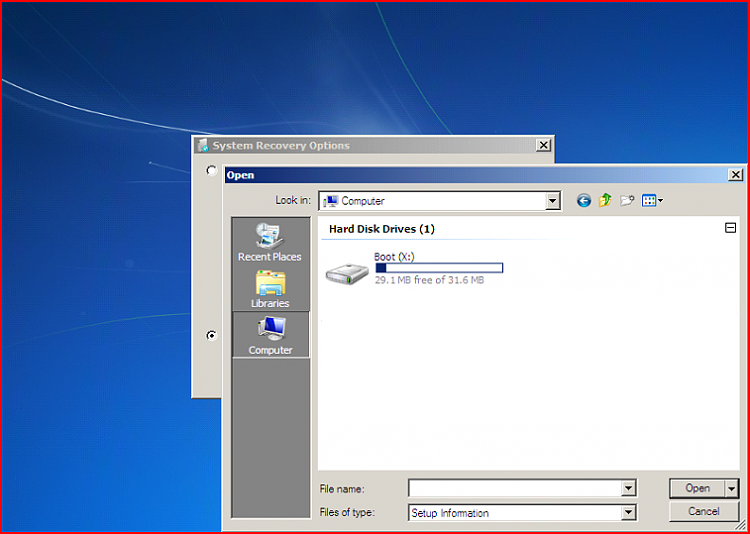
I found a guide on this website explaining how to fix this issue(view guide here), but now that I have downloaded my SATA drivers, and have put them on a flashdrive, I cannot seem to install them. When I boot back into my Win7 bootable USB, go to repair my computer, and then click load drivers, I am unable to find my flashdrive with my SATA drivers on it in the file explorer.


For reference, this is what I see when trying to find the flashdrive with the drivers on it.
5.png


I am not exactly sure what to do next, so I can get this behind me. Any thoughts?


Thanks for any help offered.
 

My Computer My Computer

At a glance

Windows 7 Ultimate x64Intel i7 Z170Crucial 32GB DDR4 2400 MHzGTX 1080 Ti
Computer type
PC/Desktop
Computer Manufacturer/Model Number
Custom
OS
Windows 7 Ultimate x64
CPU
Intel i7 Z170
Motherboard
Asus Z170 Deluxe
Memory
Crucial 32GB DDR4 2400 MHz
Graphics Card(s)
GTX 1080 Ti
Hard Drives
Samsung 850 Pro
WD Gold (x2)
Allow me to elaborate my issue, in case it helps.

This all started with be booting up my computer into Windows 7 Ultimate. I've been using it for years on this computer. I was met with an error screen that said, "Windows 7 failed to start", citing the error code 0xc000000f.


Now, it didn't take long for me to figure out that something was wrong with the BCD file. So I grabbed my bootable Win 7 USB, booted into Windows setup, and tried to repair via system recovery options.


When in system recovery, I realized that the problem may be deeper than just BCD since it didn't detect my boot drive. I tested to see if my boot SSD was still detectable on another computer, and it still was. This perplexed me, so I did some googling and found the support thread I linked in my previous post. That's when I reached the conclusion that it must need the SATA driver reinstalled. Which puts me at the place I am stuck right now.

Honestly I'm at a loss. Any insight is appreciated. If you need any more information please let me know. I want to see this issue resolved.
 

My Computer My Computer

At a glance

Windows 7 Ultimate x64Intel i7 Z170Crucial 32GB DDR4 2400 MHzGTX 1080 Ti
Computer type
PC/Desktop
Computer Manufacturer/Model Number
Custom
OS
Windows 7 Ultimate x64
CPU
Intel i7 Z170
Motherboard
Asus Z170 Deluxe
Memory
Crucial 32GB DDR4 2400 MHz
Graphics Card(s)
GTX 1080 Ti
Hard Drives
Samsung 850 Pro
WD Gold (x2)
Did system recovery work before?
Are you using a usb2 port? Probably you need usb3 and nvme drivers integrated in winpe.

You can borrow my boot media
17514x64v14.iso
 

My Computers My Computers

  • At a glance

    7 X64i5 84002x8gb 3200mhz
    Computer type
    PC/Desktop
    OS
    7 X64
    CPU
    i5 8400
    Motherboard
    gigabyte b365m ds3h
    Memory
    2x8gb 3200mhz
    Hard Drives
    various
    PSU
    pure power 11 400w cm
    Case
    Coolermaster
    Cooling
    cryorig m9i
  • At a glance

    7x64g54008gb ddr4 2400
    Computer type
    PC/Desktop
    OS
    7x64
    CPU
    g5400
    Motherboard
    ga b365m ds3h
    Memory
    8gb ddr4 2400
    PSU
    xfx pro 450w
Did system recovery work before? If so, then the problem is not missing sata drivers.
Are you using a usb2 port?


Thanks for your reply!


I never had to use system recovery before, as this is the first time I have experienced this incident. When I boot into my install USB, and go to repair there is nothing i can do of use. I've even tried going to the cmd and typing out the
Code:
bootrec /fixboot
commands to fix the BCD error but since it apparently can't detect my boot SSD, it doesn't detect Windows.


I've tried using both USB2 and 3 ports. Most recently is USB2
 

My Computer My Computer

At a glance

Windows 7 Ultimate x64Intel i7 Z170Crucial 32GB DDR4 2400 MHzGTX 1080 Ti
Computer type
PC/Desktop
Computer Manufacturer/Model Number
Custom
OS
Windows 7 Ultimate x64
CPU
Intel i7 Z170
Motherboard
Asus Z170 Deluxe
Memory
Crucial 32GB DDR4 2400 MHz
Graphics Card(s)
GTX 1080 Ti
Hard Drives
Samsung 850 Pro
WD Gold (x2)
Try my boot media - it includes usb3 and nvme drivers, and lots of useful repair tools as well as the standard MS recovery options.

extract the iso to usb using rufus or similar.

17514x64v14.iso

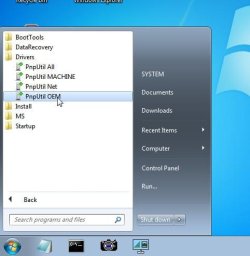
Plug it into the usb2 port. Then when you reach the desktop ( it has a desktop), under the startmenu\drivers folder, run PnpUtil OEM shortcut.
 
Last edited:

My Computers My Computers

  • At a glance

    7 X64i5 84002x8gb 3200mhz
    Computer type
    PC/Desktop
    OS
    7 X64
    CPU
    i5 8400
    Motherboard
    gigabyte b365m ds3h
    Memory
    2x8gb 3200mhz
    Hard Drives
    various
    PSU
    pure power 11 400w cm
    Case
    Coolermaster
    Cooling
    cryorig m9i
  • At a glance

    7x64g54008gb ddr4 2400
    Computer type
    PC/Desktop
    OS
    7x64
    CPU
    g5400
    Motherboard
    ga b365m ds3h
    Memory
    8gb ddr4 2400
    PSU
    xfx pro 450w
Try my boot media - it includes usb3 and nvme drivers, and lots of useful repair tools as well as the standard MS recovery options.

extract the iso to usb using rufus or similar.

17514x64v14.iso


This is Win7 Ultimate? File size seems off is why I ask.
 

My Computer My Computer

At a glance

Windows 7 Ultimate x64Intel i7 Z170Crucial 32GB DDR4 2400 MHzGTX 1080 Ti
Computer type
PC/Desktop
Computer Manufacturer/Model Number
Custom
OS
Windows 7 Ultimate x64
CPU
Intel i7 Z170
Motherboard
Asus Z170 Deluxe
Memory
Crucial 32GB DDR4 2400 MHz
Graphics Card(s)
GTX 1080 Ti
Hard Drives
Samsung 850 Pro
WD Gold (x2)
Try my boot media - it includes usb3 and nvme drivers, and lots of useful repair tools as well as the standard MS recovery options.

extract the iso to usb using rufus or similar.

17514x64v14.iso

Plug it into the usb2 port. Then when you reach the desktop ( it has a desktop), under the startmenu\drivers folder, run PnpUtil OEM shortcut.

OK, so I'm in your boot media. But I'm not really sure how to go about fixing my problem. It doesn't seem to detect my USB drives when I plug them in.
 

My Computer My Computer

At a glance

Windows 7 Ultimate x64Intel i7 Z170Crucial 32GB DDR4 2400 MHzGTX 1080 Ti
Computer type
PC/Desktop
Computer Manufacturer/Model Number
Custom
OS
Windows 7 Ultimate x64
CPU
Intel i7 Z170
Motherboard
Asus Z170 Deluxe
Memory
Crucial 32GB DDR4 2400 MHz
Graphics Card(s)
GTX 1080 Ti
Hard Drives
Samsung 850 Pro
WD Gold (x2)
First run pnputil
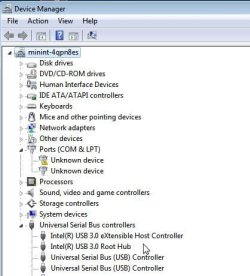
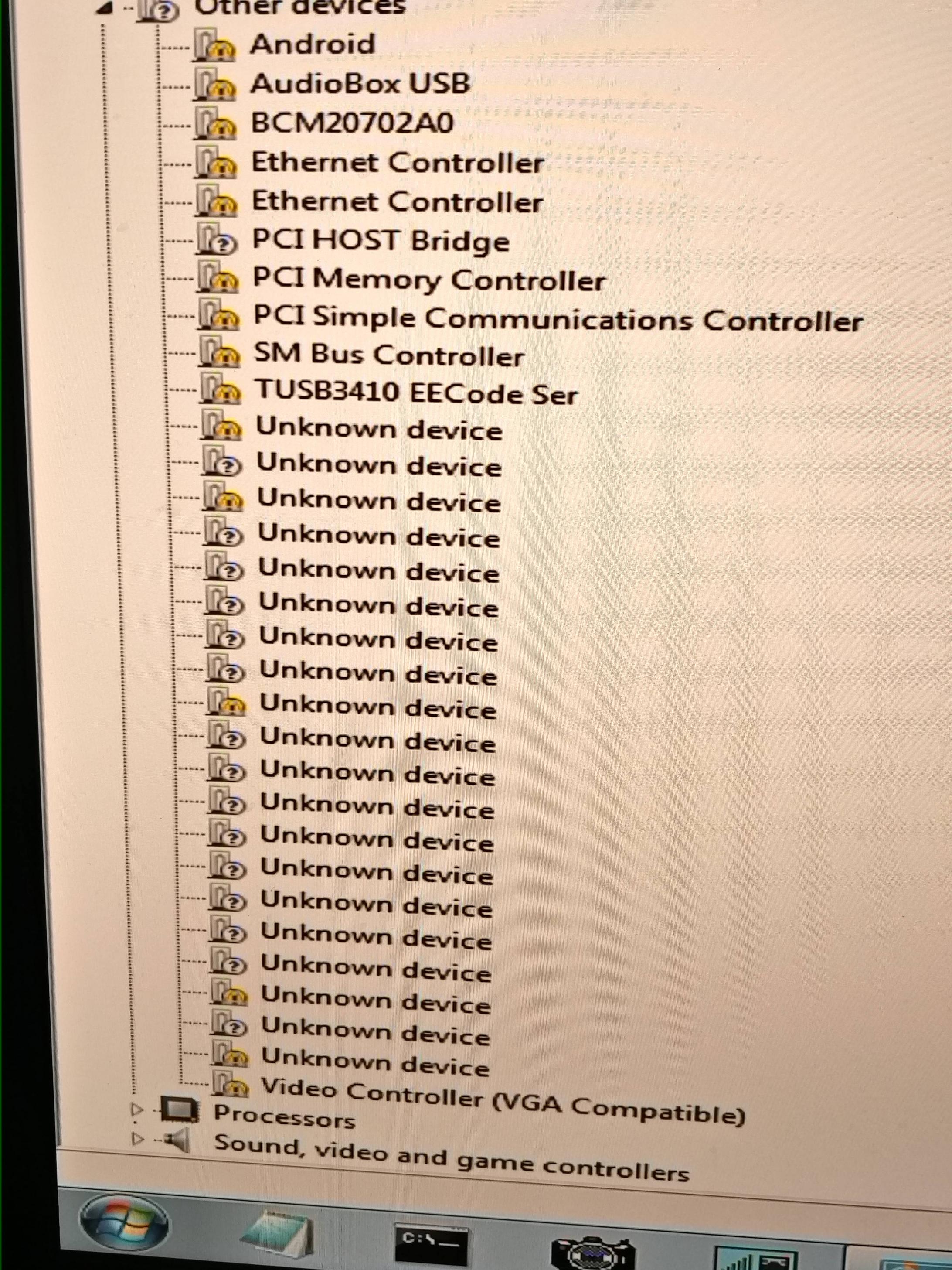
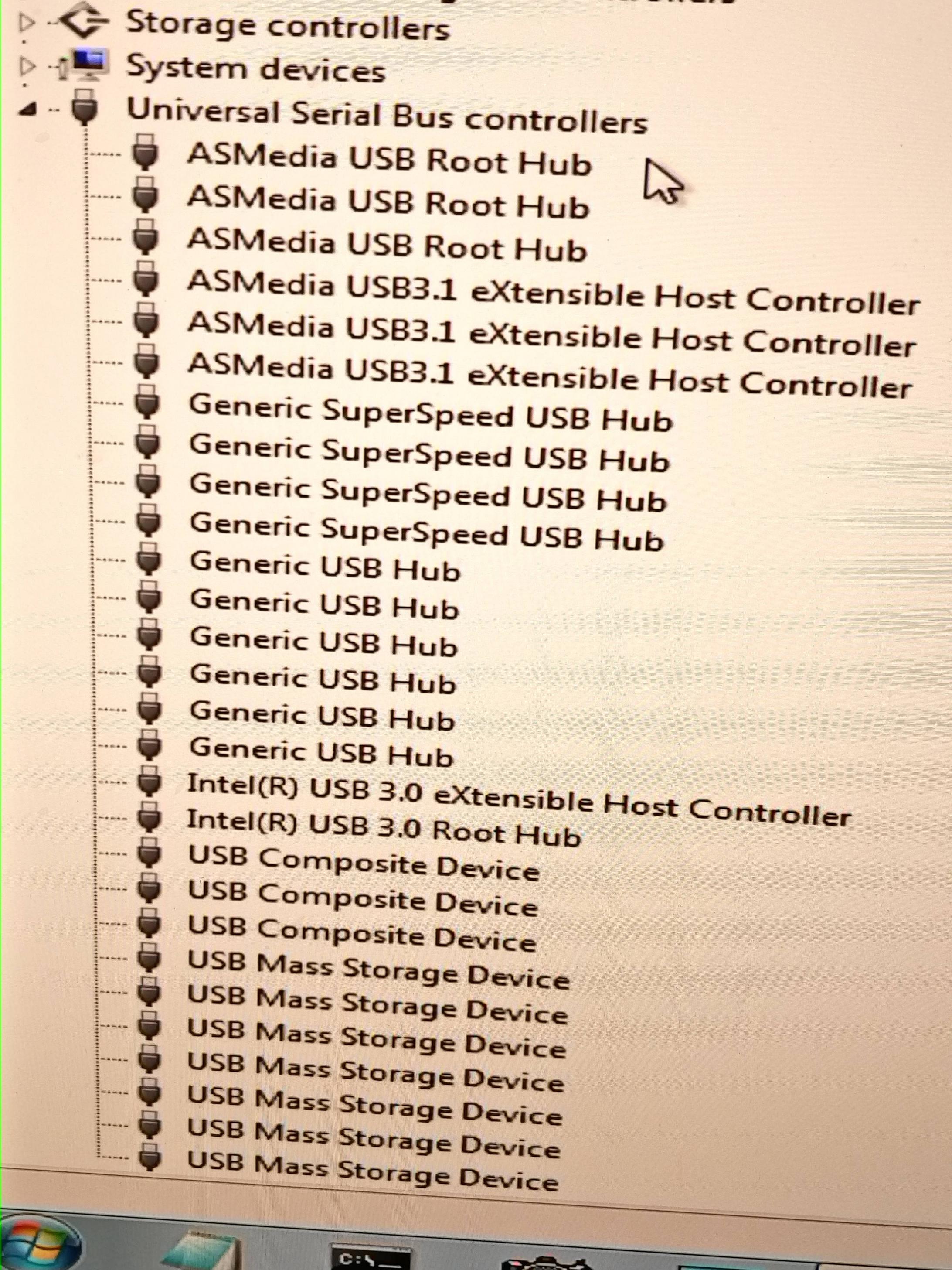
Then Check device manager and see if usb3 drivers are installed
 

My Computers My Computers

  • At a glance

    7 X64i5 84002x8gb 3200mhz
    Computer type
    PC/Desktop
    OS
    7 X64
    CPU
    i5 8400
    Motherboard
    gigabyte b365m ds3h
    Memory
    2x8gb 3200mhz
    Hard Drives
    various
    PSU
    pure power 11 400w cm
    Case
    Coolermaster
    Cooling
    cryorig m9i
  • At a glance

    7x64g54008gb ddr4 2400
    Computer type
    PC/Desktop
    OS
    7x64
    CPU
    g5400
    Motherboard
    ga b365m ds3h
    Memory
    8gb ddr4 2400
    PSU
    xfx pro 450w
Try my boot media - it includes usb3 and nvme drivers, and lots of useful repair tools as well as the standard MS recovery options.

extract the iso to usb using rufus or similar.

17514x64v14.iso

Plug it into the usb2 port. Then when you reach the desktop ( it has a desktop), under the startmenu\drivers folder, run PnpUtil OEM shortcut.

Ran the PnpUtil OEM. Should I restart and boot from my bootable media?
 

My Computer My Computer

At a glance

Windows 7 Ultimate x64Intel i7 Z170Crucial 32GB DDR4 2400 MHzGTX 1080 Ti
Computer type
PC/Desktop
Computer Manufacturer/Model Number
Custom
OS
Windows 7 Ultimate x64
CPU
Intel i7 Z170
Motherboard
Asus Z170 Deluxe
Memory
Crucial 32GB DDR4 2400 MHz
Graphics Card(s)
GTX 1080 Ti
Hard Drives
Samsung 850 Pro
WD Gold (x2)

My Computer My Computer

At a glance

Windows 7 Ultimate x64Intel i7 Z170Crucial 32GB DDR4 2400 MHzGTX 1080 Ti
Computer type
PC/Desktop
Computer Manufacturer/Model Number
Custom
OS
Windows 7 Ultimate x64
CPU
Intel i7 Z170
Motherboard
Asus Z170 Deluxe
Memory
Crucial 32GB DDR4 2400 MHz
Graphics Card(s)
GTX 1080 Ti
Hard Drives
Samsung 850 Pro
WD Gold (x2)
pnputil-oem.jpg

device-manager.jpg
 

My Computers My Computers

  • At a glance

    7 X64i5 84002x8gb 3200mhz
    Computer type
    PC/Desktop
    OS
    7 X64
    CPU
    i5 8400
    Motherboard
    gigabyte b365m ds3h
    Memory
    2x8gb 3200mhz
    Hard Drives
    various
    PSU
    pure power 11 400w cm
    Case
    Coolermaster
    Cooling
    cryorig m9i
  • At a glance

    7x64g54008gb ddr4 2400
    Computer type
    PC/Desktop
    OS
    7x64
    CPU
    g5400
    Motherboard
    ga b365m ds3h
    Memory
    8gb ddr4 2400
    PSU
    xfx pro 450w
Ran the PnpUtil OEM. Should I restart and boot from my bootable media?

NO. The drivers are only installed in that instance of booted media. It doesn't persist across to different boot media. That is because boot media runs in random access memory (ram). On reboot, ram is cleared.
 

My Computers My Computers

  • At a glance

    7 X64i5 84002x8gb 3200mhz
    Computer type
    PC/Desktop
    OS
    7 X64
    CPU
    i5 8400
    Motherboard
    gigabyte b365m ds3h
    Memory
    2x8gb 3200mhz
    Hard Drives
    various
    PSU
    pure power 11 400w cm
    Case
    Coolermaster
    Cooling
    cryorig m9i
  • At a glance

    7x64g54008gb ddr4 2400
    Computer type
    PC/Desktop
    OS
    7x64
    CPU
    g5400
    Motherboard
    ga b365m ds3h
    Memory
    8gb ddr4 2400
    PSU
    xfx pro 450w

My Computer My Computer

At a glance

Windows 7 Ultimate x64Intel i7 Z170Crucial 32GB DDR4 2400 MHzGTX 1080 Ti
Computer type
PC/Desktop
Computer Manufacturer/Model Number
Custom
OS
Windows 7 Ultimate x64
CPU
Intel i7 Z170
Motherboard
Asus Z170 Deluxe
Memory
Crucial 32GB DDR4 2400 MHz
Graphics Card(s)
GTX 1080 Ti
Hard Drives
Samsung 850 Pro
WD Gold (x2)
Looks like it has installed the drivers for your usb3 devices. What drives can you see in explorer?
 

My Computers My Computers

  • At a glance

    7 X64i5 84002x8gb 3200mhz
    Computer type
    PC/Desktop
    OS
    7 X64
    CPU
    i5 8400
    Motherboard
    gigabyte b365m ds3h
    Memory
    2x8gb 3200mhz
    Hard Drives
    various
    PSU
    pure power 11 400w cm
    Case
    Coolermaster
    Cooling
    cryorig m9i
  • At a glance

    7x64g54008gb ddr4 2400
    Computer type
    PC/Desktop
    OS
    7x64
    CPU
    g5400
    Motherboard
    ga b365m ds3h
    Memory
    8gb ddr4 2400
    PSU
    xfx pro 450w
Looks like it has installed the drivers for your usb3 devices. What drives can you see in explorer?

Only Boot (X:)
 

My Computer My Computer

At a glance

Windows 7 Ultimate x64Intel i7 Z170Crucial 32GB DDR4 2400 MHzGTX 1080 Ti
Computer type
PC/Desktop
Computer Manufacturer/Model Number
Custom
OS
Windows 7 Ultimate x64
CPU
Intel i7 Z170
Motherboard
Asus Z170 Deluxe
Memory
Crucial 32GB DDR4 2400 MHz
Graphics Card(s)
GTX 1080 Ti
Hard Drives
Samsung 850 Pro
WD Gold (x2)

My Computers My Computers

  • At a glance

    7 X64i5 84002x8gb 3200mhz
    Computer type
    PC/Desktop
    OS
    7 X64
    CPU
    i5 8400
    Motherboard
    gigabyte b365m ds3h
    Memory
    2x8gb 3200mhz
    Hard Drives
    various
    PSU
    pure power 11 400w cm
    Case
    Coolermaster
    Cooling
    cryorig m9i
  • At a glance

    7x64g54008gb ddr4 2400
    Computer type
    PC/Desktop
    OS
    7x64
    CPU
    g5400
    Motherboard
    ga b365m ds3h
    Memory
    8gb ddr4 2400
    PSU
    xfx pro 450w

My Computer My Computer

At a glance

Windows 7 Ultimate x64Intel i7 Z170Crucial 32GB DDR4 2400 MHzGTX 1080 Ti
Computer type
PC/Desktop
Computer Manufacturer/Model Number
Custom
OS
Windows 7 Ultimate x64
CPU
Intel i7 Z170
Motherboard
Asus Z170 Deluxe
Memory
Crucial 32GB DDR4 2400 MHz
Graphics Card(s)
GTX 1080 Ti
Hard Drives
Samsung 850 Pro
WD Gold (x2)

My Computers My Computers

  • At a glance

    7 X64i5 84002x8gb 3200mhz
    Computer type
    PC/Desktop
    OS
    7 X64
    CPU
    i5 8400
    Motherboard
    gigabyte b365m ds3h
    Memory
    2x8gb 3200mhz
    Hard Drives
    various
    PSU
    pure power 11 400w cm
    Case
    Coolermaster
    Cooling
    cryorig m9i
  • At a glance

    7x64g54008gb ddr4 2400
    Computer type
    PC/Desktop
    OS
    7x64
    CPU
    g5400
    Motherboard
    ga b365m ds3h
    Memory
    8gb ddr4 2400
    PSU
    xfx pro 450w

My Computer My Computer

At a glance

Windows 7 Ultimate x64Intel i7 Z170Crucial 32GB DDR4 2400 MHzGTX 1080 Ti
Computer type
PC/Desktop
Computer Manufacturer/Model Number
Custom
OS
Windows 7 Ultimate x64
CPU
Intel i7 Z170
Motherboard
Asus Z170 Deluxe
Memory
Crucial 32GB DDR4 2400 MHz
Graphics Card(s)
GTX 1080 Ti
Hard Drives
Samsung 850 Pro
WD Gold (x2)
Trying now


Ok, so it looks like everything is going to work out! However, I am trying to backup my boot disk, or perhaps I should say recover files on my boot disk. It is clear that something was wrong with my SSD, and the only way to reinstall Windows is to wipe my boot drive unfortunately. As I didn't have a backup on hand I am relying on some recovery software to find at least somethings that I'd rather keep.


Thanks for your help.
 

My Computer My Computer

At a glance

Windows 7 Ultimate x64Intel i7 Z170Crucial 32GB DDR4 2400 MHzGTX 1080 Ti
Computer type
PC/Desktop
Computer Manufacturer/Model Number
Custom
OS
Windows 7 Ultimate x64
CPU
Intel i7 Z170
Motherboard
Asus Z170 Deluxe
Memory
Crucial 32GB DDR4 2400 MHz
Graphics Card(s)
GTX 1080 Ti
Hard Drives
Samsung 850 Pro
WD Gold (x2)
Back
Top