
C.F my WU thread Servicing Stack 2019-09 kb4516655 & some updates fail clean install.
The Problem:
I did a clean install in september on a new hard drive because my old one failed.
During install I selected to format as "new" drive.
Things apparently got messed up when I installed Convenience rollup(s) aka "Service pack2" or whatever.
Snick & Paul Black helped me out. I learned my WinUpdate.log revealed some issues, SURT.log is fine, so IIRC this means Repair Install should work.
Now I can't do a Repair Install, receive the following error. I did some googling, but prefer to ask here first:
FYI, I followed the steps at Repair Install
- I disabled my antivirus.
The following issues are preventing Windows from upgrading. Cancel the upgrade, complete each task, and then restart the upgrade to continue.
You can’t upgrade 64-bit Windows to a 32-bit version of Windows. To upgrade, obtain a 64-bit version of the installation disc, or go online to see how to install Windows 7 and keep your files and settings.
32-bit Windows cannot be upgraded to a 64-bit version of Windows. To upgrade, obtain a 32-bit version of the Windows installation disc.
I used the same exact DVD when I clean installed successfully in September.
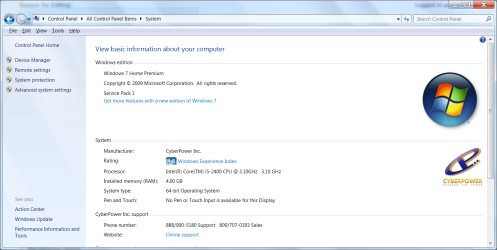
And, my system is 64bit:
Maybe I'm looking in the wrong place, but afaik, the forum rules don't say anything about posting outside links, so here's some searches I did. I don't want to proceed without knowing what I'm getting into.
You can’t upgrade 64-bit Windows to a 32-bit version of Windows - Microsoft Community
old post:
Windows 7 x64 "upgrade" repair fails (also Windows Update error 800B0001) - Super User
Thanks!
The Problem:
I did a clean install in september on a new hard drive because my old one failed.
During install I selected to format as "new" drive.
Things apparently got messed up when I installed Convenience rollup(s) aka "Service pack2" or whatever.
Snick & Paul Black helped me out. I learned my WinUpdate.log revealed some issues, SURT.log is fine, so IIRC this means Repair Install should work.
Now I can't do a Repair Install, receive the following error. I did some googling, but prefer to ask here first:
FYI, I followed the steps at Repair Install
- I disabled my antivirus.
The following issues are preventing Windows from upgrading. Cancel the upgrade, complete each task, and then restart the upgrade to continue.
You can’t upgrade 64-bit Windows to a 32-bit version of Windows. To upgrade, obtain a 64-bit version of the installation disc, or go online to see how to install Windows 7 and keep your files and settings.
32-bit Windows cannot be upgraded to a 64-bit version of Windows. To upgrade, obtain a 32-bit version of the Windows installation disc.
I used the same exact DVD when I clean installed successfully in September.
And, my system is 64bit:
Maybe I'm looking in the wrong place, but afaik, the forum rules don't say anything about posting outside links, so here's some searches I did. I don't want to proceed without knowing what I'm getting into.
You can’t upgrade 64-bit Windows to a 32-bit version of Windows - Microsoft Community
old post:
Windows 7 x64 "upgrade" repair fails (also Windows Update error 800B0001) - Super User
Thanks!
My Computer
At a glance
Windows 7 Home Premium 64 bit.Intel(R) Core(TM) i5-2400 CPU @ 3.10GHz4.00 GBIntel(R) HD Graphics Family
- Computer type
- PC/Desktop
- Computer Manufacturer/Model Number
- System Builder (Cyberpower)
- OS
- Windows 7 Home Premium 64 bit.
- CPU
- Intel(R) Core(TM) i5-2400 CPU @ 3.10GHz
- Motherboard
- ASUSTeK Computer INC. P8H67-M LE
- Memory
- 4.00 GB
- Graphics Card(s)
- Intel(R) HD Graphics Family
- Sound Card
- (1) Realtek High Definition Audio (2) Intel(R) Display Aud
- Monitor(s) Displays
- hp S2331
- Screen Resolution
- 1920 X 1080
- Hard Drives
- (1) Hitachi HDS721010CLA332 ATA Device
(2) Hitachi HDS721010CLA332 ATA Device
(3) Multi Flash Reader USB Device
- PSU
- Corsair
- Case
- Apevia
- Cooling
- Intel fan (cpu); case fans.
- Keyboard
- Xtreme Gear
- Mouse
- Microsoft USB IntelliMouse Optical
- Internet Speed
- 1.0 Gbps
- Antivirus
- Avast
- Browser
- Firefox Quantum


