System migration from MBR to UEFI

My Computer My Computer

At a glance

Windows 7 Ultimate x86
Computer type
PC/Desktop
OS
Windows 7 Ultimate x86
goopy : Greets,

1.
Did you get a chance to try the gptgen tool mentioned in the post?
Sorry, Can't say anything, Its just a link for me as for you.

2.
Were you able to get bcdboot working under W7?
Code:
bcdboot c:\windows /s s: /f UEFI

(i) I assume that the Main OS Partition is already applied to the disk & It has the BCD-Template file i.e. %WINDIR%\System32\Config\BCD-Template file. For me its D:\Windows\System32\Config\BCD-Template file. Please check if its there. It seems bcdboot looks for it.

(ii) It will definitely work. Both bcdboot c:\windows /s s: & bcdboot c:\windows /s s: /f UEFI will work.

3. Why you want to run bcdboot ? Are you not able to boot into the OS ? or you have recreated the EFI partition & want to add boot data to it ? or you want to change the disk the boot data & entry is picked from ?

Let me know.

Thanks & Regards. ...
 
Last edited:

My Computer My Computer

At a glance

Windows 7 Ultimate x32 With Sp1 + Vista Ultim...Intel Mobile Core 2 Duo T5750 @ 2.00GHz Merom...2.00GB Dual-Channel DDR2 @ 332MHz (5-5-5-15)Mobile Intel(R) 965 Express Chipset Family
Computer type
Laptop
Computer Manufacturer/Model Number
hp compaq presario c795VU notebook pc
OS
Windows 7 Ultimate x32 With Sp1 + Vista Ultimate x32 with Sp1 & Sp2 !!
CPU
Intel Mobile Core 2 Duo T5750 @ 2.00GHz Merom 65nm Technolog
Motherboard
Hewlett-Packard 30D9 (CPU)
Memory
2.00GB Dual-Channel DDR2 @ 332MHz (5-5-5-15)
Graphics Card(s)
Mobile Intel(R) 965 Express Chipset Family
Sound Card
High Definition Audio Device
Monitor(s) Displays
LP154WX4-TLCB on Mobile Intel 965 Express Chipset Family
Screen Resolution
1280x800 @ 60Hz
Hard Drives
149GB Western Digital WDC WD1600BEVS-60VAT0 ATA Device (SATA)
Keyboard
Standard 101/102-Key or Microsoft Natural PS/2 Key + HP QLB
Mouse
ALPS pointing device
Antivirus
Kaspersky AV 2017(Win 7) & AVG AntiVirus Free 2016 (VISTA)
Browser
google chrome
....
(ii) It will definitely work. Both bcdboot c:\windows /s s: & bcdboot c:\windows /s s: /f UEFI will work.
...
Greetings Vineet Garg.
So you managed to run bcdboot successfully in W7?
 

My Computer My Computer

At a glance

Windows 7 Ultimate x86
Computer type
PC/Desktop
OS
Windows 7 Ultimate x86
So you managed to run bcdboot successfully in W7?

goopy :

1. Yes it worked for me. I booted into the Win 7 SP1 x64 UEFI+GPT Pen drive Installation Media, Launched Command Prompt ( Repair Your Computer ) from there & Ran bcdboot c:\windows /s s: ( for me : bcdboot d:\windows /s z: )

2. I assume that you are not booted in the Win 7 disk ( where you are planning the changes ) & trying that from there!

3.You can also do that from the Win 10 ( already installed on your system on another disk!) supplying correct Disk no., etc. ( preferably checked from Command Prompt )

Thanks & Regards. ...
 
Last edited:

My Computer My Computer

At a glance

Windows 7 Ultimate x32 With Sp1 + Vista Ultim...Intel Mobile Core 2 Duo T5750 @ 2.00GHz Merom...2.00GB Dual-Channel DDR2 @ 332MHz (5-5-5-15)Mobile Intel(R) 965 Express Chipset Family
Computer type
Laptop
Computer Manufacturer/Model Number
hp compaq presario c795VU notebook pc
OS
Windows 7 Ultimate x32 With Sp1 + Vista Ultimate x32 with Sp1 & Sp2 !!
CPU
Intel Mobile Core 2 Duo T5750 @ 2.00GHz Merom 65nm Technolog
Motherboard
Hewlett-Packard 30D9 (CPU)
Memory
2.00GB Dual-Channel DDR2 @ 332MHz (5-5-5-15)
Graphics Card(s)
Mobile Intel(R) 965 Express Chipset Family
Sound Card
High Definition Audio Device
Monitor(s) Displays
LP154WX4-TLCB on Mobile Intel 965 Express Chipset Family
Screen Resolution
1280x800 @ 60Hz
Hard Drives
149GB Western Digital WDC WD1600BEVS-60VAT0 ATA Device (SATA)
Keyboard
Standard 101/102-Key or Microsoft Natural PS/2 Key + HP QLB
Mouse
ALPS pointing device
Antivirus
Kaspersky AV 2017(Win 7) & AVG AntiVirus Free 2016 (VISTA)
Browser
google chrome
.....
1.Yes it worked for me. I booted into the Win 7 SP1 x64 UEFI+GPT Pen drive Installation Media, Launched Command Prompt ( Repair Your Computer ) from there & Ran bcdboot c:\windows /s s: ( for me : bcdboot d:\windows /s z: ). ...
Greetings Vineet Garg.
Just run bcdboot from W7, not form installation media.
You can make an empty EFI partition on a blank GPT disk and assign letter S:. Then run the following and see if it works.
Code:
bcdboot c:\windows /s s:
Many thanks and best regards,
 

My Computer My Computer

At a glance

Windows 7 Ultimate x86
Computer type
PC/Desktop
OS
Windows 7 Ultimate x86
goopy: Greets,

1.
Just run bcdboot from W7, not from installation media.
Anyway you run, The idea is to sit outside of the disk, you want to apply changes on! Not that booted into the same disk & trying to apply the changes on it.

2.
You can make an empty EFI partition on a blank GPT disk and assign letter S:
(i) I agree you can assign S: but the thing is to make sure that EFI System Partition is assigned a drive letter. It will not matter whether you assign S: or Z:
(ii) Once the boot data is kept on it & all is well, It should drop the drive letter on the next boot or has to be made so manually.
(iii)but... what do you mean by blank GPT disk ? I assume that the GPT disk has the OS partition! Otherwise you will be adding boot menu to the empty GPT drive for an OS partition which is existing on some other disk!

3.
Then run the following and see if it works. bcdboot c:\windows /s s:
I assume that c: has been replaced by the proper volume letter of the OS in concern. Ideally, c: would be referring to the OS, you are booted in.

Thanks & Regards. ...
 
Last edited:

My Computer My Computer

At a glance

Windows 7 Ultimate x32 With Sp1 + Vista Ultim...Intel Mobile Core 2 Duo T5750 @ 2.00GHz Merom...2.00GB Dual-Channel DDR2 @ 332MHz (5-5-5-15)Mobile Intel(R) 965 Express Chipset Family
Computer type
Laptop
Computer Manufacturer/Model Number
hp compaq presario c795VU notebook pc
OS
Windows 7 Ultimate x32 With Sp1 + Vista Ultimate x32 with Sp1 & Sp2 !!
CPU
Intel Mobile Core 2 Duo T5750 @ 2.00GHz Merom 65nm Technolog
Motherboard
Hewlett-Packard 30D9 (CPU)
Memory
2.00GB Dual-Channel DDR2 @ 332MHz (5-5-5-15)
Graphics Card(s)
Mobile Intel(R) 965 Express Chipset Family
Sound Card
High Definition Audio Device
Monitor(s) Displays
LP154WX4-TLCB on Mobile Intel 965 Express Chipset Family
Screen Resolution
1280x800 @ 60Hz
Hard Drives
149GB Western Digital WDC WD1600BEVS-60VAT0 ATA Device (SATA)
Keyboard
Standard 101/102-Key or Microsoft Natural PS/2 Key + HP QLB
Mouse
ALPS pointing device
Antivirus
Kaspersky AV 2017(Win 7) & AVG AntiVirus Free 2016 (VISTA)
Browser
google chrome
goopy : Greets,

It's getting very difficult to help you without Disks view from MiniTool Partition Wizard. I hope you understand.

Thanks & Regards. ...
 

My Computer My Computer

At a glance

Windows 7 Ultimate x32 With Sp1 + Vista Ultim...Intel Mobile Core 2 Duo T5750 @ 2.00GHz Merom...2.00GB Dual-Channel DDR2 @ 332MHz (5-5-5-15)Mobile Intel(R) 965 Express Chipset Family
Computer type
Laptop
Computer Manufacturer/Model Number
hp compaq presario c795VU notebook pc
OS
Windows 7 Ultimate x32 With Sp1 + Vista Ultimate x32 with Sp1 & Sp2 !!
CPU
Intel Mobile Core 2 Duo T5750 @ 2.00GHz Merom 65nm Technolog
Motherboard
Hewlett-Packard 30D9 (CPU)
Memory
2.00GB Dual-Channel DDR2 @ 332MHz (5-5-5-15)
Graphics Card(s)
Mobile Intel(R) 965 Express Chipset Family
Sound Card
High Definition Audio Device
Monitor(s) Displays
LP154WX4-TLCB on Mobile Intel 965 Express Chipset Family
Screen Resolution
1280x800 @ 60Hz
Hard Drives
149GB Western Digital WDC WD1600BEVS-60VAT0 ATA Device (SATA)
Keyboard
Standard 101/102-Key or Microsoft Natural PS/2 Key + HP QLB
Mouse
ALPS pointing device
Antivirus
Kaspersky AV 2017(Win 7) & AVG AntiVirus Free 2016 (VISTA)
Browser
google chrome
Greetings.

MBR/GPT conversion: a summary

1. In place conversion
There are 2 tools that claim to perform in place conversion of MBR system to UEFI, mbr2gpt and gptgen. However, due to lack of endorsements from forum members, it is suggested the safer method of system migration to a new drive be used.


2. System migration
The idea is simple: prepare the desired partition layout on the target drive, restore the system image to the target partition, and add a boot entry.

(2a) Here are two MS guides to help you with MBR/GPT partition layout creation on a blank drive. In this example, the target system partition is assigned the letter S, and target OS partition W.

BIOS/MBR-based hard drive partitions | Microsoft Docs
UEFI/GPT-based hard drive partitions | Microsoft Docs

(2b) Use the tool of your choice to backup the source OS partition, and restore the image to the blank W partition. Remember not to enable any option to restore boot entry.

(2c) Run the following using elevated command prompt:
Code:
bcdboot W:\Windows /s S:
The W7 version of bcdboot tool is deprecated so you'll need the W10 version. It can be found in the latest 1909 ISO.

3. DISM++
If playing with bcdboot is not your cup of tea, DISM++ is a versatile tool that combines system image backup/restoration/boot entry creation, and more, in a single package. Highly recommended.

4. Anything else?
Well, there's no Recovery Environment on the new drive. SIW is the man to go to if you need to find out more. Or better still, if you know how it is done, your contribution here would be much appreciated.

Many thanks and best regards,
 

My Computer My Computer

At a glance

Windows 7 Ultimate x86
Computer type
PC/Desktop
OS
Windows 7 Ultimate x86
goopy
Greets,
Thanks for the wonderful write up!
Glad to know that your problems are resolved.
I don't know how to create / write Recovery Environment to an internal disk. So, i can't help you with that.

To All

There are somethings to mention :

1. The desired GPT partition layout for win 7 & 8 is mentioned here

2. GPT partition layout for Win 7 & 8 :

(i) The default config is :
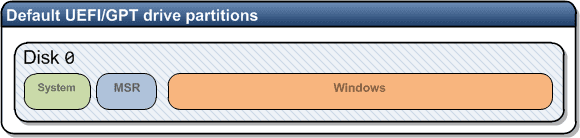
GPT Default Config.png

It is the configuration that is made / achieved by a normal installation, begun on an unallocated GPT drive.

(ii) but the recommended is :
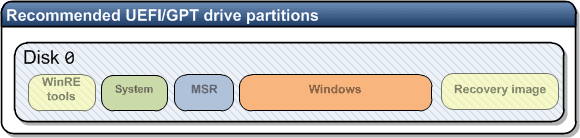
GPT recommended config.png

It is supplied by OEMs & needs some extra steps to be made so.

3. To avoid any problems, the drive letter assigned to EFI partition, is dropped automatically after Boot data is written to it. If not, it should be done so manually.

4. If one is not easy with command line options,

(i) he can use "DiskGenius" to make EFI, MSR & OS partitions. It can create EFI and/ or MSR partitions straight away!

(ii) After making the partitions, one can apply the disk image of C: ( the main OS partition ) to the planned GPT OS partition. I like to use Macrium Reflect for that.

(iii) Then he can boot into a Win 7/8/8.1 UEFI + GPT Installation / System repair disk & run Startup Repair consecutively for three times. It will automatically write the boot data to EFI partition & make the OS bootable.

5. Well, there's no Recovery Environment on the new drive.

Thanks for the info. I suppose you are talking about MBR's OEM Recovery Partition. It will need some extra steps.

Thanks & Regards. ...

 
Last edited:

My Computer My Computer

At a glance

Windows 7 Ultimate x32 With Sp1 + Vista Ultim...Intel Mobile Core 2 Duo T5750 @ 2.00GHz Merom...2.00GB Dual-Channel DDR2 @ 332MHz (5-5-5-15)Mobile Intel(R) 965 Express Chipset Family
Computer type
Laptop
Computer Manufacturer/Model Number
hp compaq presario c795VU notebook pc
OS
Windows 7 Ultimate x32 With Sp1 + Vista Ultimate x32 with Sp1 & Sp2 !!
CPU
Intel Mobile Core 2 Duo T5750 @ 2.00GHz Merom 65nm Technolog
Motherboard
Hewlett-Packard 30D9 (CPU)
Memory
2.00GB Dual-Channel DDR2 @ 332MHz (5-5-5-15)
Graphics Card(s)
Mobile Intel(R) 965 Express Chipset Family
Sound Card
High Definition Audio Device
Monitor(s) Displays
LP154WX4-TLCB on Mobile Intel 965 Express Chipset Family
Screen Resolution
1280x800 @ 60Hz
Hard Drives
149GB Western Digital WDC WD1600BEVS-60VAT0 ATA Device (SATA)
Keyboard
Standard 101/102-Key or Microsoft Natural PS/2 Key + HP QLB
Mouse
ALPS pointing device
Antivirus
Kaspersky AV 2017(Win 7) & AVG AntiVirus Free 2016 (VISTA)
Browser
google chrome
Back
Top