please help error loading operating system

um no I Will try that next.
Ok i think its failed again its not giving me that error but It says hit any button to boot CD.....
and just staying like that
For how long?

ok Should I enlarger the hard drive like what Minotar said using that link. I will put it to 20 gb this time ok?
If you dont,when you install xp not very much will fit on it.
 

My Computer

Computer Manufacturer/Model Number
Blue Shards 1.0
OS
Windows 7 Ultimate 64bit
CPU
AMD Phenom II 555 Black Edition Quad Core OC'd to 4.0GHz
Motherboard
ASUS M4A88T-M
Memory
G Skill RipJaw 1333MHz 4GB
Graphics Card(s)
ATI raideon 4250 HD/XFX ATI Radeon 1GB HD4650
Sound Card
Realteck HD Audio
Monitor(s) Displays
2x 22" Widescreen HD Monitors
Hard Drives
500GB Sata 7500RPM
80GB IDE
PSU
850W OCUK Modular
Case
Antec Dark Fleet DF-30
Cooling
Titan Fenrir Pro (CPU)
Keyboard
Logitech Wireless
Mouse
Logitech Wireless
Internet Speed
24Meg
Other Info
Getting soon-
2TB 7200RPM HDD
+8GB RAM
30GB SSD
HD6950/70
just hangs for its been like 5 mins still nothing so I will try the other idea.
 

My Computer

OS
windows 7
Are you sure you have used this disk before to successfully install?

Where did you get the download? Did you check its hash checksum to verify?
 
Thanks for the replies.
I did exactly on that tutorial told me too should i download a third party program like Partition Wizard is a Windows based FREE Partition Manager. It works as partition magic and supports Windows 2000/XP/2003/Vista/2008 server and Windows 7. FREE for Home and Business user.. how much more larger should I put it too? Its just xp?
thanks again
First install EasyBC as per tutorial.
Depends on what you want to use it for,but seeing as you have near 500GB id give it 30GB.

Thats the link,heres a closer one Free Download Partition Wizard
Download the bottom one,the boot disc.Burn it at a slow speed.
D


Hey Why dont You think I should Just go through disk management from windows instead of downloading a third party program? The Do I Have to burn it to a Disc?
 

My Computer

OS
windows 7
Thanks for the replies.
I did exactly on that tutorial told me too should i download a third party program like Partition Wizard is a Windows based FREE Partition Manager. It works as partition magic and supports Windows 2000/XP/2003/Vista/2008 server and Windows 7. FREE for Home and Business user.. how much more larger should I put it too? Its just xp?
thanks again
First install EasyBC as per tutorial.
Depends on what you want to use it for,but seeing as you have near 500GB id give it 30GB.

Thats the link,heres a closer one Free Download Partition Wizard
Download the bottom one,the boot disc.Burn it at a slow speed.
D


Hey Why dont You think I should Just go through disk management from windows instead of downloading a third party program? The Do I Have to burn it to a Disc?
Its more efficent i think.

Yes,its a bootable disc version i linked you to,bottom one.
 

My Computer

Computer Manufacturer/Model Number
Blue Shards 1.0
OS
Windows 7 Ultimate 64bit
CPU
AMD Phenom II 555 Black Edition Quad Core OC'd to 4.0GHz
Motherboard
ASUS M4A88T-M
Memory
G Skill RipJaw 1333MHz 4GB
Graphics Card(s)
ATI raideon 4250 HD/XFX ATI Radeon 1GB HD4650
Sound Card
Realteck HD Audio
Monitor(s) Displays
2x 22" Widescreen HD Monitors
Hard Drives
500GB Sata 7500RPM
80GB IDE
PSU
850W OCUK Modular
Case
Antec Dark Fleet DF-30
Cooling
Titan Fenrir Pro (CPU)
Keyboard
Logitech Wireless
Mouse
Logitech Wireless
Internet Speed
24Meg
Other Info
Getting soon-
2TB 7200RPM HDD
+8GB RAM
30GB SSD
HD6950/70
Thanks for the replies.
I did exactly on that tutorial told me too should i download a third party program like Partition Wizard is a Windows based FREE Partition Manager. It works as partition magic and supports Windows 2000/XP/2003/Vista/2008 server and Windows 7. FREE for Home and Business user.. how much more larger should I put it too? Its just xp?
thanks again
First install EasyBC as per tutorial.
Depends on what you want to use it for,but seeing as you have near 500GB id give it 30GB.

Thats the link,heres a closer one Free Download Partition Wizard
Download the bottom one,the boot disc.Burn it at a slow speed.
D


Hey Why dont You think I should Just go through disk management from windows instead of downloading a third party program? The Do I Have to burn it to a Disc?

Partition Wizard is an excellent program and can do much more that Disk Management. The bootable CD will be very nice to have.

You can try Disk Management if you want, first shrink C to about 436GB, then delete D, make a new primary partition in the un-allocated space. Should be 30GB, you'll need this space to let XP run with a few programs, as Minotar mentioned.

If you have a 4GB usb stick you can put XP on it and install from it.
Windows 7 USB/DVD Download Tool

Or try Install Windows 7 Without Using Any External Device, this will work from a XP ISO file.
 

My Computer

Computer type
PC/Desktop
Computer Manufacturer/Model Number
76~2.0
OS
Windows 7 Ult x64 - SP1/ Windows 8 Pro x64
CPU
Intel Core i5-3570K 4.6GHz
Motherboard
Gigabyte GA-Z77X UD3H, f18
Memory
8GB (2X4GB) DDR3 1600 Corsair Vengeance CL8 1.5v
Graphics Card(s)
Sapphire HD 7770 Vapor-X OC 1GB DDR5
Sound Card
Onboard VIA VT2021
Monitor(s) Displays
22" LCD Dell
Screen Resolution
1680x1050
Hard Drives
Samsung 840Pro 128GB SSD,
Seagate Barracuda 500GB SATA2 7200rpm 32MB cache, Seagate Barracuda 1TB SATA2 7200rpm 32MB cache,
PSU
Corsair HX650W
Case
Cooler Master Storm Scout
Cooling
Corsair H80 2x12cm Noctua NF P12 , 2x14cm case fans
Keyboard
Logitech Wave
Mouse
CM Sentinel
Internet Speed
Dismal
Antivirus
Avast
Browser
Opera Next
Other Info
Haswell laptop: HP Envy 17t-j, i7-4700MQ, GeForce 740M 2GB DDR3, 17.3" Full HD 1920x1080, 16GB RAM, Samsung 840 Pro 128GB, 1TB Hitachi 7200 HDD,
Desktop: eSATA ports,
External eSATA Seagate 500GB SATA2 7200rpm,
External WD USB 500GB
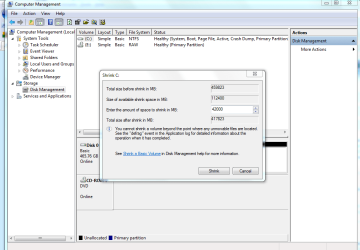
Hi how much should I shrink My C:/ i cant put 436GB
I only want to put 20 GB on there All I want to do I just run a little program on there because I dont have 32 bit operating system thats all i want to do.
 

Attachments

  • Capture.PNG
    Capture.PNG
    110.3 KB · Views: 207

My Computer

OS
windows 7
Hi how much should I shrink My C:/ i cant put 436GB
I only want to put 20 GB on there All I want to do I just run a little program on there because I dont have 32 bit operating system thats all i want to do.
Shrink by 15500 to get 30GB free Space
Shrink by 5000 to get 20gb free space

Remember,you have 16GB (16500 ish m/b ) already free
 

My Computer

Computer Manufacturer/Model Number
Blue Shards 1.0
OS
Windows 7 Ultimate 64bit
CPU
AMD Phenom II 555 Black Edition Quad Core OC'd to 4.0GHz
Motherboard
ASUS M4A88T-M
Memory
G Skill RipJaw 1333MHz 4GB
Graphics Card(s)
ATI raideon 4250 HD/XFX ATI Radeon 1GB HD4650
Sound Card
Realteck HD Audio
Monitor(s) Displays
2x 22" Widescreen HD Monitors
Hard Drives
500GB Sata 7500RPM
80GB IDE
PSU
850W OCUK Modular
Case
Antec Dark Fleet DF-30
Cooling
Titan Fenrir Pro (CPU)
Keyboard
Logitech Wireless
Mouse
Logitech Wireless
Internet Speed
24Meg
Other Info
Getting soon-
2TB 7200RPM HDD
+8GB RAM
30GB SSD
HD6950/70
Hi how much should I shrink My C:/ i cant put 436GB
I only want to put 20 GB on there All I want to do I just run a little program on there because I dont have 32 bit operating system thats all i want to do.

As much as you want.

Now that you say you only need XP on there to run 32 bit, how about just putting 32bit Win7 on there? You should have the disk in your package, and it should allow install and activation on the same computer.

Someone can please correct me if I am wrong, but I saw on this forum today that you can install Win7 dual boot on the same computer and keep activated with no problem?

Even if you only run it as a 30 day trial, you could compare the two side by side to decide which you like best. I have bailed out of 64 bit several times for buggyness.
 
Hi how much should I shrink My C:/ i cant put 436GB
I only want to put 20 GB on there All I want to do I just run a little program on there because I dont have 32 bit operating system thats all i want to do.

As much as you want.

Now that you say you only need XP on there to run 32 bit, how about just putting 32bit Win7 on there? You should have the disk in your package, and it should allow install and activation on the same computer.

Someone can please correct me if I am wrong, but I saw on this forum today that you can install Win7 dual boot on the same computer and keep activated with no problem?
I remember seeing the same thing.

On a side note,right click the program you want to run in the 32bit OS>compatability>tick the box>select XP service pack 2

This will allow you to run a program in XP mode.
 

My Computer

Computer Manufacturer/Model Number
Blue Shards 1.0
OS
Windows 7 Ultimate 64bit
CPU
AMD Phenom II 555 Black Edition Quad Core OC'd to 4.0GHz
Motherboard
ASUS M4A88T-M
Memory
G Skill RipJaw 1333MHz 4GB
Graphics Card(s)
ATI raideon 4250 HD/XFX ATI Radeon 1GB HD4650
Sound Card
Realteck HD Audio
Monitor(s) Displays
2x 22" Widescreen HD Monitors
Hard Drives
500GB Sata 7500RPM
80GB IDE
PSU
850W OCUK Modular
Case
Antec Dark Fleet DF-30
Cooling
Titan Fenrir Pro (CPU)
Keyboard
Logitech Wireless
Mouse
Logitech Wireless
Internet Speed
24Meg
Other Info
Getting soon-
2TB 7200RPM HDD
+8GB RAM
30GB SSD
HD6950/70
A dual boot Win7 32/64 would see the same hardware config and IP addy. Both should stay activated. Anyone know different?
 
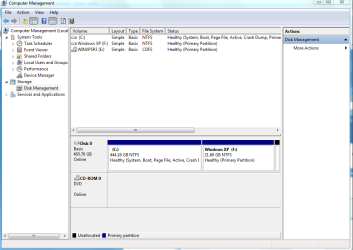
Ok Im feeling lucky this round I have re burnt on a verbitum cd. is everyone happy about the partition now?

Thanks
 

Attachments

  • Capture.PNG
    Capture.PNG
    90.1 KB · Views: 14

My Computer

OS
windows 7
Ok Im feeling lucky this round I have re burnt on a verbitum cd. is everyone happy about the partition now?

Thanks
Looks good,when your done you can delete the old one (as its still showing):)
 

My Computer

Computer Manufacturer/Model Number
Blue Shards 1.0
OS
Windows 7 Ultimate 64bit
CPU
AMD Phenom II 555 Black Edition Quad Core OC'd to 4.0GHz
Motherboard
ASUS M4A88T-M
Memory
G Skill RipJaw 1333MHz 4GB
Graphics Card(s)
ATI raideon 4250 HD/XFX ATI Radeon 1GB HD4650
Sound Card
Realteck HD Audio
Monitor(s) Displays
2x 22" Widescreen HD Monitors
Hard Drives
500GB Sata 7500RPM
80GB IDE
PSU
850W OCUK Modular
Case
Antec Dark Fleet DF-30
Cooling
Titan Fenrir Pro (CPU)
Keyboard
Logitech Wireless
Mouse
Logitech Wireless
Internet Speed
24Meg
Other Info
Getting soon-
2TB 7200RPM HDD
+8GB RAM
30GB SSD
HD6950/70
quick question Im in windows XP installition not the real thing yet but it still says D:/ 21GB which is the one but it should be F:/ . Anyway It wants me to format it but when ever i click it it says drive C in unsupported or damaged or something like that click F:/ to format. That will format my C:/ wont it thats all my data?
something not right there ?
 

My Computer

OS
windows 7
quick question Im in windows XP installition not the real thing yet but it still says D:/ 21GB which is the one but it should be F:/ . Anyway It wants me to format it but when ever i click it it says drive C in unsupported or damaged or something like that click F:/ to format. That will format my C:/ wont it thats all my data?
something not right there ?
Go back into partition wizard,delete all partitions EXCEPT the main one (the big one) then create (use ALL space)>then format>set as primary.
Run Xp disc again
 

My Computer

Computer Manufacturer/Model Number
Blue Shards 1.0
OS
Windows 7 Ultimate 64bit
CPU
AMD Phenom II 555 Black Edition Quad Core OC'd to 4.0GHz
Motherboard
ASUS M4A88T-M
Memory
G Skill RipJaw 1333MHz 4GB
Graphics Card(s)
ATI raideon 4250 HD/XFX ATI Radeon 1GB HD4650
Sound Card
Realteck HD Audio
Monitor(s) Displays
2x 22" Widescreen HD Monitors
Hard Drives
500GB Sata 7500RPM
80GB IDE
PSU
850W OCUK Modular
Case
Antec Dark Fleet DF-30
Cooling
Titan Fenrir Pro (CPU)
Keyboard
Logitech Wireless
Mouse
Logitech Wireless
Internet Speed
24Meg
Other Info
Getting soon-
2TB 7200RPM HDD
+8GB RAM
30GB SSD
HD6950/70
thanks for the reply again how do I delete when it says unallocated?
 

My Computer

OS
windows 7
you cannot delete unallocated space, just create a partition there to format
 

My Computer

Computer Manufacturer/Model Number
Blue Shards 1.0
OS
Windows 7 Ultimate 64bit
CPU
AMD Phenom II 555 Black Edition Quad Core OC'd to 4.0GHz
Motherboard
ASUS M4A88T-M
Memory
G Skill RipJaw 1333MHz 4GB
Graphics Card(s)
ATI raideon 4250 HD/XFX ATI Radeon 1GB HD4650
Sound Card
Realteck HD Audio
Monitor(s) Displays
2x 22" Widescreen HD Monitors
Hard Drives
500GB Sata 7500RPM
80GB IDE
PSU
850W OCUK Modular
Case
Antec Dark Fleet DF-30
Cooling
Titan Fenrir Pro (CPU)
Keyboard
Logitech Wireless
Mouse
Logitech Wireless
Internet Speed
24Meg
Other Info
Getting soon-
2TB 7200RPM HDD
+8GB RAM
30GB SSD
HD6950/70
Back
Top