Problem accessing special chars in laptop keyboard on Remote Desktop

yankleber

IT Dinosaur
Member
VIP
Local time
2:22 PM
Messages
212
Location
Home
I have a laptop Gateway NE56R09b and its keyboard is kind of odd. Some characters such as slash, quotation mark and a few others are located on unusual places (normally regular keys that I have to stroke while keep Ctrl and Alt pressed together).

I work in a daily basis on a remote company using remote desktop (either regular Windows and Chrome one). My difficulty is that in remote desktop mode it won't recognize the characters that demands ctrl + alt. The big problem there is that being a webdesigner I use a LOT the slash character. Currently I have worked it around by copying and pasting but this is ridiculous.

Any idea?

Thanks!
 

My Computer My Computer

At a glance

Windows 7 Professional 64bitIntel i5-33308GBOnboard
Computer type
PC/Desktop
Computer Manufacturer/Model Number
Custom
OS
Windows 7 Professional 64bit
CPU
Intel i5-3330
Motherboard
GigaByte B75M-D3H
Memory
8GB
Graphics Card(s)
Onboard
Sound Card
Behringer UCA222
Monitor(s) Displays
Samsung 22.5"
Screen Resolution
1920x1080
Hard Drives
SSD Kingston 120GB
HDD Samsung 320GB
Internet Speed
1M
Antivirus
ZoneAlarm FW + AV Free
Browser
Chrome
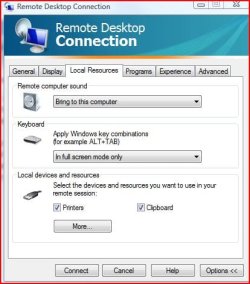
I'm not on my Win 7 system right now but can you get to the Remote Desktop settings? if you can, there should be a tab called Local Resources. in there, you can activate Windows Key Combinations and even specify which computer to use it on. I attached a copy from Vista-
 

Attachments

  • remotedesktopcombinations.JPG
    remotedesktopcombinations.JPG
    38.7 KB · Views: 5

My Computer My Computer

At a glance

Windows 7 Pro SP1 64 bit8 GB
Computer type
Laptop
Computer Manufacturer/Model Number
Dell M6500 Precision Work Station
OS
Windows 7 Pro SP1 64 bit
Memory
8 GB
Screen Resolution
1920x
Internet Speed
30 Mbps
Antivirus
Norton Security
Browser
IE 11
I'm not on my Win 7 system right now but can you get to the Remote Desktop settings? if you can, there should be a tab called Local Resources. in there, you can activate Windows Key Combinations and even specify which computer to use it on. I attached a copy from Vista-

Unfortunately it didn't do the trick. Actually my configuration was already like that. I tried also change it to "On the remote computer". No matter what I change there it doesn't seem to take any effect. But it was a good try!
 

My Computer My Computer

At a glance

Windows 7 Professional 64bitIntel i5-33308GBOnboard
Computer type
PC/Desktop
Computer Manufacturer/Model Number
Custom
OS
Windows 7 Professional 64bit
CPU
Intel i5-3330
Motherboard
GigaByte B75M-D3H
Memory
8GB
Graphics Card(s)
Onboard
Sound Card
Behringer UCA222
Monitor(s) Displays
Samsung 22.5"
Screen Resolution
1920x1080
Hard Drives
SSD Kingston 120GB
HDD Samsung 320GB
Internet Speed
1M
Antivirus
ZoneAlarm FW + AV Free
Browser
Chrome
just a thought,

Are the changes being blocked by a policy setting???

Roy
 

My Computer My Computer

At a glance

W7 home premium 32bit/W7HP 64bit/w10 tp insid...E5300 dual core3gbNvidia Geforce 7100 Nforce 630i
Computer type
PC/Desktop
Computer Manufacturer/Model Number
medionl/Aspire 6930G/acer x55a
OS
W7 home premium 32bit/W7HP 64bit/w10 tp insider ring
CPU
E5300 dual core
Motherboard
medion MS7366
Memory
3gb
Graphics Card(s)
Nvidia Geforce 7100 Nforce 630i
Monitor(s) Displays
avixc
Internet Speed
n (isp resticted to 72)
Antivirus
mse/pands
Browser
palemoon
Other Info
Belkin Fd7050 n USB using Railink RT2870 drivers, more upto date
just a thought,

Are the changes being blocked by a policy setting???

Roy

I really doubt it. But since it won't hurt to ask I will check with the administrator on Monday! ;)
 

My Computer My Computer

At a glance

Windows 7 Professional 64bitIntel i5-33308GBOnboard
Computer type
PC/Desktop
Computer Manufacturer/Model Number
Custom
OS
Windows 7 Professional 64bit
CPU
Intel i5-3330
Motherboard
GigaByte B75M-D3H
Memory
8GB
Graphics Card(s)
Onboard
Sound Card
Behringer UCA222
Monitor(s) Displays
Samsung 22.5"
Screen Resolution
1920x1080
Hard Drives
SSD Kingston 120GB
HDD Samsung 320GB
Internet Speed
1M
Antivirus
ZoneAlarm FW + AV Free
Browser
Chrome
Last edited:

My Computer My Computer

At a glance

Windows 7 Pro SP1 64 bit8 GB
Computer type
Laptop
Computer Manufacturer/Model Number
Dell M6500 Precision Work Station
OS
Windows 7 Pro SP1 64 bit
Memory
8 GB
Screen Resolution
1920x
Internet Speed
30 Mbps
Antivirus
Norton Security
Browser
IE 11
As I understand it, the remote computer recognizes all keystrokes except for the special ones he mentioned. In that case, would group policy be an issue?

Is Win 10 up to date?

Is he using Parallels Desktop and a virtual machine? I see a solution for that situation here-

Shift key not working for first character when Remote Desktop connected | Parallels Forums

I suspect that it is a keyboard driver issue. Although my remote machine is dedicated for me – is is kept within a locker and have no monitor, mouse or keyboard attached to it – the Windows 10 may be configured for the keyboard that was used locally by the administrator that set it up. If this is the case probably my problem won't have a solution because Windows would need to "sense" the presence of the physical keyboard I am using to load the proper driver. I doubt that it happen through remote desktop.

EDIT: The only way I see to fix it is to attach a generic keyboard to my laptop.
 

My Computer My Computer

At a glance

Windows 7 Professional 64bitIntel i5-33308GBOnboard
Computer type
PC/Desktop
Computer Manufacturer/Model Number
Custom
OS
Windows 7 Professional 64bit
CPU
Intel i5-3330
Motherboard
GigaByte B75M-D3H
Memory
8GB
Graphics Card(s)
Onboard
Sound Card
Behringer UCA222
Monitor(s) Displays
Samsung 22.5"
Screen Resolution
1920x1080
Hard Drives
SSD Kingston 120GB
HDD Samsung 320GB
Internet Speed
1M
Antivirus
ZoneAlarm FW + AV Free
Browser
Chrome
If it recognizes all other keystrokes, it seems that the driver would not be an issue. However, I'm not knowledgeable about such things.

I guess you could try it with your local administrators machine.

Let us know how you get this resolved. Could help someone else.
 

My Computer My Computer

At a glance

Windows 7 Pro SP1 64 bit8 GB
Computer type
Laptop
Computer Manufacturer/Model Number
Dell M6500 Precision Work Station
OS
Windows 7 Pro SP1 64 bit
Memory
8 GB
Screen Resolution
1920x
Internet Speed
30 Mbps
Antivirus
Norton Security
Browser
IE 11
Back
Top