
Update your Win 7 installation media

There isn't any need to change the intel usb drivers. 5.0.5.55 are widely compatible and you had them working on your vm previously.
Actually, not.

When using the ISO to install in Win7-VM including your provided USB3 drivers, Device Manager in the resulting Win7-VM showed the "other device", which was one of the two related devices (i.e. either USB3 root hub or USB3 XHCI controller). I had to manually "update drivers" (pointing to your very \Drivers folder) for that item in order to get "other" to go away and the two USB3 devices to show up properly.

The "help" from VMWare that appears when you specify support for USB3 in the Win7-VM provides a URL link to the Intel download site for the version of USB3 driver they want you to use, presumably fully compatible with how they represent the USB3 hardware in Win7-VM. That Intel driver page shows the driver version is 5.0.4.43v2 for Window 7, dated May 2017. And that is the one I dowloaded from the Intel site and substituted for the 5.0.5.55 that you provided.

And this time, when I used the resulting ISO (with 5.0.4.43 present) sure enough there was no "other" in Device Manager of Win7-VM. Instead, both USB3 devices (root hub and XHCI) correctly appeared, properly installed.

So, for whatever reason or explanation, using your 5.0.5.55 didn't work in Win7-VM, whereas 5.0.4.43 did. And the same result for the true physical Win7 install I did on my Z170 machine.

Anyway, I will stick with 5.0.4.43v2 in my install media.
 

My Computer My Computer

Computer type
PC/Desktop
Computer Manufacturer/Model Number
Home-built, two systems (1) and (2)
OS
Windows 7 Pro x64 (1), Win7 Pro X64 (2)
CPU
i5-3350p 3.1Ghz/6MB-cache (1); E8400 3.0Ghz/6MB-cache (2)
Motherboard
ASUS P8Z77-V Pro (1); ASUS P5Q3 (2)
Memory
8GB PC3-12800 DDR3 (1); 4GB PC3-10600 DDR3 (2)
Graphics Card(s)
ATI HD7750 (1), (see TV cards); ATI R7 250 (2)
Sound Card
Realtek ALC892 HD Audio (1); Realtek ALC1200 HD Audio (2)
Monitor(s) Displays
Eizo HD2441W LCD, Eizo S2433W (1); Eizo 24" S2433W (2)
Screen Resolution
1920x1200, 1920x1200 (1); 1920x1200 (2)
Hard Drives
(1) 1TB SATA-II (7200RPM), 2x2TB SATA-III (7200RPM), 250GB SATA-III (10000RPM) for OS; 2x2TB external USB 3.0

(2) 320GB SATA-II (7200RPM), 750GB SATA-II (7200RPM), 150GB SATA-II (10000RPM) for OS; 2TB external USB 3.0
PSU
Nesteq ECS-6001 600W (1); Nesteq ECS-5001 500W (2)
Case
Acousti-Case 360 (1) and (2)
Cooling
Noctua NH-U12P SE2 for CPU, 2x120mm case fans (1) and (2)
Keyboard
IBM PS/2 (1) and (2)
Mouse
Logitech MX Revolution wireless (1); Microsoft wired (2)
Internet Speed
100mbps down / 10mbps up
Antivirus
Microsoft Security Essentials; Malwarebyte Anti-Malware Pro
Browser
Firefox
Other Info
Ceton InfiniTV 4-tuner cablecard-enabled TV card as well as Hauppauge HVR-2250 OTA/ATSC 2-tuner TV card in (1), running under Win7 WMC
Please yourself
 

My Computers My Computers

System One System Two

  • Computer type
    PC/Desktop
    OS
    7 X64
    CPU
    i5 8400
    Motherboard
    gigabyte b365m ds3h
    Memory
    2x8gb 3200mhz
    Hard Drives
    various
    PSU
    pure power 11 400w cm
    Case
    Coolermaster
    Cooling
    cryorig m9i
  • Computer type
    PC/Desktop
    OS
    7x64
    CPU
    g5400
    Motherboard
    ga b365m ds3h
    Memory
    8gb ddr4 2400
    PSU
    xfx pro 450w
I'm almost finished setting up a new machine, all updates from the final simplex installed via your method. Regarding Windows Update...my first inclination is to to turn it off, but given that I have Office 2010 installed (new installation, updated only with the MS update pack, good to 12/2018)), should I allow WU to keep checking for updates? Will MSE continue to work and update for Win 7?
 

My Computer My Computer

Computer type
PC/Desktop
Computer Manufacturer/Model Number
custom
OS
windows 7 Pro 64 Bit
CPU
i5 4670K
Motherboard
Asus Max Hero 1150 socket
Memory
16GB DDR3@933mhz
Graphics Card(s)
Radeon R9 390 8192mb
Monitor(s) Displays
Dell U2415 x3
Screen Resolution
1920 (5760) x 1200 x3
Hard Drives
System: Kingston 128GB SSD

Installing to Samsung 860 EVO 500GB
WD Black 2 TB & 1 TB
PSU
Corsair CX750M
Cooling
Hyper 312
Internet Speed
50mbps
Will MSE continue to work and update for Win 7?

MSE should keep receiving updates to 2023 according to MS.

Office updates are not included in simplix updatepack, so I suppose get them from windows update.

Here is a list of undesirables that windows update might offer - rt click and hide them if they show up:


The following updates are undesirable and are excluded:

KB971033 -x86-x64 (Update for Windows Activation Verification Technologies)
KB2952664 -x86-x64 (System Compatibility Update for Upgrading to Windows 10)
KB2977759 -x86-x64 (Diagnosing Compatibility Issues for Upgrading to Windows 10)
KB3021917 -x86-x64 (System Diagnostics and Telemetry to upgrade to Windows 10)
KB3035583 -x86-x64 (Update installs the Get Windows 10 application)
KB3068708 -x86-x64 (Update for Telemetry Quality Improvement and Diagnostics)
KB3075249 -x86-x64 (Update adds telemetry points to consent.exe file)
KB3080149 -x86-x64 (Update for CEIP and Telemetry Diagnostics)
KB3081954 -x86-x64 (Update to improve working folders and telemetry)
KB3123862 -x86-x64 (Updated Features for Upgrading to Windows 10)
KB3139923 -x86-x64 (Update adds telemetry points to consent.exe file)
KB3150513 -x86-x64 (Updated configurations for compatibility diagnostics)
KB3161608 -x86-x64 (Update adds telemetry points to consent.exe file)
KB3163589 -x86-x64 (Message about running an outdated version of Windows)
KB3172605 -x86-x64 (Update adds telemetry points to consent.exe file)
KB3173040 -x86-x64 ( Update Expiration Notification for Windows 10)
KB4493132 -x86-x64 (Windows 7 End of Service Notification)
 

My Computers My Computers

System One System Two

  • Computer type
    PC/Desktop
    OS
    7 X64
    CPU
    i5 8400
    Motherboard
    gigabyte b365m ds3h
    Memory
    2x8gb 3200mhz
    Hard Drives
    various
    PSU
    pure power 11 400w cm
    Case
    Coolermaster
    Cooling
    cryorig m9i
  • Computer type
    PC/Desktop
    OS
    7x64
    CPU
    g5400
    Motherboard
    ga b365m ds3h
    Memory
    8gb ddr4 2400
    PSU
    xfx pro 450w
Thanks, SIW2. I guess I could just reject all Windows O.S. updates (or is it possible that some legitimate win updates might be issued?). Also, SIW2...any connection to System Information Utility?
 

My Computer My Computer

Computer type
PC/Desktop
Computer Manufacturer/Model Number
custom
OS
windows 7 Pro 64 Bit
CPU
i5 4670K
Motherboard
Asus Max Hero 1150 socket
Memory
16GB DDR3@933mhz
Graphics Card(s)
Radeon R9 390 8192mb
Monitor(s) Displays
Dell U2415 x3
Screen Resolution
1920 (5760) x 1200 x3
Hard Drives
System: Kingston 128GB SSD

Installing to Samsung 860 EVO 500GB
WD Black 2 TB & 1 TB
PSU
Corsair CX750M
Cooling
Hyper 312
Internet Speed
50mbps
It is possible - If I recall correctly, MS released one or two for xp and vista a long time after their alleged eol.

If so, then I expect they would be included by simplix in the updatepack.
 

My Computers My Computers

System One System Two

  • Computer type
    PC/Desktop
    OS
    7 X64
    CPU
    i5 8400
    Motherboard
    gigabyte b365m ds3h
    Memory
    2x8gb 3200mhz
    Hard Drives
    various
    PSU
    pure power 11 400w cm
    Case
    Coolermaster
    Cooling
    cryorig m9i
  • Computer type
    PC/Desktop
    OS
    7x64
    CPU
    g5400
    Motherboard
    ga b365m ds3h
    Memory
    8gb ddr4 2400
    PSU
    xfx pro 450w
I just ran update. The rejects you mention were in the list (which I 'hid'). Also a few Office updates and an update for MSNF 4.8 (which I allowed to install). I've always combed through updates for defectives anyway, so leaving it enabled is no burden. Thanks for all your help and all the time and effort you put into your update script and answering all of our questions. I can't tell you how helpful you've been and how much it's appreciated. Thanks!
 

My Computer My Computer

Computer type
PC/Desktop
Computer Manufacturer/Model Number
custom
OS
windows 7 Pro 64 Bit
CPU
i5 4670K
Motherboard
Asus Max Hero 1150 socket
Memory
16GB DDR3@933mhz
Graphics Card(s)
Radeon R9 390 8192mb
Monitor(s) Displays
Dell U2415 x3
Screen Resolution
1920 (5760) x 1200 x3
Hard Drives
System: Kingston 128GB SSD

Installing to Samsung 860 EVO 500GB
WD Black 2 TB & 1 TB
PSU
Corsair CX750M
Cooling
Hyper 312
Internet Speed
50mbps
In passing, I bring up a new issue regarding doing a Win7 install, even with a fully slipstreamed Win7 installer.

There is still a need to run the Intel Chipset Device Software (their new name for the old Chipset INF Utility) for your machine, as there are still a few motherboard-specific hardware items which show up as "other devices" in Device Manager post-install. Normally the relevant chipset INF utility is provided by a motherboard manufacturer on the "utilities CD" that comes in the box with the motherboard and which also provides other hardware-specific drivers or general utilities and add-ons. But you may have misplaced this disc.

Looking around now, it seems that Intel's "latest" version of the Chipset Device software is 10.1.18 dated 11/28/2019. However it is about 1/2 the size it used to be. Furthermore, looking at the info and description and then inside the components, it appears that this package only supports Win10. Clearly this is in line with EOL for Win7, and they must be cleaning house for everything they offer to remove references to Win7.

I myself used my old copy of 10.1.17 of this utility (released in 2018) just this past weekend to address the three hardware items which needed chipset INF drivers manually installed after using the 7UP-produced install media to perform a test Win7 install-from-scratch on my ASUS Z170-Deluxe machine. And this worked fine, meaning that support for Win7 is of course still contained in 10.1.17 which was released some time back.

I don't know if it's possible to include these hardware-level chipset INF drivers in the7UP \Drivers folders, and if doing so would successfully address the Device Manager "other" hardware-related items which themselves need "drivers", during the formal Win7 install process (same as with other recognized hardware for which drivers are pre-provided). The Intel download file includes an "SetupChipset.exe" to make it easy to get the job done, but I don't know if this is actually the only way these hardware item drivers can be installed.

So I mention this as something which, for me and my test install and for all Win7 installs I've done in the past, even after completing the normal Win7 install there is still a need to deal with the possibility of leftover hardware items showing up in Device Manager as "other". Generally these are covered by the Intel Chipset INF Utility. But it looks like 10.1.18 and newer from Intel will not include support for Win7.

Also, I have had a hard time finding 10.1.17 on the internet as it's not seemingly no longer available from Intel, unless you just need to know their FTP Archive Download Site URL (if it exists) for older versions. I don't know it, if it exists. But Station-Drivers (reputable) does have 10.1.17 available.

And 10.1.17 is also available from Softpedia.
 

My Computer My Computer

Computer type
PC/Desktop
Computer Manufacturer/Model Number
Home-built, two systems (1) and (2)
OS
Windows 7 Pro x64 (1), Win7 Pro X64 (2)
CPU
i5-3350p 3.1Ghz/6MB-cache (1); E8400 3.0Ghz/6MB-cache (2)
Motherboard
ASUS P8Z77-V Pro (1); ASUS P5Q3 (2)
Memory
8GB PC3-12800 DDR3 (1); 4GB PC3-10600 DDR3 (2)
Graphics Card(s)
ATI HD7750 (1), (see TV cards); ATI R7 250 (2)
Sound Card
Realtek ALC892 HD Audio (1); Realtek ALC1200 HD Audio (2)
Monitor(s) Displays
Eizo HD2441W LCD, Eizo S2433W (1); Eizo 24" S2433W (2)
Screen Resolution
1920x1200, 1920x1200 (1); 1920x1200 (2)
Hard Drives
(1) 1TB SATA-II (7200RPM), 2x2TB SATA-III (7200RPM), 250GB SATA-III (10000RPM) for OS; 2x2TB external USB 3.0

(2) 320GB SATA-II (7200RPM), 750GB SATA-II (7200RPM), 150GB SATA-II (10000RPM) for OS; 2TB external USB 3.0
PSU
Nesteq ECS-6001 600W (1); Nesteq ECS-5001 500W (2)
Case
Acousti-Case 360 (1) and (2)
Cooling
Noctua NH-U12P SE2 for CPU, 2x120mm case fans (1) and (2)
Keyboard
IBM PS/2 (1) and (2)
Mouse
Logitech MX Revolution wireless (1); Microsoft wired (2)
Internet Speed
100mbps down / 10mbps up
Antivirus
Microsoft Security Essentials; Malwarebyte Anti-Malware Pro
Browser
Firefox
Other Info
Ceton InfiniTV 4-tuner cablecard-enabled TV card as well as Hauppauge HVR-2250 OTA/ATSC 2-tuner TV card in (1), running under Win7 WMC
People can add their own stuff.

Extra drivers can be added to the DRIVERS folders. It says so on the second post of this thread

Enthusiasts who know what they are doing can also make use of the IMPORT folder.

If you want to include every conceivable driver - then use something like Atak's tool. But it takes a long time and the wim will be vast.
 
Last edited:

My Computers My Computers

System One System Two

  • Computer type
    PC/Desktop
    OS
    7 X64
    CPU
    i5 8400
    Motherboard
    gigabyte b365m ds3h
    Memory
    2x8gb 3200mhz
    Hard Drives
    various
    PSU
    pure power 11 400w cm
    Case
    Coolermaster
    Cooling
    cryorig m9i
  • Computer type
    PC/Desktop
    OS
    7x64
    CPU
    g5400
    Motherboard
    ga b365m ds3h
    Memory
    8gb ddr4 2400
    PSU
    xfx pro 450w
A bunch of .inf files that assign null drivers and a description to remove the yellow bangs from device manager and look pretty.

View attachment 410951
Are these the isolated INF files from 10.1.17, that you've organized by hardware type sub-folders? And suitable for Win7, Win8.1, Win10? Looks similar to the internal expanded contents of the previous 10.1.17 chipset ZIP file which were placed into a single folder.

Can these be added to the \Drivers folders for 7UP? Will they be picked up automatically as needed via Device Manager "update drivers" for those "other"items? If it works with the latter, it seems it would work with the former. I may try this and do another test install on my Z170.

Or must they be installed only using something like the SetupChipset.exe utility?
 

My Computer My Computer

Computer type
PC/Desktop
Computer Manufacturer/Model Number
Home-built, two systems (1) and (2)
OS
Windows 7 Pro x64 (1), Win7 Pro X64 (2)
CPU
i5-3350p 3.1Ghz/6MB-cache (1); E8400 3.0Ghz/6MB-cache (2)
Motherboard
ASUS P8Z77-V Pro (1); ASUS P5Q3 (2)
Memory
8GB PC3-12800 DDR3 (1); 4GB PC3-10600 DDR3 (2)
Graphics Card(s)
ATI HD7750 (1), (see TV cards); ATI R7 250 (2)
Sound Card
Realtek ALC892 HD Audio (1); Realtek ALC1200 HD Audio (2)
Monitor(s) Displays
Eizo HD2441W LCD, Eizo S2433W (1); Eizo 24" S2433W (2)
Screen Resolution
1920x1200, 1920x1200 (1); 1920x1200 (2)
Hard Drives
(1) 1TB SATA-II (7200RPM), 2x2TB SATA-III (7200RPM), 250GB SATA-III (10000RPM) for OS; 2x2TB external USB 3.0

(2) 320GB SATA-II (7200RPM), 750GB SATA-II (7200RPM), 150GB SATA-II (10000RPM) for OS; 2TB external USB 3.0
PSU
Nesteq ECS-6001 600W (1); Nesteq ECS-5001 500W (2)
Case
Acousti-Case 360 (1) and (2)
Cooling
Noctua NH-U12P SE2 for CPU, 2x120mm case fans (1) and (2)
Keyboard
IBM PS/2 (1) and (2)
Mouse
Logitech MX Revolution wireless (1); Microsoft wired (2)
Internet Speed
100mbps down / 10mbps up
Antivirus
Microsoft Security Essentials; Malwarebyte Anti-Malware Pro
Browser
Firefox
Other Info
Ceton InfiniTV 4-tuner cablecard-enabled TV card as well as Hauppauge HVR-2250 OTA/ATSC 2-tuner TV card in (1), running under Win7 WMC
See my previous post. If put lots of inf files in the DRIVERS folder you will end up with a ton of oem*.inf files in windows\inf.
 

My Computers My Computers

System One System Two

  • Computer type
    PC/Desktop
    OS
    7 X64
    CPU
    i5 8400
    Motherboard
    gigabyte b365m ds3h
    Memory
    2x8gb 3200mhz
    Hard Drives
    various
    PSU
    pure power 11 400w cm
    Case
    Coolermaster
    Cooling
    cryorig m9i
  • Computer type
    PC/Desktop
    OS
    7x64
    CPU
    g5400
    Motherboard
    ga b365m ds3h
    Memory
    8gb ddr4 2400
    PSU
    xfx pro 450w
See my previous post. If put lots of if files in the DRIVERS folder you will end up with a ton of oem*.inf files in windows\inf.
I was asking if these null-driver INF files isolated and organized as you have will actually work just as successfully as other real driver INF files if placed in the \Drivers folder of 7UP same as other ones are?

Normally, the Intel Chipset INF Utility is run, probably just to pick up the proper one(s) of these to deal with the specific motherboard hardware. But if the "other" items in Device Manager can also easily be resolved through a simple "update driver" pointing to the folder of these sub-folders as you've done then that would also imply they could just be put in \Drivers of 7UP and get picked up right during the official Win7 install and never appear at all in "other".

Just as I selectively added additional drivers unique to my own Z170-Deluxe motherboard and not every driver in the world, I would obviously be selective in what chipset drivers I would include. I am only concerned about Skylake hardware and not every other machine ever made, so that would be just the one single small Skylake sub-folder (from your group) that I'd add to \Drivers.

So this WILL work, pre-installing through 7-UP so that they never show up as "other" in the resulting installed Win7 initial results?
 

My Computer My Computer

Computer type
PC/Desktop
Computer Manufacturer/Model Number
Home-built, two systems (1) and (2)
OS
Windows 7 Pro x64 (1), Win7 Pro X64 (2)
CPU
i5-3350p 3.1Ghz/6MB-cache (1); E8400 3.0Ghz/6MB-cache (2)
Motherboard
ASUS P8Z77-V Pro (1); ASUS P5Q3 (2)
Memory
8GB PC3-12800 DDR3 (1); 4GB PC3-10600 DDR3 (2)
Graphics Card(s)
ATI HD7750 (1), (see TV cards); ATI R7 250 (2)
Sound Card
Realtek ALC892 HD Audio (1); Realtek ALC1200 HD Audio (2)
Monitor(s) Displays
Eizo HD2441W LCD, Eizo S2433W (1); Eizo 24" S2433W (2)
Screen Resolution
1920x1200, 1920x1200 (1); 1920x1200 (2)
Hard Drives
(1) 1TB SATA-II (7200RPM), 2x2TB SATA-III (7200RPM), 250GB SATA-III (10000RPM) for OS; 2x2TB external USB 3.0

(2) 320GB SATA-II (7200RPM), 750GB SATA-II (7200RPM), 150GB SATA-II (10000RPM) for OS; 2TB external USB 3.0
PSU
Nesteq ECS-6001 600W (1); Nesteq ECS-5001 500W (2)
Case
Acousti-Case 360 (1) and (2)
Cooling
Noctua NH-U12P SE2 for CPU, 2x120mm case fans (1) and (2)
Keyboard
IBM PS/2 (1) and (2)
Mouse
Logitech MX Revolution wireless (1); Microsoft wired (2)
Internet Speed
100mbps down / 10mbps up
Antivirus
Microsoft Security Essentials; Malwarebyte Anti-Malware Pro
Browser
Firefox
Other Info
Ceton InfiniTV 4-tuner cablecard-enabled TV card as well as Hauppauge HVR-2250 OTA/ATSC 2-tuner TV card in (1), running under Win7 WMC
I put one of those in my winpe build just so device manager would look nice. I knew which one was appropriate for the machine I was going to boot winpe on.

The purpose of this is for the average user.

Obviously, if they already know the drivers/extra hotfixes/langpacks they want, they can include them in the relevant folders.

Otherwise, they can add any extra drivers after installing. Those can vary depending on which hardware it is installed on.
 
Last edited:

My Computers My Computers

System One System Two

  • Computer type
    PC/Desktop
    OS
    7 X64
    CPU
    i5 8400
    Motherboard
    gigabyte b365m ds3h
    Memory
    2x8gb 3200mhz
    Hard Drives
    various
    PSU
    pure power 11 400w cm
    Case
    Coolermaster
    Cooling
    cryorig m9i
  • Computer type
    PC/Desktop
    OS
    7x64
    CPU
    g5400
    Motherboard
    ga b365m ds3h
    Memory
    8gb ddr4 2400
    PSU
    xfx pro 450w
I was asking if these null-driver INF files isolated and organized as you have will actually work just as successfully as other real driver INF files if placed in the \Drivers folder of 7UP same as other ones are?

Normally, the Intel Chipset INF Utility is run.

So this WILL work, pre-installing through 7-UP so that they never show up as "other" in the resulting installed Win7 initial results?
I never did see an answer to this question. But tonight I experimented for myself to see if these special chipset hardware devices could be "pre-installed" via the \Drivers folders same as real devices.

And the answer is NO!! They still show up as "other" post-install.

Furthermore, the collection of INF files (in sub-folders by chipset name) also isn't actually usable for a manual "driver update" through Device Manager, pointing to these very folders. Clearly the specific files relating to "null drivers" provided are not intended to be installed using this method. This is no doubt why placing these files in the \Drivers folders also didn't work. They're just not intended to be used this way.

Bottom line: you MUST run the Intel Chipset INF Utility 10.1.17 (or older, which still support Win7, as 10.1.18 and newer are for Win10-only) in order to clear up these "other" devices. Obviously the utility understands the form of these chipset-related files and uses them correctly, installing them where they really belong (System I believe) and disappearing the "other" devices.
 

My Computer My Computer

Computer type
PC/Desktop
Computer Manufacturer/Model Number
Home-built, two systems (1) and (2)
OS
Windows 7 Pro x64 (1), Win7 Pro X64 (2)
CPU
i5-3350p 3.1Ghz/6MB-cache (1); E8400 3.0Ghz/6MB-cache (2)
Motherboard
ASUS P8Z77-V Pro (1); ASUS P5Q3 (2)
Memory
8GB PC3-12800 DDR3 (1); 4GB PC3-10600 DDR3 (2)
Graphics Card(s)
ATI HD7750 (1), (see TV cards); ATI R7 250 (2)
Sound Card
Realtek ALC892 HD Audio (1); Realtek ALC1200 HD Audio (2)
Monitor(s) Displays
Eizo HD2441W LCD, Eizo S2433W (1); Eizo 24" S2433W (2)
Screen Resolution
1920x1200, 1920x1200 (1); 1920x1200 (2)
Hard Drives
(1) 1TB SATA-II (7200RPM), 2x2TB SATA-III (7200RPM), 250GB SATA-III (10000RPM) for OS; 2x2TB external USB 3.0

(2) 320GB SATA-II (7200RPM), 750GB SATA-II (7200RPM), 150GB SATA-II (10000RPM) for OS; 2TB external USB 3.0
PSU
Nesteq ECS-6001 600W (1); Nesteq ECS-5001 500W (2)
Case
Acousti-Case 360 (1) and (2)
Cooling
Noctua NH-U12P SE2 for CPU, 2x120mm case fans (1) and (2)
Keyboard
IBM PS/2 (1) and (2)
Mouse
Logitech MX Revolution wireless (1); Microsoft wired (2)
Internet Speed
100mbps down / 10mbps up
Antivirus
Microsoft Security Essentials; Malwarebyte Anti-Malware Pro
Browser
Firefox
Other Info
Ceton InfiniTV 4-tuner cablecard-enabled TV card as well as Hauppauge HVR-2250 OTA/ATSC 2-tuner TV card in (1), running under Win7 WMC
If you want, you can use the IMPORT folder

create folders inside it Windows\Setup\Scripts\chipset . Create setupcomplete.cmd in the Scripts folder

setupcomplete.cmd
Code:
@echo off
 IF EXIST %windir%\Setup\Scripts\chipset\Setupchipset.exe (
%windir%\Setup\Scripts\chipset\Setupchipset.exe -s -noreboot
 )

7UPDATER will copy the windows folder from IMPORT into the mounted wim.

Because you have already updated the install.wim, you don't need to rebuild the whole thing. It is easy to add the Windows folder and contents created above to an existing wim image by using 7-zip, or wimlib, or by mounting the image, copying it in, then saving the image.
 

My Computers My Computers

System One System Two

  • Computer type
    PC/Desktop
    OS
    7 X64
    CPU
    i5 8400
    Motherboard
    gigabyte b365m ds3h
    Memory
    2x8gb 3200mhz
    Hard Drives
    various
    PSU
    pure power 11 400w cm
    Case
    Coolermaster
    Cooling
    cryorig m9i
  • Computer type
    PC/Desktop
    OS
    7x64
    CPU
    g5400
    Motherboard
    ga b365m ds3h
    Memory
    8gb ddr4 2400
    PSU
    xfx pro 450w
If you want, you can use the IMPORT folder

create folders inside it Windows\Setup\Scripts\chipset . Create setupcomplete.cmd in the Scripts folder

setupcomplete.cmd
Code:
@echo off
 IF EXIST %windir%\Setup\Scripts\chipset\Setupchipset.exe (
%windir%\Setup\Scripts\chipset\Setupchipset.exe -s -noreboot
 )
7UPDATER will copy the windows folder from IMPORT into the mounted wim.
Please tell me what I'm doing wrong. I believe I followed your instructions precisely but when I ran 7UP it did not duplicate what was present in \Import into INSTALL.WIM as expected. Nothing was copied.

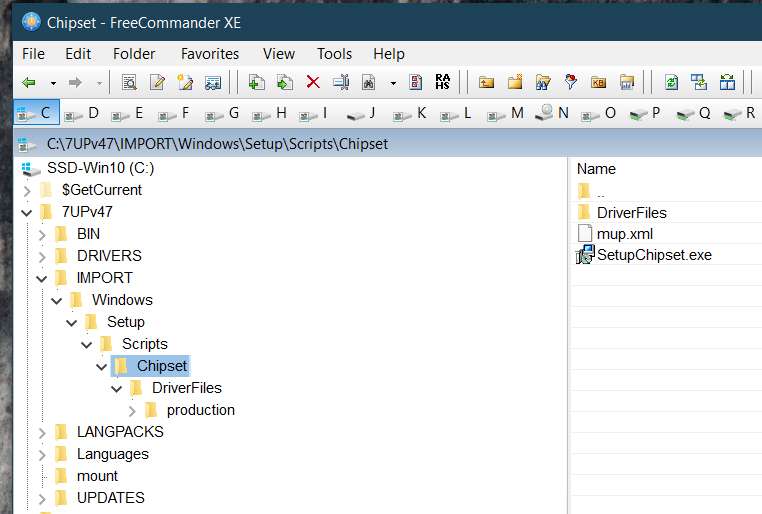
(1) I created \Import\Windows\Setup\Scripts\Chipset, inside of which I copied the full contents of the 10.1.17 chipset utility folder as expanded from the Intel 10.1.17 ZIP download:

Uhvyru.jpg


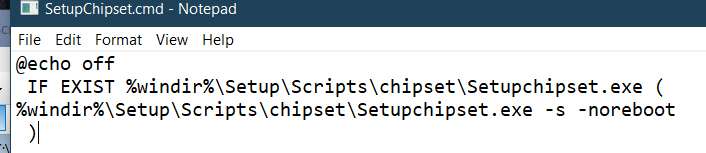
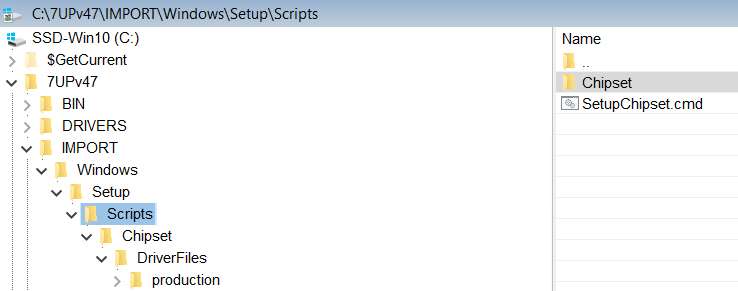
(2) I created the command you specified (calling it SetupChipset.cmd) and stored it in \Import\Windows\Setup\Scripts:

RKtfPI.jpg


60xL7G.jpg


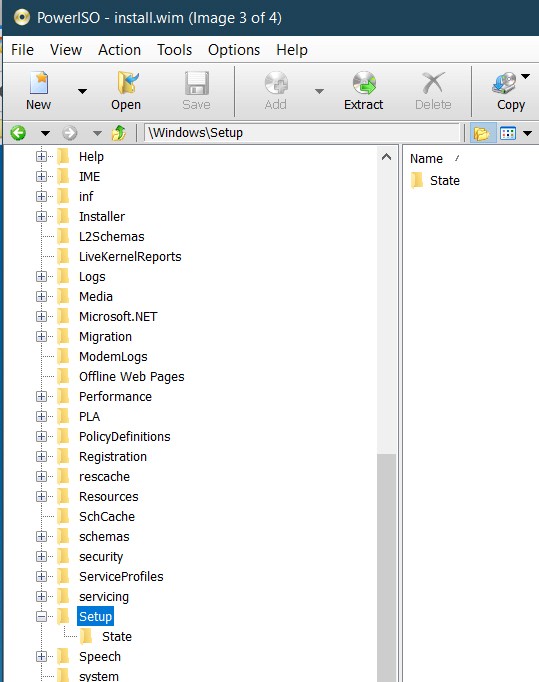
Looks to me just like you specified. And yet when I ran 7UP there was nothing copied from \Imports into the resulting INSTALL.WIM. There is no \Windows\\Setup\Scripts sub-folder in INSTALL.WIM:

kQMgkX.jpg


So what have I done wrong?


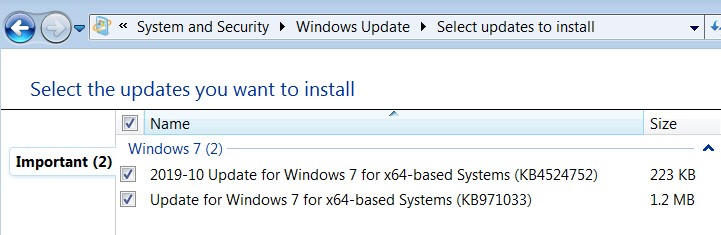
In passing I mention that the SIMPLIX pack seems to have overlooked seven updates which still get shown as "important updates" when you run Windows Updates after completing an install using the updated media.

In particular, the following five updates ARE present in MS's catalog.update.microsoft.com:

KB3021917 - 2/10/15
KB3068708 - 6/9/15
KB3080149 - 9/8/15
KB3150513 - 5/11/16
KB3172605 - 9/13/16

and the following two updates for some reason ARE NOT present in MS's catalog:

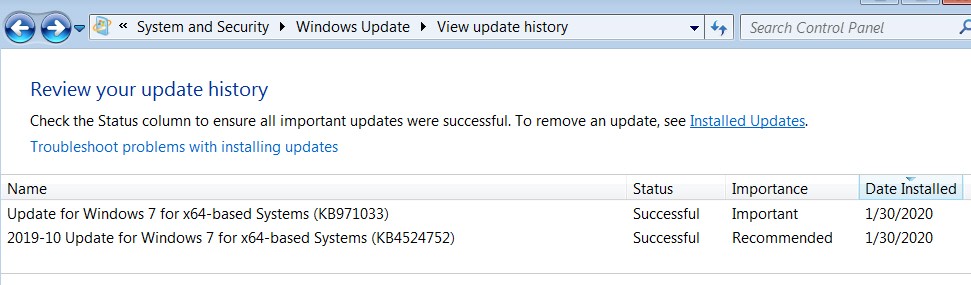
KB4524752 - 10/17/19
KB9711033 - 8/13/18

I don't understand how these last two can be missing from MS's updates catalog and yet be presented as the output from running Windows Update, but that's true.

Anyway, I manually downloaded the five MSU updates I could download and placed them in \Updates (along with the two MS NVMe updates which were already there). And sure enough all five of those update got successfully applied (confirmed by looking at "installed updates" in the installed Win7) and no longer appear in the output from Windows Update. Only those remaining two mysterious updates that are not present in MS's catalog still are presented by Windows Update.

NdptZ5.jpg


And yet, when I went ahead and did the "install updates" for these two, sure enough the updates got downloaded from somewhere and installed normally.

666l7J.jpg


So all is well in the end, except that I don't know where these two updates actually got downloaded from. If the downloaded files are the same type of MSU files as the other five, and if the MSU files are stored somewhere that I can copy them, I would place them in the \Updates folder to pre-install them like the other five. Otherwise I have no issue with doing this minor task post-install from the 7UP media.
 

My Computer My Computer

Computer type
PC/Desktop
Computer Manufacturer/Model Number
Home-built, two systems (1) and (2)
OS
Windows 7 Pro x64 (1), Win7 Pro X64 (2)
CPU
i5-3350p 3.1Ghz/6MB-cache (1); E8400 3.0Ghz/6MB-cache (2)
Motherboard
ASUS P8Z77-V Pro (1); ASUS P5Q3 (2)
Memory
8GB PC3-12800 DDR3 (1); 4GB PC3-10600 DDR3 (2)
Graphics Card(s)
ATI HD7750 (1), (see TV cards); ATI R7 250 (2)
Sound Card
Realtek ALC892 HD Audio (1); Realtek ALC1200 HD Audio (2)
Monitor(s) Displays
Eizo HD2441W LCD, Eizo S2433W (1); Eizo 24" S2433W (2)
Screen Resolution
1920x1200, 1920x1200 (1); 1920x1200 (2)
Hard Drives
(1) 1TB SATA-II (7200RPM), 2x2TB SATA-III (7200RPM), 250GB SATA-III (10000RPM) for OS; 2x2TB external USB 3.0

(2) 320GB SATA-II (7200RPM), 750GB SATA-II (7200RPM), 150GB SATA-II (10000RPM) for OS; 2TB external USB 3.0
PSU
Nesteq ECS-6001 600W (1); Nesteq ECS-5001 500W (2)
Case
Acousti-Case 360 (1) and (2)
Cooling
Noctua NH-U12P SE2 for CPU, 2x120mm case fans (1) and (2)
Keyboard
IBM PS/2 (1) and (2)
Mouse
Logitech MX Revolution wireless (1); Microsoft wired (2)
Internet Speed
100mbps down / 10mbps up
Antivirus
Microsoft Security Essentials; Malwarebyte Anti-Malware Pro
Browser
Firefox
Other Info
Ceton InfiniTV 4-tuner cablecard-enabled TV card as well as Hauppauge HVR-2250 OTA/ATSC 2-tuner TV card in (1), running under Win7 WMC
You will have to ask Simplix who is the developer of the upatepack about his criteria for exclusions.
Will adjust import to match change in updatepack function in next version.
 
Last edited:

My Computers My Computers

System One System Two

  • Computer type
    PC/Desktop
    OS
    7 X64
    CPU
    i5 8400
    Motherboard
    gigabyte b365m ds3h
    Memory
    2x8gb 3200mhz
    Hard Drives
    various
    PSU
    pure power 11 400w cm
    Case
    Coolermaster
    Cooling
    cryorig m9i
  • Computer type
    PC/Desktop
    OS
    7x64
    CPU
    g5400
    Motherboard
    ga b365m ds3h
    Memory
    8gb ddr4 2400
    PSU
    xfx pro 450w
You will have to ask Simplix who is the developer of the upatepack.
I don't really care about this minor issue regarding the mysterious two unfound updates, or even why all seven of these weren't included in their package (since they're all from 1-5 years old).

What I really asked about was why your \IMPORTS functionality didn't do anything? What did I do wrong in the setup of things, or is there an issue with 7UP itself?

I set up the folders in \Imports as you specified, and I created the SetupChipset.cmd as you indicated, and I populated the \Chipset folder with the Intel 10.1.17 chipset utility items. But it appears that NOTHING ENDED UP IN INSTALL.WIM as you said it would when 7UP was run.

So what did I do wrong, if I did do anything wrong?
 

My Computer My Computer

Computer type
PC/Desktop
Computer Manufacturer/Model Number
Home-built, two systems (1) and (2)
OS
Windows 7 Pro x64 (1), Win7 Pro X64 (2)
CPU
i5-3350p 3.1Ghz/6MB-cache (1); E8400 3.0Ghz/6MB-cache (2)
Motherboard
ASUS P8Z77-V Pro (1); ASUS P5Q3 (2)
Memory
8GB PC3-12800 DDR3 (1); 4GB PC3-10600 DDR3 (2)
Graphics Card(s)
ATI HD7750 (1), (see TV cards); ATI R7 250 (2)
Sound Card
Realtek ALC892 HD Audio (1); Realtek ALC1200 HD Audio (2)
Monitor(s) Displays
Eizo HD2441W LCD, Eizo S2433W (1); Eizo 24" S2433W (2)
Screen Resolution
1920x1200, 1920x1200 (1); 1920x1200 (2)
Hard Drives
(1) 1TB SATA-II (7200RPM), 2x2TB SATA-III (7200RPM), 250GB SATA-III (10000RPM) for OS; 2x2TB external USB 3.0

(2) 320GB SATA-II (7200RPM), 750GB SATA-II (7200RPM), 150GB SATA-II (10000RPM) for OS; 2TB external USB 3.0
PSU
Nesteq ECS-6001 600W (1); Nesteq ECS-5001 500W (2)
Case
Acousti-Case 360 (1) and (2)
Cooling
Noctua NH-U12P SE2 for CPU, 2x120mm case fans (1) and (2)
Keyboard
IBM PS/2 (1) and (2)
Mouse
Logitech MX Revolution wireless (1); Microsoft wired (2)
Internet Speed
100mbps down / 10mbps up
Antivirus
Microsoft Security Essentials; Malwarebyte Anti-Malware Pro
Browser
Firefox
Other Info
Ceton InfiniTV 4-tuner cablecard-enabled TV card as well as Hauppauge HVR-2250 OTA/ATSC 2-tuner TV card in (1), running under Win7 WMC
As stated in previous post, adjustment for import will be made in next version due to change in updatepack function

The undesirable updates have already been posted HERE
 

My Computers My Computers

System One System Two

  • Computer type
    PC/Desktop
    OS
    7 X64
    CPU
    i5 8400
    Motherboard
    gigabyte b365m ds3h
    Memory
    2x8gb 3200mhz
    Hard Drives
    various
    PSU
    pure power 11 400w cm
    Case
    Coolermaster
    Cooling
    cryorig m9i
  • Computer type
    PC/Desktop
    OS
    7x64
    CPU
    g5400
    Motherboard
    ga b365m ds3h
    Memory
    8gb ddr4 2400
    PSU
    xfx pro 450w
As stated in previous post, adjustment for import will be made in next version due to change in updatepack function
It was only very recently in your edited post #697 where you make your first ever mention of the fact that \Import is currently broken apparently for the same reason that \Drivers was broken, and that this will be fixed by the next updated version. So in fact my "nothing happened" result problem which I reported in my post #696 was actually to be expected, and was not a surprise.

Just out of curiosity since I cannot find any earlier mention of the fact that \Import functionality no longer works, did you not previously know until an hour ago that \Import had also been broken and not just \Drivers (which you fixed with 7UPv47)?

In fact just above in post #695 you specifically instructed me of the exact technique of how to use \Import to accomplish the automatic Setup-time running of the Intel chipset utility to deal with those couple of hardware items showing up as "other" in Device Manager. You made absolutely no mention whatsoever that this functionality didn't work at the current time (even using the latest 7UPv47.cmd) and therefore I should not actually expect your recipe to actually work, so of course I assumed it would work. Except that it doesn't.


So please clarify for me now.

Is it now known that 7UPv47 only fixed 7UP for the negative breakage of \Drivers caused by the new SIMPLIX pack format? Was the breakage of \Import also known previously, or only just realized?

And that now it is seen that \Import was also broken for the same reason but was not addressed by 7UPv47, and that this newly observed failure will in fact be fixed by the next version, and we should just be patient (which I will be) awaiting the fix?


The undesirable updates have already been posted HERE
What makes these updates "undesirable"? Is there any harm applying them, just as I have done for all previous MS-provided Windows Updates (except perhaps in the very rarest of situations where "the world" says not to apply a particular update)?

As it turns out six of the seven updates I listed in my own post #696 just above are in this list of "undesirable" updates. So apparently I actually shouldn't have spent any time trying to incorporate any of them manually in \Updates?

But is there any real harm in the resulting installed Win7 by applying any/all of them?
 

My Computer My Computer

Computer type
PC/Desktop
Computer Manufacturer/Model Number
Home-built, two systems (1) and (2)
OS
Windows 7 Pro x64 (1), Win7 Pro X64 (2)
CPU
i5-3350p 3.1Ghz/6MB-cache (1); E8400 3.0Ghz/6MB-cache (2)
Motherboard
ASUS P8Z77-V Pro (1); ASUS P5Q3 (2)
Memory
8GB PC3-12800 DDR3 (1); 4GB PC3-10600 DDR3 (2)
Graphics Card(s)
ATI HD7750 (1), (see TV cards); ATI R7 250 (2)
Sound Card
Realtek ALC892 HD Audio (1); Realtek ALC1200 HD Audio (2)
Monitor(s) Displays
Eizo HD2441W LCD, Eizo S2433W (1); Eizo 24" S2433W (2)
Screen Resolution
1920x1200, 1920x1200 (1); 1920x1200 (2)
Hard Drives
(1) 1TB SATA-II (7200RPM), 2x2TB SATA-III (7200RPM), 250GB SATA-III (10000RPM) for OS; 2x2TB external USB 3.0

(2) 320GB SATA-II (7200RPM), 750GB SATA-II (7200RPM), 150GB SATA-II (10000RPM) for OS; 2TB external USB 3.0
PSU
Nesteq ECS-6001 600W (1); Nesteq ECS-5001 500W (2)
Case
Acousti-Case 360 (1) and (2)
Cooling
Noctua NH-U12P SE2 for CPU, 2x120mm case fans (1) and (2)
Keyboard
IBM PS/2 (1) and (2)
Mouse
Logitech MX Revolution wireless (1); Microsoft wired (2)
Internet Speed
100mbps down / 10mbps up
Antivirus
Microsoft Security Essentials; Malwarebyte Anti-Malware Pro
Browser
Firefox
Other Info
Ceton InfiniTV 4-tuner cablecard-enabled TV card as well as Hauppauge HVR-2250 OTA/ATSC 2-tuner TV card in (1), running under Win7 WMC
Back
Top