ADATA external HDD became unallocated, shows 11 Petabytes

Inferry

New member
Local time
5:28 AM
Messages
7
After searching through these forums(and the web in general) I realize this is a far more common thing than I expected, still, I would like some help with this.

I have two ADATA HDD, 1T each(the ones with the silicon rubber on them), both slightly over the year now, and both of them were connected to my laptop, which, old as it is, had a heat stroke the other day and fainted.

One of them was fine, the one with the irrelevant data that could be painfully redownloaded again if it was somehow lost.
The other one, which contained literally thousands of valuable and irreplaceable files, was being ignored by the three devices I connected it to(laptop, PC with Ubuntu, and an XboxOne for some reason).

So I tried following some guides to see what was going on and stumble on this site, specifically, this guide.

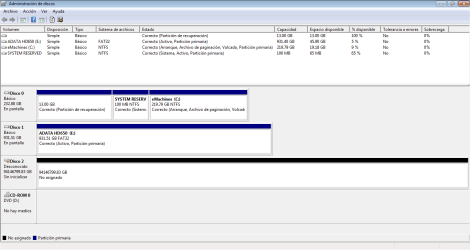
However, as I was following a previous tutorial, something weird caught my eye when I checked it with the Disk Manager, my measly 900+GB drive had somehow gained over 90000000GB extra for storage as the image below shows, so that's weird right? I kinda thought it would be normal, but the guides showed the drives with the right sizes so I wasn't so sure.

Regardless, I tried following the Test Disk tutorial you have, since is the only one that doesn't involve losing my data and hoping for it to be recovered by some other program (and to another location that I don't have), until a reached a part that stated that the disk size shown, must coincide with the actual value for the disk, which it didn't, like, at all, I forgot to screencap the window, but I don't recall a value even appearing there.

So I stopped and start searching the forums to see if there was a similar case, which I couldn't find, so now here I am, writing this in serious hopes that my files aren't gone for good.

Here's the screenshot of the Disk Manager(is in spanish), Disk 1 is the healthy HDD and Disk 2 is the crazy one. The MiniTool Partition Wizard I've seen you guys ask screenshots of shows more or less the same.
disk mng.png
 

My Computer My Computer

At a glance

Windows 7 Starter 32Celeron Dual Core T3500 @ 2.10GHz 2.09GHz2gbIntegrated chip
Computer type
Laptop
Computer Manufacturer/Model Number
emachines eME528
OS
Windows 7 Starter 32
CPU
Celeron Dual Core T3500 @ 2.10GHz 2.09GHz
Memory
2gb
Graphics Card(s)
Integrated chip
Hard Drives
WDC WD2500BEVT-22A23T0 250GB 3 Partitions
Antivirus
Avast
Browser
Vivaldi
Sad to know you don't have a backup.

Is your ADATA a HDD or SSD?
Did you follow Jumanji instructions?
 

My Computers My Computers

  • At a glance

    Windows 7 HP 64i5 6600K - 800MHz to 4200MHz4+4G GSkill DDR4 3000IG - Intel 530
    Computer type
    PC/Desktop
    Computer Manufacturer/Model Number
    custom build
    OS
    Windows 7 HP 64
    CPU
    i5 6600K - 800MHz to 4200MHz
    Motherboard
    GA-Z170-HD3P
    Memory
    4+4G GSkill DDR4 3000
    Graphics Card(s)
    IG - Intel 530
    Monitor(s) Displays
    Samsung 226BW
    Screen Resolution
    1680x1050
    Hard Drives
    (1) -1 SM951 – 128GB M.2 AHCI PCIe SSD drive for Windows 7 and Lubuntu
    (2) -1 WD SATA 3 - 1T for Data
    (3) -1 WD SATA 3 - 1T for backup
    PSU
    Thermaltake 450W TR2 gold
    Keyboard
    Old and good Chicony mechanical keyboard
    Mouse
    Logitech mX performance - 9 buttons (had to disable some)
    Internet Speed
    500Mb/s
    Browser
    Firefox 64
    Other Info
    TinyWall firewall
  • At a glance

    Windows 7 Proi7-4500U 800MHz to 3.0GHz(4+4)G DDR3 1600IG intel 4400 + NVIDIA GeForce GT 745M
    Computer type
    Laptop
    System Manufacturer/Model Number
    Asus Q550LF
    OS
    Windows 7 Pro
    CPU
    i7-4500U 800MHz to 3.0GHz
    Motherboard
    Asus Q550LF
    Memory
    (4+4)G DDR3 1600
    Graphics Card(s)
    IG intel 4400 + NVIDIA GeForce GT 745M
    Sound Card
    Realtek
    Monitor(s) Displays
    LG Display LP156WF4-SPH1
    Screen Resolution
    1920 x 1080
    Hard Drives
    BX500 120G SSD for Windows and programs +
    1T HDD for data
    Internet Speed
    500 Mb/s
    Browser
    Firefox
    Other Info
    TinyWall firewall
Some of the files do have a backup, but the majority of them were uncataloged or updated on a regular basis, the drive was almost full too :(

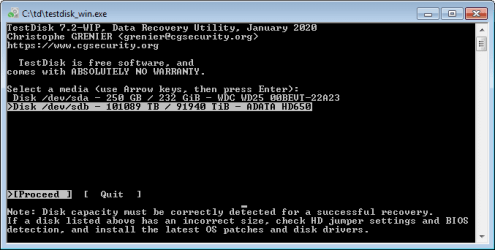
It's an HDD, and I followed the instructions to the letter, up until step 5 on the second screen, were you can see the size shows up as +10000TB(I took a screencap this time), so I stopped there because I'm not sure what to do, should I keep going as if this was the proper size?.

td.png

I can't really follow the advice at the bottom since this is an external drive it doesn't have jumpers(right?), and I don't really know how to check "the bios detection", there are no more updates for windows 7, and although the current drivers says it's from 2006, searching for a new one turns nothing saying is up to date, the version I have is 6.1.7600.16385.
 

My Computer My Computer

At a glance

Windows 7 Starter 32Celeron Dual Core T3500 @ 2.10GHz 2.09GHz2gbIntegrated chip
Computer type
Laptop
Computer Manufacturer/Model Number
emachines eME528
OS
Windows 7 Starter 32
CPU
Celeron Dual Core T3500 @ 2.10GHz 2.09GHz
Memory
2gb
Graphics Card(s)
Integrated chip
Hard Drives
WDC WD2500BEVT-22A23T0 250GB 3 Partitions
Antivirus
Avast
Browser
Vivaldi

My Computers My Computers

  • At a glance

    7 X64i5 84002x8gb 3200mhz
    Computer type
    PC/Desktop
    OS
    7 X64
    CPU
    i5 8400
    Motherboard
    gigabyte b365m ds3h
    Memory
    2x8gb 3200mhz
    Hard Drives
    various
    PSU
    pure power 11 400w cm
    Case
    Coolermaster
    Cooling
    cryorig m9i
  • At a glance

    7x64g54008gb ddr4 2400
    Computer type
    PC/Desktop
    OS
    7x64
    CPU
    g5400
    Motherboard
    ga b365m ds3h
    Memory
    8gb ddr4 2400
    PSU
    xfx pro 450w
Is it this ?
ADATA 1TB
Might be able to take it out of the enclosure and see if it works.

No, is this one
ADATA AHD650

Do you think disassembling the thing might help? I don't want to trash it by accident, so I may try it as a last resort I guess.
Megahertz07 I made a post answering your questions, but I got a message saying it had to be approved by a moderator, but basically: it is an HDD and yes, I follow them to the letter up to step 5, Test Disk says it has +100000TB of storage, and I dare not to keep ongoing since the size has to be right for that.
 

My Computer My Computer

At a glance

Windows 7 Starter 32Celeron Dual Core T3500 @ 2.10GHz 2.09GHz2gbIntegrated chip
Computer type
Laptop
Computer Manufacturer/Model Number
emachines eME528
OS
Windows 7 Starter 32
CPU
Celeron Dual Core T3500 @ 2.10GHz 2.09GHz
Memory
2gb
Graphics Card(s)
Integrated chip
Hard Drives
WDC WD2500BEVT-22A23T0 250GB 3 Partitions
Antivirus
Avast
Browser
Vivaldi
You may have a hardware failure or just a logical issue.

If it's a hardware failure on the electronics to convert SATA to USB, what SIW2 suggested will work as you're going to attach the disk SATA directly to a MB SATA port. If you do and have the same results it's a logical Issue and you should follow Jumanji instructions.

It seems to me as a logical issue as Test Disk recognize the true size.
 

My Computers My Computers

  • At a glance

    Windows 7 HP 64i5 6600K - 800MHz to 4200MHz4+4G GSkill DDR4 3000IG - Intel 530
    Computer type
    PC/Desktop
    Computer Manufacturer/Model Number
    custom build
    OS
    Windows 7 HP 64
    CPU
    i5 6600K - 800MHz to 4200MHz
    Motherboard
    GA-Z170-HD3P
    Memory
    4+4G GSkill DDR4 3000
    Graphics Card(s)
    IG - Intel 530
    Monitor(s) Displays
    Samsung 226BW
    Screen Resolution
    1680x1050
    Hard Drives
    (1) -1 SM951 – 128GB M.2 AHCI PCIe SSD drive for Windows 7 and Lubuntu
    (2) -1 WD SATA 3 - 1T for Data
    (3) -1 WD SATA 3 - 1T for backup
    PSU
    Thermaltake 450W TR2 gold
    Keyboard
    Old and good Chicony mechanical keyboard
    Mouse
    Logitech mX performance - 9 buttons (had to disable some)
    Internet Speed
    500Mb/s
    Browser
    Firefox 64
    Other Info
    TinyWall firewall
  • At a glance

    Windows 7 Proi7-4500U 800MHz to 3.0GHz(4+4)G DDR3 1600IG intel 4400 + NVIDIA GeForce GT 745M
    Computer type
    Laptop
    System Manufacturer/Model Number
    Asus Q550LF
    OS
    Windows 7 Pro
    CPU
    i7-4500U 800MHz to 3.0GHz
    Motherboard
    Asus Q550LF
    Memory
    (4+4)G DDR3 1600
    Graphics Card(s)
    IG intel 4400 + NVIDIA GeForce GT 745M
    Sound Card
    Realtek
    Monitor(s) Displays
    LG Display LP156WF4-SPH1
    Screen Resolution
    1920 x 1080
    Hard Drives
    BX500 120G SSD for Windows and programs +
    1T HDD for data
    Internet Speed
    500 Mb/s
    Browser
    Firefox
    Other Info
    TinyWall firewall
It seems to me as a logical issue as Test Disk recognize the true size.

Um sorry, where is Test Disk reporting the true size? it says to me that de drive is well over 100k times over of what it should really be, does the number doesn't matter as long as it detects something?

Do I proceed with that?
 

My Computer My Computer

At a glance

Windows 7 Starter 32Celeron Dual Core T3500 @ 2.10GHz 2.09GHz2gbIntegrated chip
Computer type
Laptop
Computer Manufacturer/Model Number
emachines eME528
OS
Windows 7 Starter 32
CPU
Celeron Dual Core T3500 @ 2.10GHz 2.09GHz
Memory
2gb
Graphics Card(s)
Integrated chip
Hard Drives
WDC WD2500BEVT-22A23T0 250GB 3 Partitions
Antivirus
Avast
Browser
Vivaldi
I think mega misunderstood the test disk screenshot.

If your data is essential you could consider professional recovery - cheapest I have seen is in Canada about $400 per disk.

Or you can take a risk and take the thing apart hoping the disk is ok and will work through another connector.
 

My Computers My Computers

  • At a glance

    7 X64i5 84002x8gb 3200mhz
    Computer type
    PC/Desktop
    OS
    7 X64
    CPU
    i5 8400
    Motherboard
    gigabyte b365m ds3h
    Memory
    2x8gb 3200mhz
    Hard Drives
    various
    PSU
    pure power 11 400w cm
    Case
    Coolermaster
    Cooling
    cryorig m9i
  • At a glance

    7x64g54008gb ddr4 2400
    Computer type
    PC/Desktop
    OS
    7x64
    CPU
    g5400
    Motherboard
    ga b365m ds3h
    Memory
    8gb ddr4 2400
    PSU
    xfx pro 450w
Not the outcome I expected, but it is what it is.

I don't have the money to pay for a professional recovery, so I'm just gonna buy a new drive one once I can, use one of the many recovery tools out there to pass the files and hope for the best to see if it can catch everything I had.

I may disassemble the thing thou, but I can't really plug a new drive directly into my lap, and don't have a desktop available right now, Mega mentioned an "MB SATA port", what's that? some sort of adaptor? can't I just use some regular external case?
 

My Computer My Computer

At a glance

Windows 7 Starter 32Celeron Dual Core T3500 @ 2.10GHz 2.09GHz2gbIntegrated chip
Computer type
Laptop
Computer Manufacturer/Model Number
emachines eME528
OS
Windows 7 Starter 32
CPU
Celeron Dual Core T3500 @ 2.10GHz 2.09GHz
Memory
2gb
Graphics Card(s)
Integrated chip
Hard Drives
WDC WD2500BEVT-22A23T0 250GB 3 Partitions
Antivirus
Avast
Browser
Vivaldi
On your profile specs it says you have a emachine desktop. That is why I suggested to take the Adata disk from its case and attach it directly to a SATA port on the MB.
Do you have a external HDD case other then the Adata?
 

My Computers My Computers

  • At a glance

    Windows 7 HP 64i5 6600K - 800MHz to 4200MHz4+4G GSkill DDR4 3000IG - Intel 530
    Computer type
    PC/Desktop
    Computer Manufacturer/Model Number
    custom build
    OS
    Windows 7 HP 64
    CPU
    i5 6600K - 800MHz to 4200MHz
    Motherboard
    GA-Z170-HD3P
    Memory
    4+4G GSkill DDR4 3000
    Graphics Card(s)
    IG - Intel 530
    Monitor(s) Displays
    Samsung 226BW
    Screen Resolution
    1680x1050
    Hard Drives
    (1) -1 SM951 – 128GB M.2 AHCI PCIe SSD drive for Windows 7 and Lubuntu
    (2) -1 WD SATA 3 - 1T for Data
    (3) -1 WD SATA 3 - 1T for backup
    PSU
    Thermaltake 450W TR2 gold
    Keyboard
    Old and good Chicony mechanical keyboard
    Mouse
    Logitech mX performance - 9 buttons (had to disable some)
    Internet Speed
    500Mb/s
    Browser
    Firefox 64
    Other Info
    TinyWall firewall
  • At a glance

    Windows 7 Proi7-4500U 800MHz to 3.0GHz(4+4)G DDR3 1600IG intel 4400 + NVIDIA GeForce GT 745M
    Computer type
    Laptop
    System Manufacturer/Model Number
    Asus Q550LF
    OS
    Windows 7 Pro
    CPU
    i7-4500U 800MHz to 3.0GHz
    Motherboard
    Asus Q550LF
    Memory
    (4+4)G DDR3 1600
    Graphics Card(s)
    IG intel 4400 + NVIDIA GeForce GT 745M
    Sound Card
    Realtek
    Monitor(s) Displays
    LG Display LP156WF4-SPH1
    Screen Resolution
    1920 x 1080
    Hard Drives
    BX500 120G SSD for Windows and programs +
    1T HDD for data
    Internet Speed
    500 Mb/s
    Browser
    Firefox
    Other Info
    TinyWall firewall
Sorry, I didn't notice that dropdown menu (is so small), I updated that info.

Is MB = Motherboard?

I don't have an external case, but I can get a good one fairly cheap.
 

My Computer My Computer

At a glance

Windows 7 Starter 32Celeron Dual Core T3500 @ 2.10GHz 2.09GHz2gbIntegrated chip
Computer type
Laptop
Computer Manufacturer/Model Number
emachines eME528
OS
Windows 7 Starter 32
CPU
Celeron Dual Core T3500 @ 2.10GHz 2.09GHz
Memory
2gb
Graphics Card(s)
Integrated chip
Hard Drives
WDC WD2500BEVT-22A23T0 250GB 3 Partitions
Antivirus
Avast
Browser
Vivaldi
With the USB case you can try to take the Adata HDD from it's case and put on the new case. It's not guarantee that you will be able to read the disk. It will only work if the problem is on the SATA to USB electronics on the Adata case.
 

My Computers My Computers

  • At a glance

    Windows 7 HP 64i5 6600K - 800MHz to 4200MHz4+4G GSkill DDR4 3000IG - Intel 530
    Computer type
    PC/Desktop
    Computer Manufacturer/Model Number
    custom build
    OS
    Windows 7 HP 64
    CPU
    i5 6600K - 800MHz to 4200MHz
    Motherboard
    GA-Z170-HD3P
    Memory
    4+4G GSkill DDR4 3000
    Graphics Card(s)
    IG - Intel 530
    Monitor(s) Displays
    Samsung 226BW
    Screen Resolution
    1680x1050
    Hard Drives
    (1) -1 SM951 – 128GB M.2 AHCI PCIe SSD drive for Windows 7 and Lubuntu
    (2) -1 WD SATA 3 - 1T for Data
    (3) -1 WD SATA 3 - 1T for backup
    PSU
    Thermaltake 450W TR2 gold
    Keyboard
    Old and good Chicony mechanical keyboard
    Mouse
    Logitech mX performance - 9 buttons (had to disable some)
    Internet Speed
    500Mb/s
    Browser
    Firefox 64
    Other Info
    TinyWall firewall
  • At a glance

    Windows 7 Proi7-4500U 800MHz to 3.0GHz(4+4)G DDR3 1600IG intel 4400 + NVIDIA GeForce GT 745M
    Computer type
    Laptop
    System Manufacturer/Model Number
    Asus Q550LF
    OS
    Windows 7 Pro
    CPU
    i7-4500U 800MHz to 3.0GHz
    Motherboard
    Asus Q550LF
    Memory
    (4+4)G DDR3 1600
    Graphics Card(s)
    IG intel 4400 + NVIDIA GeForce GT 745M
    Sound Card
    Realtek
    Monitor(s) Displays
    LG Display LP156WF4-SPH1
    Screen Resolution
    1920 x 1080
    Hard Drives
    BX500 120G SSD for Windows and programs +
    1T HDD for data
    Internet Speed
    500 Mb/s
    Browser
    Firefox
    Other Info
    TinyWall firewall
I hope it works, I still have to wait for a bit to get one thou, can I leave this post unsolved until then?

That aside, I'm curious, why is it reporting such an exaggerated size? is it normal so to speak? All other tutorials I could find didn't mention this particular case.
 

My Computer My Computer

At a glance

Windows 7 Starter 32Celeron Dual Core T3500 @ 2.10GHz 2.09GHz2gbIntegrated chip
Computer type
Laptop
Computer Manufacturer/Model Number
emachines eME528
OS
Windows 7 Starter 32
CPU
Celeron Dual Core T3500 @ 2.10GHz 2.09GHz
Memory
2gb
Graphics Card(s)
Integrated chip
Hard Drives
WDC WD2500BEVT-22A23T0 250GB 3 Partitions
Antivirus
Avast
Browser
Vivaldi
To me too it appears to be the failure of the SATA to USB bridge inside the enclosure.

Will taking the HDD out of its case and putting into a desktop or another external case work to recover data? I am skeptical, for your ADATA HD650 seems to employ hardware encryption "ADATA HD650 offers added security – strong 256-bit AES encryption provides peace-of-mind protection of valuable and sensitive contents against prying eyes, keeping your data both physically and logically secured."

So even if the HDD is good, what data you can recover is the encrypted data which will be rubbish.

I would say that you have effectively locked yourself out of your own data by buying such hardware encrypted external drive. ( In your case the SATA to USB bridge also incorporates a hardware encrypt/decrypt chip. Further the HDD inside may not have a regular SATA connector. It could be soldered directly to the SATA to USB bridge. That is a guess and you will know only when you open the case.)

Should you avoid external hard drives that boast built-in encryption? | Bald Nerd

"Mr. Priest ended the conversation saying, “if your external hard drive has built-in encryption, make sure you keep a good backup.”
 
Last edited:

My Computer My Computer

At a glance

Windows 7 Home Premium 32 bit
OS
Windows 7 Home Premium 32 bit
Back
Top