Solved External HDD became unallocated

chummy

New member
Local time
10:32 PM
Messages
19
Hi there, i removed external HDD case to use it internal now, but after removing case and use sata conenctor inside windows this just become unallocated without their before 3 partitions with lot of data inside it.

I tried using some partition recovery tools like MiniTool Partition Wizard, but this one it found the 3 partitions and space free/used exactly but when is recoverying partition it just crash.

Tried Aomei and Easus too but this both jsut say the disk is unsupported because sector is greater than 512.

Some advice how can i recovery this partitions or at least the data?

Thanks
 

My Computer

Computer type
PC/Desktop
OS
Windows 7 Ultimate x64
CPU
Phenom x4 965
Motherboard
Asus M4a785td-v evo
Memory
12gb Kingston value
Graphics Card(s)
GTX 560
Hard Drives
Seagate 250gb HDD
Have you tried putting it back together as an External unit? maybe running in its original conditions will allow you to access the data you seem to have lost. I don't know about opening up external HDDs but I do know that internal-only drives have jumpers that can be set to change settings or make resets to the drive so I don't know if this erasure/dis-allocation was caused from that but it's something to think about. If you can get it to function normally as an External HDD try to backup your data first and then straight up format the drive when you put it back to be used as an internal drive.

Out of curiosity, what is the motivation to open it up and use it as an internal drive? you can get internal drives pretty inexpensively....
 

My Computer

Computer type
PC/Desktop
Computer Manufacturer/Model Number
Custom Build (;
OS
Windows 7 x64 Ultimate
CPU
AMD Phenom II X4 970 @ 3.6 GHz
Motherboard
Gigabyte GA-78LMT
Memory
Patriot Viper 3 Series 8GB DDR3
Graphics Card(s)
Not worth noting
Hard Drives
Western Digital 1TB 7,200RPM 6GB/s
Yes i tried using usb again and keep the unallocated space. I tried partitionguru now, it fround my 3 partitions and show me all files inside each partition but only allow to copy big files to my another HDD if i purchase pro version.

Is there another software giving me option to copy files from lost partition but with free use?

No whole world is U.S or developed countries for cheap hardware. Things are not cheap here.
 

My Computer

Computer type
PC/Desktop
OS
Windows 7 Ultimate x64
CPU
Phenom x4 965
Motherboard
Asus M4a785td-v evo
Memory
12gb Kingston value
Graphics Card(s)
GTX 560
Hard Drives
Seagate 250gb HDD
I would look up some other programs, the partition programs I use are Partition Wizard and PartedMagic... but I have never used them to do what you're doing as far as viewing and recovering files.

So just so I understand, when you plug in the hard drive via USB what happens? does it function, can you view the files on the drive that way?
 

My Computer

Computer type
PC/Desktop
Computer Manufacturer/Model Number
Custom Build (;
OS
Windows 7 x64 Ultimate
CPU
AMD Phenom II X4 970 @ 3.6 GHz
Motherboard
Gigabyte GA-78LMT
Memory
Patriot Viper 3 Series 8GB DDR3
Graphics Card(s)
Not worth noting
Hard Drives
Western Digital 1TB 7,200RPM 6GB/s
No, is same like using internal sata now, unallocated space without any partition, only with Partition Wizard and Partitionguru both found my 3 partitions which was there before and find files, but Partition Wizard give no option except recover partition but cannot complete it while Partitionguru show me 3 partitions with all files inside it and i can select any of files to copy to another drive. But it only allow small files for free user, and bigger files only to Pro version.
 

My Computer

Computer type
PC/Desktop
OS
Windows 7 Ultimate x64
CPU
Phenom x4 965
Motherboard
Asus M4a785td-v evo
Memory
12gb Kingston value
Graphics Card(s)
GTX 560
Hard Drives
Seagate 250gb HDD
Yeah that's strange... I would do some more looking around online, perhaps for a free program that can let you recover data from your drive. If not maybe just get the pro version of Partitionguru. If partition wizard keeps crashing, try running it directly from the disc instead of from the RAM (or the other way around, I think there is an option for what mode you can run it in)

Just curious, why did you want to make this hard drive an internal hard drive in the first place?
 

My Computer

Computer type
PC/Desktop
Computer Manufacturer/Model Number
Custom Build (;
OS
Windows 7 x64 Ultimate
CPU
AMD Phenom II X4 970 @ 3.6 GHz
Motherboard
Gigabyte GA-78LMT
Memory
Patriot Viper 3 Series 8GB DDR3
Graphics Card(s)
Not worth noting
Hard Drives
Western Digital 1TB 7,200RPM 6GB/s
I would use it in another computer which have only USB2.0 and is too slow reading/writing in this case, internal with sata2 can push much more speed.
 

My Computer

Computer type
PC/Desktop
OS
Windows 7 Ultimate x64
CPU
Phenom x4 965
Motherboard
Asus M4a785td-v evo
Memory
12gb Kingston value
Graphics Card(s)
GTX 560
Hard Drives
Seagate 250gb HDD

My Computer

Computer type
PC/Desktop
Computer Manufacturer/Model Number
Home made Desktop
OS
Windows 10 Pro. 64/ version 1709 Windows 7 Pro/64
CPU
Intel i7-6800K @ 4.3
Motherboard
ASUS X-99 Deluxe II
Memory
Corsair Platinum 16 gig @2400
Graphics Card(s)
EVGA GTX 1070 OC
Monitor(s) Displays
Asus 27" LED LCD/VE278Q
Screen Resolution
1920-1080 or 1280-720 HDMI
Hard Drives
INTEL SSD 730-240 Gb Sata 3.0/
PSU
EVGA Platium 1200W
Case
Phanteks Luxe Tempered Glass 8 fans/ one radiator
Cooling
XSPC/ Water Cooled CPU
Keyboard
Das 4 Professional
Mouse
Logitech M705/MX Anywhere 2-S
Internet Speed
100 mbits
Antivirus
Microsoft Security Essentials/ Malwarebytes Premium 3.0/ SAS
Browser
I.E. 11 default/Firefox/ ISP Time Warner Cable/Spectrum
Other Info
LG BluRay Burner/
Sound system-KLipsch-THX/
Icy Dock ssd Hot Swap bays.
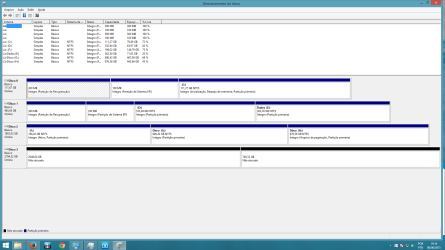
The 3tb HDD is running under USB external right now:


naoalocado.png
 

My Computer

Computer type
PC/Desktop
OS
Windows 7 Ultimate x64
CPU
Phenom x4 965
Motherboard
Asus M4a785td-v evo
Memory
12gb Kingston value
Graphics Card(s)
GTX 560
Hard Drives
Seagate 250gb HDD
I will look for someone who can read what ever language that is.
 

My Computer

Computer type
PC/Desktop
Computer Manufacturer/Model Number
Home made Desktop
OS
Windows 10 Pro. 64/ version 1709 Windows 7 Pro/64
CPU
Intel i7-6800K @ 4.3
Motherboard
ASUS X-99 Deluxe II
Memory
Corsair Platinum 16 gig @2400
Graphics Card(s)
EVGA GTX 1070 OC
Monitor(s) Displays
Asus 27" LED LCD/VE278Q
Screen Resolution
1920-1080 or 1280-720 HDMI
Hard Drives
INTEL SSD 730-240 Gb Sata 3.0/
PSU
EVGA Platium 1200W
Case
Phanteks Luxe Tempered Glass 8 fans/ one radiator
Cooling
XSPC/ Water Cooled CPU
Keyboard
Das 4 Professional
Mouse
Logitech M705/MX Anywhere 2-S
Internet Speed
100 mbits
Antivirus
Microsoft Security Essentials/ Malwarebytes Premium 3.0/ SAS
Browser
I.E. 11 default/Firefox/ ISP Time Warner Cable/Spectrum
Other Info
LG BluRay Burner/
Sound system-KLipsch-THX/
Icy Dock ssd Hot Swap bays.
3tb is Unallocated meaning it has no partitions now. If deleted then you should first try from boot Partition Wizard CD running exactly as shown here the Partition Wizard Partition Recovery Wizard - Video Help.

It cannot recover the missing partitions then test the hard drive with the maker's HD Diagnostic extended CD scan.

You can also attempt to recover your data using Test Disk or free Recuva - Features

The first two hard drives have EFI OS installations. Are you still using both?

The third hard drive has an Active partition that needs to be Modify>Set Inactive by Partition Wizard because only an MBR OS boot partition should be Active.
 
Thank you Greg for coming to help.

chummy just follow Greg's instruction.
 

My Computer

Computer type
PC/Desktop
Computer Manufacturer/Model Number
Home made Desktop
OS
Windows 10 Pro. 64/ version 1709 Windows 7 Pro/64
CPU
Intel i7-6800K @ 4.3
Motherboard
ASUS X-99 Deluxe II
Memory
Corsair Platinum 16 gig @2400
Graphics Card(s)
EVGA GTX 1070 OC
Monitor(s) Displays
Asus 27" LED LCD/VE278Q
Screen Resolution
1920-1080 or 1280-720 HDMI
Hard Drives
INTEL SSD 730-240 Gb Sata 3.0/
PSU
EVGA Platium 1200W
Case
Phanteks Luxe Tempered Glass 8 fans/ one radiator
Cooling
XSPC/ Water Cooled CPU
Keyboard
Das 4 Professional
Mouse
Logitech M705/MX Anywhere 2-S
Internet Speed
100 mbits
Antivirus
Microsoft Security Essentials/ Malwarebytes Premium 3.0/ SAS
Browser
I.E. 11 default/Firefox/ ISP Time Warner Cable/Spectrum
Other Info
LG BluRay Burner/
Sound system-KLipsch-THX/
Icy Dock ssd Hot Swap bays.

My Computer

Computer type
PC/Desktop
Computer Manufacturer/Model Number
Custom Build
OS
Windows 7 Ultimate x64 SP1
CPU
AMD Phenom 2 1090T
Motherboard
Gigabyte GA-890FXA-UD5
Memory
2x8GB Kingston HyperX Fury Black 1600Mhz Unganged
Graphics Card(s)
MSI GTX 970 Gaming 4G
Sound Card
Realtek On-Board HD 7.1 Audio / Logitech G35
Monitor(s) Displays
3xAcer GD245HQ
Screen Resolution
1920x1080
Hard Drives
Samsung 850 Pro 512GB SSD - OS /
WD Caviar Black SATA 3 - 1 TBx2 - Dynamic RAID 0 /
WD Caviar Green SATA 2 - 640GBx2 - Dynamic RAID 0 /
WD Caviar Green SATA 2 - 640GB - Internal Backup /
Seagate Barracude SATA 3 - 3TB - External Backup/ Sync
PSU
HighPower 1000W
Case
Cooler Master HAF 932
Cooling
Noctua NH-D14
Keyboard
Logitech G19
Mouse
Logitech G500
Internet Speed
100/4 Mbit Cable (100GB quota)
Antivirus
ZoneAlarm Extreme Security / MBAM Pro / MBAE Free / SAS Free
Browser
IE 11 - Firefox - Chrome
Other Info
Logitech F710/ G27/ G940/ Z5500 // TrackIR 5 // Nvidia 3D Surround Vision
Thanks for all, i will try recuva now.

Edit: Recuva dont read unallocated drives, so not helping for this case.
 
Last edited:

My Computer

Computer type
PC/Desktop
OS
Windows 7 Ultimate x64
CPU
Phenom x4 965
Motherboard
Asus M4a785td-v evo
Memory
12gb Kingston value
Graphics Card(s)
GTX 560
Hard Drives
Seagate 250gb HDD
Just to clarify, i used partitionguru and it recreated my 3 partitions with all files intacts there.

I only wanted to know why windows/HDD deleted partitions after i changed from USB to Sata, to avoid such problem in future.
 

My Computer

Computer type
PC/Desktop
OS
Windows 7 Ultimate x64
CPU
Phenom x4 965
Motherboard
Asus M4a785td-v evo
Memory
12gb Kingston value
Graphics Card(s)
GTX 560
Hard Drives
Seagate 250gb HDD
.....I only wanted to know why windows/HDD deleted partitions after i changed from USB to Sata, to avoid such problem in future.

In simple terms, your 3TB external drive used Advanced Formatting with 4096 bytes/sector with eight conventional 512bytes/sector combined. During the read/write process the firmware inside the enclosure translates the data appropriately to be read and written correctly.

"during the read process, the Advanced Format hard drive loads the entire 4096-byte sector containing the requested 512-byte data into memory located on the drive. The emulation firmware extracts and re-formats the specific data into a 512-byte chunk before sending the data to the host."

Similar translation process occurs when eight 512byte/sector data sent by the host is combined into 4096bytes and written to the HDD.

When you took out the HDD and made it as an internal drive this drive translation by the firmware inside the enclosure is lost. Your drive is unreadable to the host.

Now immediately after seeing that you were not able to read the data when you made it an internal drive, had you returned it to the enclosure everything would have been fine.

But it would appear that you had mucked it up trying so many things. My head just twirls reading this thread.:D

Anyway now that you have returned it to the enclosure, let us see what Partition Wizard sees.

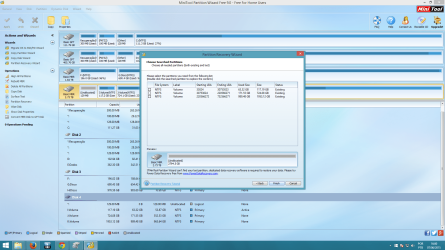
Post the first screenshot after launching PW. Then run Partition Recovery Wizard Quick Scan. When it completes post the screen showing found partitions.
 

My Computer

OS
Windows 7 Home Premium 32 bit
Windows will not delete partitions on the drive. You have to do it yourself. If there are problems with the hard drive however then the partitions could be affected. Test the drive with the maker's HD Diagnostic once you have seen if you can retrieve the files with suggested recovery tools.

Did you use the unknown partition manager after this happened? If you partition over the data then it will not be recoverable.

In the future I suggest Partition Wizard which we've used in tens of thousands of complicated partitioning operations here without a single problem. The boot disk is safest. All other partitioning managers can fail with data loss except Disk mgmt and PW boot disk.

Follow Jumanji's guidance above as he is very good on this.
 
Let me be specific, i have 2 computer, primary running windows 8.1 in GPT UEFI which i used always the External HDD.

In the secondary PC where i was to use the External HDD in internal it runs win7 x64 in MBR BIOS mode. When i plugged first time there the External HDD via USB it worked fine reading 3 partitions same like PC1. Then i removed case and plugged the HDD internally in win7, when come to see in my pc there was no partitions aside the ones from the primary HDD.

I entered the disk manager and it pops option to choose MBR or GPT for disk 2 and i selected MBR. But there inside disk manager it just shows 3tb HDD running internally being unallocated 2tb+700gb spaces.

So after that i started worrying and grab the disk back to PC1 win8.1 internally via SATA to try out and keep same unallocated thing. I pluged it back via USB again in PC1-win8.1 and used Partition Wizard to try recovery partition. After it find 3 partitions right in the last round when clicked to apply to recovery the partitions then Partition Wizard just stopped working(crash) while recoverying partitions(tried 3 times and same crash).

With PartitionGuru running HDD via USB it find the 3 lost partitions, show me all files there and i copied all files to my other drives to backup. After that i clicked "Save partition table" to try recover the partitions and Partionguru recovered 3 lost partitions with all files there running the HDD via USB.

So now i tried to go again to PC2 win7 running the HDD internally via Sata2 but again it messed up HDD, but now a bit different. It read 3 partitions without specifics sizes and cannot access them, inside disk manager it show some strange partitions sizes. Then i bring back the HDD to PC1 via USB and here it read 3 partitions fine without problems like happened yesterday when become unallocated even when bring back to USB.

I just want to use the HDD in this PC2 but try avoid formatting if possible. Is there some way to make it happen? I just dont know what is messing up to use it internally in the windows 7 PC.
 

My Computer

Computer type
PC/Desktop
OS
Windows 7 Ultimate x64
CPU
Phenom x4 965
Motherboard
Asus M4a785td-v evo
Memory
12gb Kingston value
Graphics Card(s)
GTX 560
Hard Drives
Seagate 250gb HDD
When you took out the HDD and made it as an internal drive this drive translation by the firmware inside the enclosure is lost. Your drive is unreadable to the host.

Now immediately after seeing that you were not able to read the data when you made it an internal drive, had you returned it to the enclosure everything would have been fine.

But it would appear that you had mucked it up trying so many things. My head just twirls reading this thread.:D

Anyway now that you have returned it to the enclosure, let us see what Partition Wizard sees.

Post the first screenshot after launching PW. Then run Partition Recovery Wizard Quick Scan. When it completes post the screen showing found partitions.

Only way to me use it internally in SATA then is formatting the HDD?

Running via USB:
hd no PW.png

hd no pw 2.png
 

My Computer

Computer type
PC/Desktop
OS
Windows 7 Ultimate x64
CPU
Phenom x4 965
Motherboard
Asus M4a785td-v evo
Memory
12gb Kingston value
Graphics Card(s)
GTX 560
Hard Drives
Seagate 250gb HDD
OK, the present situation is that you have recovered all data in that external HDD into another HDD. Yes/No. I just want to double confirm it.

If your answer is Yes, then what prevents you from formatting it as an internal drive on your Windows 7 PC? Any reason why you do not want to format it?

Of course you have to initialise and format it as a GPT drive. You may also create the 3 partitions and then copy all data into it.

This is going to be the ultimate solution. But hold on.

Try the following.

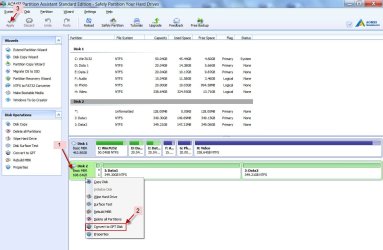
Install AOMEI Partition Assistant on your Windows 7 PC.

Hook up the HDD removed from the enclosure as a second internal drive on your Windows 7 PC.If Windows asks you to initialise it say no and cancel it. Do not initialise.

Run AOMEI Partition Assistant. Does it show it as an MBR drive?

Right click on the disk icon > Convert to GPT Disk > Apply

08-06-2015 02-39-20.jpg

Once the conversion is completed, reload the Properties when prompted. Are you able to access the partitions with all data in it?

If it does, well and good.

If not you have to go to the ultimate solution - initialising and formatting it as a GPT drive.( Do this only if you had recovered all data in it already)
 

My Computer

OS
Windows 7 Home Premium 32 bit
Back
Top