After searching through these forums(and the web in general) I realize this is a far more common thing than I expected, still, I would like some help with this.
I have two ADATA HDD, 1T each(the ones with the silicon rubber on them), both slightly over the year now, and both of them were connected to my laptop, which, old as it is, had a heat stroke the other day and fainted.
One of them was fine, the one with the irrelevant data that could be painfully redownloaded again if it was somehow lost.
The other one, which contained literally thousands of valuable and irreplaceable files, was being ignored by the three devices I connected it to(laptop, PC with Ubuntu, and an XboxOne for some reason).
So I tried following some guides to see what was going on and stumble on this site, specifically, this guide.
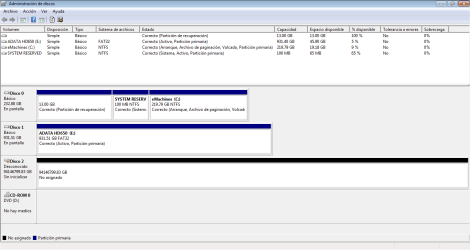
However, as I was following a previous tutorial, something weird caught my eye when I checked it with the Disk Manager, my measly 900+GB drive had somehow gained over 90000000GB extra for storage as the image below shows, so that's weird right? I kinda thought it would be normal, but the guides showed the drives with the right sizes so I wasn't so sure.
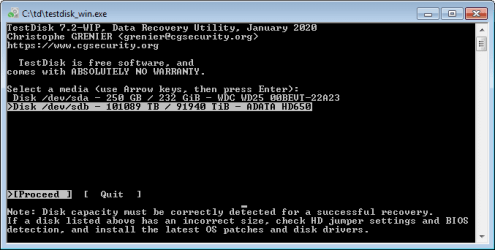
Regardless, I tried following the Test Disk tutorial you have, since is the only one that doesn't involve losing my data and hoping for it to be recovered by some other program (and to another location that I don't have), until a reached a part that stated that the disk size shown, must coincide with the actual value for the disk, which it didn't, like, at all, I forgot to screencap the window, but I don't recall a value even appearing there.
So I stopped and start searching the forums to see if there was a similar case, which I couldn't find, so now here I am, writing this in serious hopes that my files aren't gone for good.
Here's the screenshot of the Disk Manager(is in spanish), Disk 1 is the healthy HDD and Disk 2 is the crazy one. The MiniTool Partition Wizard I've seen you guys ask screenshots of shows more or less the same.
I have two ADATA HDD, 1T each(the ones with the silicon rubber on them), both slightly over the year now, and both of them were connected to my laptop, which, old as it is, had a heat stroke the other day and fainted.
One of them was fine, the one with the irrelevant data that could be painfully redownloaded again if it was somehow lost.
The other one, which contained literally thousands of valuable and irreplaceable files, was being ignored by the three devices I connected it to(laptop, PC with Ubuntu, and an XboxOne for some reason).
So I tried following some guides to see what was going on and stumble on this site, specifically, this guide.
However, as I was following a previous tutorial, something weird caught my eye when I checked it with the Disk Manager, my measly 900+GB drive had somehow gained over 90000000GB extra for storage as the image below shows, so that's weird right? I kinda thought it would be normal, but the guides showed the drives with the right sizes so I wasn't so sure.
Regardless, I tried following the Test Disk tutorial you have, since is the only one that doesn't involve losing my data and hoping for it to be recovered by some other program (and to another location that I don't have), until a reached a part that stated that the disk size shown, must coincide with the actual value for the disk, which it didn't, like, at all, I forgot to screencap the window, but I don't recall a value even appearing there.
So I stopped and start searching the forums to see if there was a similar case, which I couldn't find, so now here I am, writing this in serious hopes that my files aren't gone for good.
Here's the screenshot of the Disk Manager(is in spanish), Disk 1 is the healthy HDD and Disk 2 is the crazy one. The MiniTool Partition Wizard I've seen you guys ask screenshots of shows more or less the same.
My Computer
At a glance
Windows 7 Starter 32Celeron Dual Core T3500 @ 2.10GHz 2.09GHz2gbIntegrated chip
- Computer type
- Laptop
- Computer Manufacturer/Model Number
- emachines eME528
- OS
- Windows 7 Starter 32
- CPU
- Celeron Dual Core T3500 @ 2.10GHz 2.09GHz
- Memory
- 2gb
- Graphics Card(s)
- Integrated chip
- Hard Drives
- WDC WD2500BEVT-22A23T0 250GB 3 Partitions
- Antivirus
- Avast
- Browser
- Vivaldi