Solved External HDD became unallocated

I just unplugged the disk formated with the 3 partitions and some data inside it from last screen internal SATA in win7 and plugged in external USB at win8.1 pc but windows dont recognized the partitions were made in SATA when plugged at USB now, just get crazy like when i changed from USB enclosure to internal SATA. The difference this time it read a full 2.7tb empty primary partition without any data, when i changed from USB enclosure to SATA it become a 2.7tb unallocated space. The enclosure conversion sector size just look to be the problem, this AF thing dont let the disk be changed from USB to SATA and vice versa.

I think you made some confusion think about the transfer rate i said, i just wanted to say than i changed from enclosure USB to SATA2 in win7 PC because in that win7 computer only has USB2.0 port which i know is speed limited to transfer big files in/out in the average 25mb/s speeds. And because that limited speed i wanted to use the disk internal in SATA2 to get the full speed of that drive for transfer some big files.

But since this Advanced Format of the HDD/enclosure with sector size translations dont let me change the drive from SATA to USB and USB to SATA, i just returned it to enclosure and reformated the drive to now use in that way only.

I hope this clarify things. So thanks for all effort and help from all of you.
 

My Computer My Computer

Computer type
PC/Desktop
OS
Windows 7 Ultimate x64
CPU
Phenom x4 965
Motherboard
Asus M4a785td-v evo
Memory
12gb Kingston value
Graphics Card(s)
GTX 560
Hard Drives
Seagate 250gb HDD
Thanks for the clarification.

All or most Advance formatted drives that has been available so far are MBR drives.There is a drive translation taking place inside. I was curious to know what happens when you put the natively 4096 byte sector GPT formatted drive inside the enclosure with drive translation. It is now clear that the GPT HDD is converted back into an MBR drive. Reason why when you put it back as an internal drive it only sees 2TB.( This has nothing to do with Windows 7 or 8. The same thing will happen in both the systems.)

So either you use it as a GPT formatted Internal drive or put it inside its enclosure and use it inside the enclosure as it should by design. When inside the enclosure initialise it as an MBR drive. ( I told you we are also learning. :))

If you buy a commercially available third party enclosure capable of handling >2TB drives, this would not happen.

As I told you I was looking to buy a >2TB external drive. Most such drives are of the desktop variety + their specs showed those can be used with Windows XP. It was atonce clear that these used Advanced formatting + Drive Translation) MBR drives.

Windows 7 with a necessary update/s and Windows 8 can natively read data from a 4096 Byte sector size without requiring a translation from 4096 byte to 512 Byte data stream.

Finally I found only one drive that didn't use drive translation and truly portabale. That is this Toshiba drive. Toshiba 3TB Canvio Basics USB 3.0 Portable Hard Drive (Black) The HDD inside will be a GPT formatted one and Windows 7 and Windows 8 can read the data directly from the 4096Byte sector size, without any intervening drive translation. I didn't order because of the shipping date.

You may mark this thread as solved. This does contain some important test results from your experiments. Thank you.
 
Last edited:

My Computer My Computer

OS
Windows 7 Home Premium 32 bit
Similar to Above: Used Testdisk but confused by results

Hi there,

A friend of mine wanted some data from my Windows 7 desktop pc and brought over a laptop

hard disk which she assured me was empty. So,I plugged it in a usb port. I also have an

external 3 tb hard disk in a Startech seat plugged in a usb. When her disk came on it

showed that she had windows Vista on it. Of course I was angry, but I thought I could format

her disk to get rid Vista. It dis get rid of Vista, and I gave her the data she wanted.

Then I booted my pc and now my 3tb external disk does no show up in My Computer, and in

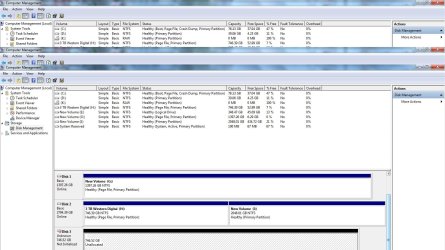
Computer Management it shows up as Not Initialed and with 746.52 Unallocated space. I have

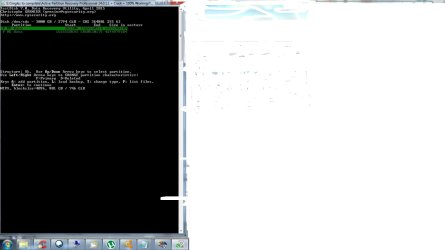
over 2tb of data on this disk. I ran Testdisk and stopped when I got to this:

Disk/dev/sdc - 3000 GB/2794 GiB - CHS 364801 255 63
Partition Start End Size in sectors
>P MS Data 262206 1565550314 1565288109
P MS Data 1565550592 5860530175 4294979584

Below this it says Structure: OK

As well as up/down keys to select partion
Keys A: Add Partition, L:n Load Backup, T: Change Type, P: List Files
Enter: to continue
NTFS, blocksize=4096, 801 GB / 746 GiB

It is here where I don't know what to next. (I really don't want to lose my data, but does

that prospect not look good?)

I think it was Jumanji who I was reading yesterday who suggested to someone else to use Testdisk.
Sorry if i made any mistakes posting images (this is my first time).

Management2.jpg

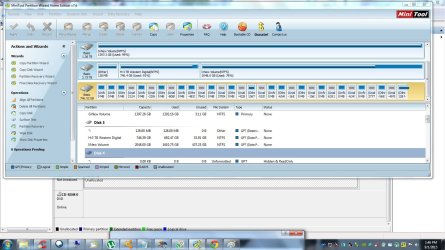
Partition Wizard.jpg

TestDisk 1a.jpg

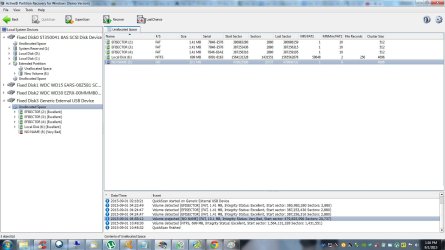
Partition.jpg
 

My Computer My Computer

Computer type
PC/Desktop
Computer Manufacturer/Model Number
Asus
OS
Windows 7 Home Premium 32 bit
CPU
AMD Athalon II + 2 250 Processor 3.01 GHz
Motherboard
M2N68-AM PLUS ASUS
Memory
3 GB
Hard Drives
3 Internal
1 external
Antivirus
Avast
Browser
Google
Back
Top