Solved You don't have permission to shut-down this computer

Shaye

New member
Local time
2:21 PM
Messages
13
Location
Seattle
Hello, I hope you can give me some input.
I have a desk top Windows 7 and I can't shut it down & re-start, (telling me I don't have permission), but I also can't do a system restore from a restore point and I'm unable to download any of my photos in my files. Windows Paint can't even view them. The files ARE there. I checked. And all 3 issues started at the same time today. I don't have a clue as what to do???
 

My Computer My Computer

At a glance

Windows 7
Computer type
PC/Desktop
Computer Manufacturer/Model Number
HP
OS
Windows 7
Worldwide problem affecting many many Win7 users. Do a Google search for "Error - You don't have permission to shut-down this computer" and you will see that all of the big sites and magazines have already published the story, and same solution.

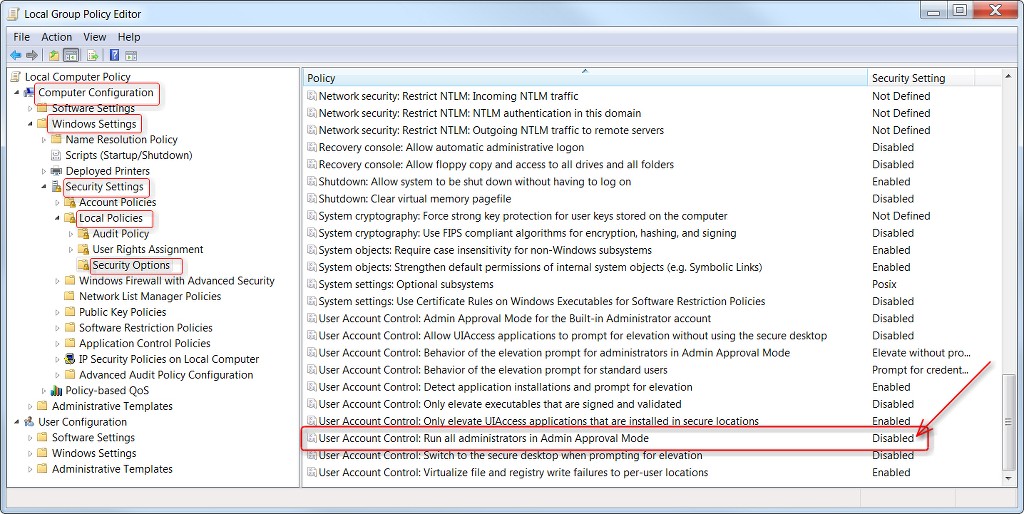
The "fix" (to overcome the major problem of not being able to shut down or restart) is a simple GPEDIT recipe clearly described on this page.

It's still not yet known what has caused this, but it just started in the past day or two. Might be something from Microsoft (which they'll have to push out the official fix for, even though theoretically Win7 Updates are supposedly dead), or something unexpected tied to EOL for Win7. Whatever the underlying explanation is still unknown.

However there are secondary additional symptoms you might now encounter, even after applying the GPEDIT fix. Seems many things previously "freed from UAC" are now being controlled by it. So even if you have UAC set to "zero", you now may see symptoms that it is at least "partially alive".

(1) programs might no longer be able to save their own data, or access the Registry, etc., You can probably overcome this by changing these programs to "run as adminstrator". Process is simple:

(a) From Start Menu, find the shortcut for your desired program. Right-click and from the popup menu select Open File Location to get Explorer for the program exe.

(b) Right-click the program and go to Properties –> Compatibility tab.

(c) In the Privilege Level section, check "Run this program as an Administrator" checkbox. Push OK, OK, to back out.

(2) file operations like DELETE or MOVE may now popup "you need permission from the administrator" to perform, and you'll have to click OK to proceed. Sure, you're already the adminstrator, and you've already applied the GPEDIT fix to make all operations get the adminstrator approval automatically.

Nevertheless you will still get these new popups, and you'll have to push OK.

(3) Inability to access content, known to be present but seemingly affected by "lack of authority". Again, you might have success if you can "run as administrator".


Lots of people affected.

I thought it might be from my BitDefender anti-virus, and something they did just in the past few days. But nobody has yet made the connection to something like that as the possible underlying cause of this.

Nevertheless it does appear to be worldwide, and well known already. Just in the past few days.

Presumably with all the worldwide publicity MS will soon get this resolved. Egg on face, of course. (but then you should already be at Win10!)
 

My Computer My Computer

At a glance

Windows 7 Pro x64 (1), Win7 Pro X64 (2)i5-3350p 3.1Ghz/6MB-cache (1); E8400 3.0Ghz/6...8GB PC3-12800 DDR3 (1); 4GB PC3-10600 DDR3 (2)ATI HD7750 (1), (see TV cards); ATI R7 250 (2)
Computer type
PC/Desktop
Computer Manufacturer/Model Number
Home-built, two systems (1) and (2)
OS
Windows 7 Pro x64 (1), Win7 Pro X64 (2)
CPU
i5-3350p 3.1Ghz/6MB-cache (1); E8400 3.0Ghz/6MB-cache (2)
Motherboard
ASUS P8Z77-V Pro (1); ASUS P5Q3 (2)
Memory
8GB PC3-12800 DDR3 (1); 4GB PC3-10600 DDR3 (2)
Graphics Card(s)
ATI HD7750 (1), (see TV cards); ATI R7 250 (2)
Sound Card
Realtek ALC892 HD Audio (1); Realtek ALC1200 HD Audio (2)
Monitor(s) Displays
Eizo HD2441W LCD, Eizo S2433W (1); Eizo 24" S2433W (2)
Screen Resolution
1920x1200, 1920x1200 (1); 1920x1200 (2)
Hard Drives
(1) 1TB SATA-II (7200RPM), 2x2TB SATA-III (7200RPM), 250GB SATA-III (10000RPM) for OS; 2x2TB external USB 3.0

(2) 320GB SATA-II (7200RPM), 750GB SATA-II (7200RPM), 150GB SATA-II (10000RPM) for OS; 2TB external USB 3.0
PSU
Nesteq ECS-6001 600W (1); Nesteq ECS-5001 500W (2)
Case
Acousti-Case 360 (1) and (2)
Cooling
Noctua NH-U12P SE2 for CPU, 2x120mm case fans (1) and (2)
Keyboard
IBM PS/2 (1) and (2)
Mouse
Logitech MX Revolution wireless (1); Microsoft wired (2)
Internet Speed
100mbps down / 10mbps up
Antivirus
Microsoft Security Essentials; Malwarebyte Anti-Malware Pro
Browser
Firefox
Other Info
Ceton InfiniTV 4-tuner cablecard-enabled TV card as well as Hauppauge HVR-2250 OTA/ATSC 2-tuner TV card in (1), running under Win7 WMC
I have a desk top Windows 7 and I can't shut it down & re-start, (telling me I don't have permission)...


This appears to be a recent and widespread problem. Some fixes and workarounds here...


Bleeping Computer said:
A "You don’t have permission to shut down this computer." error is preventing Windows 7 from shutting down or restarting their computers according to user reports that came in during the last 24 hours....
Windows 7 Users Suddenly Can't Shut Down Their PCs, How to Fix
 

My Computers My Computers

  • At a glance

    Windows 7 Home Premium x64AMD V1204GB
    Computer type
    Laptop
    Computer Manufacturer/Model Number
    Toshiba satellite C650D
    OS
    Windows 7 Home Premium x64
    CPU
    AMD V120
    Memory
    4GB
    Internet Speed
    150 Mbps
    Antivirus
    MSE
    Browser
    IE11, Edge, Firefox
    Other Info
    I also have W7 Pro on my System Two, and several W7 Hyper-V VMs. My other machines run Windows 10/11. Their specs are in my Ten Forums & Eleven Forum profiles.
  • At a glance

    Windows 7 Pro x64Intel i5-3320M8 GB
    Computer type
    Laptop
    System Manufacturer/Model Number
    Lenovo Thinkpad T430
    OS
    Windows 7 Pro x64
    CPU
    Intel i5-3320M
    Memory
    8 GB
    Hard Drives
    250GB Samsung SSD 860 EVO
    Antivirus
    MSE
Thank you very much dsperber,
I appreciate you taking the time to advise me.
I'll definitely do as you suggested.

I'm not super savvy with computers but not a complete dummy either.
I'll muddle through it and hope it resolves the problem.
Your instructions are very clear and I'm grateful for that.

Oh, and I do have Bitdefender. :huh:
 

My Computer My Computer

At a glance

Windows 7
Computer type
PC/Desktop
Computer Manufacturer/Model Number
HP
OS
Windows 7
Oh, and I do have Bitdefender. :huh:
AHAHAHAHA!!!!

Not a coincidence, possibly.

I may be onto something here!!!
 

My Computer My Computer

At a glance

Windows 7 Pro x64 (1), Win7 Pro X64 (2)i5-3350p 3.1Ghz/6MB-cache (1); E8400 3.0Ghz/6...8GB PC3-12800 DDR3 (1); 4GB PC3-10600 DDR3 (2)ATI HD7750 (1), (see TV cards); ATI R7 250 (2)
Computer type
PC/Desktop
Computer Manufacturer/Model Number
Home-built, two systems (1) and (2)
OS
Windows 7 Pro x64 (1), Win7 Pro X64 (2)
CPU
i5-3350p 3.1Ghz/6MB-cache (1); E8400 3.0Ghz/6MB-cache (2)
Motherboard
ASUS P8Z77-V Pro (1); ASUS P5Q3 (2)
Memory
8GB PC3-12800 DDR3 (1); 4GB PC3-10600 DDR3 (2)
Graphics Card(s)
ATI HD7750 (1), (see TV cards); ATI R7 250 (2)
Sound Card
Realtek ALC892 HD Audio (1); Realtek ALC1200 HD Audio (2)
Monitor(s) Displays
Eizo HD2441W LCD, Eizo S2433W (1); Eizo 24" S2433W (2)
Screen Resolution
1920x1200, 1920x1200 (1); 1920x1200 (2)
Hard Drives
(1) 1TB SATA-II (7200RPM), 2x2TB SATA-III (7200RPM), 250GB SATA-III (10000RPM) for OS; 2x2TB external USB 3.0

(2) 320GB SATA-II (7200RPM), 750GB SATA-II (7200RPM), 150GB SATA-II (10000RPM) for OS; 2TB external USB 3.0
PSU
Nesteq ECS-6001 600W (1); Nesteq ECS-5001 500W (2)
Case
Acousti-Case 360 (1) and (2)
Cooling
Noctua NH-U12P SE2 for CPU, 2x120mm case fans (1) and (2)
Keyboard
IBM PS/2 (1) and (2)
Mouse
Logitech MX Revolution wireless (1); Microsoft wired (2)
Internet Speed
100mbps down / 10mbps up
Antivirus
Microsoft Security Essentials; Malwarebyte Anti-Malware Pro
Browser
Firefox
Other Info
Ceton InfiniTV 4-tuner cablecard-enabled TV card as well as Hauppauge HVR-2250 OTA/ATSC 2-tuner TV card in (1), running under Win7 WMC
AHAHAHAHA!!!!
Not a coincidence, possibly.
I may be onto something here!!!
You may well be. I don't have Bitdefender on my three W7 machines, and I don't have the problem on any of them.
 

My Computers My Computers

  • At a glance

    Windows 7 Home Premium x64AMD V1204GB
    Computer type
    Laptop
    Computer Manufacturer/Model Number
    Toshiba satellite C650D
    OS
    Windows 7 Home Premium x64
    CPU
    AMD V120
    Memory
    4GB
    Internet Speed
    150 Mbps
    Antivirus
    MSE
    Browser
    IE11, Edge, Firefox
    Other Info
    I also have W7 Pro on my System Two, and several W7 Hyper-V VMs. My other machines run Windows 10/11. Their specs are in my Ten Forums & Eleven Forum profiles.
  • At a glance

    Windows 7 Pro x64Intel i5-3320M8 GB
    Computer type
    Laptop
    System Manufacturer/Model Number
    Lenovo Thinkpad T430
    OS
    Windows 7 Pro x64
    CPU
    Intel i5-3320M
    Memory
    8 GB
    Hard Drives
    250GB Samsung SSD 860 EVO
    Antivirus
    MSE
You may well be. I don't have Bitdefender on my three W7 machines, and I don't have the problem on any of them.
DOUBLE AHAHAHAHAH!!!

I have now opened a thread on the BitDefender Forum about this topic. We shall see what unfolds there.

I am going to uninstall BitDefender on one of my Win7 machines, to see if the issue disappears.

It's obviously a "selective problem", affecting users worldwide... and in sufficient quantities that all the big news and anti-malware and internet sites have received reports from many users, in sufficient quanitities so that they have already published articles and touted the "fix" (at least for the major problem symptom).
 

My Computer My Computer

At a glance

Windows 7 Pro x64 (1), Win7 Pro X64 (2)i5-3350p 3.1Ghz/6MB-cache (1); E8400 3.0Ghz/6...8GB PC3-12800 DDR3 (1); 4GB PC3-10600 DDR3 (2)ATI HD7750 (1), (see TV cards); ATI R7 250 (2)
Computer type
PC/Desktop
Computer Manufacturer/Model Number
Home-built, two systems (1) and (2)
OS
Windows 7 Pro x64 (1), Win7 Pro X64 (2)
CPU
i5-3350p 3.1Ghz/6MB-cache (1); E8400 3.0Ghz/6MB-cache (2)
Motherboard
ASUS P8Z77-V Pro (1); ASUS P5Q3 (2)
Memory
8GB PC3-12800 DDR3 (1); 4GB PC3-10600 DDR3 (2)
Graphics Card(s)
ATI HD7750 (1), (see TV cards); ATI R7 250 (2)
Sound Card
Realtek ALC892 HD Audio (1); Realtek ALC1200 HD Audio (2)
Monitor(s) Displays
Eizo HD2441W LCD, Eizo S2433W (1); Eizo 24" S2433W (2)
Screen Resolution
1920x1200, 1920x1200 (1); 1920x1200 (2)
Hard Drives
(1) 1TB SATA-II (7200RPM), 2x2TB SATA-III (7200RPM), 250GB SATA-III (10000RPM) for OS; 2x2TB external USB 3.0

(2) 320GB SATA-II (7200RPM), 750GB SATA-II (7200RPM), 150GB SATA-II (10000RPM) for OS; 2TB external USB 3.0
PSU
Nesteq ECS-6001 600W (1); Nesteq ECS-5001 500W (2)
Case
Acousti-Case 360 (1) and (2)
Cooling
Noctua NH-U12P SE2 for CPU, 2x120mm case fans (1) and (2)
Keyboard
IBM PS/2 (1) and (2)
Mouse
Logitech MX Revolution wireless (1); Microsoft wired (2)
Internet Speed
100mbps down / 10mbps up
Antivirus
Microsoft Security Essentials; Malwarebyte Anti-Malware Pro
Browser
Firefox
Other Info
Ceton InfiniTV 4-tuner cablecard-enabled TV card as well as Hauppauge HVR-2250 OTA/ATSC 2-tuner TV card in (1), running under Win7 WMC
The fact that so many Anti Malware developers are getting reports would suggest that it is unlikely to be one specific application, in this case bitdefender, alone but more likely some other cause either in addition to bitdefender or some other software combination.

Another possibility is that it is a previously unknown exploit which is being tested with a relatively minor payload.

One thing that worries me is those using the home versions of Windows 7 will not have access to the GP control panel so would be limited to the multi admin solution
 

My Computers My Computers

  • At a glance

    Windows 11 Pro x64 [Latest Release and Releas...Ryzen 9 5950X, 3.8 - 5.2 MHz64GB [2 x 32GB] DDR4 3200MHz4GB NVIDIA GEFORCE GTX 1650 Ti
    Computer type
    PC/Desktop
    Computer Manufacturer/Model Number
    ChillBlast - Custom to my design
    OS
    Windows 11 Pro x64 [Latest Release and Release Preview]
    CPU
    Ryzen 9 5950X, 3.8 - 5.2 MHz
    Motherboard
    Asus Prime X570-Pro
    Memory
    64GB [2 x 32GB] DDR4 3200MHz
    Graphics Card(s)
    4GB NVIDIA GEFORCE GTX 1650 Ti
    Sound Card
    On-board SPDIF to 5.1 System + HDMI [5.1 system]
    Monitor(s) Displays
    32" UHD 32 Bit HDR Monitor + 43" UHD 4K 32Bit HDR TV
    Screen Resolution
    2 x 3840 x 2160 @60Hz
    Hard Drives
    1TB M2 SSD OS, 500GB Fast Access SSD, 2 x 8TB Data + Various Externals from 1TB to 4TB, 10TB NAS
    PSU
    NZXT C750 80 PLUS Gold 750W Modular PSU
    Case
    Workstation Case [Matt Black]
    Cooling
    NZXT Kraken X63 280mm CPU Cooler +2x Quiet Case fans
    Keyboard
    Logitech Wireless MX Keys & K400 + others
    Mouse
    Logitech Wireless MX Master 3S
    Internet Speed
    920 MB Down 50 MB Up
    Antivirus
    BitDefender Total Security Pro
    Browser
    Chrome (always run latest Non-Beta)
    Other Info
    Also run ...
    Laptop - Quad 8GB - Windows 10 Pro x64
    Nexus 7 Android tablet x2
    Samsung 10.2" tablet
    Blackview TAB 8 4G Android Tablet c/w Keyboard
    Wacom Intuos Pro Medium Pen Pad
    Wacom Intuos Pro Small Pen Pad
    Wacom Expresskeys Remote
    Loopdeck+ Graphics Controller
    Shuttle Pro v2 Control
  • At a glance

    Windows 11 Pro x64 Latest RPIntel I7 10750H 5.0GHz32GB [2x16GB] DDR4 2933 MHznVidia GTX1650Ti 4 GB GDDR6
    Computer type
    Laptop
    System Manufacturer/Model Number
    Dell XPS 17 10750H
    OS
    Windows 11 Pro x64 Latest RP
    CPU
    Intel I7 10750H 5.0GHz
    Motherboard
    Dell XPS
    Memory
    32GB [2x16GB] DDR4 2933 MHz
    Graphics Card(s)
    nVidia GTX1650Ti 4 GB GDDR6
    Sound Card
    Stock [Realtek] 4 Speaker
    Monitor(s) Displays
    17" IPS UHD+ Infinity Edge Touchscreen
    Screen Resolution
    3840 x 2400
    Hard Drives
    2TB M2 NVMe, 4TB External + various 500GB & 1TB External NVMe (also have access to spinner HDD from
    PSU
    Stock
    Case
    Stock XPS Aluminium & Carbon Fibre
    Cooling
    Stock - Active Fan Control
    Keyboard
    Backlit + Various Logitech
    Mouse
    Stock Track Pad + Logitech MX Trackball
    Internet Speed
    72 MB Down 18MB Up
    Browser
    Chrome
    Other Info
    Also run ...
    Laptop - Quad 8GB - Windows 10 Pro x64
    Nexus 7 Android tablet x2
    10.2" tablet
    Sony Z3 Android Smartphone
    Wacom Intuos Pro Medium Pen Pad
    Wacom Intuos Pro Small Pen Pad
    Wacom Expresskeys Remote
    Loopdeck+ Graphics Controller
    Shuttle Pro v2 Control Pad
    10TB NAS
Well, I'm afraid it looks like BitDefender is responsible for this WORLDWIDE CRISIS!!!

I've now restored a Macrium Reflect system image backup from 2/4, which is several days before the Feb 6-7 first global appearance of this symptom. So the GP settings in effect for UAC behavior are exactly what they've always been by default, since I never have toucned them. Yes, I have UAC set to "zero" (I know, supposedly not recommended, but that's what I want), and the behavior of Win7 for the past 10 years has always been perfect. It's only since Feb 6-7 that the "new worldwide behavior" ONLY FOR BITDEFENDER USERS, APPARENTLY has occurred.

P5FeOT.jpg


After restoring the 2/4 image, I then booted to "safe mode" (without networking) and UNINSTALLED BITDEFENDER. This was to guarantee that when I booted to real Win7 I would be operating in a pure Win7 environment as of 2/4, when everything was still working perfectly. Note that after the LIKELY 2/6 push-out of the damaging update from BitDefender, I had several anomalous symptoms:

(1) After 2/7 I was receiving the "Error - You don't have permission to shut-down this computer"symptom, and could not shut down or restart. NOTE that this was "fixed" by running the GPEDIT tweak, but this fix didn't solve the following symptoms.

(2) The Clockwise.exe program I've been running for 20 years no longer worked properly. But after 2/7 it apparently no longer had the authority to access the Registry where it keeps its settings. And of course it couldn't close properly, because it wants to save its settings and didn't have authority. If I would "run as Administrator", now the program would once again work, because it had administrator permissions.

(3) Clockwise has a setting so that it auto-starts with Windows, and goes off to the internet to get the "atomic clock time", and then sets the Windows date/time. This has always worked for the past 20 years. After 2/7, either the program would not auto-start on one Win7 machine. Or if it would auto-start on a second Win7 machine but would not update the Windows date/time. These symptoms were not solved by "run as Administrator".

(4) Normally I don't get popups when MOVE or DELETE files, asking for administrator permission. I have UAC set to "zero". Well, after 2/7 I now was presented with a popup stating that administrator permission was required to perform the operation. I would reply OK and it would work, but it was annoying to now be seeing these prompts.


Now for the news. After restoring the 2/4 image and uninstalling BitDefender, NOW EVERYTHING ONCE AGAIN WORKS PERFECTLY!!!

Every single one of the above anomalies NO LONGER HAPPENS!!!

It appears it is BitDefender that has "broken all the world's Win7 computers" which run BitDefender.

I am now going to reinstall BitDefender on this very machine I'm now running on, which has the back-restored 2/4 system with the GPEDIT item still sitting at its default "disabled". So there is once again no "override fix" for the shutdown problem in particular.

I will now experiment to see if the above FOUR SYMPTOMS RETURN. If they don't, then BitDefender is off the hook and there must be some other explanation.

But if all four symptoms return, then IT ABSOLUTELY IS BITDEFENDER THAT HAS BROKEN THE WORLD!!

More in a bit, when the experiment is complete.
 

My Computer My Computer

At a glance

Windows 7 Pro x64 (1), Win7 Pro X64 (2)i5-3350p 3.1Ghz/6MB-cache (1); E8400 3.0Ghz/6...8GB PC3-12800 DDR3 (1); 4GB PC3-10600 DDR3 (2)ATI HD7750 (1), (see TV cards); ATI R7 250 (2)
Computer type
PC/Desktop
Computer Manufacturer/Model Number
Home-built, two systems (1) and (2)
OS
Windows 7 Pro x64 (1), Win7 Pro X64 (2)
CPU
i5-3350p 3.1Ghz/6MB-cache (1); E8400 3.0Ghz/6MB-cache (2)
Motherboard
ASUS P8Z77-V Pro (1); ASUS P5Q3 (2)
Memory
8GB PC3-12800 DDR3 (1); 4GB PC3-10600 DDR3 (2)
Graphics Card(s)
ATI HD7750 (1), (see TV cards); ATI R7 250 (2)
Sound Card
Realtek ALC892 HD Audio (1); Realtek ALC1200 HD Audio (2)
Monitor(s) Displays
Eizo HD2441W LCD, Eizo S2433W (1); Eizo 24" S2433W (2)
Screen Resolution
1920x1200, 1920x1200 (1); 1920x1200 (2)
Hard Drives
(1) 1TB SATA-II (7200RPM), 2x2TB SATA-III (7200RPM), 250GB SATA-III (10000RPM) for OS; 2x2TB external USB 3.0

(2) 320GB SATA-II (7200RPM), 750GB SATA-II (7200RPM), 150GB SATA-II (10000RPM) for OS; 2TB external USB 3.0
PSU
Nesteq ECS-6001 600W (1); Nesteq ECS-5001 500W (2)
Case
Acousti-Case 360 (1) and (2)
Cooling
Noctua NH-U12P SE2 for CPU, 2x120mm case fans (1) and (2)
Keyboard
IBM PS/2 (1) and (2)
Mouse
Logitech MX Revolution wireless (1); Microsoft wired (2)
Internet Speed
100mbps down / 10mbps up
Antivirus
Microsoft Security Essentials; Malwarebyte Anti-Malware Pro
Browser
Firefox
Other Info
Ceton InfiniTV 4-tuner cablecard-enabled TV card as well as Hauppauge HVR-2250 OTA/ATSC 2-tuner TV card in (1), running under Win7 WMC
Well, I'm afraid I was absolutely correct. IT IS BITDEFENDER WHICH IS RESPONSIBLE!

I reinstalled BitDefender, and during that current instance of Win7 I still had no problem either closing Clockwise or restarting Windows. Perhaps all of the relevant recent updates updates to BitDefender had not yet been downloaded/installed with that initial reinstall.

But after a restart (and perhaps further updates now applied to BitDefender), now the symptoms returned.

First, Clockwise would no longer close (because it could not update the Registry with its settings):

XyB3NK.jpg


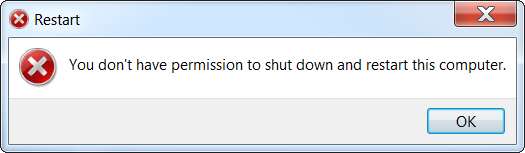
Second, it was no longer possible to shut down or restart Windows:

tfHdci.jpg


I have not yet had a chance to apply the GPEDIT "fix", so I can't yet restart, so I can't yet determine if Clockwise will start properly at Windows startup. But given that it now will not close properly because it lacks administrator authority (although that has never ever been a problem before, probably due to the fact that I have UAC set to "zero" which is still the case) I expect that when I next do restart it will not start correctly, until I change it to "run as Administrator".

I have also not yet been able to duplicate the administrator permission prompt for MOVE or DELETE, but that may simply be because of how I'm attempting to test that, or the file I'm using. So for the moment this issue has not been replicated. But this is a minor symptom anyway.

What is most important is that with BitDefender now reinstalled and one restart performed (in order to get all current updates to BitDefender applied), the two MOST CRUSHING MAJOR SYMPTOMS have returned. Can't shut down or restart Windows, and programs no longer have authority to access/update Registry without "run as Administrator".

I will duplicate this report on my BitDefender forum thread.
 

My Computer My Computer

At a glance

Windows 7 Pro x64 (1), Win7 Pro X64 (2)i5-3350p 3.1Ghz/6MB-cache (1); E8400 3.0Ghz/6...8GB PC3-12800 DDR3 (1); 4GB PC3-10600 DDR3 (2)ATI HD7750 (1), (see TV cards); ATI R7 250 (2)
Computer type
PC/Desktop
Computer Manufacturer/Model Number
Home-built, two systems (1) and (2)
OS
Windows 7 Pro x64 (1), Win7 Pro X64 (2)
CPU
i5-3350p 3.1Ghz/6MB-cache (1); E8400 3.0Ghz/6MB-cache (2)
Motherboard
ASUS P8Z77-V Pro (1); ASUS P5Q3 (2)
Memory
8GB PC3-12800 DDR3 (1); 4GB PC3-10600 DDR3 (2)
Graphics Card(s)
ATI HD7750 (1), (see TV cards); ATI R7 250 (2)
Sound Card
Realtek ALC892 HD Audio (1); Realtek ALC1200 HD Audio (2)
Monitor(s) Displays
Eizo HD2441W LCD, Eizo S2433W (1); Eizo 24" S2433W (2)
Screen Resolution
1920x1200, 1920x1200 (1); 1920x1200 (2)
Hard Drives
(1) 1TB SATA-II (7200RPM), 2x2TB SATA-III (7200RPM), 250GB SATA-III (10000RPM) for OS; 2x2TB external USB 3.0

(2) 320GB SATA-II (7200RPM), 750GB SATA-II (7200RPM), 150GB SATA-II (10000RPM) for OS; 2TB external USB 3.0
PSU
Nesteq ECS-6001 600W (1); Nesteq ECS-5001 500W (2)
Case
Acousti-Case 360 (1) and (2)
Cooling
Noctua NH-U12P SE2 for CPU, 2x120mm case fans (1) and (2)
Keyboard
IBM PS/2 (1) and (2)
Mouse
Logitech MX Revolution wireless (1); Microsoft wired (2)
Internet Speed
100mbps down / 10mbps up
Antivirus
Microsoft Security Essentials; Malwarebyte Anti-Malware Pro
Browser
Firefox
Other Info
Ceton InfiniTV 4-tuner cablecard-enabled TV card as well as Hauppauge HVR-2250 OTA/ATSC 2-tuner TV card in (1), running under Win7 WMC

My Computers My Computers

  • At a glance

    Windows 7 Home Premium x64AMD V1204GB
    Computer type
    Laptop
    Computer Manufacturer/Model Number
    Toshiba satellite C650D
    OS
    Windows 7 Home Premium x64
    CPU
    AMD V120
    Memory
    4GB
    Internet Speed
    150 Mbps
    Antivirus
    MSE
    Browser
    IE11, Edge, Firefox
    Other Info
    I also have W7 Pro on my System Two, and several W7 Hyper-V VMs. My other machines run Windows 10/11. Their specs are in my Ten Forums & Eleven Forum profiles.
  • At a glance

    Windows 7 Pro x64Intel i5-3320M8 GB
    Computer type
    Laptop
    System Manufacturer/Model Number
    Lenovo Thinkpad T430
    OS
    Windows 7 Pro x64
    CPU
    Intel i5-3320M
    Memory
    8 GB
    Hard Drives
    250GB Samsung SSD 860 EVO
    Antivirus
    MSE
I have also not yet been able to duplicate the administrator permission prompt for MOVE or DELETE, but that may simply be because of how I'm attempting to test that, or the file I'm using. So for the moment this issue has not been replicated. But this is a minor symptom anyway.
I have now run the GPEDIT "fix" for UAC so that I could restart.

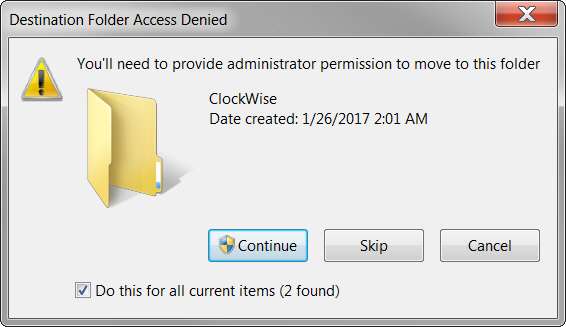
As part of my experimentation with Clockwise, I uninstalled it and reinstalled it. And then, consistent with my normal procedure for collection software product Start Menu folders in higher-level folders (to minimize what I see when I click on the Start button) I attempted to MOVE the Start Menu folder created for Clockwise into a target super-folder (of my own creation). Perfectly normal, and it normally works silently.

This time it reproduced that "permission required" prompt I mentioned earlier, but that I couldn't reproduce on-demand earlier. Apparently this particular MOVE (within the \Appdata\Roaming\ Start Menu folder triggered the prompt I was looking for but couldn't seem to duplicate. I have now duplicated it:

fYGqvn.jpg


So, again, this prompt never has been presented before a few days ago. And it didn't appear when I uninstalled BitDefender. But now that I've reinstalled BitDefender it's once again re-appeared.

This confirms that ALL of the original symptoms have reappeared, now that i've reinstalled BitDefender.

NOTE: I am aware of MS's statement that MSE will still be usable with security updates through 2023. But obviously BitDefender needs to fix their product's sudden major defect so that UAC and Win7 behavior are returned to normal.
 

My Computer My Computer

At a glance

Windows 7 Pro x64 (1), Win7 Pro X64 (2)i5-3350p 3.1Ghz/6MB-cache (1); E8400 3.0Ghz/6...8GB PC3-12800 DDR3 (1); 4GB PC3-10600 DDR3 (2)ATI HD7750 (1), (see TV cards); ATI R7 250 (2)
Computer type
PC/Desktop
Computer Manufacturer/Model Number
Home-built, two systems (1) and (2)
OS
Windows 7 Pro x64 (1), Win7 Pro X64 (2)
CPU
i5-3350p 3.1Ghz/6MB-cache (1); E8400 3.0Ghz/6MB-cache (2)
Motherboard
ASUS P8Z77-V Pro (1); ASUS P5Q3 (2)
Memory
8GB PC3-12800 DDR3 (1); 4GB PC3-10600 DDR3 (2)
Graphics Card(s)
ATI HD7750 (1), (see TV cards); ATI R7 250 (2)
Sound Card
Realtek ALC892 HD Audio (1); Realtek ALC1200 HD Audio (2)
Monitor(s) Displays
Eizo HD2441W LCD, Eizo S2433W (1); Eizo 24" S2433W (2)
Screen Resolution
1920x1200, 1920x1200 (1); 1920x1200 (2)
Hard Drives
(1) 1TB SATA-II (7200RPM), 2x2TB SATA-III (7200RPM), 250GB SATA-III (10000RPM) for OS; 2x2TB external USB 3.0

(2) 320GB SATA-II (7200RPM), 750GB SATA-II (7200RPM), 150GB SATA-II (10000RPM) for OS; 2TB external USB 3.0
PSU
Nesteq ECS-6001 600W (1); Nesteq ECS-5001 500W (2)
Case
Acousti-Case 360 (1) and (2)
Cooling
Noctua NH-U12P SE2 for CPU, 2x120mm case fans (1) and (2)
Keyboard
IBM PS/2 (1) and (2)
Mouse
Logitech MX Revolution wireless (1); Microsoft wired (2)
Internet Speed
100mbps down / 10mbps up
Antivirus
Microsoft Security Essentials; Malwarebyte Anti-Malware Pro
Browser
Firefox
Other Info
Ceton InfiniTV 4-tuner cablecard-enabled TV card as well as Hauppauge HVR-2250 OTA/ATSC 2-tuner TV card in (1), running under Win7 WMC
The fact that so many Anti Malware developers are getting reports would suggest that it is unlikely to be one specific application, in this case bitdefender, alone but more likely some other cause either in addition to bitdefender or some other software combination.

Another possibility is that it is a previously unknown exploit which is being tested with a relatively minor payload.
Reasonable thoughts. But where do you see reports that involve machines not running BitDefender but only some other anti-virus/firewall product?

For example, I have BOTH BitDefender and Malwarebytes installed (with appropriate exclusions in each so that they don't bump heads), because I want the benefit of both products. And yet, when I uninstalled ONLY BitDefender (retaining Malwarebytes), the symptoms disappeared. Although of course there is probably a non-zero possibility that it is the combination of these two that is responsible, the empirical results strongly suggest it is simply BitDefender which is at fault.


One thing that worries me is those using the home versions of Windows 7 will not have access to the GP control panel so would be limited to the multi admin solution
Certainly true. I'm running Pro so I don't have any concern and GPEDIT is the easiest way to fix this (at least the major cannot-shutdown problem) but I believe there are manual Registry updates that can accomplish the same result... I think.
 

My Computer My Computer

At a glance

Windows 7 Pro x64 (1), Win7 Pro X64 (2)i5-3350p 3.1Ghz/6MB-cache (1); E8400 3.0Ghz/6...8GB PC3-12800 DDR3 (1); 4GB PC3-10600 DDR3 (2)ATI HD7750 (1), (see TV cards); ATI R7 250 (2)
Computer type
PC/Desktop
Computer Manufacturer/Model Number
Home-built, two systems (1) and (2)
OS
Windows 7 Pro x64 (1), Win7 Pro X64 (2)
CPU
i5-3350p 3.1Ghz/6MB-cache (1); E8400 3.0Ghz/6MB-cache (2)
Motherboard
ASUS P8Z77-V Pro (1); ASUS P5Q3 (2)
Memory
8GB PC3-12800 DDR3 (1); 4GB PC3-10600 DDR3 (2)
Graphics Card(s)
ATI HD7750 (1), (see TV cards); ATI R7 250 (2)
Sound Card
Realtek ALC892 HD Audio (1); Realtek ALC1200 HD Audio (2)
Monitor(s) Displays
Eizo HD2441W LCD, Eizo S2433W (1); Eizo 24" S2433W (2)
Screen Resolution
1920x1200, 1920x1200 (1); 1920x1200 (2)
Hard Drives
(1) 1TB SATA-II (7200RPM), 2x2TB SATA-III (7200RPM), 250GB SATA-III (10000RPM) for OS; 2x2TB external USB 3.0

(2) 320GB SATA-II (7200RPM), 750GB SATA-II (7200RPM), 150GB SATA-II (10000RPM) for OS; 2TB external USB 3.0
PSU
Nesteq ECS-6001 600W (1); Nesteq ECS-5001 500W (2)
Case
Acousti-Case 360 (1) and (2)
Cooling
Noctua NH-U12P SE2 for CPU, 2x120mm case fans (1) and (2)
Keyboard
IBM PS/2 (1) and (2)
Mouse
Logitech MX Revolution wireless (1); Microsoft wired (2)
Internet Speed
100mbps down / 10mbps up
Antivirus
Microsoft Security Essentials; Malwarebyte Anti-Malware Pro
Browser
Firefox
Other Info
Ceton InfiniTV 4-tuner cablecard-enabled TV card as well as Hauppauge HVR-2250 OTA/ATSC 2-tuner TV card in (1), running under Win7 WMC
I have never used bit defender before in my life and all my non
 

My Computer My Computer

At a glance

Windows 7 Home 32 bit1.47 gigahertz Intel Pentium Dual T23102gbIntegrated
Computer type
Laptop
Computer Manufacturer/Model Number
Hewlett-Packard Presario C700 Notebook PC F.08
OS
Windows 7 Home 32 bit
CPU
1.47 gigahertz Intel Pentium Dual T2310
Motherboard
Hewlett-Packard 30D9 83.19
Memory
2gb
Graphics Card(s)
Integrated
Sound Card
Integrated
Monitor(s) Displays
Built-in
Screen Resolution
1600x900
Hard Drives
WDC WD3200BEKT-00PVMT0 [Hard drive] (320.07 GB) -- drive 0, s/n WD-WX11AC050066, rev 01.01A01, SMART Status: Healthy
Internet Speed
15mbps
Antivirus
Windows defender
Browser
Google chrome
I have never used bit defender before in my life and all my non
Typo? What are you saying? Looks like you didn't finish your sentence.

You don't have BitDefender installed. So are your Win7 machines failing, or not failing?
 

My Computer My Computer

At a glance

Windows 7 Pro x64 (1), Win7 Pro X64 (2)i5-3350p 3.1Ghz/6MB-cache (1); E8400 3.0Ghz/6...8GB PC3-12800 DDR3 (1); 4GB PC3-10600 DDR3 (2)ATI HD7750 (1), (see TV cards); ATI R7 250 (2)
Computer type
PC/Desktop
Computer Manufacturer/Model Number
Home-built, two systems (1) and (2)
OS
Windows 7 Pro x64 (1), Win7 Pro X64 (2)
CPU
i5-3350p 3.1Ghz/6MB-cache (1); E8400 3.0Ghz/6MB-cache (2)
Motherboard
ASUS P8Z77-V Pro (1); ASUS P5Q3 (2)
Memory
8GB PC3-12800 DDR3 (1); 4GB PC3-10600 DDR3 (2)
Graphics Card(s)
ATI HD7750 (1), (see TV cards); ATI R7 250 (2)
Sound Card
Realtek ALC892 HD Audio (1); Realtek ALC1200 HD Audio (2)
Monitor(s) Displays
Eizo HD2441W LCD, Eizo S2433W (1); Eizo 24" S2433W (2)
Screen Resolution
1920x1200, 1920x1200 (1); 1920x1200 (2)
Hard Drives
(1) 1TB SATA-II (7200RPM), 2x2TB SATA-III (7200RPM), 250GB SATA-III (10000RPM) for OS; 2x2TB external USB 3.0

(2) 320GB SATA-II (7200RPM), 750GB SATA-II (7200RPM), 150GB SATA-II (10000RPM) for OS; 2TB external USB 3.0
PSU
Nesteq ECS-6001 600W (1); Nesteq ECS-5001 500W (2)
Case
Acousti-Case 360 (1) and (2)
Cooling
Noctua NH-U12P SE2 for CPU, 2x120mm case fans (1) and (2)
Keyboard
IBM PS/2 (1) and (2)
Mouse
Logitech MX Revolution wireless (1); Microsoft wired (2)
Internet Speed
100mbps down / 10mbps up
Antivirus
Microsoft Security Essentials; Malwarebyte Anti-Malware Pro
Browser
Firefox
Other Info
Ceton InfiniTV 4-tuner cablecard-enabled TV card as well as Hauppauge HVR-2250 OTA/ATSC 2-tuner TV card in (1), running under Win7 WMC
BIG thank you for the help!!

I went in and followed the directions and changed Admin Approval Mode to enabled.
And then I removed the Bitdefender Program from my computer.
Everything is back to normal now - I'm a Happy Camper! :party:

Now I just need to install a different anti-virus program.
Thinking about using Malwarebytes again. Had it on my laptop and never had an issue.
Would that be the best choice for my desk top?
 

My Computer My Computer

At a glance

Windows 7
Computer type
PC/Desktop
Computer Manufacturer/Model Number
HP
OS
Windows 7
Now I just need to install a different anti-virus program.
Thinking about using Malwarebytes again. Had it on my laptop and never had an issue.
Would that be the best choice for my desk top?


There's no obvious 'best choice', but you'll get a lot of personal opinions. Malwarebytes should be OK. Personally I uses Microsoft Security Essentials. As I said in post #11, still available and supported with updates until 2023.
 

My Computers My Computers

  • At a glance

    Windows 7 Home Premium x64AMD V1204GB
    Computer type
    Laptop
    Computer Manufacturer/Model Number
    Toshiba satellite C650D
    OS
    Windows 7 Home Premium x64
    CPU
    AMD V120
    Memory
    4GB
    Internet Speed
    150 Mbps
    Antivirus
    MSE
    Browser
    IE11, Edge, Firefox
    Other Info
    I also have W7 Pro on my System Two, and several W7 Hyper-V VMs. My other machines run Windows 10/11. Their specs are in my Ten Forums & Eleven Forum profiles.
  • At a glance

    Windows 7 Pro x64Intel i5-3320M8 GB
    Computer type
    Laptop
    System Manufacturer/Model Number
    Lenovo Thinkpad T430
    OS
    Windows 7 Pro x64
    CPU
    Intel i5-3320M
    Memory
    8 GB
    Hard Drives
    250GB Samsung SSD 860 EVO
    Antivirus
    MSE
BIG thank you for the help!!

I went in and followed the directions and changed Admin Approval Mode to enabled.
And then I removed the Bitdefender Program from my computer.
Everything is back to normal now - I'm a Happy Camper! :party:

Now I just need to install a different anti-virus program.
Thinking about using Malwarebytes again. Had it on my laptop and never had an issue.
Would that be the best choice for my desk top?
It's a long story, but for many years I used the COMBINATION of both (a) Microsoft Security Essentials (MSE) on Win7, or the similar Windows Defender on both Win8.1 and Win10, both of which are free, along with (b) Malwarebytes Premium. The first product is a modest but traditional anti-virus, and the second product is more of an anti-malware tool (which I don't think of as a true anti-virus protection, but maybe I'm wrong).

This combination worked fine for me forever, until late 2018 when a software conflict between Malwarebytes and Macrium Reflect that resulted in a "freeze" symptom. I chased this problem for about 6 months thinking it was hardware failing or some other issue due to a particular software product. In the process of chasing things down I eventually discovered that if I removed Malwarebytes the problem went away, so that's when I looked for some total replacement for Malwarebytes + MSE. And that's when I happened on BitDefender, in early 2019. And I've been using it ever since.

And P.S., eventually it was learned that the "freeze" was NOT due to failing hardware, but rather due to a software combination of Malwarebytes plus [non-free] Macrium Reflect Home version (which I also used) and a potential "deadly embrace / lockout" which could occur because of a particular engineering design feature in both products. I worked with the engineers from both companies who analyzed the memory dumps I sent them and it was eventually Macrium Reflect's team that opted to revise their method just a bit but which was completely sufficient to eliminate the conflict with Malwarebytes. Case closed, freeze eliminated.

I decided to continue running BitDefender for its more full-fledged firewall and threat and ransomware protections compared to the definitely more modest MSE, along with also running Malwarebytes. There's no conflict to running them both, as I have the appropriate "carve-out exceptions" installed so that there's no issue. I feel most comfortable with both installed on my systems.

I'm sure the BitDefender people will investigate their involvement to the current Win7 symptom crisis which I believe is self-evident, and will quickly back out or fix whatever they did that is responsible. But there's certainly nothing I can really say that is in any way negative about MSE (which MS says they will continue to support with security updates through 2023). I just feel "more secure" using BitDefender, justified or not.
 

My Computer My Computer

At a glance

Windows 7 Pro x64 (1), Win7 Pro X64 (2)i5-3350p 3.1Ghz/6MB-cache (1); E8400 3.0Ghz/6...8GB PC3-12800 DDR3 (1); 4GB PC3-10600 DDR3 (2)ATI HD7750 (1), (see TV cards); ATI R7 250 (2)
Computer type
PC/Desktop
Computer Manufacturer/Model Number
Home-built, two systems (1) and (2)
OS
Windows 7 Pro x64 (1), Win7 Pro X64 (2)
CPU
i5-3350p 3.1Ghz/6MB-cache (1); E8400 3.0Ghz/6MB-cache (2)
Motherboard
ASUS P8Z77-V Pro (1); ASUS P5Q3 (2)
Memory
8GB PC3-12800 DDR3 (1); 4GB PC3-10600 DDR3 (2)
Graphics Card(s)
ATI HD7750 (1), (see TV cards); ATI R7 250 (2)
Sound Card
Realtek ALC892 HD Audio (1); Realtek ALC1200 HD Audio (2)
Monitor(s) Displays
Eizo HD2441W LCD, Eizo S2433W (1); Eizo 24" S2433W (2)
Screen Resolution
1920x1200, 1920x1200 (1); 1920x1200 (2)
Hard Drives
(1) 1TB SATA-II (7200RPM), 2x2TB SATA-III (7200RPM), 250GB SATA-III (10000RPM) for OS; 2x2TB external USB 3.0

(2) 320GB SATA-II (7200RPM), 750GB SATA-II (7200RPM), 150GB SATA-II (10000RPM) for OS; 2TB external USB 3.0
PSU
Nesteq ECS-6001 600W (1); Nesteq ECS-5001 500W (2)
Case
Acousti-Case 360 (1) and (2)
Cooling
Noctua NH-U12P SE2 for CPU, 2x120mm case fans (1) and (2)
Keyboard
IBM PS/2 (1) and (2)
Mouse
Logitech MX Revolution wireless (1); Microsoft wired (2)
Internet Speed
100mbps down / 10mbps up
Antivirus
Microsoft Security Essentials; Malwarebyte Anti-Malware Pro
Browser
Firefox
Other Info
Ceton InfiniTV 4-tuner cablecard-enabled TV card as well as Hauppauge HVR-2250 OTA/ATSC 2-tuner TV card in (1), running under Win7 WMC
...for many years I used the COMBINATION of both (a) Microsoft Security Essentials (MSE) on Win7, or the similar Windows Defender on both Win8.1 and Win10, both of which are free, along with (b) Malwarebytes Premium. The first product is a modest but traditional anti-virus, and the second product is more of an anti-malware tool (which I don't think of as a true anti-virus protection, but maybe I'm wrong).


FYI, Defender in Windows 10 (recently re-branded as Windows Security) uses the same scan engine and signatures as MSE, but does a lot more besides. It has Block at First Sight for as yet unknown virus detection and ransomware protection to prevent unauthorised apps from modifying your user files/folders. It can also be enabled for malware (PUP/PUA) detection.


Malwarebytes 4.0 Premium claims to be a full AV and when installed on W10 will turn off the Defender real time protection (as would any other 3rd-party AV) to avoid conflicts.
 

My Computers My Computers

  • At a glance

    Windows 7 Home Premium x64AMD V1204GB
    Computer type
    Laptop
    Computer Manufacturer/Model Number
    Toshiba satellite C650D
    OS
    Windows 7 Home Premium x64
    CPU
    AMD V120
    Memory
    4GB
    Internet Speed
    150 Mbps
    Antivirus
    MSE
    Browser
    IE11, Edge, Firefox
    Other Info
    I also have W7 Pro on my System Two, and several W7 Hyper-V VMs. My other machines run Windows 10/11. Their specs are in my Ten Forums & Eleven Forum profiles.
  • At a glance

    Windows 7 Pro x64Intel i5-3320M8 GB
    Computer type
    Laptop
    System Manufacturer/Model Number
    Lenovo Thinkpad T430
    OS
    Windows 7 Pro x64
    CPU
    Intel i5-3320M
    Memory
    8 GB
    Hard Drives
    250GB Samsung SSD 860 EVO
    Antivirus
    MSE
Strange that there isn't more interest or participation in this thread. I would think there would be more users affected.

So, just an update, including some new observations from others around the interweb. And there is also mention of anomalies in Win10 (but it's not clear if this is really related to the Win7 story).

Doesn't seem like there is an accepted answer yet. NOTE: one of the quoted posts below "blames" a very recent Microsoft update to Framework 4.8 (KB4503575) but I don't have that update installed on either of my Win7 systems and I still have the problem. Just shows how widespread this issue is, and that it seems to perhaps be not just one cause but maybe an interaction of many things.

(1) From a recent post in the thread on BleepingComputer:

while bitdefender may be affected, it's most certainly NOT caused by it. I'm in a domain environment, no bit defender at all (sophos), annnndddddd it's hitting windows 10 1903 machines as well. It's doing something very weird with the user security as well: sysinternals proc mon wouldn't run at all-says you have to be a member of the admin group (I'm not only admin on machine, but in the domain as well!!), sysinternals procexp was acting like it was run as limited user (with access denied on some paths). 1102w printers acting up. Profx Engagement and office 365 having issues/crashes. what a shit show. I've seen UAC settings, I've seen adobe get blamed. does anyone have the definite answer yet?

(2) From recent posts in the thread on Answers.Microsoft Community:

(a) In "msconfig" I disabled all adobe programs on the "Startup" tab & "Services" tab then rebooted by logging off first then using the button at bottom right of the login screen to restart the PC. All the issues then went away. You can try turning them back on one by one to see which program/service is causing the problem. Changing the UAC or enabling LUA just caused other problems for me. Hope this helps someone.

(b)Yes, this worked for me. It seems like Adobe services are the culprit. I deliberately don't update my Windows7 machine (rarely used, legacy apps, small hard drive, I switch it on once a blue moon) and my last Microsoft update is 2016. I don't use Bit Defender as my anti-virus.

Not only was shutdown a problem, but Search didn't work properly and Windows Explorer was malfunctioning when I tried to upload files to web. The folders would appear, but I couldn't drill down to file level.

I did try the UAC workaround, but then you have to click an extra permissions window to move files etc so I turned UAC off again.

(c)This is not a bug. This was sent out by Microsoft on 01/15/2020.

Microsoft announced End Of Life (EOL) for Windows 7 on 01/14/2020. "Coincidentally" they sent out a Framework update on 01/15/2020.

There is a command embedded into the update that would cause the server to malfunction, so as to have people upgrade to Windows 10.

after about 3 hours of troubleshooting, i figured out that the update was the problem.please double check your recently installed updates.KB4503575 - Microsoft 4.8 Framework (installed 01/15/20) - i UNINSTALLED

also uninstalled 2/3 security updates from that same day just to be safe (in case they became corrupt when i uninstalled the Framework update). there is one that doesn't give you the option to uninstall.

once all were off my computer, i was able to restart and shut down normally.

there is also another fix that is going around that involves manual commands using GPUPDATE, but it did not work for me ( i tried that first)

 

My Computer My Computer

At a glance

Windows 7 Pro x64 (1), Win7 Pro X64 (2)i5-3350p 3.1Ghz/6MB-cache (1); E8400 3.0Ghz/6...8GB PC3-12800 DDR3 (1); 4GB PC3-10600 DDR3 (2)ATI HD7750 (1), (see TV cards); ATI R7 250 (2)
Computer type
PC/Desktop
Computer Manufacturer/Model Number
Home-built, two systems (1) and (2)
OS
Windows 7 Pro x64 (1), Win7 Pro X64 (2)
CPU
i5-3350p 3.1Ghz/6MB-cache (1); E8400 3.0Ghz/6MB-cache (2)
Motherboard
ASUS P8Z77-V Pro (1); ASUS P5Q3 (2)
Memory
8GB PC3-12800 DDR3 (1); 4GB PC3-10600 DDR3 (2)
Graphics Card(s)
ATI HD7750 (1), (see TV cards); ATI R7 250 (2)
Sound Card
Realtek ALC892 HD Audio (1); Realtek ALC1200 HD Audio (2)
Monitor(s) Displays
Eizo HD2441W LCD, Eizo S2433W (1); Eizo 24" S2433W (2)
Screen Resolution
1920x1200, 1920x1200 (1); 1920x1200 (2)
Hard Drives
(1) 1TB SATA-II (7200RPM), 2x2TB SATA-III (7200RPM), 250GB SATA-III (10000RPM) for OS; 2x2TB external USB 3.0

(2) 320GB SATA-II (7200RPM), 750GB SATA-II (7200RPM), 150GB SATA-II (10000RPM) for OS; 2TB external USB 3.0
PSU
Nesteq ECS-6001 600W (1); Nesteq ECS-5001 500W (2)
Case
Acousti-Case 360 (1) and (2)
Cooling
Noctua NH-U12P SE2 for CPU, 2x120mm case fans (1) and (2)
Keyboard
IBM PS/2 (1) and (2)
Mouse
Logitech MX Revolution wireless (1); Microsoft wired (2)
Internet Speed
100mbps down / 10mbps up
Antivirus
Microsoft Security Essentials; Malwarebyte Anti-Malware Pro
Browser
Firefox
Other Info
Ceton InfiniTV 4-tuner cablecard-enabled TV card as well as Hauppauge HVR-2250 OTA/ATSC 2-tuner TV card in (1), running under Win7 WMC
Back
Top