Update your Win 7 installation media

Ok, after much thought I have come to the following conclusions with respectTo the Acer ZS600 All in One Touch Screen) which has a new HDD and now No disk
Error, No keyboard access, Only touch screen. Even shorting out the on-board battery terminals would not help as it still wouldn’t automatically find the Flash drive resetting the BIOS, unless perhaps I didn’t install the HDD upon boot but then connecting The HDD live could render it useless :(
I must remove said HDD and install drivers for a USB keyboard and USB ports so I can press the F12 startup options and GE to my USB flash drive to install the UEID Win 7 that I configured with Rufus.
Am I on the right track?
 

My Computer My Computer

Computer type
PC/Desktop
Computer Manufacturer/Model Number
Acer ZS600
OS
Win7 Home 32 EUFI
CPU
i5
Motherboard
Dunno
Memory
4yh
Hard Drives
2Tb
Trying to install to intel pc to run Blue Iris cctv.
Doing this except i can seem to get 7UPDRIVERS.7z anywhere.


1. Mount your Windows 7 ISO file (I used WinCDEmu)
2. Copy and paste all the files from the mounted disk over to a new folder on your desktop
2. Unzip 7UPv53.zip to any location on the PC you are working on
3. Put the UpdatePack7R2-20.5.20.exe file inside the 7UPv53 folder and the 7UPDRIVERS.7z into the BIN folder as per the instructions in post #1 and #3
4. Run 7UPDATERv53.cmd as administrator and select the new folder on the desktop created earlier as the installation media
5. Follow the screenshots from post #529 onwards (these screenshots didn't show up for me on my desktop but they did on my phone)
6. When everything is finished use ISO-CREATE.CMD and select the folder on the desktop with your newly updated installation files
7. Use rufus to create a USB stick selecting the newly created ISO. If it is an NVMe SSD you may need to use the GPT partition type
8. Install on new PC - Finished
Tried it without driver but get
"A required CD/DVD driver device driver is missing"
ideas please anyone

Now got
7UPDRIVERS.7z
trying again
 
Last edited:

My Computer My Computer

Computer type
PC/Desktop
Computer Manufacturer/Model Number
custom build
OS
Windows 7 Ultimate x64
CPU
QuadCore AMD A8-7650K, 3800 MHz (38 x 100)
Motherboard
Asus A88XM-A
Memory
16 gb ddr3
Graphics Card(s)
AMD Radeon R7 Series
Hard Drives
SanDisk SDSSDHP128G SATA Disk Device
Antivirus
mcafee
Browser
Firefox
Still same messaage
 

My Computer My Computer

Computer type
PC/Desktop
Computer Manufacturer/Model Number
custom build
OS
Windows 7 Ultimate x64
CPU
QuadCore AMD A8-7650K, 3800 MHz (38 x 100)
Motherboard
Asus A88XM-A
Memory
16 gb ddr3
Graphics Card(s)
AMD Radeon R7 Series
Hard Drives
SanDisk SDSSDHP128G SATA Disk Device
Antivirus
mcafee
Browser
Firefox
You need to check if the usb3 stack integrated into boot.wim. If it did, there is nothing more you can do.
 

My Computers My Computers

System One System Two

  • Computer type
    PC/Desktop
    OS
    7 X64
    CPU
    i5 8400
    Motherboard
    gigabyte b365m ds3h
    Memory
    2x8gb 3200mhz
    Hard Drives
    various
    PSU
    pure power 11 400w cm
    Case
    Coolermaster
    Cooling
    cryorig m9i
  • Computer type
    PC/Desktop
    OS
    7x64
    CPU
    g5400
    Motherboard
    ga b365m ds3h
    Memory
    8gb ddr4 2400
    PSU
    xfx pro 450w
Still same messaage

Is the hard disk you are installing to an SSD or more specifically an NVME type? I had to format the hard disk to the GPT partition type using SIW2's tools that pop up when you boot. Only then was I able to install.
 

My Computer My Computer

Computer type
PC/Desktop
OS
Windows 7 Professional 64
CPU
Intel i5 4690k
Motherboard
Asus Ranger VII
Memory
Corsair Vengeance 16GB
Graphics Card(s)
MSI GTX 970
Monitor(s) Displays
Asus Mx239h
Screen Resolution
1080p
Hard Drives
Samsung 840 Evo 120GB
3x 1TB WD Blue
PSU
Corsair Builder Series CXM 750W
Case
Corsair
Cooling
Cooler Master tower
Keyboard
Unicomp Buckling spring
Mouse
Logitech M100
Internet Speed
300Mb/sec
Antivirus
None
Browser
Opera
I recently bought a new pc and I've got Asus Z390-P motherboard. Officialy, this motherboard supports only Win10. I installed Win10 Pro, but I still like Win7 more, so I started looking for ways to install Win7 on Asus Z390-P. First, I just created a bootable usb with Win7 Pro 64-bit iso image and actually I got to the installation screen (the one where you choose languages). But I couldn't use neither my keyboard, nor my mouse - seems like the issue here is USB 3.0 port which Win7 apparently doesn't support. I don't have PS/2 keyboard and, unfortunately, I cannot buy it now (I live in Malta now and computer stores here aren't well equipped - I couldn't find PS/2 keyboard anywhere, only USB keyboards are available).


When I found this thread I was happy that there is a real chance I'll get Win7 working. I downloaded the 7Updater and also 7updrivers. I put 7Updater to C: drive (so I've got C:/7UPv54) and put 7updrivers archive (the archive itself) into BIN folder. Then I extracted my ISO image using ISO-EXTRACTOR to C:/Windows7Pro. Then I ran 7UPDATERv54 as administrator. The whole process actually went fine - I chose Win 7 Professional when install.wim was mounted. All drivers were installed succesfully and everything seemed fine. After install.wim was unmounted, the command prompt vanished so quickly that I couldn't even read the last messages. I assumed that everything was all right.


Using AnyBurn I created ISO image from C:/Windows7Pro folder (contents of EXTRACTED-ISO subfolder to be exact) and created a bootable usb. I restarted my pc, went to BIOS and chose usb as boot option. I was then welcomed with a screen very much different than usual Windows installation screen - I had some window in the top left of the screen with many options to choose from. I don't remember exactly what the options (though one of them was "SETUP"), but that doesn't matter much as my keyboard and mouse still didn't work... So even though the drivers were installed correctly, I still cannot use keyboard and mouse through USB 3.0 port while trying to install Win7.


Any help here? What could go wrong, what do I need to do to finally get USB 3.0 keyboard and mouse to get working and install Win7 successfully?
 

My Computer My Computer

Computer type
PC/Desktop
OS
Windows 10 Pro 64-bit

My Computers My Computers

System One System Two

  • Computer type
    PC/Desktop
    OS
    7 X64
    CPU
    i5 8400
    Motherboard
    gigabyte b365m ds3h
    Memory
    2x8gb 3200mhz
    Hard Drives
    various
    PSU
    pure power 11 400w cm
    Case
    Coolermaster
    Cooling
    cryorig m9i
  • Computer type
    PC/Desktop
    OS
    7x64
    CPU
    g5400
    Motherboard
    ga b365m ds3h
    Memory
    8gb ddr4 2400
    PSU
    xfx pro 450w
Now you've surprised me. I didn't know that USB keyboards / mouses come with such adapter (as this is my first USB keyboard/mouse set I ever bought). I bought this Logitech MK540 keyboard / mouse set:
Logitech MK540 Advanced Wireless Keyboard and Mouse Combo


Apparently, it doesn't come with usb to ps/2 adapter. I checked the box just now and there's nothing there. I'll check the stores again tomorrow to see if they've got an adapter like that, but in the meantime - is there any other way to install Win7 from USB 3.0?


EDIT: I haven't updated my BIOS yet. It probably wouldn't help here, but I checked Asus website and there's a BIOS update available. I downloaded it and I'm going to update BIOS today.
 

My Computer My Computer

Computer type
PC/Desktop
OS
Windows 10 Pro 64-bit
The updated media should work with your motherboard, it integrates the win8 usb3 stack.

Maybe something went awry while you were creating it.

Simpler just to get hold of an adapter or two, they are only pennies.
 

My Computers My Computers

System One System Two

  • Computer type
    PC/Desktop
    OS
    7 X64
    CPU
    i5 8400
    Motherboard
    gigabyte b365m ds3h
    Memory
    2x8gb 3200mhz
    Hard Drives
    various
    PSU
    pure power 11 400w cm
    Case
    Coolermaster
    Cooling
    cryorig m9i
  • Computer type
    PC/Desktop
    OS
    7x64
    CPU
    g5400
    Motherboard
    ga b365m ds3h
    Memory
    8gb ddr4 2400
    PSU
    xfx pro 450w
Guess I'll try using 7updater once again and buy an adapter tomorrow, if it still goes wrong. One question, though - my keyboard / mouse set works through bluetooth and there's only one USB receiver. If I buy an adapter, does it matter if I plug it in mouse or keyboard PS/2 port?
 

My Computer My Computer

Computer type
PC/Desktop
OS
Windows 10 Pro 64-bit

My Computers My Computers

System One System Two

  • Computer type
    PC/Desktop
    OS
    7 X64
    CPU
    i5 8400
    Motherboard
    gigabyte b365m ds3h
    Memory
    2x8gb 3200mhz
    Hard Drives
    various
    PSU
    pure power 11 400w cm
    Case
    Coolermaster
    Cooling
    cryorig m9i
  • Computer type
    PC/Desktop
    OS
    7x64
    CPU
    g5400
    Motherboard
    ga b365m ds3h
    Memory
    8gb ddr4 2400
    PSU
    xfx pro 450w
Thanks! I ordered USB to PS/2 adapter and it should arrive on Friday. I'll see if I'll be able to install Win7 with it.
 

My Computer My Computer

Computer type
PC/Desktop
OS
Windows 10 Pro 64-bit
I bought USB to PS/2 adapters (two - one purple for keyboard and another one, green, for mouse) and they don't work. At all - not even during Win7 installation screen, but also while using Win10. I checked them with my wireless keyboard / mouse set and I also had some wired keyboard, but the adapters didn't work with it either.


I'm going to try to use 7Updater once again, but I guess I'm out of options here.
 

My Computer My Computer

Computer type
PC/Desktop
OS
Windows 10 Pro 64-bit
You could see if a new win7 boot.wim I am just about to upload will do the job.

Rename sources\boot.wim in your installation media to boot-old.wim and copy the new boot.wim to sources folder.

It is bigger because it contains explorer and both versions of setup files.

Are there any drivers that came with your keyboard combo?
 
Last edited:

My Computers My Computers

System One System Two

  • Computer type
    PC/Desktop
    OS
    7 X64
    CPU
    i5 8400
    Motherboard
    gigabyte b365m ds3h
    Memory
    2x8gb 3200mhz
    Hard Drives
    various
    PSU
    pure power 11 400w cm
    Case
    Coolermaster
    Cooling
    cryorig m9i
  • Computer type
    PC/Desktop
    OS
    7x64
    CPU
    g5400
    Motherboard
    ga b365m ds3h
    Memory
    8gb ddr4 2400
    PSU
    xfx pro 450w
Thanks! Let me know when you upload it.


By the way, I'm not using simplix pack - that shouldn't be a problem, though, right?
 

My Computer My Computer

Computer type
PC/Desktop
OS
Windows 10 Pro 64-bit
If you arent using simplix, then only the two nvme updates, the driverframe update, and the drivers that are already in 7up will be integrated ( plus the little menu thing in boot.wim).
 

My Computers My Computers

System One System Two

  • Computer type
    PC/Desktop
    OS
    7 X64
    CPU
    i5 8400
    Motherboard
    gigabyte b365m ds3h
    Memory
    2x8gb 3200mhz
    Hard Drives
    various
    PSU
    pure power 11 400w cm
    Case
    Coolermaster
    Cooling
    cryorig m9i
  • Computer type
    PC/Desktop
    OS
    7x64
    CPU
    g5400
    Motherboard
    ga b365m ds3h
    Memory
    8gb ddr4 2400
    PSU
    xfx pro 450w
Most important thing - will USB 3.0 drivers be installed then, too? Or should I rather download and use simplix pack?
 

My Computer My Computer

Computer type
PC/Desktop
OS
Windows 10 Pro 64-bit
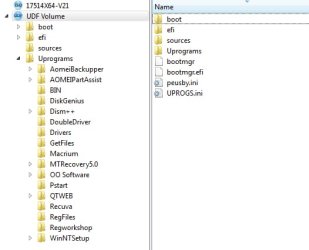
17514x64v22.iso

You can either copy just the boot.wim out from the iso sources folder - or you could extract the entire contents onto your usb install stick. That way, you will be able to access the programs in the Uprograms folder .

17514x64v21.jpg


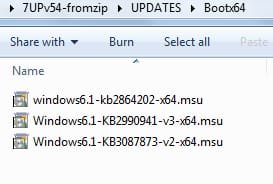
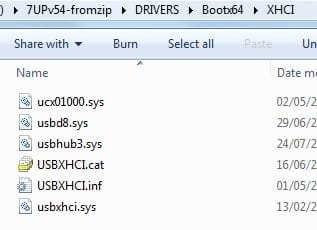
will USB 3.0 drivers be installed then, too?

Yes. They are in 7up. You can check - they should also be in UPDATES\Installx64 an DRIVERS\Installx64 folders

7up-updates.jpg

7up-xhci.jpg
 
Last edited:

My Computers My Computers

System One System Two

  • Computer type
    PC/Desktop
    OS
    7 X64
    CPU
    i5 8400
    Motherboard
    gigabyte b365m ds3h
    Memory
    2x8gb 3200mhz
    Hard Drives
    various
    PSU
    pure power 11 400w cm
    Case
    Coolermaster
    Cooling
    cryorig m9i
  • Computer type
    PC/Desktop
    OS
    7x64
    CPU
    g5400
    Motherboard
    ga b365m ds3h
    Memory
    8gb ddr4 2400
    PSU
    xfx pro 450w
Thanks! I'll try the ISO you provided out.
 

My Computer My Computer

Computer type
PC/Desktop
OS
Windows 10 Pro 64-bit

My Computers My Computers

System One System Two

  • Computer type
    PC/Desktop
    OS
    7 X64
    CPU
    i5 8400
    Motherboard
    gigabyte b365m ds3h
    Memory
    2x8gb 3200mhz
    Hard Drives
    various
    PSU
    pure power 11 400w cm
    Case
    Coolermaster
    Cooling
    cryorig m9i
  • Computer type
    PC/Desktop
    OS
    7x64
    CPU
    g5400
    Motherboard
    ga b365m ds3h
    Memory
    8gb ddr4 2400
    PSU
    xfx pro 450w
Back
Top