Update your Win 7 installation media

My Computers My Computers

System One System Two

  • Computer type
    PC/Desktop
    OS
    7 X64
    CPU
    i5 8400
    Motherboard
    gigabyte b365m ds3h
    Memory
    2x8gb 3200mhz
    Hard Drives
    various
    PSU
    pure power 11 400w cm
    Case
    Coolermaster
    Cooling
    cryorig m9i
  • Computer type
    PC/Desktop
    OS
    7x64
    CPU
    g5400
    Motherboard
    ga b365m ds3h
    Memory
    8gb ddr4 2400
    PSU
    xfx pro 450w
I'm in WinNTSetup. What should I select as bootable drive?

I currently have Win10 installed on C: drive. D: is the drive where I store all of my stuff. I also created F: drive with 200GB of free space where I intend to install Win7. In WinNTSetup I have to choose bootable and installation drives. I take it the installation drive would be my F: drive. What about bootable drive?
 

My Computer My Computer

Computer type
PC/Desktop
OS
Windows 10 Pro 64-bit
It is either the partition marked active for mbr or the esp partition for efi.

Is it showing anything in that field ?
 

My Computers My Computers

System One System Two

  • Computer type
    PC/Desktop
    OS
    7 X64
    CPU
    i5 8400
    Motherboard
    gigabyte b365m ds3h
    Memory
    2x8gb 3200mhz
    Hard Drives
    various
    PSU
    pure power 11 400w cm
    Case
    Coolermaster
    Cooling
    cryorig m9i
  • Computer type
    PC/Desktop
    OS
    7x64
    CPU
    g5400
    Motherboard
    ga b365m ds3h
    Memory
    8gb ddr4 2400
    PSU
    xfx pro 450w
Never mind that. I chose sources folder as bootable drive, got all three green lights and I installed Win7 successfully. After rebooting PC I launched Win7 and now both my keyboard and my mouse works! :D Dude, I don't know if I'll be able to thank you enough! I've been trying to install Win7 for five days and finally, with a lot of your help, I succeeded. Thanks!
 

My Computer My Computer

Computer type
PC/Desktop
OS
Windows 10 Pro 64-bit
:-)
 

My Computers My Computers

System One System Two

  • Computer type
    PC/Desktop
    OS
    7 X64
    CPU
    i5 8400
    Motherboard
    gigabyte b365m ds3h
    Memory
    2x8gb 3200mhz
    Hard Drives
    various
    PSU
    pure power 11 400w cm
    Case
    Coolermaster
    Cooling
    cryorig m9i
  • Computer type
    PC/Desktop
    OS
    7x64
    CPU
    g5400
    Motherboard
    ga b365m ds3h
    Memory
    8gb ddr4 2400
    PSU
    xfx pro 450w
One last question - since I had Win10 on drive C:, I decided to install Win7 on drive K: (just random letter; I did so to still have Win10 in case something would go wrong with Win7 installation). But now that I've got Win7 installed, I formatted C: drive and deleted the volume. Using Disk Management I wanted to change K: drive letter to C (it feels stupid having OS installed on K:), but Windows wouldn't let me do that. Any idea how to change drive letter to C?
 

My Computer My Computer

Computer type
PC/Desktop
OS
Windows 10 Pro 64-bit
Post a screenshot of win 7 disk management window.
 

My Computers My Computers

System One System Two

  • Computer type
    PC/Desktop
    OS
    7 X64
    CPU
    i5 8400
    Motherboard
    gigabyte b365m ds3h
    Memory
    2x8gb 3200mhz
    Hard Drives
    various
    PSU
    pure power 11 400w cm
    Case
    Coolermaster
    Cooling
    cryorig m9i
  • Computer type
    PC/Desktop
    OS
    7x64
    CPU
    g5400
    Motherboard
    ga b365m ds3h
    Memory
    8gb ddr4 2400
    PSU
    xfx pro 450w
If you set the os letter as k, the way to change that is a clean reinstall. Not feasible any other way.
 

My Computers My Computers

System One System Two

  • Computer type
    PC/Desktop
    OS
    7 X64
    CPU
    i5 8400
    Motherboard
    gigabyte b365m ds3h
    Memory
    2x8gb 3200mhz
    Hard Drives
    various
    PSU
    pure power 11 400w cm
    Case
    Coolermaster
    Cooling
    cryorig m9i
  • Computer type
    PC/Desktop
    OS
    7x64
    CPU
    g5400
    Motherboard
    ga b365m ds3h
    Memory
    8gb ddr4 2400
    PSU
    xfx pro 450w
I might need your help again. I plugged in usb with your installation media stuff and booted from it. Went to disk management and formatted K: drive (the one where I had Win7) and also deleted that volume. Then I created new partition, C:. I installed Win7 using winntsetup, then using dism tool I installed update and then drivers. Then I rebooted my PC to finish Windows installation, but I was welcomed with error saying that booting Windows was unsuccessful (error 0xc0000034).

I can still access installation media, but funny thing is that when I do that I've got to choose if I want to launch Windows Setup [EMS Enabled] or one of 3 Windows 7 Professional systems (one I had, one I tried to install now and one I tried installing earlier today, I assume). What do I do?
 

My Computer My Computer

Computer type
PC/Desktop
OS
Windows 10 Pro 64-bit
I formatted my whole HDD, created C: and D: partitions. Then installed Win7 on C. Now when I boot PC I can choose between Windows 7 Professional (just one) and Windows Setup. When I choose the first option, I go to the setup screen, but it crashes with error during installing devices.
 

My Computer My Computer

Computer type
PC/Desktop
OS
Windows 10 Pro 64-bit
All right, seems I solved this. I marked my C: drive as active and I managed to install Win7 successfully. Thank you once again for all your help, dude! Without you I wouldn't have Win7 at all ;)
 

My Computer My Computer

Computer type
PC/Desktop
OS
Windows 10 Pro 64-bit
[FONT=&quot]
7UPv54 on first post. Now using modded 6.2.9200 "universal" usb drivers


Greetings (again): I used your excellent utility a couple of years ago (v11); it performed as advertised. I now need to make a new install image and have downloaded your latest & greatest (v54 - Wow!). This has certainly grown in capability.

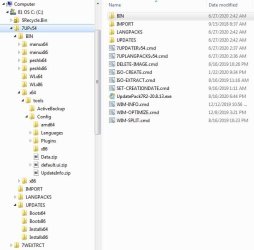
One thing puzzling me, though, is the absence of the Driver folders:

7Udater54_Folders.jpg

I did browse through this now extensive thread looking for an explanation of what they might have been subsumed into but with no luck. Which prompts 2 questions:[/FONT]

  1. [FONT=&quot]Did I get a corrupted download?[/FONT]
  2. [FONT=&quot]Will everything work as designed if I create 2 Drivers folders under C:\7UPv54? If yes would they be:[/FONT]

  • [FONT=&quot]C:\7UPv54\Drivers\boot\x64[/FONT]
  • [FONT=&quot]C:\7UPv54\Drivers\install\x64[/FONT]
[FONT=&quot]I have no need for the Update folders.


Thanks again for your time and expertise.[/FONT]
 

My Computer My Computer

Computer type
PC/Desktop
Computer Manufacturer/Model Number
Custom Build
OS
Win7 Pro x64 SP1
CPU
Intel i7-6700
Motherboard
Gigabyte Z270 HD3
Memory
16 gig (2x8)
Graphics Card(s)
MSI GTX 1660 Super
Monitor(s) Displays
AOC CQ27G2
Screen Resolution
1440p
Hard Drives
Internal:
Crucial MX500 500GB SATA SSD (OS/Apps)
WD10EZEX-00WN4A0 1TB (Data/Games)
WD10EZEX-00WN4A0 1TB (On-line backup/Testing)
External
WD 4TB USB3.1 EasyStore (off-line backup archive/"sandbox")
PSU
Cooler Master 650W Bronze
Case
Sharkoon BW9000-V tower housing
Cooling
Deep Cool Ice Blade
Internet Speed
fiber optic 2 res broadband
Antivirus
Kaspersky Free
Browser
Firefox
They are packed in BIN\drivers.7z They will be unpacked when you run the 7updater.cmd

The update folder is needed for the nvme updates BIN\msnvme.7z and for the driverframe update KB2864202 (which is needed for usb3 support.)
 

My Computers My Computers

System One System Two

  • Computer type
    PC/Desktop
    OS
    7 X64
    CPU
    i5 8400
    Motherboard
    gigabyte b365m ds3h
    Memory
    2x8gb 3200mhz
    Hard Drives
    various
    PSU
    pure power 11 400w cm
    Case
    Coolermaster
    Cooling
    cryorig m9i
  • Computer type
    PC/Desktop
    OS
    7x64
    CPU
    g5400
    Motherboard
    ga b365m ds3h
    Memory
    8gb ddr4 2400
    PSU
    xfx pro 450w
Thank you for the prompt response. I missed that because I failed to look at the Bin folder contents thoroughly enough (I've not been a programmer since my COBOL/Assembler days (>30 yrs ago) and typically treat the Bin contents as "hands off" territory).


I presume I just add my computer's specific drivers obtained with DISM++ to the BIN\drivers.7z archive in the appropriate archive sub-folders?


Thanx in advance.
 

My Computer My Computer

Computer type
PC/Desktop
Computer Manufacturer/Model Number
Custom Build
OS
Win7 Pro x64 SP1
CPU
Intel i7-6700
Motherboard
Gigabyte Z270 HD3
Memory
16 gig (2x8)
Graphics Card(s)
MSI GTX 1660 Super
Monitor(s) Displays
AOC CQ27G2
Screen Resolution
1440p
Hard Drives
Internal:
Crucial MX500 500GB SATA SSD (OS/Apps)
WD10EZEX-00WN4A0 1TB (Data/Games)
WD10EZEX-00WN4A0 1TB (On-line backup/Testing)
External
WD 4TB USB3.1 EasyStore (off-line backup archive/"sandbox")
PSU
Cooler Master 650W Bronze
Case
Sharkoon BW9000-V tower housing
Cooling
Deep Cool Ice Blade
Internet Speed
fiber optic 2 res broadband
Antivirus
Kaspersky Free
Browser
Firefox
[FONT=&quot]I've hit a "bump in the road" at about 95% complete: bootable USB starts ok:[/FONT]

  1. [FONT=&quot]very fast (and short) listing of executed files (like when boot logging is enabled)[/FONT]
  2. [FONT=&quot]1st "loading files… " with bottom-of-the-screen progress bar rapidly (1-3 secs I think) filling[/FONT]
  3. [FONT=&quot]2nd "loading files…" with bottom-of-the-screen progress bar rapidly (1-3 secs I think) filling[/FONT]
  4. [FONT=&quot]"Starting Windows" screen appears (w/MS at bottom) BUT then the process seems to hang; the animated windows logo does not appear[/FONT]
[FONT=&quot]The first time it happened I thought perhaps something got corrupted when I used Rufus to create the bootable USB so I recreated the bootable USB. Same result; this second try I let it sit at the Starting Windows step for approx 5 min. but the process did not proceed further nor was there any indication of anything progressing. I have tested creation of the boot USB with only the original Win7Pro64.ISO (so <4 gig) and made it thru to the “missing drivers” step ok. So I think the boot USB creation process appear to be valid for a 3.2 gig ISO anyway.[/FONT]

Steps:
1. Extract 7UPv54 to C:\
2. Extract Win7_Pro_SP1_English_x64.iso to C:\7Wu4iso
3. DL UpdatePack7R2-20.8.13.exe & copy to 7UPv54 folder
4. Export local drivers using DISM++ and add to BIN\DRIVERS.7z\boot x64 and \install x64 (using 7zip)
5. Ran 7UPDATERv54.cmd as admin
- Selected Y for “add found drivers to boot.wim”
- Selected Y for “add found drivers to install.wim”
- Selected Y for “add UpdatePack”
- Selected 3 for Win Pro only
6. Ran ISO-Create.cmd as admin
7. Resulting ISO is ≈5.2 gig
8. Created boot USB with Rufus w/GPT, UEFI:NTFS (I realize this is not a Rufus thread)


Which prompts a few questions:


  1. What might be causing the install to hang? Did I miss a step in the process?
  2. Do I need to use a different boot USB creation mechanism since Rufus seems to work if UEFI:FAT32 is used but not when UEFI:NTFS is used? If so, is there one you recommend?
  3. OR do I need to use the "split wim"? (I'm not sure how that works)

Thanx in advance for help.
 

My Computer My Computer

Computer type
PC/Desktop
Computer Manufacturer/Model Number
Custom Build
OS
Win7 Pro x64 SP1
CPU
Intel i7-6700
Motherboard
Gigabyte Z270 HD3
Memory
16 gig (2x8)
Graphics Card(s)
MSI GTX 1660 Super
Monitor(s) Displays
AOC CQ27G2
Screen Resolution
1440p
Hard Drives
Internal:
Crucial MX500 500GB SATA SSD (OS/Apps)
WD10EZEX-00WN4A0 1TB (Data/Games)
WD10EZEX-00WN4A0 1TB (On-line backup/Testing)
External
WD 4TB USB3.1 EasyStore (off-line backup archive/"sandbox")
PSU
Cooler Master 650W Bronze
Case
Sharkoon BW9000-V tower housing
Cooling
Deep Cool Ice Blade
Internet Speed
fiber optic 2 res broadband
Antivirus
Kaspersky Free
Browser
Firefox
Your issue seems to be loading boot.wim into ram.

Couple of possibilities

1. Possibly it is a Rufus problem. I can't help with questions about Rufus.

2. The other possibilty is the drivers you added, maybe some are not suitable for boot.wim.

I have tested creation of the boot USB with only the original Win7Pro64.ISO (so <4 gig) and made it thru to the “missing drivers” step ok. So I think the boot USB creation process appear to be valid for a 3.2 gig ISO anyway.

FIRST_ copy the updated boot.wim to the sources folder of the usb stick that works. See if that loads.

( The updated boot.wim won't find the old setup files and install.wim. That is normal. ) We are just checking that boot.wim loads into ram ok.

If it doesn't then there is a problem with boot.wim - likely drivers.


Quick way to test by mounting boot.wim and removing the drivers you added. See if that loads ok.

You can use dism++ to mount image 2, delete drivers, save image, then unmount.

NOTE: If you do an incremental save, the new image will be number 3 in boot.wim, so you need to switch the boot flag to image number 3.

If you do direct save, no need to move the flag.

Dism++ is in BIN\x64\tools


You have a strange way of adding your drivers to the folder.

EITHER Start the 7updater.cmd and the driver folders are created. You can leave the command window open, or close it. Then add your drivers to the appropriate folders.

OR create the folders DRIVERS\bootx64 and DRIVERS\installx64 first. Add your drivers to those.

Then run 7updater.cmd and the drivers in bin\drivers.7z will be extracted to those same folders.

 
Last edited:

My Computers My Computers

System One System Two

  • Computer type
    PC/Desktop
    OS
    7 X64
    CPU
    i5 8400
    Motherboard
    gigabyte b365m ds3h
    Memory
    2x8gb 3200mhz
    Hard Drives
    various
    PSU
    pure power 11 400w cm
    Case
    Coolermaster
    Cooling
    cryorig m9i
  • Computer type
    PC/Desktop
    OS
    7x64
    CPU
    g5400
    Motherboard
    ga b365m ds3h
    Memory
    8gb ddr4 2400
    PSU
    xfx pro 450w
Thank you!:geek:


Will follow your recommendations and post results ...


BTW: I just ran a test using Rufus to create a boot USB for Win 10 (5.3 gig) which proceeds as expected so Rufus clearly handles the UEFI:NTFS thing ok....
 

My Computer My Computer

Computer type
PC/Desktop
Computer Manufacturer/Model Number
Custom Build
OS
Win7 Pro x64 SP1
CPU
Intel i7-6700
Motherboard
Gigabyte Z270 HD3
Memory
16 gig (2x8)
Graphics Card(s)
MSI GTX 1660 Super
Monitor(s) Displays
AOC CQ27G2
Screen Resolution
1440p
Hard Drives
Internal:
Crucial MX500 500GB SATA SSD (OS/Apps)
WD10EZEX-00WN4A0 1TB (Data/Games)
WD10EZEX-00WN4A0 1TB (On-line backup/Testing)
External
WD 4TB USB3.1 EasyStore (off-line backup archive/"sandbox")
PSU
Cooler Master 650W Bronze
Case
Sharkoon BW9000-V tower housing
Cooling
Deep Cool Ice Blade
Internet Speed
fiber optic 2 res broadband
Antivirus
Kaspersky Free
Browser
Firefox
You have a strange way of adding your drivers to the folder.

EITHER Start the 7updater.cmd and the driver folders are created. You can leave the command window open, or close it. Then add your drivers to the appropriate folders.

OR create the folders DRIVERS\bootx64 and DRIVERS\installx64 first. Add your drivers to those.

Then run 7updater.cmd and the drivers in bin\drivers.7z will be extracted to those same folders.


I understood when you pointed me to BIN\drivers.7z I was supposed to add mine to the zip:o


Anyway, replaced the boot.wim on the boot USB made from the virgin MS Win7 ISO with the boot.wim containing my drivers created by 7UPv54. Same result. Hit the "Starting Windows" step, screen blanked out and computer restarted. I let it loop twice then aborted.


It may not be the same RAM, but I have 2x8 gigs of physical RAM.


Will see what I can do with DISM++ ...
 

My Computer My Computer

Computer type
PC/Desktop
Computer Manufacturer/Model Number
Custom Build
OS
Win7 Pro x64 SP1
CPU
Intel i7-6700
Motherboard
Gigabyte Z270 HD3
Memory
16 gig (2x8)
Graphics Card(s)
MSI GTX 1660 Super
Monitor(s) Displays
AOC CQ27G2
Screen Resolution
1440p
Hard Drives
Internal:
Crucial MX500 500GB SATA SSD (OS/Apps)
WD10EZEX-00WN4A0 1TB (Data/Games)
WD10EZEX-00WN4A0 1TB (On-line backup/Testing)
External
WD 4TB USB3.1 EasyStore (off-line backup archive/"sandbox")
PSU
Cooler Master 650W Bronze
Case
Sharkoon BW9000-V tower housing
Cooling
Deep Cool Ice Blade
Internet Speed
fiber optic 2 res broadband
Antivirus
Kaspersky Free
Browser
Firefox
No joy.


I did attempt to remove my local drivers using DISM++. (I presume I was to mount boot.wim then go into the windows\system32\drivers folder to do the deletion.) I was not confident I'd actually remove the unnecessary drivers that way (although I did learn a lot about what's actually in a wim).


Instead I re-ran 7UPDATER from start to finish then created the ISO. I only put my local drivers into the install folder & left boot empty on the assumption that what you've included should be enough to boot into and execute the install process.


Leaving my local drivers out of the boot.wim reduced the final ISO from 5.9 to 5.2 gig and reduced the boot.wim down to 185,063,424 (packed).


Any suggestions you have regarding other areas to explore will be much appreciated.
 

My Computer My Computer

Computer type
PC/Desktop
Computer Manufacturer/Model Number
Custom Build
OS
Win7 Pro x64 SP1
CPU
Intel i7-6700
Motherboard
Gigabyte Z270 HD3
Memory
16 gig (2x8)
Graphics Card(s)
MSI GTX 1660 Super
Monitor(s) Displays
AOC CQ27G2
Screen Resolution
1440p
Hard Drives
Internal:
Crucial MX500 500GB SATA SSD (OS/Apps)
WD10EZEX-00WN4A0 1TB (Data/Games)
WD10EZEX-00WN4A0 1TB (On-line backup/Testing)
External
WD 4TB USB3.1 EasyStore (off-line backup archive/"sandbox")
PSU
Cooler Master 650W Bronze
Case
Sharkoon BW9000-V tower housing
Cooling
Deep Cool Ice Blade
Internet Speed
fiber optic 2 res broadband
Antivirus
Kaspersky Free
Browser
Firefox
Back
Top