Update your Win 7 installation media

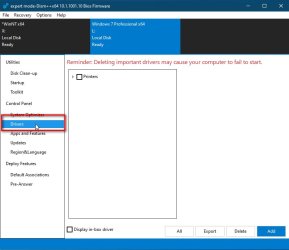
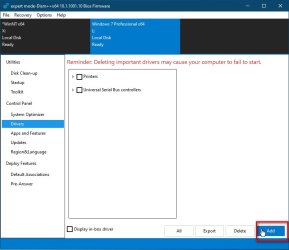
click-drivers.jpg

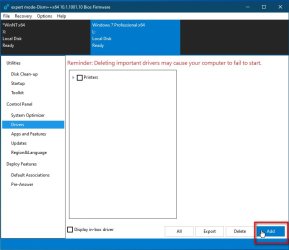
click-add-driver.jpg

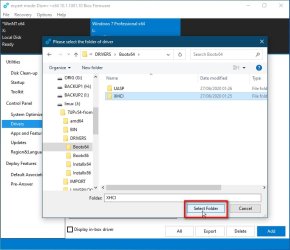
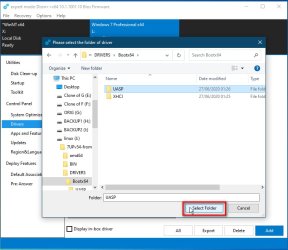
select-driverfolder1.jpg

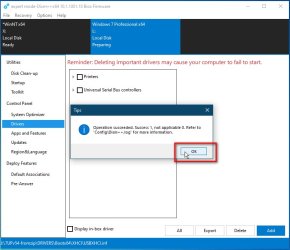
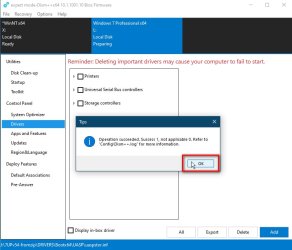
driver-success.jpg
 

My Computers My Computers

System One System Two

  • Computer type
    PC/Desktop
    OS
    7 X64
    CPU
    i5 8400
    Motherboard
    gigabyte b365m ds3h
    Memory
    2x8gb 3200mhz
    Hard Drives
    various
    PSU
    pure power 11 400w cm
    Case
    Coolermaster
    Cooling
    cryorig m9i
  • Computer type
    PC/Desktop
    OS
    7x64
    CPU
    g5400
    Motherboard
    ga b365m ds3h
    Memory
    8gb ddr4 2400
    PSU
    xfx pro 450w
another-driver-folder.jpg


add-another-driver.jpg


another-driver-success.jpg


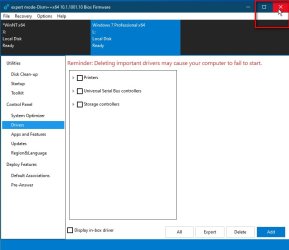
close-dism++.jpg
 

My Computers My Computers

System One System Two

  • Computer type
    PC/Desktop
    OS
    7 X64
    CPU
    i5 8400
    Motherboard
    gigabyte b365m ds3h
    Memory
    2x8gb 3200mhz
    Hard Drives
    various
    PSU
    pure power 11 400w cm
    Case
    Coolermaster
    Cooling
    cryorig m9i
  • Computer type
    PC/Desktop
    OS
    7x64
    CPU
    g5400
    Motherboard
    ga b365m ds3h
    Memory
    8gb ddr4 2400
    PSU
    xfx pro 450w
ad a succesfull Usb divemworks ok then blue screens.
How do i add "whql-win7-64bit-radeon-software-crimson-relive-17.2.1-feb28.exe" to the mix
Thanks
 

My Computer My Computer

Computer type
PC/Desktop
Computer Manufacturer/Model Number
custom build
OS
Windows 7 Ultimate x64
CPU
QuadCore AMD A8-7650K, 3800 MHz (38 x 100)
Motherboard
Asus A88XM-A
Memory
16 gb ddr3
Graphics Card(s)
AMD Radeon R7 Series
Hard Drives
SanDisk SDSSDHP128G SATA Disk Device
Antivirus
mcafee
Browser
Firefox

My Computers My Computers

System One System Two

  • Computer type
    PC/Desktop
    OS
    7 X64
    CPU
    i5 8400
    Motherboard
    gigabyte b365m ds3h
    Memory
    2x8gb 3200mhz
    Hard Drives
    various
    PSU
    pure power 11 400w cm
    Case
    Coolermaster
    Cooling
    cryorig m9i
  • Computer type
    PC/Desktop
    OS
    7x64
    CPU
    g5400
    Motherboard
    ga b365m ds3h
    Memory
    8gb ddr4 2400
    PSU
    xfx pro 450w

My Computer My Computer

Computer type
PC/Desktop
Computer Manufacturer/Model Number
HP Desktop & Compaq Laptop
OS
Win 10 x64, Linux Lite, Win 7 x64, BlackArch, & Kali
Hard Drives
Samsung 850 Pro 256Gb,
Hitachi HDD 1Tb,
Crucial MX SSD 250Gb
Segate 3Tb USB 3.0 Ext. Backup HDD
Internet Speed
150Mbps dn, 20Mbps up
Antivirus
Avast Free, Malwarebytes Anti-Exploit & Anti-Ransomware
Browser
Firefox, Chrome, Opera, & VPN
Last edited:

My Computer My Computer

Computer type
PC/Desktop
Computer Manufacturer/Model Number
custom build
OS
Windows 7 Ultimate x64
CPU
QuadCore AMD A8-7650K, 3800 MHz (38 x 100)
Motherboard
Asus A88XM-A
Memory
16 gb ddr3
Graphics Card(s)
AMD Radeon R7 Series
Hard Drives
SanDisk SDSSDHP128G SATA Disk Device
Antivirus
mcafee
Browser
Firefox
Just need to know where to put AMD Ryzen 3 3200G driver pack in 7UPv54.
Does it go in Bin or drivers,if so which folder.
Also do i need to unzip it first or just as zip.
I am running Win 7 ult 64 bit.
Many thanks
 

My Computer My Computer

Computer type
PC/Desktop
Computer Manufacturer/Model Number
custom build
OS
Windows 7 Ultimate x64
CPU
QuadCore AMD A8-7650K, 3800 MHz (38 x 100)
Motherboard
Asus A88XM-A
Memory
16 gb ddr3
Graphics Card(s)
AMD Radeon R7 Series
Hard Drives
SanDisk SDSSDHP128G SATA Disk Device
Antivirus
mcafee
Browser
Firefox
Unzip it.

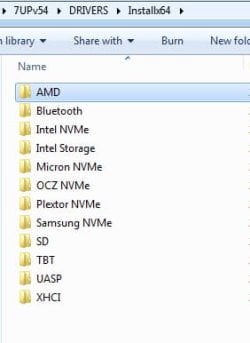
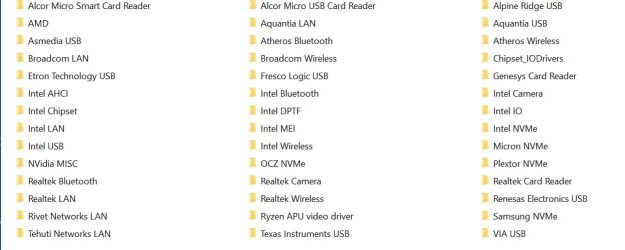
It goes in DRIVERS\Installx64

Probably a good idea to delete the AMD drivers that are already in DRIVERS\Installx64.

drvrs.jpg
 
Last edited:

My Computers My Computers

System One System Two

  • Computer type
    PC/Desktop
    OS
    7 X64
    CPU
    i5 8400
    Motherboard
    gigabyte b365m ds3h
    Memory
    2x8gb 3200mhz
    Hard Drives
    various
    PSU
    pure power 11 400w cm
    Case
    Coolermaster
    Cooling
    cryorig m9i
  • Computer type
    PC/Desktop
    OS
    7x64
    CPU
    g5400
    Motherboard
    ga b365m ds3h
    Memory
    8gb ddr4 2400
    PSU
    xfx pro 450w
hello everyone :)
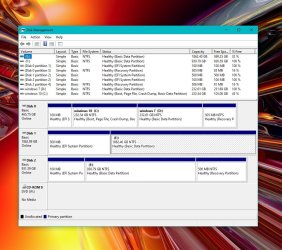
so i performed a dism command thru an admin command prompt from the desktop...everything went fine in about 45 seconds it was finished...afterwards i checked the properties of the windows directories as it was written to the SSD
& it was about 17.7 GB of goodies.

i even configured the boot menu as i wanted to be in the win 10 style with 10 as the default & 7 as the optional...

my problem now is when i choose to boot into win 7 i see the 4 swirling colors just fine...but then it stops booting, win 7 doesnt finish loading & the computer restarts into the recovery options mode
is there an option inside the program you wrote that would repair or fix this to allow win7 to be properly loaded?
i saw the nt6 repair windows you posted but i dont know how to use that utility & i dont know what all the settings mean...im willing to learn but as of now ii hesitate to create more problems
 

Attachments

  • hard drives.jpg
    hard drives.jpg
    140.4 KB · Views: 0

My Computer My Computer

Computer type
PC/Desktop
Computer Manufacturer/Model Number
evga & intel xeon dream machine❤
OS
windows 10 pro (x64), windows 7 ultimate (x64), windows XP (64)
CPU
dual intel xeon 5680 (hexacore) socket 1366
Motherboard
evga sr-2
Memory
48 GB corsair dominator ddr3 @ 1600 mhz
Graphics Card(s)
evga gtx 460 (2x)
Sound Card
creative sound blaster X-Fi titanium fatal1ty champion
Monitor(s) Displays
NEC 2690 (3x) & 1 LCD 65" flat screen TV (quadruple desktop)
Screen Resolution
3 @ 1920 X 1200 & 1 @ 1920 X 1080
Hard Drives
2 WD 600 GB velociraptor
4 WD caviar black 1 TB
2 WD caviar black 2 TB
(9 TB total drive space)
PSU
evga sr-2 1200 watt
Case
custom mountain mods ascension
Cooling
corsair h70
Keyboard
microsoft natural 4000
Mouse
ozone radon 5k
Internet Speed
optonline (some kinda boost thing)

My Computer My Computer

Computer type
PC/Desktop
Computer Manufacturer/Model Number
custom build
OS
Windows 7 Ultimate x64
CPU
QuadCore AMD A8-7650K, 3800 MHz (38 x 100)
Motherboard
Asus A88XM-A
Memory
16 gb ddr3
Graphics Card(s)
AMD Radeon R7 Series
Hard Drives
SanDisk SDSSDHP128G SATA Disk Device
Antivirus
mcafee
Browser
Firefox
Still fighting with W7 install.
Now getting Dvd driver nissing error
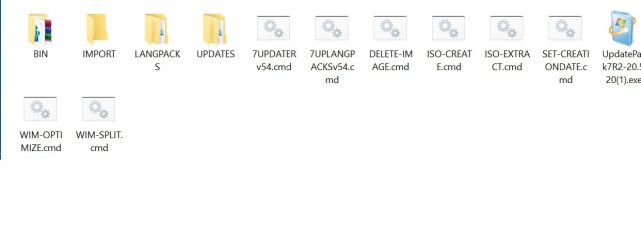
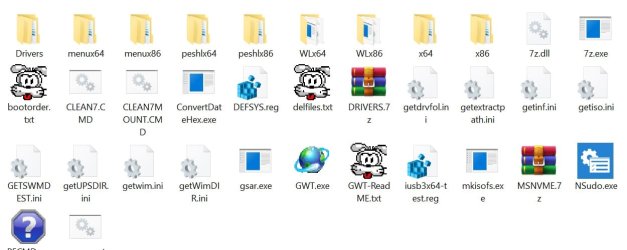
Here are my 7UPv54 layouts
 

Attachments

  • 7UPv54.jpg
    7UPv54.jpg
    26.2 KB · Views: 0
  • Bin.jpg
    Bin.jpg
    61.4 KB · Views: 0
  • install 64.jpg
    install 64.jpg
    51.5 KB · Views: 0

My Computer My Computer

Computer type
PC/Desktop
Computer Manufacturer/Model Number
custom build
OS
Windows 7 Ultimate x64
CPU
QuadCore AMD A8-7650K, 3800 MHz (38 x 100)
Motherboard
Asus A88XM-A
Memory
16 gb ddr3
Graphics Card(s)
AMD Radeon R7 Series
Hard Drives
SanDisk SDSSDHP128G SATA Disk Device
Antivirus
mcafee
Browser
Firefox
fahl

Did you leave the DRIVERS\BOOTx64 AMD folder in there?

I would try this media 17514x64v24.iso

extract it to usb stick using this View attachment Usb7ice.zip or rufus, or similar

Then copy your updated win7 install.wim onto the same usb stick. If the install.wim is too big, you could split it.

Then Boot from the usb stick and use winntsetup to apply the image from install.wim ( or install.swm) onto your hard disk.
 
Last edited:

My Computers My Computers

System One System Two

  • Computer type
    PC/Desktop
    OS
    7 X64
    CPU
    i5 8400
    Motherboard
    gigabyte b365m ds3h
    Memory
    2x8gb 3200mhz
    Hard Drives
    various
    PSU
    pure power 11 400w cm
    Case
    Coolermaster
    Cooling
    cryorig m9i
  • Computer type
    PC/Desktop
    OS
    7x64
    CPU
    g5400
    Motherboard
    ga b365m ds3h
    Memory
    8gb ddr4 2400
    PSU
    xfx pro 450w
Thanks SIW2.
But now getting error
Cannot install Windows to this drive error0x80300024
Tried 3 different dives,all mbr & cleaned with diskpart??
 

My Computer My Computer

Computer type
PC/Desktop
Computer Manufacturer/Model Number
custom build
OS
Windows 7 Ultimate x64
CPU
QuadCore AMD A8-7650K, 3800 MHz (38 x 100)
Motherboard
Asus A88XM-A
Memory
16 gb ddr3
Graphics Card(s)
AMD Radeon R7 Series
Hard Drives
SanDisk SDSSDHP128G SATA Disk Device
Antivirus
mcafee
Browser
Firefox
fahl

What is giving the message?

Are you using WinNTSetup, or something else? If you are using WinNTSetup, you need to partition and format the disk first.

Can you take a screenshot of it? There is a little camera icon on the taskbar of the boot media.

Do you have only one disk attached when trying to install ?

If you are installing to mbr disk - are you sure you are booting the usb stick in bios mode ( not efi) ?
 
Last edited:

My Computers My Computers

System One System Two

  • Computer type
    PC/Desktop
    OS
    7 X64
    CPU
    i5 8400
    Motherboard
    gigabyte b365m ds3h
    Memory
    2x8gb 3200mhz
    Hard Drives
    various
    PSU
    pure power 11 400w cm
    Case
    Coolermaster
    Cooling
    cryorig m9i
  • Computer type
    PC/Desktop
    OS
    7x64
    CPU
    g5400
    Motherboard
    ga b365m ds3h
    Memory
    8gb ddr4 2400
    PSU
    xfx pro 450w
UpdatePack7R2 20.10.15 on first post
 

My Computers My Computers

System One System Two

  • Computer type
    PC/Desktop
    OS
    7 X64
    CPU
    i5 8400
    Motherboard
    gigabyte b365m ds3h
    Memory
    2x8gb 3200mhz
    Hard Drives
    various
    PSU
    pure power 11 400w cm
    Case
    Coolermaster
    Cooling
    cryorig m9i
  • Computer type
    PC/Desktop
    OS
    7x64
    CPU
    g5400
    Motherboard
    ga b365m ds3h
    Memory
    8gb ddr4 2400
    PSU
    xfx pro 450w
I'm upgrading my desktop with a new Samsung NVME 970 EVO Plus in the M2 port (Motherboard: Asus Ranger VII Maximus, Core I5 4690K, Corsair Vengeance) I have installed all the relevant drivers and changed the bios settings and the drive now shows in diskmgmt.

I initially wanted to clone my current windows 7 over to the new drive but I couldn't clone from a MBR disk to a GPT, which is required for NVME. It simply won't show up as a boot option and I assume this is why.

So I settled for a fresh installation of windows 7 using SIW2 tools. However, when I get to the tools, my mouse and keyboard turn off and I can't do anything. I tried different slots, different keyboards but none work.

Edit: I also changed the "secure boot" and various other USB settings in the Bios, but still wouldn't work.

Any idea what's the cause?

Thanks in advance.
 

My Computer My Computer

Computer type
PC/Desktop
OS
Windows 7 Professional 64
CPU
Intel i5 4690k
Motherboard
Asus Ranger VII
Memory
Corsair Vengeance 16GB
Graphics Card(s)
MSI GTX 970
Monitor(s) Displays
Asus Mx239h
Screen Resolution
1080p
Hard Drives
Samsung 840 Evo 120GB
3x 1TB WD Blue
PSU
Corsair Builder Series CXM 750W
Case
Corsair
Cooling
Cooler Master tower
Keyboard
Unicomp Buckling spring
Mouse
Logitech M100
Internet Speed
300Mb/sec
Antivirus
None
Browser
Opera
I hate to say it but the only Reliable method I've found to insert the USB 3 and NVME drivers into a Win7 Installer was the Gigabyte USB Patch Tool -https://download.gigabyte.com/FileList/Utility/mb_utility_windowsimagetool_B18.0213.1.zip


Doesn't take too long if the system is fully up and running. You may need a Valid WIn7 ISO to place it onto a flash drive unless you have the free USB DVD tool from MS and a Valid WIn7 Install disk.


I've tried many times and only had one copy work correctly, then promptly lost the updated image - Go Figure. Since the Gigabyte tool has worked reliably, I gave up trying to do more.

 

My Computer My Computer

Computer type
PC/Desktop
Computer Manufacturer/Model Number
White Box
OS
Win7-64/Sp1 Ultimate
CPU
AMD Ryzen 5 1600
Motherboard
Asrock B450m Pro
Memory
64GB
Graphics Card(s)
GTX 1060 6GB
Hard Drives
Boot = Crucial MX500 250GB M2 Sata/AHCI
LSI 9211-8i HBA/IT card
Port1 = 1x Team Group GX2 256GB SSD (boot)
1x Crucial MX500 1TB (Raid 1 storage)
2x Team Group GX2 1TB (storage)
Port2 = 1x Team Group GX2 256GB SSD (boot)
1x Crucial MX500 1TB
PSU
EVGA B450
Keyboard
88 key (TKL) mechanical
I hate to say it but the only Reliable method I've found to insert the USB 3 and NVME drivers into a Win7 Installer was the Gigabyte USB Patch Tool -https://download.gigabyte.com/FileList/Utility/mb_utility_windowsimagetool_B18.0213.1.zip


Doesn't take too long if the system is fully up and running. You may need a Valid WIn7 ISO to place it onto a flash drive unless you have the free USB DVD tool from MS and a Valid WIn7 Install disk.


I've tried many times and only had one copy work correctly, then promptly lost the updated image - Go Figure. Since the Gigabyte tool has worked reliably, I gave up trying to do more.

Thanks for the suggestion. I think my issue relates to how the Win7/PE/SIW2 installer communicates with the BIOS/motherboard. I have all the USB3 and NVME drivers slipstreamed into the ISO already (I have confirmed this functions correctly as I installed it on my new laptop earlier in the year)
 

My Computer My Computer

Computer type
PC/Desktop
OS
Windows 7 Professional 64
CPU
Intel i5 4690k
Motherboard
Asus Ranger VII
Memory
Corsair Vengeance 16GB
Graphics Card(s)
MSI GTX 970
Monitor(s) Displays
Asus Mx239h
Screen Resolution
1080p
Hard Drives
Samsung 840 Evo 120GB
3x 1TB WD Blue
PSU
Corsair Builder Series CXM 750W
Case
Corsair
Cooling
Cooler Master tower
Keyboard
Unicomp Buckling spring
Mouse
Logitech M100
Internet Speed
300Mb/sec
Antivirus
None
Browser
Opera
I have all the USB3 and NVME drivers slipstreamed into the ISO already (I have confirmed this functions correctly as I installed it on my new laptop earlier in the year)


However, when I get to the tools, my mouse and keyboard turn off and I can't do anything.

I don't understand that.

At what point does the mouse and keyboard stop working? I think that mobo has usb2.0 ports and a psu port at the rear.
 

My Computers My Computers

System One System Two

  • Computer type
    PC/Desktop
    OS
    7 X64
    CPU
    i5 8400
    Motherboard
    gigabyte b365m ds3h
    Memory
    2x8gb 3200mhz
    Hard Drives
    various
    PSU
    pure power 11 400w cm
    Case
    Coolermaster
    Cooling
    cryorig m9i
  • Computer type
    PC/Desktop
    OS
    7x64
    CPU
    g5400
    Motherboard
    ga b365m ds3h
    Memory
    8gb ddr4 2400
    PSU
    xfx pro 450w
I don't understand that.

At what point does the mouse and keyboard stop working? I think that mobo has usb2.0 ports and a psu port at the rear.

I already have windows 7 installed on my desktop pc but the sata SSD is old and only 120GB in size. I want a straight swap out with a new 500GB NVME SSD.

I insert my Win7 installation USB and boot into it from the bios no problem. But when the SIW2 tools show up on the screen my keyboard and mouse no longer work - I can't go any further.

I have tried both USB2 and USB3 ports on the motherboard.
 

My Computer My Computer

Computer type
PC/Desktop
OS
Windows 7 Professional 64
CPU
Intel i5 4690k
Motherboard
Asus Ranger VII
Memory
Corsair Vengeance 16GB
Graphics Card(s)
MSI GTX 970
Monitor(s) Displays
Asus Mx239h
Screen Resolution
1080p
Hard Drives
Samsung 840 Evo 120GB
3x 1TB WD Blue
PSU
Corsair Builder Series CXM 750W
Case
Corsair
Cooling
Cooler Master tower
Keyboard
Unicomp Buckling spring
Mouse
Logitech M100
Internet Speed
300Mb/sec
Antivirus
None
Browser
Opera
Back
Top