Update your Win 7 installation media

Did you turn off your antivirus?

At the end of which process?

When did that message occur?

Did you select a single image or ALL?

What do you have in the extracted-iso folder?
 

My Computers My Computers

System One System Two

  • Computer type
    PC/Desktop
    OS
    7 X64
    CPU
    i5 8400
    Motherboard
    gigabyte b365m ds3h
    Memory
    2x8gb 3200mhz
    Hard Drives
    various
    PSU
    pure power 11 400w cm
    Case
    Coolermaster
    Cooling
    cryorig m9i
  • Computer type
    PC/Desktop
    OS
    7x64
    CPU
    g5400
    Motherboard
    ga b365m ds3h
    Memory
    8gb ddr4 2400
    PSU
    xfx pro 450w
Please see below quote

Did you turn off your antivirus? Yes, I don't have any

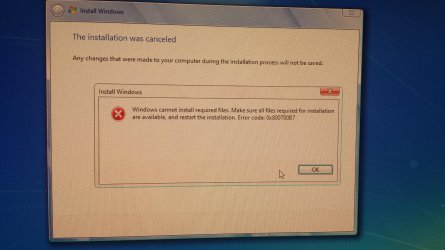
At the end of which process? Seems to be after it finished updating the specific version I selected. I saw the unmount of the wim and then it blanks out and only shows the message, returns me to the prompt

When did that message occur? See above

Did you select a single image or ALL? I can select either single image or all, it will do the same at the end.

What do you have in the extracted-iso folder?
Anything specific I should look for? When I tried to run the setup directly after the failure, setup fails like the poster couple post above me.
 

My Computer My Computer

Computer type
PC/Desktop
OS
Windows 10
What do you have in the extracted-iso folder?
Anything specific I should look for?

You can see if the boot.wim and install.wim are different sizes from the original.

You could also run wim-info.cmd and select whatever image you updated and see what that tells you.

When I tried to run the setup directly after the failure, setup fails like the poster couple post above me.

I don't know waht you mean by that. The previous poster created a usb stick ( nothing to do with this program ) and doesn't seem able to access the one time boot menu on his HP machine ( also nothing to with this program)
 

My Computers My Computers

System One System Two

  • Computer type
    PC/Desktop
    OS
    7 X64
    CPU
    i5 8400
    Motherboard
    gigabyte b365m ds3h
    Memory
    2x8gb 3200mhz
    Hard Drives
    various
    PSU
    pure power 11 400w cm
    Case
    Coolermaster
    Cooling
    cryorig m9i
  • Computer type
    PC/Desktop
    OS
    7x64
    CPU
    g5400
    Motherboard
    ga b365m ds3h
    Memory
    8gb ddr4 2400
    PSU
    xfx pro 450w
Here is a way to get your installation media up to date: Includes "universal" usb3 , standard oem nvme drivers and MS nvme updates

Download:
7Updater 7UPv54.zip
Download:
Small downloader which can be run to download the latest Simplix updatepack ( about 850mb).
https://update7.simplix.info/UpdatePack7R2.exe
OR
UpdatePack7R2-20.8.13.exe

1. Extract the 7UPv50.zip directly to the root of the drive, so you have C:\7UPv50 folder.

2. Put the UpdatePack7R2-date.exe in the C:\7UPv50 folder.

3. Copy and paste your installation media to a hard drive.
(Or use ISO-EXTRACT.cmd to extract your windows 7 iso file.)

4. Right click and Run as administrator on the the 7UPDATERv50.cmd

View attachment 412324


SCREENSHOTS HERE

NOTE: It is not required to use simplix update pack. If you only want to integrate the usb3 and nvme drivers, Run 7updater.cmd without simplix update pack present.

HELLO AGAIN SIW2....ive used your program to update the win 7 ultimate edition iso that i wanted to install so heres some background history and the results...

first of all im on a friends machine with the bios set to UEFI mode...
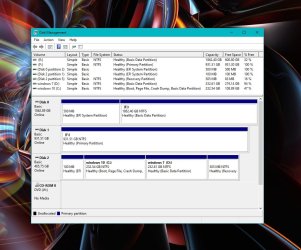
the samsung SSD NVMe drive has win 10 on partition C & id like to install win 7 in partition D...
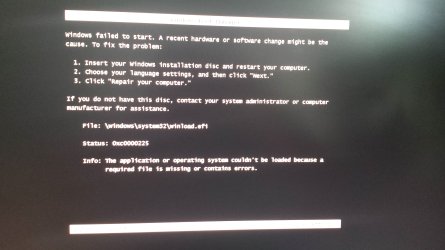
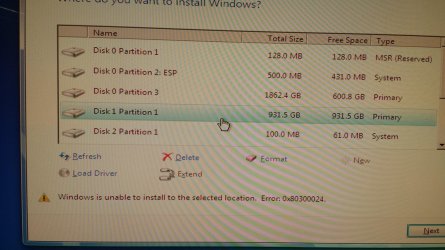
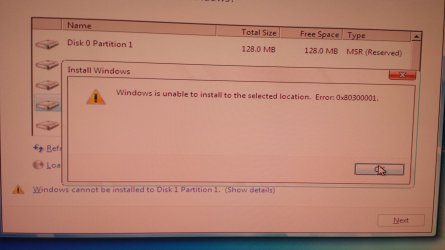
im including some screen shots & pictures of some errors ive gotten trying to boot into various partitions...

what id like to do is have everything set to UEFI in the bis & use all the drives in GPT mode but im not sure if thats possible as ive heard from some that windows WILL NOT install onto a GPT disk..


hard drives.jpg

20200904_165647.jpg

20200906_203755.jpg

20200906_204133.jpg

20200906_205243.jpg

20200906_205910.jpg
 

My Computer My Computer

Computer type
PC/Desktop
Computer Manufacturer/Model Number
evga & intel xeon dream machine❤
OS
windows 10 pro (x64), windows 7 ultimate (x64), windows XP (64)
CPU
dual intel xeon 5680 (hexacore) socket 1366
Motherboard
evga sr-2
Memory
48 GB corsair dominator ddr3 @ 1600 mhz
Graphics Card(s)
evga gtx 460 (2x)
Sound Card
creative sound blaster X-Fi titanium fatal1ty champion
Monitor(s) Displays
NEC 2690 (3x) & 1 LCD 65" flat screen TV (quadruple desktop)
Screen Resolution
3 @ 1920 X 1200 & 1 @ 1920 X 1080
Hard Drives
2 WD 600 GB velociraptor
4 WD caviar black 1 TB
2 WD caviar black 2 TB
(9 TB total drive space)
PSU
evga sr-2 1200 watt
Case
custom mountain mods ascension
Cooling
corsair h70
Keyboard
microsoft natural 4000
Mouse
ozone radon 5k
Internet Speed
optonline (some kinda boost thing)
ID LIKE TO FINALLY GET TO THIS SCREEN where the boot menu is the windows 10 stylebcdboot windir 2.png
 

My Computer My Computer

Computer type
PC/Desktop
Computer Manufacturer/Model Number
evga & intel xeon dream machine❤
OS
windows 10 pro (x64), windows 7 ultimate (x64), windows XP (64)
CPU
dual intel xeon 5680 (hexacore) socket 1366
Motherboard
evga sr-2
Memory
48 GB corsair dominator ddr3 @ 1600 mhz
Graphics Card(s)
evga gtx 460 (2x)
Sound Card
creative sound blaster X-Fi titanium fatal1ty champion
Monitor(s) Displays
NEC 2690 (3x) & 1 LCD 65" flat screen TV (quadruple desktop)
Screen Resolution
3 @ 1920 X 1200 & 1 @ 1920 X 1080
Hard Drives
2 WD 600 GB velociraptor
4 WD caviar black 1 TB
2 WD caviar black 2 TB
(9 TB total drive space)
PSU
evga sr-2 1200 watt
Case
custom mountain mods ascension
Cooling
corsair h70
Keyboard
microsoft natural 4000
Mouse
ozone radon 5k
Internet Speed
optonline (some kinda boost thing)
is there any way to change the boot screen back to a windows 10 style once windows 7 is installed last?
 

My Computer My Computer

Computer type
PC/Desktop
Computer Manufacturer/Model Number
evga & intel xeon dream machine❤
OS
windows 10 pro (x64), windows 7 ultimate (x64), windows XP (64)
CPU
dual intel xeon 5680 (hexacore) socket 1366
Motherboard
evga sr-2
Memory
48 GB corsair dominator ddr3 @ 1600 mhz
Graphics Card(s)
evga gtx 460 (2x)
Sound Card
creative sound blaster X-Fi titanium fatal1ty champion
Monitor(s) Displays
NEC 2690 (3x) & 1 LCD 65" flat screen TV (quadruple desktop)
Screen Resolution
3 @ 1920 X 1200 & 1 @ 1920 X 1080
Hard Drives
2 WD 600 GB velociraptor
4 WD caviar black 1 TB
2 WD caviar black 2 TB
(9 TB total drive space)
PSU
evga sr-2 1200 watt
Case
custom mountain mods ascension
Cooling
corsair h70
Keyboard
microsoft natural 4000
Mouse
ozone radon 5k
Internet Speed
optonline (some kinda boost thing)
In win 10 elevated command prompt:
bcdedit /set {default} bootmenupolicy standard
 

My Computers My Computers

System One System Two

  • Computer type
    PC/Desktop
    OS
    7 X64
    CPU
    i5 8400
    Motherboard
    gigabyte b365m ds3h
    Memory
    2x8gb 3200mhz
    Hard Drives
    various
    PSU
    pure power 11 400w cm
    Case
    Coolermaster
    Cooling
    cryorig m9i
  • Computer type
    PC/Desktop
    OS
    7x64
    CPU
    g5400
    Motherboard
    ga b365m ds3h
    Memory
    8gb ddr4 2400
    PSU
    xfx pro 450w
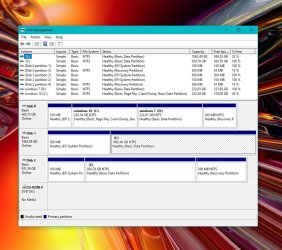
You can't install as UEFI in disk 1 partition 1 (F:) because the disk is MBR and not GPT.
You want to install on disk 2, partition ? (D:).
 
Last edited:

My Computers My Computers

System One System Two

  • Computer type
    PC/Desktop
    Computer Manufacturer/Model Number
    custom build
    OS
    Windows 7 HP 64
    CPU
    i5 6600K - 800MHz to 4200MHz
    Motherboard
    GA-Z170-HD3P
    Memory
    4+4G GSkill DDR4 3000
    Graphics Card(s)
    IG - Intel 530
    Monitor(s) Displays
    Samsung 226BW
    Screen Resolution
    1680x1050
    Hard Drives
    (1) -1 SM951 – 128GB M.2 AHCI PCIe SSD drive for Windows 7 and Lubuntu
    (2) -1 WD SATA 3 - 1T for Data
    (3) -1 WD SATA 3 - 1T for backup
    PSU
    Thermaltake 450W TR2 gold
    Keyboard
    Old and good Chicony mechanical keyboard
    Mouse
    Logitech mX performance - 9 buttons (had to disable some)
    Internet Speed
    500Mb/s
    Browser
    Firefox 64
    Other Info
    TinyWall firewall
  • Computer type
    Laptop
    System Manufacturer/Model Number
    Asus Q550LF
    OS
    Windows 7 Pro
    CPU
    i7-4500U 800MHz to 3.0GHz
    Motherboard
    Asus Q550LF
    Memory
    (4+4)G DDR3 1600
    Graphics Card(s)
    IG intel 4400 + NVIDIA GeForce GT 745M
    Sound Card
    Realtek
    Monitor(s) Displays
    LG Display LP156WF4-SPH1
    Screen Resolution
    1920 x 1080
    Hard Drives
    BX500 120G SSD for Windows and programs +
    1T HDD for data
    Internet Speed
    500 Mb/s
    Browser
    Firefox
    Other Info
    TinyWall firewall
UpdatePack7R2-20.9.10 on first post
 

My Computers My Computers

System One System Two

  • Computer type
    PC/Desktop
    OS
    7 X64
    CPU
    i5 8400
    Motherboard
    gigabyte b365m ds3h
    Memory
    2x8gb 3200mhz
    Hard Drives
    various
    PSU
    pure power 11 400w cm
    Case
    Coolermaster
    Cooling
    cryorig m9i
  • Computer type
    PC/Desktop
    OS
    7x64
    CPU
    g5400
    Motherboard
    ga b365m ds3h
    Memory
    8gb ddr4 2400
    PSU
    xfx pro 450w
[04] Mount the image from the install.wim [main menu screen, click File, and select Mount Image].
[05] Highlight the mounted image [at the top].
[06] Click Updates in the left hand menu.
[07] Click Scan.!


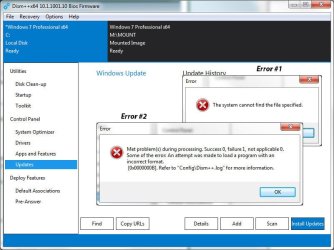
Hi Paul - I'm trying to follow the proc you posted on 25 Aug 2018 and am stuck at step 7 (although there's an anomaly with 5-6: if I highlight the mounted image at the top only a blank screen with "Open Session" shows in the working area; to get the left hand menu my local OS drive needs to be highlighted). Clicking on Scan results in error #1 and attempting to add the Siimplix exe results in error #2:
DISM1.jpg


Any idea what I'm doing wrong?


Thanx in advance for your help.
 

My Computer My Computer

Computer type
PC/Desktop
Computer Manufacturer/Model Number
Custom Build
OS
Win7 Pro x64 SP1
CPU
Intel i7-6700
Motherboard
Gigabyte Z270 HD3
Memory
16 gig (2x8)
Graphics Card(s)
MSI GTX 1660 Super
Monitor(s) Displays
AOC CQ27G2
Screen Resolution
1440p
Hard Drives
Internal:
Crucial MX500 500GB SATA SSD (OS/Apps)
WD10EZEX-00WN4A0 1TB (Data/Games)
WD10EZEX-00WN4A0 1TB (On-line backup/Testing)
External
WD 4TB USB3.1 EasyStore (off-line backup archive/"sandbox")
PSU
Cooler Master 650W Bronze
Case
Sharkoon BW9000-V tower housing
Cooling
Deep Cool Ice Blade
Internet Speed
fiber optic 2 res broadband
Antivirus
Kaspersky Free
Browser
Firefox
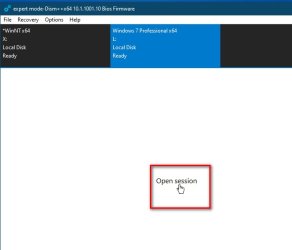
If I highlight the mounted image at the top only a blank screen with "Open Session" shows in the working area

Click Open Session to work on the mounted image

For dism ++ to scan for new updates download wsusscn3.cab into the dism++ config folder

Your question is not to do with 7UP project, which uses simplix for integrating updates. Dism++ is a different way of integrating updates.
 
Last edited:

My Computers My Computers

System One System Two

  • Computer type
    PC/Desktop
    OS
    7 X64
    CPU
    i5 8400
    Motherboard
    gigabyte b365m ds3h
    Memory
    2x8gb 3200mhz
    Hard Drives
    various
    PSU
    pure power 11 400w cm
    Case
    Coolermaster
    Cooling
    cryorig m9i
  • Computer type
    PC/Desktop
    OS
    7x64
    CPU
    g5400
    Motherboard
    ga b365m ds3h
    Memory
    8gb ddr4 2400
    PSU
    xfx pro 450w
You can't install as UEFI in disk 1 partition 1 (F:) because the disk is MBR and not GPT.
You want to install on disk 2, partition ? (D:).

YES...id like to install on D as seen here hard drives.jpg

i have a win 7 flash drive ready to go
 

My Computer My Computer

Computer type
PC/Desktop
Computer Manufacturer/Model Number
evga & intel xeon dream machine❤
OS
windows 10 pro (x64), windows 7 ultimate (x64), windows XP (64)
CPU
dual intel xeon 5680 (hexacore) socket 1366
Motherboard
evga sr-2
Memory
48 GB corsair dominator ddr3 @ 1600 mhz
Graphics Card(s)
evga gtx 460 (2x)
Sound Card
creative sound blaster X-Fi titanium fatal1ty champion
Monitor(s) Displays
NEC 2690 (3x) & 1 LCD 65" flat screen TV (quadruple desktop)
Screen Resolution
3 @ 1920 X 1200 & 1 @ 1920 X 1080
Hard Drives
2 WD 600 GB velociraptor
4 WD caviar black 1 TB
2 WD caviar black 2 TB
(9 TB total drive space)
PSU
evga sr-2 1200 watt
Case
custom mountain mods ascension
Cooling
corsair h70
Keyboard
microsoft natural 4000
Mouse
ozone radon 5k
Internet Speed
optonline (some kinda boost thing)
If you want to integrate your own drivers, please put them in the relevant folder beforehand.

for 64bit use the DRIVERS\Bootx64 and DRIVERS\Installx64 folders
SIW2:

I would like to integrate these drivers in the above described location:
Intel Q87 chipset 10.1.1.42
Intel USB 3.0 eXtensible Host Controller 5.0.4.43
Intel I217-LM Gigabit Ethernet 12.17.8.7
Intel HD Graphics 4600 10.18.14.5143
Realtek ALC3220 High Definition Audio 6.0.8978.1

Since they're all in executable files(.exe), how exactly would I go about doing that?
 

My Computer My Computer

Computer type
PC/Desktop
Computer Manufacturer/Model Number
Dell OptiPlex 9020
OS
Windows 7 Professional SP1 64-bit
CPU
Intel Core i7-4790 3.60 GHz
Memory
32 GB DDR3-1600 MHz
Graphics Card(s)
Integrated Intel HD Graphics 4600
Monitor(s) Displays
Viewsonic 32" LCD
Hard Drives
Kingston SATA 3 240 GB SSD
Internet Speed
Spectrum Internet 1000 Mbps
You won't need Intel USB 3.0 eXtensible Host Controller 5.0.4.43 because 7UP installs the usb3 stack.

7-zip is a handy way of unpacking most driver exe files

DRIVERS\Bootx64 is only for drivers you want to integrate into boot.wim and winre.wim
 

My Computers My Computers

System One System Two

  • Computer type
    PC/Desktop
    OS
    7 X64
    CPU
    i5 8400
    Motherboard
    gigabyte b365m ds3h
    Memory
    2x8gb 3200mhz
    Hard Drives
    various
    PSU
    pure power 11 400w cm
    Case
    Coolermaster
    Cooling
    cryorig m9i
  • Computer type
    PC/Desktop
    OS
    7x64
    CPU
    g5400
    Motherboard
    ga b365m ds3h
    Memory
    8gb ddr4 2400
    PSU
    xfx pro 450w
I know how to use 7-ZIP to extract the contents of a .exe or .msu or .cab or .zip file, but the rest of the process sounds too complicated for me. Thanks.
 

My Computer My Computer

Computer type
PC/Desktop
Computer Manufacturer/Model Number
Dell OptiPlex 9020
OS
Windows 7 Professional SP1 64-bit
CPU
Intel Core i7-4790 3.60 GHz
Memory
32 GB DDR3-1600 MHz
Graphics Card(s)
Integrated Intel HD Graphics 4600
Monitor(s) Displays
Viewsonic 32" LCD
Hard Drives
Kingston SATA 3 240 GB SSD
Internet Speed
Spectrum Internet 1000 Mbps
Drivers in the DRIVERS\Installx64 will be integrated into Install.wim

Drivers in the DRIVERS\bootx64 will be integrated into the bootable wim files.

Integration is performed by microsoft dism.
 

My Computers My Computers

System One System Two

  • Computer type
    PC/Desktop
    OS
    7 X64
    CPU
    i5 8400
    Motherboard
    gigabyte b365m ds3h
    Memory
    2x8gb 3200mhz
    Hard Drives
    various
    PSU
    pure power 11 400w cm
    Case
    Coolermaster
    Cooling
    cryorig m9i
  • Computer type
    PC/Desktop
    OS
    7x64
    CPU
    g5400
    Motherboard
    ga b365m ds3h
    Memory
    8gb ddr4 2400
    PSU
    xfx pro 450w
Your question is not to do with 7UP project, which uses simplix for integrating updates. Dism++ is a different way of integrating updates.


Hi SWI2 - Thanx for answering my question despite it being only tangentially related and also for the clarification. My question sprang from the series of DISM++ focused posts starting w/post #13. Having successfully used 7UPDATER I was attempting to understand what extra DISM++ brings to the party...
 

My Computer My Computer

Computer type
PC/Desktop
Computer Manufacturer/Model Number
Custom Build
OS
Win7 Pro x64 SP1
CPU
Intel i7-6700
Motherboard
Gigabyte Z270 HD3
Memory
16 gig (2x8)
Graphics Card(s)
MSI GTX 1660 Super
Monitor(s) Displays
AOC CQ27G2
Screen Resolution
1440p
Hard Drives
Internal:
Crucial MX500 500GB SATA SSD (OS/Apps)
WD10EZEX-00WN4A0 1TB (Data/Games)
WD10EZEX-00WN4A0 1TB (On-line backup/Testing)
External
WD 4TB USB3.1 EasyStore (off-line backup archive/"sandbox")
PSU
Cooler Master 650W Bronze
Case
Sharkoon BW9000-V tower housing
Cooling
Deep Cool Ice Blade
Internet Speed
fiber optic 2 res broadband
Antivirus
Kaspersky Free
Browser
Firefox
First of all thanks for kkeping alive this thread. Amazing work. Im building a machine for a friend that requires win 7 and i recomended to him the amd 3200g, but never imagine all the problems i was gonna face. I download a win7 iso with the usb 3.0 drivers and all the versions, i manage to install succesfully with the keyboard an mouse connected to the usb ports, but now on the Write your pc name screen it wont detect again the keyboard and mouse... The iso that i download on the installation it first load a windows 10 screen were i select the x64 or x86 version and then it goes to the win7 installation.

cpu amd 3200g
motherboard asus 520-m
hdd: segate 500gb
4gb ddr4
 

My Computer My Computer

Computer type
PC/Desktop
Computer Manufacturer/Model Number
custom build
OS
windows 7 x64
CPU
amd 3200g
Motherboard
asus a520-m
Memory
4gb ddr4
Graphics Card(s)
vega 8
Hard Drives
500gb
Browser
edge
gergi89

i manage to install succesfully with the keyboard an mouse connected to the usb ports, but now on the Write your pc name screen it wont detect again the keyboard and mouse...

Install this update ( if it is already installed ,there will be a not applicable message, no harm done):
View attachment windows6.1-kb2864202-x64.zip
and then install these drivers:
View attachment xhcix64.zip

Dism++ is useful for this. View attachment Dism++10.1.1000.100.zip

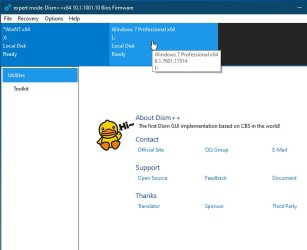
Select your win7 installation on the hard drive by clicking it in the top pane so it is highlighted in blue

Then click "Open Session"

Then click "Updates"

Then click "ADD" and browse to the update.

Then click "Drivers" in the left pane

Then click "ADD" and browse to the extracted drivers folder
 
Last edited:

My Computers My Computers

System One System Two

  • Computer type
    PC/Desktop
    OS
    7 X64
    CPU
    i5 8400
    Motherboard
    gigabyte b365m ds3h
    Memory
    2x8gb 3200mhz
    Hard Drives
    various
    PSU
    pure power 11 400w cm
    Case
    Coolermaster
    Cooling
    cryorig m9i
  • Computer type
    PC/Desktop
    OS
    7x64
    CPU
    g5400
    Motherboard
    ga b365m ds3h
    Memory
    8gb ddr4 2400
    PSU
    xfx pro 450w
1. Click the operating system you want to work on to highlight it in blue.

select-os.jpg

2. Click Open Session

open-session.jpg

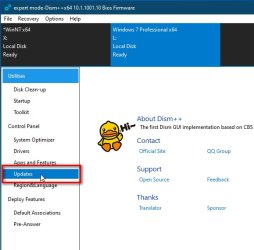
3.Click Updates

click-updates.jpg

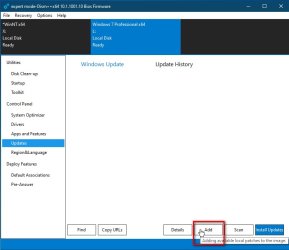
4. Click ADD

updates-add.jpg

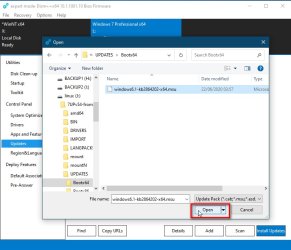
5. Browse to the update

select-update.jpg
 

My Computers My Computers

System One System Two

  • Computer type
    PC/Desktop
    OS
    7 X64
    CPU
    i5 8400
    Motherboard
    gigabyte b365m ds3h
    Memory
    2x8gb 3200mhz
    Hard Drives
    various
    PSU
    pure power 11 400w cm
    Case
    Coolermaster
    Cooling
    cryorig m9i
  • Computer type
    PC/Desktop
    OS
    7x64
    CPU
    g5400
    Motherboard
    ga b365m ds3h
    Memory
    8gb ddr4 2400
    PSU
    xfx pro 450w
Back
Top