
You are using an out of date browser. It may not display this or other websites correctly.
You should upgrade or use an alternative browser.
You should upgrade or use an alternative browser.
Solved Moving Win 7 to new drive
- Thread starter LunaEros
- Start date
Not sure if this makes a lot of sense, but execute
bcdboot H:\Windows
to create a boot selection of old and new installation in the boot manager that's currently in use, which according to disc management resides on D0P3. :sarc:
bcdboot H:\Windows
to create a boot selection of old and new installation in the boot manager that's currently in use, which according to disc management resides on D0P3. :sarc:
My Computer
- Computer type
- PC/Desktop
- OS
- Windows 7 Home Premium

- Local time
- 8:45 AM
- Messages
- 43
Not sure if this makes a lot of sense, but execute
bcdboot H:\Windows to create a boot selection of old and new installation in the boot manager that's currently in use, which according to disc management resides on D0P3. :sarc:
Does that work on a GPT drive layout too? What does it do, write boot files or create a dual boot layout or something?
My Computer
- Computer type
- PC/Desktop
- OS
- Windows 7 Ultimate x64
- Local time
- 8:45 AM
- Messages
- 43
Creates a dual boot. At least you'll have any access to the installation on Drive 0.
Not sure if that'll work then since Windows doesn't seem to see any boot files on the 8TB H: drive.
My Computer
- Computer type
- PC/Desktop
- OS
- Windows 7 Ultimate x64
You need to learn more about the Microsoft definition of System and Boot partition.
System partition and boot partition - Wikipedia
System partition and boot partition - Wikipedia
My Computer
- Computer type
- PC/Desktop
- OS
- Windows 7 Home Premium
That's incorrect.
"The system partition (or system volume)[5] is a primary partition that contains the boot loader"
"The boot partition (or boot volume)[5] is the disk partition that contains the operating system folder"
"The system partition (or system volume)[5] is a primary partition that contains the boot loader"
"The boot partition (or boot volume)[5] is the disk partition that contains the operating system folder"
My Computer
- Computer type
- PC/Desktop
- OS
- Windows 7 Home Premium
- Local time
- 8:45 AM
- Messages
- 43
That's incorrect.
"The system partition (or system volume)[5] is a primary partition that contains the boot loader"
"The boot partition (or boot volume)[5] is the disk partition that contains the operating system folder"
I know that. And? That doesn't change the fact that my system's only seeing boot files on one drive and system files on the other. Therefore making a dual boot it would only see one installation, would it not?
My Computer
- Computer type
- PC/Desktop
- OS
- Windows 7 Ultimate x64
Disc Management never shows more than one "system" and "boot" partition. You can have several partitions carrying boot files and several carrying Windows installations, but only the ones in use get indicated.
Also the "boot" flag does not indicate boot files, and the "system" flag does not indicate the powered-on machine, by definition of Microsoft.
Also the "boot" flag does not indicate boot files, and the "system" flag does not indicate the powered-on machine, by definition of Microsoft.
My Computer
- Computer type
- PC/Desktop
- OS
- Windows 7 Home Premium
- Local time
- 8:45 AM
- Messages
- 43
Ok, this is still frustrating me. I originally cloned the system drive to the new 8tb drive using mbr and have been trying to fix it since. So I decided to clone it again using Minitool's option to make the target drive GPT and it seems to have done it correctly with the correct partitions.
But it still booted to the old mbr drive. I decided to try another uefi boot manager option in the bios and now it's booting using the new AND old drive. I've also got Diskgenius and see that I can setup up bios disk manager boot entries. I'm wondering if I have it set wrong. Anyone know what the settings for a Win7 x64 UEFI should be in the bios?
Such as what device type, what partition on the GPT and what file should it point to?
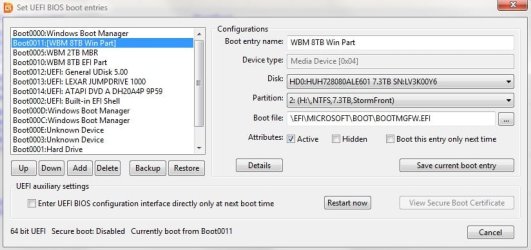
But it still booted to the old mbr drive. I decided to try another uefi boot manager option in the bios and now it's booting using the new AND old drive. I've also got Diskgenius and see that I can setup up bios disk manager boot entries. I'm wondering if I have it set wrong. Anyone know what the settings for a Win7 x64 UEFI should be in the bios?
Such as what device type, what partition on the GPT and what file should it point to?
My Computer
- Computer type
- PC/Desktop
- OS
- Windows 7 Ultimate x64

- Local time
- 1:45 PM
- Messages
- 16,786
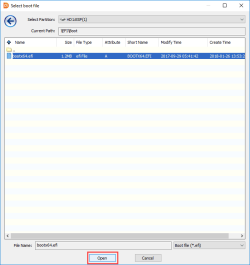
Have a look at the esp partition on the cloned disk and see what the file is called.
\EFI\Boot\bootx64.efi
\EFI\Boot\bootx64.efi
My Computers
System One System Two
-
- Computer type
- PC/Desktop
- OS
- 7 X64
- CPU
- i5 8400
- Motherboard
- gigabyte b365m ds3h
- Memory
- 2x8gb 3200mhz
- Hard Drives
- various
- PSU
- pure power 11 400w cm
- Case
- Coolermaster
- Cooling
- cryorig m9i
-
- Computer type
- PC/Desktop
- OS
- 7x64
- CPU
- g5400
- Motherboard
- ga b365m ds3h
- Memory
- 8gb ddr4 2400
- PSU
- xfx pro 450w
- Local time
- 8:45 AM
- Messages
- 43
It's called the same as what you just said. Is that the file that the boot file entry should point to? Because from most everywhere I looked it's supposed to be a file called bootmgfw.efi
My Computer
- Computer type
- PC/Desktop
- OS
- Windows 7 Ultimate x64
- Local time
- 1:45 PM
- Messages
- 16,786
My Computers
System One System Two
-
- Computer type
- PC/Desktop
- OS
- 7 X64
- CPU
- i5 8400
- Motherboard
- gigabyte b365m ds3h
- Memory
- 2x8gb 3200mhz
- Hard Drives
- various
- PSU
- pure power 11 400w cm
- Case
- Coolermaster
- Cooling
- cryorig m9i
-
- Computer type
- PC/Desktop
- OS
- 7x64
- CPU
- g5400
- Motherboard
- ga b365m ds3h
- Memory
- 8gb ddr4 2400
- PSU
- xfx pro 450w
- Local time
- 1:45 PM
- Messages
- 16,786
Sounds right for win7 try it and see.
My Computers
System One System Two
-
- Computer type
- PC/Desktop
- OS
- 7 X64
- CPU
- i5 8400
- Motherboard
- gigabyte b365m ds3h
- Memory
- 2x8gb 3200mhz
- Hard Drives
- various
- PSU
- pure power 11 400w cm
- Case
- Coolermaster
- Cooling
- cryorig m9i
-
- Computer type
- PC/Desktop
- OS
- 7x64
- CPU
- g5400
- Motherboard
- ga b365m ds3h
- Memory
- 8gb ddr4 2400
- PSU
- xfx pro 450w
- Local time
- 8:45 AM
- Messages
- 43
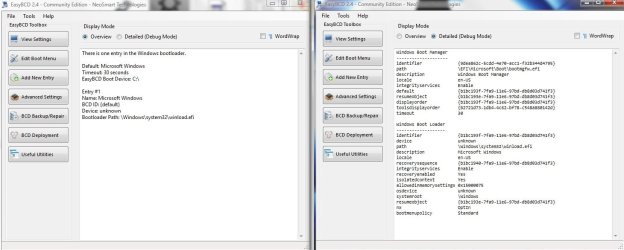
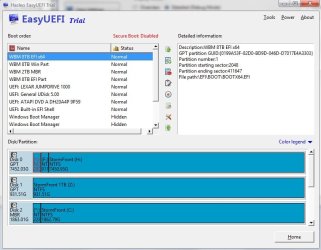
Tried it but it didn't work. I got an error of 0xc0000225 which from what I can find is a problem with the configuration files of some sort. It said hit enter to continue or exit so I continued and it booted into the same way it was last time with "boot" on the old MBR drive and "system" on the new GPT drive.
It seems like it's starting the boot on the GPT drive and then throwing it to the MBR drive.
This is what I'm seeing in the different programs I'm using.....
EZ BCD
EasyUEFI
DiskGenius
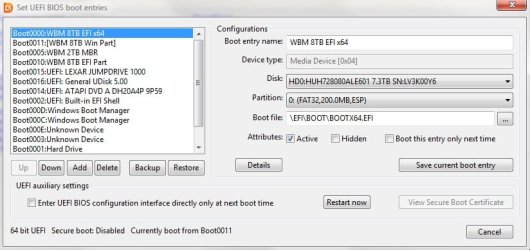
Windows Disk Management
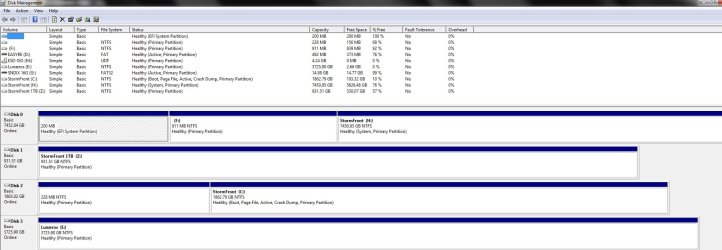
It seems like it's starting the boot on the GPT drive and then throwing it to the MBR drive.
This is what I'm seeing in the different programs I'm using.....
EZ BCD
EasyUEFI
DiskGenius
Windows Disk Management
My Computer
- Computer type
- PC/Desktop
- OS
- Windows 7 Ultimate x64
- Local time
- 8:45 AM
- Messages
- 43
D03P?
I tired adding an entry for it before and it gave me 2 entries but somehow it still didn't boot right. I think it was still putting the boot and system on different drive.
I'll try it again though
I tired adding an entry for it before and it gave me 2 entries but somehow it still didn't boot right. I think it was still putting the boot and system on different drive.
I'll try it again though
My Computer
- Computer type
- PC/Desktop
- OS
- Windows 7 Ultimate x64
D0P3. Disk 0 Partition 3, Volume H.D03P?
My Computer
- Computer type
- PC/Desktop
- OS
- Windows 7 Home Premium
Similar threads
- Replies
- 0
- Views
- 7K
- Replies
- 0
- Views
- 1K
- Replies
- 1
- Views
- 639

- Replies
- 0
- Views
- 431