Display Language Packs - Install and Uninstall

How to Install and Uninstall Display Languages in Windows 7 Ultimate and Enterprise

   Information
This will show you how to install and uninstall a Language Interface Pack (LIP) in the Windows 7 Ultimate and Windows 7 Enterprise editions. These can be used to change the display language Windows 7 uses to display text in wizards, dialog boxes, menus, and other items in the user interface.

By default Windows 7 uses the language selected during it's installation.
   Note
When you install a language pack and change the display language to it, this will also automatically add a keyboard input language for this language in the Language bar.


OPTION ONE

Install a Language Pack (LIP)


1. Open the Control Panel (icon view), and click on the Windows Update icon.
A) Go to step 3.
OR

2. Open the Control Panel (icon view), and click on the Region and Language icon.
A) Click on the Keyboards and Languages tab, then click on the Install/uninstall languages button. (see screenshot below)
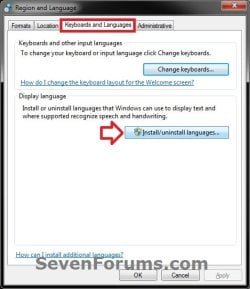
Install-1-UAC.jpg
B) If prompted by UAC, click on Yes (if administrator) or type in the administrator's password (if standard user).

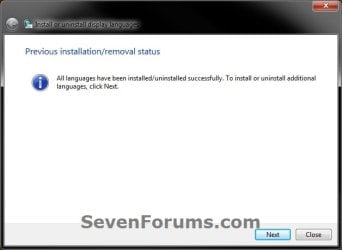
C) If you see this screen, click on Next. (see screenshot below)
Install-2.jpg
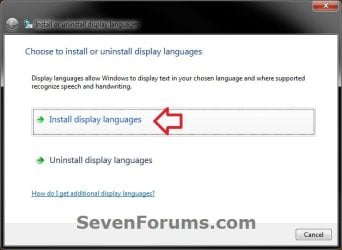
D) Click on Install display languages. (see screenshot below)
Install-3.jpg
E) Click on Launch Windows Update. (see screenshot below)
Install-4.jpg
3. In Windows Update, click on the view optional updates are available link. (see screenshot below)
NOTE: If you do not see this link, then click on the Check for updates link.
Step1.jpg
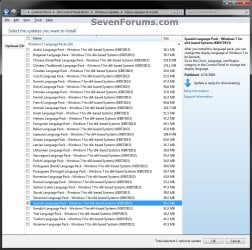
4. Select and check the language pack(s) that you want to install, then click on OK. (see screenshot below)
NOTE: If the language packs are missing and not hidden, then resetting the Windows Update history will also restore the default language packs in Windows 7 Ultimate and Enterprise editions after you Check for updates next after resetting.
Step2.jpg
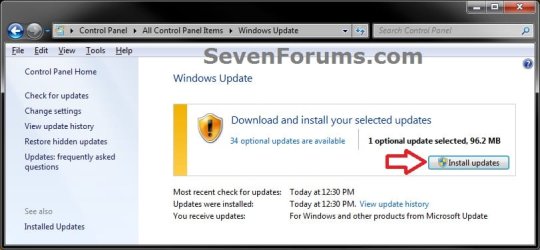
5. Click on the Install updates button. (see screenshot below)
Step3-UAC.jpg
6. If prompted by UAC, click on Yes (if administrator) or type in the administrator's password (if standard user).

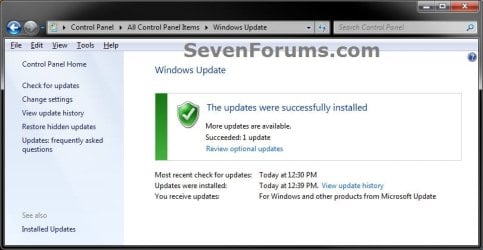
7. When finished downloading and installing, you can close Windows Update. (see screenshot below)
Step5.jpg
8. You will now be able to use the installed language pack(s) to change the display language with.


OPTION TWO

Uninstall a Language Pack (LIP)


NOTE: You will need to make sure that you do not have the same display language set to the language pack that you want to uninstall. If it is, then you will need to change the display language to another language first.
1. Open the Control Panel (icon view), and click on the Region and Language icon.

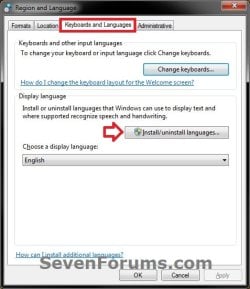
2. Click on the Keyboards and Languages tab, then click on the Install/uninstall languages button. (see screenshot below)
Uninstall-1-UAC.jpg
3. If prompted by UAC, click on Yes (if administrator) or type in the administrator's password (if standard user).

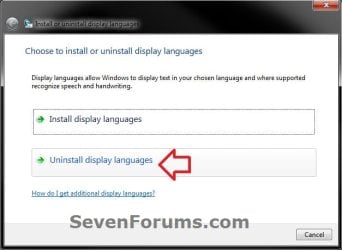
4. Click on Uninstall display languages. (see screenshot below).
Uninstall-2.jpg
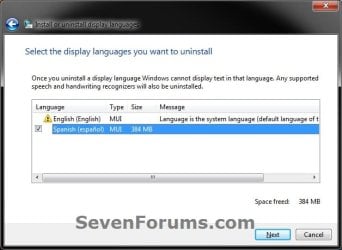
5. Select and check the language pack(s) that you want to uninstall, then click on Next. (see screenshot below)
NOTE: You will not be able to uninstall a language pack that is set as your current default display language.
Uninstall-3.jpg
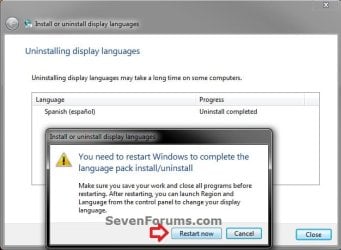
6. When finished uninstalling, click on Restart now. (see screenshot below)
WARNING: This will restart the computer immediately. Be sure to save and close all work and open programs first.
Uninstall-5.jpg
That's it,
Shawn


Last edited:
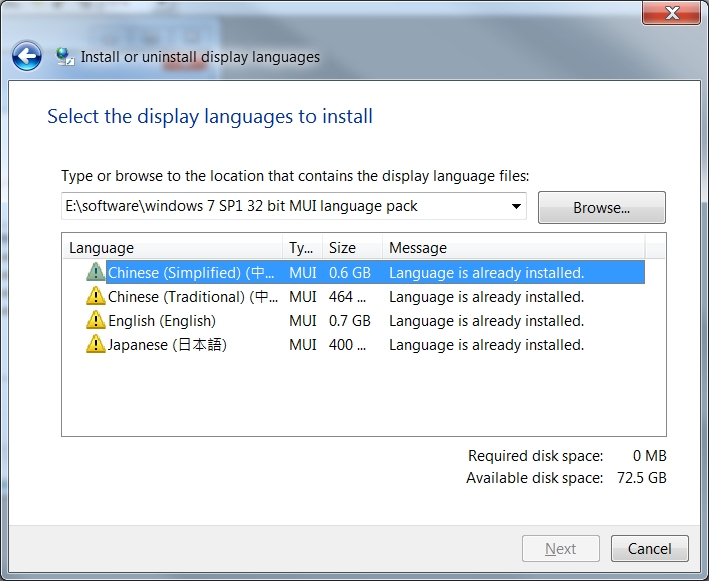
install.jpg


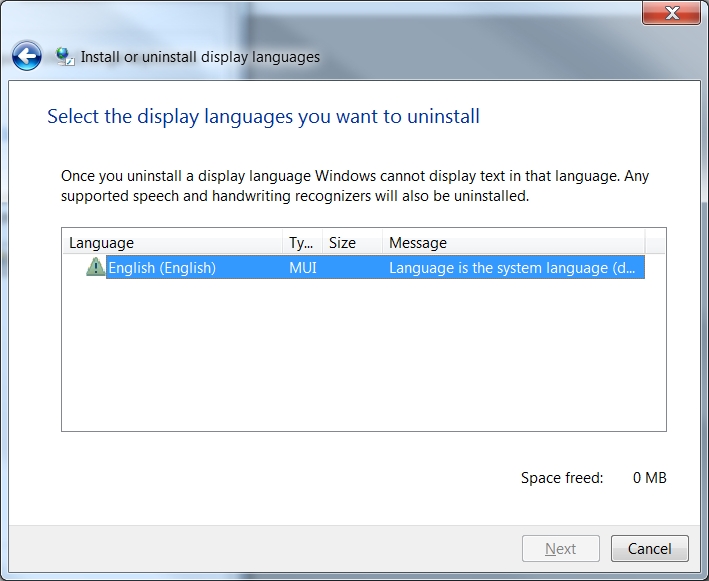
uninstall.jpg


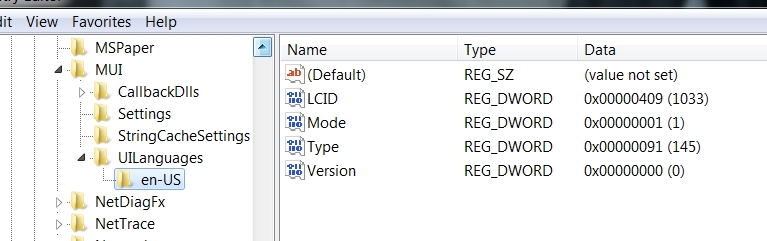
registry%2BMUI.jpg


strange scenario!
installed language packs don't appear in the uninstall list
couldn't install or uninstall language packs (MUI)
a screenshot of the registry attached for reference
any suggestions how to force uninstall already installed language packs and start all over again?

William
Hongkong
1 August 2012
 

My Computer My Computer

OS
windows 7 ultimate
Hello William,

I noticed in your first screenshot to install, that you manually browsed to a locaton on E. Did you install those language packs using the same method in OPTION ONE? If not, then you might see if you may be able to install them using this method instead.

Do you have the Choose a display language drop down menu in the screenshot under step 2 of OPTION TWO, and are the missing installed languages listed here?
 

My Computer My Computer

Computer type
PC/Desktop
Computer Manufacturer/Model Number
Self built custom
OS
64-bit Windows 11 Pro for Workstations
CPU
Intel i7-8700K OC'd to 5 GHz
Motherboard
ASUS ROG Maximus XI Formula Z390
Memory
64 GB (4x16GB) G.SKILL TridentZ RGB DDR4 3600 MHz
Graphics Card(s)
ASUS ROG-STRIX-GTX1080TI-O11G-GAMING
Sound Card
Integrated
Monitor(s) Displays
2 x Samsung Odyssey G7 27"
Screen Resolution
2560x1440
Hard Drives
1TB Samsung 990 PRO M.2,
4TB Samsung 990 PRO PRO M.2,
TerraMaster F8 SSD Plus NAS
PSU
Seasonic Prime Titanium 850W
Case
Thermaltake Core P3
Cooling
Corsair Hydro H115i
Keyboard
Logitech wireless K800
Mouse
Logitech MX Master 4
Internet Speed
2 Gb/s Download and 100 Mb/s Upload
Antivirus
Malwarebyte Anti-Malware Premium
Browser
Google Chrome
Other Info
Logitech Z625 speaker system,
Logitech BRIO 4K Pro webcam,
HP Color LaserJet Pro MFP M477fdn,
APC SMART-UPS RT 1000 XL - SURT1000XLI,
Galaxy S23 Plus phone
Hello William,

I noticed in your first screenshot to install, that you manually browsed to a locaton on E. Did you install those language packs using the same method in OPTION ONE? If not, then you might see if you may be able to install them using this method instead.

Do you have the Choose a display language drop down menu in the screenshot under step 2 of OPTION TWO, and are the missing installed languages listed here?

thankyou for your reply

i solved the problem

i for some reason deleted the thing under "UIlanguages" so all the language pack references except en-us are gone

i imported back that .reg thing

all came back

========================
Windows Registry Editor Version 5.00

[HKEY_LOCAL_MACHINE\SYSTEM\CurrentControlSet\Control\MUI\UILanguages]

[HKEY_LOCAL_MACHINE\SYSTEM\CurrentControlSet\Control\MUI\UILanguages\en-US]
"LCID"=dword:00000409
"Type"=dword:00000091
"Version"=dword:00000000
"Mode"=dword:00000001

[HKEY_LOCAL_MACHINE\SYSTEM\CurrentControlSet\Control\MUI\UILanguages\ja-JP]
"LCID"=dword:00000411
"Type"=dword:00000091

[HKEY_LOCAL_MACHINE\SYSTEM\CurrentControlSet\Control\MUI\UILanguages\zh-CN]
"LCID"=dword:00000804
"DefaultFallback"="en-US"
"en-US"=hex(7):00,00,00,00
"Type"=dword:00000092

[HKEY_LOCAL_MACHINE\SYSTEM\CurrentControlSet\Control\MUI\UILanguages\zh-HK]
"LCID"=dword:00000c04
"DefaultFallback"="zh-TW"
"zh-TW"=hex(7):65,00,6e,00,2d,00,55,00,53,00,00,00,00,00
"Type"=dword:00000092

[HKEY_LOCAL_MACHINE\SYSTEM\CurrentControlSet\Control\MUI\UILanguages\zh-TW]
"DefaultFallback"="en-US"
"en-US"=hex(7):
"LCID"=dword:00000404
"Type"=dword:00000112
===========================


My Computer My Computer

OS
windows 7 ultimate
Ah, perfect. Good thing you kept the exported .reg file for this.
 

My Computer My Computer

Computer type
PC/Desktop
Computer Manufacturer/Model Number
Self built custom
OS
64-bit Windows 11 Pro for Workstations
CPU
Intel i7-8700K OC'd to 5 GHz
Motherboard
ASUS ROG Maximus XI Formula Z390
Memory
64 GB (4x16GB) G.SKILL TridentZ RGB DDR4 3600 MHz
Graphics Card(s)
ASUS ROG-STRIX-GTX1080TI-O11G-GAMING
Sound Card
Integrated
Monitor(s) Displays
2 x Samsung Odyssey G7 27"
Screen Resolution
2560x1440
Hard Drives
1TB Samsung 990 PRO M.2,
4TB Samsung 990 PRO PRO M.2,
TerraMaster F8 SSD Plus NAS
PSU
Seasonic Prime Titanium 850W
Case
Thermaltake Core P3
Cooling
Corsair Hydro H115i
Keyboard
Logitech wireless K800
Mouse
Logitech MX Master 4
Internet Speed
2 Gb/s Download and 100 Mb/s Upload
Antivirus
Malwarebyte Anti-Malware Premium
Browser
Google Chrome
Other Info
Logitech Z625 speaker system,
Logitech BRIO 4K Pro webcam,
HP Color LaserJet Pro MFP M477fdn,
APC SMART-UPS RT 1000 XL - SURT1000XLI,
Galaxy S23 Plus phone
language packs

I have a computer which has Windows 7 Professional installed but the system is in Polish. Going to settings and trying to change the language doesnt seem to work. As its the system language I need to change, is there a pack i can download?
 

My Computer My Computer

Computer Manufacturer/Model Number
Various desktops, laptops and network storage devices.
OS
Windows 7 32bit, Windows XP Pro., Ubunto.
Other Info
Also main desktop set up as dual boot with XP Pro and Win7 Pro 32bit.
I have a computer which has Windows 7 Professional installed but the system is in Polish. Going to settings and trying to change the language doesnt seem to work. As its the system language I need to change, is there a pack i can download?

Hello Mike, :-)

You can use option 2 in the tutorial below to change the System UI display language.

Display Language - Change
 

My Computer My Computer

Computer type
PC/Desktop
Computer Manufacturer/Model Number
Self built custom
OS
64-bit Windows 11 Pro for Workstations
CPU
Intel i7-8700K OC'd to 5 GHz
Motherboard
ASUS ROG Maximus XI Formula Z390
Memory
64 GB (4x16GB) G.SKILL TridentZ RGB DDR4 3600 MHz
Graphics Card(s)
ASUS ROG-STRIX-GTX1080TI-O11G-GAMING
Sound Card
Integrated
Monitor(s) Displays
2 x Samsung Odyssey G7 27"
Screen Resolution
2560x1440
Hard Drives
1TB Samsung 990 PRO M.2,
4TB Samsung 990 PRO PRO M.2,
TerraMaster F8 SSD Plus NAS
PSU
Seasonic Prime Titanium 850W
Case
Thermaltake Core P3
Cooling
Corsair Hydro H115i
Keyboard
Logitech wireless K800
Mouse
Logitech MX Master 4
Internet Speed
2 Gb/s Download and 100 Mb/s Upload
Antivirus
Malwarebyte Anti-Malware Premium
Browser
Google Chrome
Other Info
Logitech Z625 speaker system,
Logitech BRIO 4K Pro webcam,
HP Color LaserJet Pro MFP M477fdn,
APC SMART-UPS RT 1000 XL - SURT1000XLI,
Galaxy S23 Plus phone
Thanks but bear in mind I have win 7 pro not ultimate. Is that OK?
 

My Computer My Computer

Computer Manufacturer/Model Number
Various desktops, laptops and network storage devices.
OS
Windows 7 32bit, Windows XP Pro., Ubunto.
Other Info
Also main desktop set up as dual boot with XP Pro and Win7 Pro 32bit.
Thanks but bear in mind I have win 7 pro not ultimate. Is that OK?

You can give it a try to see if you may get lucky.
 

My Computer My Computer

Computer type
PC/Desktop
Computer Manufacturer/Model Number
Self built custom
OS
64-bit Windows 11 Pro for Workstations
CPU
Intel i7-8700K OC'd to 5 GHz
Motherboard
ASUS ROG Maximus XI Formula Z390
Memory
64 GB (4x16GB) G.SKILL TridentZ RGB DDR4 3600 MHz
Graphics Card(s)
ASUS ROG-STRIX-GTX1080TI-O11G-GAMING
Sound Card
Integrated
Monitor(s) Displays
2 x Samsung Odyssey G7 27"
Screen Resolution
2560x1440
Hard Drives
1TB Samsung 990 PRO M.2,
4TB Samsung 990 PRO PRO M.2,
TerraMaster F8 SSD Plus NAS
PSU
Seasonic Prime Titanium 850W
Case
Thermaltake Core P3
Cooling
Corsair Hydro H115i
Keyboard
Logitech wireless K800
Mouse
Logitech MX Master 4
Internet Speed
2 Gb/s Download and 100 Mb/s Upload
Antivirus
Malwarebyte Anti-Malware Premium
Browser
Google Chrome
Other Info
Logitech Z625 speaker system,
Logitech BRIO 4K Pro webcam,
HP Color LaserJet Pro MFP M477fdn,
APC SMART-UPS RT 1000 XL - SURT1000XLI,
Galaxy S23 Plus phone
Back
Top