Error 0xc0000005 after reinstall W7, can't find the problem.

Fleur

New member
Local time
5:38 PM
Messages
9
OS: Windows 7 Ultimate x64.
Computer: Desktop PC.
HDD: C: and D: logical partitions in 1 physical disk, E: in another physical disk.

Background to the problem:

I had a problem with photoshop bridge not working and decided to use a software to install drivers, DriverHub - free driver updater tool, it seemed to have some hardware drivers to install so i let it work.
After some minutes running i realized it might be a bad idea to use a third party software to mess with my drivers so i aborted the driver process and decided to re-install windows 7, just to be sure (and maybe it would fix the photoshop bridge error!).

The problem:

After reinstalling W7 i keep getting this problem all the time, many software (even from microsoft) give an error 0xc0000005 when try to run it from a folder saved on D: HDD:
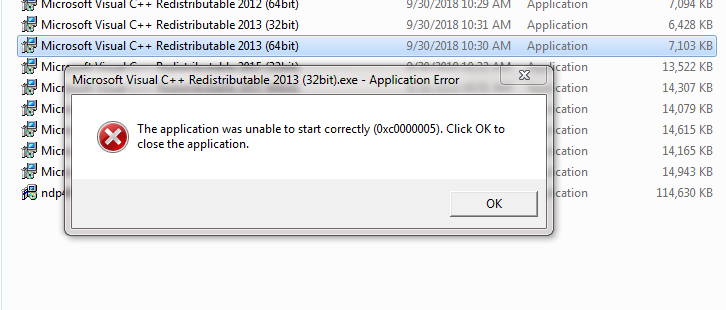
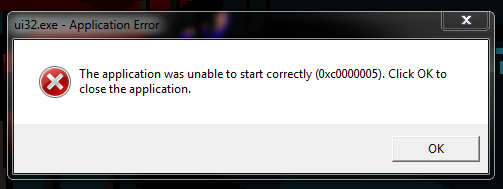

ZMB8d.png

wRmM1.png


If i re-download the exact same C++ redistributable, it WILL run NORMALLY BUT WHEN I TRIED RUNNING THIS AGAIN MINUTES LATER SUDDENLY I GOT AGAIN ERROR 0xc0000005!
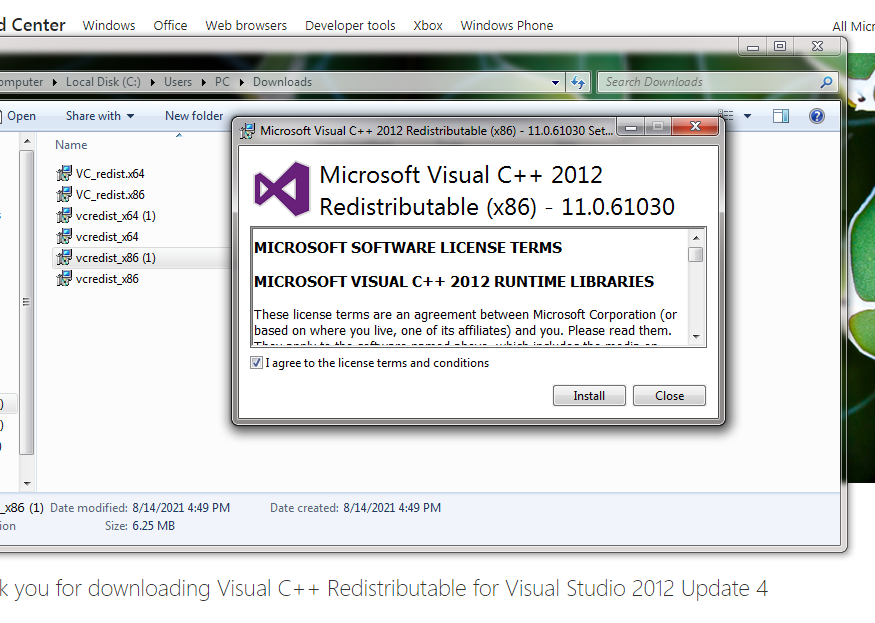

eJVFV.png

It worked and then minutes later it didn't!

Same with other software, Steam was running fine but i closed it and when tried to re-open it, it gave an error 0xc0000005 and refuses to open anymore.

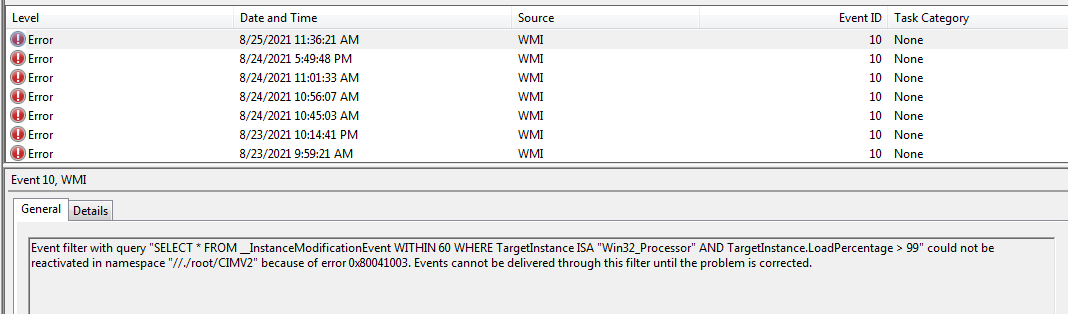
This is the message i get in the event viewer, i don't know what it is:


RvAUBwZ.png


Solutions i tried:


  • sfc /scannow to check errors on HDD, disk test passed with no errors.
  • Test ram memory with memtest86+, 5 pass and 0 errors.
  • Run W7 from a live USB, problem persists.
  • Install W7 in the other physical partition (E:), problem persists.
  • Did a disk error-checking for C: and D:, disk test passed with no errors.
  • Replaced CMOS battery with a new one in case it was a CMOS error, problem persists.
  • Installed W7 multiple times removing a RAM memory stick each time to see if one was damaged, the result was weird, sometimes i could run a software that could not run, but STILL there were 0xc0000005 errors.
  • Reinstalled windows 7 multiple times from multiple (clean) sources, even other versions like Windows 7 Ultimate N.
  • Tested processor with Intel processor diagnostic tool, ALL test passed, 0 errors.

Absolutely nothing worked.

A weird thing that happened was that sometimes when i left my PC testing something or idle and came back, the PC was shutdown. The event viewer said there was an unexpected shutdown.

Anyone knows what could the problem be?

I am between the RAM (because software somewhat ran after remove some sticks) or the PSU (because of shutdowns) or the MOBO itself, don't know how to test the last 2 or if they are related to the error , what would cause error 0xc0000005?
 

My Computers My Computers

System One System Two

  • Computer type
    PC/Desktop
    OS
    Windows 7 ultimate x64
  • Computer type
    PC/Desktop
Welcome to the Forum

Did you do a clean install (boot from a Win 7 installation drive and delete all partitions) or did you do a Repair install (run Win 7 setup from running windows)?

After installation, did you check Device manager to see if all drivers were installed and without a yellow alert?

What version of Photoshop are you installing? Is it compatible with win 7?

Is you Win 7 legally activated?

How to Fix 0xc0000005 Error in Windows - Driver Easy
 

My Computers My Computers

System One System Two

  • Computer type
    PC/Desktop
    Computer Manufacturer/Model Number
    custom build
    OS
    Windows 7 HP 64
    CPU
    i5 6600K - 800MHz to 4200MHz
    Motherboard
    GA-Z170-HD3P
    Memory
    4+4G GSkill DDR4 3000
    Graphics Card(s)
    IG - Intel 530
    Monitor(s) Displays
    Samsung 226BW
    Screen Resolution
    1680x1050
    Hard Drives
    (1) -1 SM951 – 128GB M.2 AHCI PCIe SSD drive for Windows 7 and Lubuntu
    (2) -1 WD SATA 3 - 1T for Data
    (3) -1 WD SATA 3 - 1T for backup
    PSU
    Thermaltake 450W TR2 gold
    Keyboard
    Old and good Chicony mechanical keyboard
    Mouse
    Logitech mX performance - 9 buttons (had to disable some)
    Internet Speed
    500Mb/s
    Browser
    Firefox 64
    Other Info
    TinyWall firewall
  • Computer type
    Laptop
    System Manufacturer/Model Number
    Asus Q550LF
    OS
    Windows 7 Pro
    CPU
    i7-4500U 800MHz to 3.0GHz
    Motherboard
    Asus Q550LF
    Memory
    (4+4)G DDR3 1600
    Graphics Card(s)
    IG intel 4400 + NVIDIA GeForce GT 745M
    Sound Card
    Realtek
    Monitor(s) Displays
    LG Display LP156WF4-SPH1
    Screen Resolution
    1920 x 1080
    Hard Drives
    BX500 120G SSD for Windows and programs +
    1T HDD for data
    Internet Speed
    500 Mb/s
    Browser
    Firefox
    Other Info
    TinyWall firewall
Did you do a clean install (boot from a Win 7 installation drive and delete all partitions) or did you do a Repair install (run Win 7 setup from running windows)?

Clean ones, when microsoft offered them.

Even did a hash check to make sure they were clean.
After installation, did you check Device manager to see if all drivers were installed and without a yellow alert?

I must have re-installed over 10 times trying to find an error, but yes, sometimes i checked while trying to find the problem but nothing unusual appeared.
What version of Photoshop are you installing? Is it compatible with win 7?
Not the first time i had installed photoshop, i was simply re-installing photoshop after a clean OS installation.
Is you Win 7 legally activated?
Yup.

Thanks for the link.
This was among the first links i found while trying to fix this, but it was not very helpful.

DEP cannot be disabled for microsoft software (such as C++ redistributables) and this guide starts from the premise your PC might have a virus in a long-time OS installation or you changed the RAM recently.

Also, i could not make this part of their solutions work:

del d:\windows\system32\xntkrnl.exedel d:\windows\system32\xosload.exe

del d:\windows\system32\drivers\oem-drv64.sys

attrib c:\boot\bcd -h -r -s

ren c:\boot\bcd bcd.old
bootrec /rebuildbcd

Even changing D: for C: it cannot find any of those files (i checked manually, they do not exist), nor bootrec /rebuildbcd

I wonder:

Could a PSU failure be the issue behind this 0xc0000005 error?
Could RAM failure be behind the random shutdowns when idle?

After about 10 days of troubleshooting and 10+ reinstallations of windows 7, those 2 are my prime suspects for the problem but do not know how to identify which is it.
 

My Computers My Computers

System One System Two

  • Computer type
    PC/Desktop
    OS
    Windows 7 ultimate x64
  • Computer type
    PC/Desktop

My Computers My Computers

System One System Two

  • Computer type
    PC/Desktop
    Computer Manufacturer/Model Number
    custom build
    OS
    Windows 7 HP 64
    CPU
    i5 6600K - 800MHz to 4200MHz
    Motherboard
    GA-Z170-HD3P
    Memory
    4+4G GSkill DDR4 3000
    Graphics Card(s)
    IG - Intel 530
    Monitor(s) Displays
    Samsung 226BW
    Screen Resolution
    1680x1050
    Hard Drives
    (1) -1 SM951 – 128GB M.2 AHCI PCIe SSD drive for Windows 7 and Lubuntu
    (2) -1 WD SATA 3 - 1T for Data
    (3) -1 WD SATA 3 - 1T for backup
    PSU
    Thermaltake 450W TR2 gold
    Keyboard
    Old and good Chicony mechanical keyboard
    Mouse
    Logitech mX performance - 9 buttons (had to disable some)
    Internet Speed
    500Mb/s
    Browser
    Firefox 64
    Other Info
    TinyWall firewall
  • Computer type
    Laptop
    System Manufacturer/Model Number
    Asus Q550LF
    OS
    Windows 7 Pro
    CPU
    i7-4500U 800MHz to 3.0GHz
    Motherboard
    Asus Q550LF
    Memory
    (4+4)G DDR3 1600
    Graphics Card(s)
    IG intel 4400 + NVIDIA GeForce GT 745M
    Sound Card
    Realtek
    Monitor(s) Displays
    LG Display LP156WF4-SPH1
    Screen Resolution
    1920 x 1080
    Hard Drives
    BX500 120G SSD for Windows and programs +
    1T HDD for data
    Internet Speed
    500 Mb/s
    Browser
    Firefox
    Other Info
    TinyWall firewall
How did you do the updates?

With windows updates.

However, every time i do a clean installation of windows, i run updates AFTER installing the basic stuff (graphic card drivers, C++ redistributables, dot net framework) and never had errors 0xc0000005 of any kind while installing that base software, until this time.

This time lots of software are broken no matter how many times i format the logical partition and re-install windows 7.

I think it's impossible...but maybe driverhub broke something? Drivers are normally installed on the windows partition (as far as i know, if not then that could totally be the problem) so format would solve it, but it's weird i am getting errors 0xc0000005 after i aborted it and re-installed W7.
 

My Computers My Computers

System One System Two

  • Computer type
    PC/Desktop
    OS
    Windows 7 ultimate x64
  • Computer type
    PC/Desktop
Try a repair install and use simplix for the updates. Don't let WU install anything you don't manually accept.
 

My Computers My Computers

System One System Two

  • Computer type
    PC/Desktop
    Computer Manufacturer/Model Number
    custom build
    OS
    Windows 7 HP 64
    CPU
    i5 6600K - 800MHz to 4200MHz
    Motherboard
    GA-Z170-HD3P
    Memory
    4+4G GSkill DDR4 3000
    Graphics Card(s)
    IG - Intel 530
    Monitor(s) Displays
    Samsung 226BW
    Screen Resolution
    1680x1050
    Hard Drives
    (1) -1 SM951 – 128GB M.2 AHCI PCIe SSD drive for Windows 7 and Lubuntu
    (2) -1 WD SATA 3 - 1T for Data
    (3) -1 WD SATA 3 - 1T for backup
    PSU
    Thermaltake 450W TR2 gold
    Keyboard
    Old and good Chicony mechanical keyboard
    Mouse
    Logitech mX performance - 9 buttons (had to disable some)
    Internet Speed
    500Mb/s
    Browser
    Firefox 64
    Other Info
    TinyWall firewall
  • Computer type
    Laptop
    System Manufacturer/Model Number
    Asus Q550LF
    OS
    Windows 7 Pro
    CPU
    i7-4500U 800MHz to 3.0GHz
    Motherboard
    Asus Q550LF
    Memory
    (4+4)G DDR3 1600
    Graphics Card(s)
    IG intel 4400 + NVIDIA GeForce GT 745M
    Sound Card
    Realtek
    Monitor(s) Displays
    LG Display LP156WF4-SPH1
    Screen Resolution
    1920 x 1080
    Hard Drives
    BX500 120G SSD for Windows and programs +
    1T HDD for data
    Internet Speed
    500 Mb/s
    Browser
    Firefox
    Other Info
    TinyWall firewall
Try a repair install and use simplix for the updates. Don't let WU install anything you don't manually accept.

Already did, the first thing i get when windows runs is the error 0xc0000005 because of steam, the C++ redistributables still give that error too.

At this point i am almost sure it is something driverhub did and somehow persisted through multiple W7 clean reinstallations

I remember clearly when i was running it that it installed some texas instruments driver before i aborted the process and made a clean installation of windows 7.

I open my device manager and what do i see? This:

ZJmwv8F.png

But it makes no sense, drivers are saved on windows partition, right? So a clean installation would have erased that faulty driverhub texas instruments driver.

Yet here i am, with ALL windows updates of simplix, a clean W7 installation and this error.

Is there a way i can manually download this driver so maybe i can fix it? Or revert all hardware driver changes to fabric even after multiple W7 installations?

When i press "scan for new hardware" option on the top of the window it is fixed, but it should not be broken in the first place.


If not that then a RAM failure or a PSU failure, but i am not sure which of the 3 could be.
 

Attachments

  • 1.PNG
    1.PNG
    4.2 KB · Views: 13

My Computers My Computers

System One System Two

  • Computer type
    PC/Desktop
    OS
    Windows 7 ultimate x64
  • Computer type
    PC/Desktop
Open Device Manager
Right click on the IEEE 1394
Select properties - Details tab
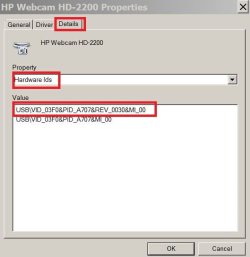
select hardware ID
select the first line, right click and copy
Paste it here and on GoogleHardwareID.JPG
 

My Computers My Computers

System One System Two

  • Computer type
    PC/Desktop
    Computer Manufacturer/Model Number
    custom build
    OS
    Windows 7 HP 64
    CPU
    i5 6600K - 800MHz to 4200MHz
    Motherboard
    GA-Z170-HD3P
    Memory
    4+4G GSkill DDR4 3000
    Graphics Card(s)
    IG - Intel 530
    Monitor(s) Displays
    Samsung 226BW
    Screen Resolution
    1680x1050
    Hard Drives
    (1) -1 SM951 – 128GB M.2 AHCI PCIe SSD drive for Windows 7 and Lubuntu
    (2) -1 WD SATA 3 - 1T for Data
    (3) -1 WD SATA 3 - 1T for backup
    PSU
    Thermaltake 450W TR2 gold
    Keyboard
    Old and good Chicony mechanical keyboard
    Mouse
    Logitech mX performance - 9 buttons (had to disable some)
    Internet Speed
    500Mb/s
    Browser
    Firefox 64
    Other Info
    TinyWall firewall
  • Computer type
    Laptop
    System Manufacturer/Model Number
    Asus Q550LF
    OS
    Windows 7 Pro
    CPU
    i7-4500U 800MHz to 3.0GHz
    Motherboard
    Asus Q550LF
    Memory
    (4+4)G DDR3 1600
    Graphics Card(s)
    IG intel 4400 + NVIDIA GeForce GT 745M
    Sound Card
    Realtek
    Monitor(s) Displays
    LG Display LP156WF4-SPH1
    Screen Resolution
    1920 x 1080
    Hard Drives
    BX500 120G SSD for Windows and programs +
    1T HDD for data
    Internet Speed
    500 Mb/s
    Browser
    Firefox
    Other Info
    TinyWall firewall
Open Device Manager
Right click on the IEEE 1394
Select properties - Details tab
select hardware ID
select the first line, right click and copy
Paste it here and on Google

Since i put "scan for hardware changes" on it, the texas instruments no longer shows the "!" icon. Maybe if i re-install W7 it will show with a "!" again? It might be worth to try it.

Strangely, IEEE it did not show at all in the device manager after putting "scan for hardware changes", i had to restart PC for it to show. Very weird.

Anyway here it is: VEN_104C&DEV_8023&SUBSYS_50448086&REV_00

I tried google but it's full of shady sites that trick you into downloading their "driver installer" tools.
 

My Computers My Computers

System One System Two

  • Computer type
    PC/Desktop
    OS
    Windows 7 ultimate x64
  • Computer type
    PC/Desktop
Try this driver
FirewireDriver

Extract to a folder.
Under device manager ask to update the driver. Browse to the folder where you expanded the drivers
 

My Computers My Computers

System One System Two

  • Computer type
    PC/Desktop
    Computer Manufacturer/Model Number
    custom build
    OS
    Windows 7 HP 64
    CPU
    i5 6600K - 800MHz to 4200MHz
    Motherboard
    GA-Z170-HD3P
    Memory
    4+4G GSkill DDR4 3000
    Graphics Card(s)
    IG - Intel 530
    Monitor(s) Displays
    Samsung 226BW
    Screen Resolution
    1680x1050
    Hard Drives
    (1) -1 SM951 – 128GB M.2 AHCI PCIe SSD drive for Windows 7 and Lubuntu
    (2) -1 WD SATA 3 - 1T for Data
    (3) -1 WD SATA 3 - 1T for backup
    PSU
    Thermaltake 450W TR2 gold
    Keyboard
    Old and good Chicony mechanical keyboard
    Mouse
    Logitech mX performance - 9 buttons (had to disable some)
    Internet Speed
    500Mb/s
    Browser
    Firefox 64
    Other Info
    TinyWall firewall
  • Computer type
    Laptop
    System Manufacturer/Model Number
    Asus Q550LF
    OS
    Windows 7 Pro
    CPU
    i7-4500U 800MHz to 3.0GHz
    Motherboard
    Asus Q550LF
    Memory
    (4+4)G DDR3 1600
    Graphics Card(s)
    IG intel 4400 + NVIDIA GeForce GT 745M
    Sound Card
    Realtek
    Monitor(s) Displays
    LG Display LP156WF4-SPH1
    Screen Resolution
    1920 x 1080
    Hard Drives
    BX500 120G SSD for Windows and programs +
    1T HDD for data
    Internet Speed
    500 Mb/s
    Browser
    Firefox
    Other Info
    TinyWall firewall
Try this driver
FirewireDriver
Extract to a folder.
Under device manager ask to update the driver. Browse to the folder where you expanded the drivers

Thanks for the link!

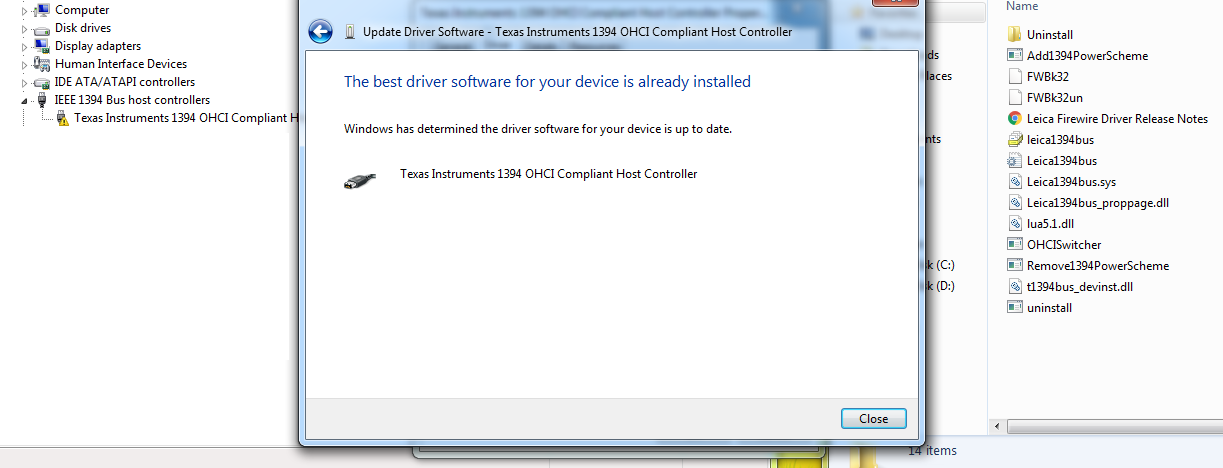
I tried it but was told that the drivers i had were already the latest, so i manually went and fixed it.

aOIjM4D.png


So, now i have these IEEE drivers you suggested installed instead of these ones, but it seems the main issue was not solved at all.

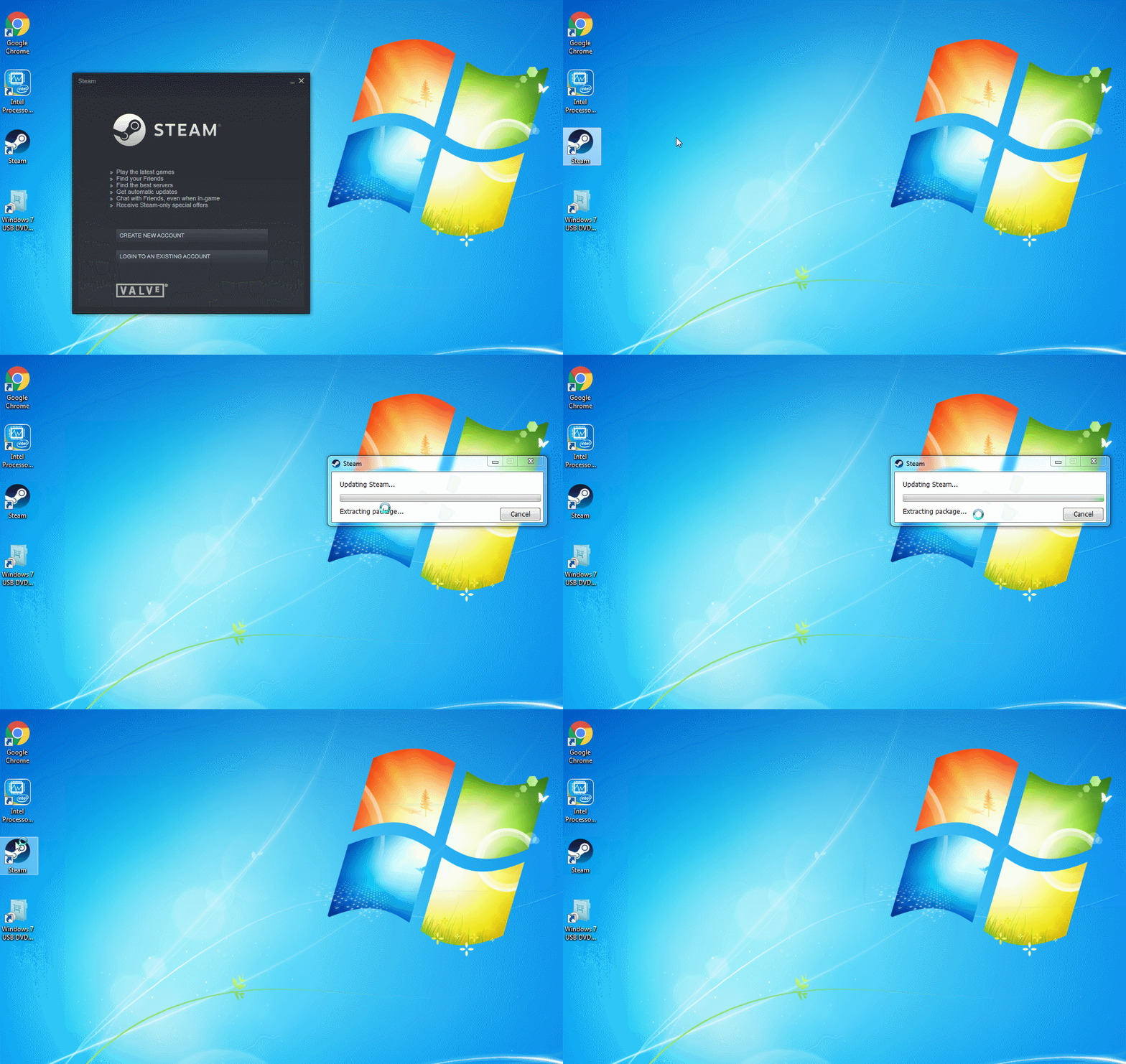
I was actually able to capture a gif of the problem, how steam was running, then i closed it and finally it was stuck in the annoying error 0xc0000005:

3hLb9H9.gif


This gif shows how unusual the problem is, 1 second is working the next second it is not.

One might think it's because i closed it while it was updating but that is NOT the case, it is the same with other 3rd party software AND microsoft software i open like C++ redistributables and software i open FOR THE FIRST TIME after reinstalling W7.

The ones i download and work one day, the next day when i try to open them they do not anymore!

I tried to clear the ram using a shortcut with the link "%windir%\system32\rundll32.exe advapi32.dll,ProcessIdleTasks" as seen on websites like these hoping the problem would be fixed, but it did not work: How to Clear Random Access Memory (RAM) in Windows | Techwalla

Now i truly wonder if it is a faulty ram or faulty PSU, i have no other possible suspects.
 

My Computers My Computers

System One System Two

  • Computer type
    PC/Desktop
    OS
    Windows 7 ultimate x64
  • Computer type
    PC/Desktop
I don't think you have a hardware (Mem or PSU) problem.
Is Steam or any other you installed win 7 compatible?
 

My Computers My Computers

System One System Two

  • Computer type
    PC/Desktop
    Computer Manufacturer/Model Number
    custom build
    OS
    Windows 7 HP 64
    CPU
    i5 6600K - 800MHz to 4200MHz
    Motherboard
    GA-Z170-HD3P
    Memory
    4+4G GSkill DDR4 3000
    Graphics Card(s)
    IG - Intel 530
    Monitor(s) Displays
    Samsung 226BW
    Screen Resolution
    1680x1050
    Hard Drives
    (1) -1 SM951 – 128GB M.2 AHCI PCIe SSD drive for Windows 7 and Lubuntu
    (2) -1 WD SATA 3 - 1T for Data
    (3) -1 WD SATA 3 - 1T for backup
    PSU
    Thermaltake 450W TR2 gold
    Keyboard
    Old and good Chicony mechanical keyboard
    Mouse
    Logitech mX performance - 9 buttons (had to disable some)
    Internet Speed
    500Mb/s
    Browser
    Firefox 64
    Other Info
    TinyWall firewall
  • Computer type
    Laptop
    System Manufacturer/Model Number
    Asus Q550LF
    OS
    Windows 7 Pro
    CPU
    i7-4500U 800MHz to 3.0GHz
    Motherboard
    Asus Q550LF
    Memory
    (4+4)G DDR3 1600
    Graphics Card(s)
    IG intel 4400 + NVIDIA GeForce GT 745M
    Sound Card
    Realtek
    Monitor(s) Displays
    LG Display LP156WF4-SPH1
    Screen Resolution
    1920 x 1080
    Hard Drives
    BX500 120G SSD for Windows and programs +
    1T HDD for data
    Internet Speed
    500 Mb/s
    Browser
    Firefox
    Other Info
    TinyWall firewall
I don't think you have a hardware (Mem or PSU) problem.

Why not?

Is there something that makes you think it might not be a faulty RAM or PSU?

I am not sure, but i have read that 0xc0000005 problem is memory related.


Is Steam or any other you installed win 7 compatible?

Yes, as you can see at the start of the gif, steam was opened, the second time opened it also worked (it was unpacking stuff), the third time was the dreaded 0xc0000005 error.

Same with C++ redistributables and Wallpaper engine, some of the software that give this error.

Like i mentioned, when i re-downloaded them/re-installed them they somewhat run, but they randomly suddenly give the 0xc0000005 error some time later.

I am not upgrading my PC OS to W7, i am simply doing a re-install so all my software is 100% W7 compatible.

I have absolutely no idea how could a software fail when it was working literally 3 seconds ago.
 

My Computers My Computers

System One System Two

  • Computer type
    PC/Desktop
    OS
    Windows 7 ultimate x64
  • Computer type
    PC/Desktop

My Computers My Computers

System One System Two

  • Computer type
    PC/Desktop
    Computer Manufacturer/Model Number
    custom build
    OS
    Windows 7 HP 64
    CPU
    i5 6600K - 800MHz to 4200MHz
    Motherboard
    GA-Z170-HD3P
    Memory
    4+4G GSkill DDR4 3000
    Graphics Card(s)
    IG - Intel 530
    Monitor(s) Displays
    Samsung 226BW
    Screen Resolution
    1680x1050
    Hard Drives
    (1) -1 SM951 – 128GB M.2 AHCI PCIe SSD drive for Windows 7 and Lubuntu
    (2) -1 WD SATA 3 - 1T for Data
    (3) -1 WD SATA 3 - 1T for backup
    PSU
    Thermaltake 450W TR2 gold
    Keyboard
    Old and good Chicony mechanical keyboard
    Mouse
    Logitech mX performance - 9 buttons (had to disable some)
    Internet Speed
    500Mb/s
    Browser
    Firefox 64
    Other Info
    TinyWall firewall
  • Computer type
    Laptop
    System Manufacturer/Model Number
    Asus Q550LF
    OS
    Windows 7 Pro
    CPU
    i7-4500U 800MHz to 3.0GHz
    Motherboard
    Asus Q550LF
    Memory
    (4+4)G DDR3 1600
    Graphics Card(s)
    IG intel 4400 + NVIDIA GeForce GT 745M
    Sound Card
    Realtek
    Monitor(s) Displays
    LG Display LP156WF4-SPH1
    Screen Resolution
    1920 x 1080
    Hard Drives
    BX500 120G SSD for Windows and programs +
    1T HDD for data
    Internet Speed
    500 Mb/s
    Browser
    Firefox
    Other Info
    TinyWall firewall

Thank you for the links!

The C++ were downloaded from there, all microsoft software is from microsoft and it runs fine...at the start.

Then when try to run them a day later it gives a 0xc0000005 error.

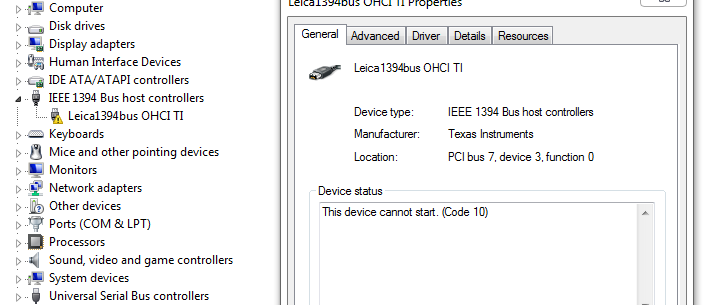
I noticed something weird, the new IEEE drivers are not working properly even if they were the previous day!

8rLXpLV.png


Something very interesting here, this is a code 10 error.

When a software gives the 0xc0000005 error, the event viewer shows it's a code 10 error.

4PkJQS9.png


If this is a freaky coincidence or if something is going on with the drivers, i do not know.
 

My Computers My Computers

System One System Two

  • Computer type
    PC/Desktop
    OS
    Windows 7 ultimate x64
  • Computer type
    PC/Desktop
Try to disable the IEEE driver
 

My Computers My Computers

System One System Two

  • Computer type
    PC/Desktop
    Computer Manufacturer/Model Number
    custom build
    OS
    Windows 7 HP 64
    CPU
    i5 6600K - 800MHz to 4200MHz
    Motherboard
    GA-Z170-HD3P
    Memory
    4+4G GSkill DDR4 3000
    Graphics Card(s)
    IG - Intel 530
    Monitor(s) Displays
    Samsung 226BW
    Screen Resolution
    1680x1050
    Hard Drives
    (1) -1 SM951 – 128GB M.2 AHCI PCIe SSD drive for Windows 7 and Lubuntu
    (2) -1 WD SATA 3 - 1T for Data
    (3) -1 WD SATA 3 - 1T for backup
    PSU
    Thermaltake 450W TR2 gold
    Keyboard
    Old and good Chicony mechanical keyboard
    Mouse
    Logitech mX performance - 9 buttons (had to disable some)
    Internet Speed
    500Mb/s
    Browser
    Firefox 64
    Other Info
    TinyWall firewall
  • Computer type
    Laptop
    System Manufacturer/Model Number
    Asus Q550LF
    OS
    Windows 7 Pro
    CPU
    i7-4500U 800MHz to 3.0GHz
    Motherboard
    Asus Q550LF
    Memory
    (4+4)G DDR3 1600
    Graphics Card(s)
    IG intel 4400 + NVIDIA GeForce GT 745M
    Sound Card
    Realtek
    Monitor(s) Displays
    LG Display LP156WF4-SPH1
    Screen Resolution
    1920 x 1080
    Hard Drives
    BX500 120G SSD for Windows and programs +
    1T HDD for data
    Internet Speed
    500 Mb/s
    Browser
    Firefox
    Other Info
    TinyWall firewall
Back
Top