Solved Windows 7 Service Pack 1 Windows Update Install?

Xp4me

New member
Member
Local time
5:35 AM
Messages
65
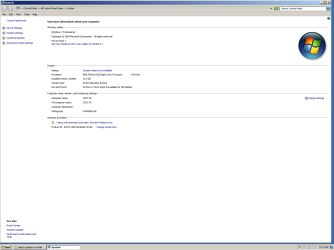
Just installed windows 7 64 bit Service Pack 1
Service pack 1.png

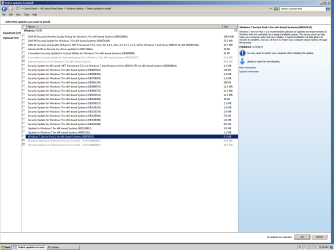
Now Windows Update wants me to install Service Pack 1........HUH!
Service Pack 1 Update.png

And this is after I also already installed Service Pack 2.....AKA Windows Update rollup to 2016. (KB3020369 and KB3125574)

What should I do, just ignore the update?
 

My Computer My Computer

Computer type
PC/Desktop
Computer Manufacturer/Model Number
Custom build
OS
XP 32 Bit & Win 7 64 Bit
CPU
FX 8350 AMD 8 - Core
Motherboard
Gigabyte 990FXA-UD5
Memory
Mushkin Silverline 8GB x2 16GB
Graphics Card(s)
MSI Twin Frozr Geforce GTX 660
Hard Drives
SSD Samsung SSD 840 EVO
HDD Seagate Barracuda ST3000DM001 3TB
Antivirus
Bitdefender Internet Security
Browser
Firefox
Install it.

Most importantly download and install KB4490628 at your earliest convenience. Windows Update will not readily offer this one.

2019 SHA-2 Code Signing Support requirement for Windows and WSUS

Why would I install Service Pack 1 over an the existing one that came preinstalled on the OS cd?

Microsoft is a total mess, I don't know what to do with that page you directed me to. There's no way for me to know which one of these to install for my computer. The one you mentioned is part of the first Stand Alone install, it shows two of them. The KB4474419 is ready for install thru my windows updates. They are showing several others that are for people who have Service Pack 2 installed.......which I do.
 

My Computer My Computer

Computer type
PC/Desktop
Computer Manufacturer/Model Number
Custom build
OS
XP 32 Bit & Win 7 64 Bit
CPU
FX 8350 AMD 8 - Core
Motherboard
Gigabyte 990FXA-UD5
Memory
Mushkin Silverline 8GB x2 16GB
Graphics Card(s)
MSI Twin Frozr Geforce GTX 660
Hard Drives
SSD Samsung SSD 840 EVO
HDD Seagate Barracuda ST3000DM001 3TB
Antivirus
Bitdefender Internet Security
Browser
Firefox
You do not have Service Pack 2 installed. Neither has anyone.
 

My Computer My Computer

Computer type
PC/Desktop
OS
Windows 7 Home Premium
You do not have Service Pack 2 installed. Neither has anyone.
Although there was no official SP2 for Windows 7 some people refer to the "convenience rollup" for Windows 7 as SP2.

If you only install Windows 7 with SP1 then Windows update does not work. The "convenience rollup" provides a quick way to update Windows 7 so Windows update works again.

Officially, Microsoft only released a single service pack for Windows 7 - Service Pack 1 was released to the public on February 22, 2011. However, despite promising that Windows 7 would only have one service pack, Microsoft decided to release a "convenience rollup" for Windows 7 in May 2016. This single package combines all previously released updates from the release of SP1 to April 2016. So even though Microsoft isn't calling this a service pack, for all intents and purposes, it serves as one.

This article will show you how to install the convenience update (SP2 for Windows 7).

How to obtain and install Windows 7 SP2
https://answers.microsoft.com/en-us...ws-7-sp2/c2c7009f-3a10-4199-9c89-48e1e883051e
 

My Computers My Computers

System One System Two

  • Computer type
    PC/Desktop
    Computer Manufacturer/Model Number
    Custom build
    OS
    Windows 7 Home Premium 64-bits
    CPU
    AMD FX-8350
    Motherboard
    Gigabyte GA-990FXA-UD3 (AM3+)
    Memory
    GSKILL Ripjaw-X PC3 12800 8GB (2x4GB)
    Graphics Card(s)
    ASUS ROG STRIX GTX 1060 6GB
    Sound Card
    Integrated
    Monitor(s) Displays
    Asus VE228H (21.5-in)
    Screen Resolution
    1920x1080 60Hz
    Hard Drives
    SAMSUNG 870 EVO 2.5 Inch SATA SSD (1TB)
    SAMSUNG 870 EVO 2.5 Inch SATA SSD (1TB)
    SAMSUNG 870 EVO 2.5 Inch SATA SSD (1TB)
    PSU
    Corsair RM750x (750 watts)
    Case
    Corsair Carbide Series 200R
    Cooling
    Corsair Hydro Series H60 (CWCH60)
    Keyboard
    Logitech Elite
    Mouse
    Logitech M510 Wireless Mouse
    Internet Speed
    Comcast Gigabit Extra (1200Mbps down / 35Mbps up)
    Antivirus
    Malwarebytes
    Browser
    Firefox, Edge, Chrome
    Other Info
    ASUS DRW-24B1ST DVD-RW (24X) optical drive
    Seagate Expansion Desk (5TB) external SATA/USB HDD
    Comcast XB8 Internet Gateway
  • Computer type
    PC/Desktop
    System Manufacturer/Model Number
    Custom
    OS
    Windows 7 Pro (64-bit)
    CPU
    AMD Phenom II 960T X4
    Motherboard
    ASUS M4N82 Deluxe
    Memory
    Corsair XMS2 DDR2-800 8GB (4x2GB)
    Graphics Card(s)
    ASUS ENGTX560 DCII OC/2DI/1GD5 1GB
    Monitor(s) Displays
    Samsung 930B 19-inch LCD
    Screen Resolution
    1280x1024
    Hard Drives
    Samsung SSD 870 EVO 1000 GB (Windows 10)
    Seagate ST1000DM003 1000 GB (Windows 7)
    PSU
    Antec TruePower (new) TP-650
    Case
    Antec Three Hundred
    Cooling
    AMD stock cooler from FX8350
    Mouse
    Logitech M100
    Internet Speed
    Xfinity Gigabit Extra 1200/35 Mbps
The "convenience rollup" provides a quick way to update Windows 7 so Windows update works again.
That's at the cost of 912 MB and a prerequisite. The quick path to Windows Update working is KB3138612:

3 MB.PNG

3 MB straight.
 

My Computer My Computer

Computer type
PC/Desktop
OS
Windows 7 Home Premium
That's at the cost of 912 MB and a prerequisite. The quick path to Windows Update working is KB3138612:

View attachment 420872

3 MB straight.
The difference is in time. If you do it your way you will get the same updates as the rollup but it may take weeks to get there. If you run the rollup you will have installed five years worth of updates all at one time.

Its like saying I am going to skip Windows 7 SP1 and let the normal updates take care of the updates. Its that a big update like SP1 or the rollup saves a person a lot of time.
 

My Computers My Computers

System One System Two

  • Computer type
    PC/Desktop
    Computer Manufacturer/Model Number
    Custom build
    OS
    Windows 7 Home Premium 64-bits
    CPU
    AMD FX-8350
    Motherboard
    Gigabyte GA-990FXA-UD3 (AM3+)
    Memory
    GSKILL Ripjaw-X PC3 12800 8GB (2x4GB)
    Graphics Card(s)
    ASUS ROG STRIX GTX 1060 6GB
    Sound Card
    Integrated
    Monitor(s) Displays
    Asus VE228H (21.5-in)
    Screen Resolution
    1920x1080 60Hz
    Hard Drives
    SAMSUNG 870 EVO 2.5 Inch SATA SSD (1TB)
    SAMSUNG 870 EVO 2.5 Inch SATA SSD (1TB)
    SAMSUNG 870 EVO 2.5 Inch SATA SSD (1TB)
    PSU
    Corsair RM750x (750 watts)
    Case
    Corsair Carbide Series 200R
    Cooling
    Corsair Hydro Series H60 (CWCH60)
    Keyboard
    Logitech Elite
    Mouse
    Logitech M510 Wireless Mouse
    Internet Speed
    Comcast Gigabit Extra (1200Mbps down / 35Mbps up)
    Antivirus
    Malwarebytes
    Browser
    Firefox, Edge, Chrome
    Other Info
    ASUS DRW-24B1ST DVD-RW (24X) optical drive
    Seagate Expansion Desk (5TB) external SATA/USB HDD
    Comcast XB8 Internet Gateway
  • Computer type
    PC/Desktop
    System Manufacturer/Model Number
    Custom
    OS
    Windows 7 Pro (64-bit)
    CPU
    AMD Phenom II 960T X4
    Motherboard
    ASUS M4N82 Deluxe
    Memory
    Corsair XMS2 DDR2-800 8GB (4x2GB)
    Graphics Card(s)
    ASUS ENGTX560 DCII OC/2DI/1GD5 1GB
    Monitor(s) Displays
    Samsung 930B 19-inch LCD
    Screen Resolution
    1280x1024
    Hard Drives
    Samsung SSD 870 EVO 1000 GB (Windows 10)
    Seagate ST1000DM003 1000 GB (Windows 7)
    PSU
    Antec TruePower (new) TP-650
    Case
    Antec Three Hundred
    Cooling
    AMD stock cooler from FX8350
    Mouse
    Logitech M100
    Internet Speed
    Xfinity Gigabit Extra 1200/35 Mbps
Although there was no official SP2 for Windows 7 some people refer to the "convenience rollup" for Windows 7 as SP2.

If you only install Windows 7 with SP1 then Windows update does not work. The "convenience rollup" provides a quick way to update Windows 7 so Windows update works again.


How to obtain and install Windows 7 SP2
https://answers.microsoft.com/en-us...ws-7-sp2/c2c7009f-3a10-4199-9c89-48e1e883051e

I'm having real problems trying to get Winn 7 Pro 64bit to reinstall without locking up/freezing after install. I'm probably going to have create a new thread though because one of the admins may say this is off subject from the Service Pack 2 issue.

Anyway, these are the steps that I do during the OS install. Start the OS cd > Delete all partitions> except new partition size> it creates 3 partitions 100bm System, 128mb MBR, and 467.7 Primary > I format the primary and then install the Gigabyte Sata driver from USB flash and hit GO to start the install.
When install is complete I reconnect my two internal storage drives where I have the install files for Service PK 2....AKA Windows Update Rollup to 2016. I install the prerequiste Windows6.1-KB3020369-x64 1st and then the actual rollup windows6.1-kb3125574-v4-x64.

I then do a restart and install drivers from from the Gigabyte MB cd. ( Realtek Lan Driver , Etron USB 3.0 Host Controller) I stopped installing the Gigabyte Chipset Drivers because when I try a little driver message pops up in the bottom right hand corner saying something about driver being faster. I've never been able to read it though because it disappears too quickly. I'm assuming it's telling me that the current Microsoft drivers are faster......not positive.

I do a restart, setup internet connection, install Firefox Browser, install Bitdefender Total Security and then let Windows Updates run and tell me which updates are available for download. I then install most of the Important drivers only. Restart and start using PC.
I immediately start getting hangups and freeze ups as I go thru my normal routine of installing my programs back onto the PC and then configuring and using Firefox. When something locks up I always try to go into Task Manager, sometimes it comes up and some times not, if not I have to push the start button and shut the PC down. When Task Manager does work sometimes the program is not responding and sometimes it is actually still running, but not responding to my clicks. Sometimes my internet stops working and when I check it shows (Limited access), but strength is excellent, usually followed by a message telling me that Windows Explorer is not responding, not Internet Explorer, Windows Explorer. Sometimes I'll just click on a drive to open it and I'll be looking at an hourglass for 10 minutes or have to power down again.
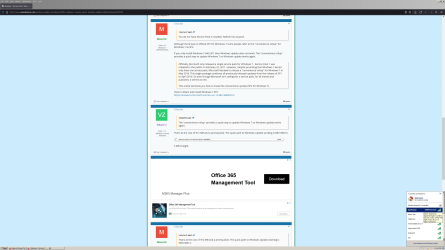
Limited internet access.png

Now, I have reinstall the OS on this SSD over a dozen times now trying to figure out what is going on so maybe the SSD is damaged at this point. Also, I'm wondering if the Service PK2 files that I have had saved on one of my storage drives for the past 4 or 5 years may have gotten corrupt. I went and downloaded the Service PK 2 files directly from the microsoft site this time just in case. This is what happened after I installed the prerequiste KB3020369 and then the rollup that I just downloaded from micrsoft. Looks like maybe their files are corrupt and who do you tell, they no longer support the OS.
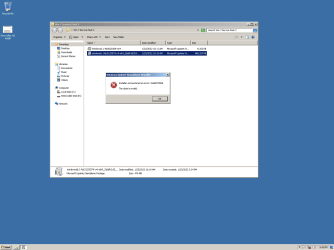
Error Service PK 2.png

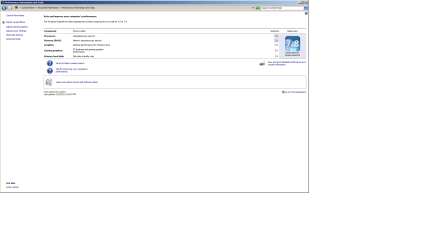
Maybe my Service PK 2 files are okay and it's a hardware issue. I ran the windows Performance Index test and CPU and Memory were always 7.8 , but now are at 7.7 so they are down by one point, but not enough to cause the issues that I've been having including this most recent Blue Screen Error message.......unless just maybe it's a Power Supply issue.
20220127_130649.jpg20220127_132626.jpg20220127_132831.jpg

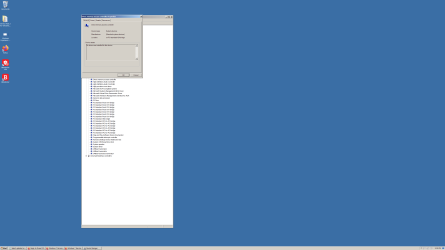
This is what Windows Event Viewer shows.......Holy cow! I noticed the AMD Sata, I'm not sure, but I think that just started showing after I installed Windows Update labeled: "Advanced Micro Devices, Inc driver update for AMD SMbus 3/31/2017"
Event Viewer.png


I also have a Blue Screen Mini Dump file saved, but have no idea how to open a .dmp file.

I'm at a loss, especially because I have this same OS from the same CD on another old SSD and just installed on same PC and used it for a whole day without any issues.....other than the same downgraded Performance Index results of 7.7 for CPU and Memory.

Any ideas would be extremely helpful,
Bruce
 

My Computer My Computer

Computer type
PC/Desktop
Computer Manufacturer/Model Number
Custom build
OS
XP 32 Bit & Win 7 64 Bit
CPU
FX 8350 AMD 8 - Core
Motherboard
Gigabyte 990FXA-UD5
Memory
Mushkin Silverline 8GB x2 16GB
Graphics Card(s)
MSI Twin Frozr Geforce GTX 660
Hard Drives
SSD Samsung SSD 840 EVO
HDD Seagate Barracuda ST3000DM001 3TB
Antivirus
Bitdefender Internet Security
Browser
Firefox
I'm having real problems trying to get Winn 7 Pro 64bit to reinstall without locking up/freezing after install. I'm probably going to have create a new thread though because one of the admins may say this is off subject from the Service Pack 2 issue.

Anyway, these are the steps that I do during the OS install. Start the OS cd > Delete all partitions> except new partition size> it creates 3 partitions 100bm System, 128mb MBR, and 467.7 Primary > I format the primary and then install the Gigabyte Sata driver from USB flash and hit GO to start the install.
When install is complete I reconnect my two internal storage drives where I have the install files for Service PK 2....AKA Windows Update Rollup to 2016. I install the prerequiste Windows6.1-KB3020369-x64 1st and then the actual rollup windows6.1-kb3125574-v4-x64.

I then do a restart and install drivers from from the Gigabyte MB cd. ( Realtek Lan Driver , Etron USB 3.0 Host Controller) I stopped installing the Gigabyte Chipset Drivers because when I try a little driver message pops up in the bottom right hand corner saying something about driver being faster. I've never been able to read it though because it disappears too quickly. I'm assuming it's telling me that the current Microsoft drivers are faster......not positive.

I do a restart, setup internet connection, install Firefox Browser, install Bitdefender Total Security and then let Windows Updates run and tell me which updates are available for download. I then install most of the Important drivers only. Restart and start using PC.
I immediately start getting hangups and freeze ups as I go thru my normal routine of installing my programs back onto the PC and then configuring and using Firefox. When something locks up I always try to go into Task Manager, sometimes it comes up and some times not, if not I have to push the start button and shut the PC down. When Task Manager does work sometimes the program is not responding and sometimes it is actually still running, but not responding to my clicks. Sometimes my internet stops working and when I check it shows (Limited access), but strength is excellent, usually followed by a message telling me that Windows Explorer is not responding, not Internet Explorer, Windows Explorer. Sometimes I'll just click on a drive to open it and I'll be looking at an hourglass for 10 minutes or have to power down again.


Now, I have reinstall the OS on this SSD over a dozen times now trying to figure out what is going on so maybe the SSD is damaged at this point. Also, I'm wondering if the Service PK2 files that I have had saved on one of my storage drives for the past 4 or 5 years may have gotten corrupt. I went and downloaded the Service PK 2 files directly from the microsoft site this time just in case. This is what happened after I installed the prerequiste KB3020369 and then the rollup that I just downloaded from micrsoft. Looks like maybe their files are corrupt and who do you tell, they no longer support the OS.

Maybe my Service PK 2 files are okay and it's a hardware issue. I ran the windows Performance Index test and CPU and Memory were always 7.8 , but now are at 7.7 so they are down by one point, but not enough to cause the issues that I've been having including this most recent Blue Screen Error message.......unless just maybe it's a Power Supply issue.

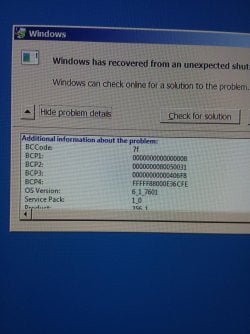
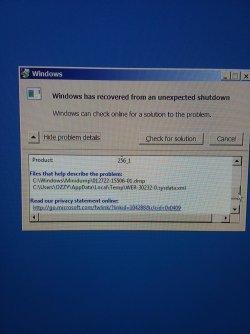
This is what Windows Event Viewer shows.......Holy cow! I noticed the AMD Sata, I'm not sure, but I think that just started showing after I installed Windows Update labeled: "Advanced Micro Devices, Inc driver update for AMD SMbus 3/31/2017"
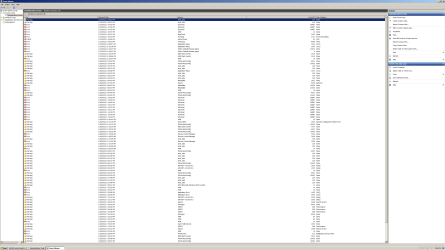
I also have a Blue Screen Mini Dump file saved, but have no idea how to open a .dmp file.
I'm at a loss, especially because I have this same OS from the same CD on another old SSD and just installed on same PC and used it for a whole day without any issues.....other than the same downgraded Performance Index results of 7.7 for CPU and Memory.

Any ideas would be extremely helpful,
Bruce

It seems you are doing a lot more work than I usually do. What I have been doing is
  • Boot Windows 7 with SP1
  • Delete all partitions
  • Let Windows 7 setup create any needed partitions
  • I then complete the installation of Windows 7
After 1st boot

  • I check Device Manager and note any devices not working
  • I install latest drivers from motherboard manufacturer website
  • I install latest graphic card driver
  • I check Device Manager again to make sure all devices are working
  • I then install the unofficial SP2 (prerequisite and rollup)
  • Once that is done I can then let Windows Update install any additional updates needed

Note I have done this with no problems on two different computers over the last four months.
 

My Computers My Computers

System One System Two

  • Computer type
    PC/Desktop
    Computer Manufacturer/Model Number
    Custom build
    OS
    Windows 7 Home Premium 64-bits
    CPU
    AMD FX-8350
    Motherboard
    Gigabyte GA-990FXA-UD3 (AM3+)
    Memory
    GSKILL Ripjaw-X PC3 12800 8GB (2x4GB)
    Graphics Card(s)
    ASUS ROG STRIX GTX 1060 6GB
    Sound Card
    Integrated
    Monitor(s) Displays
    Asus VE228H (21.5-in)
    Screen Resolution
    1920x1080 60Hz
    Hard Drives
    SAMSUNG 870 EVO 2.5 Inch SATA SSD (1TB)
    SAMSUNG 870 EVO 2.5 Inch SATA SSD (1TB)
    SAMSUNG 870 EVO 2.5 Inch SATA SSD (1TB)
    PSU
    Corsair RM750x (750 watts)
    Case
    Corsair Carbide Series 200R
    Cooling
    Corsair Hydro Series H60 (CWCH60)
    Keyboard
    Logitech Elite
    Mouse
    Logitech M510 Wireless Mouse
    Internet Speed
    Comcast Gigabit Extra (1200Mbps down / 35Mbps up)
    Antivirus
    Malwarebytes
    Browser
    Firefox, Edge, Chrome
    Other Info
    ASUS DRW-24B1ST DVD-RW (24X) optical drive
    Seagate Expansion Desk (5TB) external SATA/USB HDD
    Comcast XB8 Internet Gateway
  • Computer type
    PC/Desktop
    System Manufacturer/Model Number
    Custom
    OS
    Windows 7 Pro (64-bit)
    CPU
    AMD Phenom II 960T X4
    Motherboard
    ASUS M4N82 Deluxe
    Memory
    Corsair XMS2 DDR2-800 8GB (4x2GB)
    Graphics Card(s)
    ASUS ENGTX560 DCII OC/2DI/1GD5 1GB
    Monitor(s) Displays
    Samsung 930B 19-inch LCD
    Screen Resolution
    1280x1024
    Hard Drives
    Samsung SSD 870 EVO 1000 GB (Windows 10)
    Seagate ST1000DM003 1000 GB (Windows 7)
    PSU
    Antec TruePower (new) TP-650
    Case
    Antec Three Hundred
    Cooling
    AMD stock cooler from FX8350
    Mouse
    Logitech M100
    Internet Speed
    Xfinity Gigabit Extra 1200/35 Mbps
It seems you are doing a lot more work than I usually do. What I have been doing is
  • Boot Windows 7 with SP1
  • Delete all partitions
  • Let Windows 7 setup create any needed partitions
  • I then complete the installation of Windows 7
After 1st boot

  • I check Device Manager and note any devices not working
  • I install latest drivers from motherboard manufacturer website
  • I install latest graphic card driver
  • I check Device Manager again to make sure all devices are working
  • I then install the unofficial SP2 (prerequisite and rollup)
  • Once that is done I can then let Windows Update install any additional updates needed

Note I have done this with no problems on two different computers over the last four months.

Then there could be an issue with my hardware, that's also why I'm asking for help.

I'm really not doing anything different than you other than installing the Mother Board Sata Driver during install. I install Service pack two so at least I have some updated protection before connecting to the internet to download my security package.

The way that you're doing it, you have no windows updates installed at all or virus security before visiting websites to do download mother board drivers.

Are you getting the 2 files for Service pack 2 from a different location other than the Microsoft link that you provided earlier? I got them from there for the last install and you can see the error I get when trying to install those two files.

And I can't just let windows install ALL updates. You can see the AMD errors in Event Viewer that I've been getting ever since installing the Microsoft/AMD update dated 3/31/2017 with no actual KB number.
 

My Computer My Computer

Computer type
PC/Desktop
Computer Manufacturer/Model Number
Custom build
OS
XP 32 Bit & Win 7 64 Bit
CPU
FX 8350 AMD 8 - Core
Motherboard
Gigabyte 990FXA-UD5
Memory
Mushkin Silverline 8GB x2 16GB
Graphics Card(s)
MSI Twin Frozr Geforce GTX 660
Hard Drives
SSD Samsung SSD 840 EVO
HDD Seagate Barracuda ST3000DM001 3TB
Antivirus
Bitdefender Internet Security
Browser
Firefox
It seems you are doing a lot more work than I usually do. What I have been doing is
  • Boot Windows 7 with SP1
  • Delete all partitions
  • Let Windows 7 setup create any needed partitions
  • I then complete the installation of Windows 7
After 1st boot

  • I check Device Manager and note any devices not working
  • I install latest drivers from motherboard manufacturer website
  • I install latest graphic card driver
  • I check Device Manager again to make sure all devices are working
  • I then install the unofficial SP2 (prerequisite and rollup)
  • Once that is done I can then let Windows Update install any additional updates needed

Note I have done this with no problems on two different computers over the last four months.

I no longer think it's an install issue.
My PC is not using all of the memory, it's seeing it, but not using it. Processes are hanging, or running very slow. I'm getting total lockups and have to hold down the power button to shut it down. I'm also getting "limited access" error sometimes when using the internet, files are getting corrupt when transferring or downloading, and drives just don't open or take 5 minutes to load everything inside.
I ran the "Windows Memory Diagnostics tool" and says there's a hardware issue. If I remove two memory sticks and just run 1+2 or 3+4 I get error messages telling me I "don't have enough memory to complete the task". If I run the Windows Experience Index" with only two sticks the Hard Disk Score drops from 7.9 to 7.3
With 2 sticks of memory.png

I went looking in Device Manager and under "System" the "Direct Memory Access Controller" shows "No driver installed", but yet if I click on driver it shows "Microsoft 6/21/2006 driver" If I try to update it says, " the best driver is already installed. I had some people tell me theirs is setup the same way and they've never had any problems.

Can you please check to see how yours is set up?

I tried the memory sticks in all different configurations and still get the same results. Is it possible that a small electric current slightly damaged all 4 sticks?
I ordered 2 new memory sticks if they don't change anything I'll have to take it in for repairs.
 

My Computer My Computer

Computer type
PC/Desktop
Computer Manufacturer/Model Number
Custom build
OS
XP 32 Bit & Win 7 64 Bit
CPU
FX 8350 AMD 8 - Core
Motherboard
Gigabyte 990FXA-UD5
Memory
Mushkin Silverline 8GB x2 16GB
Graphics Card(s)
MSI Twin Frozr Geforce GTX 660
Hard Drives
SSD Samsung SSD 840 EVO
HDD Seagate Barracuda ST3000DM001 3TB
Antivirus
Bitdefender Internet Security
Browser
Firefox
I have the same driver for "Direct Memory Access Controller".

Download Memtest86+ and create a bootable flash drive. Boot the flash drive and run it on single RAM sticks and in pairs. If you have four RAM sticks run it with all of them also.

Let it run for at least four passes for each run. This will at least tell you if you have any RAM issues. This will take a while so be patient. Note that with 8GB (2x4GB) RAM one pass took about 47 minutes.

I just noticed you have 32GB RAM. I only have 8GB (2x4GB) RAM in my computer. Do you really need that much RAM? If some of your RAM is defective then you might consider just running with the RAM that is good.

Another thing is all the RAM from one kit? If not then mixing kits might cause stability problems.

BTW, I have another computer that started with 4GB (2x2GB) RAM. It was running Windows 7 32-bit. I added a second identical 4GB (2x2GB) RAM kit to bring the total to 8GB (4x2GB) RAM. I upgraded to Windows 7 64-bit. It is running stable but maybe I was just lucky.

The computer with the FX-8350 started out the same way. It also started with started with 4GB (2x2GB) RAM. It was running Windows 7 32-bit. I did not wanted to take any chances and replaced this RAM with 8GB (2x4GB) RAM before upgrading to Windows 7 64-bit.

Memtest86+
Memtest86+ - Advanced Memory Diagnostic Tool

-= Download (Pre-built & ISOs) =-
Memtest86+ - Advanced Memory Diagnostic Tool

Download - Auto-installer for USB Key (Win 7/8/10)

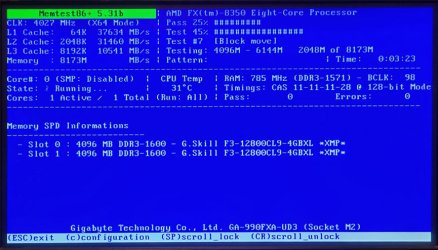
20220202_002820B.jpg

- - - Updated - - -

Update:
Memtest86+ is taking longer than I first expected. I let it run overnight. So far it has taken 9hr 50min to complete 5 passes. There were no errors. I expected that so I am aborting the tests.
 
Last edited:

My Computers My Computers

System One System Two

  • Computer type
    PC/Desktop
    Computer Manufacturer/Model Number
    Custom build
    OS
    Windows 7 Home Premium 64-bits
    CPU
    AMD FX-8350
    Motherboard
    Gigabyte GA-990FXA-UD3 (AM3+)
    Memory
    GSKILL Ripjaw-X PC3 12800 8GB (2x4GB)
    Graphics Card(s)
    ASUS ROG STRIX GTX 1060 6GB
    Sound Card
    Integrated
    Monitor(s) Displays
    Asus VE228H (21.5-in)
    Screen Resolution
    1920x1080 60Hz
    Hard Drives
    SAMSUNG 870 EVO 2.5 Inch SATA SSD (1TB)
    SAMSUNG 870 EVO 2.5 Inch SATA SSD (1TB)
    SAMSUNG 870 EVO 2.5 Inch SATA SSD (1TB)
    PSU
    Corsair RM750x (750 watts)
    Case
    Corsair Carbide Series 200R
    Cooling
    Corsair Hydro Series H60 (CWCH60)
    Keyboard
    Logitech Elite
    Mouse
    Logitech M510 Wireless Mouse
    Internet Speed
    Comcast Gigabit Extra (1200Mbps down / 35Mbps up)
    Antivirus
    Malwarebytes
    Browser
    Firefox, Edge, Chrome
    Other Info
    ASUS DRW-24B1ST DVD-RW (24X) optical drive
    Seagate Expansion Desk (5TB) external SATA/USB HDD
    Comcast XB8 Internet Gateway
  • Computer type
    PC/Desktop
    System Manufacturer/Model Number
    Custom
    OS
    Windows 7 Pro (64-bit)
    CPU
    AMD Phenom II 960T X4
    Motherboard
    ASUS M4N82 Deluxe
    Memory
    Corsair XMS2 DDR2-800 8GB (4x2GB)
    Graphics Card(s)
    ASUS ENGTX560 DCII OC/2DI/1GD5 1GB
    Monitor(s) Displays
    Samsung 930B 19-inch LCD
    Screen Resolution
    1280x1024
    Hard Drives
    Samsung SSD 870 EVO 1000 GB (Windows 10)
    Seagate ST1000DM003 1000 GB (Windows 7)
    PSU
    Antec TruePower (new) TP-650
    Case
    Antec Three Hundred
    Cooling
    AMD stock cooler from FX8350
    Mouse
    Logitech M100
    Internet Speed
    Xfinity Gigabit Extra 1200/35 Mbps
I have the same driver for "Direct Memory Access Controller".

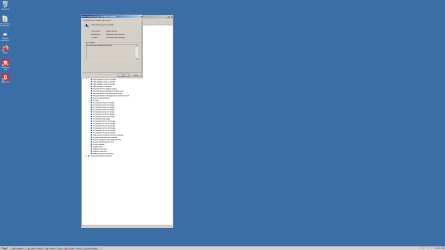
Mine says,"No Drivers Are Installed For This Device"
No Drivers Installed.png

I just noticed you have 32GB RAM. I only have 8GB (2x4GB) RAM in my computer. Do you really need that much RAM? If some of your RAM is defective then you might consider just running with the RAM that is good.

Yes, I had the PC built with (2x8GB) and later decided to add 2 more. I edit videos and when using the Timeline to edit it can use a lot of memory. Some of my videos are close to 20GB in size. As I said in the previous post, if I remove 2 sticks I get error messages telling me."You don't have enough memory to complete the task". I also tried moving them around/ different configurations......same result.

Another thing is all the RAM from one kit? If not then mixing kits might cause stability problems.
If you mean matched sets, no. Whenever I order memory they always send individual sticks, I can only tell them how many I want. https://www.amazon.com/Mushkin-9920...shkin+silverline+992074,electronics,48&sr=1-3
This PC was built with 2 and I added 2 about a year later, they worked fine together with a "Windows Experience Index"memory score of 7.8 for the past 7 yrs....... until now.


Memtest86+
Memtest86+ - Advanced Memory Diagnostic Tool

-= Download (Pre-built & ISOs) =-
Memtest86+ - Advanced Memory Diagnostic Tool

Download - Auto-installer for USB Key (Win 7/8/10)

View attachment 420918

- - - Updated - - -

Update:
Memtest86+ is taking longer than I first expected. I let it run overnight. So far it has taken 9hr 50min to complete 5 passes. There were no errors. I expected that so I am aborting the tests.

Yes, I read up on Memtest86+ a couple days ago and people were all saying that they had to let the test run over night. I think I'm going to try running just the 2 new sticks when they arrive to see how that plays out before running the long Memtest86+ test on the 4 old sticks.
I don't think it's a physical memory problem. I hope it is because it would be an easy fix. I think it has something to do with the way that the memory is being read/used by another component in the PC.

Thanks for sticking with me thru all this I really appreciate it.
 

My Computer My Computer

Computer type
PC/Desktop
Computer Manufacturer/Model Number
Custom build
OS
XP 32 Bit & Win 7 64 Bit
CPU
FX 8350 AMD 8 - Core
Motherboard
Gigabyte 990FXA-UD5
Memory
Mushkin Silverline 8GB x2 16GB
Graphics Card(s)
MSI Twin Frozr Geforce GTX 660
Hard Drives
SSD Samsung SSD 840 EVO
HDD Seagate Barracuda ST3000DM001 3TB
Antivirus
Bitdefender Internet Security
Browser
Firefox
Mine says,"No Drivers Are Installed For This Device"
View attachment 420920


Yes, I had the PC built with (2x8GB) and later decided to add 2 more. I edit videos and when using the Timeline to edit it can use a lot of memory. Some of my videos are close to 20GB in size. As I said in the previous post, if I remove 2 sticks I get error messages telling me."You don't have enough memory to complete the task". I also tried moving them around/ different configurations......same result.


If you mean matched sets, no. Whenever I order memory they always send individual sticks, I can only tell them how many I want. Amazon.com
This PC was built with 2 and I added 2 about a year later, they worked fine together with a "Windows Experience Index"memory score of 7.8 for the past 7 yrs....... until now.


Yes, I read up on Memtest86+ a couple days ago and people were all saying that they had to let the test run over night. I think I'm going to try running just the 2 new sticks when they arrive to see how that plays out before running the long Memtest86+ test on the 4 old sticks.
I don't think it's a physical memory problem. I hope it is because it would be an easy fix. I think it has something to do with the way that the memory is being read/used by another component in the PC.

Thanks for sticking with me thru all this I really appreciate it.


Well, installing the 2 new sticks of memory did not change anything. However, installing the Win 7 OS on a brand new SSD did seem to fix the problem. I'm now back to a good "Windows Experience Index" score and the PC is no longer freezing up on me.
Good Score Again.png

I also put all 4 of the old memory sticks back in and it's still running good. So there was nothing wrong with the memory or the way that Win 7 was being installed. Also, apparently, you don't need a driver for the "Direct Memory Access Controller".
No Drivers Installed.png

There must have just been something wrong with the old SSD.

Thanks for all your help "MisterEd"
 

My Computer My Computer

Computer type
PC/Desktop
Computer Manufacturer/Model Number
Custom build
OS
XP 32 Bit & Win 7 64 Bit
CPU
FX 8350 AMD 8 - Core
Motherboard
Gigabyte 990FXA-UD5
Memory
Mushkin Silverline 8GB x2 16GB
Graphics Card(s)
MSI Twin Frozr Geforce GTX 660
Hard Drives
SSD Samsung SSD 840 EVO
HDD Seagate Barracuda ST3000DM001 3TB
Antivirus
Bitdefender Internet Security
Browser
Firefox

My Computer My Computer

Computer type
PC/Desktop
Computer Manufacturer/Model Number
Custom build
OS
XP 32 Bit & Win 7 64 Bit
CPU
FX 8350 AMD 8 - Core
Motherboard
Gigabyte 990FXA-UD5
Memory
Mushkin Silverline 8GB x2 16GB
Graphics Card(s)
MSI Twin Frozr Geforce GTX 660
Hard Drives
SSD Samsung SSD 840 EVO
HDD Seagate Barracuda ST3000DM001 3TB
Antivirus
Bitdefender Internet Security
Browser
Firefox
Back
Top