Windows 7 in-place repair upgrade

fruh

New member
Local time
10:29 AM
Messages
9
Windows 7 OEM in-place repair upgrade (no disk)

Hi everyone. I have a Windows 7 SP1 pc with broken windows update (and probably much other stuff). I have the activation key, though the system didn't come with an installation CD or anything.

I've tried everything but the in-place repair upgrade thing so that's the next step. I want to stay on W7 but MS wisely decided not to provide W7 ISOs anymore. I have another (good and fully updated) W7 pc, is it possible to create an USB installation media from that pc to repair the first one?

I haven't found anything on the web (haven't had much time to do so), I hope someone here can tell me where to look. Thanks :)
 
Last edited:

My Computers My Computers

  • At a glance

    7 sp1
    OS
    7 sp1
  • Computer type
    PC/Desktop
What is the brand name and model name and model number and serial number of your broken PC?

What is the exact Windows version on its Certificate-Of-Authenticity sticker?

Is the Windows 7 in your good PC the same version (Home Premium, Professional, Ultimate, etc.) that is in your broken PC?
 

My Computer My Computer

At a glance

Windows 7 Professional SP1 64-bitIntel Core i7-4790 3.60 GHz32 GB DDR3-1600 MHzIntegrated Intel HD Graphics 4600
Computer type
PC/Desktop
Computer Manufacturer/Model Number
Dell OptiPlex 9020
OS
Windows 7 Professional SP1 64-bit
CPU
Intel Core i7-4790 3.60 GHz
Memory
32 GB DDR3-1600 MHz
Graphics Card(s)
Integrated Intel HD Graphics 4600
Monitor(s) Displays
Viewsonic 32" LCD
Hard Drives
Kingston SATA 3 240 GB SSD
Internet Speed
Spectrum Internet 1000 Mbps
What is the brand name and model name and model number and serial number of your broken PC? What is the exact Windows version on its Certificate-Of-Authenticity sticker?

Is the Windows 7 in your good PC the same version (Home Premium, Professional, Ultimate, etc.) that is in your broken PC?

The Windows 7 version is the same on both PCs of course.

The good PC is a Dell Vostro 1500 and the broken one is kind of a no name pre-assembled PC with off-the-shelf components (Asrock motherboard, first gen i3), of which the COA says "Windows 7 Home Premium - OEM Software"

I think I might be all right except for I don't really know where to download the tools to make the ISO needed for the in-place upgrade
 

My Computers My Computers

  • At a glance

    7 sp1
    OS
    7 sp1
  • Computer type
    PC/Desktop
What windows language language you're looking for?
I have Win7_SP1_English_x64 that I can give you a link.
 

My Computers My Computers

  • At a glance

    Windows 7 HP 64i5 6600K - 800MHz to 4200MHz4+4G GSkill DDR4 3000IG - Intel 530
    Computer type
    PC/Desktop
    Computer Manufacturer/Model Number
    custom build
    OS
    Windows 7 HP 64
    CPU
    i5 6600K - 800MHz to 4200MHz
    Motherboard
    GA-Z170-HD3P
    Memory
    4+4G GSkill DDR4 3000
    Graphics Card(s)
    IG - Intel 530
    Monitor(s) Displays
    Samsung 226BW
    Screen Resolution
    1680x1050
    Hard Drives
    (1) -1 SM951 – 128GB M.2 AHCI PCIe SSD drive for Windows 7 and Lubuntu
    (2) -1 WD SATA 3 - 1T for Data
    (3) -1 WD SATA 3 - 1T for backup
    PSU
    Thermaltake 450W TR2 gold
    Keyboard
    Old and good Chicony mechanical keyboard
    Mouse
    Logitech mX performance - 9 buttons (had to disable some)
    Internet Speed
    500Mb/s
    Browser
    Firefox 64
    Other Info
    TinyWall firewall
  • At a glance

    Windows 7 Proi7-4500U 800MHz to 3.0GHz(4+4)G DDR3 1600IG intel 4400 + NVIDIA GeForce GT 745M
    Computer type
    Laptop
    System Manufacturer/Model Number
    Asus Q550LF
    OS
    Windows 7 Pro
    CPU
    i7-4500U 800MHz to 3.0GHz
    Motherboard
    Asus Q550LF
    Memory
    (4+4)G DDR3 1600
    Graphics Card(s)
    IG intel 4400 + NVIDIA GeForce GT 745M
    Sound Card
    Realtek
    Monitor(s) Displays
    LG Display LP156WF4-SPH1
    Screen Resolution
    1920 x 1080
    Hard Drives
    BX500 120G SSD for Windows and programs +
    1T HDD for data
    Internet Speed
    500 Mb/s
    Browser
    Firefox
    Other Info
    TinyWall firewall
What windows language language you're looking for?
I have Win7_SP1_English_x64 that I can give you a link.

It's very kind of you, the current installation is in italian though

So you are telling me it's not possible to make an ISO from an existing W7 PC?
 

My Computers My Computers

  • At a glance

    7 sp1
    OS
    7 sp1
  • Computer type
    PC/Desktop

My Computers My Computers

  • At a glance

    Windows 7 HP 64i5 6600K - 800MHz to 4200MHz4+4G GSkill DDR4 3000IG - Intel 530
    Computer type
    PC/Desktop
    Computer Manufacturer/Model Number
    custom build
    OS
    Windows 7 HP 64
    CPU
    i5 6600K - 800MHz to 4200MHz
    Motherboard
    GA-Z170-HD3P
    Memory
    4+4G GSkill DDR4 3000
    Graphics Card(s)
    IG - Intel 530
    Monitor(s) Displays
    Samsung 226BW
    Screen Resolution
    1680x1050
    Hard Drives
    (1) -1 SM951 – 128GB M.2 AHCI PCIe SSD drive for Windows 7 and Lubuntu
    (2) -1 WD SATA 3 - 1T for Data
    (3) -1 WD SATA 3 - 1T for backup
    PSU
    Thermaltake 450W TR2 gold
    Keyboard
    Old and good Chicony mechanical keyboard
    Mouse
    Logitech mX performance - 9 buttons (had to disable some)
    Internet Speed
    500Mb/s
    Browser
    Firefox 64
    Other Info
    TinyWall firewall
  • At a glance

    Windows 7 Proi7-4500U 800MHz to 3.0GHz(4+4)G DDR3 1600IG intel 4400 + NVIDIA GeForce GT 745M
    Computer type
    Laptop
    System Manufacturer/Model Number
    Asus Q550LF
    OS
    Windows 7 Pro
    CPU
    i7-4500U 800MHz to 3.0GHz
    Motherboard
    Asus Q550LF
    Memory
    (4+4)G DDR3 1600
    Graphics Card(s)
    IG intel 4400 + NVIDIA GeForce GT 745M
    Sound Card
    Realtek
    Monitor(s) Displays
    LG Display LP156WF4-SPH1
    Screen Resolution
    1920 x 1080
    Hard Drives
    BX500 120G SSD for Windows and programs +
    1T HDD for data
    Internet Speed
    500 Mb/s
    Browser
    Firefox
    Other Info
    TinyWall firewall
I understand. Thank you for the link, I'll look into that. Damn if only I had found this method before MS retired the W7 ISO download page
 

My Computers My Computers

  • At a glance

    7 sp1
    OS
    7 sp1
  • Computer type
    PC/Desktop
fruh

Several members have Win7 ISOs, me included if you need to borrow a copy. You can also still download with Heidoc Windows-ISO-Downloader.exe, however only the Win7 August 2018 is the only working link.

Snick
 

My Computer My Computer

At a glance

Win 10 x64, Linux Lite, Win 7 x64, BlackArch,...
Computer type
PC/Desktop
Computer Manufacturer/Model Number
HP Desktop & Compaq Laptop
OS
Win 10 x64, Linux Lite, Win 7 x64, BlackArch, & Kali
Hard Drives
Samsung 850 Pro 256Gb,
Hitachi HDD 1Tb,
Crucial MX SSD 250Gb
Segate 3Tb USB 3.0 Ext. Backup HDD
Internet Speed
150Mbps dn, 20Mbps up
Antivirus
Avast Free, Malwarebytes Anti-Exploit & Anti-Ransomware
Browser
Firefox, Chrome, Opera, & VPN
fruh

Several members have Win7 ISOs, me included if you need to borrow a copy. You can also still download with Heidoc Windows-ISO-Downloader.exe, however only the Win7 August 2018 is the only working link.

Snick


Sorry for the late reply. It's very kind of you, I really appreciate it. My PC doesn't receive updates since way before than 2018 so it should be ok.

I'm still not sure about the OEM license thing since my PC doesn't even have a recovery partition so I don't really know if a regular license would work. I'll keep into consideration your suggestion anyway.

Maybe also WSUSoffline could be worth a try? Of course it's able to download the updates, though I dont' know if it would be able to install them still
 

My Computers My Computers

  • At a glance

    7 sp1
    OS
    7 sp1
  • Computer type
    PC/Desktop
fruh

You can run Magical Jellybean to retrieve your license key. It is a free program. you can also run a VBS script (essentially the same code) to decipher the hexadecimal key stored on your machine.
Snick
Magical Jellybean link

VBS Script:

Set WshShell = CreateObject("WScript.Shell")
MsgBox ConvertToKey(WshShell.RegRead("HKLM\SOFTWARE\Microsoft\Windows NT\CurrentVersion\DigitalProductId"))

Function ConvertToKey(Key)
Const KeyOffset = 52
i = 28
Chars = "BCDFGHJKMPQRTVWXY2346789"
Do
Cur = 0
x = 14
Do
Cur = Cur * 256
Cur = Key(x + KeyOffset) + Cur
Key(x + KeyOffset) = (Cur \ 24) And 255
Cur = Cur Mod 24
x = x -1
Loop While x >= 0
i = i -1
KeyOutput = Mid(Chars, Cur + 1, 1) & KeyOutput
If (((29 - i) Mod 6) = 0) And (i <> -1) Then
i = i -1
KeyOutput = "-" & KeyOutput
End If
Loop While i >= 0
ConvertToKey = KeyOutput
End Function
 

My Computer My Computer

At a glance

Win 10 x64, Linux Lite, Win 7 x64, BlackArch,...
Computer type
PC/Desktop
Computer Manufacturer/Model Number
HP Desktop & Compaq Laptop
OS
Win 10 x64, Linux Lite, Win 7 x64, BlackArch, & Kali
Hard Drives
Samsung 850 Pro 256Gb,
Hitachi HDD 1Tb,
Crucial MX SSD 250Gb
Segate 3Tb USB 3.0 Ext. Backup HDD
Internet Speed
150Mbps dn, 20Mbps up
Antivirus
Avast Free, Malwarebytes Anti-Exploit & Anti-Ransomware
Browser
Firefox, Chrome, Opera, & VPN
fruh

You can run Magical Jellybean to retrieve your license key. It is a free program. you can also run a VBS script (essentially the same code) to decipher the hexadecimal key stored on your machine.
Snick
Magical Jellybean link

End Function

Thanks for everything :)


As I've read from the Jellybean FAQ, since I have an OEM key, Jellybean may return a different key from the one I have on the sticker. Then would it work for the in-place repair upgrade?

Thanks again for your help
 

My Computers My Computers

  • At a glance

    7 sp1
    OS
    7 sp1
  • Computer type
    PC/Desktop
Theree are 3 kinds of normal Win 7 license (+ Enterprise and Education) .
- Retail - You buy on a store or supermarket to be used by you. Transferable to another computer
- OEM - For small computer builders. Not transferable to another computer.
- SLP - Comes on big computer builders like Dell. Not transferable to another computer.

The retail and OEM you set during installation and can be retrieved with little software like show key plus or LicenseCrawler.

The SLP is activated with a small file and a BIOS code. If your computer came with SLP you can save the activation file with ABR
You retrieve and save the activation file under the original Windows and then install and apply the activation file after the clean install.

To see what kind of license you have, run MGADiag
 
Last edited:

My Computers My Computers

  • At a glance

    Windows 7 HP 64i5 6600K - 800MHz to 4200MHz4+4G GSkill DDR4 3000IG - Intel 530
    Computer type
    PC/Desktop
    Computer Manufacturer/Model Number
    custom build
    OS
    Windows 7 HP 64
    CPU
    i5 6600K - 800MHz to 4200MHz
    Motherboard
    GA-Z170-HD3P
    Memory
    4+4G GSkill DDR4 3000
    Graphics Card(s)
    IG - Intel 530
    Monitor(s) Displays
    Samsung 226BW
    Screen Resolution
    1680x1050
    Hard Drives
    (1) -1 SM951 – 128GB M.2 AHCI PCIe SSD drive for Windows 7 and Lubuntu
    (2) -1 WD SATA 3 - 1T for Data
    (3) -1 WD SATA 3 - 1T for backup
    PSU
    Thermaltake 450W TR2 gold
    Keyboard
    Old and good Chicony mechanical keyboard
    Mouse
    Logitech mX performance - 9 buttons (had to disable some)
    Internet Speed
    500Mb/s
    Browser
    Firefox 64
    Other Info
    TinyWall firewall
  • At a glance

    Windows 7 Proi7-4500U 800MHz to 3.0GHz(4+4)G DDR3 1600IG intel 4400 + NVIDIA GeForce GT 745M
    Computer type
    Laptop
    System Manufacturer/Model Number
    Asus Q550LF
    OS
    Windows 7 Pro
    CPU
    i7-4500U 800MHz to 3.0GHz
    Motherboard
    Asus Q550LF
    Memory
    (4+4)G DDR3 1600
    Graphics Card(s)
    IG intel 4400 + NVIDIA GeForce GT 745M
    Sound Card
    Realtek
    Monitor(s) Displays
    LG Display LP156WF4-SPH1
    Screen Resolution
    1920 x 1080
    Hard Drives
    BX500 120G SSD for Windows and programs +
    1T HDD for data
    Internet Speed
    500 Mb/s
    Browser
    Firefox
    Other Info
    TinyWall firewall
Theree are 3 kinds of normal Win 7 license (+ Enterprise and Education) .
- Retail - You buy on a store or supermarket to be used by you. Transferable to another computer
- OEM - For small computer builders. Not transferable to another computer.
- SLP - Comes on big computer builders like Dell. Not transferable to another computer.

The retail and OEM you set during installation and can be retrieved with little software like show key plus or LicenseCrawler.

The SLP is activated with a small file and a BIOS code. If your computer came with SLP you can save the activation file with ABR
You retrieve and save the activation file under the original Windows and then install and apply the activation file after the clean install.

To see what kind of license you have, run MGADiag
:thumbsup:
 

My Computer My Computer

At a glance

Win 10 x64, Linux Lite, Win 7 x64, BlackArch,...
Computer type
PC/Desktop
Computer Manufacturer/Model Number
HP Desktop & Compaq Laptop
OS
Win 10 x64, Linux Lite, Win 7 x64, BlackArch, & Kali
Hard Drives
Samsung 850 Pro 256Gb,
Hitachi HDD 1Tb,
Crucial MX SSD 250Gb
Segate 3Tb USB 3.0 Ext. Backup HDD
Internet Speed
150Mbps dn, 20Mbps up
Antivirus
Avast Free, Malwarebytes Anti-Exploit & Anti-Ransomware
Browser
Firefox, Chrome, Opera, & VPN
Sorry for being absent for all this time, I have taken a look at all your interesting replies.

Just to recap, I have a W7 OEM licensed PC and I HAVE the key, though the system didn't come with the ISO disk or whatever. Since Microsoft's download pages have been shut down, how can I get an ISO that I can activate with the OEM license key I already have to do the in-place-repair-upgrade?

If I borrow a copy of W7 like from a member of this forum, will I be able to activate it with my OEM key?

Thanks to everyone who has helped :)
 
Last edited:

My Computers My Computers

  • At a glance

    7 sp1
    OS
    7 sp1
  • Computer type
    PC/Desktop
no name pre-assembled PC with off-the-shelf components (Asrock motherboard, first gen i3), of which the COA says "Windows 7 Home Premium - OEM Software"

will I be able to activate it with my OEM key

Yes.

Step 1

There is an easy way to backup the activation and drivers from your current system
:ar: SEE HERE

You can put them back on after a clean reinstall.


Step 2


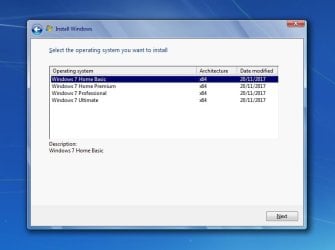
You can use ANY official MS win7 iso because they are the same apart from a little file in the sources folder called ei.cfg.

search internet for

X17-59465.iso

OR

en_windows_7_ultimate_with_sp1_x64_dvd_u_677332.iso

OR

X17-58997.iso

OR

en_windows_7_home_premium_with_sp1_x64_dvd_u_676549.iso


Delete the ei.cfg file from the sources folder and ALL editions will be offered during installation.

editions-win7.jpg

Obviously select the edition you have a license for.

Step 3

Suggest you get hold of an iso and Update it first.
Update your Win 7 installation media


Step 4

Then install your edition, skip entering the product key. After you reach the desktop put back the activation and drivers you backed up in step 1.
 
Last edited:

My Computers My Computers

  • At a glance

    7 X64i5 84002x8gb 3200mhz
    Computer type
    PC/Desktop
    OS
    7 X64
    CPU
    i5 8400
    Motherboard
    gigabyte b365m ds3h
    Memory
    2x8gb 3200mhz
    Hard Drives
    various
    PSU
    pure power 11 400w cm
    Case
    Coolermaster
    Cooling
    cryorig m9i
  • At a glance

    7x64g54008gb ddr4 2400
    Computer type
    PC/Desktop
    OS
    7x64
    CPU
    g5400
    Motherboard
    ga b365m ds3h
    Memory
    8gb ddr4 2400
    PSU
    xfx pro 450w

All right!! Thank you a lot, I haven't been able to find that procedure for the longest time. I will definitely try it out.

I assume that after all of that I just have to do a normal in-place repair upgrade. Do you think that if I borrow a copy here on 7forums it will work fine too?

Thanks again :)
 

My Computers My Computers

  • At a glance

    7 sp1
    OS
    7 sp1
  • Computer type
    PC/Desktop
Just search for it with any internet search engine, google, bing, yandex, whatever

search internet for

X17-59465.iso

OR

en_windows_7_ultimate_with_sp1_x64_dvd_u_677332.iso

OR

X17-59186.iso

OR

en_windows_7_home_premium_with_sp1_x64_dvd_u_676549.iso
 

My Computers My Computers

  • At a glance

    7 X64i5 84002x8gb 3200mhz
    Computer type
    PC/Desktop
    OS
    7 X64
    CPU
    i5 8400
    Motherboard
    gigabyte b365m ds3h
    Memory
    2x8gb 3200mhz
    Hard Drives
    various
    PSU
    pure power 11 400w cm
    Case
    Coolermaster
    Cooling
    cryorig m9i
  • At a glance

    7x64g54008gb ddr4 2400
    Computer type
    PC/Desktop
    OS
    7x64
    CPU
    g5400
    Motherboard
    ga b365m ds3h
    Memory
    8gb ddr4 2400
    PSU
    xfx pro 450w
Back
Top