WIFI connections not detecting

goodlad

New member
Hi friends,

All of a sudden today, W7 is not able to detect any Wifi connections in the system. I used to have this problem, when I woke the system from "Sleep Mode" at times in the past but after restarting the system - it used to detect the network without any issues.

I tried restarting thrice already no change, it shows only my old LAN connections in the options & no wireless ones at all. When I restart the laptop, it takes a while to show up network thing in the System Tray only to show no connections detected.

I have 3 active WIFI connections & its detecting none. The same connections work on my W10 & also mobiles, so its not an issue with them.

Really appreciate any help.
 

My Computer

Computer type
Laptop
Computer Manufacturer/Model Number
DELL
OS
windows 7 ultimate x32
CPU
T6670,
Motherboard
INTEL CORE 2 DUO, 0TFXK9
Memory
8GB DDR3
Screen Resolution
1366*768
Hard Drives
512GB SSD
Mouse
Logitech M165 w/sidebuttons
Internet Speed
30-150 mb/s
Antivirus
Bitdefender
Browser
FF, Opera GX
Hi
please run these from an Admin command mode

Ipconfig /flushdns
Ipconfig /release
Ipconfig /renew

please check device manager >> Network adapters >> wifi


and the really silly comment
is the Wifi turned off, assuming it has either an Fn or dedicated on/off button
 

My Computer

Computer type
PC/Desktop
Computer Manufacturer/Model Number
medionl/Aspire 6930G/acer x55a
OS
W7 home premium 32bit/W7HP 64bit/w10 tp insider ring
CPU
E5300 dual core
Motherboard
medion MS7366
Memory
3gb
Graphics Card(s)
Nvidia Geforce 7100 Nforce 630i
Monitor(s) Displays
avixc
Internet Speed
n (isp resticted to 72)
Antivirus
mse/pands
Browser
palemoon
Other Info
Belkin Fd7050 n USB using Railink RT2870 drivers, more upto date
Hi
please run these from an Admin command mode

Ipconfig /flushdns
Ipconfig /release
Ipconfig /renew

please check device manager >> Network adapters >> wifi


and the really silly comment
is the Wifi turned off, assuming it has either an Fn or dedicated on/off button
Thanks mate, for offering help. Here are my findings:


I do not have dedicated on/off button for WIFI & there is some Tower symbol on F11, I have never pressed that before. Still I tried FN+F11, no change.

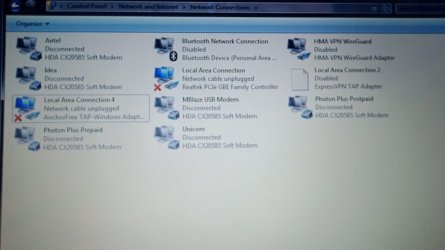
In device manager -> network adapters -> I don't see an wifi option in there. Attaching a screenshot of what shows up for me. In the screenshot - Airtel, Idea, Photon, MBlaze, Unicom haven't been used in years - some of them no longer operate in the country either :roflmao:


Ipconfig /flushdns
Successfully flushed the DNS Resovler Cache

Ipconfig /release
No operation can be performed on Local Area Connection 4 while it has its media disconnected.
No operation can be performed on Local Area Connection while it has its media disconnected.

Ipconfig /renew
No operation can be performed on Local Area Connection 4 while it has its media disconnected.
No operation can be performed on Local Area Connection while it has its media disconnected.

- - - Updated - - -

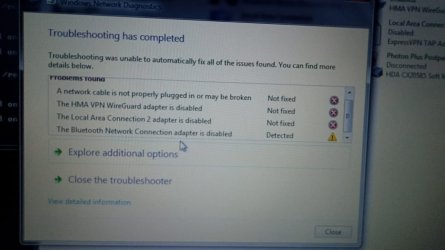
tried windows network diagnostics & it showed the following result, as in the screenshot
 

Attachments

  • 2.jpg
    2.jpg
    46.4 KB · Views: 1
  • 1.jpg
    1.jpg
    48.8 KB · Views: 1

My Computer

Computer type
Laptop
Computer Manufacturer/Model Number
DELL
OS
windows 7 ultimate x32
CPU
T6670,
Motherboard
INTEL CORE 2 DUO, 0TFXK9
Memory
8GB DDR3
Screen Resolution
1366*768
Hard Drives
512GB SSD
Mouse
Logitech M165 w/sidebuttons
Internet Speed
30-150 mb/s
Antivirus
Bitdefender
Browser
FF, Opera GX
Hi

Network is only showing Ethernet/Modem connections. however it is showing Bluetooth dissabled.....
(generally that connection IS related to the wifi driver)
PLEASE post the the DEVICE driver manager page ....
ARE there any UNKNOWN devices or have a yellow triangle with an ! mark init.... if so these are likely your Wifi
Other issue could be that Wifi(intrernal devices) has been turned OFF in your BIOS settings

would be handy if you could post your exact Dell model details
 

My Computer

Computer type
PC/Desktop
Computer Manufacturer/Model Number
medionl/Aspire 6930G/acer x55a
OS
W7 home premium 32bit/W7HP 64bit/w10 tp insider ring
CPU
E5300 dual core
Motherboard
medion MS7366
Memory
3gb
Graphics Card(s)
Nvidia Geforce 7100 Nforce 630i
Monitor(s) Displays
avixc
Internet Speed
n (isp resticted to 72)
Antivirus
mse/pands
Browser
palemoon
Other Info
Belkin Fd7050 n USB using Railink RT2870 drivers, more upto date
Hi

Network is only showing Ethernet/Modem connections. however it is showing Bluetooth dissabled.....
(generally that connection IS related to the wifi driver)
PLEASE post the the DEVICE driver manager page ....
ARE there any UNKNOWN devices or have a yellow triangle with an ! mark init.... if so these are likely your Wifi
Other issue could be that Wifi(intrernal devices) has been turned OFF in your BIOS settings

would be handy if you could post your exact Dell model details


its the same model as specified in my computer section of - my profile. Its an old Dell Vostro 1015. Found this link on google, when I tried searching for the model -
https://www.dell.com/ae/business/p/vostro-1015/pd

attached device manager photo along with this reply, other than the "Other devices" section, no others have exclamation or any errors showing up in them

I have no clue about BIOS, I don't even know how to play with it.

Unrelated - my CD/DVD writer stopped working few years ago (hardly ever used it) & laptop speaker has stopped working years ago - so using external speaker or wired headphones. In case, they are somehow related.
 

My Computer

Computer type
Laptop
Computer Manufacturer/Model Number
DELL
OS
windows 7 ultimate x32
CPU
T6670,
Motherboard
INTEL CORE 2 DUO, 0TFXK9
Memory
8GB DDR3
Screen Resolution
1366*768
Hard Drives
512GB SSD
Mouse
Logitech M165 w/sidebuttons
Internet Speed
30-150 mb/s
Antivirus
Bitdefender
Browser
FF, Opera GX
Hi

Service documentation link
http://downloads.dell.com/Manuals/a...notebook/vostro-1015_service manual_en-us.pdf

The above confirms my suspicion regarding wifi/bluetooth link
(you have dissabled BT at some point)

Immediately after turning on please hit F12 this will take you into the bios
Check Wifi settings (see page 67 in manual)

There is no photo attached
anything in Unknown devices IS a problem need to see it
 

My Computer

Computer type
PC/Desktop
Computer Manufacturer/Model Number
medionl/Aspire 6930G/acer x55a
OS
W7 home premium 32bit/W7HP 64bit/w10 tp insider ring
CPU
E5300 dual core
Motherboard
medion MS7366
Memory
3gb
Graphics Card(s)
Nvidia Geforce 7100 Nforce 630i
Monitor(s) Displays
avixc
Internet Speed
n (isp resticted to 72)
Antivirus
mse/pands
Browser
palemoon
Other Info
Belkin Fd7050 n USB using Railink RT2870 drivers, more upto date
Hi

Service documentation link
http://downloads.dell.com/Manuals/a...notebook/vostro-1015_service manual_en-us.pdf

The above confirms my suspicion regarding wifi/bluetooth link
(you have dissabled BT at some point)

Immediately after turning on please hit F12 this will take you into the bios
Check Wifi settings (see page 67 in manual)

There is no photo attached
anything in Unknown devices IS a problem need to see it

not sure, why the photo didn't go through - it was uploaded successfully. Attaching photo again

- - - Updated - - -

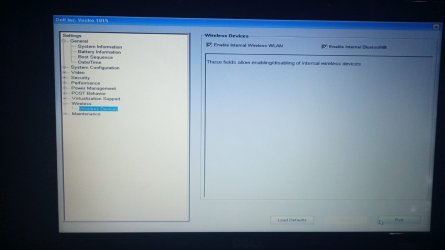
In the BIOS, I found this option.. not sure if I went through the correct setup, plz refer to the photo.

If this not what you were referring, can you kindly let me know - what option to choose when the options popup - Diagnostics, BIOS, Internal HDD & etc..
 

Attachments

  • 1.jpg
    1.jpg
    189.3 KB · Views: 1
  • 2.jpg
    2.jpg
    72.2 KB · Views: 1

My Computer

Computer type
Laptop
Computer Manufacturer/Model Number
DELL
OS
windows 7 ultimate x32
CPU
T6670,
Motherboard
INTEL CORE 2 DUO, 0TFXK9
Memory
8GB DDR3
Screen Resolution
1366*768
Hard Drives
512GB SSD
Mouse
Logitech M165 w/sidebuttons
Internet Speed
30-150 mb/s
Antivirus
Bitdefender
Browser
FF, Opera GX
Hi

NO sign of the Wifi adapter.....not good
i would like you to check a couple of things

from the Bios options, last pic
does your Wifi adapter appear on ANY of the options, especially
System Configuration or System information or Performance and power management


Under Maintainance
is there a system dagnostics option....if so please run it

please also reset Bios to default values.. reboot
recheck that Wifi and Bluetooth are ticked

I would also like you to check the 2 gold wifi connectors are attached properly
(you need to remove the back cover)

Re Other devices
IF any of the above suggestions "repair" the wifi then all the Bluetooth entries will likely be corrected
The base system device is different
select it then Properties(right click) and goto the Details tab then from the dropdown arrow
select Hardware ID and post the pci/vend detail
 

My Computer

Computer type
PC/Desktop
Computer Manufacturer/Model Number
medionl/Aspire 6930G/acer x55a
OS
W7 home premium 32bit/W7HP 64bit/w10 tp insider ring
CPU
E5300 dual core
Motherboard
medion MS7366
Memory
3gb
Graphics Card(s)
Nvidia Geforce 7100 Nforce 630i
Monitor(s) Displays
avixc
Internet Speed
n (isp resticted to 72)
Antivirus
mse/pands
Browser
palemoon
Other Info
Belkin Fd7050 n USB using Railink RT2870 drivers, more upto date
Hate to say it (not really) but AnchorFree is NOT something you want and you get what you pay for... It might have messed up your TCP/IP stack.

I'd uninstall all that crap, restart, run these commands, and then restart again. Now reinstall the Wi-Fi driver.

Is the Wi-Fi card part of the computer or is it USB? Is it PCI-e? Make and model.
 

My Computer

Computer type
PC/Desktop
OS
Windows 7 Ultimate x64
Back
Top