Win 7 pro x64 and Acronis

Davy

New member
Member
Local time
12:04 PM
Messages
69
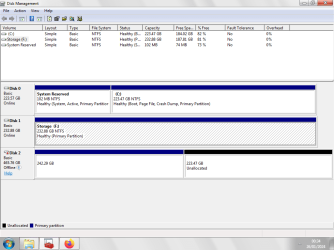
I've done it zillions of times of cloning a hard drive and SSD's BUT not this time...! I clone the SSD but it just won't boot. In Drive management it show's two windows, one is the 'system reserve' showing Active primary partition and the other the
(C) Boot page file crash dump partition.

It show's System reserved file which is 'blank' when booted as an exernal drive, but no 'program' window with files. Many a time's it showed a blank System reserve window and another window with a drive letter with all the program files.

Anyone around brave enough to put me out the mystery.... been bugging me all afternoon.

Thanks Dave.
 

My Computer My Computer

Computer type
PC/Desktop
Computer Manufacturer/Model Number
custom build
OS
win7 x64
CPU
Trinity A6-5600K
Motherboard
Gigabyte GA-F2A88X-D3H
Memory
8Gb
Graphics Card(s)
APU
Hard Drives
Western Digital
Antivirus
NoD32
Browser
Firefox
Post a screen shot from diskmanager so we can see the problem showing all details and old drive
 

My Computer My Computer

Computer type
PC/Desktop
OS
win 8 32 bit
View attachment 423470

- - - Updated - - -

Hi, thanks for reply. Here goes hope I get it right this time.

image.png

- - - Updated - - -

Unallocated worries me. Dave

- - - Updated - - -

Further to the above.
I right click the off line disk, it then shows online and still shows the unallocated section, device manager says the drive is working properly but no disc drives show up like the other's. When connecting to another computer the drive only show's a blank reserve file and not the programs files.... yet the format time seemed about right. Does that help any?

Dave
 

My Computer My Computer

Computer type
PC/Desktop
Computer Manufacturer/Model Number
custom build
OS
win7 x64
CPU
Trinity A6-5600K
Motherboard
Gigabyte GA-F2A88X-D3H
Memory
8Gb
Graphics Card(s)
APU
Hard Drives
Western Digital
Antivirus
NoD32
Browser
Firefox
You are booting from disk 0 the allocated you can extend the partition or create a new one
 

My Computer My Computer

Computer type
PC/Desktop
OS
win 8 32 bit
View attachment 423470

- - - Updated - - -

Hi, thanks for reply. Here goes hope I get it right this time.

View attachment 423472

- - - Updated - - -

Unallocated worries me. Dave

- - - Updated - - -

Further to the above.
I right click the off line disk, it then shows online and still shows the unallocated section, device manager says the drive is working properly but no disc drives show up like the other's. When connecting to another computer the drive only show's a blank reserve file and not the programs files.... yet the format time seemed about right. Does that help any?

Dave

After bringing the disk online you ned to give the partition a drive letter to see it in explorer.
 

My Computers My Computers

System One System Two

  • Computer type
    PC/Desktop
    OS
    7 X64
    CPU
    i5 8400
    Motherboard
    gigabyte b365m ds3h
    Memory
    2x8gb 3200mhz
    Hard Drives
    various
    PSU
    pure power 11 400w cm
    Case
    Coolermaster
    Cooling
    cryorig m9i
  • Computer type
    PC/Desktop
    OS
    7x64
    CPU
    g5400
    Motherboard
    ga b365m ds3h
    Memory
    8gb ddr4 2400
    PSU
    xfx pro 450w
Thank you for the replies.
Never had to do give drive letter before, I could just clone and the 'cloned would come up G and H (drive F is my Storage). I tried to give it a drive letter but it woudn't let me, could have been me,I'll try again.

I don't know if it's related, I wondered if the drive was getting 'goosed' so I installed Crucial drive test, come up fine BUT advised me to update the drives firmware.... this I 'gingerly' did, made the computer seemed much more zipper, so I want to try another clone. I know Win 7 is getting on now but it does me proud..... so did XP until they started altering drivers for this n' that. Thank you again, I'll have a play and report back. Dave
 

My Computer My Computer

Computer type
PC/Desktop
Computer Manufacturer/Model Number
custom build
OS
win7 x64
CPU
Trinity A6-5600K
Motherboard
Gigabyte GA-F2A88X-D3H
Memory
8Gb
Graphics Card(s)
APU
Hard Drives
Western Digital
Antivirus
NoD32
Browser
Firefox
It wouldn't let me add the drive letter is usually G and H

I've removed Acronis thinking it was a glitch, the older drives SSD and Sata 'spinners' work fine I usually clone from Sata but have used USB once in a while.... what a mess that was!

I uninstalled using the un-installer, left a lod of files and lot of stuff in Registry, I used their clean up tool in CMD - bad mistake...! That jiggered the computer and wouldn't boot, after alot of time wasting trying repair install, that would'nt work, I then tried booting from a boot disk, I got it to work after umpteen attempts, it put me in safe mode so I booted 'The last good config', success....! Minus Acronis of course.

All the oldies boot fine and show as expected G and H drive, Right now I'm out of spare drives I want two new ones plus one to 'play' with but.... what to do about Acronis, I'm certainly not going to pay a subscription, I'm wondering if Acronis got thier hand on it to make me pay a subscription or if it got corrupted someway? At the moment I've no drives to play with.

I usually buy Crucial drives they comes with a cloning link to set you off, so I'm wondering if I should ditch Acronis. The first time Acronis has given me trouble.

Last but not least thank you for the reply, Dave.
 

My Computer My Computer

Computer type
PC/Desktop
Computer Manufacturer/Model Number
custom build
OS
win7 x64
CPU
Trinity A6-5600K
Motherboard
Gigabyte GA-F2A88X-D3H
Memory
8Gb
Graphics Card(s)
APU
Hard Drives
Western Digital
Antivirus
NoD32
Browser
Firefox
If g is in use you first have to change that then you can set the drive once its changed
 

My Computer My Computer

Computer type
PC/Desktop
OS
win 8 32 bit
Sorry samuria, I don't follow.
The reserved drive G show's up correctly, just like the other two oldie back ups they show 101Mb used and it'll boot. I can't do anything now because I removed Acronis, right now I've no spare drives just now, I need one to have a play with - I just gotta get some.

I was planning swapping this drive for an oldie just to try, worse comes to worse I'll have update the oldy and then update the files.... arghhhh thanks Acronic?

Dave

I
 

My Computer My Computer

Computer type
PC/Desktop
Computer Manufacturer/Model Number
custom build
OS
win7 x64
CPU
Trinity A6-5600K
Motherboard
Gigabyte GA-F2A88X-D3H
Memory
8Gb
Graphics Card(s)
APU
Hard Drives
Western Digital
Antivirus
NoD32
Browser
Firefox
Back
Top