Merging partitions with Partition Magic V12

robertpri

New member
Local time
6:14 AM
Messages
46
My laptop came with Vista on one hard drive having three partitions, one for Vista, Data, and Recovery. I then added another internal SATA drive and made a live copy of the first drive. I then had two drives with a total of 6 partitions. That was manageable, although not what I wanted, being an obsessive fanatic about backups, I added an ESATA drive and copied to that guy.
I then had three drives with nine partitions. Way too much confusion.
After installing Windows 7 I decided to fix this partition nightmare, so bought the latest version of Partition Magic V12.
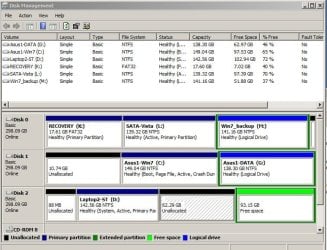
The first objective was Disk 2 shown on the attached snip. I have created and deleted the last two partitions to the right, formatted them, tried to merge them, resize them, etc., over and over, with no luck. I want those two merged into "D" on that drive to have one large drive.
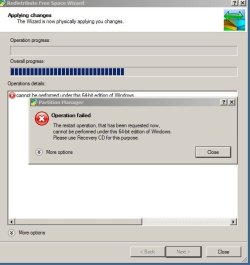
I have tried to merge them as various combinations of NTFS formatted, unallocated, and/or free space, and finally gave up last night. The error message I get is shown in the other snip pic.
PM will not let me merge the drives or even resize them inside Win 7.
Booting to the PM Recovery DVD offers very few options, there is no merge that I can find, but there is a resize. So, I wanted to resize D to capture the unallocated space and the free space. It won't let me do it.
To merge partitions, they should be partitioned the same way, right? Formatted to NTFS? For some reason, I cannot get them to merge or resize no matter what their status.
Eventually, I want three large hard drives with only one partition on each one. For now, I will be happy just fixing one at a time. Having 9 is terrible!
 

Attachments
  • three.JPG
    three.JPG
    39.7 KB · Views: 132
  • two.JPG
    two.JPG
    83.6 KB · Views: 247

My Computer My Computer

Computer Manufacturer/Model Number
Asus G50 and Toshiba L505
OS
Win 7 - 64 Pro
CPU
2.28
Motherboard
?- asus laptop
Memory
4 gb
Graphics Card(s)
? laptop
Sound Card
? laptop
Monitor(s) Displays
dual display, laptop and 24" Samsung
Hard Drives
two 250gb drives in laptop and one 250 Esata
PSU
laptop
Case
laptop
Cooling
laptop

My Computer My Computer

Computer Manufacturer/Model Number
Keeps changing - (Custom)
OS
Windows 7 Professional x64
CPU
Intel Core i7 860
Motherboard
Gigabyte GA-P55-UD4P
Memory
4GB DDR3 Mushkin 1600Mhz @ 7-8-7-20
Graphics Card(s)
MSI GTS250 1GB DDR3 Twin Frozr
Sound Card
Onboard realtek
Monitor(s) Displays
Samsung SyncMaster 24" P2450 + Samsung 20" 2033
Screen Resolution
1920 X 1080 and 1600 X 900 (#2 system 1440 X 900)
Hard Drives
Patriot Inferno 120GB SSD + 3 WD Blue 640GB drives
PSU
Corsair 750 HX Modular
Case
Lancool PC-K62
Cooling
Cooler Master TX3 CPU cooler and 4-140mm and 1-120mm case
Keyboard
Gigabyte USB keyboard
Mouse
Microsoft wireless laser mouse 5000
Internet Speed
7 Mb down 1.5 up
Other Info
System #2: AMD Phenom II X6 1055T (Freezer 7 Pro cooler) - Gigabyte 880GMA-UD2H - WD 500GB Black - 9500GT (1GB) 500W OCZ modular PSU - Antec 200 case. System #3 (LapTop) Core 2 Duo T6670 - 320GB 7200RPM HD - 4GB DDR3 RAM.
I have been looking for a 64 bit compatible partition manager. Is this 32 bit only? Sure looks like that's the problem.

This is the only one I can find...

BEST FREE Partition Manager for Windows supports all 32-bit & 64 bit Windows No-server OS.

Well, now that could be the issue. When I decided to kill those extra partitions, I went to Partition Magic site and bought the latest version.

I figured it had to work with 64 bit because that has been out for a long time in Vista. I will go back to the PM site and see what it says.

One question: when I try to merge or resize or anything with unalllocated or free space, should I make them into partitions first, and then format to match the parent partition?

I don't know if it's best to work with 'unallocated' and 'free space' or not.
 

My Computer My Computer

Computer Manufacturer/Model Number
Asus G50 and Toshiba L505
OS
Win 7 - 64 Pro
CPU
2.28
Motherboard
?- asus laptop
Memory
4 gb
Graphics Card(s)
? laptop
Sound Card
? laptop
Monitor(s) Displays
dual display, laptop and 24" Samsung
Hard Drives
two 250gb drives in laptop and one 250 Esata
PSU
laptop
Case
laptop
Cooling
laptop
The upgrade from Vista to Win 7 resulted in losing many files. I did not realize that I had version 9 of PM, but my email receipts showed that I bought version 10! So, I went to my PM account and there is was to download.

Installed and it sort of works. Of course, PM has lost most of the prestige and reliability since Symantec bought it, but it kind of works.
 

My Computer My Computer

Computer Manufacturer/Model Number
Asus G50 and Toshiba L505
OS
Win 7 - 64 Pro
CPU
2.28
Motherboard
?- asus laptop
Memory
4 gb
Graphics Card(s)
? laptop
Sound Card
? laptop
Monitor(s) Displays
dual display, laptop and 24" Samsung
Hard Drives
two 250gb drives in laptop and one 250 Esata
PSU
laptop
Case
laptop
Cooling
laptop
Instead of partition magic, I use Gparted. It's a free open source application and works great. I know that you already paid for partition magic, but if it doesn't accomplish what you need....maybe you should try another program.
 

My Computer My Computer

Computer Manufacturer/Model Number
Self-Built in July 2009
OS
Windows 7 Ultimate x64
CPU
Intel Q9550 2.83Ghz OC'd to 3.40Ghz
Motherboard
Gigabyte GA-EP45-UD3R rev. 1.1, F12 BIOS
Memory
8GB G.Skill PI DDR2-800, 4-4-4-12 timings
Graphics Card(s)
EVGA 1280MB Nvidia GeForce GTX570
Sound Card
Realtek ALC899A 8 channel onboard audio
Monitor(s) Displays
23" Acer x233H
Screen Resolution
1920x1080
Hard Drives
Intel X25-M 80GB Gen 2 SSD
Western Digital 1TB Caviar Black, 32MB cache. WD1001FALS
PSU
Corsair 620HX modular
Case
Antec P182
Cooling
stock
Keyboard
ABS M1 Mechanical
Mouse
Logitech G9 Laser Mouse
Internet Speed
15/2 cable modem
Other Info
Windows and Linux enthusiast. Logitech G35 Headset.
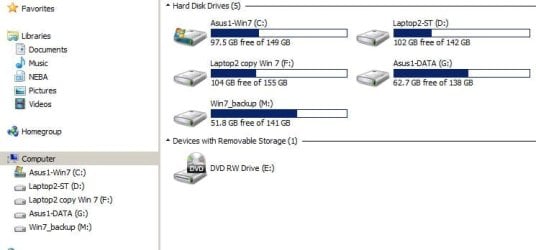
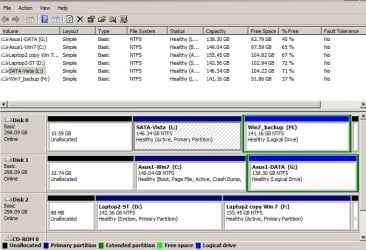
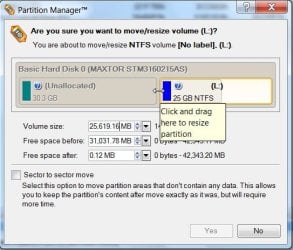
Heh, I finally got some things working, but I also deleted an old RECOVERY partition. The idea being that I would merge or resize the next partition, called, "SATA-Vista (L)" As seen in the snip.

But Explore no longer sees the SATA-Vista drive, nor does PM. So, I deleted one partition and appears to have lost two.

Lord, I hate partitions!!!!!!!
 

Attachments

  • four.JPG
    four.JPG
    33 KB · Views: 44
  • five.JPG
    five.JPG
    79.2 KB · Views: 86

My Computer My Computer

Computer Manufacturer/Model Number
Asus G50 and Toshiba L505
OS
Win 7 - 64 Pro
CPU
2.28
Motherboard
?- asus laptop
Memory
4 gb
Graphics Card(s)
? laptop
Sound Card
? laptop
Monitor(s) Displays
dual display, laptop and 24" Samsung
Hard Drives
two 250gb drives in laptop and one 250 Esata
PSU
laptop
Case
laptop
Cooling
laptop
Hi Robert,

Do you have a link for Partition Magic v12 ? Afaik, Partition Magic is not compatible with the NT6 partitioning rules.

Would you like to incorporate the Unallocated space on Disk0 with the Vista L partition?

You can only merge partitions. Unallocated space is not a partition.

If you meant Paragon Partition Manager 10:

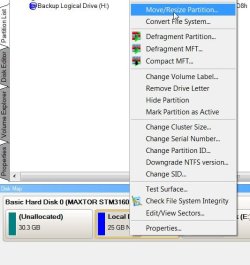
You can rt click the Vista partition, select Move/Resize and drag to the left to incorporate the Unallocated space.


RESIZE-1-2009-11-08_035856.jpg

RESIZE-2-2009-11-08_040024.jpg

RESIZE-3-2009-11-08_040057.jpg

Then click Apply.

If you extend the Vista partition to the left - you will need to adjust the bcd entry for Vista - to be able to boot into it.

Hope it helps
 
Last edited:

My Computers My Computers

System One System Two

  • Computer type
    PC/Desktop
    OS
    7 X64
    CPU
    i5 8400
    Motherboard
    gigabyte b365m ds3h
    Memory
    2x8gb 3200mhz
    Hard Drives
    various
    PSU
    pure power 11 400w cm
    Case
    Coolermaster
    Cooling
    cryorig m9i
  • Computer type
    PC/Desktop
    OS
    7x64
    CPU
    g5400
    Motherboard
    ga b365m ds3h
    Memory
    8gb ddr4 2400
    PSU
    xfx pro 450w
Free space is inside an Extended partition.

If you wish to make the whole drive one partition, Rt click the Extended partition and convert to Primary partition.

You can then merge the two Primaries into one.

Hope it helps.
 

My Computers My Computers

System One System Two

  • Computer type
    PC/Desktop
    OS
    7 X64
    CPU
    i5 8400
    Motherboard
    gigabyte b365m ds3h
    Memory
    2x8gb 3200mhz
    Hard Drives
    various
    PSU
    pure power 11 400w cm
    Case
    Coolermaster
    Cooling
    cryorig m9i
  • Computer type
    PC/Desktop
    OS
    7x64
    CPU
    g5400
    Motherboard
    ga b365m ds3h
    Memory
    8gb ddr4 2400
    PSU
    xfx pro 450w
it is not safe to merge partitions directly, resize partition is much better. paragon and easeus partition manager are good tool to resize then merge partitions, I found an article how to resize windows 7 partitions.
 

My Computer My Computer

OS
Windows 7
That, is the same process of resize explained in the screenshots above. Easeus is a decent app. The free version only works on 32 bit , sadly.

Best FREE partitioner 32 and 64 bit :

Free Download Partition Wizard

Best paid partitioner is Paragon.

Paragon have an oddly named app. called System Update Utilities - this includes a full version of PM10 personal, and other utilities as well - plus WinPE cd - strangely, it is cheaper than the PM10 personal on it's own:

http://www.paragon-software.com/home/suu/features.html
 

My Computers My Computers

System One System Two

  • Computer type
    PC/Desktop
    OS
    7 X64
    CPU
    i5 8400
    Motherboard
    gigabyte b365m ds3h
    Memory
    2x8gb 3200mhz
    Hard Drives
    various
    PSU
    pure power 11 400w cm
    Case
    Coolermaster
    Cooling
    cryorig m9i
  • Computer type
    PC/Desktop
    OS
    7x64
    CPU
    g5400
    Motherboard
    ga b365m ds3h
    Memory
    8gb ddr4 2400
    PSU
    xfx pro 450w
SIW2 is correct, it's Partition Manager 10. I had also downloaded Winzip 12 and had that number in my head: "12" Also, waaaaay back, I think it was called Partition Magic [I've used it for years] and got that mixed up too. So, my Parttion Magic 12 is really Partition Manager 10. [this is why I make lists, and not count on my memory] And they do have both 32 and 64 bit.

Anyway, while upgrading to Win 7 from Vista, I had endless problems with drivers. [that's another thread] so I called MS Tech Support and got through in about three minutes! A miracle. I explained my driver nightmare and mentioned my multiple partitions. He told me how to fix it with the Win 7 install disk, and a few minutes later I had three hard drives and one partition each for three drives. [instead of 9]

Win 7 did it in a couple of minutes, but PM10 often takes a long long time. So, it all worked out fine.
 

My Computer My Computer

Computer Manufacturer/Model Number
Asus G50 and Toshiba L505
OS
Win 7 - 64 Pro
CPU
2.28
Motherboard
?- asus laptop
Memory
4 gb
Graphics Card(s)
? laptop
Sound Card
? laptop
Monitor(s) Displays
dual display, laptop and 24" Samsung
Hard Drives
two 250gb drives in laptop and one 250 Esata
PSU
laptop
Case
laptop
Cooling
laptop
Back
Top