How can I backup my DVDs for quick & easy access?

JohnnyScience

New member
Power User
Local time
3:55 PM
Messages
889
I am looking to backup my dvds for quick & easy access on the computer instead of having to search through & load up each one.

What is the easiest way to do this in 7?
 

My Computer My Computer

Computer Manufacturer/Model Number
Built it myself
OS
Windows 7 64 & Ubuntu 64
CPU
Intel Quad Core Q6600 2.40GHz
Motherboard
Asus
Memory
8g
Graphics Card(s)
Nvidia 9600 GT & 9800 GT
Sound Card
Turtle Beach 5.1
Monitor(s) Displays
Three 19" Dell's & one 46" Samsung 750
Copy them all to your HDD and create shortcuts.
No need to browse, just click on the shortcuts.
Am i gettn warm as to what you want?
 

My Computer My Computer

Computer Manufacturer/Model Number
Lenovo ThinkPad T60
OS
Windows 7 Ultimate 64Bit
CPU
GenuineIntel Intel(R) Core(TM) DuoCore T2400 @ 1.83GHz
Motherboard
Intel(R) 82801G (ICH7 Family)
Memory
2.00 GB
Graphics Card(s)
Mobile Intel(R) 945 Express Chipset
Sound Card
SoundMAX Integrated Digital HD Audio
Monitor(s) Displays
ThinkPad Display
Screen Resolution
1400x1050
Hard Drives
100Gb SATA
Keyboard
Standard Keyboard
Mouse
HID-compliant Mouse
Internet Speed
Cable Broadband - 54Mbps
Other Info
Intel(R) PRO/1000 PL Network Connection
11a/b/g Wireless LAN Mini PCI Express Adapter
Copy them all to your HDD and create shortcuts.
No need to browse, just click on the shortcuts.
Am i gettn warm as to what you want?

Yeah but whats the best program in 7 to use to copy them to my HDD?
 

My Computer My Computer

Computer Manufacturer/Model Number
Built it myself
OS
Windows 7 64 & Ubuntu 64
CPU
Intel Quad Core Q6600 2.40GHz
Motherboard
Asus
Memory
8g
Graphics Card(s)
Nvidia 9600 GT & 9800 GT
Sound Card
Turtle Beach 5.1
Monitor(s) Displays
Three 19" Dell's & one 46" Samsung 750
You dont need a special program to do this... just copy and paste...
 

My Computer My Computer

Computer type
PC/Desktop
Computer Manufacturer/Model Number
LENOVO K450 @3.0GHZ
OS
64-bit Windows 8.1 Pro
CPU
Core(TM) i5 CPU 4330 Haswell @ 3.20GHz
Motherboard
LENOVO
Memory
12.00 GB
Graphics Card(s)
Intel(R) HD Graphics
Sound Card
Intel HD integtrated
Monitor(s) Displays
HP 25' ISP Monitor
Screen Resolution
1900/1020
Hard Drives
(1) ST1000DM003-1CH162 (2) Generic STORAGE DEVICE USB Device (3) Generic STORAGE DEVICE USB Device
Internet Speed
100mb down/10mb up
You dont need a special program to do this... just copy and paste...

Hmm. Just go into My computer & copy the CDROM icon & paste it where I want? I always thought you needed some type of ripping program?
 

My Computer My Computer

Computer Manufacturer/Model Number
Built it myself
OS
Windows 7 64 & Ubuntu 64
CPU
Intel Quad Core Q6600 2.40GHz
Motherboard
Asus
Memory
8g
Graphics Card(s)
Nvidia 9600 GT & 9800 GT
Sound Card
Turtle Beach 5.1
Monitor(s) Displays
Three 19" Dell's & one 46" Samsung 750
dvd shrink and burn is one way to do it
DVD Shrink - Wikipedia, the free encyclopedia
i used this to do mine ust tell it to back up and save in folder instead of burning to disk
i have all my dvds on a hard drive and use win 7 media center to view them
 

My Computer My Computer

OS
Windows 7 Ultimate 64-bit (6.1, Build 7600)
CPU
Intel(R) Core(TM) i7 CPU 920 @ 2.67GHz
Motherboard
EVGA 132-BL-E758-A1 X58 3-Way SLI Core i7 Motherboard
Memory
12 GB Mushkin Enhanced Blackline Frostbyte
Graphics Card(s)
2-Asus GTX 550 Ti In SLI
Sound Card
On Board
Monitor(s) Displays
HP w2207 Wide LCD Monitor
Screen Resolution
1690x1050
Hard Drives
4-OCZ Vertex Plus R2 Series 120GB 2.5in SATA II MLC SSD
running in raid 0
PSU
OCZ / GameXStream / 700-Watt / ATX / 120mm Fan / SATA R
Case
NZXT M59-001BK M59 Gaming Mid Tower Case - ATX, mATX, Baby A
Cooling
Corsair H60
Keyboard
Merc Gaming Keyboard
Mouse
Mini wireless
Internet Speed
25 meg dsl
That all depends on what type of data you want to copy... you never said... if its music, you can use Windows Media Player to rip it to your hard drive.. if its data, open the cd in windows explorer then copy and paste what you want to backup
 

My Computer My Computer

Computer type
PC/Desktop
Computer Manufacturer/Model Number
LENOVO K450 @3.0GHZ
OS
64-bit Windows 8.1 Pro
CPU
Core(TM) i5 CPU 4330 Haswell @ 3.20GHz
Motherboard
LENOVO
Memory
12.00 GB
Graphics Card(s)
Intel(R) HD Graphics
Sound Card
Intel HD integtrated
Monitor(s) Displays
HP 25' ISP Monitor
Screen Resolution
1900/1020
Hard Drives
(1) ST1000DM003-1CH162 (2) Generic STORAGE DEVICE USB Device (3) Generic STORAGE DEVICE USB Device
Internet Speed
100mb down/10mb up
dvd shrink and burn is one way to do it
DVD Shrink - Wikipedia, the free encyclopedia
i used this to do mine ust tell it to back up and save in folder instead of burning to disk
i have all my dvds on a hard drive and use win 7 media center to view them

Is this dvd shrink better than copy & paste?

I see it compresses & therefore losing quality - something I would be concerned about with higher end movies in HD etc?

And yes they are dvds/movies etc. I'd like them all to be compiled so I can run them through something like WMC or WMV.

I love WMC but I just hate how it takes ever the entire screen & locks your mouse on that program. I have 3 monitors & like to multi task while watching things.
 

My Computer My Computer

Computer Manufacturer/Model Number
Built it myself
OS
Windows 7 64 & Ubuntu 64
CPU
Intel Quad Core Q6600 2.40GHz
Motherboard
Asus
Memory
8g
Graphics Card(s)
Nvidia 9600 GT & 9800 GT
Sound Card
Turtle Beach 5.1
Monitor(s) Displays
Three 19" Dell's & one 46" Samsung 750
most dvds are copy protected so trying to copy and past may not work as i have never tried to do it that way
dvd shrink will work in most cases unless the dvd has some heavy duty copy protectin then you would need another program for that
 

My Computer My Computer

OS
Windows 7 Ultimate 64-bit (6.1, Build 7600)
CPU
Intel(R) Core(TM) i7 CPU 920 @ 2.67GHz
Motherboard
EVGA 132-BL-E758-A1 X58 3-Way SLI Core i7 Motherboard
Memory
12 GB Mushkin Enhanced Blackline Frostbyte
Graphics Card(s)
2-Asus GTX 550 Ti In SLI
Sound Card
On Board
Monitor(s) Displays
HP w2207 Wide LCD Monitor
Screen Resolution
1690x1050
Hard Drives
4-OCZ Vertex Plus R2 Series 120GB 2.5in SATA II MLC SSD
running in raid 0
PSU
OCZ / GameXStream / 700-Watt / ATX / 120mm Fan / SATA R
Case
NZXT M59-001BK M59 Gaming Mid Tower Case - ATX, mATX, Baby A
Cooling
Corsair H60
Keyboard
Merc Gaming Keyboard
Mouse
Mini wireless
Internet Speed
25 meg dsl
most dvds are copy protected so trying to copy and past may not work as i have never tried to do it that way
dvd shrink will work in most cases unless the dvd has some heavy duty copy protectin then you would need another program for that

How much quality is lost with the compression?
 

My Computer My Computer

Computer Manufacturer/Model Number
Built it myself
OS
Windows 7 64 & Ubuntu 64
CPU
Intel Quad Core Q6600 2.40GHz
Motherboard
Asus
Memory
8g
Graphics Card(s)
Nvidia 9600 GT & 9800 GT
Sound Card
Turtle Beach 5.1
Monitor(s) Displays
Three 19" Dell's & one 46" Samsung 750
ive not noticed any problems with the quality every one i have done has worked nice
you should try using it see what happens one thing about it the program is free

at any rate this is my last post fro a while i have to go to work
 

My Computer My Computer

OS
Windows 7 Ultimate 64-bit (6.1, Build 7600)
CPU
Intel(R) Core(TM) i7 CPU 920 @ 2.67GHz
Motherboard
EVGA 132-BL-E758-A1 X58 3-Way SLI Core i7 Motherboard
Memory
12 GB Mushkin Enhanced Blackline Frostbyte
Graphics Card(s)
2-Asus GTX 550 Ti In SLI
Sound Card
On Board
Monitor(s) Displays
HP w2207 Wide LCD Monitor
Screen Resolution
1690x1050
Hard Drives
4-OCZ Vertex Plus R2 Series 120GB 2.5in SATA II MLC SSD
running in raid 0
PSU
OCZ / GameXStream / 700-Watt / ATX / 120mm Fan / SATA R
Case
NZXT M59-001BK M59 Gaming Mid Tower Case - ATX, mATX, Baby A
Cooling
Corsair H60
Keyboard
Merc Gaming Keyboard
Mouse
Mini wireless
Internet Speed
25 meg dsl
Ok so I finally had a chance to try out DVDShrink and I'm a bit stuck.

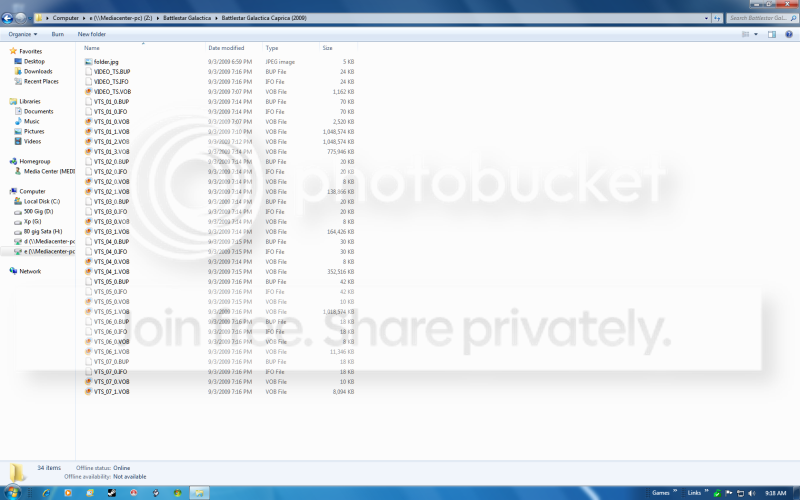
I ran through the process to save everything to my HDD, but then I was left with an empty AUDIO_TS file & a VIDEO_TS file with a bunch of .VOB files.

I wanted to back this up so that everything was all under one file/icon that I can double click to just start automatically playing the movie.

So how do I change these files to do that?
 

My Computer My Computer

Computer Manufacturer/Model Number
Built it myself
OS
Windows 7 64 & Ubuntu 64
CPU
Intel Quad Core Q6600 2.40GHz
Motherboard
Asus
Memory
8g
Graphics Card(s)
Nvidia 9600 GT & 9800 GT
Sound Card
Turtle Beach 5.1
Monitor(s) Displays
Three 19" Dell's & one 46" Samsung 750
That is correct. The .VOB .IFO .BUP files are part of dvd's. For what you want I'd re-encode the films to 300-400mb x264 mkv films. I can walk you through the process. Those DVD shrink films are fat - 4.7GB. You should be able to open the VIDEO_TS files with Media Player Classic - HOme Cinema choose eitehr the x86 or x64 versions as necessary.
 

My Computer My Computer

Computer Manufacturer/Model Number
Sony Vaio Z46GDU
OS
Windows 7 Ultimate x86-64
CPU
[email protected] 1066MHz FSB
Motherboard
Sony branded
Memory
6GB DDR3 1066MHz
Graphics Card(s)
9300M GS 256MB Dedicated (Speed) + Intel4500MHD (Stamina)
Sound Card
Realtek HD Audio
Monitor(s) Displays
13.1' WXGA
Screen Resolution
1600x900
Hard Drives
320GB 7200RPM w/ 16MB cache
Internet Speed
1MB/s

My Computer My Computer

Computer Manufacturer/Model Number
Built it myself
OS
Windows 7 64 & Ubuntu 64
CPU
Intel Quad Core Q6600 2.40GHz
Motherboard
Asus
Memory
8g
Graphics Card(s)
Nvidia 9600 GT & 9800 GT
Sound Card
Turtle Beach 5.1
Monitor(s) Displays
Three 19" Dell's & one 46" Samsung 750
See above - twitchy mousepad.
 

My Computer My Computer

Computer Manufacturer/Model Number
Sony Vaio Z46GDU
OS
Windows 7 Ultimate x86-64
CPU
[email protected] 1066MHz FSB
Motherboard
Sony branded
Memory
6GB DDR3 1066MHz
Graphics Card(s)
9300M GS 256MB Dedicated (Speed) + Intel4500MHD (Stamina)
Sound Card
Realtek HD Audio
Monitor(s) Displays
13.1' WXGA
Screen Resolution
1600x900
Hard Drives
320GB 7200RPM w/ 16MB cache
Internet Speed
1MB/s
You want to copy your movies off the DVD to a single file for later viewing on your computer correct?

If this is what you want then I can help as I have been doing this to my DVD collection for view off a Western Digital HD Media Player. There are many different apps that can be used depending on the quality you want and how fast it works. I Keep my files smaller so I can store more on my USB HDD but I lose sound quality but keep the HD video instead. There are many guides online about this topic depending on the software used.

If you do a complete back-up of a DVD you could have 4+GB used, if you rip the movie you can reduce this to smaller sizes. I rip to about 1.2GB for my movies.
 

My Computer My Computer

Computer Manufacturer/Model Number
Alienware M17x R3
OS
Windows 7 Ultimate x64
CPU
Intel Core i7 2670QM 2.2GHz 3.3GHz Turbo Mode
Memory
12GB Dual Channel DDR3 at 1333MHz
Graphics Card(s)
2GB GDDR5 AMD Radeon 6990M
Sound Card
Audio Powered by Klipsch
Monitor(s) Displays
17.3-inch WideFHD 1920 x 1080 60Hz WLED
Screen Resolution
1920x1080
Hard Drives
120GB SSD slot 1
1TB HDD slot 2
Case
alienware laptop case
Cooling
Dual heatsink and fans
Keyboard
Alienware multi color keyboard
Mouse
logitech G300 gaming mouse
Other Info
Intel® Centrino Advanced-N 6230 2x2 agn+ Bluetooth

finally got it!!!
You want to copy your movies off the DVD to a single file for later viewing on your computer correct?

If this is what you want then I can help as I have been doing this to my DVD collection for view off a Western Digital HD Media Player. There are many different apps that can be used depending on the quality you want and how fast it works. I Keep my files smaller so I can store more on my USB HDD but I lose sound quality but keep the HD video instead. There are many guides online about this topic depending on the software used.

If you do a complete back-up of a DVD you could have 4+GB used, if you rip the movie you can reduce this to smaller sizes. I rip to about 1.2GB for my movies.

You can rip to less than 500mb with x264 and keep the quality - .avi and xvid isn't as good - if that's what you are using.
 

My Computer My Computer

Computer Manufacturer/Model Number
Sony Vaio Z46GDU
OS
Windows 7 Ultimate x86-64
CPU
[email protected] 1066MHz FSB
Motherboard
Sony branded
Memory
6GB DDR3 1066MHz
Graphics Card(s)
9300M GS 256MB Dedicated (Speed) + Intel4500MHD (Stamina)
Sound Card
Realtek HD Audio
Monitor(s) Displays
13.1' WXGA
Screen Resolution
1600x900
Hard Drives
320GB 7200RPM w/ 16MB cache
Internet Speed
1MB/s
I back up all ISO's in Downloads folder.

If the image is on a disk, I use ImgBurn to extract the ISO.
 
using dvd shrink when you do the back up uncheck create seperate audio and video folders
then have it save in a folder with the name you want
then in media center go to movies tab right click then add movies select folder to watch

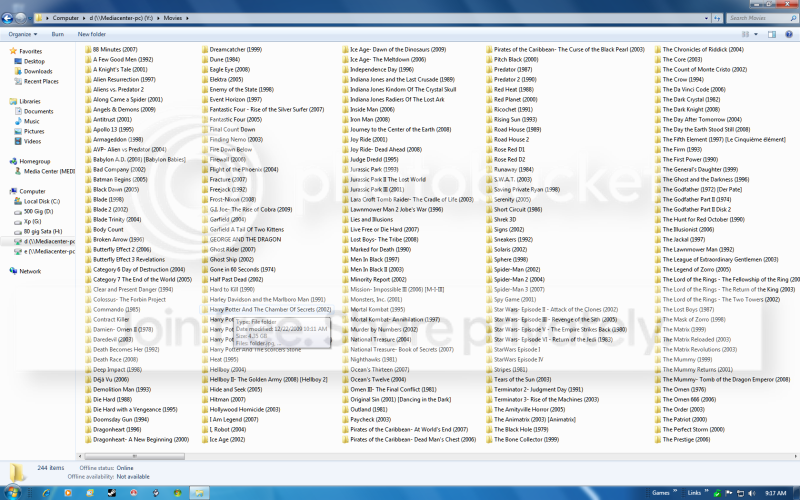
i have a folder on my hard drive called movies then in that i have a folders for each movie

it also helps to add a picture in the folder and rename it to folder
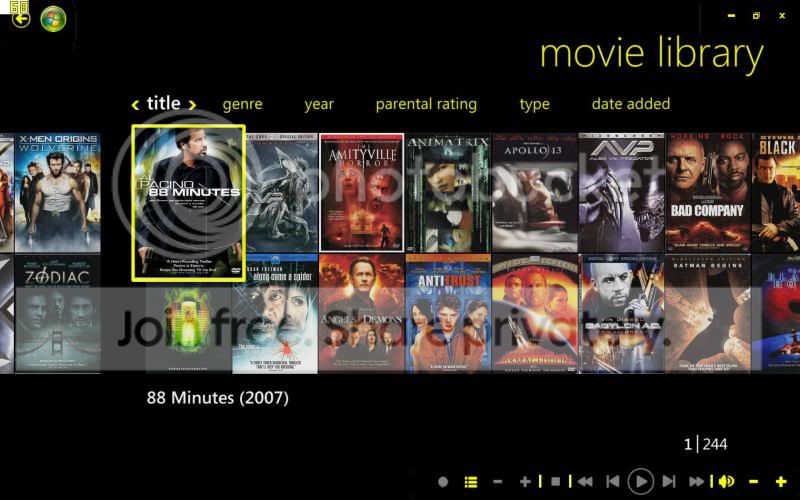
give me a bit of time i can post some screen shots of what i have but it will take me a bit
 

My Computer My Computer

OS
Windows 7 Ultimate 64-bit (6.1, Build 7600)
CPU
Intel(R) Core(TM) i7 CPU 920 @ 2.67GHz
Motherboard
EVGA 132-BL-E758-A1 X58 3-Way SLI Core i7 Motherboard
Memory
12 GB Mushkin Enhanced Blackline Frostbyte
Graphics Card(s)
2-Asus GTX 550 Ti In SLI
Sound Card
On Board
Monitor(s) Displays
HP w2207 Wide LCD Monitor
Screen Resolution
1690x1050
Hard Drives
4-OCZ Vertex Plus R2 Series 120GB 2.5in SATA II MLC SSD
running in raid 0
PSU
OCZ / GameXStream / 700-Watt / ATX / 120mm Fan / SATA R
Case
NZXT M59-001BK M59 Gaming Mid Tower Case - ATX, mATX, Baby A
Cooling
Corsair H60
Keyboard
Merc Gaming Keyboard
Mouse
Mini wireless
Internet Speed
25 meg dsl
this is inside my movie folder

folder.png


this is inside one of the movie folders

insidefolder.png


this is what i get with media center

mediacenter.jpg
 

My Computer My Computer

OS
Windows 7 Ultimate 64-bit (6.1, Build 7600)
CPU
Intel(R) Core(TM) i7 CPU 920 @ 2.67GHz
Motherboard
EVGA 132-BL-E758-A1 X58 3-Way SLI Core i7 Motherboard
Memory
12 GB Mushkin Enhanced Blackline Frostbyte
Graphics Card(s)
2-Asus GTX 550 Ti In SLI
Sound Card
On Board
Monitor(s) Displays
HP w2207 Wide LCD Monitor
Screen Resolution
1690x1050
Hard Drives
4-OCZ Vertex Plus R2 Series 120GB 2.5in SATA II MLC SSD
running in raid 0
PSU
OCZ / GameXStream / 700-Watt / ATX / 120mm Fan / SATA R
Case
NZXT M59-001BK M59 Gaming Mid Tower Case - ATX, mATX, Baby A
Cooling
Corsair H60
Keyboard
Merc Gaming Keyboard
Mouse
Mini wireless
Internet Speed
25 meg dsl
Back
Top