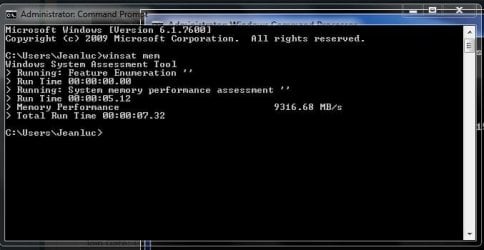
What's your memory assessment speed?

Status
Not open for further replies.
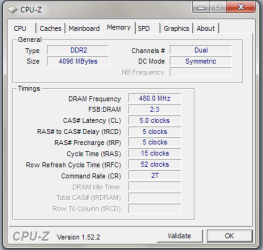
I think I need much help. This is the RAM I use DDR2 1066

In the BIOS I have the settings set as
Performance Enhance - Extreme
(G)MCH Frequency Latch - 266MHz
System Memory Multiplier SPD - 4.00A
Memory Frequency 1066
Timings 5 5 5 15

Any advice will be greatly appreciated.
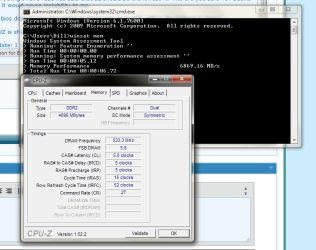
EDIT: I changed a few of my BIOS settings, changed my FSB from 266 to 400, as well as my RAM frequency. I changed my timings according to the CPUZ 'Timings Table(5 5 5 18)' as well as the voltage to 1.8 down from 2.2. The new picture is attached.

your ram is running at 1066, 533x2 (double data rate)=1066

dont look at the SPD tab in CPU-Z it is a graph table NOT YOUR REAL TIMINGS.
the only tab you look at is the MEMORY tab.

In your BIOS, adjust your tRFC setting to 40, and try to set you CR
(command rate) to 1T, if it boots into Windows normal then it should be faster.

other than that, try to overclock your FSB or CPU speed.

post screen shots if you adjust them.;)
 

My Computer My Computer

At a glance

Windows 7 7600 x64 (16385) Ultimate,Windows V...Intel Quad core Q9550 [email protected](AS5 lap...2gbx4 GSkill1600MHz9/9/9/24/2T-1.8v@1677MHz9/...x2 Leadtek 9800GX2 Quad SLI(re-pasted/no case...
Computer Manufacturer/Model Number
Mad Customs #4
OS
Windows 7 7600 x64 (16385) Ultimate,Windows Vista x64 Ultimate
CPU
Intel Quad core Q9550 [email protected](AS5 lapped)(1845FSB)
Motherboard
EVGA 790i FTW DIGITAL PWM (AS5 re-pasted)
Memory
2gbx4 GSkill1600MHz9/9/9/24/2T-1.8v@1677MHz9/9/9/18/1T-1.8v
Graphics Card(s)
x2 Leadtek 9800GX2 Quad SLI(re-pasted/no cases)755/1120/1820
Sound Card
Crapative XF-i Plat
Monitor(s) Displays
Chimei22"ws(DVI)/LG32"LCD(HDMI)/Samsung 40"LCD(HDMI)
Screen Resolution
1680x1050/1360x768/1920x1080 (1080P)
Hard Drives
Seagate 1TB "40NS" 32mb sata2, Hitachi 500gb 16mb sata2 (backup storage), Sandisk 16gb micro SD (mobile storage)
PSU
Zalman 850-HP 850watt x6 12v@18A
Case
Tiled floor (nice and cold-usually 18c idle)
Cooling
fan forced 120 Xtreme (lapped)with push/pull setup
Keyboard
Logitech Di Novo Edge
Mouse
MX 1100
Internet Speed
Bigpond 17mbit/s cable=Max witnessed 2.5Mbyte/s down 30kb up
Other Info
Enzotech SLF-1+Enzotech CNB-EVGAi chipset coolers/Sunbeamtech Rheobus Extreme 30 Watt x 6 channel fan controller/Zalman ZM-MFC2 fan controller-Watt meter/Logitech G25 Racing Wheel/Logitech cordless number pad/OCZ NIA//HTPC:7600 x64/[email protected]/2x2Gb ST Proj.X DDR3 1800 9-9-9-24/Nvidia 8400GS 512Mb/Asus HDAV1.3 Delux(changed OPAmps to OPA627)/250Gb 16Mb 7200/480W PSU/Custom made cardboard box!!
your ram is running at 1066, 533x2 (double data rate)=1066

dont look at the SPD tab in CPU-Z it is a graph table NOT YOUR REAL TIMINGS.
the only tab you look at is the MEMORY tab.

In your BIOS, adjust your tRFC setting to 40, and try to set you CR
(command rate) to 1T, if it boots into Windows normal then it should be faster.

other than that, try to overclock your FSB or CPU speed.

post screen shots if you adjust them.;)

Everything I have read has said that 52 should be the lowest for me, are you sure 40? Seems like it would cause instability to me.

My bios doesn't give the option to bring ram up to 533. 400 is the highest it shows.

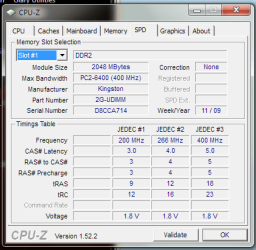
CPUZ is showing my RAM as PC2-6400 (400MHz), Shouldn't it be listed as PC2-8500(533MHz)?

Update: I changed my FSB to 333 with 9 multiplier and matched my ram with it, Also when I change my CAS latencys down to 4 4 4 15 I get boot failure o.O

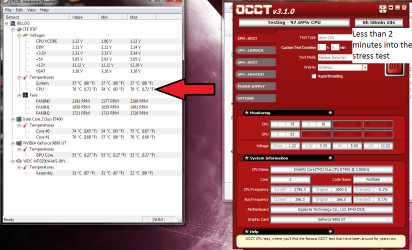
And yet another update from me, I'm going to break something ;-P, at 333 FSB when I used OCCT to stress test it stoped within 3 mins after getting over 70c, Just tested at 80c. Will this hurt my CPU? My fans are running, all 3 of them, and my voltage is well under the limit but my system is getting hot. Stock fan but not stock Themal Grease. Should I reapply the Grease?
 

Attachments

  • 333mhz.PNG
    333mhz.PNG
    30.6 KB · Views: 23
  • hot.png
    hot.png
    110.7 KB · Views: 15
Last edited:

My Computer My Computer

At a glance

Home Premium x64Intel e7400 2.8GHz Dual Core, OC @ 3.36GHz4GB DDR2 1066Nvidia GeForce 9800 GT
OS
Home Premium x64
CPU
Intel e7400 2.8GHz Dual Core, OC @ 3.36GHz
Motherboard
Gigabyte GA-EP43-DS3L/S3L
Memory
4GB DDR2 1066
Graphics Card(s)
Nvidia GeForce 9800 GT
Sound Card
Realtek Surround Onboard.
Monitor(s) Displays
ASUS VW224, 22 Inch and Samsung SyncMaster 713v
Screen Resolution
Main Screen @1680x1050, Secondary @ 1280x1024
Hard Drives
Western Digital WD3200AAKS 320GB 7200 RPM SATA 3.0Gb/s
PSU
Thermaltake Purepower W0100RU 500W
Case
Rosewill R5601-BK Screw-less
Cooling
Two 120mm fans and Stock CPU fans
Keyboard
Old Dell Keyboard my neighbor gave me.
Mouse
Logitech MX518
Internet Speed
6Kbps
Other Info
Logitech X-540 70 watts 5.1 Speakers
Where is CPU-Z showing your RAM as 400MHz? The screenshot you posted has your RAM being listed correctly.

As for the temps, try re-applying the thermal grease, but properly clean off the other stuff as putting too much can increase temps. You only need a grain of rice sized amount on the CPU, although the stock cooler will also be causing a problem as it isn't exactly the most suitable cooler for benchmarking, though make sure it's properly fitted as well.
 

My Computer My Computer

At a glance

Windows 8.1 Pro x64Intel Core i7 4790k8GB Corsair Dominator 1600MHzMSI TwinFrozr GeForce GTX770
Computer type
PC/Desktop
Computer Manufacturer/Model Number
Custom Built
OS
Windows 8.1 Pro x64
CPU
Intel Core i7 4790k
Motherboard
MSI Z97S Krait Edition
Memory
8GB Corsair Dominator 1600MHz
Graphics Card(s)
MSI TwinFrozr GeForce GTX770
Sound Card
ASUS Xonar DX/XD 7.1
Monitor(s) Displays
Dell 24" S2409W + Dell 20" E207WFP
Screen Resolution
1920x1080 + 1680x1050
Hard Drives
1x 120GB OCZ Agility 3, 1x 750GB Western Digital Caviar Black, 1x 1TB Western Digital Caviar Blue
PSU
Corsair HX850 modular
Case
Fractal Design Define R4
Cooling
Corsair H60 w/ twin Corsair SP120 fans
Keyboard
Logitech G510S Keyboard
Mouse
Logitech G500S Laser Mouse
Internet Speed
40Mbps
Antivirus
Microsoft Security Essentials
Browser
Google Chrome
Other Info
LG Blu-Ray player
your ram is running at 1066, 533x2 (double data rate)=1066

dont look at the SPD tab in CPU-Z it is a graph table NOT YOUR REAL TIMINGS.
the only tab you look at is the MEMORY tab.

In your BIOS, adjust your tRFC setting to 40, and try to set you CR
(command rate) to 1T, if it boots into Windows normal then it should be faster.

other than that, try to overclock your FSB or CPU speed.

post screen shots if you adjust them.;)

Everything I have read has said that 52 should be the lowest for me, are you sure 40? Seems like it would cause instability to me.

My bios doesn't give the option to bring ram up to 533. 400 is the highest it shows.

CPUZ is showing my RAM as PC2-6400 (400MHz), Shouldn't it be listed as PC2-8500(533MHz)?

Update: I changed my FSB to 333 with 9 multiplier and matched my ram with it, Also when I change my CAS latencys down to 4 4 4 15 I get boot failure o.O

And yet another update from me, I'm going to break something ;-P, at 333 FSB when I used OCCT to stress test it stoped within 3 mins after getting over 70c, Just tested at 80c. Will this hurt my CPU? My fans are running, all 3 of them, and my voltage is well under the limit but my system is getting hot. Stock fan but not stock Themal Grease. Should I reapply the Grease?

ok, you no longer need to worry about your memory as its at 533(1066).
also your default multiplier is 10.5 so i would be running it at 10.5 to get full advantage of it.

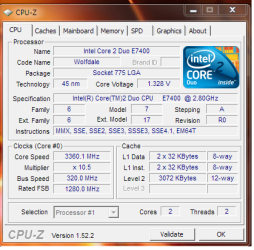
try 320 FSB with the 10.5 multiplier. that should give you 3.36ghz.
BUT leave your ram at 5/5/5/15, i think the reason for boot fail is because you changed it to 4/4/4. the reason for that is because the actual chips used on the memory has a latency value of 5, by lowering it to 4 and keeping the memory speed,not increasing voltage slightly and not increasing other memory timing values, it will try to do the impossible, which is...impossible for the chip.

as for CPU-Z showing 400mhz, it also tells me mine is 1333mhz, which it is in fact 1600, its strange how it works.

i think the 40 value setting is a realistic value, its not insanely low. mine is set to 2, so a small decrease to 40 should be well over achievable.

and your temps do seem high. even for a stock intel cooler. when you applied the paste, was the cooler clean and it had a flat contact surface? (some intel coolers have thermal grease/pads already applied, so they are a 'plug and play' setup, so you need to make sure you remove the original stuff first).
all you need is a perfectly thin layer. i have always had good results from a thin layer on both the cpu and cooler surface, and by thin i mean THIN, its only purpose is to fill in the microscopic gaps and impure flat surface between the two layers, by putting too much can cause overheating, as its restricting the heat dissipation.
all Intel cpu's have a thermal shutdown zone. once they hit their max (TjMax-thermal junction, between the 2 cores) it will force an immediate shutdown, no BSOD nothing, no delay no warning, that way there is little or no chance to damage the internals of the cpu. it will then have to wait until it cools below the max setting before it will function again. its handy having that feature;)

so...i would re-past that cpu, try out the settings i mentioned above @ 320 FSB and leave the mem timings at 5/5/5/15. see if it works.

this is the specs on your CPU.
Intel® Core?2 Duo Desktop Processor E7400 - SLB9Y

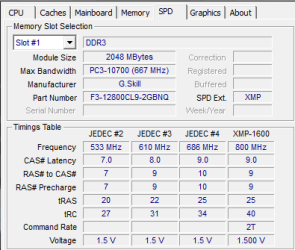
anyway, here are the timings i run on my memory.
apture.PNG


let me know what happens, i gota get some rest.:sleepy:
 
Last edited:

My Computer My Computer

At a glance

Windows 7 7600 x64 (16385) Ultimate,Windows V...Intel Quad core Q9550 [email protected](AS5 lap...2gbx4 GSkill1600MHz9/9/9/24/2T-1.8v@1677MHz9/...x2 Leadtek 9800GX2 Quad SLI(re-pasted/no case...
Computer Manufacturer/Model Number
Mad Customs #4
OS
Windows 7 7600 x64 (16385) Ultimate,Windows Vista x64 Ultimate
CPU
Intel Quad core Q9550 [email protected](AS5 lapped)(1845FSB)
Motherboard
EVGA 790i FTW DIGITAL PWM (AS5 re-pasted)
Memory
2gbx4 GSkill1600MHz9/9/9/24/2T-1.8v@1677MHz9/9/9/18/1T-1.8v
Graphics Card(s)
x2 Leadtek 9800GX2 Quad SLI(re-pasted/no cases)755/1120/1820
Sound Card
Crapative XF-i Plat
Monitor(s) Displays
Chimei22"ws(DVI)/LG32"LCD(HDMI)/Samsung 40"LCD(HDMI)
Screen Resolution
1680x1050/1360x768/1920x1080 (1080P)
Hard Drives
Seagate 1TB "40NS" 32mb sata2, Hitachi 500gb 16mb sata2 (backup storage), Sandisk 16gb micro SD (mobile storage)
PSU
Zalman 850-HP 850watt x6 12v@18A
Case
Tiled floor (nice and cold-usually 18c idle)
Cooling
fan forced 120 Xtreme (lapped)with push/pull setup
Keyboard
Logitech Di Novo Edge
Mouse
MX 1100
Internet Speed
Bigpond 17mbit/s cable=Max witnessed 2.5Mbyte/s down 30kb up
Other Info
Enzotech SLF-1+Enzotech CNB-EVGAi chipset coolers/Sunbeamtech Rheobus Extreme 30 Watt x 6 channel fan controller/Zalman ZM-MFC2 fan controller-Watt meter/Logitech G25 Racing Wheel/Logitech cordless number pad/OCZ NIA//HTPC:7600 x64/[email protected]/2x2Gb ST Proj.X DDR3 1800 9-9-9-24/Nvidia 8400GS 512Mb/Asus HDAV1.3 Delux(changed OPAmps to OPA627)/250Gb 16Mb 7200/480W PSU/Custom made cardboard box!!
all Intel cpu's have a thermal shutdown zone. once they hit their max (TjMax-thermal junction, between the 2 cores) it will force an immediate shutdown, no BSOD nothing, no delay no warning, that way there is little or no chance to damage the internals of the cpu. it will then have to wait until it cools below the max setting before it will function again. its handy having that feature

Well said. I remember AMD users burning the CPU out easily. With improper heatsink applied or improper cpu paste technique, trouble immediately!
 

My Computer My Computer

At a glance

7600.20510 x86P4 550 3.4 GHz HT running at 3.5 GHzOCZ 2 GB(2x1GB) DDR400mHz running @ 414 mHzHIS Radeon HD 3850 IceQ 3 Turbo HDMI Dual DL-...
Computer Manufacturer/Model Number
self built
OS
7600.20510 x86
CPU
P4 550 3.4 GHz HT running at 3.5 GHz
Motherboard
MSI PM8M3-V (MS-7211 v1.x) Micro-ATX mainboard
Memory
OCZ 2 GB(2x1GB) DDR400mHz running @ 414 mHz
Graphics Card(s)
HIS Radeon HD 3850 IceQ 3 Turbo HDMI Dual DL-DVI AGP
Sound Card
MOTU Traveler firewire studio interface 192 kHz 24 bit
Monitor(s) Displays
22" widescreen Acer X223W LCD, 17" Compaq P75 CRT
Screen Resolution
1680x1050 and 1280x1024
Hard Drives
SATA I x2 WD, 400 GB and 120 GB, SATA 2 WD Caviar Black 1 TB
PSU
350W generic
Case
Cybertronpc, it glows blue
Cooling
stock cpu fan, Ice-Q 3 gpu and system, many case fans
Keyboard
Logitch Classical Keyboard 200
Mouse
Logitech Mediaplay cordless
Internet Speed
1792/448 kbits/sec
Other Info
SATA II PCI fake RAID adapter, 1 GB Readyboost, original ATI Remote Wonder (even works with WMC perfectly), Logitech Rumblepad 2 game controller x2
Where is CPU-Z showing your RAM as 400MHz? The screenshot you posted has your RAM being listed correctly.

As for the temps, try re-applying the thermal grease, but properly clean off the other stuff as putting too much can increase temps. You only need a grain of rice sized amount on the CPU, although the stock cooler will also be causing a problem as it isn't exactly the most suitable cooler for benchmarking, though make sure it's properly fitted as well.

i think there was confusion with CPU-Z on the SPD tab page. i dont know how many times i have seen people get confused with that stupid graph/table example area. it states my ram is also 667(1333)mhz but is actually 800(1600)mhz. and i dont think my ram will even run at 1.5v. its range is between 1.7-1.85 from the OEM website yet JEDEK XMP profile states 1.5 @ 1600mhz? some XMP that is.

pture.PNG
 

My Computer My Computer

At a glance

Windows 7 7600 x64 (16385) Ultimate,Windows V...Intel Quad core Q9550 [email protected](AS5 lap...2gbx4 GSkill1600MHz9/9/9/24/2T-1.8v@1677MHz9/...x2 Leadtek 9800GX2 Quad SLI(re-pasted/no case...
Computer Manufacturer/Model Number
Mad Customs #4
OS
Windows 7 7600 x64 (16385) Ultimate,Windows Vista x64 Ultimate
CPU
Intel Quad core Q9550 [email protected](AS5 lapped)(1845FSB)
Motherboard
EVGA 790i FTW DIGITAL PWM (AS5 re-pasted)
Memory
2gbx4 GSkill1600MHz9/9/9/24/2T-1.8v@1677MHz9/9/9/18/1T-1.8v
Graphics Card(s)
x2 Leadtek 9800GX2 Quad SLI(re-pasted/no cases)755/1120/1820
Sound Card
Crapative XF-i Plat
Monitor(s) Displays
Chimei22"ws(DVI)/LG32"LCD(HDMI)/Samsung 40"LCD(HDMI)
Screen Resolution
1680x1050/1360x768/1920x1080 (1080P)
Hard Drives
Seagate 1TB "40NS" 32mb sata2, Hitachi 500gb 16mb sata2 (backup storage), Sandisk 16gb micro SD (mobile storage)
PSU
Zalman 850-HP 850watt x6 12v@18A
Case
Tiled floor (nice and cold-usually 18c idle)
Cooling
fan forced 120 Xtreme (lapped)with push/pull setup
Keyboard
Logitech Di Novo Edge
Mouse
MX 1100
Internet Speed
Bigpond 17mbit/s cable=Max witnessed 2.5Mbyte/s down 30kb up
Other Info
Enzotech SLF-1+Enzotech CNB-EVGAi chipset coolers/Sunbeamtech Rheobus Extreme 30 Watt x 6 channel fan controller/Zalman ZM-MFC2 fan controller-Watt meter/Logitech G25 Racing Wheel/Logitech cordless number pad/OCZ NIA//HTPC:7600 x64/[email protected]/2x2Gb ST Proj.X DDR3 1800 9-9-9-24/Nvidia 8400GS 512Mb/Asus HDAV1.3 Delux(changed OPAmps to OPA627)/250Gb 16Mb 7200/480W PSU/Custom made cardboard box!!
all Intel cpu's have a thermal shutdown zone. once they hit their max (TjMax-thermal junction, between the 2 cores) it will force an immediate shutdown, no BSOD nothing, no delay no warning, that way there is little or no chance to damage the internals of the cpu. it will then have to wait until it cools below the max setting before it will function again. its handy having that feature

Well said. I remember AMD users burning the CPU out easily. With improper heatsink applied or improper cpu paste technique, trouble immediately!

geez i remember those days, i think that is what originally turned me off AMD, even though it was quite a few years ago, it still floats in the back of my mind, although they would have more than likely fixed that issue within a few new cpu designs from that date, as there would have been alot of unhappy enthusiasts:confused:
 

My Computer My Computer

At a glance

Windows 7 7600 x64 (16385) Ultimate,Windows V...Intel Quad core Q9550 [email protected](AS5 lap...2gbx4 GSkill1600MHz9/9/9/24/2T-1.8v@1677MHz9/...x2 Leadtek 9800GX2 Quad SLI(re-pasted/no case...
Computer Manufacturer/Model Number
Mad Customs #4
OS
Windows 7 7600 x64 (16385) Ultimate,Windows Vista x64 Ultimate
CPU
Intel Quad core Q9550 [email protected](AS5 lapped)(1845FSB)
Motherboard
EVGA 790i FTW DIGITAL PWM (AS5 re-pasted)
Memory
2gbx4 GSkill1600MHz9/9/9/24/2T-1.8v@1677MHz9/9/9/18/1T-1.8v
Graphics Card(s)
x2 Leadtek 9800GX2 Quad SLI(re-pasted/no cases)755/1120/1820
Sound Card
Crapative XF-i Plat
Monitor(s) Displays
Chimei22"ws(DVI)/LG32"LCD(HDMI)/Samsung 40"LCD(HDMI)
Screen Resolution
1680x1050/1360x768/1920x1080 (1080P)
Hard Drives
Seagate 1TB "40NS" 32mb sata2, Hitachi 500gb 16mb sata2 (backup storage), Sandisk 16gb micro SD (mobile storage)
PSU
Zalman 850-HP 850watt x6 12v@18A
Case
Tiled floor (nice and cold-usually 18c idle)
Cooling
fan forced 120 Xtreme (lapped)with push/pull setup
Keyboard
Logitech Di Novo Edge
Mouse
MX 1100
Internet Speed
Bigpond 17mbit/s cable=Max witnessed 2.5Mbyte/s down 30kb up
Other Info
Enzotech SLF-1+Enzotech CNB-EVGAi chipset coolers/Sunbeamtech Rheobus Extreme 30 Watt x 6 channel fan controller/Zalman ZM-MFC2 fan controller-Watt meter/Logitech G25 Racing Wheel/Logitech cordless number pad/OCZ NIA//HTPC:7600 x64/[email protected]/2x2Gb ST Proj.X DDR3 1800 9-9-9-24/Nvidia 8400GS 512Mb/Asus HDAV1.3 Delux(changed OPAmps to OPA627)/250Gb 16Mb 7200/480W PSU/Custom made cardboard box!!
ok, you no longer need to worry about your memory as its at 533(1066).
also your default multiplier is 10.5 so i would be running it at 10.5 to get full advantage of it.

try 320 FSB with the 10.5 multiplier. that should give you 3.36ghz.
BUT leave your ram at 5/5/5/15, i
think the reason for boot fail is because you changed it to 4/4/4. the reason for that is because the actual chips used on the memory has a latency value of 5, by lowering it to 4 and keeping the memory speed,not increasing voltage slightly and not increasing other memory timing values, it will try to do the impossible, which is...impossible for the chip.

as for CPU-Z showing 400mhz, it also tells me mine is 1333mhz, which it is in fact 1600, its strange how it works.

i think the 40 value setting is a realistic value, its not insanely low. mine is set to 17, so a small decrease to 40 should be well over achievable.


let me know what happens, i gota get some rest.:sleepy:

When I change the FSB to 320, should I change the (G)MCH Frequency Latch from 266 with 4.00a Multiplier? I'm guessing not but I'm not too sure about this.

And I think when I took my comp apart 2 days ago to clean the dust out, when I removed the heat sync it broke the thermal paste bond or something. After reapplying the temps are back down to normal.

Where is CPU-Z showing your RAM as 400MHz? The screenshot you posted has your RAM being listed correctly.

As for the temps, try re-applying the thermal grease, but properly clean off the other stuff as putting too much can increase temps. You only need a grain of rice sized amount on the CPU, although the stock cooler will also be causing a problem as it isn't exactly the most suitable cooler for benchmarking, though make sure it's properly fitted as well.

CPU-Z was showing that under the SPD tab, but I guess that is just the chip standard settings?
 

Attachments

  • spd1.png
    spd1.png
    13.8 KB · Views: 2

My Computer My Computer

At a glance

Home Premium x64Intel e7400 2.8GHz Dual Core, OC @ 3.36GHz4GB DDR2 1066Nvidia GeForce 9800 GT
OS
Home Premium x64
CPU
Intel e7400 2.8GHz Dual Core, OC @ 3.36GHz
Motherboard
Gigabyte GA-EP43-DS3L/S3L
Memory
4GB DDR2 1066
Graphics Card(s)
Nvidia GeForce 9800 GT
Sound Card
Realtek Surround Onboard.
Monitor(s) Displays
ASUS VW224, 22 Inch and Samsung SyncMaster 713v
Screen Resolution
Main Screen @1680x1050, Secondary @ 1280x1024
Hard Drives
Western Digital WD3200AAKS 320GB 7200 RPM SATA 3.0Gb/s
PSU
Thermaltake Purepower W0100RU 500W
Case
Rosewill R5601-BK Screw-less
Cooling
Two 120mm fans and Stock CPU fans
Keyboard
Old Dell Keyboard my neighbor gave me.
Mouse
Logitech MX518
Internet Speed
6Kbps
Other Info
Logitech X-540 70 watts 5.1 Speakers
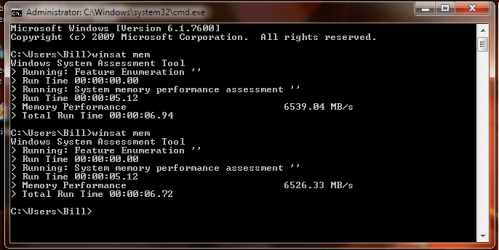
Thanks to all of you for the advice. Here are the new screenshots.
 

Attachments

  • memsat3.png
    memsat3.png
    16.2 KB · Views: 10
  • cpuz cpu.png
    cpuz cpu.png
    21.2 KB · Views: 2
  • cpuz memory 2.png
    cpuz memory 2.png
    12 KB · Views: 2

My Computer My Computer

At a glance

Home Premium x64Intel e7400 2.8GHz Dual Core, OC @ 3.36GHz4GB DDR2 1066Nvidia GeForce 9800 GT
OS
Home Premium x64
CPU
Intel e7400 2.8GHz Dual Core, OC @ 3.36GHz
Motherboard
Gigabyte GA-EP43-DS3L/S3L
Memory
4GB DDR2 1066
Graphics Card(s)
Nvidia GeForce 9800 GT
Sound Card
Realtek Surround Onboard.
Monitor(s) Displays
ASUS VW224, 22 Inch and Samsung SyncMaster 713v
Screen Resolution
Main Screen @1680x1050, Secondary @ 1280x1024
Hard Drives
Western Digital WD3200AAKS 320GB 7200 RPM SATA 3.0Gb/s
PSU
Thermaltake Purepower W0100RU 500W
Case
Rosewill R5601-BK Screw-less
Cooling
Two 120mm fans and Stock CPU fans
Keyboard
Old Dell Keyboard my neighbor gave me.
Mouse
Logitech MX518
Internet Speed
6Kbps
Other Info
Logitech X-540 70 watts 5.1 Speakers
Thanks to all of you for the advice. Here are the new screenshots.

ahh excellent, hows the system running at 320 FSB? is it overheating still, did you re-paste the cpu at all?

i noticed your ram has dropped back down from 533mhz?

is there a noticeable speed gain now at 320? personally i would invest in a new cpu cooler, and i would set the 320FSB as the max limit for the stockie. once you get a better cooler you can go higher ;)

did you happen to try the 5/5/5/15/2T/40 timings? also another hint, if you want the ram to run faster, try setting that CR command rate down to 1T. that will give it a hefty boost, and seeing as your ram is rated at 1066mhz and its running at 960mhz you may just get 1T to work strait off the bat, as usually you would have to loosen timings (increase them), increase voltage a tad and sometimes decrease the mhz on the ram. but sometimes 1T can be worth it all. it usually boosts it by anywhere from 1000mb/s to 3000mb/s! there is no harm in trying!

all that matters in overclocking is that your careful with increasing voltages, the cpu is usually ok as it has thermal protection, but some motherboards do not have overheat/overvolt protect and i HAVE killed a old ddr2 mobo i had years ago by increasing the northbridge voltage a bit too high (i was still learning to overclock lga775 boards). and also the ram can be a bit sensitive to voltage, but stay around the 1.8-2.0v and you should be fine with that.

there are probably heaps of people here that can help in overclocking, but this forum is more dedicated to operating systems, so if you want to learn more, there is a forum i joined some time ago, and have learnt heaps from them in the past!
http://www.xtremesystems.org/
 

My Computer My Computer

At a glance

Windows 7 7600 x64 (16385) Ultimate,Windows V...Intel Quad core Q9550 [email protected](AS5 lap...2gbx4 GSkill1600MHz9/9/9/24/2T-1.8v@1677MHz9/...x2 Leadtek 9800GX2 Quad SLI(re-pasted/no case...
Computer Manufacturer/Model Number
Mad Customs #4
OS
Windows 7 7600 x64 (16385) Ultimate,Windows Vista x64 Ultimate
CPU
Intel Quad core Q9550 [email protected](AS5 lapped)(1845FSB)
Motherboard
EVGA 790i FTW DIGITAL PWM (AS5 re-pasted)
Memory
2gbx4 GSkill1600MHz9/9/9/24/2T-1.8v@1677MHz9/9/9/18/1T-1.8v
Graphics Card(s)
x2 Leadtek 9800GX2 Quad SLI(re-pasted/no cases)755/1120/1820
Sound Card
Crapative XF-i Plat
Monitor(s) Displays
Chimei22"ws(DVI)/LG32"LCD(HDMI)/Samsung 40"LCD(HDMI)
Screen Resolution
1680x1050/1360x768/1920x1080 (1080P)
Hard Drives
Seagate 1TB "40NS" 32mb sata2, Hitachi 500gb 16mb sata2 (backup storage), Sandisk 16gb micro SD (mobile storage)
PSU
Zalman 850-HP 850watt x6 12v@18A
Case
Tiled floor (nice and cold-usually 18c idle)
Cooling
fan forced 120 Xtreme (lapped)with push/pull setup
Keyboard
Logitech Di Novo Edge
Mouse
MX 1100
Internet Speed
Bigpond 17mbit/s cable=Max witnessed 2.5Mbyte/s down 30kb up
Other Info
Enzotech SLF-1+Enzotech CNB-EVGAi chipset coolers/Sunbeamtech Rheobus Extreme 30 Watt x 6 channel fan controller/Zalman ZM-MFC2 fan controller-Watt meter/Logitech G25 Racing Wheel/Logitech cordless number pad/OCZ NIA//HTPC:7600 x64/[email protected]/2x2Gb ST Proj.X DDR3 1800 9-9-9-24/Nvidia 8400GS 512Mb/Asus HDAV1.3 Delux(changed OPAmps to OPA627)/250Gb 16Mb 7200/480W PSU/Custom made cardboard box!!
:)
Thanks to all of you for the advice. Here are the new screenshots.

ahh excellent, hows the system running at 320 FSB? is it overheating still, did you re-paste the cpu at all?

i noticed your ram has dropped back down from 533mhz?

is there a noticeable speed gain now at 320? personally i would invest in a new cpu cooler, and i would set the 320FSB as the max limit for the stockie. once you get a better cooler you can go higher ;)

did you happen to try the 5/5/5/15/2T/40 timings? also another hint, if you want the ram to run faster, try setting that CR command rate down to 1T. that will give it a hefty boost, and seeing as your ram is rated at 1066mhz and its running at 960mhz you may just get 1T to work strait off the bat, as usually you would have to loosen timings (increase them), increase voltage a tad and sometimes decrease the mhz on the ram. but sometimes 1T can be worth it all. it usually boosts it by anywhere from 1000mb/s to 3000mb/s! there is no harm in trying!

all that matters in overclocking is that your careful with increasing voltages, the cpu is usually ok as it has thermal protection, but some motherboards do not have overheat/overvolt protect and i HAVE killed a old ddr2 mobo i had years ago by increasing the northbridge voltage a bit too high (i was still learning to overclock lga775 boards). and also the ram can be a bit sensitive to voltage, but stay around the 1.8-2.0v and you should be fine with that.

there are probably heaps of people here that can help in overclocking, but this forum is more dedicated to operating systems, so if you want to learn more, there is a forum i joined some time ago, and have learnt heaps from them in the past!
XtremeSystems Inc

With my FSB at 320 my system has been very stable. My highest temp with a 30 min stress test was 63c I think. When I set the timing from 52 down to 40 my system won't start, I'll get many beeps(didn't bother to count them) and my bios restores itself. I set it to 1T and I don't notice any real raise in winsat mem speeds.

I have my RAM MCH Frequency Latch set at 266 with x3 multiplier because at x4 my system fails to boot. I'm happy with it is even though it probably isn't the best, 1000MBs faster is great.

I agree that I should go read on an overclock forums and that this should go back to the thread topic, winsat mem speeds. Sorry about the hijack all...
 

My Computer My Computer

At a glance

Home Premium x64Intel e7400 2.8GHz Dual Core, OC @ 3.36GHz4GB DDR2 1066Nvidia GeForce 9800 GT
OS
Home Premium x64
CPU
Intel e7400 2.8GHz Dual Core, OC @ 3.36GHz
Motherboard
Gigabyte GA-EP43-DS3L/S3L
Memory
4GB DDR2 1066
Graphics Card(s)
Nvidia GeForce 9800 GT
Sound Card
Realtek Surround Onboard.
Monitor(s) Displays
ASUS VW224, 22 Inch and Samsung SyncMaster 713v
Screen Resolution
Main Screen @1680x1050, Secondary @ 1280x1024
Hard Drives
Western Digital WD3200AAKS 320GB 7200 RPM SATA 3.0Gb/s
PSU
Thermaltake Purepower W0100RU 500W
Case
Rosewill R5601-BK Screw-less
Cooling
Two 120mm fans and Stock CPU fans
Keyboard
Old Dell Keyboard my neighbor gave me.
Mouse
Logitech MX518
Internet Speed
6Kbps
Other Info
Logitech X-540 70 watts 5.1 Speakers
:)
Thanks to all of you for the advice. Here are the new screenshots.

ahh excellent, hows the system running at 320 FSB? is it overheating still, did you re-paste the cpu at all?

i noticed your ram has dropped back down from 533mhz?

is there a noticeable speed gain now at 320? personally i would invest in a new cpu cooler, and i would set the 320FSB as the max limit for the stockie. once you get a better cooler you can go higher ;)

did you happen to try the 5/5/5/15/2T/40 timings? also another hint, if you want the ram to run faster, try setting that CR command rate down to 1T. that will give it a hefty boost, and seeing as your ram is rated at 1066mhz and its running at 960mhz you may just get 1T to work strait off the bat, as usually you would have to loosen timings (increase them), increase voltage a tad and sometimes decrease the mhz on the ram. but sometimes 1T can be worth it all. it usually boosts it by anywhere from 1000mb/s to 3000mb/s! there is no harm in trying!

all that matters in overclocking is that your careful with increasing voltages, the cpu is usually ok as it has thermal protection, but some motherboards do not have overheat/overvolt protect and i HAVE killed a old ddr2 mobo i had years ago by increasing the northbridge voltage a bit too high (i was still learning to overclock lga775 boards). and also the ram can be a bit sensitive to voltage, but stay around the 1.8-2.0v and you should be fine with that.

there are probably heaps of people here that can help in overclocking, but this forum is more dedicated to operating systems, so if you want to learn more, there is a forum i joined some time ago, and have learnt heaps from them in the past!
XtremeSystems Inc

With my FSB at 320 my system has been very stable. My highest temp with a 30 min stress test was 63c I think. When I set the timing from 52 down to 40 my system won't start, I'll get many beeps(didn't bother to count them) and my bios restores itself. I set it to 1T and I don't notice any real raise in winsat mem speeds.

I have my RAM MCH Frequency Latch set at 266 with x3 multiplier because at x4 my system fails to boot. I'm happy with it is even though it probably isn't the best, 1000MBs faster is great.

I agree that I should go read on an overclock forums and that this should go back to the thread topic, winsat mem speeds. Sorry about the hijack all...

well at least its running better. and your temps seem nice even with a stock cooler!

and its almost getting the same mb/s as my setup with ddr3 so its doing well!

and dont worry too much about going off topic, i created this thread, but i too have a habit of going off topic, everybody does it sometimes, but its good to help others.:D
 

My Computer My Computer

At a glance

Windows 7 7600 x64 (16385) Ultimate,Windows V...Intel Quad core Q9550 [email protected](AS5 lap...2gbx4 GSkill1600MHz9/9/9/24/2T-1.8v@1677MHz9/...x2 Leadtek 9800GX2 Quad SLI(re-pasted/no case...
Computer Manufacturer/Model Number
Mad Customs #4
OS
Windows 7 7600 x64 (16385) Ultimate,Windows Vista x64 Ultimate
CPU
Intel Quad core Q9550 [email protected](AS5 lapped)(1845FSB)
Motherboard
EVGA 790i FTW DIGITAL PWM (AS5 re-pasted)
Memory
2gbx4 GSkill1600MHz9/9/9/24/2T-1.8v@1677MHz9/9/9/18/1T-1.8v
Graphics Card(s)
x2 Leadtek 9800GX2 Quad SLI(re-pasted/no cases)755/1120/1820
Sound Card
Crapative XF-i Plat
Monitor(s) Displays
Chimei22"ws(DVI)/LG32"LCD(HDMI)/Samsung 40"LCD(HDMI)
Screen Resolution
1680x1050/1360x768/1920x1080 (1080P)
Hard Drives
Seagate 1TB "40NS" 32mb sata2, Hitachi 500gb 16mb sata2 (backup storage), Sandisk 16gb micro SD (mobile storage)
PSU
Zalman 850-HP 850watt x6 12v@18A
Case
Tiled floor (nice and cold-usually 18c idle)
Cooling
fan forced 120 Xtreme (lapped)with push/pull setup
Keyboard
Logitech Di Novo Edge
Mouse
MX 1100
Internet Speed
Bigpond 17mbit/s cable=Max witnessed 2.5Mbyte/s down 30kb up
Other Info
Enzotech SLF-1+Enzotech CNB-EVGAi chipset coolers/Sunbeamtech Rheobus Extreme 30 Watt x 6 channel fan controller/Zalman ZM-MFC2 fan controller-Watt meter/Logitech G25 Racing Wheel/Logitech cordless number pad/OCZ NIA//HTPC:7600 x64/[email protected]/2x2Gb ST Proj.X DDR3 1800 9-9-9-24/Nvidia 8400GS 512Mb/Asus HDAV1.3 Delux(changed OPAmps to OPA627)/250Gb 16Mb 7200/480W PSU/Custom made cardboard box!!
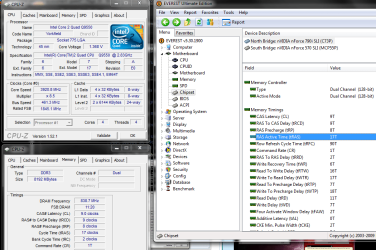
ah ok, forget the SPD tab, it is simply a example or something of what the ram can run at. the one you got to look at is the memory tab, that will show what it is at. so your ram is at 200mhz which in double data rate is 400mhz. which is still lower than it should be which is 333mhz (667)
Is there anything I could do to turn it 'up' like in the BIOS of something.

all i can suggest is to try and manually set the mem speed in the bios. you want to set it to 667 but im not sure how your bios is layed out as its an AMD system, i have only experience in Intel platforms. if there is anything along the lines of linked or synced, you need it to be set at unlinked. and go from there. leave the memory timings on auto until you can get the correct speed on the memory. if you can go to the motherboards manufacturers website, and find a link to download the manual or something, i will have a look through it and see if i can figure it out.;)
I've looked through each & every BIOS setting and I can't find that option, maybe because my PC wasn't custom build it's locked up by HP?
 

My Computer My Computer

At a glance

Windows 7 x64 UltimateAMD Phenom II X4 955 @ 3.72GHzPatriot 8GB DDR3 1333MHzNVIDIA GTX560
Computer Manufacturer/Model Number
Custom Build
OS
Windows 7 x64 Ultimate
CPU
AMD Phenom II X4 955 @ 3.72GHz
Motherboard
Gigabyte GA-MA770T-UD3P
Memory
Patriot 8GB DDR3 1333MHz
Graphics Card(s)
NVIDIA GTX560
Sound Card
-
Monitor(s) Displays
LG 23" W2343T
Screen Resolution
1920 x 1080
Hard Drives
256GB Crucial M4 SSD - OS/program files
250GB - Internal HDD - User files
500GB - Internal HDD - Storage #1
1.5TB - Internal HDD - Storage #2
500GB - External HDD - Portable Storage #1
2TB - External HDD - Portable Storage #2
PSU
TT450W
Case
Thermaltake V3
Cooling
Blue Orb II
Keyboard
Compaq.
Mouse
Logitech MX518
Internet Speed
7Mbps.
Other Info
Cooling (couldn't fit it above).
2 x 120mm LED Blue Fan
1 x Blue Orb II [CPU Cooler]
Is there anything I could do to turn it 'up' like in the BIOS of something.

all i can suggest is to try and manually set the mem speed in the bios. you want to set it to 667 but im not sure how your bios is layed out as its an AMD system, i have only experience in Intel platforms. if there is anything along the lines of linked or synced, you need it to be set at unlinked. and go from there. leave the memory timings on auto until you can get the correct speed on the memory. if you can go to the motherboards manufacturers website, and find a link to download the manual or something, i will have a look through it and see if i can figure it out.;)
I've looked through each & every BIOS setting and I can't find that option, maybe because my PC wasn't custom build it's locked up by HP?

oh so you have a HP bios. yes it may lock out performance options. so will it allow you to overclock the CPU? or it does not even have that? does it have a section saying something like voltage settings or something?

EDIT i had a look on the HP website :rolleyes: and after reading all the online manuals, i found nothing on the bios, then i went to the 'how to' section and found my way through to the bios setup, if your pc is the one in your specs, SR5060AN, all it has is the main screen, advanced (nothing useful) and power options. if i were you, the next step is to upgrade to anything apart from a HP motherboard. I personally like EVGA motherboards, Asus are good but expensive for that brand name. the reason i say this is you cannot control anything but shared graphics with that HP board.
 
Last edited:

My Computer My Computer

At a glance

Windows 7 7600 x64 (16385) Ultimate,Windows V...Intel Quad core Q9550 [email protected](AS5 lap...2gbx4 GSkill1600MHz9/9/9/24/2T-1.8v@1677MHz9/...x2 Leadtek 9800GX2 Quad SLI(re-pasted/no case...
Computer Manufacturer/Model Number
Mad Customs #4
OS
Windows 7 7600 x64 (16385) Ultimate,Windows Vista x64 Ultimate
CPU
Intel Quad core Q9550 [email protected](AS5 lapped)(1845FSB)
Motherboard
EVGA 790i FTW DIGITAL PWM (AS5 re-pasted)
Memory
2gbx4 GSkill1600MHz9/9/9/24/2T-1.8v@1677MHz9/9/9/18/1T-1.8v
Graphics Card(s)
x2 Leadtek 9800GX2 Quad SLI(re-pasted/no cases)755/1120/1820
Sound Card
Crapative XF-i Plat
Monitor(s) Displays
Chimei22"ws(DVI)/LG32"LCD(HDMI)/Samsung 40"LCD(HDMI)
Screen Resolution
1680x1050/1360x768/1920x1080 (1080P)
Hard Drives
Seagate 1TB "40NS" 32mb sata2, Hitachi 500gb 16mb sata2 (backup storage), Sandisk 16gb micro SD (mobile storage)
PSU
Zalman 850-HP 850watt x6 12v@18A
Case
Tiled floor (nice and cold-usually 18c idle)
Cooling
fan forced 120 Xtreme (lapped)with push/pull setup
Keyboard
Logitech Di Novo Edge
Mouse
MX 1100
Internet Speed
Bigpond 17mbit/s cable=Max witnessed 2.5Mbyte/s down 30kb up
Other Info
Enzotech SLF-1+Enzotech CNB-EVGAi chipset coolers/Sunbeamtech Rheobus Extreme 30 Watt x 6 channel fan controller/Zalman ZM-MFC2 fan controller-Watt meter/Logitech G25 Racing Wheel/Logitech cordless number pad/OCZ NIA//HTPC:7600 x64/[email protected]/2x2Gb ST Proj.X DDR3 1800 9-9-9-24/Nvidia 8400GS 512Mb/Asus HDAV1.3 Delux(changed OPAmps to OPA627)/250Gb 16Mb 7200/480W PSU/Custom made cardboard box!!
Sometimes, like I did, you could find users that made bios for motherboards that were previously locked.

I installed one of these and now have all the overclocking features when I didn't previously.

Proceed with caution on this one though, of course.
 

My Computer My Computer

At a glance

7600.20510 x86P4 550 3.4 GHz HT running at 3.5 GHzOCZ 2 GB(2x1GB) DDR400mHz running @ 414 mHzHIS Radeon HD 3850 IceQ 3 Turbo HDMI Dual DL-...
Computer Manufacturer/Model Number
self built
OS
7600.20510 x86
CPU
P4 550 3.4 GHz HT running at 3.5 GHz
Motherboard
MSI PM8M3-V (MS-7211 v1.x) Micro-ATX mainboard
Memory
OCZ 2 GB(2x1GB) DDR400mHz running @ 414 mHz
Graphics Card(s)
HIS Radeon HD 3850 IceQ 3 Turbo HDMI Dual DL-DVI AGP
Sound Card
MOTU Traveler firewire studio interface 192 kHz 24 bit
Monitor(s) Displays
22" widescreen Acer X223W LCD, 17" Compaq P75 CRT
Screen Resolution
1680x1050 and 1280x1024
Hard Drives
SATA I x2 WD, 400 GB and 120 GB, SATA 2 WD Caviar Black 1 TB
PSU
350W generic
Case
Cybertronpc, it glows blue
Cooling
stock cpu fan, Ice-Q 3 gpu and system, many case fans
Keyboard
Logitch Classical Keyboard 200
Mouse
Logitech Mediaplay cordless
Internet Speed
1792/448 kbits/sec
Other Info
SATA II PCI fake RAID adapter, 1 GB Readyboost, original ATI Remote Wonder (even works with WMC perfectly), Logitech Rumblepad 2 game controller x2
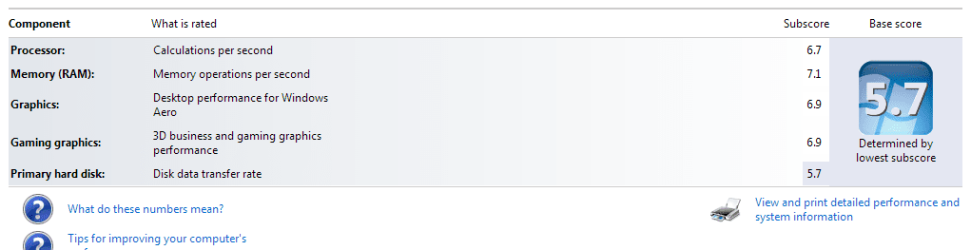
DDR2 818 4-4-4-12. win 7 gives it a 7.1
 

My Computer My Computer

At a glance

Windows 7 Ultimate 64bit with XP ModeAMD 6400+ 64bit 3.2GHZ Dual core4GB ,TWIN2X2048-6400C4 Dual Channel 4-4-4-12PNY XLR 8800GT , PNY 6600GT
Computer Manufacturer/Model Number
Home Built
OS
Windows 7 Ultimate 64bit with XP Mode
CPU
AMD 6400+ 64bit 3.2GHZ Dual core
Motherboard
ASUS M2N32-SLI Deluxe Wireless Edition
Memory
4GB ,TWIN2X2048-6400C4 Dual Channel 4-4-4-12
Graphics Card(s)
PNY XLR 8800GT , PNY 6600GT
Sound Card
Creative Soundblaster Audigy 4
Monitor(s) Displays
42" HDTV + 27" HDTV
Screen Resolution
42" HDTV 1920 X 1080 - 27" HDTV 1920 x 1080
Hard Drives
36GB Western Digital Raptor 10,000 RPM, Maxtor 100GB, 500GB Western Digital X 2
PSU
Antec TruePower TP-750 Blue 750W Continuous Power
Case
Antec 900
all i can suggest is to try and manually set the mem speed in the bios. you want to set it to 667 but im not sure how your bios is layed out as its an AMD system, i have only experience in Intel platforms. if there is anything along the lines of linked or synced, you need it to be set at unlinked. and go from there. leave the memory timings on auto until you can get the correct speed on the memory. if you can go to the motherboards manufacturers website, and find a link to download the manual or something, i will have a look through it and see if i can figure it out.;)
I've looked through each & every BIOS setting and I can't find that option, maybe because my PC wasn't custom build it's locked up by HP?

oh so you have a HP bios. yes it may lock out performance options. so will it allow you to overclock the CPU? or it does not even have that? does it have a section saying something like voltage settings or something?

EDIT i had a look on the HP website :rolleyes: and after reading all the online manuals, i found nothing on the bios, then i went to the 'how to' section and found my way through to the bios setup, if your pc is the one in your specs, SR5060AN, all it has is the main screen, advanced (nothing useful) and power options. if i were you, the next step is to upgrade to anything apart from a HP motherboard. I personally like EVGA motherboards, Asus are good but expensive for that brand name. the reason i say this is you cannot control anything but shared graphics with that HP board.
It's some Pheonix Technologies or something, I'm fine for now, I can run Bf2 and some other powerful games, I'll get a couple of books on computers and probably in 6 to 12 months I'll look into building a decent PC.
 

My Computer My Computer

At a glance

Windows 7 x64 UltimateAMD Phenom II X4 955 @ 3.72GHzPatriot 8GB DDR3 1333MHzNVIDIA GTX560
Computer Manufacturer/Model Number
Custom Build
OS
Windows 7 x64 Ultimate
CPU
AMD Phenom II X4 955 @ 3.72GHz
Motherboard
Gigabyte GA-MA770T-UD3P
Memory
Patriot 8GB DDR3 1333MHz
Graphics Card(s)
NVIDIA GTX560
Sound Card
-
Monitor(s) Displays
LG 23" W2343T
Screen Resolution
1920 x 1080
Hard Drives
256GB Crucial M4 SSD - OS/program files
250GB - Internal HDD - User files
500GB - Internal HDD - Storage #1
1.5TB - Internal HDD - Storage #2
500GB - External HDD - Portable Storage #1
2TB - External HDD - Portable Storage #2
PSU
TT450W
Case
Thermaltake V3
Cooling
Blue Orb II
Keyboard
Compaq.
Mouse
Logitech MX518
Internet Speed
7Mbps.
Other Info
Cooling (couldn't fit it above).
2 x 120mm LED Blue Fan
1 x Blue Orb II [CPU Cooler]

Attachments

  • cpuz memory 2.png
    cpuz memory 2.png
    12 KB · Views: 5
  • Performance index.png
    Performance index.png
    14.8 KB · Views: 12

My Computer My Computer

At a glance

Home Premium x64Intel e7400 2.8GHz Dual Core, OC @ 3.36GHz4GB DDR2 1066Nvidia GeForce 9800 GT
OS
Home Premium x64
CPU
Intel e7400 2.8GHz Dual Core, OC @ 3.36GHz
Motherboard
Gigabyte GA-EP43-DS3L/S3L
Memory
4GB DDR2 1066
Graphics Card(s)
Nvidia GeForce 9800 GT
Sound Card
Realtek Surround Onboard.
Monitor(s) Displays
ASUS VW224, 22 Inch and Samsung SyncMaster 713v
Screen Resolution
Main Screen @1680x1050, Secondary @ 1280x1024
Hard Drives
Western Digital WD3200AAKS 320GB 7200 RPM SATA 3.0Gb/s
PSU
Thermaltake Purepower W0100RU 500W
Case
Rosewill R5601-BK Screw-less
Cooling
Two 120mm fans and Stock CPU fans
Keyboard
Old Dell Keyboard my neighbor gave me.
Mouse
Logitech MX518
Internet Speed
6Kbps
Other Info
Logitech X-540 70 watts 5.1 Speakers
I've looked through each & every BIOS setting and I can't find that option, maybe because my PC wasn't custom build it's locked up by HP?

oh so you have a HP bios. yes it may lock out performance options. so will it allow you to overclock the CPU? or it does not even have that? does it have a section saying something like voltage settings or something?

EDIT i had a look on the HP website :rolleyes: and after reading all the online manuals, i found nothing on the bios, then i went to the 'how to' section and found my way through to the bios setup, if your pc is the one in your specs, SR5060AN, all it has is the main screen, advanced (nothing useful) and power options. if i were you, the next step is to upgrade to anything apart from a HP motherboard. I personally like EVGA motherboards, Asus are good but expensive for that brand name. the reason i say this is you cannot control anything but shared graphics with that HP board.
It's some Pheonix Technologies or something, I'm fine for now, I can run Bf2 and some other powerful games, I'll get a couple of books on computers and probably in 6 to 12 months I'll look into building a decent PC.

Pheonix Tech is just the maker of the BIOS chip. they have been the I.T. industry standard for decades.

Like Torrentg posted before, there maybe a bios 'hack' for that mobo, but the risk of doing things like that can cause the mobo to become 'bricked' (unusable to the point when you will turn it on and it wont beep or anything) and the only way around that that i know of is to get a replacement BIOS chip (thats if its on a removable socket), so like Torrentg said, it is risky, but if it was me in your position, i like to tinker and would try and find it. you just have to be 100% sure its made for your mobo and it actually works.

good thinking Torrentg!;) just like the firmware hacks for modems and routers. i just never thought they would make them for mobo bios's, and after all, why not, a company that restricts you from taking full advantage of your own hardware should be a crime!.
 

My Computer My Computer

At a glance

Windows 7 7600 x64 (16385) Ultimate,Windows V...Intel Quad core Q9550 [email protected](AS5 lap...2gbx4 GSkill1600MHz9/9/9/24/2T-1.8v@1677MHz9/...x2 Leadtek 9800GX2 Quad SLI(re-pasted/no case...
Computer Manufacturer/Model Number
Mad Customs #4
OS
Windows 7 7600 x64 (16385) Ultimate,Windows Vista x64 Ultimate
CPU
Intel Quad core Q9550 [email protected](AS5 lapped)(1845FSB)
Motherboard
EVGA 790i FTW DIGITAL PWM (AS5 re-pasted)
Memory
2gbx4 GSkill1600MHz9/9/9/24/2T-1.8v@1677MHz9/9/9/18/1T-1.8v
Graphics Card(s)
x2 Leadtek 9800GX2 Quad SLI(re-pasted/no cases)755/1120/1820
Sound Card
Crapative XF-i Plat
Monitor(s) Displays
Chimei22"ws(DVI)/LG32"LCD(HDMI)/Samsung 40"LCD(HDMI)
Screen Resolution
1680x1050/1360x768/1920x1080 (1080P)
Hard Drives
Seagate 1TB "40NS" 32mb sata2, Hitachi 500gb 16mb sata2 (backup storage), Sandisk 16gb micro SD (mobile storage)
PSU
Zalman 850-HP 850watt x6 12v@18A
Case
Tiled floor (nice and cold-usually 18c idle)
Cooling
fan forced 120 Xtreme (lapped)with push/pull setup
Keyboard
Logitech Di Novo Edge
Mouse
MX 1100
Internet Speed
Bigpond 17mbit/s cable=Max witnessed 2.5Mbyte/s down 30kb up
Other Info
Enzotech SLF-1+Enzotech CNB-EVGAi chipset coolers/Sunbeamtech Rheobus Extreme 30 Watt x 6 channel fan controller/Zalman ZM-MFC2 fan controller-Watt meter/Logitech G25 Racing Wheel/Logitech cordless number pad/OCZ NIA//HTPC:7600 x64/[email protected]/2x2Gb ST Proj.X DDR3 1800 9-9-9-24/Nvidia 8400GS 512Mb/Asus HDAV1.3 Delux(changed OPAmps to OPA627)/250Gb 16Mb 7200/480W PSU/Custom made cardboard box!!
Patriot 4gb (2x2gb) DDR2 1066 Dual Channel
 

Attachments

  • Capture.JPG
    Capture.JPG
    32.2 KB · Views: 23

My Computer My Computer

At a glance

Windows 7 Ultimate Signature Edition x64AMD Phenom X3 8450Patriot Viper 4GB (2 x 2GB) DDR2 1066GIGABYTE GV-R485ZL-512H HD 4850 512MB 256-bit...
Computer Manufacturer/Model Number
Custom Built
OS
Windows 7 Ultimate Signature Edition x64
CPU
AMD Phenom X3 8450
Motherboard
Gigabyte GA-MA770-UD3
Memory
Patriot Viper 4GB (2 x 2GB) DDR2 1066
Graphics Card(s)
GIGABYTE GV-R485ZL-512H HD 4850 512MB 256-bit GDDR3 P
Monitor(s) Displays
(2) SAMSUNG 2243BWX High Gloss Piano Black 22
Screen Resolution
1680 x 1050
Hard Drives
Western Digital Caviar Blue WD3200AAJS 320GB 7200 RPM 8MB Cache SATA 3.0Gb
PSU
CORSAIR CMPSU-850TX
Keyboard
Sidewinder X6
Mouse
Sidewinder X5
Internet Speed
10meg
Status
Not open for further replies.
Back
Top