Move Windows 7 new to partition on same drive

giblet

New member
Local time
5:28 PM
Messages
15
Hi

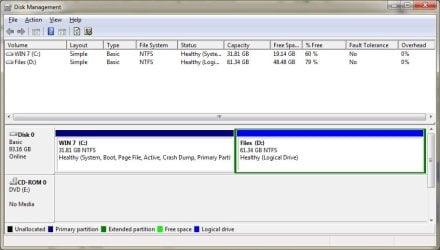
Bit stuck! I did what many others have done. I installed Win 7 on a partition on the same drive as XP.

1 - XP was on C: Win 7 installed to F:

2 - I have removed XP from C:.

3 - Repaired Win 7. Win 7 boots fine.

Now I want to move Win 7 to the beginning of the drive but unsure how - as Acronis doesn't allow me to clone to the same drive - even though its another partition.

Is there any way round this?

Thanks in advance
 

Attachments

  • Untitled.jpg
    Untitled.jpg
    56.9 KB · Views: 107

My Computer My Computer

Computer Manufacturer/Model Number
Titan Onyx i7 920 Overclockers UK
OS
Windows 7 Ultimate 64bit
CPU
Intel Core i7 920 overclocked to 4.00ghz
Motherboard
Asus P6T Deluxe
Memory
6gb Corsair DDR3
Graphics Card(s)
Radeon HD 5850
Sound Card
Onboard
Monitor(s) Displays
ProLite E2407HDS
Screen Resolution
1920 x 1080
Hard Drives
System Drive: Crucial CT128M4SSD
Data Drive: Hitachi HDE721010SLA330 1 TB SATA II Hard Drive
PSU
OCZ600
Cooling
Air
Keyboard
G11
Mouse
MX518
Internet Speed
20mb
Is there a practical reason for this or is it just something you prefer to do?
 

My Computer My Computer

Computer type
PC/Desktop
Computer Manufacturer/Model Number
LENOVO K450 @3.0GHZ
OS
64-bit Windows 8.1 Pro
CPU
Core(TM) i5 CPU 4330 Haswell @ 3.20GHz
Motherboard
LENOVO
Memory
12.00 GB
Graphics Card(s)
Intel(R) HD Graphics
Sound Card
Intel HD integtrated
Monitor(s) Displays
HP 25' ISP Monitor
Screen Resolution
1900/1020
Hard Drives
(1) ST1000DM003-1CH162 (2) Generic STORAGE DEVICE USB Device (3) Generic STORAGE DEVICE USB Device
Internet Speed
100mb down/10mb up
The automated way to do this is to use a third party partition manager like Paragon (which can copy the MBR) or free Partition Wizard which has a bootable disk that is a valuable tool.

Right click on C: partition and delete so it is unallocated space.

Right click on Win7 F: partition and Resize it enough to fit in the old C: unallocated space.

Then right click on F: and Copy to deleted old C: space. Right click on F: to Delete original Win7 partition. Resize both remaining partions as desired. Apply all steps.

Now boot into the Win7 installer and run Startup repair 3 times as it will attempt multiple fixes before rewriting the MBR if required.
 
Is there a practical reason for this or is it just something you prefer to do?

From what I understand, it will improve performance if the OS is located at the beginning of the disk.
 

My Computer My Computer

Computer Manufacturer/Model Number
Titan Onyx i7 920 Overclockers UK
OS
Windows 7 Ultimate 64bit
CPU
Intel Core i7 920 overclocked to 4.00ghz
Motherboard
Asus P6T Deluxe
Memory
6gb Corsair DDR3
Graphics Card(s)
Radeon HD 5850
Sound Card
Onboard
Monitor(s) Displays
ProLite E2407HDS
Screen Resolution
1920 x 1080
Hard Drives
System Drive: Crucial CT128M4SSD
Data Drive: Hitachi HDE721010SLA330 1 TB SATA II Hard Drive
PSU
OCZ600
Cooling
Air
Keyboard
G11
Mouse
MX518
Internet Speed
20mb
You need to recheck your sources... you will not be able to tell the difference... and the possibility of borking your boot loader, MBR, etc is not worth the hoops you would have to go through...
 

My Computer My Computer

Computer type
PC/Desktop
Computer Manufacturer/Model Number
LENOVO K450 @3.0GHZ
OS
64-bit Windows 8.1 Pro
CPU
Core(TM) i5 CPU 4330 Haswell @ 3.20GHz
Motherboard
LENOVO
Memory
12.00 GB
Graphics Card(s)
Intel(R) HD Graphics
Sound Card
Intel HD integtrated
Monitor(s) Displays
HP 25' ISP Monitor
Screen Resolution
1900/1020
Hard Drives
(1) ST1000DM003-1CH162 (2) Generic STORAGE DEVICE USB Device (3) Generic STORAGE DEVICE USB Device
Internet Speed
100mb down/10mb up
You were right Tews

After countless repairs, booting several times with Win7 and Partition Wizard disks I eventually got to a point where I had Win7 loading to a blue screen. Also.. my Windows decided it was no longer Genuine! I'm sure I could of got out of this particular conundrum too, but I gave up.

I'm now reinstalling it - which I should have done yesterday.

It only takes 25mins and with Ninite Easy PC Setup and Multiple App Installer - Great For Win7 Upgrades installing all my favourite apps is pretty quick too!

Still it was an interesting experiment but one I won't repeat.

Cheers for the help anyway Greg
 

My Computer My Computer

Computer Manufacturer/Model Number
Titan Onyx i7 920 Overclockers UK
OS
Windows 7 Ultimate 64bit
CPU
Intel Core i7 920 overclocked to 4.00ghz
Motherboard
Asus P6T Deluxe
Memory
6gb Corsair DDR3
Graphics Card(s)
Radeon HD 5850
Sound Card
Onboard
Monitor(s) Displays
ProLite E2407HDS
Screen Resolution
1920 x 1080
Hard Drives
System Drive: Crucial CT128M4SSD
Data Drive: Hitachi HDE721010SLA330 1 TB SATA II Hard Drive
PSU
OCZ600
Cooling
Air
Keyboard
G11
Mouse
MX518
Internet Speed
20mb
Im glad you have it sorted out.... now when its all setup the way you want it, make an image of your system drive and save it to a separate drive/partition... ;)
 

My Computer My Computer

Computer type
PC/Desktop
Computer Manufacturer/Model Number
LENOVO K450 @3.0GHZ
OS
64-bit Windows 8.1 Pro
CPU
Core(TM) i5 CPU 4330 Haswell @ 3.20GHz
Motherboard
LENOVO
Memory
12.00 GB
Graphics Card(s)
Intel(R) HD Graphics
Sound Card
Intel HD integtrated
Monitor(s) Displays
HP 25' ISP Monitor
Screen Resolution
1900/1020
Hard Drives
(1) ST1000DM003-1CH162 (2) Generic STORAGE DEVICE USB Device (3) Generic STORAGE DEVICE USB Device
Internet Speed
100mb down/10mb up
It would have been easier if you didn't have that data partition in the middle of your old XP and new Win7, just sliding the Partition Wizard Resize border over onto the old space.

But copying is more complicated and doesn't always work on some hardware.

I always find the lessons learned make failure as valuable as success, especially when the fallback means a clean reinstall which is always the best option anyway!

Enjoy Windows 7! You've earned it.
 
Thanks again guys

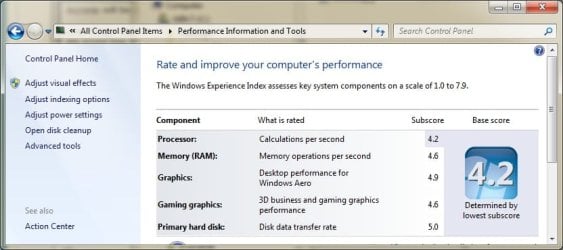
One thing I did find though is that although Tews mentioned no noticeable performance increase my score has changed for the better in the Windows Experience Index so a reinstall was worth it.... that's my justification anyway and I'm sticking to it :D

And actually that's a pretty good score for an ASUS W3J that's pushing 3+ years. I knew at the time that spending £1200 on a laptop was a good idea.... I'm hoping to get 6 years out of it and unless quantum computing becomes more mainstream I think it might just make it!

Imaging will commence shortly. :rolleyes:
 

Attachments

  • hoorah.jpg
    hoorah.jpg
    52 KB · Views: 57
  • windows experience.jpg
    windows experience.jpg
    45.2 KB · Views: 37

My Computer My Computer

Computer Manufacturer/Model Number
Titan Onyx i7 920 Overclockers UK
OS
Windows 7 Ultimate 64bit
CPU
Intel Core i7 920 overclocked to 4.00ghz
Motherboard
Asus P6T Deluxe
Memory
6gb Corsair DDR3
Graphics Card(s)
Radeon HD 5850
Sound Card
Onboard
Monitor(s) Displays
ProLite E2407HDS
Screen Resolution
1920 x 1080
Hard Drives
System Drive: Crucial CT128M4SSD
Data Drive: Hitachi HDE721010SLA330 1 TB SATA II Hard Drive
PSU
OCZ600
Cooling
Air
Keyboard
G11
Mouse
MX518
Internet Speed
20mb
hi giblet,

i had the same problem as well. and i solved it exactly as gregrocker said.
after copying win7 to the beginning of the drive i maked the new partition as active.
i also neede several repair runs to fix all issues.

one issue remained unsolved: in system protection the old win7 partition was still listed. i deactivated system protection for the old partition and activated it for the new one.

brj
 

My Computer My Computer

Computer Manufacturer/Model Number
HP NC6400, HP 6710B, HP 6830S
OS
Win7 Home Premium 32
Thanks again guys

One thing I did find though is that although Tews mentioned no noticeable performance increase my score has changed for the better in the Windows Experience Index so a reinstall was worth it.... that's my justification anyway and I'm sticking to it :D

And actually that's a pretty good score for an ASUS W3J that's pushing 3+ years. I knew at the time that spending £1200 on a laptop was a good idea.... I'm hoping to get 6 years out of it and unless quantum computing becomes more mainstream I think it might just make it!

Imaging will commence shortly. :rolleyes:

giblet, the idea that the first partition space is faster comes from the fact that the laser parks on the outer edge of the drive, therefore has less distance to travel to read the data. This is less noticeable with second partitions, but your Win7 was way out in right field so I think you made a good decision.

Did you format before clean installing?

I find performance is increased by using the state-of-the-art free CCleaner (cleaner and registry tabs) and Auslogics Defraggers (disk and registry) monthly - have put these on 100+ machines without a single issue and they all run fast.

Using default power options will save wear on your laptop. Edit your startup items tightly.

A lightweight free AV like Avast also works in perfect sync with the default Windows Firewall and Defender with no noticeable resource hit.
 
hi giblet,

i had the same problem as well. and i solved it exactly as gregrocker said.
after copying win7 to the beginning of the drive i maked the new partition as active.
i also neede several repair runs to fix all issues.

one issue remained unsolved: in system protection the old win7 partition was still listed. i deactivated system protection for the old partition and activated it for the new one.

brj

Type msconfig in start box and look at Boot tab to see if there is still an extra Win7 listing to delete.

After copying operations, give yourself a clean bill of health by running chkdsk, then if needed your HDD manufacturer's diagnostics/repair tool. I also run sfc/scannow to make sure all system files held tight.
 
Cheers Greg - I did format the drive before installing and have used CCleaner since it's release - excellent free software! Always disable lots of erroneous start up entries too.

I'll try Auslogics Defraggers too.

Glad you managed to sort it brj.

I used Partition Wizard to set the partition as active which enabled win to boot but when I saw the blue screen (after lots of repairs with Win 7 disk) and the fact that Win 7 said it wasn't genuine anymore I gave up.

To be honest it wasn't too bad for me reinstalling Win 7, and actually I think it's better to reinstall than move all that data (I should of just done it in the first place) - but either way as long as it's working it's good!
 

My Computer My Computer

Computer Manufacturer/Model Number
Titan Onyx i7 920 Overclockers UK
OS
Windows 7 Ultimate 64bit
CPU
Intel Core i7 920 overclocked to 4.00ghz
Motherboard
Asus P6T Deluxe
Memory
6gb Corsair DDR3
Graphics Card(s)
Radeon HD 5850
Sound Card
Onboard
Monitor(s) Displays
ProLite E2407HDS
Screen Resolution
1920 x 1080
Hard Drives
System Drive: Crucial CT128M4SSD
Data Drive: Hitachi HDE721010SLA330 1 TB SATA II Hard Drive
PSU
OCZ600
Cooling
Air
Keyboard
G11
Mouse
MX518
Internet Speed
20mb
Back
Top