HomeGroup Issues

You should have no problem getting Homegroup to work properly. If your like me than giving up is not an option. Make sure that both machines are using the same workgroup name and different machine names.

I haven't given up, but I haven't had success either. :sick:
 

My Computer My Computer

At a glance

7 x64 UltimateAMD Ryzen 516GB DDR4Radeon R7 360
Computer type
PC/Desktop
Computer Manufacturer/Model Number
Custom
OS
7 x64 Ultimate
CPU
AMD Ryzen 5
Motherboard
Gigabyte GA-AB350-Gaming
Memory
16GB DDR4
Graphics Card(s)
Radeon R7 360
Monitor(s) Displays
2 x Dell U2518D
Screen Resolution
2560x1440 2560x1440
Hard Drives
WD 500GB x2
Samsung SSD 128MB (OS)
XPG SX8200 Pro M.2 2280 1TB
PSU
Antec 500
Cooling
Hyper 212 EVO
Keyboard
Logitech cordless K800
Mouse
Logitech M510
Antivirus
Avira
You were right Chev65 - my router needed to be updated. I flashed with dd-wrt and I was able to join the homegroup. It was easy. Thanks and Happy Holidays
 

My Computer My Computer

At a glance

W7
OS
W7
You were right Chev65 - my router needed to be updated. I flashed with dd-wrt and I was able to join the homegroup. It was easy. Thanks and Happy Holidays

Finally some success. It's nice to know that a simple router update will enable functionality for Windows 7 on older routers.

Thanks for confirming that updating the router can make a difference. Glad you have your network up and running tanger. Happy Holidays. :)
 

My Computer My Computer

At a glance

Windows 7 Ult, Windows 8.1 Pro,Q9650-4.275GHz, E8600 4.5GHz, E6750-3.8GHzG.Skill PC2 9600 1200Mhz 5 5 5 15 2TGTX480
Computer type
PC/Desktop
Computer Manufacturer/Model Number
Home built
OS
Windows 7 Ult, Windows 8.1 Pro,
CPU
Q9650-4.275GHz, E8600 4.5GHz, E6750-3.8GHz
Motherboard
Evga 780i FTW
Memory
G.Skill PC2 9600 1200Mhz 5 5 5 15 2T
Graphics Card(s)
GTX480
Sound Card
Asus Xonar D2
Monitor(s) Displays
HannsG
Screen Resolution
1680X1050
Hard Drives
GSkill Phoenix Pro 120GB SSD
PSU
ThermalTake Toughpower 1000Watt modular
Case
ThermalTake XaserV
Cooling
Xigmatek S1283
Keyboard
Logitech G15
Mouse
Logitech G9
Internet Speed
T1
OK...still some kinks to iron out. I created the group with my laptop, joined successfully with my desktop. From my desktop I can see my laptop in the Homegroup. But from my laptop I cannot see my desktop.
 

My Computer My Computer

At a glance

W7
OS
W7
You should have no problem getting Homegroup to work properly. If your like me than giving up is not an option. Make sure that both machines are using the same workgroup name and different machine names.

I haven't given up, but I haven't had success either. :sick:

Don't give up, it is probably just one setting out of place that is keeping things from working.
 

My Computer My Computer

At a glance

Windows 7 Ult, Windows 8.1 Pro,Q9650-4.275GHz, E8600 4.5GHz, E6750-3.8GHzG.Skill PC2 9600 1200Mhz 5 5 5 15 2TGTX480
Computer type
PC/Desktop
Computer Manufacturer/Model Number
Home built
OS
Windows 7 Ult, Windows 8.1 Pro,
CPU
Q9650-4.275GHz, E8600 4.5GHz, E6750-3.8GHz
Motherboard
Evga 780i FTW
Memory
G.Skill PC2 9600 1200Mhz 5 5 5 15 2T
Graphics Card(s)
GTX480
Sound Card
Asus Xonar D2
Monitor(s) Displays
HannsG
Screen Resolution
1680X1050
Hard Drives
GSkill Phoenix Pro 120GB SSD
PSU
ThermalTake Toughpower 1000Watt modular
Case
ThermalTake XaserV
Cooling
Xigmatek S1283
Keyboard
Logitech G15
Mouse
Logitech G9
Internet Speed
T1
OK...still some kinks to iron out. I created the group with my laptop, joined successfully with my desktop. From my desktop I can see my laptop in the Homegroup. But from my laptop I cannot see my desktop.

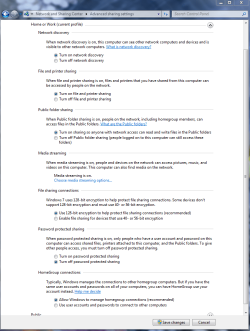
Check the settings out on the desktop, make sure you have it set up like this. If just one of those isn't set correctly you won't be able to see the desktop. It might work better if you " turn off password protected sharing" . Rebooting each machine might help also.

Also make sure that both computers are using different machine names or one of them won't show up on the network " I personally tested this out". You can use the same user name but not the same machine name.
 

Attachments

  • Home or work homegroup enable.PNG
    Home or work homegroup enable.PNG
    45 KB · Views: 44

My Computer My Computer

At a glance

Windows 7 Ult, Windows 8.1 Pro,Q9650-4.275GHz, E8600 4.5GHz, E6750-3.8GHzG.Skill PC2 9600 1200Mhz 5 5 5 15 2TGTX480
Computer type
PC/Desktop
Computer Manufacturer/Model Number
Home built
OS
Windows 7 Ult, Windows 8.1 Pro,
CPU
Q9650-4.275GHz, E8600 4.5GHz, E6750-3.8GHz
Motherboard
Evga 780i FTW
Memory
G.Skill PC2 9600 1200Mhz 5 5 5 15 2T
Graphics Card(s)
GTX480
Sound Card
Asus Xonar D2
Monitor(s) Displays
HannsG
Screen Resolution
1680X1050
Hard Drives
GSkill Phoenix Pro 120GB SSD
PSU
ThermalTake Toughpower 1000Watt modular
Case
ThermalTake XaserV
Cooling
Xigmatek S1283
Keyboard
Logitech G15
Mouse
Logitech G9
Internet Speed
T1
I have those settings exact on both machines but still no luck. I can see both on the network though
 

My Computer My Computer

At a glance

W7
OS
W7
Using any antivirus software or using a third party firewall?

You could try creating the homegroup again from the desktop or use the Workgroup network and see if that works. Perhaps even a router reboot is in order.
 
Last edited:

My Computer My Computer

At a glance

Windows 7 Ult, Windows 8.1 Pro,Q9650-4.275GHz, E8600 4.5GHz, E6750-3.8GHzG.Skill PC2 9600 1200Mhz 5 5 5 15 2TGTX480
Computer type
PC/Desktop
Computer Manufacturer/Model Number
Home built
OS
Windows 7 Ult, Windows 8.1 Pro,
CPU
Q9650-4.275GHz, E8600 4.5GHz, E6750-3.8GHz
Motherboard
Evga 780i FTW
Memory
G.Skill PC2 9600 1200Mhz 5 5 5 15 2T
Graphics Card(s)
GTX480
Sound Card
Asus Xonar D2
Monitor(s) Displays
HannsG
Screen Resolution
1680X1050
Hard Drives
GSkill Phoenix Pro 120GB SSD
PSU
ThermalTake Toughpower 1000Watt modular
Case
ThermalTake XaserV
Cooling
Xigmatek S1283
Keyboard
Logitech G15
Mouse
Logitech G9
Internet Speed
T1
Im using Avast Home edition. I dont think its an issue. No 3rd party firewall. I just tried creating the homegroup form my desktop instead. When I try to join with the laptop it doesnt recognize that there is alread a homegroup created. I have no option to join, just to create a new one.
 

My Computer My Computer

At a glance

W7
OS
W7
I have those settings exact on both machines but still no luck. I can see both on the network though

Same here with two desktops on the same router. One is wireless.

The Homegroup troubleshooter on the wireless machine indicates undetermined network issues, but the computers can interact via the workgroup just fine.
 

My Computer My Computer

At a glance

7 x64 UltimateAMD Ryzen 516GB DDR4Radeon R7 360
Computer type
PC/Desktop
Computer Manufacturer/Model Number
Custom
OS
7 x64 Ultimate
CPU
AMD Ryzen 5
Motherboard
Gigabyte GA-AB350-Gaming
Memory
16GB DDR4
Graphics Card(s)
Radeon R7 360
Monitor(s) Displays
2 x Dell U2518D
Screen Resolution
2560x1440 2560x1440
Hard Drives
WD 500GB x2
Samsung SSD 128MB (OS)
XPG SX8200 Pro M.2 2280 1TB
PSU
Antec 500
Cooling
Hyper 212 EVO
Keyboard
Logitech cordless K800
Mouse
Logitech M510
Antivirus
Avira
I was just messing around with it some more and I think I spotted something strange. It has to do with wireless internet. Normally, both the desktop and laptop are connected wirelessly to the internet and I can create the homegroup without a problem on either machine but cant get the other one to join. I just tried with the laptop hard wired and created the homegroup and magically, the desktop was able to join the group. But still I can only see one computer on the homegroup instead of both.

Edit: When I have both machines hard wired, it works flawlessly. The second I go wireless, the homegroup is lost.
 
Last edited:

My Computer My Computer

At a glance

W7
OS
W7
I was just messing around with it some more and I think I spotted something strange. It has to do with wireless internet. Normally, both the desktop and laptop are connected wirelessly to the internet and I can create the homegroup without a problem on either machine but cant get the other one to join. I just tried with the laptop hard wired and created the homegroup and magically, the desktop was able to join the group. But still I can only see one computer on the homegroup instead of both.

Edit: When I have both machines hard wired, it works flawlessly. The second I go wireless, the homegroup is lost.

In that case try going into the Router configuration page and see if any of the settings relate to wireless permissions or secrurity. Maybe you can change a settings to enable sharing on the wireless network.

I think it's clear from your report that Homegroup is working correctly and the problems seems to be with the Routers wireless security.
 

My Computer My Computer

At a glance

Windows 7 Ult, Windows 8.1 Pro,Q9650-4.275GHz, E8600 4.5GHz, E6750-3.8GHzG.Skill PC2 9600 1200Mhz 5 5 5 15 2TGTX480
Computer type
PC/Desktop
Computer Manufacturer/Model Number
Home built
OS
Windows 7 Ult, Windows 8.1 Pro,
CPU
Q9650-4.275GHz, E8600 4.5GHz, E6750-3.8GHz
Motherboard
Evga 780i FTW
Memory
G.Skill PC2 9600 1200Mhz 5 5 5 15 2T
Graphics Card(s)
GTX480
Sound Card
Asus Xonar D2
Monitor(s) Displays
HannsG
Screen Resolution
1680X1050
Hard Drives
GSkill Phoenix Pro 120GB SSD
PSU
ThermalTake Toughpower 1000Watt modular
Case
ThermalTake XaserV
Cooling
Xigmatek S1283
Keyboard
Logitech G15
Mouse
Logitech G9
Internet Speed
T1
One possible, I've posted elsewhere in this forum, is that there's a registry bug in Homegroups.
It isn't enough to have IPV6 enabled on your computer.
There has to be a line in the registry specifically saying that none of the IPV6 elements are disallowed.
Otherwise there will be error messages saying that IPV6 needs to be enabled, despite the fact that Win7 says that IPV6 is already enabled. Go figure!

What bug is this? I sure never had it on my system. Do you know what causes this bug and do you have the registry key available so we can fix this mysterious problem?

I'am guessing it's only a problem if you get the error message IPv6 diabled even though it appears enabled?

Well, yes. It needs that message.
Here's the original thread and within it the solution I found on the MS knowledge base.
http://www.sevenforums.com/network-sharing/38207-homegroup-2.html

Also, the Homegroup only works if the date and time are the same on each machine. I don't know how close they have to be, seconds, minutes,??
I made the mistake on one machine of not checking that - I'd got the wrong date on the latest one. It took hours of head scratching to work out what the issue was.
 

My Computer My Computer

At a glance

Win 7Intel core 2 duo4 gig
Computer Manufacturer/Model Number
Mesh PC
OS
Win 7
CPU
Intel core 2 duo
Memory
4 gig
Hard Drives
1 x250 gig
1 x 500 gig
Mouse
MS lasermouse 5000 -'cos it scrolls smoothly, no wheel click
Internet Speed
10mb - cable
Other Info
The mouse took most research. I hate that click on the wheel, this one has the old fashioned smooth wheel. There aren't many about.
I was just messing around with it some more and I think I spotted something strange. It has to do with wireless internet. Normally, both the desktop and laptop are connected wirelessly to the internet and I can create the homegroup without a problem on either machine but cant get the other one to join. I just tried with the laptop hard wired and created the homegroup and magically, the desktop was able to join the group. But still I can only see one computer on the homegroup instead of both.

Edit: When I have both machines hard wired, it works flawlessly. The second I go wireless, the homegroup is lost.

In that case try going into the Router configuration page and see if any of the settings relate to wireless permissions or secrurity. Maybe you can change a settings to enable sharing on the wireless network.

I think it's clear from your report that Homegroup is working correctly and the problems seems to be with the Routers wireless security.

Im not sure what to look for within my router settings. Not much of a networking guy. Could it be the wireless mode? Its currently set to AP but theres Client, Client bridge, Adhoc, Repeater, Repeater Bridge.

I can see the computer fine over the network though, so maybe its not an issue with the router. Maybe its got something to do with the router settings and/or the IPv6 protocol?
 

My Computer My Computer

At a glance

W7
OS
W7
tbernstein said this worked for him.

SORTED!!!!!

I found a reference in the MS knowledge base.
You won't believe this.
You have to set the disabled items registry key to 0
But..... if it hasn't got one ( mine didn't) you have to create one first and then set it to zero!!!!!!

Or in Microsoft speak - if nothing is disabled everything is disabled unless you tell it that nothing is disabled.

In technical terms;
regedit
hkey-local machine\system\currentcontrolset\services\tcpip6\parameters
Then you have to set the DisabledComponents Dword to 0
And if there isn't a disabled components dword you have to create one and then set it to zero???????
 

My Computer My Computer

At a glance

Windows 7 Ult, Windows 8.1 Pro,Q9650-4.275GHz, E8600 4.5GHz, E6750-3.8GHzG.Skill PC2 9600 1200Mhz 5 5 5 15 2TGTX480
Computer type
PC/Desktop
Computer Manufacturer/Model Number
Home built
OS
Windows 7 Ult, Windows 8.1 Pro,
CPU
Q9650-4.275GHz, E8600 4.5GHz, E6750-3.8GHz
Motherboard
Evga 780i FTW
Memory
G.Skill PC2 9600 1200Mhz 5 5 5 15 2T
Graphics Card(s)
GTX480
Sound Card
Asus Xonar D2
Monitor(s) Displays
HannsG
Screen Resolution
1680X1050
Hard Drives
GSkill Phoenix Pro 120GB SSD
PSU
ThermalTake Toughpower 1000Watt modular
Case
ThermalTake XaserV
Cooling
Xigmatek S1283
Keyboard
Logitech G15
Mouse
Logitech G9
Internet Speed
T1
tbernstein said this worked for him.

SORTED!!!!!

I found a reference in the MS knowledge base.
You won't believe this.
You have to set the disabled items registry key to 0
But..... if it hasn't got one ( mine didn't) you have to create one first and then set it to zero!!!!!!

Or in Microsoft speak - if nothing is disabled everything is disabled unless you tell it that nothing is disabled.

In technical terms;
regedit
hkey-local machine\system\currentcontrolset\services\tcpip6\parameters
Then you have to set the DisabledComponents Dword to 0
And if there isn't a disabled components dword you have to create one and then set it to zero???????
Yes, I included the link to that MS site in my first post on this thread:

How to disable certain Internet Protocol version 6 (IPv6) components in Windows Vista, Windows 7 and Windows Server 2008

Cheers!
 

My Computer My Computer

At a glance

...
OS
...
I created the DWORD (32 bit) called DisabledComponents on both computers and set its value to 0. I created a homegroup from the desktop but the laptop didnt recognize it. So I created a homegroup from the laptop, and for some reason, the desktop recognizes it and was able to join. But I still have the problem thatonly the laptop is showing up in the homegroup. Im stumped....:confused:
 

My Computer My Computer

At a glance

W7
OS
W7
Where are you looking to see the desktop as part of the Homegroup?

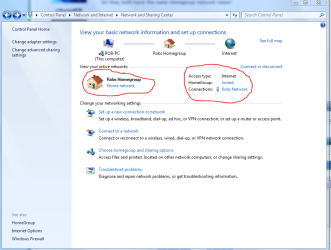
Do they both have the same Homegroup network name? Those names need to match on both machines like in the first picture.

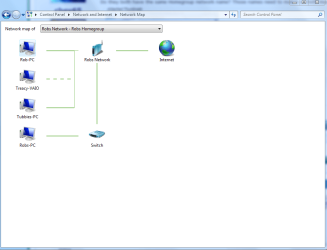
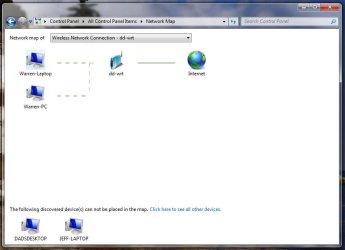
Can you post a screen shot of your network map like the one in the second picture.
 

Attachments

  • Homegroup network name.PNG
    Homegroup network name.PNG
    48.4 KB · Views: 15
  • network map.PNG
    network map.PNG
    30.7 KB · Views: 16

My Computer My Computer

At a glance

Windows 7 Ult, Windows 8.1 Pro,Q9650-4.275GHz, E8600 4.5GHz, E6750-3.8GHzG.Skill PC2 9600 1200Mhz 5 5 5 15 2TGTX480
Computer type
PC/Desktop
Computer Manufacturer/Model Number
Home built
OS
Windows 7 Ult, Windows 8.1 Pro,
CPU
Q9650-4.275GHz, E8600 4.5GHz, E6750-3.8GHz
Motherboard
Evga 780i FTW
Memory
G.Skill PC2 9600 1200Mhz 5 5 5 15 2T
Graphics Card(s)
GTX480
Sound Card
Asus Xonar D2
Monitor(s) Displays
HannsG
Screen Resolution
1680X1050
Hard Drives
GSkill Phoenix Pro 120GB SSD
PSU
ThermalTake Toughpower 1000Watt modular
Case
ThermalTake XaserV
Cooling
Xigmatek S1283
Keyboard
Logitech G15
Mouse
Logitech G9
Internet Speed
T1
Where are you looking to see the desktop as part of the Homegroup?

I am looking through Windows Explorer, from both computers, but cant see the desktop on either.

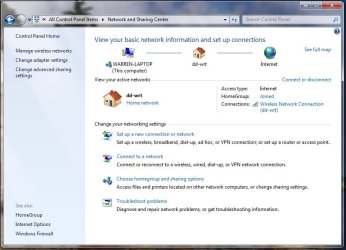
The Network name is identical. Here is a pic of the network map.
 

Attachments

  • NetworkSettings.jpg
    NetworkSettings.jpg
    60.3 KB · Views: 11
  • Network_Map.jpg
    Network_Map.jpg
    34.5 KB · Views: 9

My Computer My Computer

At a glance

W7
OS
W7
Where are you looking to see the desktop as part of the Homegroup?

I am looking through Windows Explorer, from both computers, but cant see the desktop on either.

The Network name is identical. Here is a pic of the network map.

Everything looks good to me tanger.

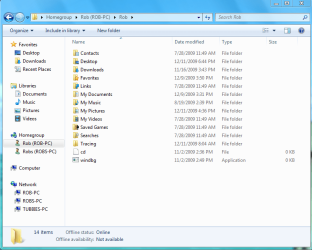
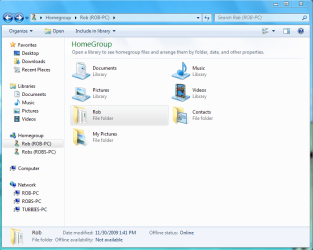
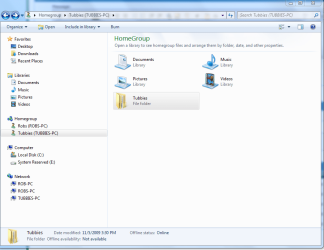
Desktop sharing isn't a part of Homegroups so you need to add either the desktop folder or the "user" folder to the Homegroup like in the 1st picture below. Notice how I added the entire "Rob" user folder to the Homegroup.

The 2nd picture is all the folders being shared with the Homegroup inside of the "Rob" user folder. That is just to give you an idea of what's inside the User folder.

You have access to pretty much everything this way unless you set permissions for individual folders or users.

In order to share the entire User folder you just need to navigate to the User folder on the machine you want to share the desktop from, like in the 3rd picture "Tubbies" user folder.

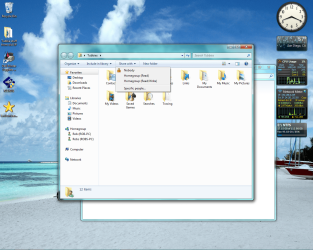
After that just click on the "Share With" button at the top of the page 3rd picture, then choose "Homegroup read/write" or you can choose individual users to share that folder with. This setting is also known to fix Homegroup sharing problems with other folders as well.

The second I clicked on the "Share with" Homegroup read/write tab the user file appeared on my other monitor in Rob Homegroup.

"Tubbies" User files will now be shared with the Homegroup, 4th picture. Easy as pie.

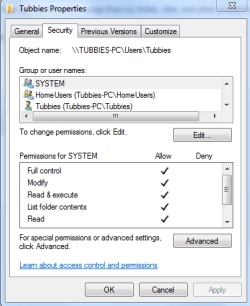
You might also need to give permissions to other users in order for them to change and work with the files like in the 5th picture below.

Edit: When I have both machines hard wired, it works flawlessly. The second I go wireless, the homegroup is lost.

If you joined the Homegroup when those machines were hardwired into the network it could create problems when you reconnect with the wireless.

You should leave the Homegroup with the wireless computers while they are hard-wired into the network and then attempt to rejoin the Homegroup after you are connected to the wireless LAN. You may need to flush the old IP's in the router control panel. Or perform an IP flush IP renew on the wireless machines. ipconfig /release ipconfig /renew

 

Attachments

  • Inside Rob file is everything.PNG
    Inside Rob file is everything.PNG
    36.9 KB · Views: 4
  • Homegroup with Rob user file added.PNG
    Homegroup with Rob user file added.PNG
    45.6 KB · Views: 6
  • Tubbies share with Homegroup.png
    Tubbies share with Homegroup.png
    353.3 KB · Views: 6
  • Tubbies user folder inside Homegroup.PNG
    Tubbies user folder inside Homegroup.PNG
    44.5 KB · Views: 5
  • Tubbies access full control.PNG
    Tubbies access full control.PNG
    13.2 KB · Views: 3
Last edited:

My Computer My Computer

At a glance

Windows 7 Ult, Windows 8.1 Pro,Q9650-4.275GHz, E8600 4.5GHz, E6750-3.8GHzG.Skill PC2 9600 1200Mhz 5 5 5 15 2TGTX480
Computer type
PC/Desktop
Computer Manufacturer/Model Number
Home built
OS
Windows 7 Ult, Windows 8.1 Pro,
CPU
Q9650-4.275GHz, E8600 4.5GHz, E6750-3.8GHz
Motherboard
Evga 780i FTW
Memory
G.Skill PC2 9600 1200Mhz 5 5 5 15 2T
Graphics Card(s)
GTX480
Sound Card
Asus Xonar D2
Monitor(s) Displays
HannsG
Screen Resolution
1680X1050
Hard Drives
GSkill Phoenix Pro 120GB SSD
PSU
ThermalTake Toughpower 1000Watt modular
Case
ThermalTake XaserV
Cooling
Xigmatek S1283
Keyboard
Logitech G15
Mouse
Logitech G9
Internet Speed
T1
Back
Top