
Multi-boot/Dual-Boot Windows XP on Windows 7

In Nlite, what do I do here?

Stand by. Need to see which chipset you have.

Those are the storage controllers. WOuld be AHCI, not RAID

You figure it out yet?
And I don't know what to do here from then on. Want me to stop here, and pickup from here tomorrow?
 

My Computer My Computer

Computer Manufacturer/Model Number
Gateway KAV60
OS
Windows 7 Home Premium 32-bit
Memory
2 GB
Screen Resolution
1024x600
Hard Drives
250 GB HDD
Internet Speed
Time Warner Cable/Road Runner
Other Info
Intel Atom processor N270
Multi-in-1 card reader
802.11b/g
NO optical drive
NO WWAN
NO Bluetooth
In Nlite, what do I do here?

There are two chipsets given on product specs page:

Mobile Intel® 945GSE Express Chipset (DDR2 400/533/667 MHz)
Mobile Intel® 82801GBM Chipset

Run this quick audit and see what chipset is in there: View attachment 41860

Did any disks come with that netbook? Was XP originally on it?
No disks came in the netbook. And Windows 7 was originally on it.
 

My Computer My Computer

Computer Manufacturer/Model Number
Gateway KAV60
OS
Windows 7 Home Premium 32-bit
Memory
2 GB
Screen Resolution
1024x600
Hard Drives
250 GB HDD
Internet Speed
Time Warner Cable/Road Runner
Other Info
Intel Atom processor N270
Multi-in-1 card reader
802.11b/g
NO optical drive
NO WWAN
NO Bluetooth
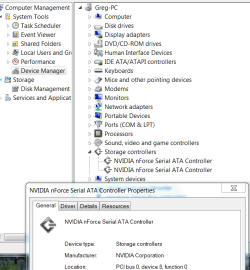
Look in the Device Manager and see the exact name of Storage Controller

It will be that one you want to select in Nlite screen you sent me above.

Capture.PNG
 
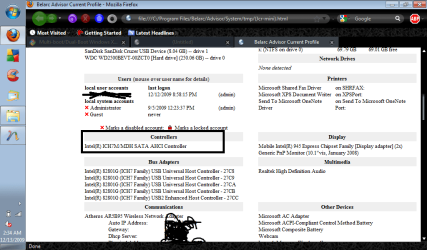
What I squared is what I think your looking for.
 

Attachments

  • XP8.png
    XP8.png
    44 KB · Views: 38

My Computer My Computer

Computer Manufacturer/Model Number
Gateway KAV60
OS
Windows 7 Home Premium 32-bit
Memory
2 GB
Screen Resolution
1024x600
Hard Drives
250 GB HDD
Internet Speed
Time Warner Cable/Road Runner
Other Info
Intel Atom processor N270
Multi-in-1 card reader
802.11b/g
NO optical drive
NO WWAN
NO Bluetooth
My Computer My Computer

Computer Manufacturer/Model Number
Gateway KAV60
OS
Windows 7 Home Premium 32-bit
Memory
2 GB
Screen Resolution
1024x600
Hard Drives
250 GB HDD
Internet Speed
Time Warner Cable/Road Runner
Other Info
Intel Atom processor N270
Multi-in-1 card reader
802.11b/g
NO optical drive
NO WWAN
NO Bluetooth
What I squared is what I think your looking for.

Good. You see that in Nlite list to choose from?

That's what was causing the bluescreen. It needed that driver, according to the Stop codes. Too modern to be in the XP installer.

You have any problem with the other chipset drivers, for your main board? There should be a BelArc listing for exact chipset of the two shown for your model in my posts above.

There were two downloads for Chipsets, one the storage controller and other mainboard.
 
What I squared is what I think your looking for.

Good. You see that in Nlite list to choose from?

That's what was causing the bluescreen. It needed that driver, according to the Stop codes. Too modern to be in the XP installer.

You have any problem with the other chipset drivers, for your main board? There should be a BelArc listing for exact chipset of the two shown for your model in my posts above.

There were two downloads for Chipsets, one the storage controller and other mainboard.
I found it. Now I hope to see that I get everything to work in a bit then.
Good thing I downloaded everything then.

There are two modes though, Regular something and text something. It's selected by default text. Do I leave it so?
 

My Computer My Computer

Computer Manufacturer/Model Number
Gateway KAV60
OS
Windows 7 Home Premium 32-bit
Memory
2 GB
Screen Resolution
1024x600
Hard Drives
250 GB HDD
Internet Speed
Time Warner Cable/Road Runner
Other Info
Intel Atom processor N270
Multi-in-1 card reader
802.11b/g
NO optical drive
NO WWAN
NO Bluetooth
How do I check the chipset that I have?

It's listed on the Belarc advisor under mobo. Let me see a fuller screenshot.

There are two modes though, Regular something and text something. It's selected by default text. Do I leave it so?

Here's the answer to your question: Nlite Question - Computer Forums
Ok, I'm supposed to leave it in Textmode.
Is knowing the chipset at the moment important? That question was for a post a while ago. Besides, I ctrl + f and I find no mobo.
 

My Computer My Computer

Computer Manufacturer/Model Number
Gateway KAV60
OS
Windows 7 Home Premium 32-bit
Memory
2 GB
Screen Resolution
1024x600
Hard Drives
250 GB HDD
Internet Speed
Time Warner Cable/Road Runner
Other Info
Intel Atom processor N270
Multi-in-1 card reader
802.11b/g
NO optical drive
NO WWAN
NO Bluetooth
Mobile Intel® 945GSE Express Chipset (DDR2 400/533/667 MHz) is your graphics.

Mobile Intel® 82801GBM Chipset is your mobo chipset.

Load the other chipset drivers next so we can get them sorted.

You wanna wait til tomorrow?
 
Mobile Intel® 945GSE Express Chipset (DDR2 400/533/667 MHz) is your graphics.

Mobile Intel® 82801GBM Chipset is your mobo chipset.
Alright thanks with that. Do you want to continue? Because I'm falling sleepy. I can stay up, but I probably won't wake up for tomorrow. So we continue tomorrow then?
 

My Computer My Computer

Computer Manufacturer/Model Number
Gateway KAV60
OS
Windows 7 Home Premium 32-bit
Memory
2 GB
Screen Resolution
1024x600
Hard Drives
250 GB HDD
Internet Speed
Time Warner Cable/Road Runner
Other Info
Intel Atom processor N270
Multi-in-1 card reader
802.11b/g
NO optical drive
NO WWAN
NO Bluetooth
Yeah good to be sharp.

Good work!

See u tmw:sleepy:

Anybody else wanna jump in here with second opinions, please feel free!

I am still learning myself. So if you spot something that could help, please say so....
 
I found out something just now. Nlite is giving me a warning if I slipstream drivers from different bits, there would be a installation error. So right now, I'm trying to identify which one is for which.

And they're all 32-bit -_-. I checked them on the Gateway website, and they're all 32-bit. I'm not sure to trust that, because one of the folders says something like 'DRIVERS-x64' or something similiar.
 

My Computer My Computer

Computer Manufacturer/Model Number
Gateway KAV60
OS
Windows 7 Home Premium 32-bit
Memory
2 GB
Screen Resolution
1024x600
Hard Drives
250 GB HDD
Internet Speed
Time Warner Cable/Road Runner
Other Info
Intel Atom processor N270
Multi-in-1 card reader
802.11b/g
NO optical drive
NO WWAN
NO Bluetooth
I can tell your on Greg, lol. :P I want to start, I already made it into an ISO, put the files into the flash, and now this is where I don't know what to do.
 

My Computer My Computer

Computer Manufacturer/Model Number
Gateway KAV60
OS
Windows 7 Home Premium 32-bit
Memory
2 GB
Screen Resolution
1024x600
Hard Drives
250 GB HDD
Internet Speed
Time Warner Cable/Road Runner
Other Info
Intel Atom processor N270
Multi-in-1 card reader
802.11b/g
NO optical drive
NO WWAN
NO Bluetooth

My Computer My Computer

Computer Manufacturer/Model Number
Gateway KAV60
OS
Windows 7 Home Premium 32-bit
Memory
2 GB
Screen Resolution
1024x600
Hard Drives
250 GB HDD
Internet Speed
Time Warner Cable/Road Runner
Other Info
Intel Atom processor N270
Multi-in-1 card reader
802.11b/g
NO optical drive
NO WWAN
NO Bluetooth
I thought you said that tutorial you followed to make the bootable flash used XP files and not XP ISO?
Yeah, but I did both. :P

Anyways, I think I'm supposed to be in the part where I start installing. I checked this morning on tutorials, and I think I have to do something with F6.
 

Attachments

  • XPfiles.png
    XPfiles.png
    186.4 KB · Views: 4

My Computer My Computer

Computer Manufacturer/Model Number
Gateway KAV60
OS
Windows 7 Home Premium 32-bit
Memory
2 GB
Screen Resolution
1024x600
Hard Drives
250 GB HDD
Internet Speed
Time Warner Cable/Road Runner
Other Info
Intel Atom processor N270
Multi-in-1 card reader
802.11b/g
NO optical drive
NO WWAN
NO Bluetooth

My Computer My Computer

Computer Manufacturer/Model Number
Gateway KAV60
OS
Windows 7 Home Premium 32-bit
Memory
2 GB
Screen Resolution
1024x600
Hard Drives
250 GB HDD
Internet Speed
Time Warner Cable/Road Runner
Other Info
Intel Atom processor N270
Multi-in-1 card reader
802.11b/g
NO optical drive
NO WWAN
NO Bluetooth
Back
Top