adsl connection keep running but no internet?

allouh

New member
Local time
5:25 AM
Messages
5
adsl connection keep running but no internet? (Solved)

Hello
I only had windows 7 for a week and i managed to configure my windows the way i want thanks to this site.
Now i have a persistent problem that i couldn't find any solution or the source of the problem.
I use a normal pppoe adsl connection directly from my pc, and it's working fine, and the internet provider that i have provide me with a dynamic ip address, so i can't continuously keep the connection more than 24Hr, it will disconnect from the provider and i had to redial the connection again.
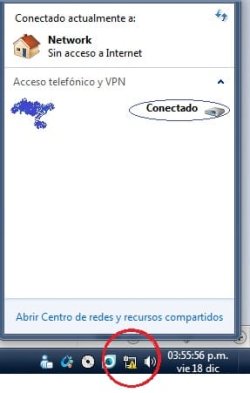
now the problem is that when the connection disconnected by the provider (after the 24Hr) a yellow mark on the taskbar icon appears indicate that there is no connection.
but the adsl connection on my pc keep running and i can't disconnect it to redial the connection.
I tried to disable the Ethernet adapter but still the connection kept on, even when i enabled it again.
The problem will be solved if i restart my pc, but this is not an actual solution to this problem.
I can't do any test or check for this problem because it's not happening now, but if someone can provide my with any guide so i can do before it happened it would be good to solve the problem.
thanks

Edit2:
Problem seems to be solved.
I did a couple of changes at the same time and the problem is gone, so i won't exactly know which one is responsible for the fix. Here what i did:
- Disable IPv6 "under local area connection properties"
- Disable Link-layer technology (both) "under local area connection properties"
- Disable power saving For the ethernet.
- Enable flow control "under My network adapter device manager properties"
Hope this can help.
 
Last edited:

My Computer My Computer

Computer Manufacturer/Model Number
Custom Build
OS
windows 7 Ultimate, 32bit, build 7600
CPU
E7400 Core2due/2.8GHz
Motherboard
Gigabyte GA-945GCM-S2L
Memory
3GB-kingston/667MHz
Graphics Card(s)
Nvidia Geforce 9400GT/1024MB
Sound Card
Realtek HD
Monitor(s) Displays
Compaq 22"-p1100
Screen Resolution
1600x1200
Hard Drives
320GB WDC
PSU
300W
Case
none
Cooling
already winter
Keyboard
compaq, KU-0133
Mouse
Anything in hand
Internet Speed
2048Down/512Up
Hi
I've a problem that is quite similar. Internet is ok and connected but the network says "no internet access". This issue still remains after a restart..
Probably you're experiencing another problem as I do. When you set up a new broadboand connection (just say you wanna test it from scratch, just in case), Windows 7 tries but fails to connect to the internet. However, if I choose skip and create and then connect manually later it works normally, even tough the YELLOW TRIANGLE is always there, near the clock.

Please does anyone know how to fix this?? Thanks

PD: 2 questions

1 Did you install virtualbox recently..?? because that started my internet problem in the first place, but I'm not sure
2 How did you manage to get Atomic Alarm Clock work in W7?? Is it maybe because you have 32 bit W7 version??

Thanks again
 

My Computer My Computer

OS
Windows 7 Ultimate 64-bit
@freedoomer:
The connection is for sure disconnected from the provider but it refuses to disconnect from the windows, and it keep giving me the connection is already active if i try to connect again.
1-I have VMware machine V7.0 installed, it could be the cause but i can't assure this because i always need it installed and i directly installed it after windows setup finished.
2-The program isn't atomic alarm clock, it's the sister program (Active Alarm Clock) from the same company.
 

My Computer My Computer

Computer Manufacturer/Model Number
Custom Build
OS
windows 7 Ultimate, 32bit, build 7600
CPU
E7400 Core2due/2.8GHz
Motherboard
Gigabyte GA-945GCM-S2L
Memory
3GB-kingston/667MHz
Graphics Card(s)
Nvidia Geforce 9400GT/1024MB
Sound Card
Realtek HD
Monitor(s) Displays
Compaq 22"-p1100
Screen Resolution
1600x1200
Hard Drives
320GB WDC
PSU
300W
Case
none
Cooling
already winter
Keyboard
compaq, KU-0133
Mouse
Anything in hand
Internet Speed
2048Down/512Up
Hello
I only had windows 7 for a week and i managed to configure my windows the way i want thanks to this site.
Now i have a persistent problem that i couldn't find any solution or the source of the problem.
I use a normal pppoe adsl connection directly from my pc, and it's working fine, and the internet provider that i have provide me with a dynamic ip address, so i can't continuously keep the connection more than 24Hr, it will disconnect from the provider and i had to redial the connection again.
now the problem is that when the connection disconnected by the provider (after the 24Hr) a yellow mark on the taskbar icon appears indicate that there is no connection.
but the adsl connection on my pc keep running and i can't disconnect it to redial the connection.
I tried to disable the Ethernet adapter but still the connection kept on, even when i enabled it again.
The problem will be solved if i restart my pc, but this is not an actual solution to this problem.
I can't do any test or check for this problem because it's not happening now, but if someone can provide my with any guide so i can do before it happened it would be good to solve the problem.
check the attachment.
thanks

This is what I would do if it was happening on my computer.
I would go into my system and uninstall my network card. I would then delete any newtork hookup I may have. I would turn off my DSL/Cable Modem and shut down my computer.

Turn on modem
Restart computer and let Win7 detect the NIC card and internet access again.
You may have to do this manually under control panel and new network.

Good luck
 

My Computer My Computer

Computer type
PC/Desktop
Computer Manufacturer/Model Number
Self Built
OS
Windows 10 Pro
CPU
Intel i5
Motherboard
I have a fatherboard
Memory
I'm old and lost a few chips
Graphics Card(s)
Yup
Sound Card
Yup
Monitor(s) Displays
Samsung 32" UHD
Screen Resolution
3840 x 2160
Hard Drives
Samsung 860 EVO drives
PSU
450 Watt and some fans that blow
Case
Small tower
Cooling
Yes I am cool. lol
Keyboard
Who needs a keyboard?
Mouse
Logitech Laser G7 wireless
Internet Speed
Zippy fast UP and DOWN
Antivirus
I got a shot
Browser
The new Improved EDGE 2020
The connection is for sure disconnected from the provider but it refuses to disconnect from the windows, and it keep giving me the connection is already active if i try to connect again.
1-I have VMware machine V7.0 installed, it could be the cause but i can't assure this because i always need it installed and i directly installed it after windows setup finished.
2-The program isn't atomic alarm clock, it's the sister program (Active Alarm Clock) from the same company.
Thanks for your quick reply. Indeed, I thought you had a virtualization software installed, WMware in this case. My point is these programs install another network driver. That's why you have 2 networks available. Back to your problem, I don't know the details but your modem may be configured as a router, so it's connected all the time.
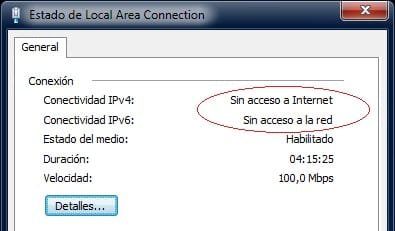
Regarding my problem, by going to my Local Network properties, the IPv4 and IPv6 connectivities are down. But, with all of this, Internet works OK, browsers, p2p, etc. It's connected.

The following DID NOT WORK:

1-Power off and back on my modem
2-Restart, reinstall my network drivers
3-Checking hardware problem, like cable and phone line
4-Set up a new internet connection, with default options
 

Attachments

  • WTF.jpg
    WTF.jpg
    13.2 KB · Views: 17
  • WTF2.jpg
    WTF2.jpg
    12.8 KB · Views: 5
  • WTF3.jpg
    WTF3.jpg
    15.9 KB · Views: 46
Last edited:

My Computer My Computer

OS
Windows 7 Ultimate 64-bit
Main topic updated.
 

My Computer My Computer

Computer Manufacturer/Model Number
Custom Build
OS
windows 7 Ultimate, 32bit, build 7600
CPU
E7400 Core2due/2.8GHz
Motherboard
Gigabyte GA-945GCM-S2L
Memory
3GB-kingston/667MHz
Graphics Card(s)
Nvidia Geforce 9400GT/1024MB
Sound Card
Realtek HD
Monitor(s) Displays
Compaq 22"-p1100
Screen Resolution
1600x1200
Hard Drives
320GB WDC
PSU
300W
Case
none
Cooling
already winter
Keyboard
compaq, KU-0133
Mouse
Anything in hand
Internet Speed
2048Down/512Up
Back
Top