Latest Intel Chipset Device Software

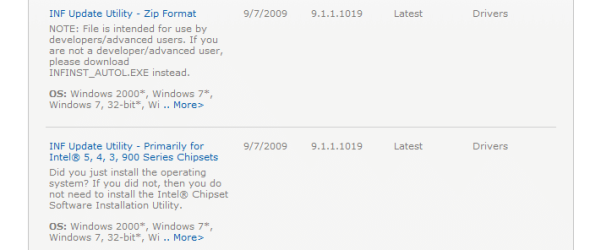
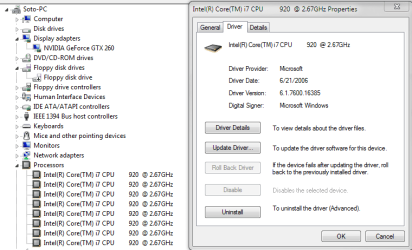
Guys, help me out here. I want to have the latest Intel drivers for my system and have a "hard time understanding" chipset drivers. I downloaded the exe for the 5 series chipsets, ran it, it said it had installed successfully. It didn't say to restart but I did anyway and here is what I am left with.....Microsoft drivers. This is why I don't get it. Am I way off base here? Thanks for any thoughts.
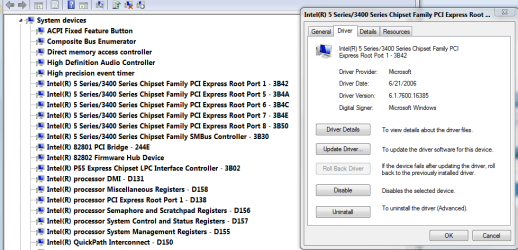
chipsetdrivers.PNG

Looks like this is the one it updated. It caused a BSOD and my boot SSD to disappear from BIOS!
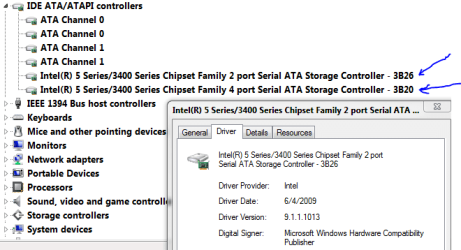
intelsatadriver.PNG

This is the one I downloaded. It shows as the latest Win7 64 bit chipset driver. It shows as version 1019 and devicw manager shows 1013 ???
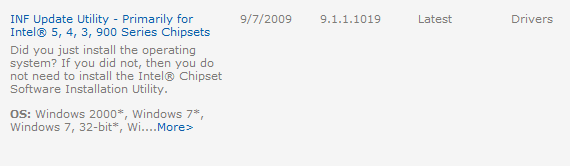
intelinf.PNG

EDIT: Shortly after installing this driver I got a BSOD and my SSD disappeared from the BIOS and everything. The system would not boot. I loaded optimized defaults in the BIOS....nothing. I have two SATA controllers so I hooked my boot drive to another, set it as 1st boot drive and rolled this driver back and re-set all BIOS settings. If anyone can tell me why this happened and what I am doing wrong I would greatly appreciate the info. I guess the latest intel drivers don't work well with my SSD, but it appears the USB controllers are still being controlled by the driver. Am I right? (1013)
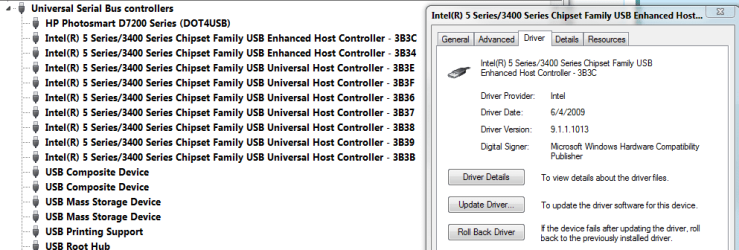
intelusbdriver.PNG

And I am back to this driver for the P55 chipset controlled SATA controller.
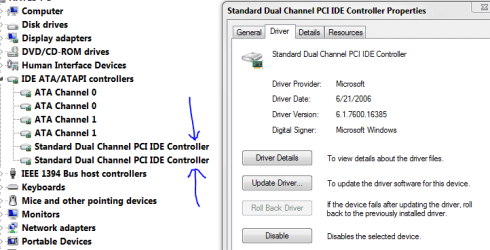
rollbacktomsfromintel.PNG
 
Last edited:

My Computer My Computer

Computer Manufacturer/Model Number
Keeps changing - (Custom)
OS
Windows 7 Professional x64
CPU
Intel Core i7 860
Motherboard
Gigabyte GA-P55-UD4P
Memory
4GB DDR3 Mushkin 1600Mhz @ 7-8-7-20
Graphics Card(s)
MSI GTS250 1GB DDR3 Twin Frozr
Sound Card
Onboard realtek
Monitor(s) Displays
Samsung SyncMaster 24" P2450 + Samsung 20" 2033
Screen Resolution
1920 X 1080 and 1600 X 900 (#2 system 1440 X 900)
Hard Drives
Patriot Inferno 120GB SSD + 3 WD Blue 640GB drives
PSU
Corsair 750 HX Modular
Case
Lancool PC-K62
Cooling
Cooler Master TX3 CPU cooler and 4-140mm and 1-120mm case
Keyboard
Gigabyte USB keyboard
Mouse
Microsoft wireless laser mouse 5000
Internet Speed
7 Mb down 1.5 up
Other Info
System #2: AMD Phenom II X6 1055T (Freezer 7 Pro cooler) - Gigabyte 880GMA-UD2H - WD 500GB Black - 9500GT (1GB) 500W OCZ modular PSU - Antec 200 case. System #3 (LapTop) Core 2 Duo T6670 - 320GB 7200RPM HD - 4GB DDR3 RAM.
Hallo Forum,

please can someone explain me how to check which intel chipset version is installed on my windows 7 x64 Asus P5B ?
Under HKEY_LOCAL_MACHINE\SOFTWARE\Intel and HKEY_CURRENT_USER\Software i have no entry.
I have installed 9.1.1.1020

Thanks
 
Last edited:

My Computer My Computer

OS
vista
I know this might seem like a silly question but I really don't know - Do you need to have an intel motherboard to download the chipset drivers? The reason I am asking I done a scan with pc pitstop recently and it came up that i should update some of my intel usb and sm drivers. I have a gigabyte ga-ex58-ud3r motherboard and Windows 7 Home Premium x64 installed.

If I do can someone please tell me if it's just a question of clicking on the link at the beginning of this thread and looking for my operating system and then downloading and installing the pack?
 

My Computer My Computer

OS
Windows 7 Ultimate x64
CPU
i7 CORE 2 QUAD 920 (2.66GHZ, 8MB L2 CACHE, 1066MHZ FSB)
Motherboard
GIGABYTE GA-EX58-UD3R MOTHERBOARD
Memory
3 x CORSAIR 2GB PC12800 DDR3 1600MHZ RAM
Graphics Card(s)
XFX NVIDIA GTS 250 512MB PCI-E GRAPHICS CARD
Sound Card
X-Fi Titanium Fatal1ty Pro 7.1 Soundcard - PCI-Express
Monitor(s) Displays
Samsung SM2343BW 23"
Screen Resolution
2048x1152
Hard Drives
2 x 500GB S-ATA 7200RPM Hard Drive
PSU
NorthQ 850W Dual Rail PSU
Case
Coolermaster Elite 330
Cooling
Noctua CPU Heatsink and Cooler
Keyboard
Microsoft Wireless Laser Keyboard 5000
Mouse
Microsoft Wireless Laser Mouse 5000
I know this might seem like a silly question but I really don't know - Do you need to have an intel motherboard to download the chipset drivers? The reason I am asking I done a scan with pc pitstop recently and it came up that i should update some of my intel usb and sm drivers. I have a gigabyte ga-ex58-ud3r motherboard and Windows 7 Home Premium x64 installed.

If I do can someone please tell me if it's just a question of clicking on the link at the beginning of this thread and looking for my operating system and then downloading and installing the pack?


You do have an Intel chipset which is manufactured by Gigabyte so yes you can install these drivers.

Yes you can download drivers from my first post.
The drivers are preset for Windows 7 but can be used on Vista.
 

My Computer My Computer

Computer type
PC/Desktop
Computer Manufacturer/Model Number
Custom
OS
Windows 7 SP1 x64
CPU
Intel E8400 3.0 GHz
Motherboard
Gigabyte EP45-DS3R
Memory
4x1 Trascend DDR2 800 Mhz
Graphics Card(s)
Gainward 8800GT 512 Mb
Sound Card
Realtek HD Audio 889A
Monitor(s) Displays
LG L204WS
Screen Resolution
1680x1050
Hard Drives
Intel 520 Series 120Gb SSD (System)
Western Digital 6400AAKS 640Gb (Data)
PSU
Cooler Master 650W
Case
Cooler Master Centurion 532
Cooling
2x 12 cm fans
Keyboard
Logitech Wave
Mouse
Logitech G5
Internet Speed
10 Mbit Cable Flat
Antivirus
NOD32 Smart Security
Browser
Google Chrome
I know this might seem like a silly question but I really don't know - Do you need to have an intel motherboard to download the chipset drivers? The reason I am asking I done a scan with pc pitstop recently and it came up that i should update some of my intel usb and sm drivers. I have a gigabyte ga-ex58-ud3r motherboard and Windows 7 Home Premium x64 installed.

If I do can someone please tell me if it's just a question of clicking on the link at the beginning of this thread and looking for my operating system and then downloading and installing the pack?


You do have an Intel chipset which is manufactured by Gigabyte so yes you can install these drivers.

Yes you can download drivers from my first post.
The drivers are preset for Windows 7 but can be used on Vista.

Thanks for the help. There is 2 of the latest to choose from the link you posted. Which do you suggest or does it matter?
 

Attachments

  • Capture.PNG
    Capture.PNG
    13.3 KB · Views: 85

My Computer My Computer

OS
Windows 7 Ultimate x64
CPU
i7 CORE 2 QUAD 920 (2.66GHZ, 8MB L2 CACHE, 1066MHZ FSB)
Motherboard
GIGABYTE GA-EX58-UD3R MOTHERBOARD
Memory
3 x CORSAIR 2GB PC12800 DDR3 1600MHZ RAM
Graphics Card(s)
XFX NVIDIA GTS 250 512MB PCI-E GRAPHICS CARD
Sound Card
X-Fi Titanium Fatal1ty Pro 7.1 Soundcard - PCI-Express
Monitor(s) Displays
Samsung SM2343BW 23"
Screen Resolution
2048x1152
Hard Drives
2 x 500GB S-ATA 7200RPM Hard Drive
PSU
NorthQ 850W Dual Rail PSU
Case
Coolermaster Elite 330
Cooling
Noctua CPU Heatsink and Cooler
Keyboard
Microsoft Wireless Laser Keyboard 5000
Mouse
Microsoft Wireless Laser Mouse 5000
I know this might seem like a silly question but I really don't know - Do you need to have an intel motherboard to download the chipset drivers? The reason I am asking I done a scan with pc pitstop recently and it came up that i should update some of my intel usb and sm drivers. I have a gigabyte ga-ex58-ud3r motherboard and Windows 7 Home Premium x64 installed.

If I do can someone please tell me if it's just a question of clicking on the link at the beginning of this thread and looking for my operating system and then downloading and installing the pack?


You do have an Intel chipset which is manufactured by Gigabyte so yes you can install these drivers.

Yes you can download drivers from my first post.
The drivers are preset for Windows 7 but can be used on Vista.

Thanks for the help. There is 2 of the latest to choose from the link you posted. Which do you suggest or does it matter?

They are the same but, take the second one
(INF Update Utility - Primarily for Intel® 5, 4, 3, 900 Series Chipsets
)
(the first is a zip for developers who wish to modify the drivers)

They are easier to install
 

My Computer My Computer

Computer type
PC/Desktop
Computer Manufacturer/Model Number
Custom
OS
Windows 7 SP1 x64
CPU
Intel E8400 3.0 GHz
Motherboard
Gigabyte EP45-DS3R
Memory
4x1 Trascend DDR2 800 Mhz
Graphics Card(s)
Gainward 8800GT 512 Mb
Sound Card
Realtek HD Audio 889A
Monitor(s) Displays
LG L204WS
Screen Resolution
1680x1050
Hard Drives
Intel 520 Series 120Gb SSD (System)
Western Digital 6400AAKS 640Gb (Data)
PSU
Cooler Master 650W
Case
Cooler Master Centurion 532
Cooling
2x 12 cm fans
Keyboard
Logitech Wave
Mouse
Logitech G5
Internet Speed
10 Mbit Cable Flat
Antivirus
NOD32 Smart Security
Browser
Google Chrome
You do have an Intel chipset which is manufactured by Gigabyte so yes you can install these drivers.

Yes you can download drivers from my first post.
The drivers are preset for Windows 7 but can be used on Vista.

Thanks for the help. There is 2 of the latest to choose from the link you posted. Which do you suggest or does it matter?

They are the same but, take the second one
(INF Update Utility - Primarily for Intel® 5, 4, 3, 900 Series Chipsets
)
(the first is a zip for developers who wish to modify the drivers)

They are easier to install

Thanks for all your help.
 

My Computer My Computer

OS
Windows 7 Ultimate x64
CPU
i7 CORE 2 QUAD 920 (2.66GHZ, 8MB L2 CACHE, 1066MHZ FSB)
Motherboard
GIGABYTE GA-EX58-UD3R MOTHERBOARD
Memory
3 x CORSAIR 2GB PC12800 DDR3 1600MHZ RAM
Graphics Card(s)
XFX NVIDIA GTS 250 512MB PCI-E GRAPHICS CARD
Sound Card
X-Fi Titanium Fatal1ty Pro 7.1 Soundcard - PCI-Express
Monitor(s) Displays
Samsung SM2343BW 23"
Screen Resolution
2048x1152
Hard Drives
2 x 500GB S-ATA 7200RPM Hard Drive
PSU
NorthQ 850W Dual Rail PSU
Case
Coolermaster Elite 330
Cooling
Noctua CPU Heatsink and Cooler
Keyboard
Microsoft Wireless Laser Keyboard 5000
Mouse
Microsoft Wireless Laser Mouse 5000

My Computer My Computer

Computer type
PC/Desktop
Computer Manufacturer/Model Number
Custom
OS
Windows 7 SP1 x64
CPU
Intel E8400 3.0 GHz
Motherboard
Gigabyte EP45-DS3R
Memory
4x1 Trascend DDR2 800 Mhz
Graphics Card(s)
Gainward 8800GT 512 Mb
Sound Card
Realtek HD Audio 889A
Monitor(s) Displays
LG L204WS
Screen Resolution
1680x1050
Hard Drives
Intel 520 Series 120Gb SSD (System)
Western Digital 6400AAKS 640Gb (Data)
PSU
Cooler Master 650W
Case
Cooler Master Centurion 532
Cooling
2x 12 cm fans
Keyboard
Logitech Wave
Mouse
Logitech G5
Internet Speed
10 Mbit Cable Flat
Antivirus
NOD32 Smart Security
Browser
Google Chrome
Guys, help me out here. I want to have the latest Intel drivers for my system and have a "hard time understanding" chipset drivers. I downloaded the exe for the 5 series chipsets, ran it, it said it had installed successfully. It didn't say to restart but I did anyway and here is what I am left with.....Microsoft drivers. This is why I don't get it. Am I way off base here? Thanks for any thoughts.

I am wondering the same thing. why are driver version not matching up in device manager when I've installed the latest from the Intel site.
 

My Computer My Computer

OS
Windows 7 x64
CPU
Intel 9450
Motherboard
Asus P5Q-E
Memory
4 GB OCZ
Graphics Card(s)
Evga GTX 295
Sound Card
Soundblaster X-Fi
Monitor(s) Displays
Viewsonic 20 inch
Hard Drives
1x Western Digital 300 GB 7200 RPM
2x Hitachi 150 GB 7200 RPM
PSU
PC Power & Cooling 480
Case
Cooler Master
Guys, help me out here. I want to have the latest Intel drivers for my system and have a "hard time understanding" chipset drivers. I downloaded the exe for the 5 series chipsets, ran it, it said it had installed successfully. It didn't say to restart but I did anyway and here is what I am left with.....Microsoft drivers. This is why I don't get it. Am I way off base here? Thanks for any thoughts.

I am wondering the same thing. why are driver version not matching up in device manager when I've installed the latest from the Intel site.
Because the Intel Chipset Software is not a driver, and does not contain any drivers. As I've said before, the Intel Chipset Software is just a bunch of descriptive INF files that tell the operating system what name to display in Device Manager.

The actual drivers are Microsoft's, and are included in the default Windows 7 install - they don't need updating, and there are no updates available.
 

My Computer My Computer

Computer Manufacturer/Model Number
Self-built
OS
Win7 Pro; Linux Mint 7
CPU
E8500 @ 3.8GHz
Motherboard
Asus P5QL PRO
Memory
Corsair XMS2 2GB @800MHz
Graphics Card(s)
Nvidia 9800GT
Sound Card
onboard
Hard Drives
Western Digital Caviar 500GB x2
Microsoft makes the drivers.

Intel INF has info abt your model of mobo, number or ports,components...both are required
 

My Computer My Computer

Computer type
PC/Desktop
Computer Manufacturer/Model Number
Custom
OS
Windows 7 SP1 x64
CPU
Intel E8400 3.0 GHz
Motherboard
Gigabyte EP45-DS3R
Memory
4x1 Trascend DDR2 800 Mhz
Graphics Card(s)
Gainward 8800GT 512 Mb
Sound Card
Realtek HD Audio 889A
Monitor(s) Displays
LG L204WS
Screen Resolution
1680x1050
Hard Drives
Intel 520 Series 120Gb SSD (System)
Western Digital 6400AAKS 640Gb (Data)
PSU
Cooler Master 650W
Case
Cooler Master Centurion 532
Cooling
2x 12 cm fans
Keyboard
Logitech Wave
Mouse
Logitech G5
Internet Speed
10 Mbit Cable Flat
Antivirus
NOD32 Smart Security
Browser
Google Chrome

My Computer My Computer

Computer type
PC/Desktop
Computer Manufacturer/Model Number
Custom
OS
Windows 7 SP1 x64
CPU
Intel E8400 3.0 GHz
Motherboard
Gigabyte EP45-DS3R
Memory
4x1 Trascend DDR2 800 Mhz
Graphics Card(s)
Gainward 8800GT 512 Mb
Sound Card
Realtek HD Audio 889A
Monitor(s) Displays
LG L204WS
Screen Resolution
1680x1050
Hard Drives
Intel 520 Series 120Gb SSD (System)
Western Digital 6400AAKS 640Gb (Data)
PSU
Cooler Master 650W
Case
Cooler Master Centurion 532
Cooling
2x 12 cm fans
Keyboard
Logitech Wave
Mouse
Logitech G5
Internet Speed
10 Mbit Cable Flat
Antivirus
NOD32 Smart Security
Browser
Google Chrome
I've always been a little confused on chipset drivers to be honest. I have W7 ordered and on its way, and would like to know if I should us these, or just install the chipset drivers from my motherboard CD? Running Vista64 now, but have never really known where to go look to see what version I'm running. Should I stick to the CD chipset drivers, or install these if I can find out which are the correct ones I need? I suppose you can see my PC specs, but should probably dig out my motherboard box for more specific specs and add them to my spec sheet here. Thanks for any help. it is appreciated.

BTW, Glad I found this forum. I've read nearly every thread in here since I was directed to here from a friend just the other day. Trying to retain as much info as possible for the new W7 install when it gets here Friday.
 

My Computer My Computer

Computer Manufacturer/Model Number
Custom
OS
W7 Pro/clean install
CPU
I7/940-3838A611@3750mhz
Motherboard
eVGA X58/SZ1G
Memory
OCZ DDR3 3G1600LV2G 3x2 gig
Graphics Card(s)
eVGA 295GTX/195.62 WHQL
Sound Card
Audigy 2 Platinum
Monitor(s) Displays
3 x Dell 2209WA/DTH2go
Screen Resolution
5040 x 1050@59hz
Hard Drives
1-300gig WD Velociraptor-GLFS
2 x 200 gig Seagate Barracudas-st3200822as
PSU
Corsair CMPSU-1000HX A
Case
Antec 1200
Cooling
Air cooling x 8
Keyboard
Yeah
Mouse
That too
Internet Speed
Comcast 8mg/16mg
I've always been a little confused on chipset drivers to be honest. I have W7 ordered and on its way, and would like to know if I should us these, or just install the chipset drivers from my motherboard CD? Running Vista64 now, but have never really known where to go look to see what version I'm running. Should I stick to the CD chipset drivers, or install these if I can find out which are the correct ones I need? I suppose you can see my PC specs, but should probably dig out my motherboard box for more specific specs and add them to my spec sheet here. Thanks for any help. it is appreciated.

BTW, Glad I found this forum. I've read nearly every thread in here since I was directed to here from a friend just the other day. Trying to retain as much info as possible for the new W7 install when it gets here Friday.

Hello Tommy and welcome to Windows 7 Forum,

The drivers on the CD that came with your motherboard are probably
ancient and would cause more trouble than if you didn't install them.
You should download the latest version there is of EVERY driver in
your computer to achieve maximum stability.
There is only one Intel Chipset driver which will work on any intel
motherboard.
Be shore to update you graphic and audio driver too!;)
 

My Computer My Computer

Computer type
PC/Desktop
Computer Manufacturer/Model Number
Custom
OS
Windows 7 SP1 x64
CPU
Intel E8400 3.0 GHz
Motherboard
Gigabyte EP45-DS3R
Memory
4x1 Trascend DDR2 800 Mhz
Graphics Card(s)
Gainward 8800GT 512 Mb
Sound Card
Realtek HD Audio 889A
Monitor(s) Displays
LG L204WS
Screen Resolution
1680x1050
Hard Drives
Intel 520 Series 120Gb SSD (System)
Western Digital 6400AAKS 640Gb (Data)
PSU
Cooler Master 650W
Case
Cooler Master Centurion 532
Cooling
2x 12 cm fans
Keyboard
Logitech Wave
Mouse
Logitech G5
Internet Speed
10 Mbit Cable Flat
Antivirus
NOD32 Smart Security
Browser
Google Chrome
Dell Inspiron 1525 laptop upgrade

Hi,

Need help to find and install correct Intel graphics driver for Mobile Intel 965 on Windows 7. The new driver on Intel page 9.1.1.1025 doesn't say it supports this?

Any help much appreciated

Ray:D
 

My Computer My Computer

Computer type
Laptop
Computer Manufacturer/Model Number
PC Specialist
OS
windows 7 64 bit
CPU
i5 4200M @ 2.50 Ghz
Motherboard
?
Memory
4Gb DDR2 SDRAM
Graphics Card(s)
GeForce GTX
Sound Card
onboard
Monitor(s) Displays
laptop
Screen Resolution
1920 x 1080
Hard Drives
500 GB
Keyboard
laptop
Mouse
Polaroid
Internet Speed
70 mb
Antivirus
AVG Free
Browser
Chrome

My Computer My Computer

Computer type
PC/Desktop
Computer Manufacturer/Model Number
Custom
OS
Windows 7 SP1 x64
CPU
Intel E8400 3.0 GHz
Motherboard
Gigabyte EP45-DS3R
Memory
4x1 Trascend DDR2 800 Mhz
Graphics Card(s)
Gainward 8800GT 512 Mb
Sound Card
Realtek HD Audio 889A
Monitor(s) Displays
LG L204WS
Screen Resolution
1680x1050
Hard Drives
Intel 520 Series 120Gb SSD (System)
Western Digital 6400AAKS 640Gb (Data)
PSU
Cooler Master 650W
Case
Cooler Master Centurion 532
Cooling
2x 12 cm fans
Keyboard
Logitech Wave
Mouse
Logitech G5
Internet Speed
10 Mbit Cable Flat
Antivirus
NOD32 Smart Security
Browser
Google Chrome
Inspiron 1525

Thanks for fast reply.

Ray:D
 

My Computer My Computer

Computer type
Laptop
Computer Manufacturer/Model Number
PC Specialist
OS
windows 7 64 bit
CPU
i5 4200M @ 2.50 Ghz
Motherboard
?
Memory
4Gb DDR2 SDRAM
Graphics Card(s)
GeForce GTX
Sound Card
onboard
Monitor(s) Displays
laptop
Screen Resolution
1920 x 1080
Hard Drives
500 GB
Keyboard
laptop
Mouse
Polaroid
Internet Speed
70 mb
Antivirus
AVG Free
Browser
Chrome
No prob.

Jez i found your reply before i was even notified:shock:

Glad to help!:D
 

My Computer My Computer

Computer type
PC/Desktop
Computer Manufacturer/Model Number
Custom
OS
Windows 7 SP1 x64
CPU
Intel E8400 3.0 GHz
Motherboard
Gigabyte EP45-DS3R
Memory
4x1 Trascend DDR2 800 Mhz
Graphics Card(s)
Gainward 8800GT 512 Mb
Sound Card
Realtek HD Audio 889A
Monitor(s) Displays
LG L204WS
Screen Resolution
1680x1050
Hard Drives
Intel 520 Series 120Gb SSD (System)
Western Digital 6400AAKS 640Gb (Data)
PSU
Cooler Master 650W
Case
Cooler Master Centurion 532
Cooling
2x 12 cm fans
Keyboard
Logitech Wave
Mouse
Logitech G5
Internet Speed
10 Mbit Cable Flat
Antivirus
NOD32 Smart Security
Browser
Google Chrome

Attachments

  • Capture.PNG
    Capture.PNG
    20.8 KB · Views: 183

My Computer My Computer

OS
windows 7 professional 64 bit
CPU
intel core i7 920 (1366)
Motherboard
Asus P6T Deluxe V2
Memory
Corsair Dominators (TR3X6G1600C8D)
Graphics Card(s)
Sapphire 5970
Sound Card
on board / Asus Xonar D2
Monitor(s) Displays
lg flatron wide 22" 2x
Hard Drives
caviar black 1tb
caviar green 1tb

external western digital my book 1tb
external western my book digital 500gb
PSU
corsair 750w
Case
antec 1200
Cooling
sythek mugen - 2
Keyboard
flico maje
Mouse
g500
Internet Speed
comcast houstont x, 16mb down with boost. 2mb up
Back
Top