
Dual Boot Installation with Windows 7 and Vista

How to Setup a Dual Boot Installation with Windows 7 and Vista

   Information
This will show you how to install Windows 7 and Vista to dual boot with when you already have either Windows 7 or Vista installed first.
   Note
With a dual boot installaton, you will have two operating systems (OS) installed. When you start the computer, you will have the choice to choose which OS you would like to start up to. This method is the easiest way of doing a dual boot with these two operating systems.
   Tip
When dual booting with another OS (ex: Vista or XP), you may not always have that OS partition show up in Computer with a driver letter in Windows 7. If this happens, then you will just need to add a drive letter to the OS (ex: Vista or XP) partition in Windows 7 Disk Management for it to show up in Computer with a driver letter.
   Warning
Windows 7 Minimum Hardware Requirements:

NOTE: For more iformation on this, see: Windows 7 system requirements
  • 1 GHz 32-bit or 64-bit processor
  • 1 GB RAM for 32-bit Windows 7 OR 2 GB RAM for 64-bit Windows 7
  • 16 GB available disk space 32-bit Windows 7 OR 20 GB for 64-bit Windows 7
  • Support for DirectX 9 graphics with 128 MB memory (in order to enable Aero theme)
  • DVD-R/W Drive
  • Internet or phone access to activate Windows 7.
Vista Minimum Hardware Requirements:
NOTE: For more information, see: Microsoft Windows Vista: Recommended System Requirements

Vista Home Basic
  • Processor: 1GHz (32 or 64 bit)
  • System Memory (RAM): 512MB
  • Hard Drive: 20GB with 15GB available for Vista
  • Video Card: 32MB Memory and DirectX 9 Support
  • DVD-ROM Drive
Vista Home Premium, Business, or Ultimate
  • Processor: 1GHz (32 or 64 bit)
  • System Memory (RAM): 1GB
  • Hard Drive: 40GB with 15GB available for Vista
  • Video Card: 128MB Memory, DirectX 9 Support with: WDDM Driver, Pixel Shader 2.0, 32bits per pixel
  • DVD-ROM Drive

EXAMPLE: Windows Boot Manager
NOTE: This is the boot screen where you select what operating system that you would like to start. By default, you have 30 seconds to choose another operating system before the default operating system will start automatically.
Boot_Manager.jpg


Here's How:
1. If Installing Second OS on a Separate Hard Drive
NOTE: This is if you are going to install the second OS (Windows 7 or Vista) on a separate hard drive than the first OS in installed on.
A) Go to step 3.
2. If Installing Second OS on another Partition on the Same Hard Drive
NOTE: This is if you are going to install the second OS (Windows 7 or Vista) on a different partition on the same hard drive than the first OS is installed on.
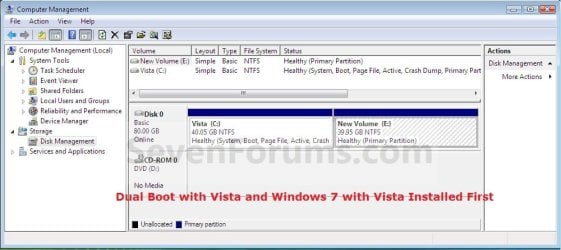
A) If Vista was installed first, then create a new partition for Windows 7 (second OS) to be installed on later if you do not already have one to use. (See screenshot below)
Create_Windows7_Partition_.jpg
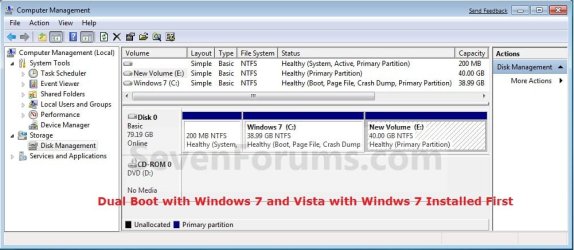
B) If Windows 7 was installed first, then create a new partition for Vista (second OS) to be installed on later if you do not already have one to use. (See screenshot below)
Create_Vista_Partition_.jpg
3. Insert the second OS (Windows 7 or Vista) installation DVD, and restart the computer to start installing it.
A) If Vista was installed first, then select the new partition (step 2A) or drive and do a clean install of Windows 7 (second OS) on it. (See screenshot below)
Windows7_Partition.jpg
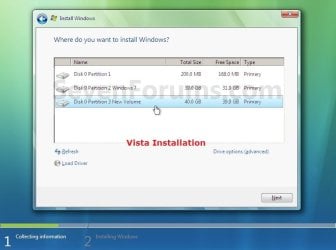
B) If Windows 7 was installed first, then select the new partition (step 2B) or drive and do a clean install of Vista (second OS) on it. (See screenshot below)
Vista_Partition.jpg
4. When the second OS is finished installing you will now have the option to select which OS to start to in the Windows Boot Manager screen at start up. (See example screenshot at the top of the tutorial)
NOTE: Whatever OS you install last will be the OS listed first in the Windows Boot Manager screen at startup.

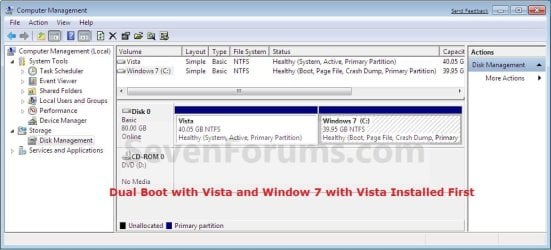
5. This is what you will see in Disk Management below if you installed the second OS on another partition on the same hard drive (step 2).
A) If Vista was installed first. (See screenshot below)
Disk_Management-Windows7.jpg
B) If Windows 7 was installed first. (See screenshot below)
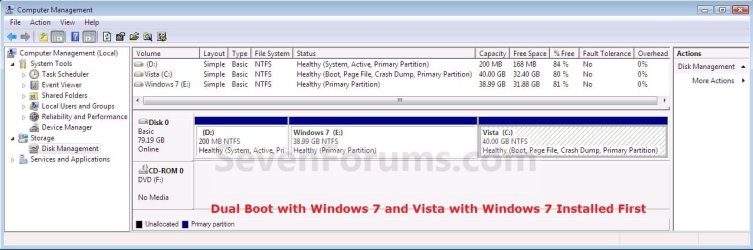
Disk_Management-Vista.jpg
That's it,
Shawn


Last edited:
THAT WAS WHAT I NEED TO KNOW

THANKS FOR YOUR HELP DEAR FRIEND.
YOUR EXPLANATION WAS HELP FULL.
ERNESTO
 

My Computer My Computer

At a glance

windows vista ultimateintel duo core 2DDR2 4 GBNVIDIA
Computer Manufacturer/Model Number
my pc is mounted
OS
windows vista ultimate
CPU
intel duo core 2
Motherboard
MSI P6NGM2 SERIES
Memory
DDR2 4 GB
Graphics Card(s)
NVIDIA
Sound Card
ON BOARD
Monitor(s) Displays
LG FLATRON L1953H
Hard Drives
MAXTOR 250 GB
SAMSUNG 160 GB
WD 250 GB
You're welcome Pescadorsub, and welcome to Seven Forums. :)
 

My Computer My Computer

At a glance

64-bit Windows 11 Pro for WorkstationsIntel i7-8700K OC'd to 5 GHz64 GB (4x16GB) G.SKILL TridentZ RGB DDR4 3600...ASUS ROG-STRIX-GTX1080TI-O11G-GAMING
Computer type
PC/Desktop
Computer Manufacturer/Model Number
Self built custom
OS
64-bit Windows 11 Pro for Workstations
CPU
Intel i7-8700K OC'd to 5 GHz
Motherboard
ASUS ROG Maximus XI Formula Z390
Memory
64 GB (4x16GB) G.SKILL TridentZ RGB DDR4 3600 MHz
Graphics Card(s)
ASUS ROG-STRIX-GTX1080TI-O11G-GAMING
Sound Card
Integrated
Monitor(s) Displays
2 x Samsung Odyssey G7 27"
Screen Resolution
2560x1440
Hard Drives
1TB Samsung 990 PRO M.2,
4TB Samsung 990 PRO PRO M.2,
TerraMaster F8 SSD Plus NAS
PSU
Seasonic Prime Titanium 850W
Case
Thermaltake Core P3
Cooling
Corsair Hydro H115i
Keyboard
Logitech wireless K800
Mouse
Logitech MX Master 4
Internet Speed
2 Gb/s Download and 100 Mb/s Upload
Antivirus
Malwarebyte Anti-Malware Premium
Browser
Google Chrome
Other Info
Logitech Z625 speaker system,
Logitech BRIO 4K Pro webcam,
HP Color LaserJet Pro MFP M477fdn,
APC SMART-UPS RT 1000 XL - SURT1000XLI,
Galaxy S23 Plus phone
i installed win 7 on primary HD

and i disconnected primary HD and installed vista on Secondary HD

now i connected Primary HD bbut now boot is going to vista only how to get win 7 too!!!
 

My Computer My Computer

At a glance

win 7 build 7600.16385 x64AMD Athlon Dual core 7750 2.7GHz4GB 800MhzATI HD 3200 IGP
Computer Manufacturer/Model Number
Custom Build
OS
win 7 build 7600.16385 x64
CPU
AMD Athlon Dual core 7750 2.7GHz
Motherboard
Gigabyte GA78MA s2h
Memory
4GB 800Mhz
Graphics Card(s)
ATI HD 3200 IGP
Monitor(s) Displays
Acer 15 inch
Screen Resolution
1280x720
Hard Drives
Seagate 1 TB
Keyboard
Logitech
Mouse
Logitech
Internet Speed
Airtel DSL 2Mbps
Hello Raj,

You should have left both drives connected, so that when you installed Vista it would have been added to the boot file with Windows 7. Instead, you have a boot file on both drives with Vista being the primary now since it was done last.

You might see if doing a startup repair using the Windows 7 installation disc may be able to add it for you.

Hope this helps,
Shawn
 
Last edited:

My Computer My Computer

At a glance

64-bit Windows 11 Pro for WorkstationsIntel i7-8700K OC'd to 5 GHz64 GB (4x16GB) G.SKILL TridentZ RGB DDR4 3600...ASUS ROG-STRIX-GTX1080TI-O11G-GAMING
Computer type
PC/Desktop
Computer Manufacturer/Model Number
Self built custom
OS
64-bit Windows 11 Pro for Workstations
CPU
Intel i7-8700K OC'd to 5 GHz
Motherboard
ASUS ROG Maximus XI Formula Z390
Memory
64 GB (4x16GB) G.SKILL TridentZ RGB DDR4 3600 MHz
Graphics Card(s)
ASUS ROG-STRIX-GTX1080TI-O11G-GAMING
Sound Card
Integrated
Monitor(s) Displays
2 x Samsung Odyssey G7 27"
Screen Resolution
2560x1440
Hard Drives
1TB Samsung 990 PRO M.2,
4TB Samsung 990 PRO PRO M.2,
TerraMaster F8 SSD Plus NAS
PSU
Seasonic Prime Titanium 850W
Case
Thermaltake Core P3
Cooling
Corsair Hydro H115i
Keyboard
Logitech wireless K800
Mouse
Logitech MX Master 4
Internet Speed
2 Gb/s Download and 100 Mb/s Upload
Antivirus
Malwarebyte Anti-Malware Premium
Browser
Google Chrome
Other Info
Logitech Z625 speaker system,
Logitech BRIO 4K Pro webcam,
HP Color LaserJet Pro MFP M477fdn,
APC SMART-UPS RT 1000 XL - SURT1000XLI,
Galaxy S23 Plus phone
Hi raj,

Because you are likely to be booting into 7 most, I suggest you go into bios and set the 7 HD as the first HD in bios boot order.

If you prefer, you can simply swap the order the SATA cables are connected to the motherboard.

Then you can add Vista to the 7 boot menu with startup repair, bcdedit, or Easybcd.
 

My Computers My Computers

  • At a glance

    7 X64i5 84002x8gb 3200mhz
    Computer type
    PC/Desktop
    OS
    7 X64
    CPU
    i5 8400
    Motherboard
    gigabyte b365m ds3h
    Memory
    2x8gb 3200mhz
    Hard Drives
    various
    PSU
    pure power 11 400w cm
    Case
    Coolermaster
    Cooling
    cryorig m9i
  • At a glance

    7x64g54008gb ddr4 2400
    Computer type
    PC/Desktop
    OS
    7x64
    CPU
    g5400
    Motherboard
    ga b365m ds3h
    Memory
    8gb ddr4 2400
    PSU
    xfx pro 450w
Vista will have all it's programs, applications and shortcuts installed on C.

When you boot to Win 7 and install any programs, applications and shortcuts they will be on C. Install Win 7 from a booted DVD on the G drive, and when you boot to 7, it will be C. It's not like you will be running programs on the G drive when you are booted to Vista.

I've been running multiboot since at least Windows 95.

I some cases a prog can be installed in 1 OS, and run from other OS.
Or, there may be files that one needs to share amongst OS.

Another, better, approach is have another parttion in which shared files/programs can be installed, rather than plopping then on the C drive for an OS.

I use both approaches.

Win 7 seems to want to hide the C drive for other OS.
This forces me to use the better, approach of putting common files in a separate partition.

For some programs, this may be easy, e.g., Firefox an Thunderbird. For others, it might be difficult to have thg prog and related files in separate partitions.

I guess that I'll yell Uncle! and use the approach of creating a separate programs partition, as well as a separate data partition, or have separate folders in a separate partition.

More importantly, as I look at my calendar, I note that we are now in 2009, with 2010 not far away.

Isn't it about time that MSFT dropped all this partition/drive letter nonesense, and just used mount points?

Re: the program files on a separate partition. I have installed programs in Vista to a separate D: drive, where I also have files.

If I install upgrade or clean/custom Windows 7 (new partition on C: or on separate D: drive?), is there a way to get the programs to run in both Vista and Windows 7? Would I just reinstall from each O.S. and point to the separate D: for programs and files? They would then keep overwriting themselves. Wouldn't that cause problems?

If anyone has got this to work, please let me know before I install 7. Thanks.
 

My Computer My Computer

At a glance

Vista Windows 7 each 64 bit Home Premium
Computer Manufacturer/Model Number
HP HDX18, HP DV7 Quad Edition to arrive soon
OS
Vista Windows 7 each 64 bit Home Premium
Monitor(s) Displays
Acer H233H External Monitor
Hard Drives
2 Hard Drives on both computers
Hello Oldroser,

Sorry, but you would need to reinstall each program in each OS for them to work properly. :(
 

My Computer My Computer

At a glance

64-bit Windows 11 Pro for WorkstationsIntel i7-8700K OC'd to 5 GHz64 GB (4x16GB) G.SKILL TridentZ RGB DDR4 3600...ASUS ROG-STRIX-GTX1080TI-O11G-GAMING
Computer type
PC/Desktop
Computer Manufacturer/Model Number
Self built custom
OS
64-bit Windows 11 Pro for Workstations
CPU
Intel i7-8700K OC'd to 5 GHz
Motherboard
ASUS ROG Maximus XI Formula Z390
Memory
64 GB (4x16GB) G.SKILL TridentZ RGB DDR4 3600 MHz
Graphics Card(s)
ASUS ROG-STRIX-GTX1080TI-O11G-GAMING
Sound Card
Integrated
Monitor(s) Displays
2 x Samsung Odyssey G7 27"
Screen Resolution
2560x1440
Hard Drives
1TB Samsung 990 PRO M.2,
4TB Samsung 990 PRO PRO M.2,
TerraMaster F8 SSD Plus NAS
PSU
Seasonic Prime Titanium 850W
Case
Thermaltake Core P3
Cooling
Corsair Hydro H115i
Keyboard
Logitech wireless K800
Mouse
Logitech MX Master 4
Internet Speed
2 Gb/s Download and 100 Mb/s Upload
Antivirus
Malwarebyte Anti-Malware Premium
Browser
Google Chrome
Other Info
Logitech Z625 speaker system,
Logitech BRIO 4K Pro webcam,
HP Color LaserJet Pro MFP M477fdn,
APC SMART-UPS RT 1000 XL - SURT1000XLI,
Galaxy S23 Plus phone
Drive letter change after Dual boot install

I intend to install Win7 HP 64 bit on a new additional HDD which would be my 'D' drive with the already existing 'C' drive containing VistaHP 32 bit.

Once Win7 and all programs are installed and properly running on 'D', will I be able to change 'C' to drive letter 'E', then change 'D' to drive letter 'C' and then reformat 'F' to just leave me with Win7 on 'C' as the sole OS

Thanks in advance
Pedro38
 

My Computer My Computer

At a glance

Win 8 Pro 64 bit OEMIntel i7 -3770 3.4Ghz Socket 1155 8MB Cache32Gb DDR3 1600Gigabyte ATI Radeon 7850 HD 975Mhz 2Gb PCIE 3.00
Computer type
PC/Desktop
Computer Manufacturer/Model Number
Home build
OS
Win 8 Pro 64 bit OEM
CPU
Intel i7 -3770 3.4Ghz Socket 1155 8MB Cache
Motherboard
Gigabyte GA-Z77X-UDH5H
Memory
32Gb DDR3 1600
Graphics Card(s)
Gigabyte ATI Radeon 7850 HD 975Mhz 2Gb PCIE 3.00
Sound Card
on board
Monitor(s) Displays
Lenovo ThinkVision L220x Wide Screen
Screen Resolution
1920 x 1200
Hard Drives
2 x 500 Gb Crucial M4 SSD
External Samsung 1Tb USB3
PSU
Seasonic X-Series 850W
Case
Corsair Carbide 400R
Cooling
Noctua NH-C12P SE14
Keyboard
Microsoft Wireless Comfort Keyboard 5000
Mouse
Microsoft Wireless Mouse 5000
Internet Speed
Down 37mbps Up 8.5mbps
Antivirus
Norton 360 Premium
Browser
IE 11
Other Info
2 x Samsung SH-224 Optical Drives
1 NXZT USB3 5.25" Aperture Card Reader / 2 x USB3
Edimax N300 Wireless PCI-E Express Adapter
Logitech HD 1080P Webcam
Hauppauge WinTV V7 Adapter
Zoom modem
Hi Pedro,

The way to do that is to disconnect the HD containing Vista.

Have only the new HD connected. Install 7 onto it.

Make sure the 7 HD is first in Bios HD boot order.

Reattach the Vista HD.

Add an entry for Vista to the 7 boot menu by installing Easybcd on 7, or by using bcdedit.
 

My Computers My Computers

  • At a glance

    7 X64i5 84002x8gb 3200mhz
    Computer type
    PC/Desktop
    OS
    7 X64
    CPU
    i5 8400
    Motherboard
    gigabyte b365m ds3h
    Memory
    2x8gb 3200mhz
    Hard Drives
    various
    PSU
    pure power 11 400w cm
    Case
    Coolermaster
    Cooling
    cryorig m9i
  • At a glance

    7x64g54008gb ddr4 2400
    Computer type
    PC/Desktop
    OS
    7x64
    CPU
    g5400
    Motherboard
    ga b365m ds3h
    Memory
    8gb ddr4 2400
    PSU
    xfx pro 450w
What I hate about 7 is the Access Denied on some folders. Is there any way around that? As administrator, I want to look at all my folders.
 

My Computer My Computer

At a glance

Dual boot to Vista and Windows 7 Home PremiumP86006Gnvidia
Computer Manufacturer/Model Number
HP pavillion dv7 1285dx Notebook
OS
Dual boot to Vista and Windows 7 Home Premium
CPU
P8600
Motherboard
HP
Memory
6G
Graphics Card(s)
nvidia
Monitor(s) Displays
laptop
Screen Resolution
Whatever I want.
Hard Drives
2X 500G WD Scorpio Blue
Mouse
Logitech Notebook
Internet Speed
+25 on a good day
Many thanks SIW2, I'll let you know how I get on once I've completed the procedure.
Happy New Year
Pedro38
 

My Computer My Computer

At a glance

Win 8 Pro 64 bit OEMIntel i7 -3770 3.4Ghz Socket 1155 8MB Cache32Gb DDR3 1600Gigabyte ATI Radeon 7850 HD 975Mhz 2Gb PCIE 3.00
Computer type
PC/Desktop
Computer Manufacturer/Model Number
Home build
OS
Win 8 Pro 64 bit OEM
CPU
Intel i7 -3770 3.4Ghz Socket 1155 8MB Cache
Motherboard
Gigabyte GA-Z77X-UDH5H
Memory
32Gb DDR3 1600
Graphics Card(s)
Gigabyte ATI Radeon 7850 HD 975Mhz 2Gb PCIE 3.00
Sound Card
on board
Monitor(s) Displays
Lenovo ThinkVision L220x Wide Screen
Screen Resolution
1920 x 1200
Hard Drives
2 x 500 Gb Crucial M4 SSD
External Samsung 1Tb USB3
PSU
Seasonic X-Series 850W
Case
Corsair Carbide 400R
Cooling
Noctua NH-C12P SE14
Keyboard
Microsoft Wireless Comfort Keyboard 5000
Mouse
Microsoft Wireless Mouse 5000
Internet Speed
Down 37mbps Up 8.5mbps
Antivirus
Norton 360 Premium
Browser
IE 11
Other Info
2 x Samsung SH-224 Optical Drives
1 NXZT USB3 5.25" Aperture Card Reader / 2 x USB3
Edimax N300 Wireless PCI-E Express Adapter
Logitech HD 1080P Webcam
Hauppauge WinTV V7 Adapter
Zoom modem
Dual boot-Dual Hard Drives

Hi Shawn,
I read somewhere in the Vista tutorials about dual HD boot. But for the live of me can't remember who or where. (WHS I think) I't said to disconnect primary, install 7 on second drive then reattach-reboot. I did this, and it seems ok. Other than the fact that I have no boot options on startup unless I use F12... But after reading your tutorials, I'm wondering if I should'nt uninstall 7 and install through the Vista drive ONTO secondary.(If you notice,theres no boot or page file on disk 0) I would like to actually use half(or so) of the second drive for backups. That, and if I remember correctly, 7 will activate itself in this manner without workaround.(RTM) The location of the drives arent accurate. In manager it shows Vista (disk 0 on MOBO), to be on disk 1, and WIN7(disk2 on MOBO) to be on 0. ! is my Optical drive. I dont really care about drive letters and all, as long as everything runs smoothly. :) Whats your opinion?

hehe...I'm a noob here..:cry:
 
Last edited:

My Computer My Computer

At a glance

Windows 7 ultimate X64Core i7 870 Lynnfield4GB Corsair XMS 3 1600MhzGeForce 8800 GTS (for the time being)
Computer Manufacturer/Model Number
Custom
OS
Windows 7 ultimate X64
CPU
Core i7 870 Lynnfield
Motherboard
MSI P55-GD55
Memory
4GB Corsair XMS 3 1600Mhz
Graphics Card(s)
GeForce 8800 GTS (for the time being)
Sound Card
Onboard 7.1 digital
Monitor(s) Displays
Dell 19"
Screen Resolution
1280x1024
Hard Drives
Barracuda 750Gb
PSU
Corsair TX 650w
Case
Thermaltake Armour Extreme Edition
Cooling
Corsair H50
Keyboard
Dell XPS slim
Mouse
Dell XPS mouse (only good product)
Internet Speed
100 Mbps +/-
7 should activate fine as it is. Did you try?

No need to reinstall - just set 7 HD as first in Bios boot order ( or swap the SATA leads at the mobo end.)

Then add Vista to the 7 boot menu.

Easily done with Easybcd. EasyBCD 2.0 - The NeoSmart Forums

You won't see Boot or pagefile on the 7 partition - unless you are booted into it.
 

My Computers My Computers

  • At a glance

    7 X64i5 84002x8gb 3200mhz
    Computer type
    PC/Desktop
    OS
    7 X64
    CPU
    i5 8400
    Motherboard
    gigabyte b365m ds3h
    Memory
    2x8gb 3200mhz
    Hard Drives
    various
    PSU
    pure power 11 400w cm
    Case
    Coolermaster
    Cooling
    cryorig m9i
  • At a glance

    7x64g54008gb ddr4 2400
    Computer type
    PC/Desktop
    OS
    7x64
    CPU
    g5400
    Motherboard
    ga b365m ds3h
    Memory
    8gb ddr4 2400
    PSU
    xfx pro 450w
7 should activate fine as it is. Did you try?

No need to reinstall - just set 7 HD as first in Bios boot order ( or swap the SATA leads at the mobo end.)

Then add Vista to the 7 boot menu.

Easily done with Easybcd. EasyBCD 2.0 - The NeoSmart Forums

You won't see Boot or pagefile on the 7 partition - unless you are booted into it.

No, haven't tried actually. ROFL! That make too much sense! **You won't see Boot or pagefile on the 7 partition - unless you are booted into it.** Cool, thanks. Off to find EasyBCD.
 

My Computer My Computer

At a glance

Windows 7 ultimate X64Core i7 870 Lynnfield4GB Corsair XMS 3 1600MhzGeForce 8800 GTS (for the time being)
Computer Manufacturer/Model Number
Custom
OS
Windows 7 ultimate X64
CPU
Core i7 870 Lynnfield
Motherboard
MSI P55-GD55
Memory
4GB Corsair XMS 3 1600Mhz
Graphics Card(s)
GeForce 8800 GTS (for the time being)
Sound Card
Onboard 7.1 digital
Monitor(s) Displays
Dell 19"
Screen Resolution
1280x1024
Hard Drives
Barracuda 750Gb
PSU
Corsair TX 650w
Case
Thermaltake Armour Extreme Edition
Cooling
Corsair H50
Keyboard
Dell XPS slim
Mouse
Dell XPS mouse (only good product)
Internet Speed
100 Mbps +/-
Well, I don't think I did that correctly. I still boot to Vista first. I ran BCD from 7, is that correct? Theres not really a help file on BCD either, and I'm unfamiliar with it. Looks like I could rearrange til I screw something up good. :D
 

My Computer My Computer

At a glance

Windows 7 ultimate X64Core i7 870 Lynnfield4GB Corsair XMS 3 1600MhzGeForce 8800 GTS (for the time being)
Computer Manufacturer/Model Number
Custom
OS
Windows 7 ultimate X64
CPU
Core i7 870 Lynnfield
Motherboard
MSI P55-GD55
Memory
4GB Corsair XMS 3 1600Mhz
Graphics Card(s)
GeForce 8800 GTS (for the time being)
Sound Card
Onboard 7.1 digital
Monitor(s) Displays
Dell 19"
Screen Resolution
1280x1024
Hard Drives
Barracuda 750Gb
PSU
Corsair TX 650w
Case
Thermaltake Armour Extreme Edition
Cooling
Corsair H50
Keyboard
Dell XPS slim
Mouse
Dell XPS mouse (only good product)
Internet Speed
100 Mbps +/-
If you set the 7 HD first in Bios boot order, you should be booting thru. the 100mb partition - you will need to mark it Active , first.
 

My Computers My Computers

  • At a glance

    7 X64i5 84002x8gb 3200mhz
    Computer type
    PC/Desktop
    OS
    7 X64
    CPU
    i5 8400
    Motherboard
    gigabyte b365m ds3h
    Memory
    2x8gb 3200mhz
    Hard Drives
    various
    PSU
    pure power 11 400w cm
    Case
    Coolermaster
    Cooling
    cryorig m9i
  • At a glance

    7x64g54008gb ddr4 2400
    Computer type
    PC/Desktop
    OS
    7x64
    CPU
    g5400
    Motherboard
    ga b365m ds3h
    Memory
    8gb ddr4 2400
    PSU
    xfx pro 450w
If you set the 7 HD first in Bios boot order, you should be booting thru. the 100mb partition - you will need to mark it Active , first.
Yeah I think i have it. I did set 7 as first in bios, but it stll tried to boot from Vista. When I rebooted and F12, I changed drives and got the OS menu finally. I suppose I will swap sata lines and see if that helps.
Thanks for the help SIW:)
 

My Computer My Computer

At a glance

Windows 7 ultimate X64Core i7 870 Lynnfield4GB Corsair XMS 3 1600MhzGeForce 8800 GTS (for the time being)
Computer Manufacturer/Model Number
Custom
OS
Windows 7 ultimate X64
CPU
Core i7 870 Lynnfield
Motherboard
MSI P55-GD55
Memory
4GB Corsair XMS 3 1600Mhz
Graphics Card(s)
GeForce 8800 GTS (for the time being)
Sound Card
Onboard 7.1 digital
Monitor(s) Displays
Dell 19"
Screen Resolution
1280x1024
Hard Drives
Barracuda 750Gb
PSU
Corsair TX 650w
Case
Thermaltake Armour Extreme Edition
Cooling
Corsair H50
Keyboard
Dell XPS slim
Mouse
Dell XPS mouse (only good product)
Internet Speed
100 Mbps +/-
If you set the 7 HD first in Bios boot order, you should be booting thru. the 100mb partition - you will need to mark it Active , first.
Yeah I think i have it. I did set 7 as first in bios, but it stll tried to boot from Vista. When I rebooted and F12, I changed drives and got the OS menu finally. I suppose I will swap sata lines and see if that helps.
Thanks for the help SIW:)


Ok,we'll just chalked this one up as CRS. LOL I just went to swap lines.....I put them in the wrong port last night! sheesh... Ever have those moments? :rolleyes:
Thanks again...
 

My Computer My Computer

At a glance

Windows 7 ultimate X64Core i7 870 Lynnfield4GB Corsair XMS 3 1600MhzGeForce 8800 GTS (for the time being)
Computer Manufacturer/Model Number
Custom
OS
Windows 7 ultimate X64
CPU
Core i7 870 Lynnfield
Motherboard
MSI P55-GD55
Memory
4GB Corsair XMS 3 1600Mhz
Graphics Card(s)
GeForce 8800 GTS (for the time being)
Sound Card
Onboard 7.1 digital
Monitor(s) Displays
Dell 19"
Screen Resolution
1280x1024
Hard Drives
Barracuda 750Gb
PSU
Corsair TX 650w
Case
Thermaltake Armour Extreme Edition
Cooling
Corsair H50
Keyboard
Dell XPS slim
Mouse
Dell XPS mouse (only good product)
Internet Speed
100 Mbps +/-
No dual boot menu

Hello,

Today I bought a new harddisk and installed Windows 7 on it. I left the old Vista drive in the computer. But after finishing the installation, now I have NO boot menu on system restart. What went wrong and what can I do?

Overview of my drives:
  • SATA 0: old harddisk with only data
  • SATA 1: my new SpinPoint F3 harddisk with Windows 7
  • IDE cable 0: my old Vista harddisk
  • IDE cable 1: DVD drive
  • USB: 2 more harddisks with just data
Some facts:
  • I installed Windows 7 on a new partition that I created during installation.
  • I got rid of the 100MB system reserved partition created by Windows 7 install, by extending the 100MB partition and installing Windows 7 on it.
  • In my BIOS, I have set up the drive order: first the new Windows 7 drive, then my old Vista drive, then the other drives.
  • In my BIOS, in the boot order menu, I can't select my old Vista drive. I can only select the new Windows 7 drive, the DVD and the floppy.
  • I have tried EasyBCD, adding an entry pointing to the new drive letter (E) of my old Vista drive. When I now choose 'view settings', there are 2 entries: Windows 7 on drive C and Vista on drive U, and not E, which would be correct!
  • On a restart, I still see no boot menu. Pressing F8 on restart does not bring up a boot menu either, only the safe windows etc.
Is it something that I can setup in my bios? Or is it something that Windows 7 did not do correctly? Is it somthing I can fix?

Thank you very much for your help in advance!

Kind greetings,
Jeroen
 

My Computer My Computer

At a glance

Windows 7Pentium 4-24002GBGeForce 7600 GS AGP
OS
Windows 7
CPU
Pentium 4-2400
Motherboard
Intel D865GLC
Memory
2GB
Graphics Card(s)
GeForce 7600 GS AGP
Hard Drives
Samsung SpinPoint F3
Did you check the Vista HD is plugged in correctly ?

Easy to dislodge the leads. Try unplugging a and replugging the drive cables at both ends.
 

My Computers My Computers

  • At a glance

    7 X64i5 84002x8gb 3200mhz
    Computer type
    PC/Desktop
    OS
    7 X64
    CPU
    i5 8400
    Motherboard
    gigabyte b365m ds3h
    Memory
    2x8gb 3200mhz
    Hard Drives
    various
    PSU
    pure power 11 400w cm
    Case
    Coolermaster
    Cooling
    cryorig m9i
  • At a glance

    7x64g54008gb ddr4 2400
    Computer type
    PC/Desktop
    OS
    7x64
    CPU
    g5400
    Motherboard
    ga b365m ds3h
    Memory
    8gb ddr4 2400
    PSU
    xfx pro 450w
Back
Top