Free space taking over HD

go into start.. back up center, create system image, save it on Back up..

Thanks for all your help


I would give u some more rep greg, but it wont let me xD from last time
 

My Computer

Computer type
PC/Desktop
Computer Manufacturer/Model Number
Custom Build
OS
Windows 7 Professional 64bit
CPU
Intel Core i5 - 2500K @ 3.30GHz
Motherboard
Gigabyte Z77-HD3
Memory
4GB DDR3
Graphics Card(s)
EVGA Nvidia GeForce GT 740 2GB DDR3
Screen Resolution
1680 x 1050
Hard Drives
1T Samaung HD/ 1T toshiba external drive/ 1T western digital external drive/ 2T seagate external drive/ 250gb samaung SSD
PSU
Antec 430W
Keyboard
Microsoft Wireless Keyboard 800
Mouse
Microsoft Wireless Mouse 1000
Antivirus
AVG
Browser
Internet Explorer
Hold it. You need to delete it in Start>Computer first. Open Backup partition, right click WindowsImageBackup file and delete.

Then enter Backup Center, Create Image, let it discover empty partition, save new image there.
 
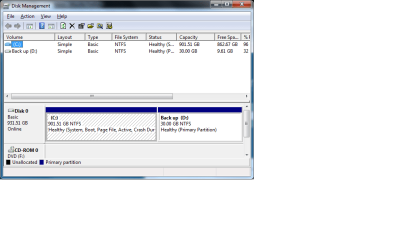
okay, and this is what disk thing look like
 

Attachments

  • Untitled.png
    Untitled.png
    69.4 KB · Views: 9

My Computer

Computer type
PC/Desktop
Computer Manufacturer/Model Number
Custom Build
OS
Windows 7 Professional 64bit
CPU
Intel Core i5 - 2500K @ 3.30GHz
Motherboard
Gigabyte Z77-HD3
Memory
4GB DDR3
Graphics Card(s)
EVGA Nvidia GeForce GT 740 2GB DDR3
Screen Resolution
1680 x 1050
Hard Drives
1T Samaung HD/ 1T toshiba external drive/ 1T western digital external drive/ 2T seagate external drive/ 250gb samaung SSD
PSU
Antec 430W
Keyboard
Microsoft Wireless Keyboard 800
Mouse
Microsoft Wireless Mouse 1000
Antivirus
AVG
Browser
Internet Explorer
go into start.. back up center, create system image, save it on Back up..

Thanks for all your help


I would give u some more rep greg, but it wont let me xD from last time

I just gave you rep. You are doing some very advanced operations here, Mitch.

You are learning a lot, and asking the right questions.

I am real proud of you.;)

Where is your Wake-up freeze issue posted so others can help you there?

Thanks Si for steering us around the iceburg. Maybe you could look at his sleep wake up issue.
 

My Computer

Computer type
PC/Desktop
Computer Manufacturer/Model Number
Custom Build
OS
Windows 7 Professional 64bit
CPU
Intel Core i5 - 2500K @ 3.30GHz
Motherboard
Gigabyte Z77-HD3
Memory
4GB DDR3
Graphics Card(s)
EVGA Nvidia GeForce GT 740 2GB DDR3
Screen Resolution
1680 x 1050
Hard Drives
1T Samaung HD/ 1T toshiba external drive/ 1T western digital external drive/ 2T seagate external drive/ 250gb samaung SSD
PSU
Antec 430W
Keyboard
Microsoft Wireless Keyboard 800
Mouse
Microsoft Wireless Mouse 1000
Antivirus
AVG
Browser
Internet Explorer
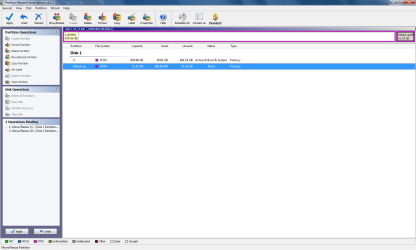
Open PW, right click on C: Windows 7>Resize, move right grey slider bar to the left by another 20 gigs. OK.

Then riightclick D: Backup>Resize>move left grey slider bar to the left to take up the 20gb space. OK

Make sure no unallocated space is showing anywhere and Apply.
 
correct?
 

Attachments

  • Untitled.png
    Untitled.png
    145.6 KB · Views: 6

My Computer

Computer type
PC/Desktop
Computer Manufacturer/Model Number
Custom Build
OS
Windows 7 Professional 64bit
CPU
Intel Core i5 - 2500K @ 3.30GHz
Motherboard
Gigabyte Z77-HD3
Memory
4GB DDR3
Graphics Card(s)
EVGA Nvidia GeForce GT 740 2GB DDR3
Screen Resolution
1680 x 1050
Hard Drives
1T Samaung HD/ 1T toshiba external drive/ 1T western digital external drive/ 2T seagate external drive/ 250gb samaung SSD
PSU
Antec 430W
Keyboard
Microsoft Wireless Keyboard 800
Mouse
Microsoft Wireless Mouse 1000
Antivirus
AVG
Browser
Internet Explorer
Yeah Apply then see if it will take the System Image.

It only needs to be larger than the 39 gb used by C: so you should be good.
 
So i think it working, Once it done am i able to shrink some more space and add some back to C?

Also my freezin, even tho you helped me more than ENOUGH!


Which i thank you for
 

My Computer

Computer type
PC/Desktop
Computer Manufacturer/Model Number
Custom Build
OS
Windows 7 Professional 64bit
CPU
Intel Core i5 - 2500K @ 3.30GHz
Motherboard
Gigabyte Z77-HD3
Memory
4GB DDR3
Graphics Card(s)
EVGA Nvidia GeForce GT 740 2GB DDR3
Screen Resolution
1680 x 1050
Hard Drives
1T Samaung HD/ 1T toshiba external drive/ 1T western digital external drive/ 2T seagate external drive/ 250gb samaung SSD
PSU
Antec 430W
Keyboard
Microsoft Wireless Keyboard 800
Mouse
Microsoft Wireless Mouse 1000
Antivirus
AVG
Browser
Internet Explorer
Look how much wide open space you got outback on C, matey! :rolleyes:

I wouldn't cramp the image any. You need to depend on that image to recover the HD if anything goes wrong.

Test it by booting the DVD>Repair my computer>Recover Using An Image. See if it detects the image in its' partition and cues it up after highlighting and clicking Next once.

Dont' click Next more than once or it will reimage the HD, which wouldn't hurt I guess since it is new.
 
I have 879gb with 848gb free on C

and Back up has 51.5gb with 23.8gb free,

couldent i take like 5 - 10gbs?
 

My Computer

Computer type
PC/Desktop
Computer Manufacturer/Model Number
Custom Build
OS
Windows 7 Professional 64bit
CPU
Intel Core i5 - 2500K @ 3.30GHz
Motherboard
Gigabyte Z77-HD3
Memory
4GB DDR3
Graphics Card(s)
EVGA Nvidia GeForce GT 740 2GB DDR3
Screen Resolution
1680 x 1050
Hard Drives
1T Samaung HD/ 1T toshiba external drive/ 1T western digital external drive/ 2T seagate external drive/ 250gb samaung SSD
PSU
Antec 430W
Keyboard
Microsoft Wireless Keyboard 800
Mouse
Microsoft Wireless Mouse 1000
Antivirus
AVG
Browser
Internet Explorer
What you need the space for?

Can't you wait til you need it? Let it ride.

You got leads to follow up in your freezing issue post. That is gonna take some focus to research and get to the cause. :geek: Don't pass over any step. Ask back if you need help.
 
Back
Top